

The Problem SDP Solves
Traditional network architectures operate on a “connect first, authenticate second” model. When a client wants to access a server, it first establishes a TCP connection, completing the three-way handshake before any authentication occurs. This means the server must be reachable on the network, its ports must be open, and its service banners are visible to anyone who can route packets to it. Attackers exploit this by scanning for open ports, fingerprinting services, and launching exploits against exposed attack surfaces before any authentication challenge is issued.
Software-Defined Perimeter (SDP) inverts this model: authenticate first, connect second. An SDP-protected application is invisible on the network. Its ports are closed to all traffic by default. No TCP connection is possible until the client has been authenticated and authorized by a separate control plane. Only after the control plane verifies the user’s identity and device posture does it instruct the gateway to allow a connection from that specific client to that specific application. This is the “dark cloud” model described in the Cloud Security Alliance’s SDP specification.
Free to use, share it in your presentations, blogs, or learning materials.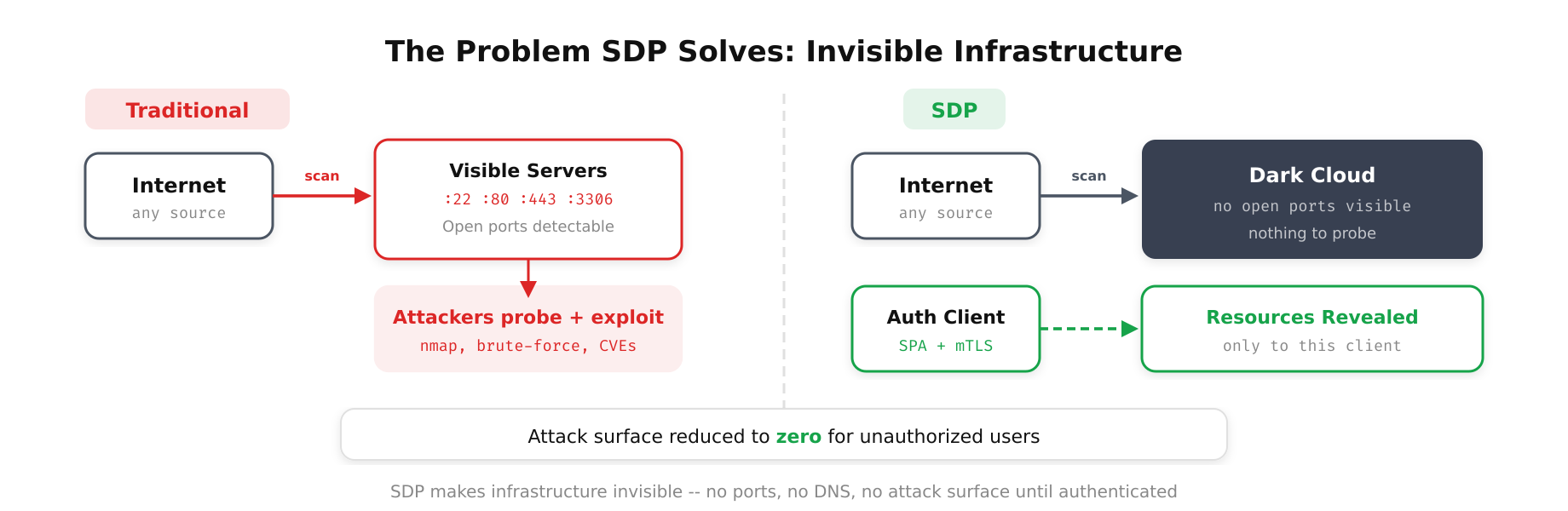
This diagram highlights the fundamental difference between traditional network exposure and SDP-protected services. On the left, exposed ports and service banners invite reconnaissance and exploitation. On the right, SDP wraps services in a dark cloud where no ports respond, no banners are visible, and access is granted only after authentication through a separate control plane.
SDP Architecture Components
An SDP deployment consists of three distinct components, each with a specific role in the authentication and connection process.
The SDP Controller
The controller is the brain of the SDP system. It maintains the policy database, integrates with identity providers, receives device posture data, and makes authorization decisions. When a client requests access to an application, the controller verifies the client’s identity (via OIDC, SAML, or certificate-based authentication), checks the device’s security posture (OS version, patch level, EDR status, disk encryption), evaluates the request against access policies, and if approved, generates a one-time connection token and instructs the gateway to expect a connection from this specific client.
The controller itself does not carry application traffic. Its sole function is authentication, authorization, and connection brokering. This separation of control plane and data plane is a deliberate design decision that limits the blast radius of a controller compromise; an attacker who compromises the controller cannot directly access backend applications without also compromising a gateway.
The SDP Gateway (Accepting Host)
The gateway sits in front of the protected application and defaults to deny-all. Its firewall rules drop all incoming traffic. When the controller authorizes a connection, it sends a signal to the gateway instructing it to accept traffic from a specific source IP on a specific port for a limited time window. The gateway opens a pinhole firewall rule for that exact connection tuple and closes it when the session ends or the time window expires.
This default-deny posture means the gateway does not respond to port scans, SYN probes, or any other network reconnaissance. From the perspective of an unauthorized scanner, the gateway and the application behind it simply do not exist on the network. There is no TCP RST response, no ICMP unreachable message, and no banner to fingerprint. The application is invisible.
The SDP Client (Initiating Host)
The client is software running on the user’s device that communicates with the controller to authenticate and request access. The client collects device posture information (installed software, OS version, security configuration), presents it to the controller along with the user’s identity credentials, receives the authorization token, and establishes a connection to the gateway using the token. The connection is typically encrypted using mutual TLS, with both the client and gateway presenting certificates issued or validated by the controller.
Free to use, share it in your presentations, blogs, or learning materials.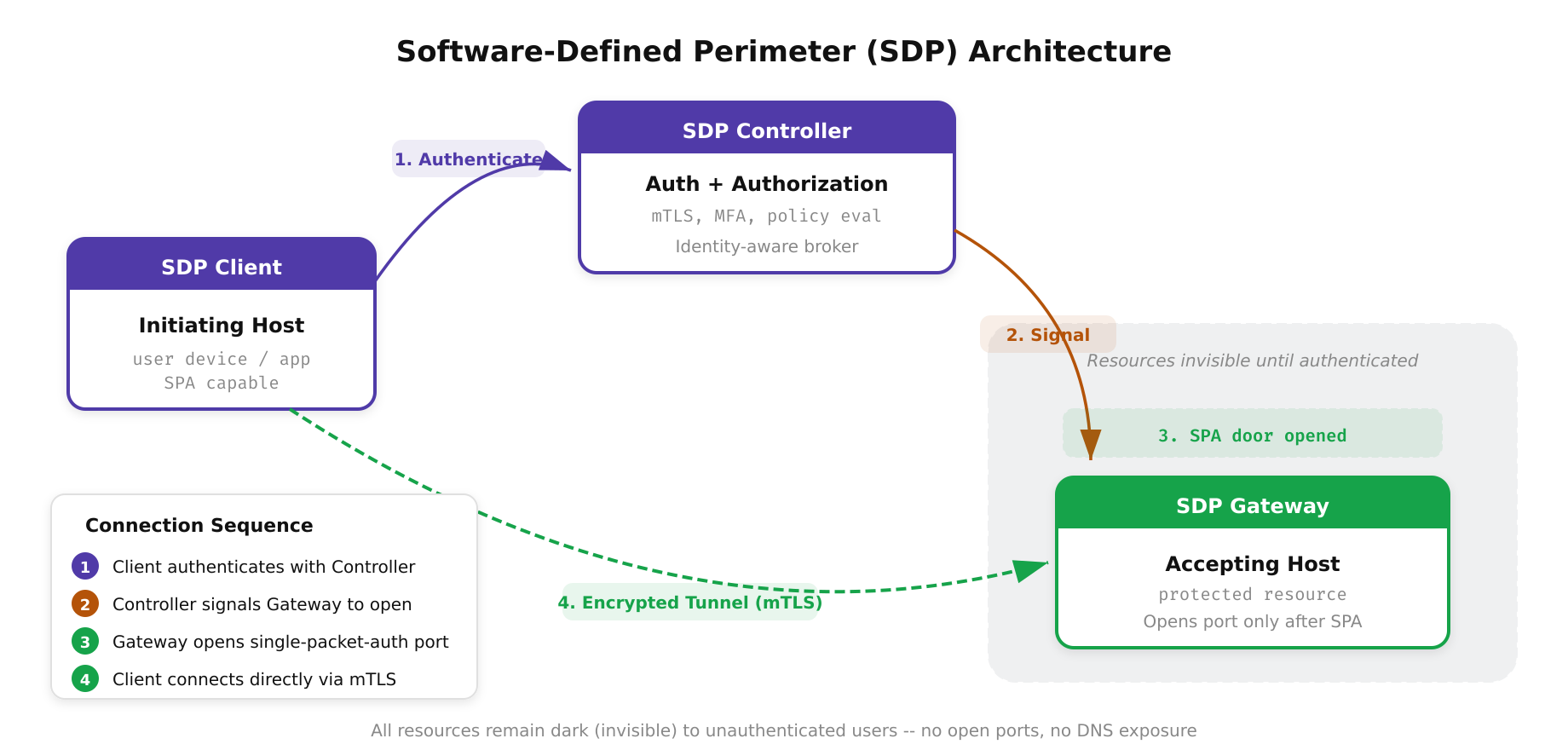
The above illustration maps the three core components of the SDP architecture and their interaction flow. The SDP Client first authenticates with the Controller, which validates the identity and device posture. Only then does the Controller signal the Gateway to open a connection for that specific client. Resources behind the gateway remain completely invisible to unauthenticated users, there is nothing to scan, probe, or attack.
The SDP Connection Workflow
The step-by-step connection process illustrates why SDP is fundamentally more secure than traditional network access.
- Step 1 – Client registration: The SDP client starts and establishes a secure channel to the controller using a pre-provisioned certificate or device attestation. The client reports its device posture data.
- Step 2 – User authentication: The user authenticates through the client, which redirects to the organization’s identity provider. Multi-factor authentication is enforced at this stage.
- Step 3 – Policy evaluation: The controller evaluates the access request against its policy engine, considering user identity, group membership, device posture, time of day, geographic location, and risk score.
- Step 4 – Gateway signaling: If the policy permits access, the controller signals the gateway to expect a connection from the client’s IP address. The gateway opens a temporary pinhole rule.
- Step 5 – Mutual TLS connection: The client connects to the gateway using mTLS. Both sides verify each other’s certificates. The gateway validates that the client’s certificate matches the authorization from the controller.
- Step 6 – Application access: The gateway forwards the authenticated, authorized traffic to the backend application. The client can now interact with the application through the encrypted tunnel.
At no point in this process is the application visible or reachable to an unauthenticated client. The TCP connection in Step 5 cannot even begin until Steps 1 through 4 are complete.
Free to use, share it in your presentations, blogs, or learning materials.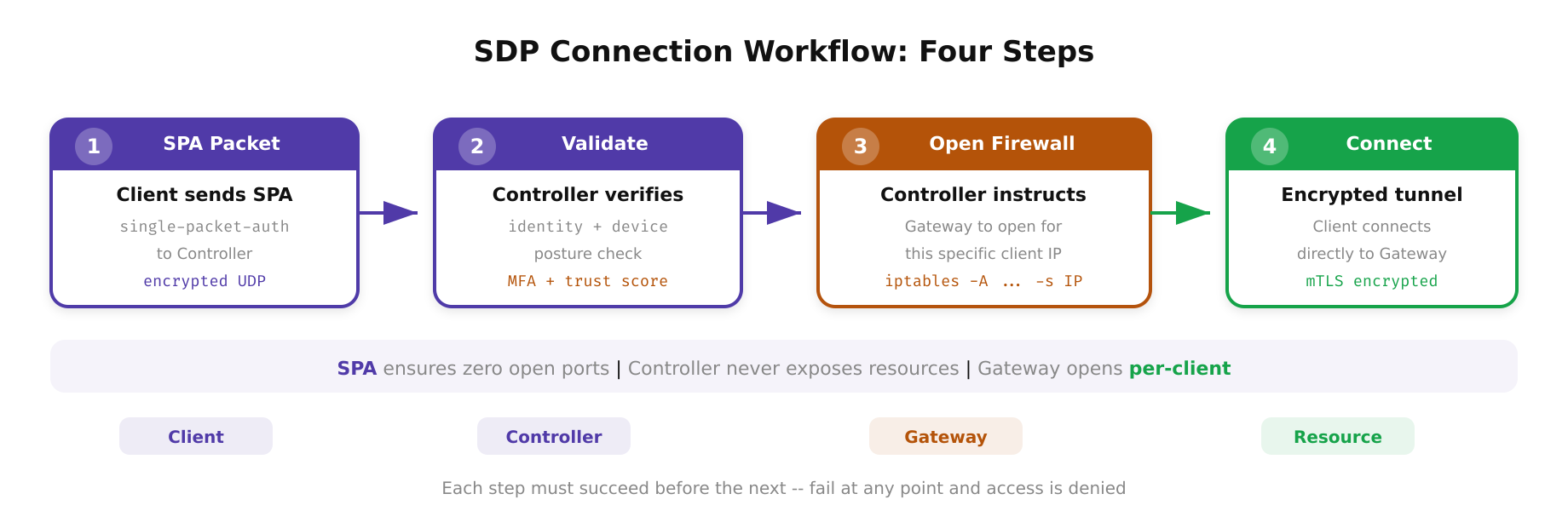
As shown above, the SDP connection sequence enforces a strict order of operations: device registration, user authentication, policy evaluation, and gateway signaling must all complete successfully before any network connection to the protected application is permitted. This authenticate-first-connect-second model eliminates the attack surface that traditional connect-first architectures expose.
SDP vs. VPN vs. Identity-Aware Proxy
SDP, VPN, and identity-aware proxies are often discussed as alternatives, but they operate at different layers and are suited to different use cases.
VPNs provide network-layer tunnels. Once connected, the user has broad access to the network segment. VPNs are appropriate for legacy applications that require IP-level connectivity and cannot be fronted by a proxy. They are inappropriate for modern architectures because they violate least privilege by granting excessive network access.
Identity-aware proxies operate at Layer 7 and are ideal for web applications, APIs, and any service that communicates over HTTP/HTTPS. They provide rich application-layer policy controls but are limited to protocols they can proxy. Non-HTTP protocols like SSH, RDP, and database connections require special handling (TCP proxy mode, browser-based rendering, or dedicated protocol connectors).
SDP operates at Layer 3/4 and can protect any IP-based application regardless of protocol. It provides network-level invisibility that neither VPNs nor identity-aware proxies offer. However, SDP gateways typically do not inspect application-layer traffic, so they cannot enforce policies based on HTTP paths, API methods, or request content.
In practice, many organizations layer SDP and identity-aware proxies together. SDP provides the network-level invisibility and pre-authentication, while the identity-aware proxy adds application-layer policy enforcement for HTTP-based services.
Free to use, share it in your presentations, blogs, or learning materials.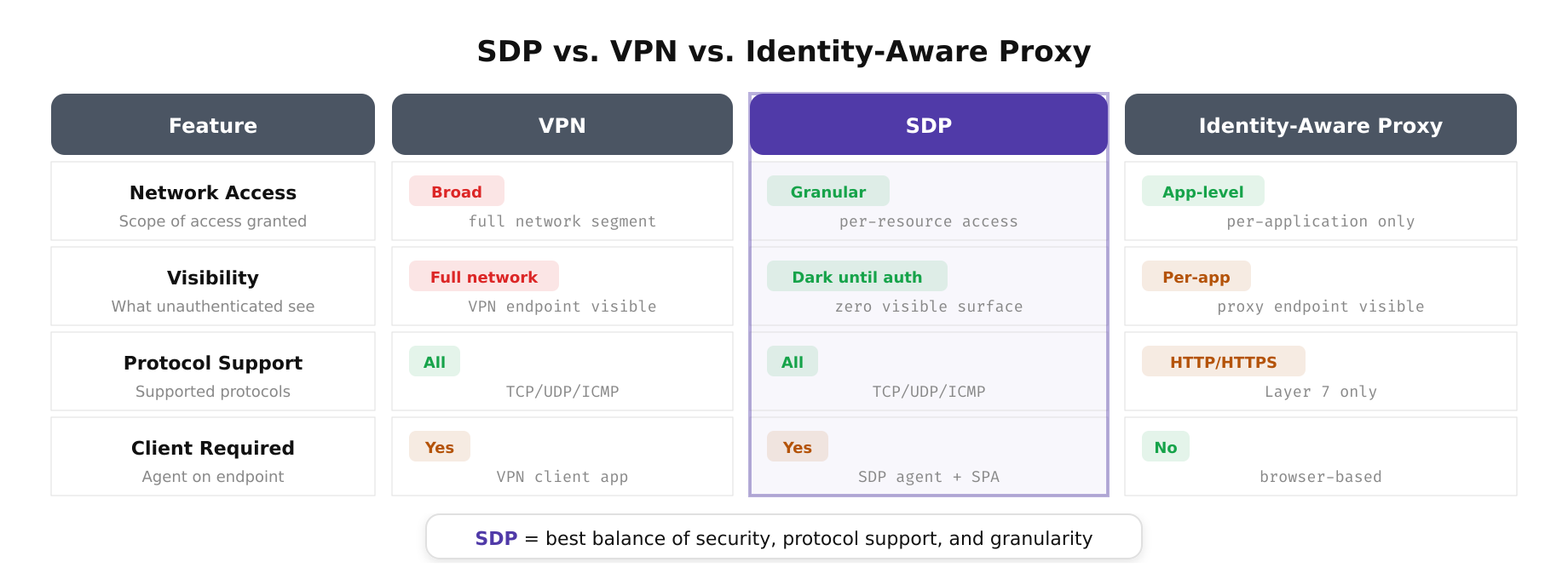
The above illustration depicts the key differences between SDP, VPN, and Identity-Aware Proxy approaches across multiple dimensions including security posture, protocol support, scalability, and user experience. While VPNs grant broad network access and identity-aware proxies excel at Layer 7 control, SDP uniquely provides network-level invisibility that makes protected applications undetectable to unauthorized users.
Deploying SDP in Production
Production SDP deployments require careful attention to high availability, performance, and operational management. The controller is a critical single point of failure; if it goes down, no new connections can be established. Deploy controllers in an active-active configuration across multiple availability zones with a shared or replicated policy database. Gateway availability depends on the application; deploy gateways in the same availability pattern as the applications they protect.
Performance considerations center on the gateway. Because the gateway must maintain state for every active connection and enforce per-session firewall rules, it must be sized for the expected concurrent session count. In high-throughput environments, deploy multiple gateways behind a load balancer and use the controller to distribute clients across them.
Certificate management is the most operationally demanding aspect of SDP. Every client, controller, and gateway requires certificates, and those certificates must be rotated regularly. Automate certificate issuance and rotation using a PKI system like HashiCorp Vault, step-ca, or a cloud provider’s certificate service. Manual certificate management will not scale beyond a handful of deployments.
SDP is not a product category you can buy off the shelf and deploy in a day. It is an architectural pattern that requires integration with your identity provider, device management system, and network infrastructure. The investment is justified for organizations that need to protect high-value applications from network-level reconnaissance and pre-authentication attacks. In a Zero Trust architecture, the principle that applications should be invisible to unauthorized users is not aspirational; SDP makes it operational.