

This article details the complete Ansible automation strategy for BalticChain, a supply chain tracking consortium operating Hyperledger Fabric 2.5 with Besu settlement across data centers in Tallinn, Riga, and Vilnius. BalticChain manages logistics tracking for 18 Nordic and Baltic shipping companies, and the production network must be reproducibly deployable, drift-resistant, and auditable for ISO 27001 compliance.
Free to use, share it in your presentations, blogs, or learning materials.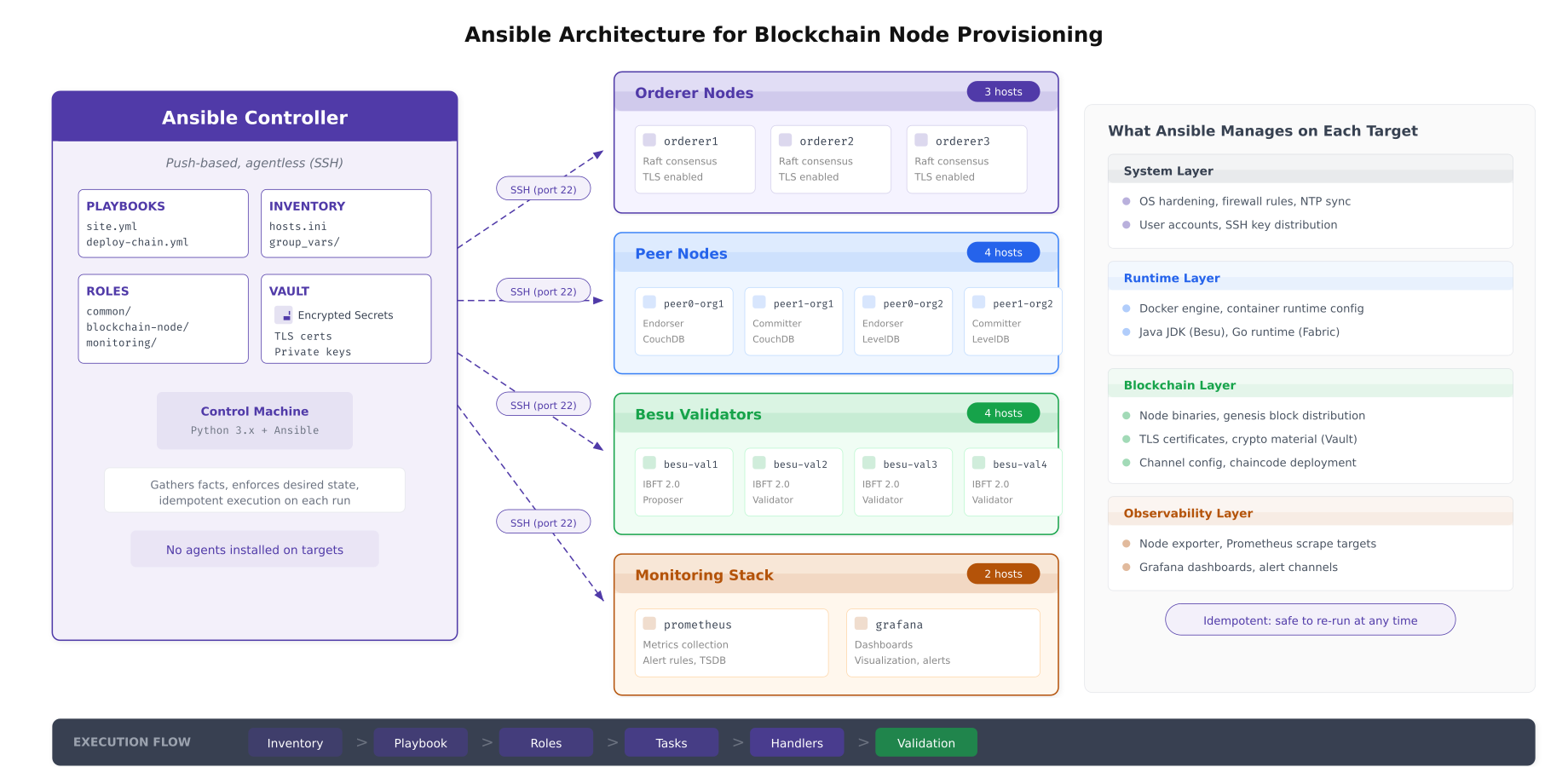
The architecture above shows BalticChain’s Ansible deployment model. A single controller node holds all playbooks, roles, inventory definitions, and encrypted secrets. It connects to every target node over SSH using key-based authentication. No agent software is installed on target nodes. This agentless design means that Ansible adds zero runtime overhead to blockchain nodes and requires no additional ports beyond the SSH port already open for management.
Inventory Organization
The inventory defines every host in the blockchain network, organized into groups that map to both geographic sites and functional roles. This dual-axis grouping allows BalticChain to target playbooks at a specific site (for maintenance windows), a specific role (for rolling upgrades), or a cross-cutting combination of both.
Free to use, share it in your presentations, blogs, or learning materials.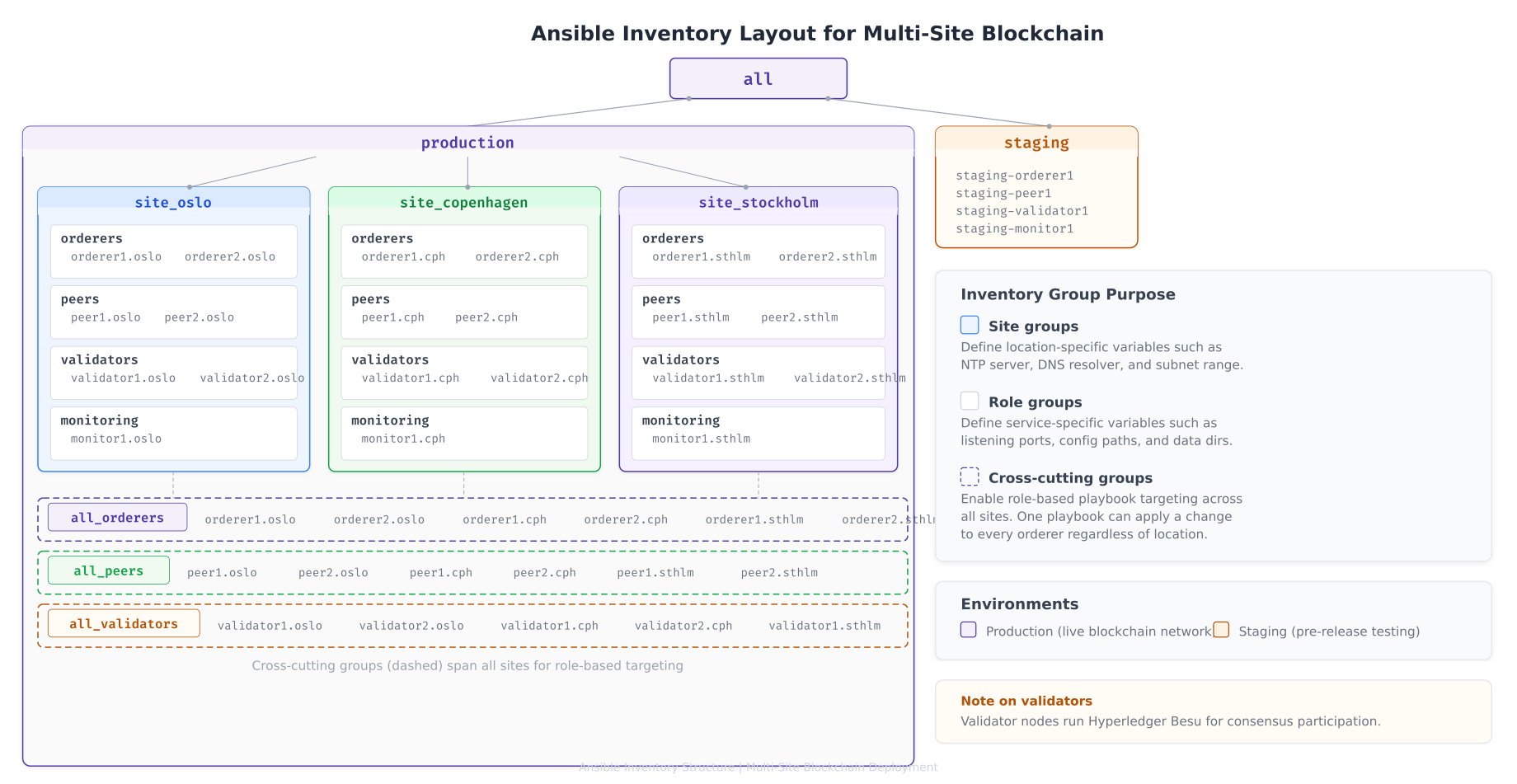
The inventory layout above shows BalticChain’s three-level grouping strategy. Site groups carry location-specific variables such as NTP server addresses, DNS resolvers, and subnet ranges. Role groups carry service-specific variables such as port numbers, binary versions, and configuration paths. Cross-cutting groups like all_orderers enable operations that must apply uniformly across every orderer regardless of location, such as Raft configuration updates.
Inventory File Structure
# inventory/hosts.yml
# BalticChain Multi-Site Blockchain Inventory

all:
  children:
    production:
      children:
        site_tallinn:
          children:
            tallinn_orderers:
              hosts:
                orderer1.tallinn.balticchain.net:
                  ansible_host: 10.10.0.11
                orderer2.tallinn.balticchain.net:
                  ansible_host: 10.10.0.12
            tallinn_peers:
              hosts:
                peer0.org1.tallinn.balticchain.net:
                  ansible_host: 10.10.0.21
                peer1.org1.tallinn.balticchain.net:
                  ansible_host: 10.10.0.22
            tallinn_validators:
              hosts:
                besu-val1.tallinn.balticchain.net:
                  ansible_host: 10.10.0.41
            tallinn_monitoring:
              hosts:
                prometheus.tallinn.balticchain.net:
                  ansible_host: 10.10.0.51
          vars:
            site_name: tallinn
            ntp_server: ntp.tallinn.balticchain.net
            dns_servers:
              - 10.10.0.2
              - 10.10.0.3

        site_riga:
          children:
            riga_orderers:
              hosts:
                orderer3.riga.balticchain.net:
                  ansible_host: 10.20.0.11
            riga_peers:
              hosts:
                peer0.org2.riga.balticchain.net:
                  ansible_host: 10.20.0.21
                peer1.org2.riga.balticchain.net:
                  ansible_host: 10.20.0.22
            riga_validators:
              hosts:
                besu-val2.riga.balticchain.net:
                  ansible_host: 10.20.0.41
                besu-val3.riga.balticchain.net:
                  ansible_host: 10.20.0.42
          vars:
            site_name: riga
            ntp_server: ntp.riga.balticchain.net
            dns_servers:
              - 10.20.0.2
              - 10.20.0.3

        site_vilnius:
          children:
            vilnius_orderers:
              hosts:
                orderer4.vilnius.balticchain.net:
                  ansible_host: 10.30.0.11
                orderer5.vilnius.balticchain.net:
                  ansible_host: 10.30.0.12
            vilnius_peers:
              hosts:
                peer0.org3.vilnius.balticchain.net:
                  ansible_host: 10.30.0.21
            vilnius_validators:
              hosts:
                besu-val4.vilnius.balticchain.net:
                  ansible_host: 10.30.0.41
          vars:
            site_name: vilnius
            ntp_server: ntp.vilnius.balticchain.net
            dns_servers:
              - 10.30.0.2

    # Cross-cutting role groups for role-based targeting
    all_orderers:
      children:
        tallinn_orderers:
        riga_orderers:
        vilnius_orderers:

    all_peers:
      children:
        tallinn_peers:
        riga_peers:
        vilnius_peers:

    all_validators:
      children:
        tallinn_validators:
        riga_validators:
        vilnius_validators:

    staging:
      hosts:
        staging-node1.balticchain.net:
          ansible_host: 192.168.10.11
        staging-node2.balticchain.net:
          ansible_host: 192.168.10.12
Role Architecture
BalticChain organizes its Ansible automation into four roles. The common role applies to every node regardless of function. The fabric-node and besu-node roles contain service-specific tasks. The monitoring role configures the observability stack. This separation ensures that shared security hardening is consistent across all nodes while allowing role-specific customization.
Free to use, share it in your presentations, blogs, or learning materials.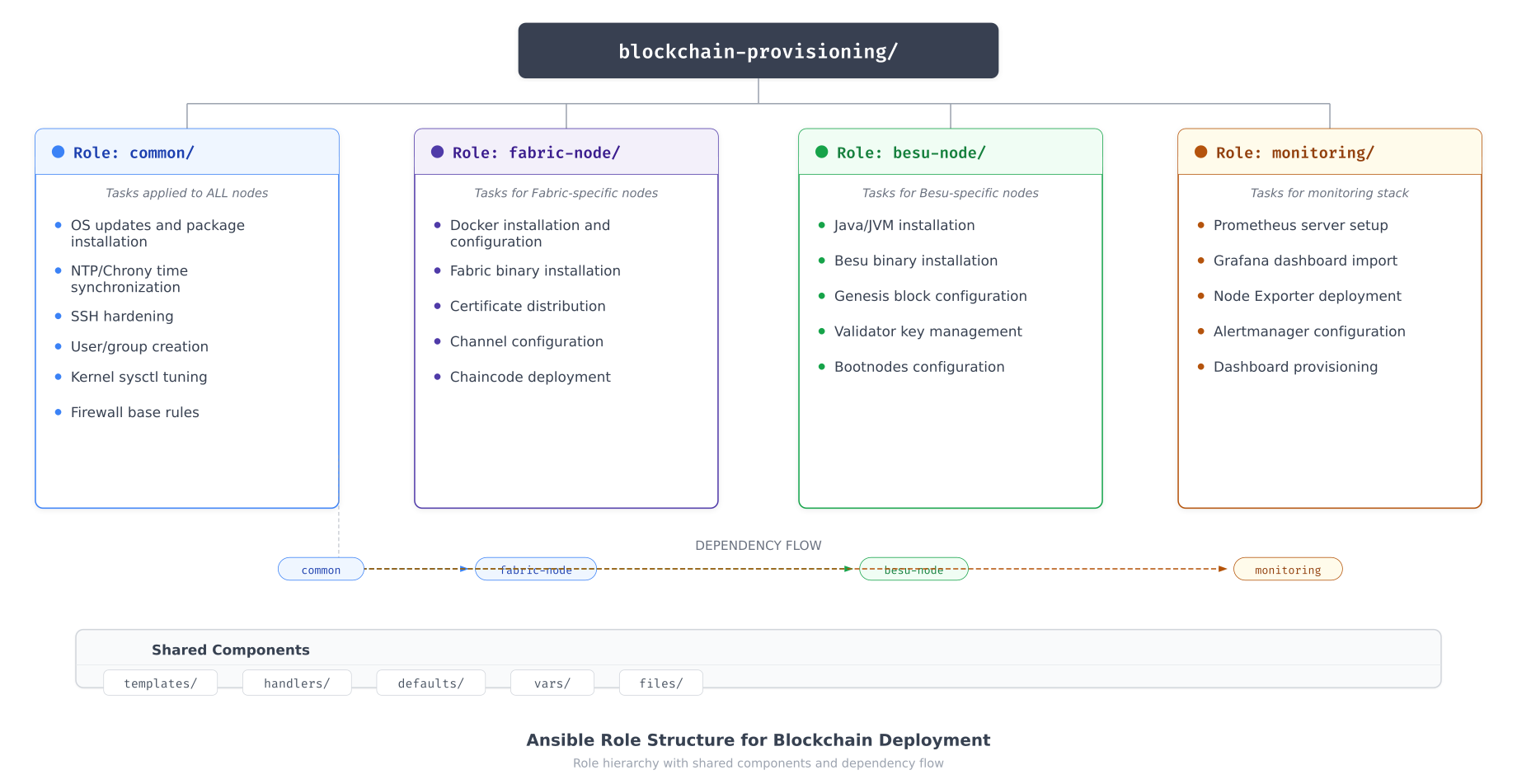
The role structure above shows how the common role serves as the dependency for all specialized roles. When a playbook targets an orderer, Ansible first executes the common role (OS updates, SSH hardening, sysctl tuning, firewall rules, user creation) before proceeding to the fabric-node role (Docker installation, Fabric binaries, certificate deployment). This dependency chain guarantees that no blockchain node enters service without the full hardening baseline applied.
Common Role Tasks
# roles/common/tasks/main.yml
# BalticChain Common Role - Applied to ALL blockchain nodes

- name: Update apt package cache
  apt:
    update_cache: yes
    cache_valid_time: 3600

- name: Install required system packages
  apt:
    name: "{{ common_packages }}"
    state: present
  vars:
    common_packages:
      - chrony
      - ufw
      - fail2ban
      - unattended-upgrades
      - smartmontools
      - lvm2
      - xfsprogs
      - python3-pip
      - jq
      - curl
      - gnupg

- name: Create blockchain service group
  group:
    name: blockchain
    gid: 2000
    state: present

- name: Create blockchain service accounts
  user:
    name: "{{ item.name }}"
    uid: "{{ item.uid }}"
    group: blockchain
    shell: /usr/sbin/nologin
    create_home: no
    system: yes
  loop:
    - { name: fabric-orderer, uid: 2001 }
    - { name: fabric-peer, uid: 2002 }
    - { name: fabric-ca, uid: 2003 }
    - { name: besu-validator, uid: 2004 }

- name: Apply kernel sysctl hardening
  sysctl:
    name: "{{ item.key }}"
    value: "{{ item.value }}"
    sysctl_file: /etc/sysctl.d/99-blockchain-hardening.conf
    reload: yes
  loop: "{{ blockchain_sysctl_params }}"

- name: Configure SSH hardening
  template:
    src: sshd_config.j2
    dest: /etc/ssh/sshd_config
    owner: root
    group: root
    mode: '0600'
    validate: 'sshd -t -f %s'
  notify: restart sshd

- name: Configure Chrony NTP
  template:
    src: chrony.conf.j2
    dest: /etc/chrony/chrony.conf
    owner: root
    group: root
    mode: '0644'
  notify: restart chrony

- name: Configure base firewall rules
  template:
    src: nftables.conf.j2
    dest: /etc/nftables.conf
    owner: root
    group: root
    mode: '0600'
  notify: reload nftables

- name: Enable and start required services
  systemd:
    name: "{{ item }}"
    state: started
    enabled: yes
  loop:
    - chrony
    - fail2ban
    - nftables
    - smartd
Common Role Variables
# roles/common/defaults/main.yml
# Default variables for the common role

# Kernel sysctl parameters for blockchain hardening
blockchain_sysctl_params:
  - { key: net.ipv4.ip_forward, value: "0" }
  - { key: net.ipv4.conf.all.rp_filter, value: "1" }
  - { key: net.ipv4.conf.all.accept_source_route, value: "0" }
  - { key: net.ipv4.conf.all.accept_redirects, value: "0" }
  - { key: net.ipv4.conf.all.send_redirects, value: "0" }
  - { key: net.ipv4.icmp_echo_ignore_broadcasts, value: "1" }
  - { key: net.ipv4.tcp_syncookies, value: "1" }
  - { key: net.ipv4.tcp_max_syn_backlog, value: "4096" }
  - { key: vm.swappiness, value: "10" }
  - { key: vm.dirty_ratio, value: "40" }
  - { key: vm.dirty_background_ratio, value: "10" }

# SSH hardening parameters
ssh_port: 22
ssh_permit_root_login: "no"
ssh_password_authentication: "no"
ssh_max_auth_tries: 3
ssh_allowed_groups:
  - blockchain-admins

# Chrony NTP configuration
chrony_servers:
  - "{{ ntp_server }} iburst prefer"
  - "0.pool.ntp.org iburst"
  - "1.pool.ntp.org iburst"
Fabric Node Role
# roles/fabric-node/tasks/main.yml
# BalticChain Fabric Node Role

- name: Install Docker prerequisites
  apt:
    name:
      - ca-certificates
      - curl
      - gnupg
      - lsb-release
    state: present

- name: Add Docker GPG key
  apt_key:
    url: https://download.docker.com/linux/ubuntu/gpg
    state: present

- name: Add Docker repository
  apt_repository:
    repo: "deb https://download.docker.com/linux/ubuntu {{ ansible_distribution_release }} stable"
    state: present

- name: Install Docker CE
  apt:
    name:
      - docker-ce
      - docker-ce-cli
      - containerd.io
      - docker-compose-plugin
    state: present
    update_cache: yes

- name: Configure Docker daemon
  template:
    src: daemon.json.j2
    dest: /etc/docker/daemon.json
    owner: root
    group: root
    mode: '0644'
  notify: restart docker

- name: Create Fabric directories
  file:
    path: "{{ item }}"
    state: directory
    owner: "{{ fabric_user }}"
    group: blockchain
    mode: '0750'
  loop:
    - "{{ fabric_home }}"
    - "{{ fabric_home }}/config"
    - "{{ fabric_home }}/tls"
    - "{{ fabric_home }}/msp"
    - /var/lib/fabric/ledger
    - /var/lib/fabric/snapshots

- name: Download Fabric binaries
  get_url:
    url: "{{ fabric_binary_url }}"
    dest: /tmp/fabric-binaries.tar.gz
    checksum: "sha256:{{ fabric_binary_checksum }}"

- name: Extract Fabric binaries
  unarchive:
    src: /tmp/fabric-binaries.tar.gz
    dest: "{{ fabric_home }}"
    remote_src: yes

- name: Deploy TLS certificates from vault
  copy:
    content: "{{ item.content }}"
    dest: "{{ item.dest }}"
    owner: "{{ fabric_user }}"
    group: blockchain
    mode: '0400'
  loop: "{{ fabric_tls_certs }}"
  no_log: yes

- name: Deploy node configuration
  template:
    src: "{{ fabric_node_type }}.yaml.j2"
    dest: "{{ fabric_home }}/config/{{ fabric_node_type }}.yaml"
    owner: "{{ fabric_user }}"
    group: blockchain
    mode: '0640'
  notify: restart fabric

- name: Deploy systemd service unit
  template:
    src: fabric-{{ fabric_node_type }}.service.j2
    dest: /etc/systemd/system/fabric-{{ fabric_node_type }}.service
    owner: root
    group: root
    mode: '0644'
  notify:
    - reload systemd
    - restart fabric

- name: Enable and start Fabric service
  systemd:
    name: "fabric-{{ fabric_node_type }}"
    state: started
    enabled: yes
    daemon_reload: yes
Provisioning Workflow
BalticChain’s provisioning workflow transforms a bare Ubuntu 22.04 LTS installation into a production-ready blockchain node in approximately 46 minutes. The workflow proceeds through six sequential stages, each building on the outputs of the previous stage. If any stage fails, the workflow halts and alerts the operations team rather than continuing with a partially configured node.
Free to use, share it in your presentations, blogs, or learning materials.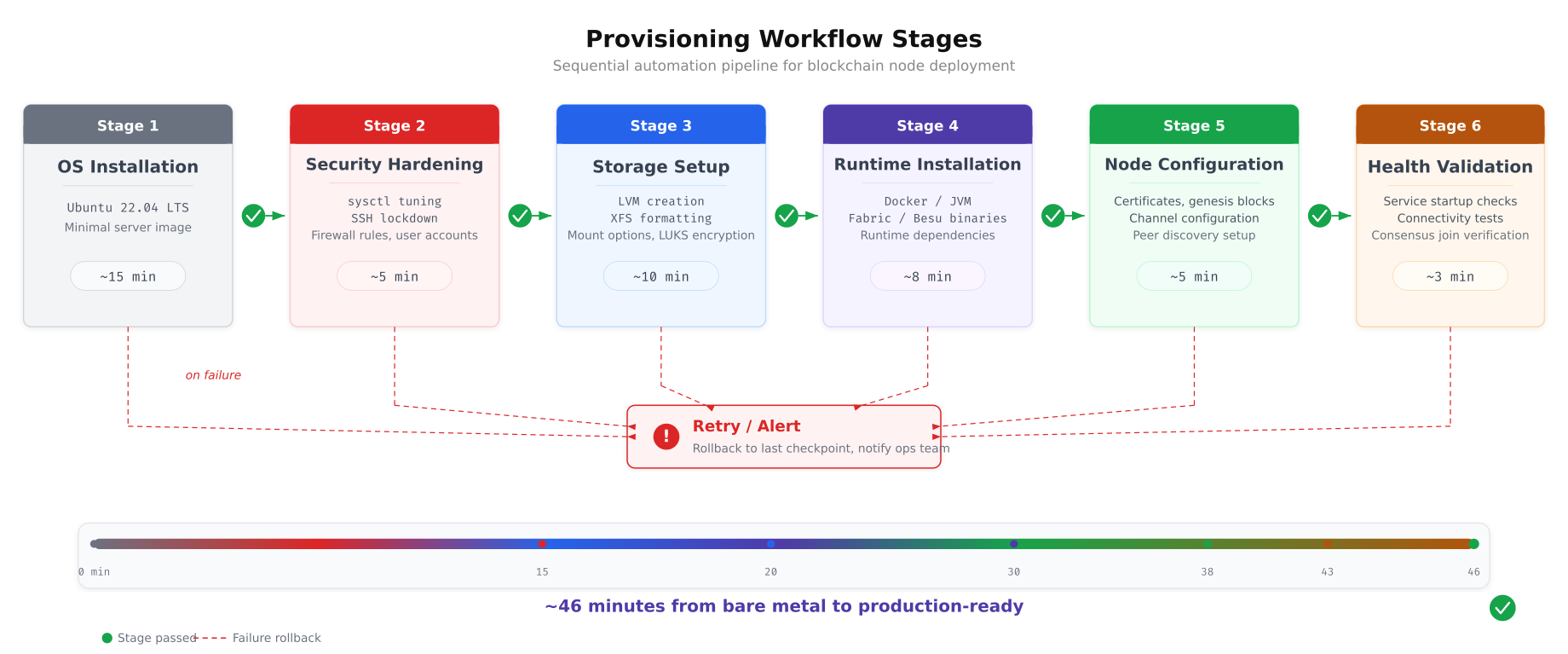
The workflow above shows how each stage gates the next. The OS installation provides the base platform. Security hardening locks down the kernel, SSH, and firewall before any blockchain software is installed, ensuring that the node is never exposed with default settings. Storage setup creates the LVM layout and XFS filesystems. Runtime installation deploys Docker or JVM depending on the node type. Configuration distributes certificates, genesis blocks, and service definitions. The final validation stage confirms that the node is healthy, has joined consensus, and is visible to the monitoring stack.
Master Playbook
# site.yml - BalticChain Master Provisioning Playbook

# Stage 1 & 2: Base OS + Security Hardening (all nodes)
- name: Apply common hardening to all blockchain nodes
  hosts: production
  become: yes
  roles:
    - role: common
      tags: [base, hardening]

# Stage 3: Storage Setup (all nodes)
- name: Configure LVM and filesystems
  hosts: production
  become: yes
  tasks:
    - name: Include storage tasks
      include_role:
        name: common
        tasks_from: storage
      tags: [storage]

# Stage 4 & 5: Fabric Orderer Nodes
- name: Provision Fabric Orderer nodes
  hosts: all_orderers
  become: yes
  serial: 1
  roles:
    - role: fabric-node
      vars:
        fabric_node_type: orderer
      tags: [fabric, orderer]
  post_tasks:
    - name: Verify orderer health
      uri:
        url: "https://{{ ansible_host }}:8443/healthz"
        validate_certs: no
        status_code: 200
      register: orderer_health
      retries: 5
      delay: 10
      until: orderer_health.status == 200
      tags: [validation]

# Stage 4 & 5: Fabric Peer Nodes
- name: Provision Fabric Peer nodes
  hosts: all_peers
  become: yes
  serial: 2
  roles:
    - role: fabric-node
      vars:
        fabric_node_type: peer
      tags: [fabric, peer]

# Stage 4 & 5: Besu Validator Nodes
- name: Provision Besu Validator nodes
  hosts: all_validators
  become: yes
  serial: 1
  roles:
    - role: besu-node
      tags: [besu, validator]

# Stage 6: Monitoring Stack
- name: Provision Monitoring infrastructure
  hosts: tallinn_monitoring
  become: yes
  roles:
    - role: monitoring
      tags: [monitoring]

# Final validation
- name: Run post-deployment validation
  hosts: production
  become: yes
  tasks:
    - name: Validate all services are running
      systemd:
        name: "{{ blockchain_service_name }}"
      register: service_status
      failed_when: service_status.status.ActiveState != 'active'
      tags: [validation]
Secrets Management with Ansible Vault
Blockchain deployments handle highly sensitive material: TLS private keys that authenticate nodes to the network, CA root certificates that anchor the trust chain, database credentials for CouchDB state stores, and validator signing keys that authorize block production. None of these secrets can exist in plaintext in a Git repository or on the Ansible controller’s filesystem. BalticChain uses Ansible Vault to encrypt all sensitive variables at rest.
Free to use, share it in your presentations, blogs, or learning materials.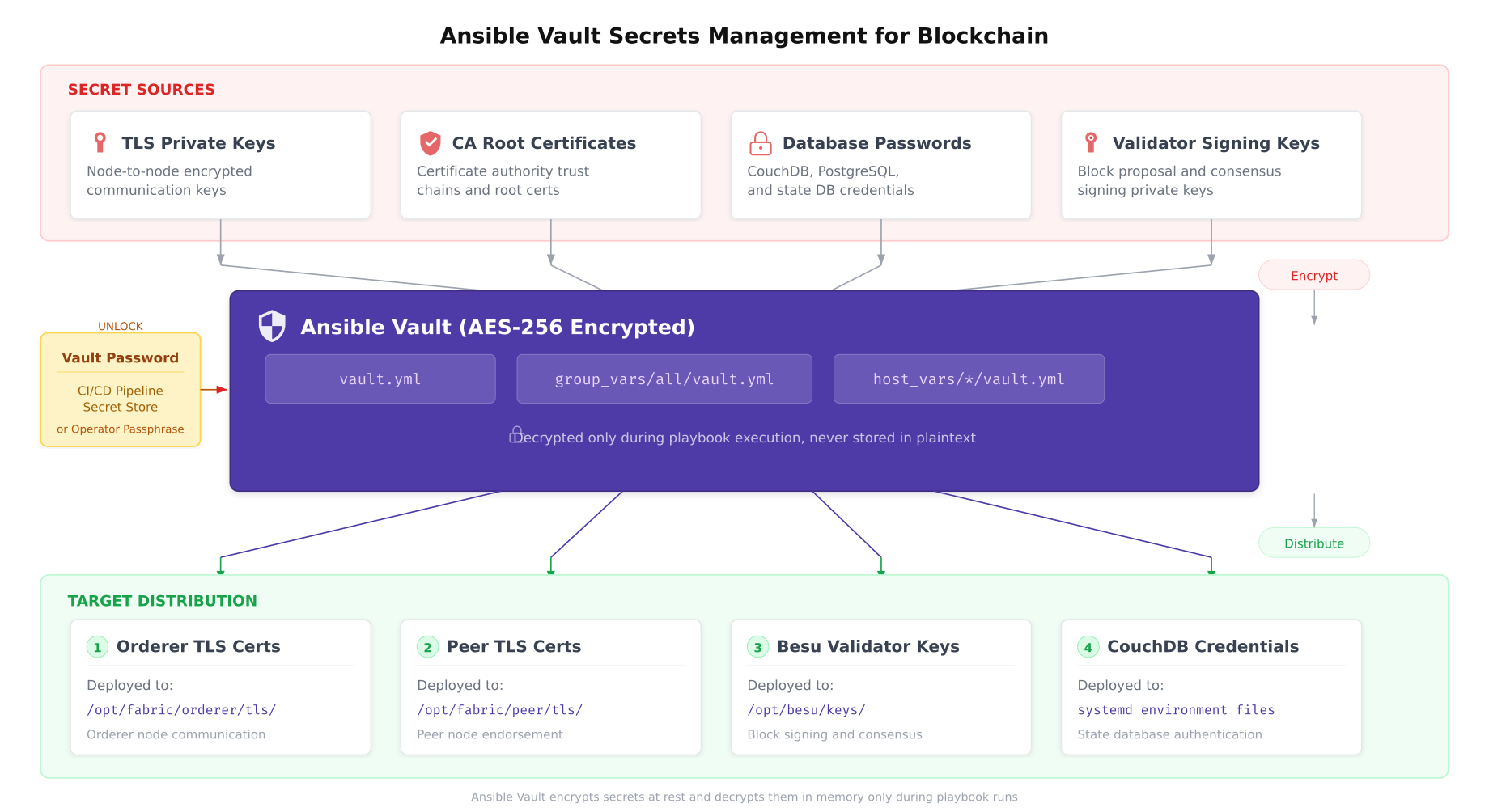
The diagram above illustrates BalticChain’s secrets pipeline. Sensitive materials are encrypted into Vault files using AES-256 encryption. During playbook execution, the vault password (provided by the CI/CD pipeline’s secret store or an operator passphrase) decrypts the secrets in memory only. They are never written to disk in plaintext on the controller. The Ansible copy module then distributes the decrypted content to target nodes with strict file permissions (0400), ensuring that only the designated service account can read the deployed secrets.
Creating and Managing Vault Files
# Create a new vault-encrypted file for production secrets
ansible-vault create inventory/group_vars/production/vault.yml

# Example vault file contents (shown unencrypted for reference):
# vault_fabric_tls_key: |
#   -----BEGIN EC PRIVATE KEY-----
#   MHQCAQEEIGx... (actual key content)
#   -----END EC PRIVATE KEY-----
#
# vault_fabric_ca_cert: |
#   -----BEGIN CERTIFICATE-----
#   MIICpTCCAkugAwIBAgI... (actual cert content)
#   -----END CERTIFICATE-----
#
# vault_couchdb_password: "strong-random-password-here"
#
# vault_besu_validator_key: "0xabc123... (validator private key)"

# Edit an existing vault file
ansible-vault edit inventory/group_vars/production/vault.yml

# Encrypt an existing plaintext file
ansible-vault encrypt files/tls/orderer-tls-key.pem

# View encrypted file contents without editing
ansible-vault view inventory/group_vars/production/vault.yml

# Rotate vault password (re-encrypt with new password)
ansible-vault rekey inventory/group_vars/production/vault.yml

# Run playbook with vault password from file
ansible-playbook site.yml --vault-password-file ~/.vault_pass.txt

# Run playbook with vault password from environment variable
export ANSIBLE_VAULT_PASSWORD_FILE=~/.vault_pass.txt
ansible-playbook site.yml
Idempotency and Drift Detection
Ansible’s greatest strength for blockchain infrastructure is idempotency: running the same playbook multiple times produces the same end state without side effects. This property transforms Ansible from a deployment tool into a continuous compliance engine. BalticChain schedules nightly playbook runs against all production nodes. If a sysctl parameter has drifted due to manual intervention or kernel update, Ansible detects the difference and corrects it automatically.
Free to use, share it in your presentations, blogs, or learning materials.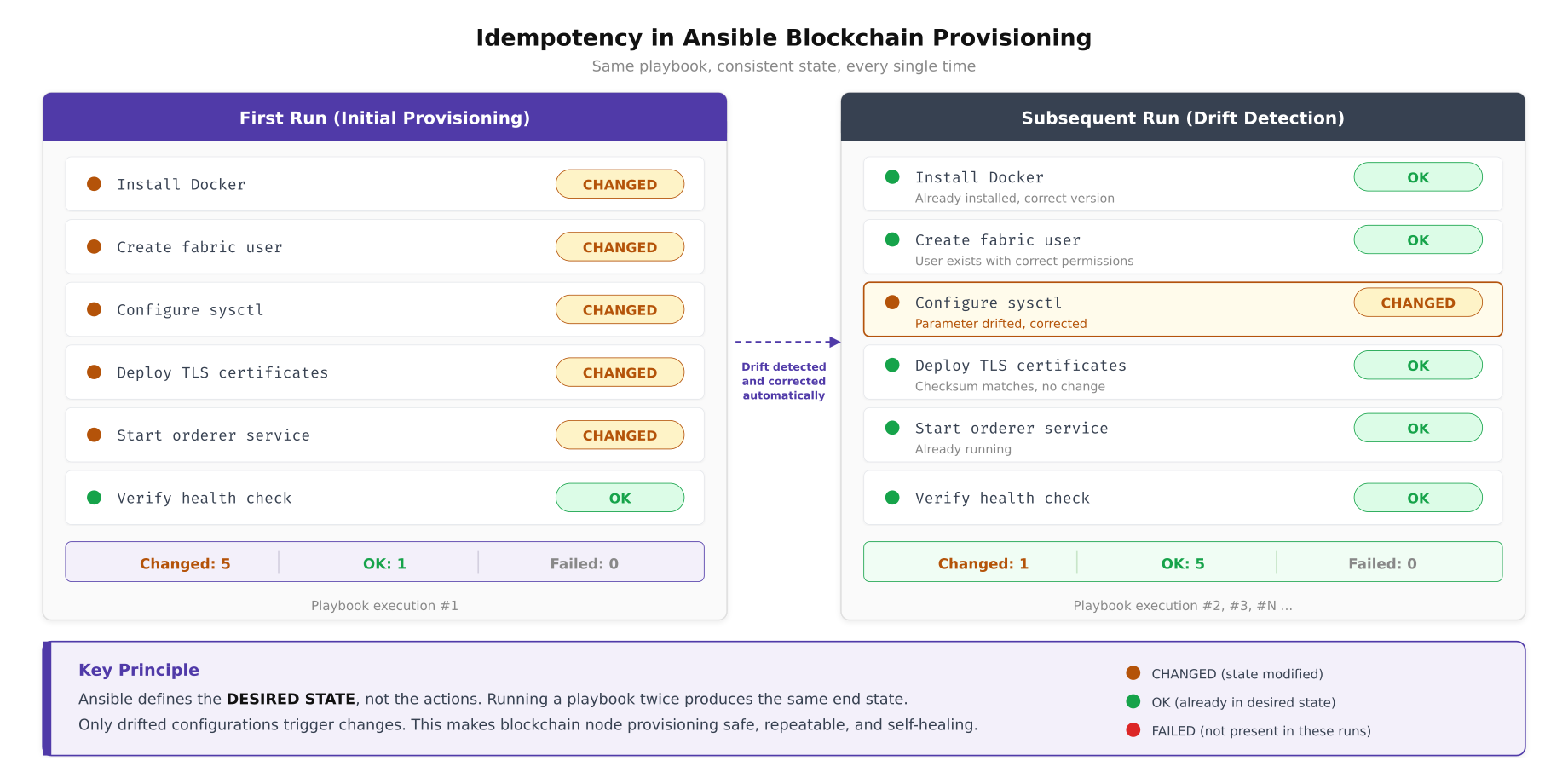
The comparison above shows how Ansible differentiates between initial provisioning and ongoing compliance enforcement. During the first run, every task reports “changed” because the node starts from a default state. During subsequent runs, only configurations that have drifted from the desired state trigger changes. In the example shown, a sysctl parameter was manually modified between runs, and Ansible detected and corrected the drift automatically. This behavior makes Ansible runs safe to schedule as cron jobs because they will not restart services or overwrite files that already match the desired state.
CI/CD Integration
BalticChain integrates Ansible playbooks into a CI/CD pipeline that gates every infrastructure change through automated testing before it reaches production. No playbook modification reaches production nodes without passing syntax validation, YAML linting, role unit testing, and staging environment verification.
Free to use, share it in your presentations, blogs, or learning materials.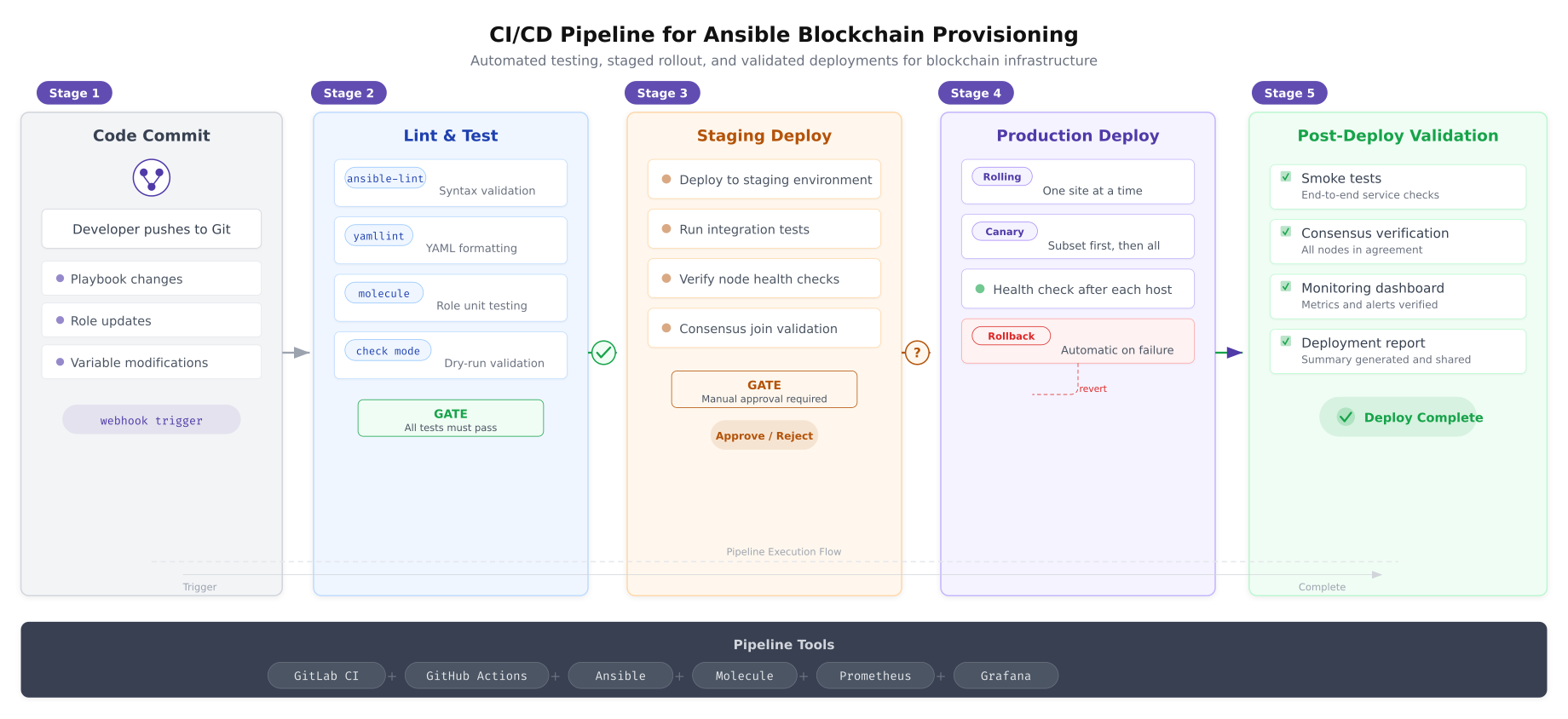
The pipeline above enforces five quality gates. The lint and test stage catches syntax errors and YAML formatting issues before any deployment occurs. Molecule runs role unit tests in ephemeral Docker containers, verifying that each role produces the expected state. The staging deploy applies changes to a non-production environment and runs integration tests including consensus join verification. A manual approval gate prevents automatic promotion to production, giving the operations team a checkpoint to review changes. The production deploy uses rolling strategy (one site at a time) with automatic rollback if health checks fail on any host.
GitLab CI Pipeline Configuration
# .gitlab-ci.yml
# BalticChain Ansible CI/CD Pipeline

stages:
  - lint
  - test
  - staging
  - approve
  - production
  - validate

variables:
  ANSIBLE_FORCE_COLOR: "true"
  ANSIBLE_HOST_KEY_CHECKING: "false"

lint:
  stage: lint
  image: cytopia/ansible-lint:latest
  script:
    - ansible-lint site.yml
    - yamllint -c .yamllint.yml .
  tags:
    - docker

molecule-test:
  stage: test
  image: quay.io/ansible/molecule:latest
  script:
    - cd roles/common && molecule test
    - cd ../fabric-node && molecule test
    - cd ../besu-node && molecule test
    - cd ../monitoring && molecule test
  tags:
    - docker

dry-run:
  stage: test
  script:
    - ansible-playbook site.yml --check --diff
      --vault-password-file $VAULT_PASSWORD_FILE
      -i inventory/hosts.yml
      --limit staging
  tags:
    - ansible-runner

staging-deploy:
  stage: staging
  script:
    - ansible-playbook site.yml
      --vault-password-file $VAULT_PASSWORD_FILE
      -i inventory/hosts.yml
      --limit staging
    - ansible-playbook tests/integration.yml
      -i inventory/hosts.yml
      --limit staging
  tags:
    - ansible-runner
  environment:
    name: staging

production-approval:
  stage: approve
  script:
    - echo "Awaiting manual approval for production deployment"
  when: manual
  allow_failure: false

production-deploy:
  stage: production
  script:
    - ansible-playbook site.yml
      --vault-password-file $VAULT_PASSWORD_FILE
      -i inventory/hosts.yml
      --limit production
      -e "deploy_strategy=rolling"
  tags:
    - ansible-runner
  environment:
    name: production
  needs:
    - production-approval

post-validate:
  stage: validate
  script:
    - ansible-playbook tests/smoke-tests.yml
      -i inventory/hosts.yml
      --limit production
    - ansible-playbook tests/consensus-check.yml
      -i inventory/hosts.yml
      --limit production
  tags:
    - ansible-runner
Rolling Updates and Maintenance
Blockchain networks cannot tolerate all nodes going offline simultaneously. BalticChain uses Ansible’s serial directive to update nodes one at a time, verifying consensus health after each update before proceeding to the next. This rolling strategy maintains network availability throughout maintenance windows.
# rolling-update.yml
# BalticChain Rolling Update Playbook

- name: Rolling update for Fabric orderer nodes
  hosts: all_orderers
  become: yes
  serial: 1
  max_fail_percentage: 0
  pre_tasks:
    - name: Check current orderer health before update
      uri:
        url: "https://{{ ansible_host }}:8443/healthz"
        validate_certs: no
        status_code: 200
      register: pre_health

    - name: Verify Raft leader is not this node (prefer updating followers first)
      shell: |
        curl -sk https://{{ ansible_host }}:8443/raft/status | jq -r '.role'
      register: raft_role
      changed_when: false

  roles:
    - role: fabric-node
      vars:
        fabric_node_type: orderer

  post_tasks:
    - name: Wait for orderer to rejoin Raft cluster
      uri:
        url: "https://{{ ansible_host }}:8443/healthz"
        validate_certs: no
        status_code: 200
      register: post_health
      retries: 12
      delay: 10
      until: post_health.status == 200

    - name: Verify Raft cluster has quorum
      shell: |
        curl -sk https://{{ ansible_host }}:8443/raft/status | jq -r '.cluster_size'
      register: cluster_check
      failed_when: cluster_check.stdout | int < 3
      changed_when: false

    - name: Pause between orderer updates for consensus stabilization
      pause:
        seconds: 30
Production Deployment Checklist
Before BalticChain's Ansible automation is considered production-ready, the following items must be verified.
- Inventory complete: all hosts defined with correct IP addresses, site assignments, and role group memberships verified against the network diagram
- Roles tested: every role passes Molecule unit tests and ansible-lint validation with zero warnings
- Vault encrypted: all secrets (TLS keys, CA certs, database passwords, validator keys) stored in Ansible Vault with AES-256 encryption, vault password stored in CI/CD secret store
- Idempotency verified: running the master playbook twice produces zero changes on the second run, confirming all tasks are idempotent
- Rolling update tested: serial deployment validated on staging with consensus health checks between each host update
- CI/CD pipeline operational: lint, test, staging deploy, manual approval gate, and production deploy stages all passing
- Drift detection scheduled: nightly compliance playbook run configured via cron or systemd timer with Slack notification for any detected changes
- Rollback procedure documented: previous known-good playbook version tagged in Git, rollback playbook tested on staging
- SSH key rotation automated: Ansible user SSH keys rotated quarterly via dedicated key-rotation playbook
- Audit trail enabled: Ansible callback plugin logging all playbook runs, changed tasks, and host outcomes to SIEM
BalticChain's Ansible automation eliminates the two greatest risks in blockchain infrastructure operations: configuration drift and human error during manual provisioning. Every node in the consortium is provisioned from the same set of roles, tested through the same CI/CD pipeline, and continuously validated against the same desired state definition. When a new organization joins the consortium and needs nodes provisioned across three data centers, the operations team adds hosts to the inventory, assigns the appropriate role groups, and runs the master playbook. Forty-six minutes later, the new nodes are hardened, configured, and participating in consensus, identical in every detail to every other node in the network.