
In Part 3, you generated the channel creation transaction (fjordtradechannel.tx) and anchor peer update transactions (Org1MSPanchors.tx, Org2MSPanchors.tx). This part submits those artifacts to the running orderer cluster to create the channel, then joins all four peers and configures gossip discovery. By the end, both organizations will share a synchronized ledger on the fjordtradechannel application channel.
FjordTrade is the scenario company used throughout this series. FjordTrade is a Nordic commodity trading platform with offices in Oslo (Org1), Helsinki (Org2), and Tallinn (Org3, added later). Each office operates its own peer nodes within the permissioned Fabric network.
Free to use, share it in your presentations, blogs, or learning materials.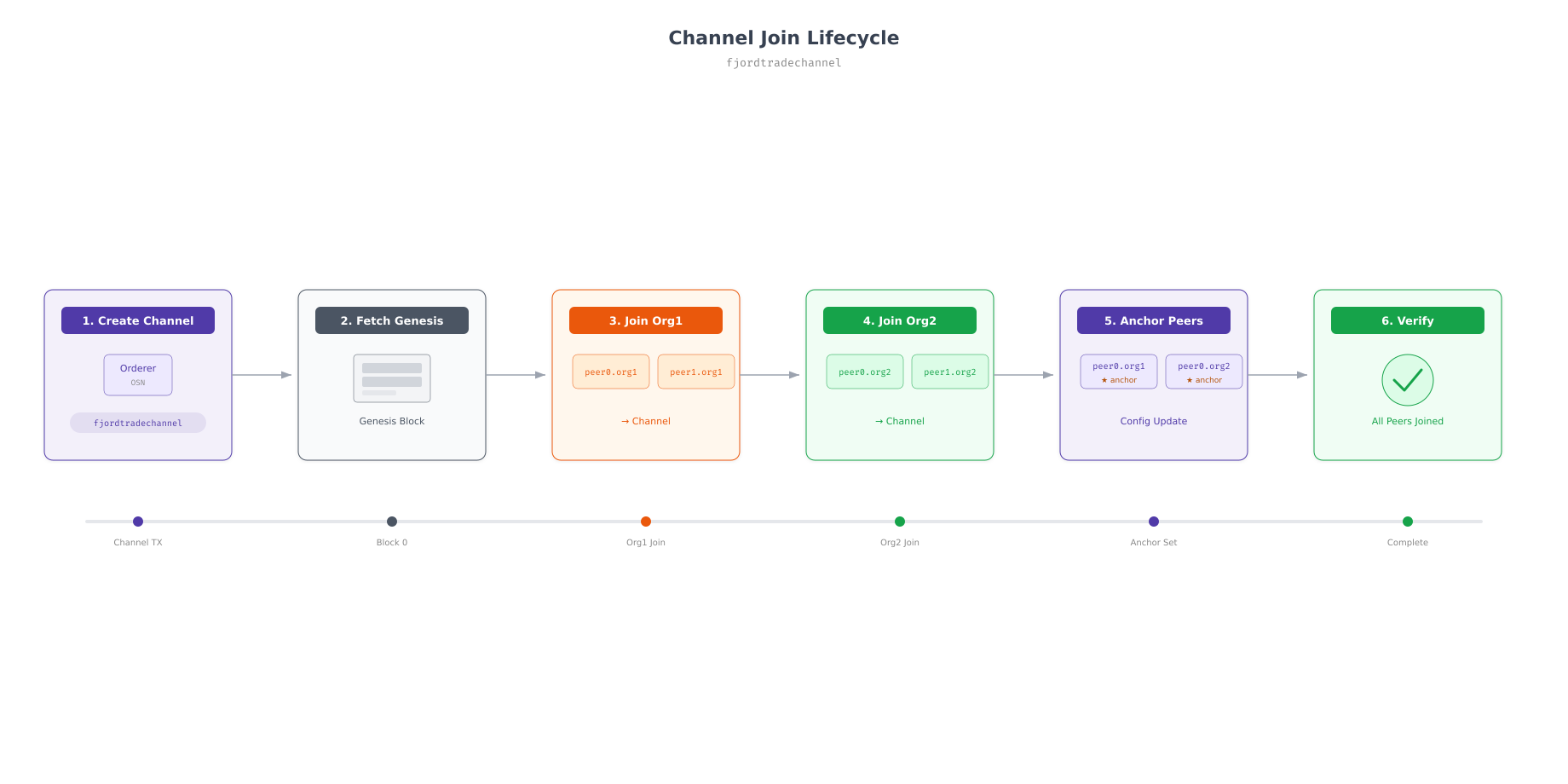
The flow above maps every step covered in this part. The channel is first created on the orderer, then each organization’s peers fetch the channel genesis block and join. After all peers have joined, anchor peers are configured to enable cross-organization gossip discovery. The final verification step confirms that all four peers see the same block height.
Prerequisites
Before proceeding, confirm that all 13 FjordTrade containers from Part 4 are running and the Raft cluster has an elected leader.
$ docker ps –format “table {{.Names}}\t{{.Status}}” | grep fjordtrade | wc -l13$ docker logs orderer1.orderer.fjordtrade.com 2>&1 | grep -i “became leader”2026-03-02 11:00:15.234 UTC [orderer.consensus.etcdraft] becomeLeader -> INFO 012 1 became leader at term 2 channel=system-channelSetting Up Environment Variables
Channel operations require several environment variables that tell the peer CLI which organization identity to use, where to find the TLS certificates, and which orderer to contact. These variables must be set before every peer channel command and must be switched when operating as a different organization.
Org1 Admin Environment
Set the environment to operate as the Org1 admin. All channel operations use this identity until you switch to Org2.
$ export CORE_PEER_TLS_ENABLED=true
$ export CORE_PEER_LOCALMSPID=”Org1MSP”
$ export CORE_PEER_TLS_ROOTCERT_FILE=${PWD}/../crypto-config/peerOrganizations/org1.fjordtrade.com/peers/peer0.org1.fjordtrade.com/tls/ca.crt
$ export CORE_PEER_MSPCONFIGPATH=${PWD}/../crypto-config/peerOrganizations/org1.fjordtrade.com/users/Admin@org1.fjordtrade.com/msp
$ export CORE_PEER_ADDRESS=localhost:7051
$ export ORDERER_CA=${PWD}/../crypto-config/ordererOrganizations/orderer.fjordtrade.com/orderers/orderer1.orderer.fjordtrade.com/msp/tlscacerts/tlsca.orderer.fjordtrade.com-cert.pem
The CORE_PEER_MSPCONFIGPATH points to the Admin user’s MSP directory, which gives this shell session administrative privileges for Org1. The ORDERER_CA variable stores the orderer’s TLS CA certificate path, required for all TLS-secured communications with the orderer.
Creating the Channel
The channel creation command submits the fjordtradechannel.tx transaction (generated in Part 3) to the orderer. The orderer validates the transaction against the consortium definition in the genesis block, creates the channel, and returns the channel genesis block.
$ cd ~/fjordtrade-network/docker
$ peer channel create \
$   -o localhost:7050 \
$   -c fjordtradechannel \
$   -f ../channel-artifacts/fjordtradechannel.tx \
$   –outputBlock ../channel-artifacts/fjordtradechannel.block \
$   –tls \
$ –cafile $ORDERER_CA2026-03-02 11:05:32.456 UTC [channelCmd] InitCmdFactory -> INFO 001 Endorser and orderer connections initialized
2026-03-02 11:05:32.512 UTC [cli.common] readBlock -> INFO 002 Expect block, but got status: &{NOT_FOUND}
2026-03-02 11:05:32.516 UTC [channelCmd] InitCmdFactory -> INFO 003 Endorser and orderer connections initialized
2026-03-02 11:05:32.723 UTC [cli.common] readBlock -> INFO 004 Expect block, but got status: &{SERVICE_UNAVAILABLE}
2026-03-02 11:05:32.728 UTC [channelCmd] InitCmdFactory -> INFO 005 Endorser and orderer connections initialized
2026-03-02 11:05:32.936 UTC [cli.common] readBlock -> INFO 006 Received block: 0The “Received block: 0” message confirms that the channel was created successfully and the genesis block (block 0) was returned. The intermediate “NOT_FOUND” and “SERVICE_UNAVAILABLE” messages are normal; they occur while the orderer is processing the channel creation request. The output block is saved to ../channel-artifacts/fjordtradechannel.block, which peers will use to join the channel.
$ ls -la ~/fjordtrade-network/channel-artifacts/fjordtradechannel.block-rw-r–r– 1 fjordtrade fjordtrade 17256 Mar 2 11:05 /home/fjordtrade/fjordtrade-network/channel-artifacts/fjordtradechannel.blockJoining Org1 Peers
With the channel genesis block in hand, join Org1’s peers. Each peer reads the genesis block to learn the channel configuration and connects to the orderer to start receiving blocks.
Joining peer0.org1
$ export CORE_PEER_ADDRESS=localhost:7051
$ peer channel join -b ../channel-artifacts/fjordtradechannel.block2026-03-02 11:06:15.234 UTC [channelCmd] InitCmdFactory -> INFO 001 Endorser and orderer connections initialized
2026-03-02 11:06:15.312 UTC [channelCmd] executeJoin -> INFO 002 Successfully submitted proposal to join channelJoining peer1.org1
Switch the peer address to peer1’s host port and join with the same block file.
$ export CORE_PEER_ADDRESS=localhost:8051
$ peer channel join -b ../channel-artifacts/fjordtradechannel.block2026-03-02 11:06:28.567 UTC [channelCmd] InitCmdFactory -> INFO 001 Endorser and orderer connections initialized
2026-03-02 11:06:28.645 UTC [channelCmd] executeJoin -> INFO 002 Successfully submitted proposal to join channelVerifying Org1 Channel Membership
$ export CORE_PEER_ADDRESS=localhost:7051
$ peer channel list2026-03-02 11:06:45.123 UTC [channelCmd] InitCmdFactory -> INFO 001 Endorser and orderer connections initialized
Channels peers has joined:
fjordtradechannelJoining Org2 Peers
Switch all environment variables to the Org2 admin identity before joining Org2’s peers. Every variable that references Org1 paths or identity must change to the Org2 equivalent.
$ export CORE_PEER_LOCALMSPID=”Org2MSP”
$ export CORE_PEER_TLS_ROOTCERT_FILE=${PWD}/../crypto-config/peerOrganizations/org2.fjordtrade.com/peers/peer0.org2.fjordtrade.com/tls/ca.crt
$ export CORE_PEER_MSPCONFIGPATH=${PWD}/../crypto-config/peerOrganizations/org2.fjordtrade.com/users/Admin@org2.fjordtrade.com/msp
Joining peer0.org2
$ export CORE_PEER_ADDRESS=localhost:9051
$ peer channel join -b ../channel-artifacts/fjordtradechannel.block2026-03-02 11:07:15.890 UTC [channelCmd] InitCmdFactory -> INFO 001 Endorser and orderer connections initialized
2026-03-02 11:07:15.968 UTC [channelCmd] executeJoin -> INFO 002 Successfully submitted proposal to join channelJoining peer1.org2
$ export CORE_PEER_ADDRESS=localhost:10051
$ peer channel join -b ../channel-artifacts/fjordtradechannel.block2026-03-02 11:07:28.123 UTC [channelCmd] InitCmdFactory -> INFO 001 Endorser and orderer connections initialized
2026-03-02 11:07:28.201 UTC [channelCmd] executeJoin -> INFO 002 Successfully submitted proposal to join channelVerifying Org2 Channel Membership
$ export CORE_PEER_ADDRESS=localhost:9051
$ peer channel list2026-03-02 11:07:45.456 UTC [channelCmd] InitCmdFactory -> INFO 001 Endorser and orderer connections initialized
Channels peers has joined:
fjordtradechannelUpdating Anchor Peers
Anchor peers serve as the discovery endpoints for cross-organization gossip communication. Without anchor peer configuration, peers within Org1 can gossip with each other, and peers within Org2 can gossip with each other, but the two organizations cannot discover each other’s peers. The anchor peer update transactions generated in Part 3 register peer0 of each organization as the designated contact point for external discovery.
Setting Org1 Anchor Peer
Switch back to the Org1 admin identity and submit the Org1 anchor peer update.
$ export CORE_PEER_LOCALMSPID=”Org1MSP”
$ export CORE_PEER_TLS_ROOTCERT_FILE=${PWD}/../crypto-config/peerOrganizations/org1.fjordtrade.com/peers/peer0.org1.fjordtrade.com/tls/ca.crt
$ export CORE_PEER_MSPCONFIGPATH=${PWD}/../crypto-config/peerOrganizations/org1.fjordtrade.com/users/Admin@org1.fjordtrade.com/msp
$ export CORE_PEER_ADDRESS=localhost:7051

$ peer channel update \
$   -o localhost:7050 \
$   -c fjordtradechannel \
$   -f ../channel-artifacts/Org1MSPanchors.tx \
$   –tls \
$ –cafile $ORDERER_CA2026-03-02 11:08:15.234 UTC [channelCmd] InitCmdFactory -> INFO 001 Endorser and orderer connections initialized
2026-03-02 11:08:15.256 UTC [channelCmd] update -> INFO 002 Successfully submitted channel updateSetting Org2 Anchor Peer
$ export CORE_PEER_LOCALMSPID=”Org2MSP”
$ export CORE_PEER_TLS_ROOTCERT_FILE=${PWD}/../crypto-config/peerOrganizations/org2.fjordtrade.com/peers/peer0.org2.fjordtrade.com/tls/ca.crt
$ export CORE_PEER_MSPCONFIGPATH=${PWD}/../crypto-config/peerOrganizations/org2.fjordtrade.com/users/Admin@org2.fjordtrade.com/msp
$ export CORE_PEER_ADDRESS=localhost:9051

$ peer channel update \
$   -o localhost:7050 \
$   -c fjordtradechannel \
$   -f ../channel-artifacts/Org2MSPanchors.tx \
$   –tls \
$ –cafile $ORDERER_CA2026-03-02 11:08:32.567 UTC [channelCmd] InitCmdFactory -> INFO 001 Endorser and orderer connections initialized
2026-03-02 11:08:32.589 UTC [channelCmd] update -> INFO 002 Successfully submitted channel updateVerifying Channel State
After all peers have joined and anchor peers are configured, verify that every peer sees the same channel state. The channel creation produced block 0 (genesis), and each anchor peer update added a configuration block. All peers should report the same block height.
Free to use, share it in your presentations, blogs, or learning materials.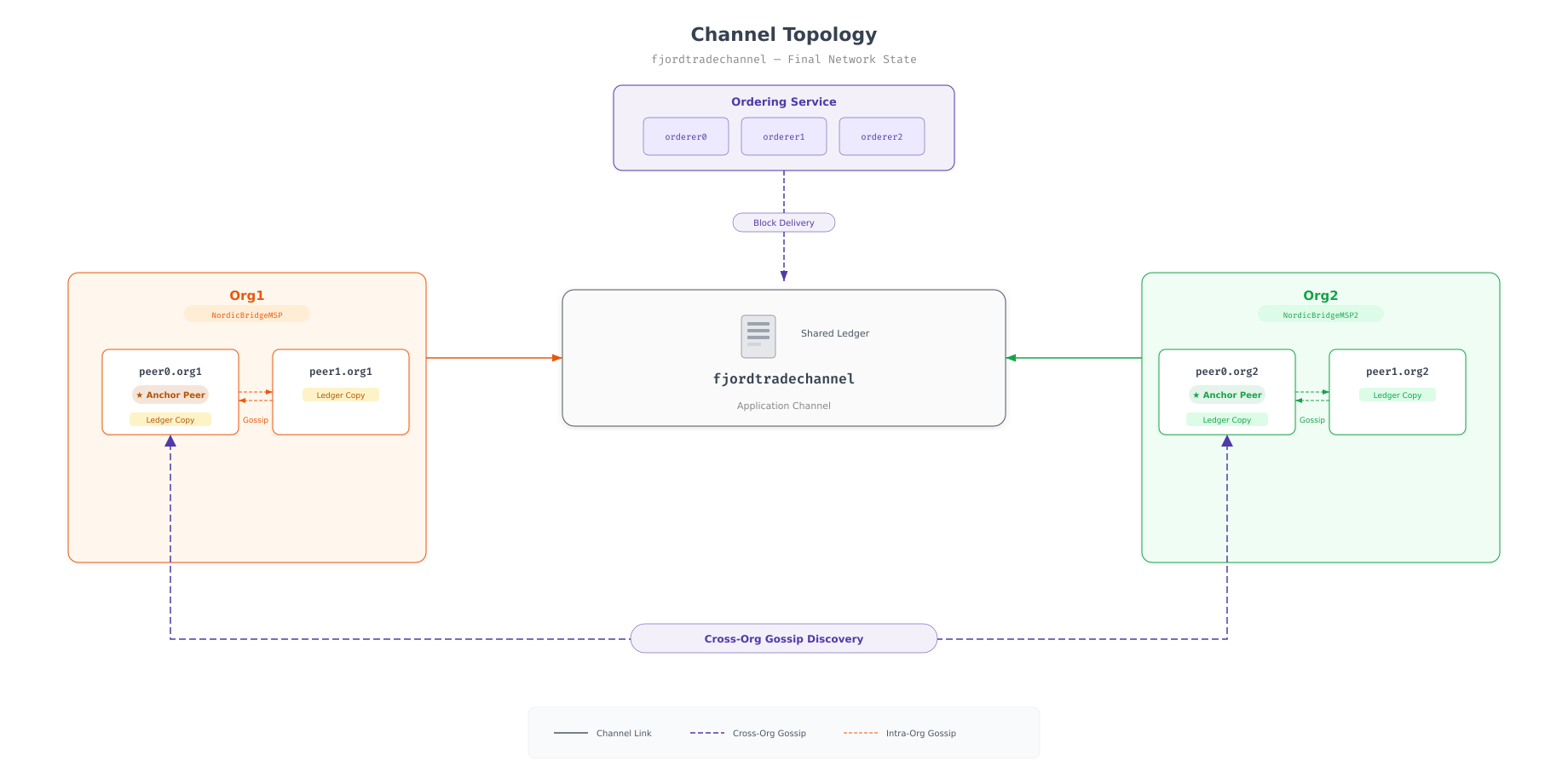
The topology above shows the completed channel state. All four peers are connected to the fjordtradechannel shared ledger. Within each organization, peers exchange blocks via intra-org gossip. Between organizations, the anchor peers (peer0.org1 and peer0.org2) provide the discovery bridge that allows Org1 to find Org2’s peers and vice versa. The orderer cluster delivers new blocks to all connected peers.
$ export CORE_PEER_LOCALMSPID=”Org1MSP”
$ export CORE_PEER_TLS_ROOTCERT_FILE=${PWD}/../crypto-config/peerOrganizations/org1.fjordtrade.com/peers/peer0.org1.fjordtrade.com/tls/ca.crt
$ export CORE_PEER_MSPCONFIGPATH=${PWD}/../crypto-config/peerOrganizations/org1.fjordtrade.com/users/Admin@org1.fjordtrade.com/msp
$ export CORE_PEER_ADDRESS=localhost:7051

$ peer channel getinfo -c fjordtradechannel2026-03-02 11:09:15.234 UTC [channelCmd] InitCmdFactory -> INFO 001 Endorser and orderer connections initialized
Blockchain info: {“height”:3,”currentBlockHash”:”abc123…”,”previousBlockHash”:”def456…”}$ export CORE_PEER_LOCALMSPID=”Org2MSP”
$ export CORE_PEER_TLS_ROOTCERT_FILE=${PWD}/../crypto-config/peerOrganizations/org2.fjordtrade.com/peers/peer0.org2.fjordtrade.com/tls/ca.crt
$ export CORE_PEER_MSPCONFIGPATH=${PWD}/../crypto-config/peerOrganizations/org2.fjordtrade.com/users/Admin@org2.fjordtrade.com/msp
$ export CORE_PEER_ADDRESS=localhost:9051
$ peer channel getinfo -c fjordtradechannel2026-03-02 11:09:28.567 UTC [channelCmd] InitCmdFactory -> INFO 001 Endorser and orderer connections initialized
Blockchain info: {“height”:3,”currentBlockHash”:”abc123…”,”previousBlockHash”:”def456…”}Both peers report a block height of 3. Block 0 is the channel genesis block. Blocks 1 and 2 are the anchor peer configuration updates for Org1 and Org2 respectively. Matching block heights confirm that both organizations are synchronized and receiving blocks from the orderer.
$ for port in 7051 8051 9051 10051; do
$   export CORE_PEER_ADDRESS=localhost:$port
$   if [ $port -le 8051 ]; then
$     export CORE_PEER_LOCALMSPID=”Org1MSP”
$     export CORE_PEER_TLS_ROOTCERT_FILE=${PWD}/../crypto-config/peerOrganizations/org1.fjordtrade.com/peers/peer0.org1.fjordtrade.com/tls/ca.crt
$     export CORE_PEER_MSPCONFIGPATH=${PWD}/../crypto-config/peerOrganizations/org1.fjordtrade.com/users/Admin@org1.fjordtrade.com/msp
$   else
$     export CORE_PEER_LOCALMSPID=”Org2MSP”
$     export CORE_PEER_TLS_ROOTCERT_FILE=${PWD}/../crypto-config/peerOrganizations/org2.fjordtrade.com/peers/peer0.org2.fjordtrade.com/tls/ca.crt
$     export CORE_PEER_MSPCONFIGPATH=${PWD}/../crypto-config/peerOrganizations/org2.fjordtrade.com/users/Admin@org2.fjordtrade.com/msp
$   fi
$   echo “Port $port:”
$   peer channel getinfo -c fjordtradechannel 2>&1 | grep height
$ donePort 7051:
Blockchain info: {“height”:3,”currentBlockHash”:”abc123…”,”previousBlockHash”:”def456…”}
Port 8051:
Blockchain info: {“height”:3,”currentBlockHash”:”abc123…”,”previousBlockHash”:”def456…”}
Port 9051:
Blockchain info: {“height”:3,”currentBlockHash”:”abc123…”,”previousBlockHash”:”def456…”}
Port 10051:
Blockchain info: {“height”:3,”currentBlockHash”:”abc123…”,”previousBlockHash”:”def456…”}All four peers report identical block heights and block hashes. The FjordTrade channel is fully operational with synchronized ledgers across both organizations.
Troubleshooting
Channel Creation Fails with Access Denied
If the peer channel create command returns an access denied error, the identity used does not have permission to create channels. Verify that CORE_PEER_MSPCONFIGPATH points to an Admin user’s MSP directory (not a regular User1 MSP). Only admin identities have the Writers policy permission needed for channel creation.
Join Fails with “Genesis Block Not Found”
If peer channel join reports that the genesis block file cannot be found, check the path to fjordtradechannel.block. This file is created by the peer channel create command and must be accessible from the current working directory using the path specified in the -b flag.
$ ls -la ~/fjordtrade-network/channel-artifacts/fjordtradechannel.blockPeers Show Different Block Heights
If peers report different block heights after joining, gossip may not have finished synchronizing. Wait 10 to 15 seconds and check again. If the discrepancy persists, verify that all peers are connected to the same Docker network and that no peer is reporting errors in its logs.
$ docker logs peer0.org1.fjordtrade.com 2>&1 | grep -i “gossip” | tail -5Anchor Peer Update Fails
The anchor peer update must be submitted by an admin of the organization being updated. If you try to submit Org1MSPanchors.tx while the environment is set to Org2MSP, the orderer will reject it with a policy violation. Always verify that CORE_PEER_LOCALMSPID matches the organization in the anchor peer update file.
Summary
This part created the FjordTrade application channel and connected all peer nodes to it. Here is what was accomplished.
Environment setup: Configured shell environment variables for both Org1 and Org2 admin identities, including MSP paths, TLS certificate locations, peer addresses, and the orderer TLS CA certificate.
Channel creation: Submitted the fjordtradechannel.tx transaction to the orderer cluster. The orderer validated the request against the consortium definition, created the channel, and returned the channel genesis block (block 0) saved as fjordtradechannel.block.
Org1 peer joining: Joined both peer0.org1 (port 7051) and peer1.org1 (port 8051) to the channel using the channel genesis block. Verified channel membership on both peers.
Org2 peer joining: Switched to Org2 admin identity and joined both peer0.org2 (port 9051) and peer1.org2 (port 10051) to the channel. Verified channel membership on both peers.
Anchor peer configuration: Submitted anchor peer updates for both organizations. Org1 registered peer0.org1 as its anchor peer. Org2 registered peer0.org2 as its anchor peer. These updates enable cross-organization gossip discovery so peers from different organizations can find each other.
Verification: Confirmed that all four peers report identical block heights (3 blocks: genesis, Org1 anchor update, Org2 anchor update) and matching block hashes, proving that the ledger is synchronized across both organizations.
What Comes Next
In Part 6: Deploying Chaincode and Testing Real Transactions, you will write a Go chaincode for FjordTrade’s commodity trade settlement, package it, install it on all peers, approve it for both organizations through the Fabric lifecycle, and commit the chaincode definition to the channel. You will then invoke real transactions to create trade assets, query them, transfer ownership between organizations, and verify the results through both the peer CLI and the CouchDB Fauxton web interface.