
In Part 3, you connected three messaging channels to the OpenClaw gateway: Telegram for management, Discord for engineering, and WhatsApp for sales. The agent responds on all three platforms with shared memory. This part adds capabilities beyond conversation.
By the end of this part, the LumaNova agent will have five marketplace skills installed, one custom morning briefing skill, and automated cron jobs delivering daily and weekly reports to the appropriate team channels.
Free to use, share it in your presentations, blogs, or learning materials.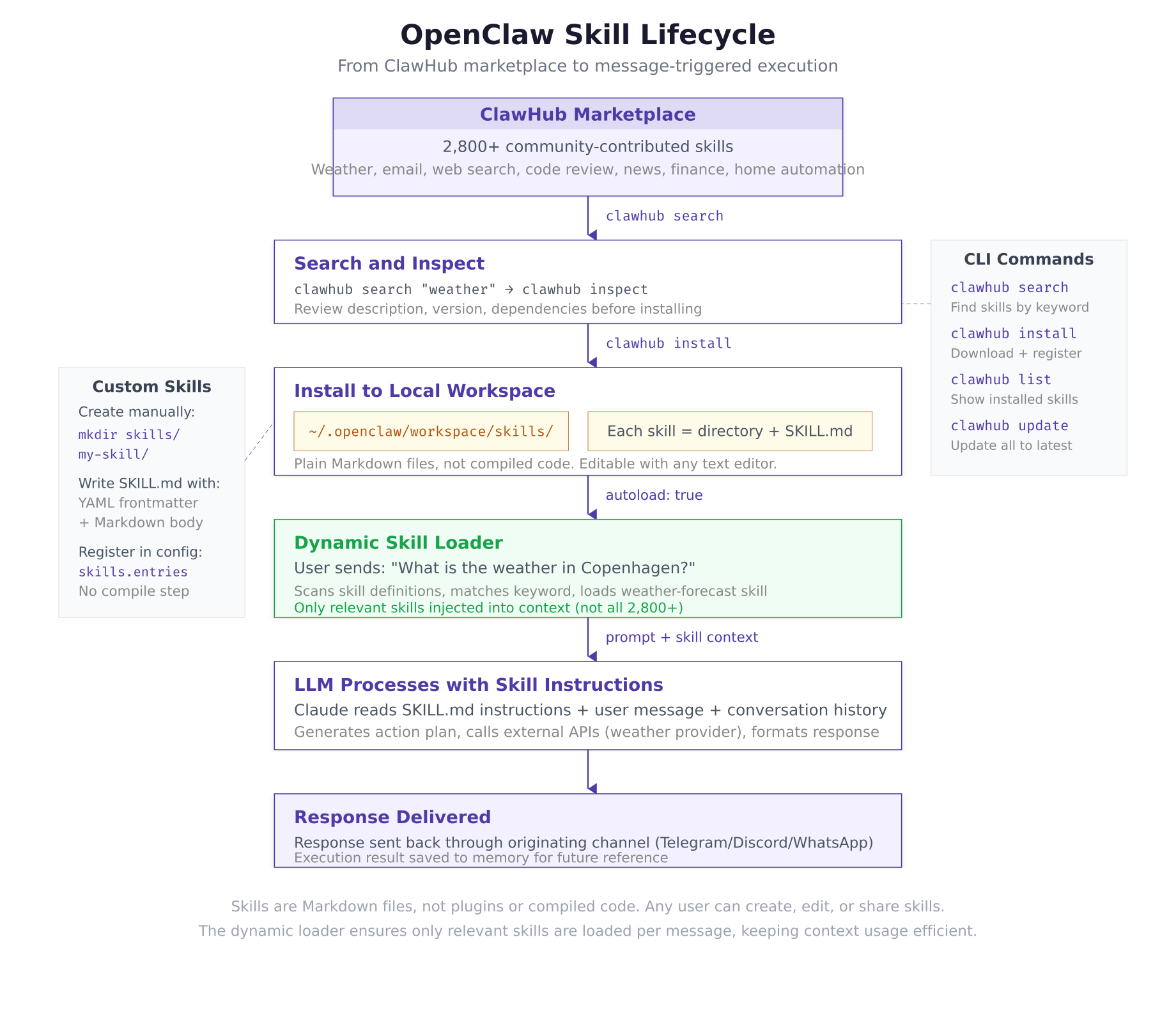
The lifecycle diagram above traces a skill from marketplace discovery to execution. When a user sends a message, the dynamic loader scans installed skills, selects only the relevant one based on keyword matching, injects its instructions into the LLM context, and returns a skill-enhanced response through the originating channel.
Prerequisites
Completed Part 3: The OpenClaw gateway is running with Telegram, Discord, and WhatsApp channels active.
$ curl -s http://127.0.0.1:18789/healthz | jq ‘{status: .status, channels: .channels}’{
“status”: “ok”,
“channels”: {
“configured”: 3,
“active”: 3
}
}Searching the ClawHub Marketplace
ClawHub is the community skill marketplace for OpenClaw, hosting over 2,800 skills across categories from productivity and development to smart home control and finance. The clawhub CLI tool is bundled with OpenClaw and runs inside the gateway container.
$ docker exec openclaw-gateway clawhub search “weather”ClawHub Search: “weather”
Found 12 results:
weather-forecast ★ 4.8 (2,341 installs) Current weather + 7-day forecast
weather-alerts ★ 4.6 (892 installs) Severe weather notifications
weather-historical ★ 4.2 (234 installs) Historical weather data lookup
weather-outfit ★ 4.1 (567 installs) Outfit recommendations by weather
…$ docker exec openclaw-gateway clawhub inspect weather-forecastweather-forecast v2.1.0
========================
Author: clawhub-community
License: MIT
Installs: 2,341
Rating: 4.8/5.0
Description:
Fetches current weather conditions and 7-day forecasts for any city.
Supports temperature units (C/F), wind speed, humidity, UV index.
Uses OpenWeatherMap API (free tier: 1,000 calls/day).
Required Environment Variables:
OPENWEATHER_API_KEY – Get free key at openweathermap.org/api
Permissions:
– HTTP outbound (api.openweathermap.org)
Files:
SKILL.md (3.2 KB)Installing Marketplace Skills
Install five practical skills that cover the most common use cases for the LumaNova team: weather forecasts, email management, web search, code review, and news briefings.
$ docker exec openclaw-gateway clawhub install weather-forecast
$ docker exec openclaw-gateway clawhub install email-manager
$ docker exec openclaw-gateway clawhub install web-search
$ docker exec openclaw-gateway clawhub install code-reviewer
$ docker exec openclaw-gateway clawhub install news-briefingInstalling weather-forecast v2.1.0…
Downloaded SKILL.md (3.2 KB)
Installed to: ~/.openclaw/workspace/skills/weather-forecast/
✓ weather-forecast installed successfully
Installing email-manager v1.8.3…
Downloaded SKILL.md (4.1 KB)
Installed to: ~/.openclaw/workspace/skills/email-manager/
✓ email-manager installed successfully
Installing web-search v3.0.1…
Downloaded SKILL.md (2.8 KB)
Installed to: ~/.openclaw/workspace/skills/web-search/
✓ web-search installed successfully
Installing code-reviewer v2.4.0…
Downloaded SKILL.md (5.3 KB)
Installed to: ~/.openclaw/workspace/skills/code-reviewer/
✓ code-reviewer installed successfully
Installing news-briefing v1.5.2…
Downloaded SKILL.md (3.7 KB)
Installed to: ~/.openclaw/workspace/skills/news-briefing/
✓ news-briefing installed successfully$ docker exec openclaw-gateway clawhub listInstalled skills (5):
weather-forecast v2.1.0 ~/.openclaw/workspace/skills/weather-forecast/
email-manager v1.8.3 ~/.openclaw/workspace/skills/email-manager/
web-search v3.0.1 ~/.openclaw/workspace/skills/web-search/
code-reviewer v2.4.0 ~/.openclaw/workspace/skills/code-reviewer/
news-briefing v1.5.2 ~/.openclaw/workspace/skills/news-briefing/Configuring Skill Environment Variables
Some skills require API keys for the external services they connect to. Add these to the environment file.
$ vim ~/.openclaw/.envANTHROPIC_API_KEY=sk-ant-api03-xxxxxxxxxxxxxxxxxxxxxxxxxxxxx
TELEGRAM_BOT_TOKEN=7234567890:AAHdqTcvCH1vGWJxfSeofSAs0K5PALDsaw
DISCORD_BOT_TOKEN=MTIzNDU2Nzg5MDEyMzQ1Njc4OQ.GHJklm.abcdefghijklmnopqrstuvwxyz1234567890
OPENWEATHER_API_KEY=a1b2c3d4e5f6g7h8i9j0k1l2m3n4o5p6
SERP_API_KEY=your-serp-api-key-here
NEWS_API_KEY=your-newsapi-key-herePress Esc, type :wq, press Enter to save and exit.
The OPENWEATHER_API_KEY is required by the weather-forecast skill (free tier at openweathermap.org). The SERP_API_KEY powers the web-search skill. The NEWS_API_KEY feeds the news-briefing skill.
$ cd ~/openclaw/docker && docker compose restart$ curl -s http://127.0.0.1:18789/healthz | jq .skills{
“loaded”: 5,
“available”: 5
}Test a skill by sending a message on any connected channel: “What is the weather in Copenhagen?” The agent should use the weather-forecast skill to fetch current conditions and return a formatted response.
Creating a Custom Skill
Marketplace skills cover common use cases, but LumaNova needs a custom morning briefing skill that combines weather, calendar events, and news headlines into a single daily summary tailored to the Copenhagen office. Custom skills are Markdown files with YAML frontmatter describing the skill’s purpose, triggers, and behavior.
$ mkdir -p ~/.openclaw/workspace/skills/morning-briefing$ vim ~/.openclaw/workspace/skills/morning-briefing/SKILL.md—
name: morning-briefing
version: 1.0.0
description: Daily morning briefing for LumaNova Technologies
author: lumanova
triggers:
– morning briefing
– daily briefing
– start my day
– good morning
tools:
– weather-forecast
– news-briefing
schedule:
cron: “0 7 * * *”
channel: whatsapp
message: “Deliver the morning briefing for today”
—
# Morning Briefing Skill
You are the LumaNova morning briefing assistant. When triggered, compile a comprehensive daily briefing for the Copenhagen office.
## Briefing Structure
1. **Greeting**: Start with “Good morning, LumaNova team” and today’s date
2. **Weather**: Fetch current weather for Copenhagen, Denmark. Include temperature (Celsius), conditions, wind speed, and any weather alerts
3. **Calendar**: Check for scheduled meetings and events today. List time, title, and attendees for each
4. **News**: Fetch top 5 technology and AI industry headlines from the past 24 hours. Include source and one-sentence summary for each
5. **Reminders**: List any pending tasks or deadlines this week
## Formatting Rules
– Use clear section headers
– Keep each section concise (3-5 lines maximum)
– End with “Have a productive day!” and the current time in Copenhagen (CET/CEST)
– Format for WhatsApp readability (no Markdown, use plain text with line breaks)Press Esc, type :wq, press Enter to save and exit.
The YAML frontmatter defines the skill metadata. The triggers array lists phrases that activate this skill when a user sends a matching message. The tools array references other installed skills that this skill can use as data sources. The schedule object defines the cron job that triggers this skill automatically. The Markdown body contains the instructions the LLM follows when executing the skill.
Registering the Custom Skill
Add the custom skill to the openclaw.json configuration so the gateway explicitly loads it alongside the marketplace skills.
$ vim ~/.openclaw/openclaw.jsonPress <code>Esc</code>, type <code>:wq</code>, press <code>Enter</code> to save and exit.
[gsl_terminal title="Restart gateway and verify"]cd ~/openclaw/docker && docker compose restart
curl -s http://127.0.0.1:18789/healthz | jq .skills{
“loaded”: 6,
“available”: 6
}The skill count increased from 5 to 6, confirming the custom morning-briefing skill loaded successfully. Test it by sending “Good morning” or “Start my day” on any channel.
Configuring Cron Job Automation
OpenClaw supports cron-based scheduling that triggers skills at specific times without user interaction. The morning briefing skill already has a schedule defined in its YAML frontmatter (0 7 * * *), but you can also manage schedules through the CLI and add additional jobs.
$ docker exec openclaw-gateway openclaw cron listScheduled jobs (1):
morning-briefing 0 7 * * * whatsapp “Deliver the morning briefing for today”
Next run: 2026-03-03 07:00:00 UTC$ docker exec openclaw-gateway openclaw cron add \
$ –schedule “0 9 * * MON” \
$ –channel telegram \
$ –message “Generate a weekly summary report of all conversations and tasks from the past 7 days. Include key decisions made, action items assigned, and any outstanding issues. Format for Telegram with clear section headers.”Cron job added:
ID: weekly-report-001
Schedule: 0 9 * * MON (Every Monday at 09:00 UTC)
Channel: telegram
Next run: 2026-03-09 09:00:00 UTC$ docker exec openclaw-gateway openclaw cron add \
$ –schedule “0 18 * * FRI” \
$ –channel discord \
$ –message “Generate a sprint summary for the engineering team. List all code reviews completed this week, pull requests merged, and any blockers discussed. Include a brief performance metrics section.”Cron job added:
ID: sprint-summary-001
Schedule: 0 18 * * FRI (Every Friday at 18:00 UTC)
Channel: discord
Next run: 2026-03-06 18:00:00 UTC$ docker exec openclaw-gateway openclaw cron listScheduled jobs (3):
morning-briefing 0 7 * * * whatsapp “Deliver the morning briefing…”
weekly-report-001 0 9 * * MON telegram “Generate a weekly summary…”
sprint-summary-001 0 18 * * FRI discord “Generate a sprint summary…”Skill Management Commands
Reference for common skill management operations.
$ docker exec openclaw-gateway clawhub update –allChecking for updates…
weather-forecast: up to date (v2.1.0)
email-manager: update available (v1.8.3 → v1.9.0)
web-search: up to date (v3.0.1)
code-reviewer: up to date (v2.4.0)
news-briefing: up to date (v1.5.2)
Updating email-manager to v1.9.0… ✓
1 skill updated.$ docker exec openclaw-gateway clawhub uninstall email-managerUninstalling email-manager…
Removed: ~/.openclaw/workspace/skills/email-manager/
✓ email-manager uninstalled$ docker exec openclaw-gateway clawhub install email-managerMemory Management
As the agent processes messages and executes skills, it accumulates memory. The memory management commands let you inspect and search the agent’s stored knowledge.
$ docker exec openclaw-gateway openclaw memory statusMemory Status:
Directory: ~/.openclaw/workspace/memory/
Files: 8
Total size: 42.3 KB
Oldest entry: 2026-03-02T10:25:12Z
Newest entry: 2026-03-02T12:18:47Z
Context tokens used: 4,832 / 32,000 max$ docker exec openclaw-gateway openclaw memory search “Q3 revenue”Found 1 result:
[2026-03-02T11:42:18Z] telegram
“Remember that our Q3 revenue target is 2.4 million EUR.”
→ Stored as: q3-revenue-target.md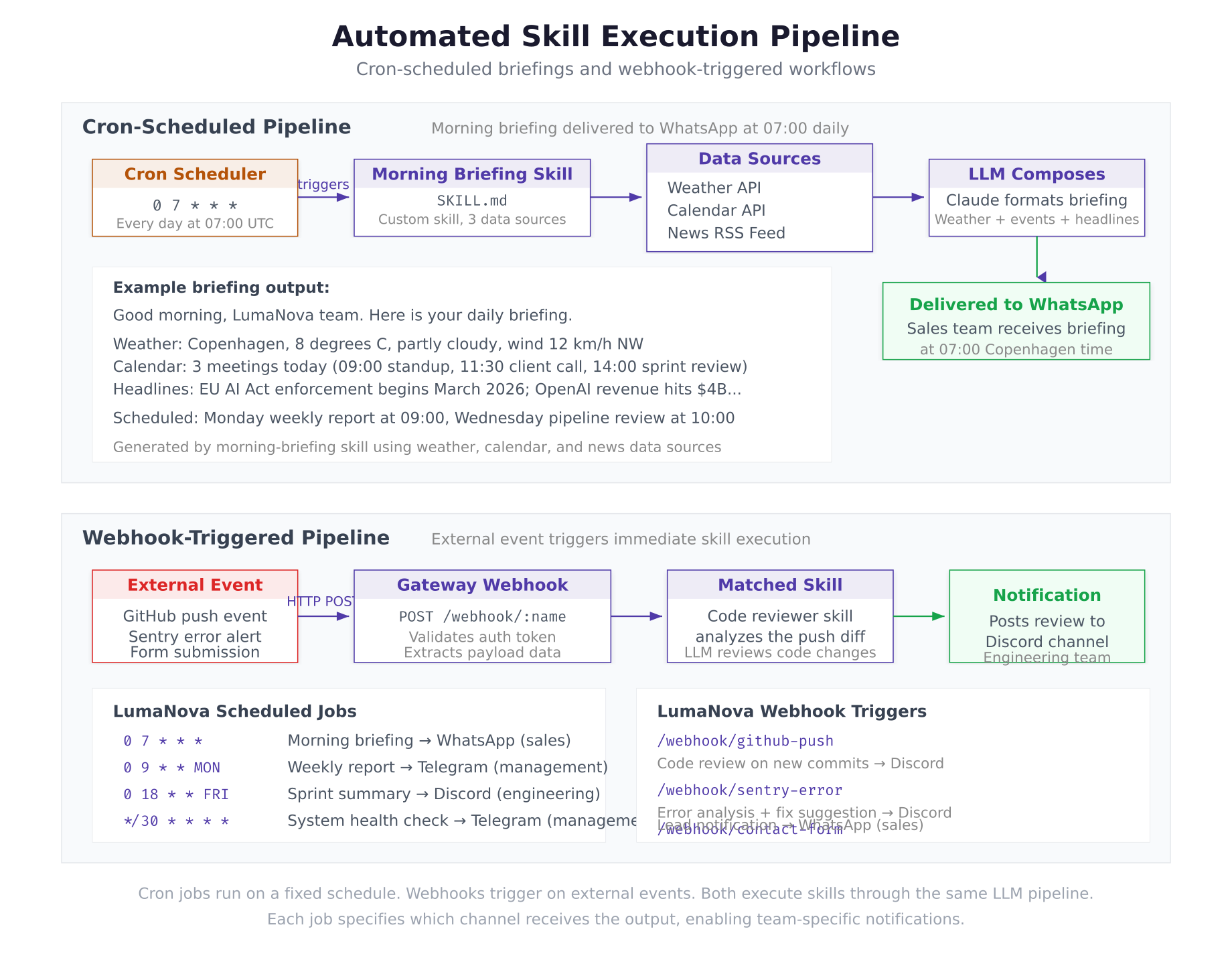
The automation diagram above shows the two execution paths. The cron pipeline triggers the morning briefing at 07:00 daily, fetches data from three sources, composes the briefing via Claude, and delivers it to the sales team on WhatsApp. The webhook pipeline listens for external events (GitHub pushes, Sentry errors) on the gateway endpoint, triggers the matched skill, and posts the result to the engineering team on Discord.
Troubleshooting
Skill Not Triggering
If the agent does not use a skill when expected, check that the skill loaded successfully.
$ docker logs openclaw-gateway 2>&1 | grep -i “skill”Common causes: the skill directory name does not match the entry in openclaw.json, the SKILL.md file has invalid YAML frontmatter (missing --- delimiters), or the autoload setting is set to false.
Cron Job Not Running
If a scheduled job does not execute at the expected time, verify the timezone and job status.
$ docker exec openclaw-gateway openclaw cron list –verboseCron schedules use UTC by default. If the LumaNova team is in Copenhagen (CET, UTC+1), a 07:00 local delivery requires a 0 6 * * * UTC schedule. Adjust the cron expressions accordingly.
Summary
The LumaNova OpenClaw agent now has specialized capabilities and automated workflows. This part accomplished the following:
- Searched the ClawHub marketplace (2,800+ community skills) using the
clawhubCLI - Installed five marketplace skills: weather-forecast, email-manager, web-search, code-reviewer, news-briefing
- Configured skill-specific API keys (OpenWeatherMap, SERP, NewsAPI) in the environment file
- Created a custom morning-briefing skill as a Markdown SKILL.md file with YAML frontmatter and natural language instructions
- Registered the custom skill in
openclaw.jsonand verified it loaded (6 total skills) - Configured three cron jobs: daily morning briefing (WhatsApp at 07:00), weekly report (Telegram Mondays at 09:00), sprint summary (Discord Fridays at 18:00)
- Reviewed skill management commands: search, inspect, install, list, update, uninstall
- Verified memory management: status, search, and token usage tracking
What Comes Next
In Part 5: Local LLM with Ollama and Security Hardening, you will install Ollama on the LumaNova server, configure OpenClaw to use a local LLM as a fallback provider, move all API keys from configuration files to environment variables, lock down file permissions, run the security audit, and create encrypted backups of the entire configuration.