
OpenClaw was created by Austrian programmer Peter Steinberger and first released in November 2025 under the name Clawdbot. After a trademark dispute with Anthropic, the project was briefly renamed to Moltbot in January 2026, then settled on its current name, OpenClaw, three days later. Within weeks of its launch, the repository accumulated over 140,000 GitHub stars and 20,000 forks, making it one of the fastest-growing open-source projects in GitHub’s history. The project is licensed under the MIT License and is written in TypeScript. In February 2026, Steinberger announced he would join OpenAI and transfer the project to an open-source foundation to ensure its continued development by the community.
Free to use, share it in your presentations, blogs, or learning materials.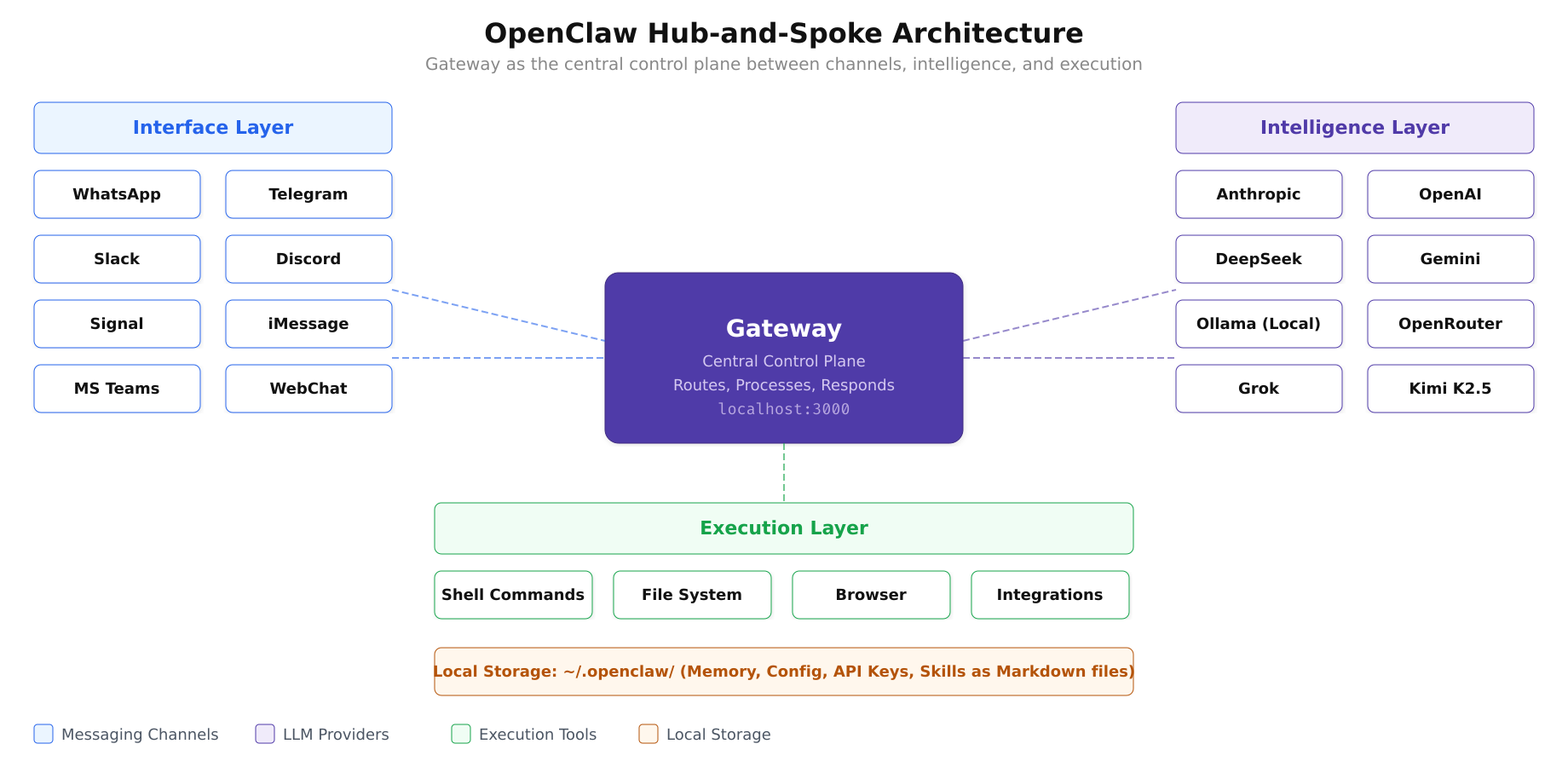
The architecture diagram above shows how the Gateway sits at the center, routing messages between any of the supported channels and the configured LLM provider, while the execution layer provides real-world capabilities like shell access, file management, and browser automation. All state is stored locally as Markdown files.
How OpenClaw Works: The Hub-and-Spoke Architecture
OpenClaw follows a hub-and-spoke architecture centered on a single component called the Gateway. The Gateway acts as the control plane between user inputs (from messaging channels) and the AI agent runtime (where intelligence and execution live). When a message arrives on WhatsApp or Telegram, the Gateway receives it, determines which skill or capability is relevant, routes the request to the appropriate LLM provider, processes the response, and sends it back through the same messaging channel.
The architecture separates three layers cleanly. The interface layer handles connections to messaging platforms: WhatsApp, Telegram, Slack, Discord, Signal, iMessage, Microsoft Teams, Google Chat, Matrix, and WebChat. The intelligence layer connects to LLM providers such as Anthropic (Claude), OpenAI (GPT-4o, GPT-5.2), DeepSeek, or local models running through Ollama. The execution layer provides the agent with tools: file system access, shell command execution, browser automation, and integrations with third-party services. All three layers are coordinated by the Gateway running locally on your machine.
Supported LLM Providers
One of OpenClaw’s strongest design decisions is its provider-agnostic approach. The framework does not lock users into a single AI model or vendor. It supports over 12 LLM providers, giving users the freedom to choose based on cost, capability, privacy requirements, or latency preferences.
Cloud providers include Anthropic (Claude Opus 4.6, Sonnet 4.6, Haiku 4.5), OpenAI (GPT-4o, GPT-4, GPT-5.2), DeepSeek (the cheapest cloud option with strong code capabilities), Google Gemini (3 Pro and Flash Preview), Grok Code Fast 1, Kimi K2.5, GLM-5 Free, and MiniMax M2.5 Free. Local model support is provided through Ollama, enabling users to run models like Llama 3.3, Mistral, Qwen, and DeepSeek-Coder-V2 entirely on their own hardware with no data leaving the machine. OpenRouter is also supported as a unified gateway to dozens of additional models.
The recommended provider for serious agent work is Anthropic’s Claude, which offers the strongest reasoning capabilities for complex multi-step tasks. DeepSeek provides the best cost-to-performance ratio for code-heavy workflows. For users who prioritize data privacy above all else, Ollama with a local model ensures that no data is transmitted to any external server.
The Skill System: 2,800+ Capabilities
Skills are the building blocks of what OpenClaw can do. Unlike traditional plugin systems that require compiled code, OpenClaw skills are defined as Markdown files. Each skill lives in a directory under ~/clawd/skills/<skill-name>/SKILL.md and contains a natural language description of what the skill does, what inputs it expects, and how the agent should execute it. The agent dynamically loads only the skills relevant to the current task rather than injecting all 2,800+ skill definitions into every prompt.
The ClawHub marketplace hosts over 2,857 community-contributed skills covering categories from productivity and development to smart home control and financial analysis. Users can install skills with a single command, modify existing ones by editing the Markdown file, or create entirely new skills by writing a SKILL.md file that describes the desired behavior in plain English.
This design makes skill creation accessible to non-programmers. A user who wants the agent to summarize their daily calendar and send it via WhatsApp every morning at 7 AM can write a skill in natural language describing that workflow, and the agent’s LLM backbone handles the implementation details.
Free to use, share it in your presentations, blogs, or learning materials.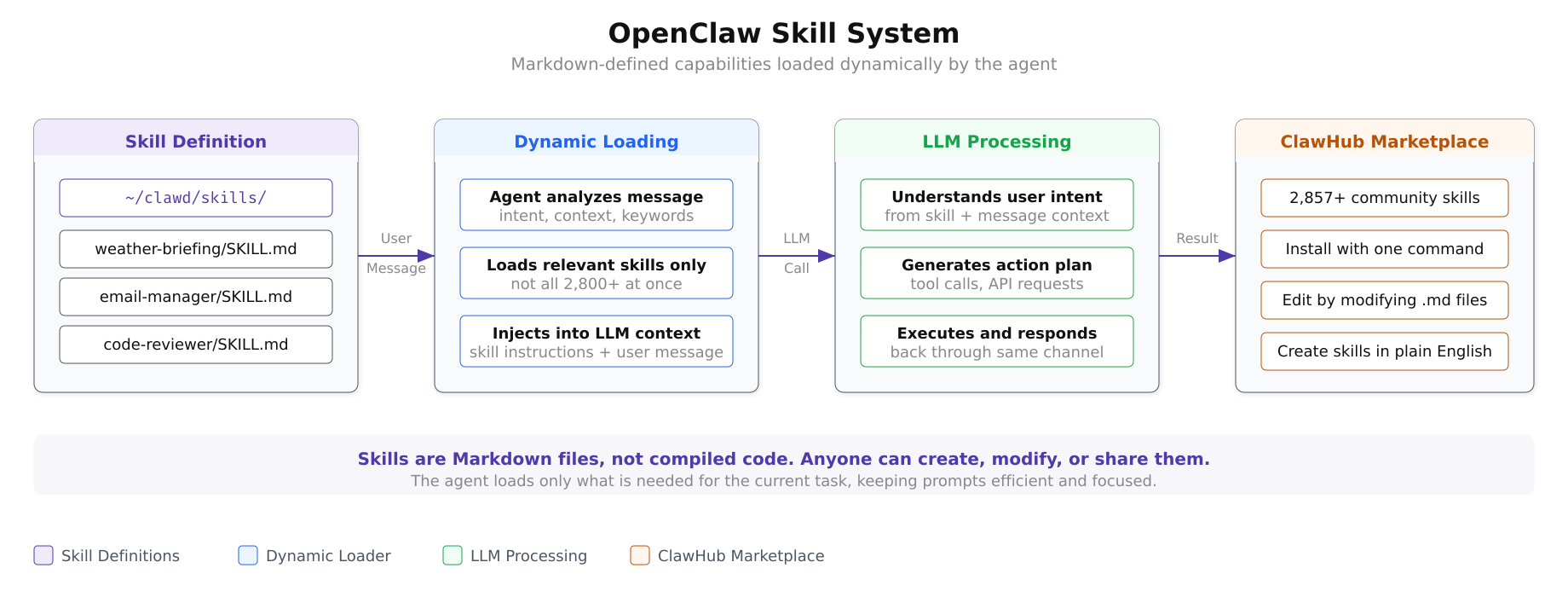
As shown in the diagram above, the skill system operates in four stages. Skill definitions stored as Markdown files are matched to incoming user messages by the dynamic loader, which selects only the relevant skills rather than injecting all available capabilities into the LLM context. The LLM processes the user’s intent alongside the skill instructions, generates an action plan, and executes it. The ClawHub marketplace provides a growing library of pre-built skills that can be installed with a single command.
Multi-Channel Messaging Support
OpenClaw supports a broad range of messaging platforms as input/output channels. The currently supported platforms are:
- WhatsApp: The most popular integration, enabling AI agent access from the same app used for personal and business messaging
- Telegram: Full bot API integration with support for inline keyboards and rich media
- Slack: Workspace integration for team-level AI assistance in channels and direct messages
- Discord: Server and channel-level agent interaction for community management
- Signal: Privacy-focused messaging with end-to-end encryption
- iMessage: Apple ecosystem integration (via BlueBubbles bridge)
- Microsoft Teams: Enterprise messaging integration for corporate environments
- Google Chat: Google Workspace integration
- Matrix: Open-source, federated messaging protocol support
- WebChat: Browser-based fallback interface
Each channel operates independently but shares the same agent backend. A user can send a message on WhatsApp asking the agent to draft an email, then switch to Slack to ask about the same draft, and the agent maintains context across channels because the memory and state are managed centrally by the Gateway.
Free to use, share it in your presentations, blogs, or learning materials.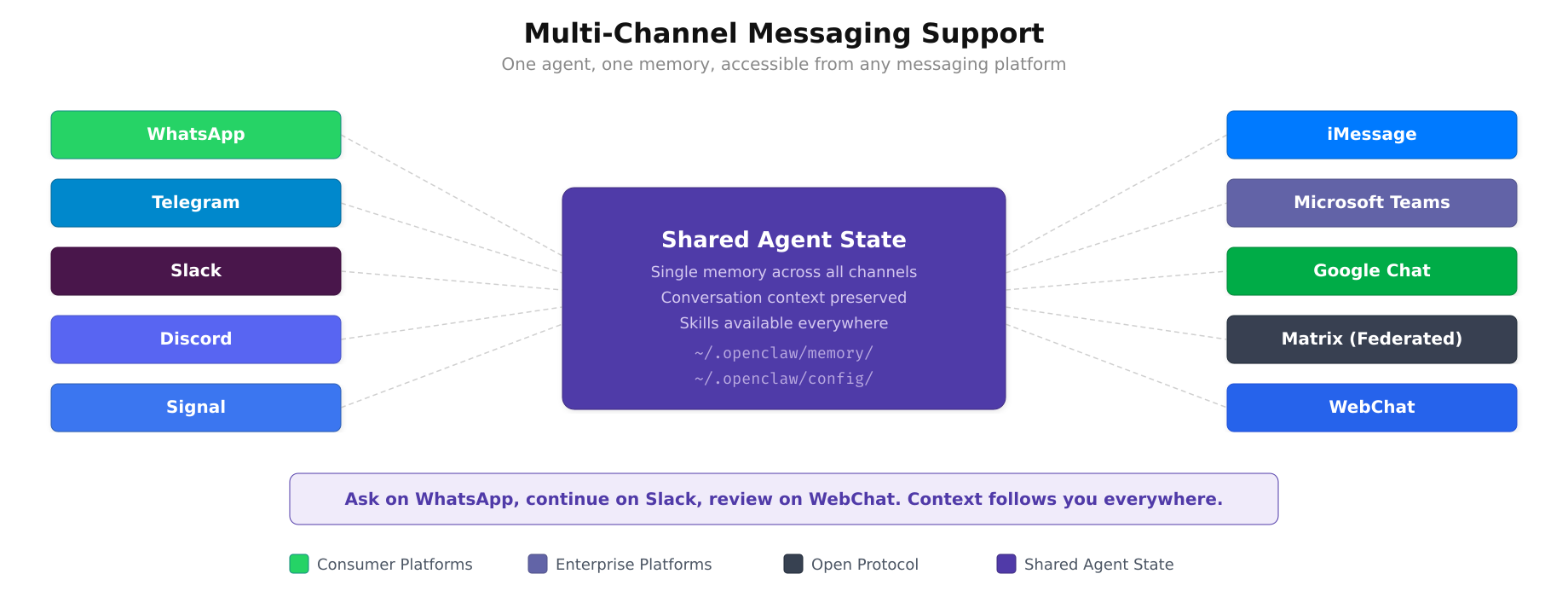
The diagram above visualizes the multi-channel design. Every platform, from consumer messaging apps like WhatsApp and Signal to enterprise tools like Microsoft Teams and Google Chat, connects to the same agent backend. The shared state in the center means a user can start a conversation on Telegram, switch to Slack for follow-up, and the agent retains full context throughout.
Practical Use Cases
Free to use, share it in your presentations, blogs, or learning materials.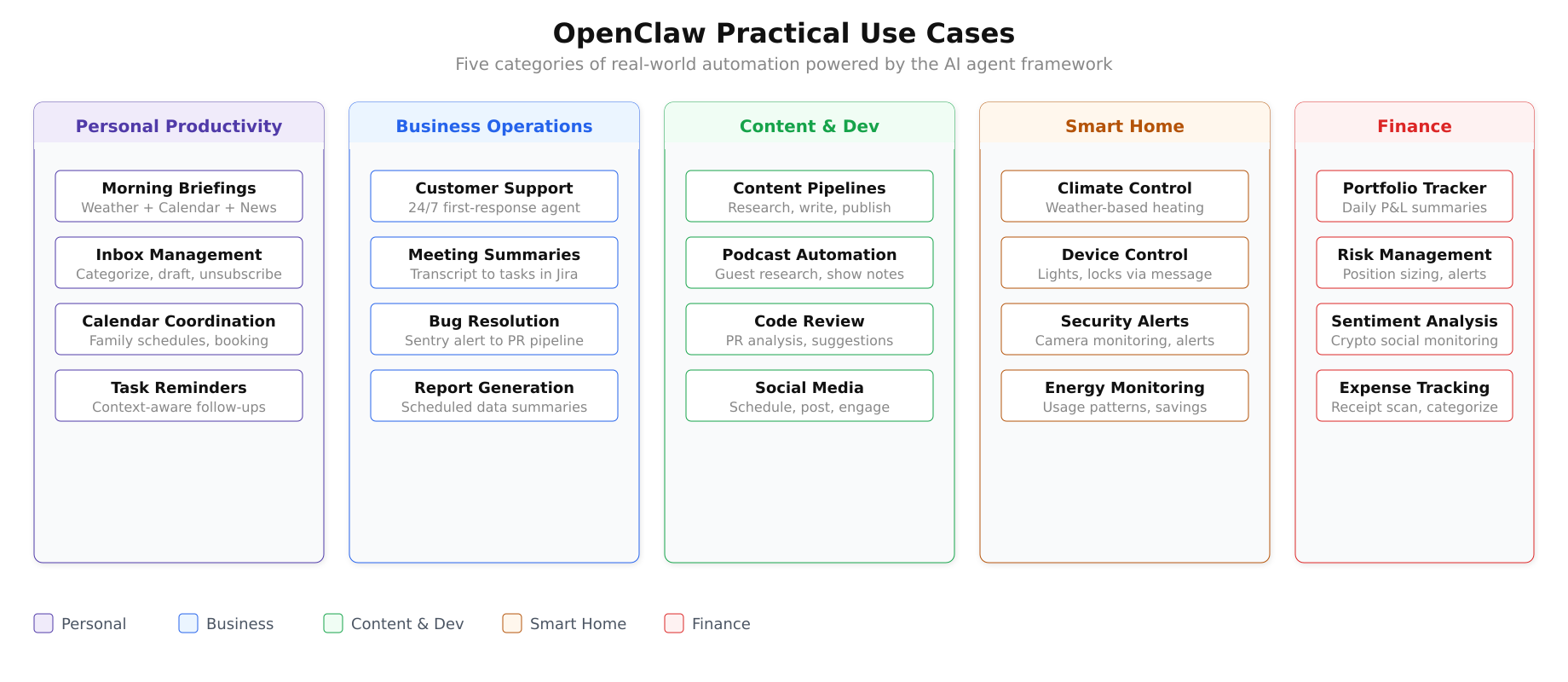
The use case landscape above maps the five major categories where OpenClaw delivers value. Each category contains multiple automation workflows that can be configured through the skill system without writing traditional code.
Personal Productivity
Morning briefings: Configure the agent to aggregate weather forecasts, calendar events, and top news headlines, then deliver a formatted summary via WhatsApp every morning before you start your day. The agent pulls data from configured APIs, formats it into a readable digest, and sends it on schedule.
Inbox management: Connect the agent to your email account and have it process thousands of messages autonomously. It can unsubscribe from spam newsletters, categorize messages by urgency, draft replies to routine inquiries, and flag only the emails that genuinely require your attention.
Calendar coordination: The agent can aggregate family calendars, detect scheduling conflicts, propose meeting times that work for all participants, and even make phone calls to book appointments at businesses that do not offer online booking.
Business Operations
Customer support automation: Deploy the agent as a first-response system that answers customer inquiries on WhatsApp, Telegram, or webchat with sub-minute response times around the clock. The agent handles routine questions from its knowledge base and escalates complex issues to human agents with full conversation context attached.
Meeting summaries and task creation: After a meeting, the agent processes the transcript, generates structured summaries with key decisions and action items, and automatically creates tasks in project management tools like Jira, Linear, or Todoist. A notification with the summary is posted to the relevant Slack channel.
Automated bug resolution: Set up a pipeline where the agent monitors Sentry for new errors, analyzes the stack trace, generates a fix, creates a pull request on GitHub, and posts a notification in Slack with a link to the PR. The entire flow from error detection to proposed fix happens without human intervention.
Content Creation and Development
Content pipelines: Multi-agent workflows where one agent researches a topic, another writes the draft, a third generates thumbnail images, and a fourth schedules the publication. Each agent specializes in its step and passes results to the next.
Podcast automation: The agent handles guest research (finding potential guests based on topic relevance), generates episode outlines, produces show notes after recording, creates social media promotion posts, and distributes the episode to configured platforms.
Smart Home and Finance
Home automation: The agent can adjust heating systems based on weather forecasts, control smart devices through messaging commands (“Turn off the living room lights”), monitor energy consumption patterns, and send alerts when unusual activity is detected by security cameras.
Financial workflows: Configure the agent to calculate position sizes based on portfolio rules, manage stop-loss levels for trading accounts, monitor cryptocurrency sentiment across social media, and send daily portfolio summaries with profit/loss calculations.
Voice Capabilities
OpenClaw supports voice interaction through integration with ElevenLabs for text-to-speech synthesis. On macOS, iOS, and Android, users can activate a wake-word mode where the agent listens for voice commands, processes them through the configured LLM, and responds with natural-sounding synthesized speech. This turns OpenClaw into a voice assistant comparable to Alexa or Google Assistant but backed by a far more capable language model and fully customizable behavior.
Security and Privacy Model
Because OpenClaw runs locally, the security model differs fundamentally from cloud-hosted AI services. Your conversation history, memory files, skill configurations, and API keys are stored as files on your machine, not on a remote server. The only external communication is between the Gateway and your chosen LLM provider when processing a prompt, and even this can be eliminated entirely by using a local model through Ollama.
The Docker deployment option adds an additional security layer by running the agent in an isolated container with a non-root user. File system access is limited to explicitly mounted volumes, and network access can be restricted using Docker’s network policies.
Memory and configuration are stored as Markdown files under ~/.openclaw/, making them easy to audit, version control with Git, and back up. There is no opaque database or binary state file. Everything the agent knows and has been configured to do is readable in plain text.
System Requirements
OpenClaw is lightweight by design. The core Gateway requires minimal resources when using cloud LLM providers. Resource demands increase significantly only if you choose to run local models through Ollama.
Minimum requirements: Dual-core 64-bit CPU, 4 GB RAM, 20 GB disk space, Node.js 22 or newer.
Recommended for cloud LLM usage: Multi-core CPU, 8 GB RAM, 50 GB disk space.
Recommended for local models (Ollama): Multi-core CPU, 32 GB+ RAM, 100 GB+ disk space, dedicated GPU (NVIDIA recommended for CUDA acceleration).
The framework runs on Linux, macOS, and Windows. Docker installation is available for all three platforms and is the recommended deployment method for production or server-based setups.
Current Version and Release Cadence
The current stable release is 2026.3.1, released in early March 2026. This version includes OpenAI WebSocket streaming support, Claude 4.6 integration for faster response times, Android feature parity with iOS (system notifications, photo access, contact management, calendar integration, motion/pedometer data), and Feishu/Docx table and upload support.
OpenClaw follows a rapid release cadence with updates every few days. The project uses calendar-based versioning (YYYY.M.D format). Users can update to the latest version with a single npm command: npm i openclaw.
Getting Started
The simplest way to try OpenClaw is through the Docker-based installation on a Linux server. The process involves installing Docker Engine, cloning the OpenClaw repository, running the setup script, and completing an interactive onboarding wizard that walks you through connecting an LLM provider and configuring your first messaging channel.
The GitHub repository is publicly available at https://github.com/openclaw/openclaw under the MIT License. The official documentation at https://docs.openclaw.ai provides comprehensive guides for installation, configuration, skill development, and channel setup.
The upcoming parts of this series will cover the complete installation and configuration process on Ubuntu 24.04 LTS using Docker, from system preparation through connecting LLM providers and messaging channels to deploying production-ready agent workflows.
Summary
OpenClaw is an open-source, locally-hosted AI agent framework that brings large language model capabilities into the messaging platforms people already use. Its hub-and-spoke architecture centered on the Gateway component cleanly separates the messaging interface layer, the AI intelligence layer, and the execution tool layer. With support for 12+ LLM providers (both cloud and local), 13+ messaging channels, and 2,800+ community-contributed skills defined in plain Markdown, it provides a flexible foundation for building personal assistants, business automation workflows, content pipelines, smart home controllers, and financial monitoring systems. The MIT License, local-first architecture, and Markdown-based configuration ensure that users maintain complete control over their data, their agent’s behavior, and their choice of AI provider.