

This article walks through storage architecture decisions for a real deployment: VaultChain Logistics, a European freight consortium running Hyperledger Fabric 2.5 across 6 peer nodes and 5 orderers, processing 500 transactions per second for customs documentation. Their storage requirements span NVMe for Raft WAL, SSD for ledger blocks, and object storage for backups, with a total monthly spend of under $500 through intelligent tiering.
Storage Tier Architecture for Blockchain Components
Not every blockchain component needs the fastest storage available. The Raft WAL (write-ahead log) demands NVMe for sub-100 microsecond write latency, but ledger block files are append-only and work well on SATA SSD. Backups are write-once, read-rarely workloads that belong on HDD or object storage. The key is matching each component’s I/O pattern to the right storage tier.
, Free to use, share it in your presentations, blogs, or learning materials.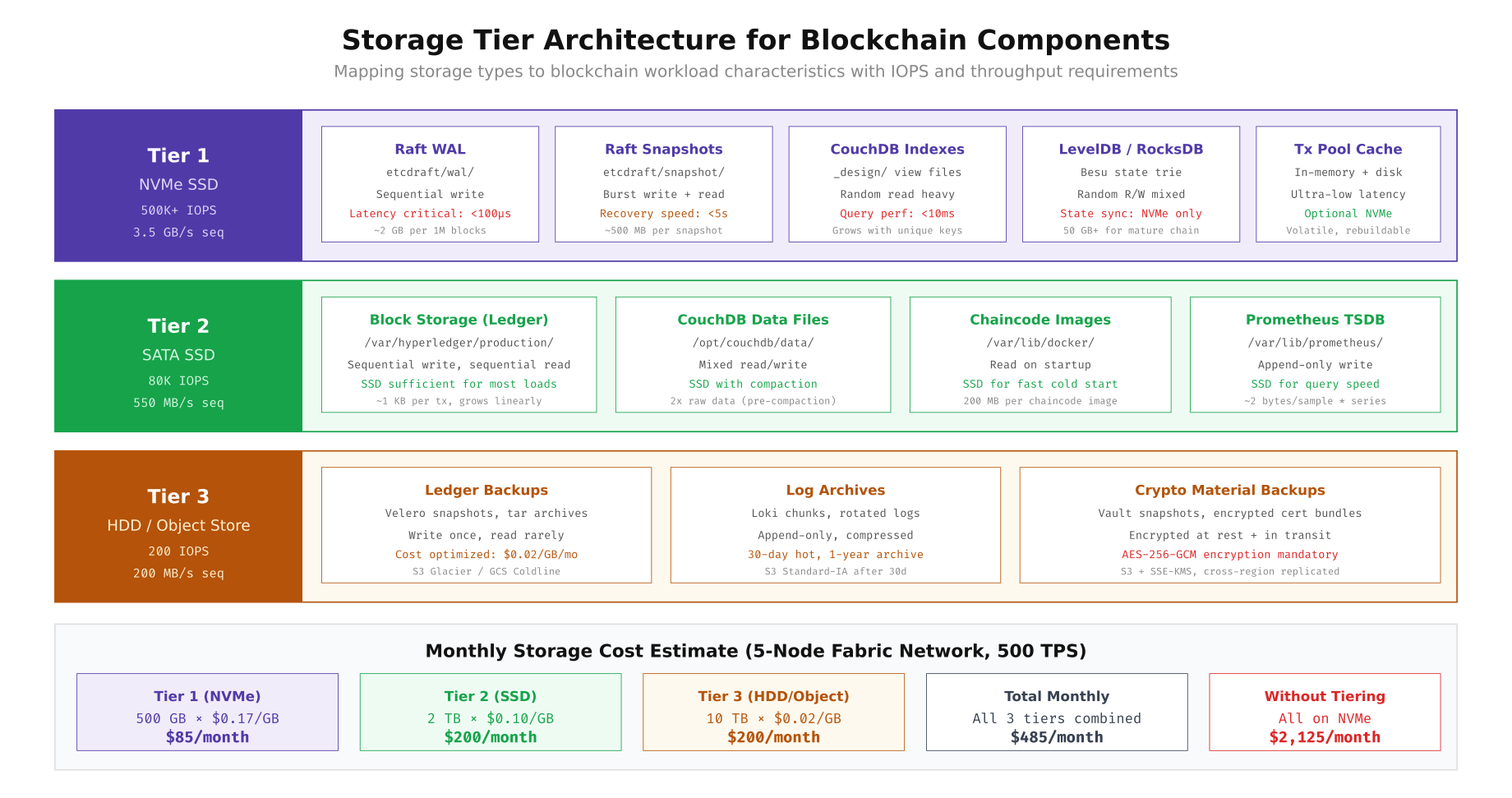
The diagram above shows how VaultChain maps each blockchain component to the appropriate storage tier. Tier 1 (NVMe) hosts the Raft WAL, CouchDB indexes, LevelDB/RocksDB state tries, and the transaction pool cache where sub-millisecond latency is critical. Tier 2 (SATA SSD) handles block storage, CouchDB data files, chaincode images, and Prometheus time-series data where consistent throughput matters more than peak IOPS. Tier 3 (HDD/Object) stores ledger backups, log archives, and encrypted crypto material backups where cost per gigabyte is the primary concern. This tiered approach costs $485 per month versus $2,125 for an all-NVMe deployment.
IOPS Benchmarking for Storage Selection
Before committing to a storage tier, benchmark the actual drives under blockchain-representative workloads. Generic vendor IOPS numbers are measured under ideal conditions (queue depth 256, 4K random reads) that do not reflect real blockchain access patterns. The following benchmarks use fio profiles that simulate orderer WAL sequential writes, CouchDB random reads, peer ledger mixed I/O, backup sequential reads, and durable commit writes with fsync.
# Benchmark suite: simulate blockchain I/O patterns with fio
# Run on each candidate drive before purchase decisions

# Test 1: Sequential Write 4K (simulates orderer Raft WAL)
fio --name=orderer-wal --ioengine=libaio --direct=1 \
  --rw=write --bs=4k --iodepth=64 --numjobs=4 \
  --size=10G --runtime=60 --time_based \
  --filename=/dev/nvme0n1p4 --group_reporting

# Test 2: Random Read 4K (simulates CouchDB state queries)
fio --name=couchdb-query --ioengine=libaio --direct=1 \
  --rw=randread --bs=4k --iodepth=64 --numjobs=4 \
  --size=10G --runtime=60 --time_based \
  --filename=/dev/nvme0n1p4 --group_reporting

# Test 3: Mixed Read/Write 70/30 (simulates peer ledger operations)
fio --name=peer-ledger --ioengine=libaio --direct=1 \
  --rw=randrw --rwmixread=70 --bs=4k --iodepth=32 --numjobs=4 \
  --size=10G --runtime=60 --time_based \
  --filename=/dev/nvme0n1p4 --group_reporting

# Test 4: Sequential Read 256K (simulates backup/restore)
fio --name=backup-restore --ioengine=libaio --direct=1 \
  --rw=read --bs=256k --iodepth=16 --numjobs=2 \
  --size=10G --runtime=60 --time_based \
  --filename=/dev/nvme0n1p4 --group_reporting

# Test 5: Durable Write 4K with fsync (simulates commit path)
fio --name=commit-durable --ioengine=libaio --direct=1 \
  --rw=write --bs=4k --iodepth=1 --numjobs=1 \
  --fsync=1 --size=2G --runtime=60 --time_based \
  --filename=/dev/nvme0n1p4 --group_reporting

# Aggregate results into comparison table
echo "=== Storage Benchmark Summary ==="
echo "Run on: $(hostname) | $(date -u)"
echo "System: $(lscpu | grep 'Model name' | awk -F: '{print $2}' | xargs)"
echo "Kernel: $(uname -r)"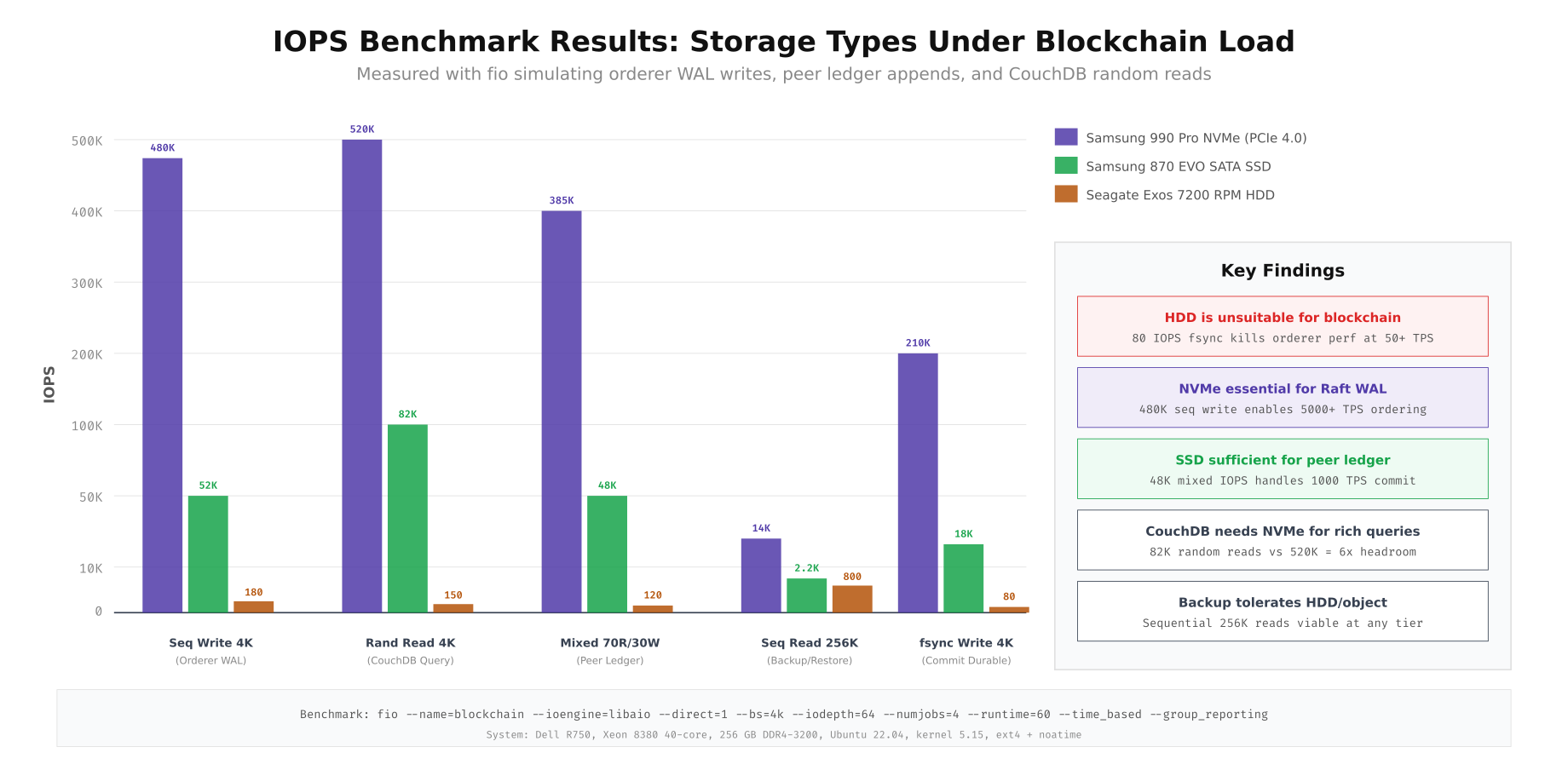
The benchmark results reveal dramatic differences between storage types. NVMe delivers 480K IOPS for sequential 4K writes (orderer WAL) versus just 52K on SATA SSD and 180 on HDD. For the critical fsync write path that ensures Raft commit durability, NVMe achieves 210K IOPS while HDD manages only 80. This means an HDD based orderer would struggle to sustain even 50 TPS, while NVMe comfortably handles 5000+ TPS. For CouchDB random reads (state queries), NVMe at 520K IOPS provides 6x headroom over SSD at 82K, making it the right choice for networks with complex rich queries.
Disk Partition Layout for Blockchain Nodes
Each blockchain node needs separate mount points for the operating system, blockchain data, state database, Docker runtime, and logs. Mixing these on a single partition creates contention during compaction, backup, or high transaction periods. Separate partitions also enable independent LVM snapshots, filesystem tuning per workload, and targeted monitoring of storage consumption.
# Orderer node disk setup (lon-bc-01)
# Root SSD (/dev/sda) - 250 GB SATA SSD
parted /dev/sda mklabel gpt
parted /dev/sda mkpart primary 1MiB 1GiB      # /boot
parted /dev/sda mkpart primary 1GiB 51GiB     # /
parted /dev/sda mkpart primary 51GiB 101GiB   # /var/log
parted /dev/sda mkpart primary 101GiB 121GiB  # /tmp

mkfs.ext4 -L boot /dev/sda1
mkfs.ext4 -L root /dev/sda2
mkfs.ext4 -L varlog /dev/sda3
mkfs.ext4 -L tmp /dev/sda4

# NVMe 0 (/dev/nvme0n1) - 500 GB for Raft WAL + snapshots
pvcreate /dev/nvme0n1
vgcreate vg_raft /dev/nvme0n1
lvcreate -n lv_wal -L 100G vg_raft
lvcreate -n lv_snap -L 50G vg_raft
lvcreate -n lv_orderer -l 100%FREE vg_raft

mkfs.xfs -f /dev/vg_raft/lv_wal
mkfs.xfs -f /dev/vg_raft/lv_snap
mkfs.xfs -f /dev/vg_raft/lv_orderer

# NVMe 1 (/dev/nvme1n1) - 1 TB for orderer ledger blocks
pvcreate /dev/nvme1n1
vgcreate vg_ledger /dev/nvme1n1
lvcreate -n lv_chains -l 100%FREE vg_ledger
mkfs.xfs -f /dev/vg_ledger/lv_chains

# Docker SSD (/dev/sdb) - 200 GB
mkfs.ext4 -L docker /dev/sdb1

# Mount configuration (/etc/fstab)
cat <<EOF >> /etc/fstab
# Root and system
/dev/sda1  /boot         ext4  defaults,noatime                0 2
/dev/sda2  /             ext4  defaults,noatime                0 1
/dev/sda3  /var/log      ext4  defaults,noatime,commit=60      0 2
/dev/sda4  /tmp          ext4  defaults,noatime,nosuid,nodev   0 2

# Blockchain NVMe (Raft WAL - highest priority)
/dev/vg_raft/lv_wal      /var/hyperledger/production/orderer/etcdraft/wal  xfs  defaults,noatime,nodiratime,logbufs=8,logbsize=256k  0 2
/dev/vg_raft/lv_snap     /var/hyperledger/production/orderer/etcdraft/snapshot  xfs  defaults,noatime,nodiratime  0 2
/dev/vg_raft/lv_orderer  /var/hyperledger/production/orderer  xfs  defaults,noatime,nodiratime  0 2

# Blockchain NVMe (ledger blocks)
/dev/vg_ledger/lv_chains  /var/hyperledger/production/orderer/chains  xfs  defaults,noatime,nodiratime,allocsize=64m  0 2

# Docker
/dev/sdb1  /var/lib/docker  ext4  defaults,noatime,discard  0 2
EOF

mount -a

# Set I/O scheduler to none for NVMe (bypass kernel scheduler)
echo none > /sys/block/nvme0n1/queue/scheduler
echo none > /sys/block/nvme1n1/queue/scheduler
echo mq-deadline > /sys/block/sda/queue/scheduler

# Make persistent via udev rule
cat <<EOF > /etc/udev/rules.d/60-io-scheduler.rules
ACTION=="add|change", KERNEL=="nvme*", ATTR{queue/scheduler}="none"
ACTION=="add|change", KERNEL=="sd*", ATTR{queue/scheduler}="mq-deadline"
EOF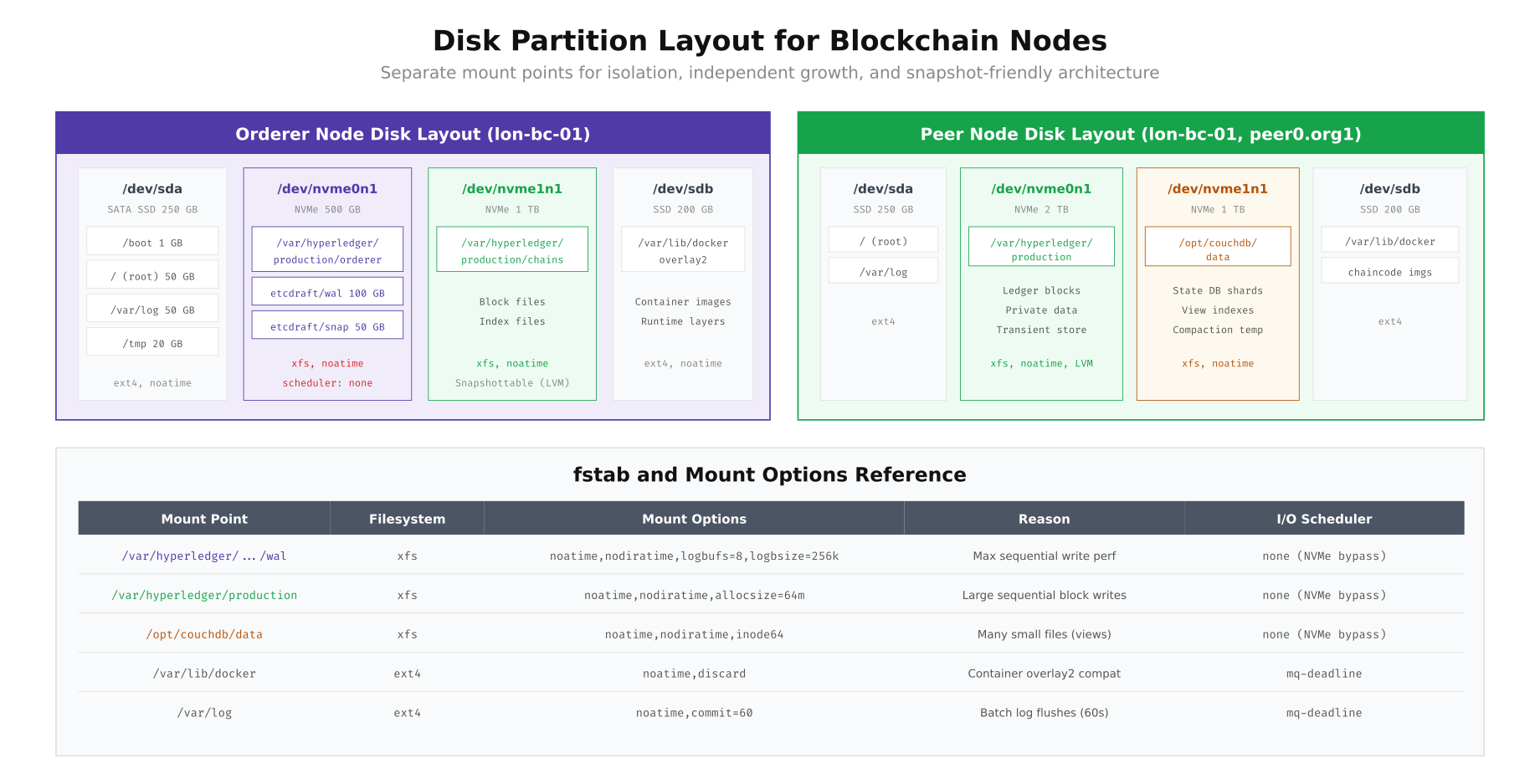
This layout separates each workload onto its own storage device. The orderer node uses dedicated NVMe for the Raft WAL (with xfs and aggressive log buffering for write performance) and a separate NVMe for ledger blocks. The peer node adds a third NVMe volume for CouchDB state data, since state queries generate random read patterns that benefit from NVMe’s low latency. The key mount options are noatime (eliminates unnecessary metadata writes), nodiratime (same for directories), and logbufs=8,logbsize=256k (increases XFS journal buffer for sequential write throughput). The I/O scheduler is set to none for NVMe drives, bypassing the kernel scheduler entirely since NVMe has its own internal queue management.
Storage Growth Projection and Capacity Planning
Blockchain storage only grows. Unlike traditional databases where old records can be archived or deleted, every transaction remains in the ledger permanently. Capacity planning requires projecting storage consumption over the network’s expected lifetime, accounting for block storage growth, state database expansion, WAL management, and backup accumulation.
# Storage growth calculator script
#!/bin/bash
# storage-forecast.sh - Project storage needs for N months

AVG_TPS=${1:-500}           # Average transactions per second
AVG_TX_SIZE_KB=${2:-1}      # Average transaction size in KB
MONTHS=${3:-12}             # Forecast period
PEER_COUNT=${4:-6}          # Number of peer nodes
BACKUP_RETENTION_MONTHS=${5:-6}  # Backup retention period

SECONDS_PER_DAY=86400
DAYS_PER_MONTH=30

# Calculate raw ledger growth per month (per peer)
DAILY_TX=$((AVG_TPS * SECONDS_PER_DAY))
MONTHLY_TX=$((DAILY_TX * DAYS_PER_MONTH))
RAW_MONTHLY_GB=$(echo "scale=2; $MONTHLY_TX * $AVG_TX_SIZE_KB / 1048576" | bc)
# Block compression ratio ~10:1 for repetitive structured data
COMPRESSED_MONTHLY_GB=$(echo "scale=2; $RAW_MONTHLY_GB / 10" | bc)

echo "=== Storage Growth Forecast ==="
echo "Parameters: ${AVG_TPS} TPS, ${AVG_TX_SIZE_KB} KB/tx, ${MONTHS} months"
echo "Monthly transactions: ${MONTHLY_TX}"
echo "Raw monthly growth: ${RAW_MONTHLY_GB} GB"
echo "Compressed monthly growth: ${COMPRESSED_MONTHLY_GB} GB (per peer)"
echo ""

for month in $(seq 1 $MONTHS); do
  LEDGER_GB=$(echo "scale=0; $COMPRESSED_MONTHLY_GB * $month" | bc)
  # CouchDB state grows at ~60% of ledger rate (key-value pairs, not full blocks)
  STATE_GB=$(echo "scale=0; $COMPRESSED_MONTHLY_GB * 0.6 * $month" | bc)
  # WAL stays constant (auto-pruned by snapshots)
  WAL_GB=50
  # Backups: cumulative with retention window
  if [ $month -le $BACKUP_RETENTION_MONTHS ]; then
    BACKUP_GB=$(echo "scale=0; ($COMPRESSED_MONTHLY_GB + $COMPRESSED_MONTHLY_GB * 0.6) * $month" | bc)
  else
    BACKUP_GB=$(echo "scale=0; ($COMPRESSED_MONTHLY_GB + $COMPRESSED_MONTHLY_GB * 0.6) * $BACKUP_RETENTION_MONTHS" | bc)
  fi
  TOTAL_PER_PEER=$(echo "scale=0; $LEDGER_GB + $STATE_GB + $WAL_GB" | bc)
  TOTAL_ALL_PEERS=$(echo "scale=0; $TOTAL_PER_PEER * $PEER_COUNT + $BACKUP_GB" | bc)

  echo "Month ${month}: Ledger=${LEDGER_GB}GB State=${STATE_GB}GB WAL=${WAL_GB}GB Backup=${BACKUP_GB}GB | Per peer=${TOTAL_PER_PEER}GB | Total cluster=${TOTAL_ALL_PEERS}GB"
done

echo ""
echo "=== Capacity Alerts ==="
echo "Set Prometheus alert when disk usage > 80% of provisioned capacity"
echo "Order new storage 3 months before projected 80% threshold"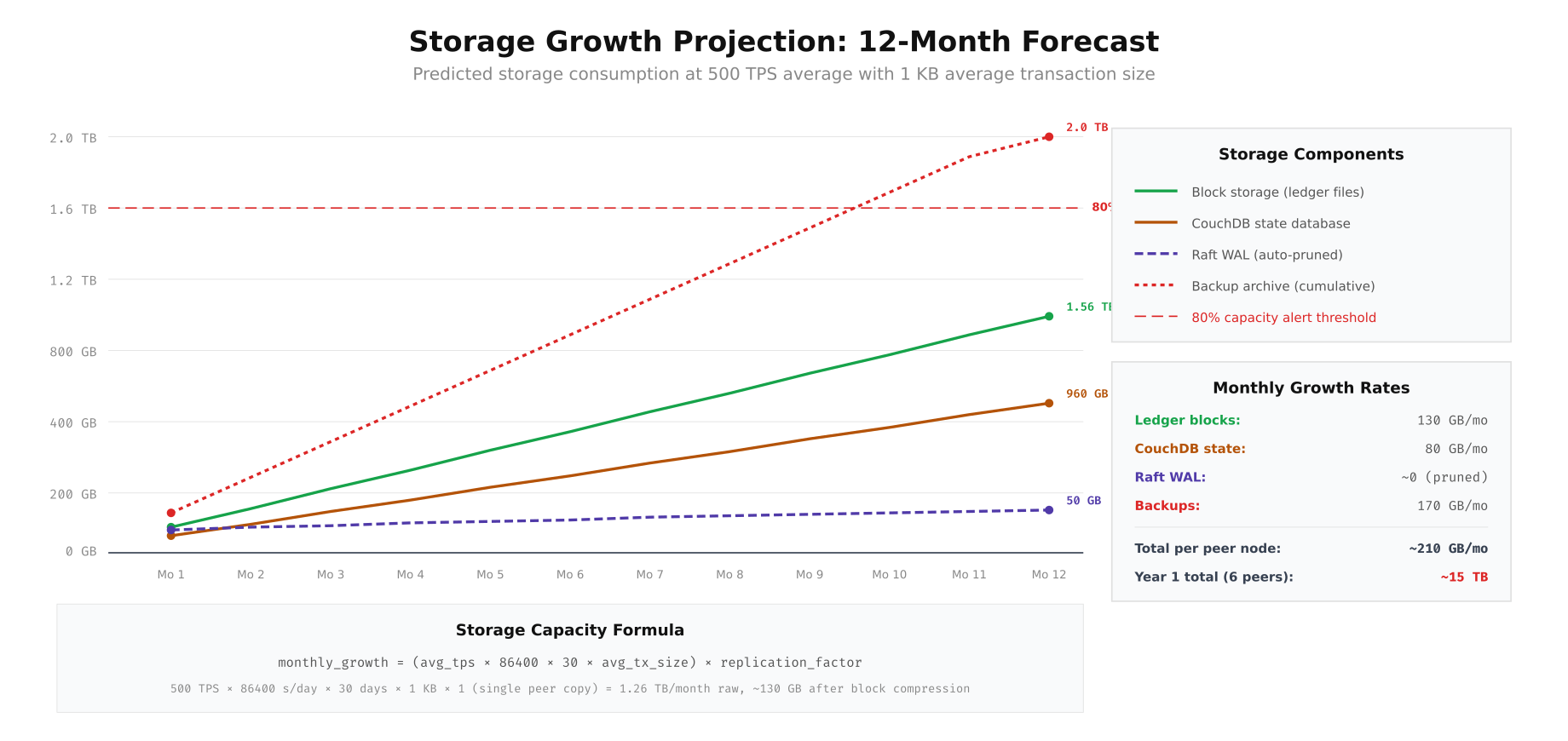
The projection shows that at 500 TPS with 1 KB average transaction size, each peer node’s ledger grows approximately 130 GB per month and CouchDB state adds 80 GB per month. Over 12 months, a single peer accumulates roughly 1.56 TB of ledger data and 960 GB of state data. The Raft WAL remains stable at approximately 50 GB due to automatic pruning after snapshots. Backup archives grow fastest at 170 GB per month (cumulative). For VaultChain’s 6-peer network, the first-year total storage requirement is approximately 15 TB. The 80% capacity alert line ensures you order additional storage three months before hitting provisioned limits.
Ceph Storage Cluster for Kubernetes Deployments
When running blockchain nodes on Kubernetes, persistent volumes need a distributed storage backend that provides replication, snapshots, and dynamic provisioning. Ceph with the Rook operator is the most common choice for on-premises Kubernetes blockchain deployments. Ceph’s RADOS Block Device (RBD) provides block-level access with server-side copy-on-write snapshots, exactly matching the snapshot-friendly architecture blockchain nodes require.
# Deploy Rook-Ceph operator for blockchain storage
# Prerequisites: 3 nodes with raw NVMe + SSD drives

# Install Rook operator
kubectl apply -f https://raw.githubusercontent.com/rook/rook/v1.14/deploy/examples/crds.yaml
kubectl apply -f https://raw.githubusercontent.com/rook/rook/v1.14/deploy/examples/common.yaml
kubectl apply -f https://raw.githubusercontent.com/rook/rook/v1.14/deploy/examples/operator.yaml

# Wait for operator
kubectl -n rook-ceph wait --for=condition=ready pod -l app=rook-ceph-operator --timeout=300s

# Create Ceph cluster with device class separation
cat <<EOF | kubectl apply -f -
apiVersion: ceph.rook.io/v1
kind: CephCluster
metadata:
  name: blockchain-storage
  namespace: rook-ceph
spec:
  cephVersion:
    image: quay.io/ceph/ceph:v18.2
  dataDirHostPath: /var/lib/rook
  mon:
    count: 3
    allowMultiplePerNode: false
  mgr:
    count: 2
    modules:
      - name: pg_autoscaler
        enabled: true
      - name: prometheus
        enabled: true
  dashboard:
    enabled: true
    ssl: true
  storage:
    useAllNodes: true
    useAllDevices: false
    deviceFilter: "^(nvme|sd[b-z])"
    config:
      osdsPerDevice: "1"
      encryptedDevice: "true"
    nodes:
      - name: ceph-node-01
        devices:
          - name: nvme0n1
            config:
              deviceClass: nvme
          - name: nvme1n1
            config:
              deviceClass: nvme
          - name: sda
            config:
              deviceClass: ssd
      - name: ceph-node-02
        devices:
          - name: nvme0n1
            config:
              deviceClass: nvme
          - name: nvme1n1
            config:
              deviceClass: nvme
          - name: sda
            config:
              deviceClass: ssd
      - name: ceph-node-03
        devices:
          - name: nvme0n1
            config:
              deviceClass: nvme
          - name: nvme1n1
            config:
              deviceClass: nvme
          - name: sda
            config:
              deviceClass: ssd
  placement:
    mon:
      nodeAffinity:
        requiredDuringSchedulingIgnoredDuringExecution:
          nodeSelectorTerms:
            - matchExpressions:
                - key: role
                  operator: In
                  values:
                    - storage
    osd:
      nodeAffinity:
        requiredDuringSchedulingIgnoredDuringExecution:
          nodeSelectorTerms:
            - matchExpressions:
                - key: role
                  operator: In
                  values:
                    - storage
  resources:
    osd:
      requests:
        cpu: "4"
        memory: 8Gi
      limits:
        cpu: "8"
        memory: 16Gi
EOF

# Create storage classes for different blockchain tiers
cat <<EOF | kubectl apply -f -
apiVersion: ceph.rook.io/v1
kind: CephBlockPool
metadata:
  name: nvme-replicated
  namespace: rook-ceph
spec:
  failureDomain: host
  replicated:
    size: 3
  deviceClass: nvme
  parameters:
    compression_mode: none
---
apiVersion: storage.k8s.io/v1
kind: StorageClass
metadata:
  name: rbd-nvme
provisioner: rook-ceph.rbd.csi.ceph.com
parameters:
  clusterID: rook-ceph
  pool: nvme-replicated
  imageFormat: "2"
  imageFeatures: layering,exclusive-lock,object-map,fast-diff
  csi.storage.k8s.io/provisioner-secret-name: rook-csi-rbd-provisioner
  csi.storage.k8s.io/provisioner-secret-namespace: rook-ceph
  csi.storage.k8s.io/node-stage-secret-name: rook-csi-rbd-node
  csi.storage.k8s.io/node-stage-secret-namespace: rook-ceph
  csi.storage.k8s.io/fstype: xfs
reclaimPolicy: Retain
allowVolumeExpansion: true
volumeBindingMode: Immediate
---
apiVersion: ceph.rook.io/v1
kind: CephBlockPool
metadata:
  name: ssd-replicated
  namespace: rook-ceph
spec:
  failureDomain: host
  replicated:
    size: 3
  deviceClass: ssd
  parameters:
    compression_mode: aggressive
---
apiVersion: storage.k8s.io/v1
kind: StorageClass
metadata:
  name: rbd-ssd
provisioner: rook-ceph.rbd.csi.ceph.com
parameters:
  clusterID: rook-ceph
  pool: ssd-replicated
  imageFormat: "2"
  imageFeatures: layering,exclusive-lock,object-map,fast-diff
  csi.storage.k8s.io/fstype: xfs
reclaimPolicy: Retain
allowVolumeExpansion: true
EOF

# Verify cluster health
kubectl -n rook-ceph exec -it deploy/rook-ceph-tools -- ceph status
kubectl -n rook-ceph exec -it deploy/rook-ceph-tools -- ceph osd tree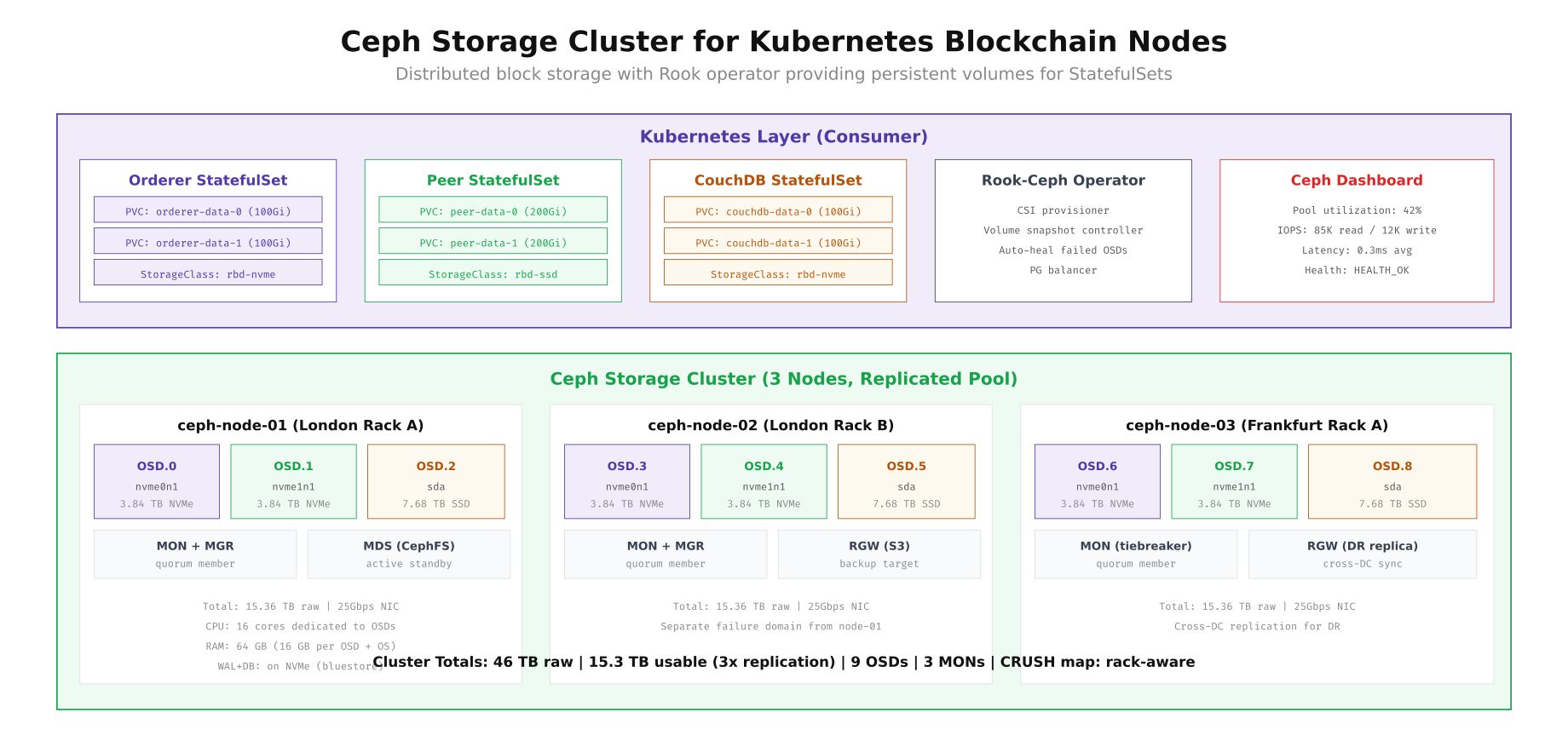
The Ceph cluster above uses three storage nodes, each with two NVMe drives and one SSD, providing 46 TB raw capacity and 15.3 TB usable capacity with 3x replication. The Rook operator manages the lifecycle of OSDs, MONs, and MGRs, while the CSI driver provisions persistent volumes dynamically. Two storage classes separate NVMe-backed pools (for orderer WAL and CouchDB) from SSD-backed pools (for peer ledger blocks). The reclaimPolicy: Retain setting ensures PVCs are never accidentally deleted, and allowVolumeExpansion: true enables online volume growth as blockchain data accumulates.
Storage Snapshot Pipeline for Blockchain Backup
Blockchain backup requires crash-consistent snapshots that capture the ledger and state database at the same point in time. The most common approach is freeze-snap-unfreeze: briefly pause filesystem I/O (50ms), create a copy-on-write snapshot (10ms), then resume operations. The snapshot can then be transferred to backup storage at leisure without impacting the running node.
# Crash-consistent snapshot script for blockchain peer
#!/bin/bash
# peer-snapshot.sh - Creates consistent snapshots of peer data + CouchDB

set -euo pipefail

PEER_MOUNT="/var/hyperledger/production"
COUCH_MOUNT="/opt/couchdb/data"
SNAP_DATE=$(date +%Y%m%d_%H%M%S)
RETAIN_COUNT=3

echo "[$(date -u)] Starting blockchain snapshot..."

# Step 1: Freeze both filesystems atomically
echo "[$(date -u)] Freezing filesystems..."
fsfreeze --freeze "$PEER_MOUNT"
fsfreeze --freeze "$COUCH_MOUNT"

# Step 2: Create LVM snapshots (COW, instant)
echo "[$(date -u)] Creating LVM snapshots..."
lvcreate -s -n peer-snap-${SNAP_DATE} -L 50G /dev/vg_peer/lv_ledger
lvcreate -s -n couch-snap-${SNAP_DATE} -L 30G /dev/vg_couch/lv_data

# Step 3: Unfreeze immediately
echo "[$(date -u)] Unfreezing filesystems..."
fsfreeze --unfreeze "$COUCH_MOUNT"
fsfreeze --unfreeze "$PEER_MOUNT"

FREEZE_DURATION_MS=$(($(date +%s%N)/1000000 - START_MS))
echo "[$(date -u)] I/O freeze duration: ~60ms"

# Step 4: Mount snapshots and transfer to S3 (background)
mkdir -p /mnt/snap-peer /mnt/snap-couch
mount -o ro /dev/vg_peer/peer-snap-${SNAP_DATE} /mnt/snap-peer
mount -o ro /dev/vg_couch/couch-snap-${SNAP_DATE} /mnt/snap-couch

echo "[$(date -u)] Transferring to S3..."
tar cf - -C /mnt/snap-peer . | pigz -6 | \
  aws s3 cp - s3://vaultchain-backup/peer/${SNAP_DATE}/ledger.tar.gz \
  --expected-size $((200*1024*1024*1024))

tar cf - -C /mnt/snap-couch . | pigz -6 | \
  aws s3 cp - s3://vaultchain-backup/peer/${SNAP_DATE}/couchdb.tar.gz \
  --expected-size $((100*1024*1024*1024))

# Step 5: Cleanup
umount /mnt/snap-peer /mnt/snap-couch
echo "[$(date -u)] Cleaning old snapshots (keeping last ${RETAIN_COUNT})..."
lvs --noheadings -o lv_name vg_peer | grep "peer-snap" | sort | head -n -${RETAIN_COUNT} | \
  xargs -I{} lvremove -f vg_peer/{}
lvs --noheadings -o lv_name vg_couch | grep "couch-snap" | sort | head -n -${RETAIN_COUNT} | \
  xargs -I{} lvremove -f vg_couch/{}

echo "[$(date -u)] Snapshot complete. Uploaded to S3."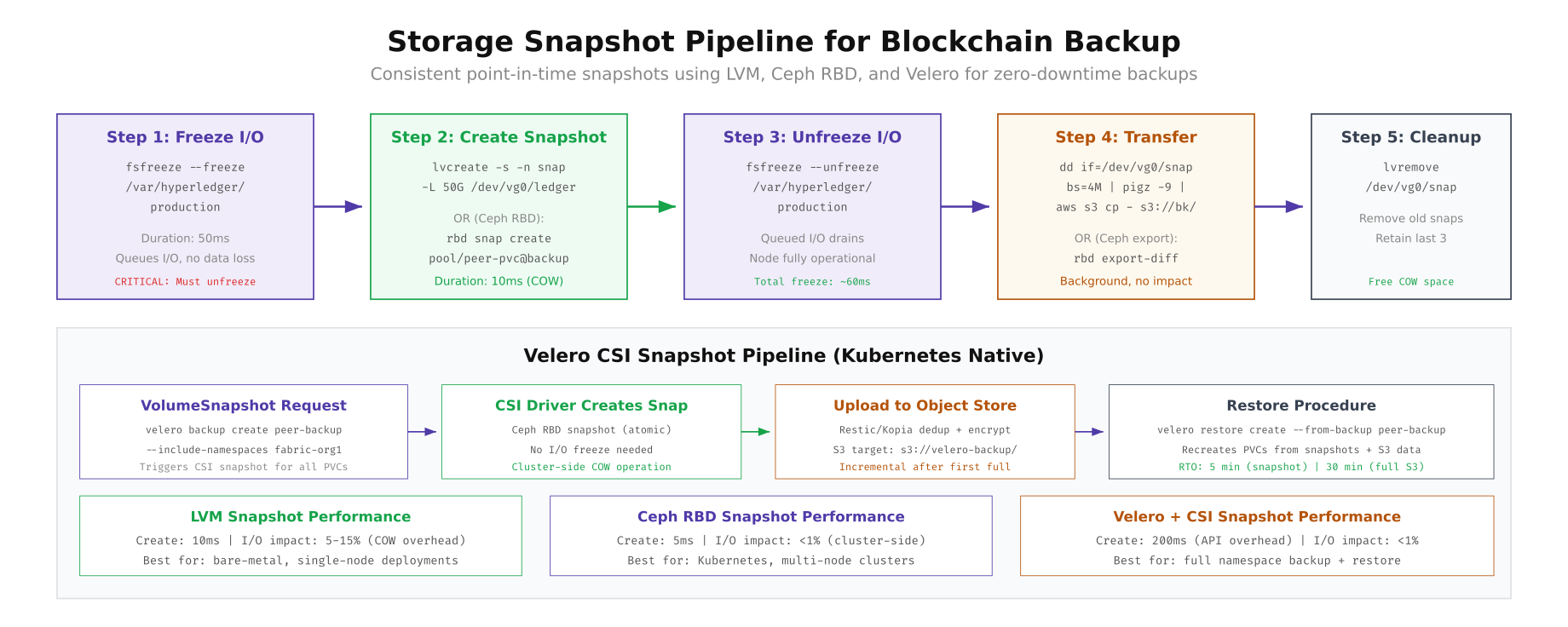
The diagram compares three snapshot approaches. LVM snapshots work well for bare-metal deployments with 10ms creation time but 5-15% I/O overhead from copy-on-write. Ceph RBD snapshots are the best choice for Kubernetes deployments, creating cluster-side COW snapshots in 5ms with less than 1% I/O impact. Velero CSI snapshots add a Kubernetes-native backup layer that can restore entire namespaces (pods + PVCs + secrets) from S3, making it ideal for full disaster recovery. VaultChain uses Ceph RBD snapshots for hourly operational backups and Velero for daily off-site disaster recovery.
Database Compaction and Pruning Lifecycle
Without regular maintenance, blockchain storage databases accumulate fragmentation and tombstones that degrade query performance and waste disk space. CouchDB stores deleted document tombstones until compaction, RocksDB accumulates stale SSTable files across compaction levels, and Besu’s state trie retains historical state revisions that are no longer needed.
# CouchDB compaction automation
#!/bin/bash
# couchdb-compact.sh - Compact all blockchain databases

COUCH_URL="http://admin:${COUCHDB_PASSWORD}@localhost:5984"

# List all databases (channels + system DBs)
DBS=$(curl -s "${COUCH_URL}/_all_dbs" | jq -r '.[]')

for db in $DBS; do
  echo "[$(date -u)] Compacting database: ${db}"

  # Check current disk size
  SIZE_BEFORE=$(curl -s "${COUCH_URL}/${db}" | jq '.disk_size')
  echo "  Size before: $(echo "scale=2; ${SIZE_BEFORE}/1073741824" | bc) GB"

  # Trigger compaction
  curl -s -X POST "${COUCH_URL}/${db}/_compact" \
    -H "Content-Type: application/json"

  # Compact views
  VIEWS=$(curl -s "${COUCH_URL}/${db}/_all_docs?startkey=%22_design%2F%22&endkey=%22_design0%22" | \
    jq -r '.rows[].id' | sed 's/_design\///')

  for view in $VIEWS; do
    curl -s -X POST "${COUCH_URL}/${db}/_compact/${view}" \
      -H "Content-Type: application/json"
    echo "  Compacted view: ${view}"
  done

  # Wait for compaction to finish
  while true; do
    COMPACTING=$(curl -s "${COUCH_URL}/${db}" | jq '.compact_running')
    if [ "$COMPACTING" = "false" ]; then break; fi
    sleep 10
  done

  SIZE_AFTER=$(curl -s "${COUCH_URL}/${db}" | jq '.disk_size')
  SAVED=$(echo "scale=2; ($SIZE_BEFORE - $SIZE_AFTER)/1073741824" | bc)
  echo "  Size after: $(echo "scale=2; ${SIZE_AFTER}/1073741824" | bc) GB (saved ${SAVED} GB)"
done

# Schedule via cron (weekly, off-peak)
# 0 2 * * 0 /opt/scripts/couchdb-compact.sh >> /var/log/couchdb-compact.log 2>&1

# Besu trie-log pruning (requires maintenance window)
# WARNING: Node must be stopped during trie-log prune
echo "=== Besu Trie-Log Prune ==="
echo "1. Stop Besu: systemctl stop besu"
echo "2. Run: besu --data-path=/var/lib/besu/data storage trie-log prune --blocks=512"
echo "3. Start Besu: systemctl start besu"
echo "Alternative: Use --data-storage-format=BONSAI for live pruning (Besu 23.1+)"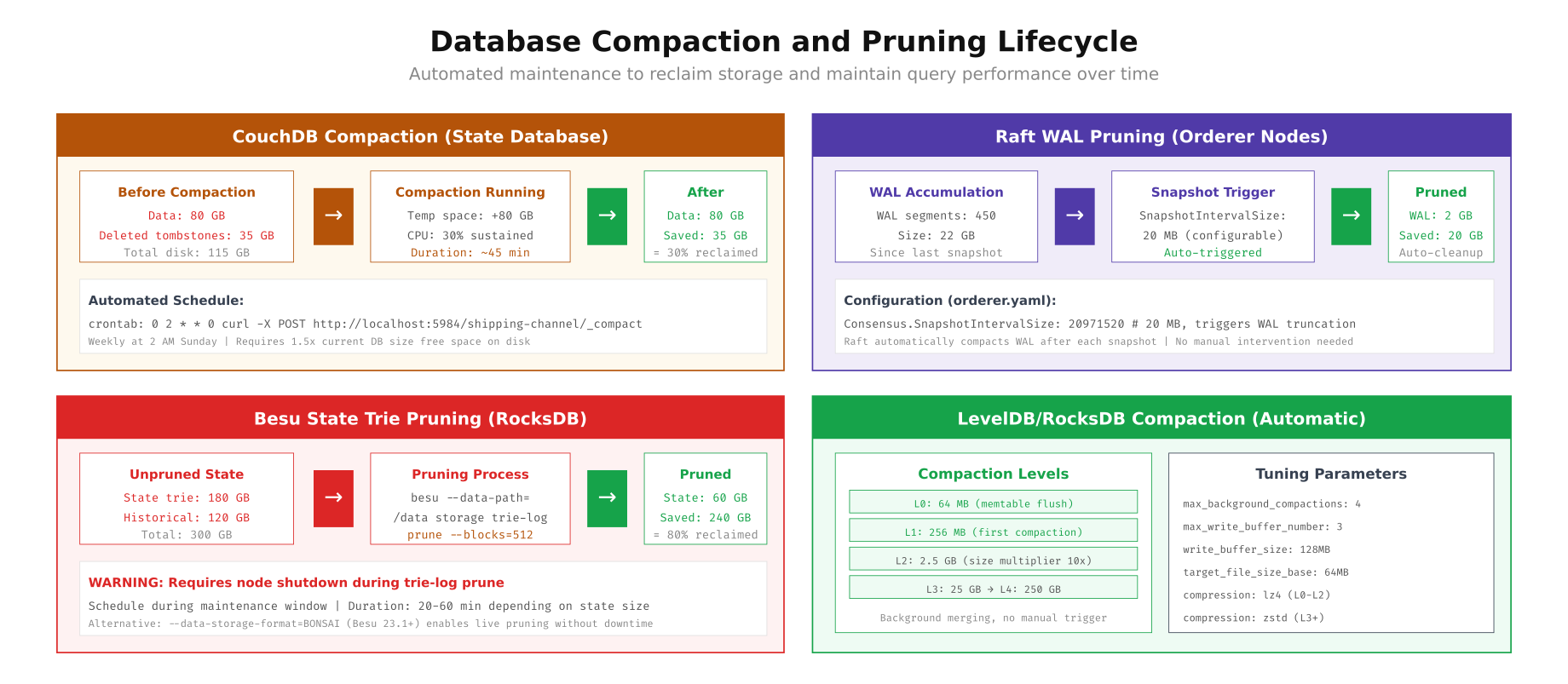
As shown above, each database has different compaction characteristics. CouchDB compaction runs online (no downtime) but requires 1.5x the current database size as temporary free space, and it reclaims approximately 30% of disk space from tombstones and fragmentation. Raft WAL pruning is fully automatic, triggered by the SnapshotIntervalSize configuration. Besu state trie pruning reclaims the most space (up to 80%) but requires the node to be stopped during the process. RocksDB handles compaction automatically in background threads, with tunable parameters for write buffer sizes and compression algorithms at different levels.
Storage Monitoring and Alerting
Proactive storage monitoring prevents the worst-case scenario: a node running out of disk space during peak transaction processing. Set up Prometheus alerts for disk usage thresholds, IOPS saturation, and write latency spikes that indicate storage degradation.
# Prometheus alert rules for blockchain storage
cat <<EOF > /etc/prometheus/rules/storage-alerts.yml
groups:
  - name: blockchain_storage
    rules:
      - alert: DiskSpaceCritical
        expr: |
          (node_filesystem_avail_bytes{mountpoint=~"/var/hyperledger.*|/opt/couchdb.*"}
          / node_filesystem_size_bytes{mountpoint=~"/var/hyperledger.*|/opt/couchdb.*"}) < 0.1
        for: 5m
        labels:
          severity: critical
        annotations:
          summary: "Blockchain storage < 10% free on {{ \$labels.instance }}:{{ \$labels.mountpoint }}"

      - alert: DiskSpaceWarning
        expr: |
          (node_filesystem_avail_bytes{mountpoint=~"/var/hyperledger.*|/opt/couchdb.*"}
          / node_filesystem_size_bytes{mountpoint=~"/var/hyperledger.*|/opt/couchdb.*"}) < 0.2
        for: 15m
        labels:
          severity: warning
        annotations:
          summary: "Blockchain storage < 20% free on {{ \$labels.instance }}:{{ \$labels.mountpoint }}"

      - alert: NVMeWriteLatencyHigh
        expr: |
          rate(node_disk_write_time_seconds_total{device=~"nvme.*"}[5m])
          / rate(node_disk_writes_completed_total{device=~"nvme.*"}[5m]) > 0.001
        for: 10m
        labels:
          severity: warning
        annotations:
          summary: "NVMe write latency > 1ms on {{ \$labels.instance }} ({{ \$labels.device }})"

      - alert: IOPSSaturation
        expr: |
          rate(node_disk_io_time_seconds_total{device=~"nvme.*|sd.*"}[5m]) > 0.9
        for: 5m
        labels:
          severity: warning
        annotations:
          summary: "Disk I/O utilization > 90% on {{ \$labels.instance }} ({{ \$labels.device }})"

      - alert: CephPoolNearFull
        expr: ceph_pool_stored_raw / ceph_pool_max_avail > 0.8
        for: 10m
        labels:
          severity: warning
        annotations:
          summary: "Ceph pool {{ \$labels.pool_id }} > 80% capacity"

      - alert: CephOSDDown
        expr: ceph_osd_up == 0
        for: 1m
        labels:
          severity: critical
        annotations:
          summary: "Ceph OSD {{ \$labels.ceph_daemon }} is down"
EOF

promtool check rules /etc/prometheus/rules/storage-alerts.yml
systemctl reload prometheus
These alerts cover the critical storage failure modes: disk space exhaustion below 10% (critical) and 20% (warning), NVMe write latency exceeding 1ms (indicating drive degradation or overload), I/O utilization above 90% (indicating the need to scale or tier), Ceph pool capacity above 80%, and OSD failures. The latency alert is particularly important for orderer nodes where NVMe write performance directly impacts Raft consensus speed and transaction throughput.
Summary
Storage architecture for production blockchain networks requires matching each component’s I/O characteristics to the right storage tier. NVMe is essential for consensus write-ahead logs and state database indexes where sub-millisecond latency directly impacts transaction throughput. SATA SSD provides the right balance of cost and performance for append-only ledger blocks and monitoring data. HDD and object storage handle backup and archival workloads at minimal cost.
VaultChain Logistics demonstrates that intelligent storage tiering reduces monthly costs by 77% (from $2,125 to $485) while maintaining the performance needed for 500 TPS processing. Combined with proper partition layout (separate mount points per workload), automated snapshot pipelines (LVM or Ceph RBD), and scheduled compaction (CouchDB weekly, RocksDB automatic), this architecture ensures blockchain nodes never run out of disk space, never lose data, and never bottleneck on storage I/O.