
AI-powered customer support solves this by providing 24/7 availability, instant responses, consistent quality across every interaction, and the ability to handle multiple conversations at once. The AI agent never takes a day off, never forgets a product specification, and never gives a different answer to the same question. It handles the repetitive inquiries that consume 80% of support time, freeing human agents to focus on complex issues that genuinely need a person.
OpenClaw makes this possible without writing a single line of application code. Its skill-based knowledge system, multi-channel routing, and LLM integration turn a generic chatbot framework into a purpose-built customer support agent. If you completed the five-part installation series, you already have a running OpenClaw gateway with Docker, messaging channels, skills, and a local LLM. This series takes that foundation and transforms it into a production customer support agent for a web hosting company.
Introducing NimbusServe Technologies
NimbusServe Technologies is a Frankfurt-based web hosting and cloud infrastructure provider. They serve small businesses, developers, and enterprises across Europe with a portfolio spanning shared hosting to bare metal dedicated servers. Their support team of eight agents handles roughly 400 tickets per week, with 60% of those being repetitive inquiries about plans, DNS configuration, billing, and common troubleshooting steps.
NimbusServe offers five distinct service lines. NimbusLite covers shared hosting with three tiers: Starter at 4.99/mo for personal websites, Business at 12.99/mo for growing companies, and Enterprise at 29.99/mo for high-traffic sites with priority support. NimbusCloud provides Cloud VPS instances in four sizes: Spark (2 vCPU, 4 GB), Blaze (4 vCPU, 8 GB), Storm (8 vCPU, 16 GB), and Thunder (16 vCPU, 32 GB) with full root SSH access and NVMe storage.
For performance-intensive workloads, NimbusBare offers dedicated servers ranging from an entry-level Intel E-2388G to a dual AMD EPYC 9554 with 512 GB RAM. NimbusDomains handles domain registration across 200+ TLDs, transfers, DNS management, WHOIS privacy, and DNSSEC. Finally, NimbusSaaS provides add-on modules including email hosting with spam filtering, automated daily and weekly backups, uptime monitoring at 60-second intervals, and a drag-and-drop website builder with 50+ templates.
Free to use, share it in your presentations, blogs, or learning materials.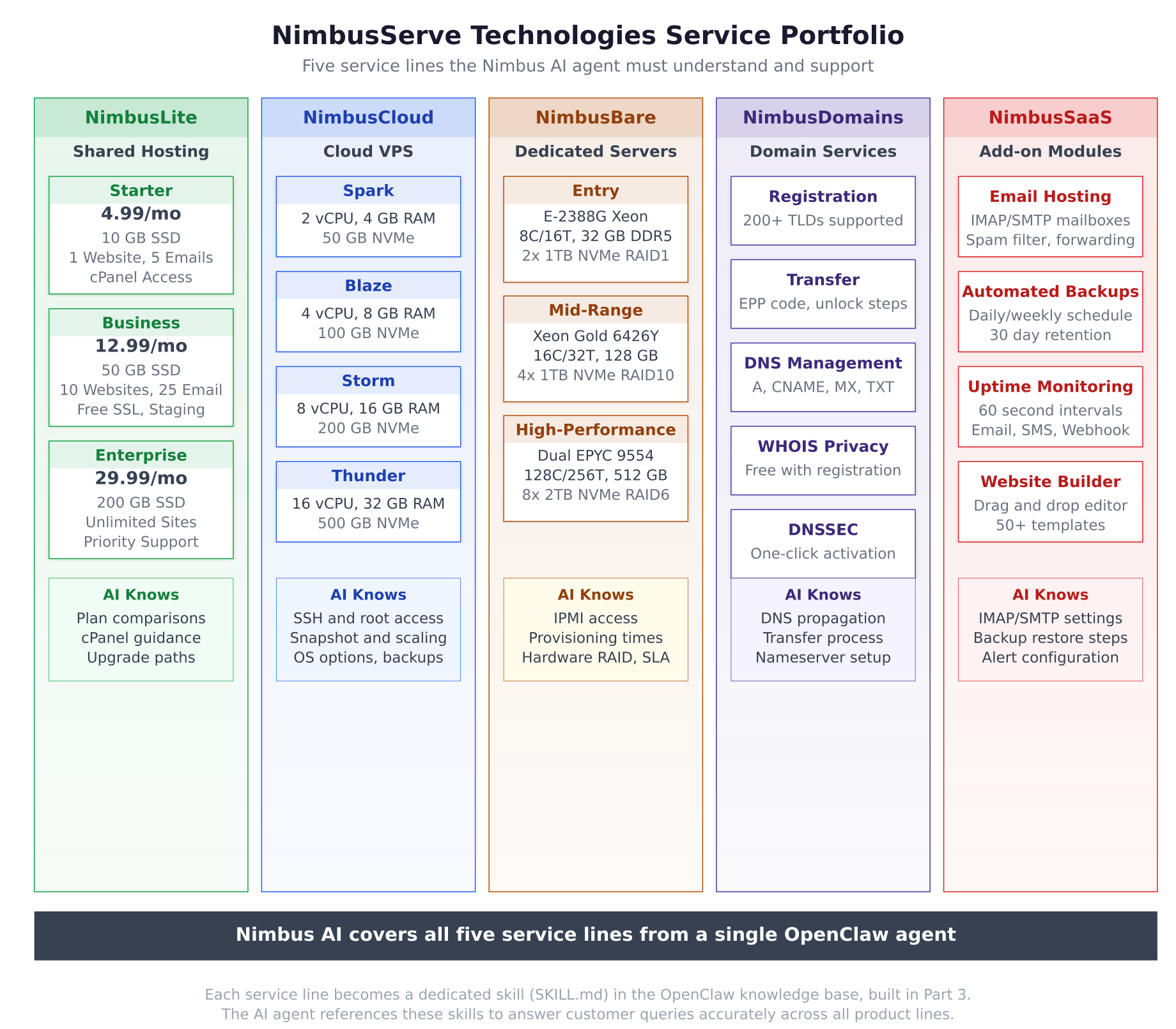
The service portfolio illustration above maps every product line and tier that NimbusServe offers. Each column represents a distinct service domain with its plans, specifications, and the specific knowledge areas the AI agent needs to understand. Part 3 of this series creates a dedicated skill file for each of these five service lines plus a common troubleshooting skill.
How OpenClaw Fits as a Customer Support Agent
OpenClaw was designed as a messaging gateway that connects LLM providers to communication channels. For customer support, this architecture maps perfectly: customer messages arrive from WhatsApp, Telegram, or a web chat widget. The gateway receives each message, classifies the intent, routes it to the appropriate knowledge skill, and uses the LLM to generate a contextual response based on real product data. The customer receives an answer that sounds natural and is grounded in actual NimbusServe documentation.
The support agent is named Nimbus. It maintains a professional, friendly, and concise personality configured through the agent section of openclaw.json. Nimbus greets customers by name when possible, keeps responses under 200 words unless the customer asks for detail, always provides next steps, and uses simple language without jargon. When Nimbus cannot resolve an issue or detects certain triggers like billing disputes or security concerns, it escalates to the human support team with a full conversation summary.
The key difference between a generic chatbot and what this series builds is the knowledge base. Nimbus does not improvise answers. Every response is grounded in six SKILL.md files that contain detailed product specifications, FAQ entries, and step-by-step troubleshooting procedures. When a customer asks about NimbusCloud VPS pricing, the agent retrieves exact specifications from the NimbusCloud skill file. When someone reports a 502 error, the troubleshooting skill provides a systematic resolution tree. The LLM formats this retrieved knowledge into a natural, helpful response rather than hallucinating information.
What the Nimbus Agent Handles
Nimbus is configured to handle the following categories of customer inquiries across all five service lines.
Plan inquiries and comparisons. Customers frequently ask which hosting plan suits their needs, what the differences between Starter and Business shared hosting are, or whether they should choose a Cloud VPS over shared hosting. Nimbus provides accurate tier comparisons with specifications, pricing, and feature differences pulled directly from the knowledge base.
DNS configuration help. Domain management generates a significant portion of support tickets. Nimbus walks customers through adding A records, configuring CNAME entries, setting up MX records for email, understanding DNS propagation timelines, and troubleshooting domains that are not resolving.
Technical troubleshooting. The most common support requests involve websites showing 502 Bad Gateway errors, SSL certificate issues, email delivery failures, slow website performance, and database connection problems. Nimbus follows structured troubleshooting trees from the knowledge base to guide customers through resolution steps.
Billing and subscription questions. Customers ask about their current plan, how to upgrade or downgrade, what happens when a plan renews, and how add-on modules like backup or monitoring affect their monthly cost. Nimbus provides plan details and directs customers to the billing portal for account-specific changes.
Server status and access help. VPS and dedicated server customers need help with SSH access, IPMI connections, firewall configuration, and understanding server resource usage. Nimbus provides step-by-step instructions for common server management tasks.
What the Nimbus Agent Does Not Handle
Equally important is defining what the AI agent must never do. Nimbus operates under strict boundaries to protect customer data and prevent unauthorized actions.
Account modifications. Nimbus cannot change passwords, modify account settings, add or remove services, or make any changes to a customer’s account. It can explain how to do these things through the NimbusServe control panel, but it never takes action directly.
Payment processing and refunds. Any request involving money, whether a refund, a payment dispute, a charge inquiry, or a promo code application, is immediately escalated to the human support team. Nimbus acknowledges the request and confirms that a team member will follow up.
Security incidents. If a customer reports suspected unauthorized access, a compromised account, or unusual activity, Nimbus escalates immediately. It does not attempt to troubleshoot security incidents because mishandling these situations could make things worse.
Legal matters. Questions about terms of service, SLA claims, GDPR compliance, or legal disputes are forwarded to the appropriate team without the AI attempting to provide legal guidance.
The Support Architecture
The complete architecture connects customer channels to the OpenClaw gateway, which processes messages through the Nimbus agent identity, matches queries to knowledge skills, generates responses via the LLM, and either delivers the answer directly or escalates to the human team.
Free to use, share it in your presentations, blogs, or learning materials.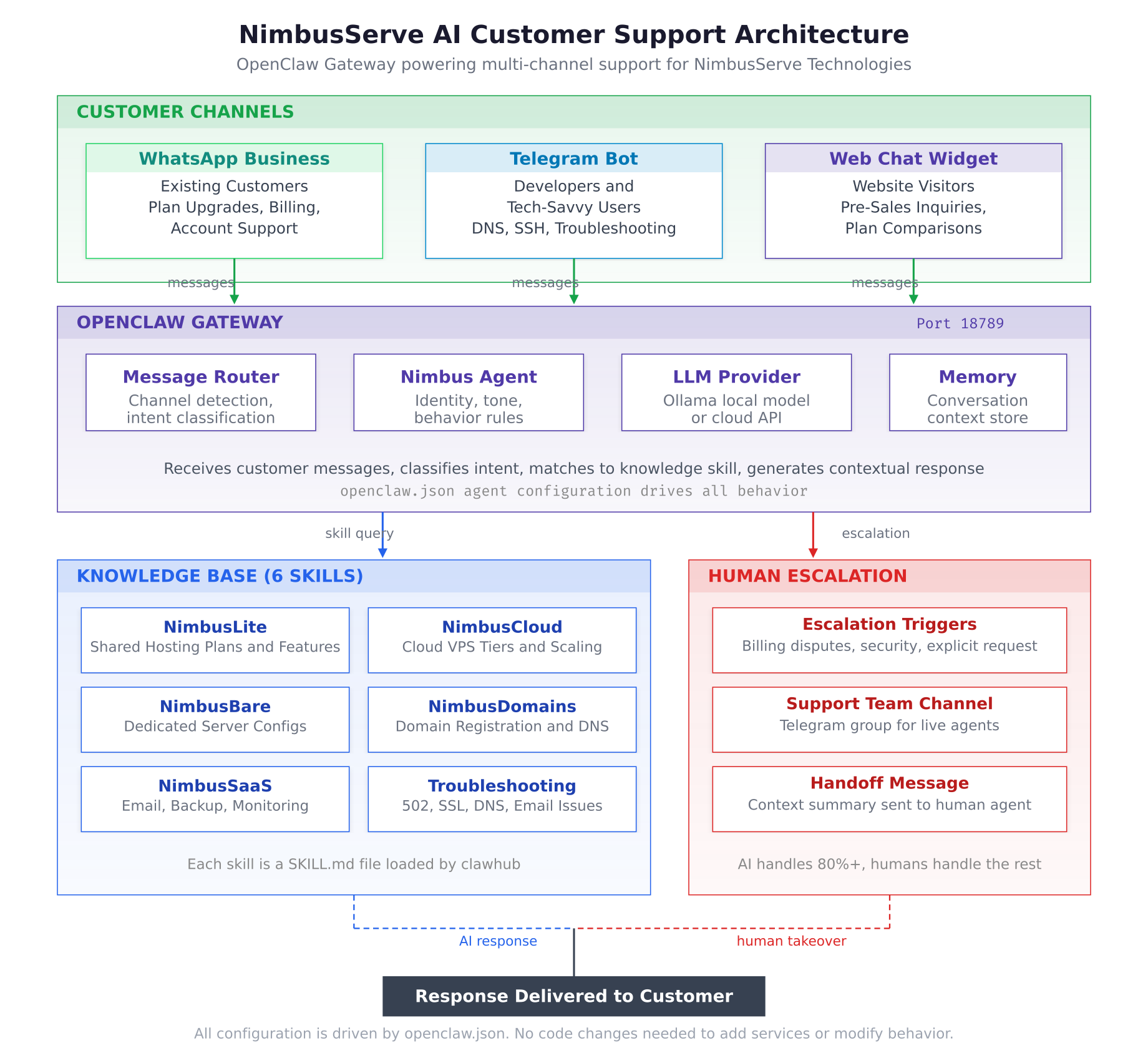
The architecture diagram above illustrates the end-to-end flow. Three customer channels (WhatsApp Business for existing customers, Telegram for developers, and a web chat widget for website visitors) feed into the OpenClaw Gateway running on port 18789. Inside the gateway, the Message Router detects the source channel and classifies the customer’s intent. The Nimbus Agent applies personality rules and behavior boundaries. The LLM Provider (Ollama running locally or a cloud API) generates the actual response text using retrieved knowledge. Memory stores conversation context so the agent maintains continuity across multiple messages.
Below the gateway, the Knowledge Base contains six skills covering every NimbusServe service line plus common troubleshooting procedures. When the gateway cannot resolve a query or detects an escalation trigger, it routes the conversation to the human support team through a dedicated Telegram group, providing the team with a summary of the conversation and the reason for escalation.
Customer Channels
NimbusServe deploys Nimbus across three channels to reach customers wherever they prefer to communicate.
WhatsApp Business serves as the primary channel for existing customers. Most NimbusServe customers are European small businesses that already use WhatsApp for daily communication. Support conversations happen in the same app they use for everything else, eliminating the friction of logging into a portal or waiting for email responses. WhatsApp handles plan inquiries, billing questions, and general support.
Telegram Bot targets developers and technically inclined customers who prefer a platform with command support, code formatting, and a faster interface. The Telegram bot offers slash commands like /plans, /status, /dns, and /support for quick access to specific information without conversational overhead.
Web Chat Widget is embedded on the nimbusserve.com website to capture pre-sales inquiries from visitors who are browsing hosting plans. The widget appears as a floating button that proactively greets visitors after 30 seconds with a message like “Looking for the right hosting plan? I can help you compare options.” This channel converts website traffic into informed leads by answering questions before visitors leave the site.
Prerequisites
This series assumes you have a working OpenClaw installation. If you have not completed the installation yet, follow the five-part series linked below before continuing.
Part 1: System Preparation and Docker Installation covers Ubuntu 24.04 LTS setup, Docker CE installation, and Node.js 22 LTS deployment.
Part 2: Cloning OpenClaw and Running the Docker Setup covers cloning the OpenClaw repository, running docker-setup.sh, and completing the onboarding wizard.
Part 3: Configuring Messaging Channels covers setting up Telegram, Discord, and WhatsApp channels through openclaw.json.
Part 4: Installing Skills and Configuring Automation covers the ClawHub skill marketplace, custom skill creation, and cron job automation.
Part 5: Local LLM with Ollama and Security Hardening covers Ollama integration for local inference and production security configuration.
After completing the installation series, your server should have Docker running with the OpenClaw gateway container active on port 18789, at least one messaging channel configured, and the clawhub CLI available for skill management. You can verify this with two quick checks.
$ curl -s http://127.0.0.1:18789/healthz | jq .{
“status”: “ok”,
“version”: “2026.3.1”,
“uptime”: “4d 12h 33m”
}$ clawhub listInstalled Skills:
(none or previously installed skills from Part 4)If both commands succeed, your OpenClaw installation is ready for the customer support configuration that begins in Part 2.
Series Roadmap
This series is structured to build the NimbusServe AI support agent incrementally, with each part adding a complete layer of functionality.
Part 1 (this article) introduces the NimbusServe scenario, the support architecture, what the Nimbus agent handles and does not handle, and the prerequisites for the rest of the series.
Part 2 configures the agent identity inside openclaw.json. You will define the Nimbus personality, set response behavior rules, establish boundary definitions for what the agent must never do, configure escalation triggers, and create response templates for common scenarios like welcome messages and handoff acknowledgments.
Part 3 builds the hosting knowledge base. Six custom skills are created, one for each NimbusServe service line plus a common troubleshooting skill. Each skill is a SKILL.md file containing product specifications, pricing details, FAQ entries, and step-by-step troubleshooting procedures. By the end of Part 3, Nimbus can answer detailed questions about any NimbusServe product.
Part 4 connects the customer channels, configures the human escalation workflow, sets up operating hours with after-hours auto-responses, runs through a go-live checklist, and covers monitoring and continuous improvement for the running agent. By the end of Part 4, NimbusServe has a fully operational AI customer support agent live on three channels.
Each part builds on the previous one, so follow them in order. The configuration files shown in each article are cumulative, with the final openclaw.json in Part 4 containing all settings from Parts 2 through 4.