
The VPN did its job. It encrypted the tunnel. It authenticated the user. What it could not do was prevent the attacker from reaching every service on the network once they had the session. That is the fundamental limitation of VPN-based remote access. It grants network access, not application access. KryptoLedger needed a different model. One where the database and admin dashboard are invisible to the network entirely, where a compromised credential gives the attacker access to exactly one application for a limited time, and where the server has zero open ports for anyone to scan. That model is SDP, and the tool they chose to implement it is OpenZiti.
Introducing KryptoLedger AG
KryptoLedger AG is a Zurich-based fintech company that builds settlement infrastructure for digital asset exchanges across Europe. The team has 85 employees, with 12 backend developers working remotely from Berlin, Vienna, and Amsterdam. Their core infrastructure runs on two Ubuntu 24.04 servers in a Zurich data center: a PostgreSQL 16 cluster holding transaction ledgers and a Node.js admin dashboard for operations staff. Both servers previously sat behind a WireGuard VPN gateway on UDP 51820.
After the breach, the security team conducted a post-mortem. The attacker had used a stolen WireGuard private key (extracted from the developer’s unencrypted ~/.config/wireguard/ directory) to establish a tunnel. Once inside, nmap found 14 services responding across the subnet. The PostgreSQL instance had no client certificate requirement, just password authentication, which the attacker brute-forced in under 6 minutes using credentials leaked from a third-party SaaS breach. The root cause was not the VPN itself. It was the architecture: network-level access with no per-application controls, no device posture checks, and no visibility into what the authenticated user was actually doing on the network.
What Is OpenZiti
OpenZiti is an open-source zero trust networking platform maintained by NetFoundry. It creates an overlay mesh network on top of existing infrastructure, making services completely invisible to anyone who has not been explicitly authorized to access them. Unlike a VPN that punches a hole through the firewall and gives you a network, OpenZiti connects authenticated identities to specific services through encrypted tunnels that exist only for the duration of the session.
The project has been in active development since 2019 and reached version 1.6.14 as of March 2025. It is written in Go, runs on Linux, macOS, and Windows, and provides SDKs for embedding zero trust directly into applications (Go, Python, C, Node.js, Java, Swift). The entire platform is Apache 2.0 licensed. What makes OpenZiti different from simpler SDP tools like fwknop is that it provides the complete stack: identity management, policy engine, certificate authority, edge routing, and smart mesh fabric, all in one platform.
If you are new to the concept of Software-Defined Perimeter, the SDP introduction article explains the authenticate-first-connect-second model in detail. The SDP vs VPN comparison covers why organizations like KryptoLedger are moving away from VPNs entirely.
OpenZiti Architecture
OpenZiti consists of five components that work together to create the overlay network. Each component has a distinct role, and understanding what each one does is critical before you start deploying.
Free to use, share it in your presentations, blogs, or learning materials.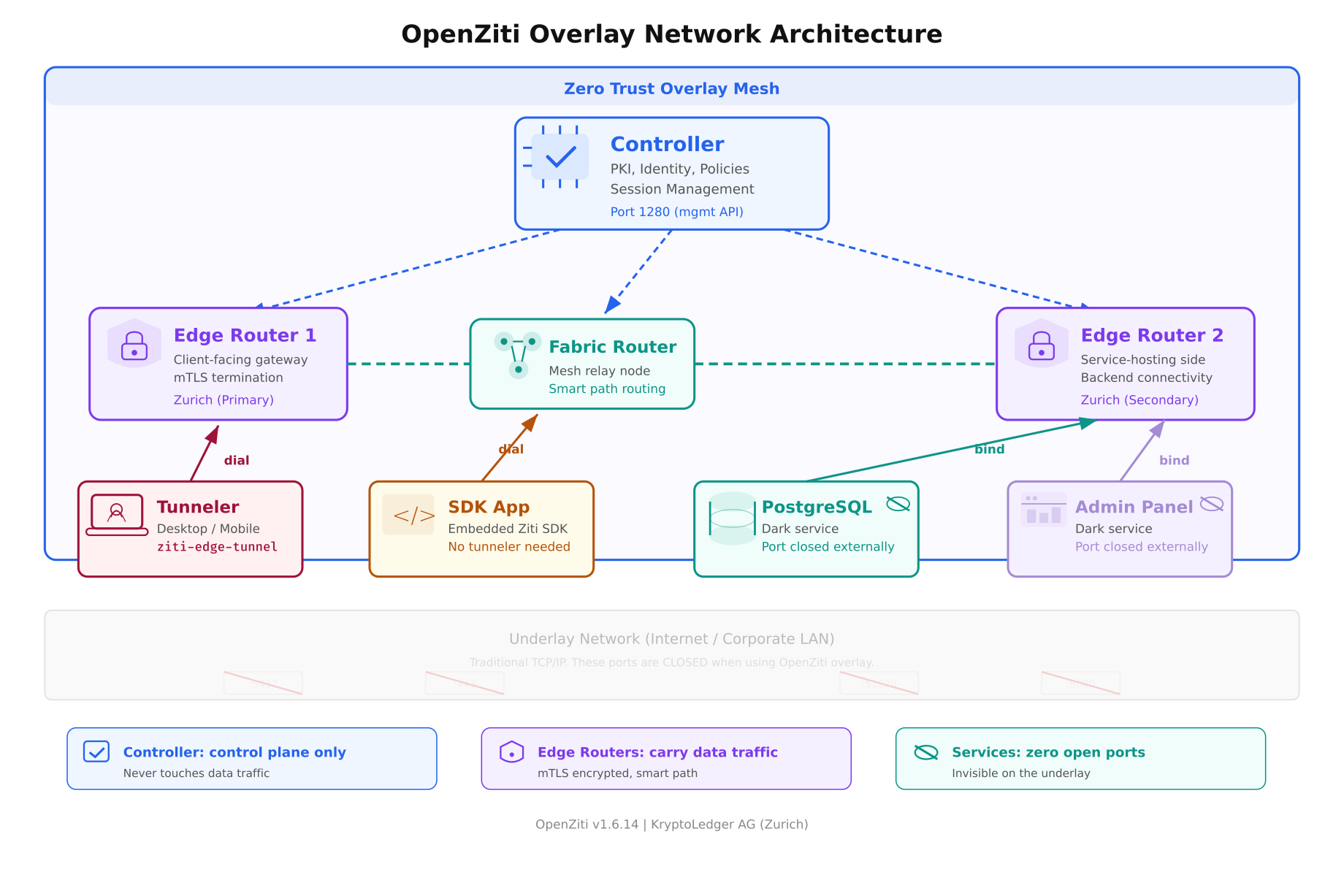
The architecture diagram above shows all five components in their deployment positions. The overlay mesh (light blue zone) sits on top of the underlay network (grey zone at the bottom). Notice that the services at the bottom (PostgreSQL, Admin Panel) have their ports closed on the underlay. They are only reachable through the overlay via authenticated, authorized sessions managed by the controller.
The Controller
Role: The brain of the network. The controller is a Go binary that runs the management API on port 1280. It handles identity creation, certificate issuance (it runs its own PKI), policy evaluation, session management, and router enrollment. The controller never touches data traffic. It operates purely on the control plane. If the controller goes down, existing sessions continue working because the edge routers have cached the session data. New sessions cannot be created until the controller recovers.
Think of it as the air traffic control tower. It tells planes where to go, but it does not carry passengers. In KryptoLedger’s deployment, the controller runs on a dedicated 2 vCPU / 4 GB VM in their Zurich data center.
Edge Routers
Role: The gateways where clients and services connect. An edge router terminates mTLS connections from tunnelers and SDK apps, validates session tokens issued by the controller, and forwards traffic to the destination service. Edge routers are the only components that touch actual data traffic.
KryptoLedger runs two edge routers: one client-facing (accepts connections from the 12 remote developers) and one service-facing (connects to PostgreSQL and the admin dashboard on localhost). In a single-server deployment, one edge router can handle both roles.
Fabric Routers
Role: Internal mesh relay nodes. Fabric routers connect edge routers to each other and provide smart path selection. If KryptoLedger opens a second data center in Frankfurt, a fabric router in between would relay traffic between the Zurich and Frankfurt edge routers, choosing the lowest-latency path automatically. For single-site deployments, fabric routers are optional.
Tunnelers
Role: Lightweight agents that run on client devices. The tunneler (ziti-edge-tunnel) intercepts DNS queries and TCP connections for services the user is authorized to access, wraps them in mTLS, and sends them through the overlay to the appropriate edge router. From the user’s perspective, they connect to postgres.kryptoledger.ziti as if it were a local DNS name. The tunneler handles everything.
Tunnelers are available for Linux, macOS, Windows, iOS, and Android. KryptoLedger’s developers run the Linux desktop tunneler on Ubuntu and the macOS tunneler on their MacBooks.
SDKs
Role: For applications that want to embed zero trust directly into their code. Instead of relying on a tunneler, the application links the Ziti SDK and makes connections through the overlay natively. KryptoLedger is evaluating this for their settlement engine, which would make the application itself a Ziti endpoint, eliminating the need for a tunneler on the server side entirely. SDKs exist for Go, Python, C, Node.js, Java, Swift, and Kotlin.
How KryptoLedger’s Network Changes
Free to use, share it in your presentations, blogs, or learning materials.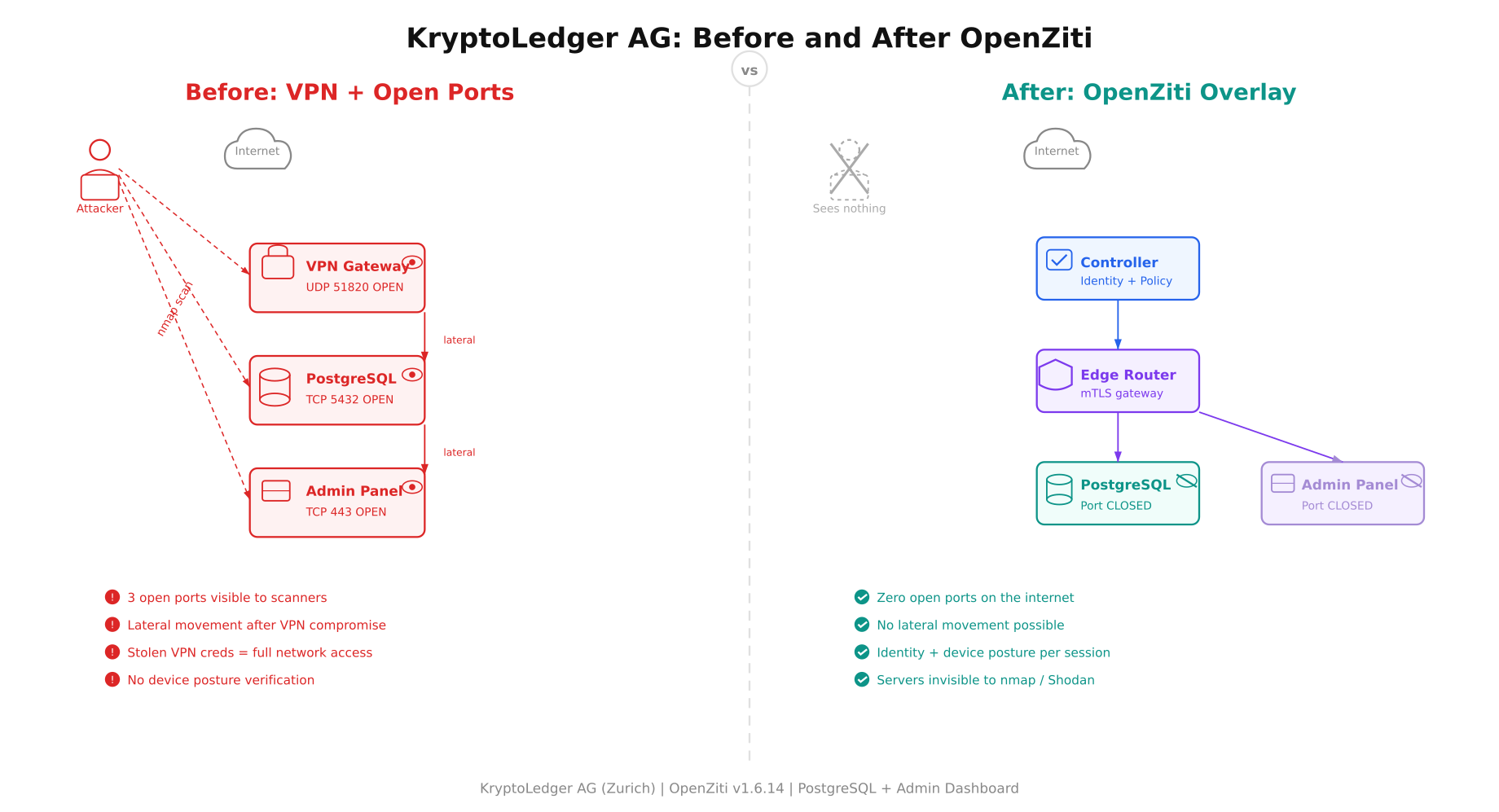
The before-and-after comparison makes the architectural shift concrete. On the left, an attacker scans from the internet and finds three services responding: the WireGuard VPN gateway on UDP 51820, PostgreSQL on TCP 5432, and the admin dashboard on TCP 443. Red arrows show lateral movement paths after a VPN compromise. On the right, the same attacker sees nothing. The controller, edge router, and dark services exist on the overlay only. The PostgreSQL port is closed on the server’s firewall. The admin dashboard port is closed. There is no VPN gateway to scan. An nmap sweep returns zero open ports.
Prerequisites
KryptoLedger’s deployment runs on Ubuntu 24.04 LTS. The following are the minimum requirements for a single-node deployment (controller + edge router on the same machine).
- Operating system. Ubuntu 24.04 LTS (Noble Numbat), x86_64. Other Linux distributions work but the commands in this article target Ubuntu/Debian.
- CPU and RAM. Minimum 4 vCPU and 8 GB RAM. The controller and edge router together use approximately 200-400 MB of RAM at idle, but the Go runtime benefits from available memory for garbage collection.
- Disk. 20 GB minimum. The PKI certificates, configuration files, and logs consume under 500 MB. The rest is for the OS and the services you are protecting.
- Network. A public IP address or a DNS name that resolves to the server. The controller API (port 1280) and edge router listener (port 3022) need to be reachable from client devices. These are the only two ports that need to be open.
- DNS. A domain or subdomain pointing to the server. KryptoLedger uses
ziti.kryptoledger.internal. For testing, you can use the server’s IP address directly.
Installing the OpenZiti Controller
OpenZiti provides a quickstart script that bootstraps the controller and a default edge router in one step. For a production deployment, you would install each component separately with custom PKI. This article uses the quickstart for the initial setup, then explains how to customize it.
Download and run the OpenZiti quickstart. This installs the ziti CLI binary and initializes the controller with a self-signed PKI.
$ curl -sL https://get.openziti.io/quick/ziti-cli-functions.sh | bash

$ source ~/.ziti/quickstart/$(hostname)/$(hostname).env

$ expressInstall
The curl command downloads the Ziti CLI functions script. The source command loads environment variables for this deployment (paths to certificates, controller address, admin credentials). The expressInstall function does the heavy lifting: it downloads the latest Ziti binaries, generates a root CA, creates the controller configuration, initializes the database, creates an admin identity, and starts the controller process.
generating PKI

  creating CA: /home/ziti/.ziti/quickstart/ziti-ctrl/pki/cas/ziti-ctrl-intermediate/

  creating server cert: /home/ziti/.ziti/quickstart/ziti-ctrl/pki/…

initializing controller database

starting controller

  controller started on port 1280

creating default admin identity

  admin username: admin

  admin password: (auto-generated, shown in output)

creating default edge router

  edge router started on port 3022

[OK] OpenZiti quickstart complete
The quickstart creates both the controller (port 1280) and a default edge router (port 3022) on the same machine. Save the admin password shown in the output. You will need it to authenticate with the controller API using the ziti CLI.
Verifying the Installation
Log into the controller with the admin credentials and verify that the controller and edge router are running.
$ ziti edge login localhost:1280 -u admin -p $(cat ~/.ziti/quickstart/$(hostname)/admin.password)Token: eyJhbGciOiJSUzI1NiIsInR5cCI6IkpXVCJ9…
Logged in successfullyThe ziti edge login command authenticates against the controller’s management API and stores a session token locally. All subsequent ziti CLI commands use this token.
List the edge routers to confirm the default router is online.
$ ziti edge list edge-routersid: abc123def456
name: ziti-ctrl-edge-router
isOnline: true
isVerified: true
role attributes: [“public”]
createdAt: 2026-04-04T10:15:00ZThe key field is isOnline: true. If the router shows isOnline: false, the router process is not running or cannot reach the controller. Check the router logs at ~/.ziti/quickstart/$(hostname)/ for connection errors.
Verify the controller health endpoint directly.
$ curl -sk https://localhost:1280/edge/client/v1/version | python3 -m json.tool{
“data”: {
“apiVersions”: {
“edge”: {
“v1”: {
“apiBaseUrls”: [“https://localhost:1280/edge/client/v1”]
}
}
},
“buildDate”: “2025-03-13”,
“revision”: “v1.6.14”,
“runtimeVersion”: “go1.24.1”,
“version”: “v1.6.14”
}
}The version field confirms you are running v1.6.14. The controller is healthy and accepting API requests. At this point, KryptoLedger has a functioning OpenZiti overlay network with one controller and one edge router, both running on the same Ubuntu 24.04 server.
Understanding the PKI
The quickstart generated a full PKI hierarchy automatically. Understanding what was created helps when you need to troubleshoot certificate issues or rotate keys.
$ ls -la ~/.ziti/quickstart/$(hostname)/pki/Root CA. The top of the certificate chain. All other certificates chain back to this. The root CA private key should be protected and ideally stored offline in production.
Intermediate CA. Signs server certificates and identity certificates. This is the CA that the controller uses day-to-day. If the intermediate CA is compromised, you can revoke it and issue a new one from the root CA without rebuilding the entire PKI.
Server certificates. The controller and edge router each have their own server certificate signed by the intermediate CA. These certificates are presented during TLS handshakes with clients and other routers.
Every identity enrolled in the network (users, services, routers) receives a client certificate signed by the same intermediate CA. This is how mutual TLS works: both sides of every connection present certificates, and both sides verify the other against the shared CA chain.
Firewall Configuration
With the overlay network running, configure the host firewall to allow only the two ports that OpenZiti needs and close everything else. This is where KryptoLedger’s security posture changes. PostgreSQL’s port 5432 and the admin dashboard’s port 443 are no longer exposed.
$ sudo ufw default deny incoming

$ sudo ufw default allow outgoing

$ sudo ufw allow 22/tcp comment ‘SSH management’

$ sudo ufw allow 1280/tcp comment ‘Ziti controller API’

$ sudo ufw allow 3022/tcp comment ‘Ziti edge router’

$ sudo ufw enable

$ sudo ufw status numberedStatus: active
To Action From
— —— —-
[ 1] 22/tcp ALLOW IN Anywhere # SSH management
[ 2] 1280/tcp ALLOW IN Anywhere # Ziti controller API
[ 3] 3022/tcp ALLOW IN Anywhere # Ziti edge routerPort 5432 (PostgreSQL) and port 443 (admin dashboard) are not in this list. They are closed to the internet. The only way to reach them is through the OpenZiti overlay after identity verification, device posture check, and policy authorization. This is the “dark cloud” effect in practice.
Verify from outside the server that the database port is truly closed.
$ nmap -sS -p 5432,443,51820 ziti.kryptoledger.internalPORT STATE SERVICE
443/tcp filtered https
5432/tcp filtered postgresql
51820/udp filtered wireguard
Nmap done: 1 IP address (1 host up) — 0 open ports foundZero open ports for the services that matter. The old WireGuard port is also closed since it has been decommissioned. Only SSH (for management), the controller API (for identity operations), and the edge router (for data traffic) are reachable.
What Comes Next
Part 1 covered the architecture, the scenario, and the installation. KryptoLedger now has a functioning OpenZiti controller and edge router on Ubuntu 24.04 with a proper PKI and a firewall that closes all service ports to the internet. Part 2 will create the PostgreSQL and admin dashboard services on the overlay, define identity-based access policies, enroll the first remote developer client, test dark server access through the overlay, and harden the deployment for production.
References
- OpenZiti Documentation: https://openziti.io/docs (redirects to netfoundry.io/docs/openziti)
- OpenZiti GitHub: https://github.com/openziti/ziti
- Ziti CLI Reference: https://openziti.io/docs/reference/cli/
- Previous article: What Is a Software-Defined Perimeter
- Previous article: SDP vs VPN Comparison