
On-Premises Architecture: Bare-Metal Kubernetes
EuroSettle’s on-premises option placed Kubernetes clusters in three company-owned data centers: Frankfurt (primary), Amsterdam (secondary), and Zurich (disaster recovery). Each data center hosts a stacked etcd control plane, dedicated worker nodes for blockchain components, Ceph storage for persistent volumes, and a Thales Luna HSM for cryptographic key protection. The inter-DC connectivity uses dedicated MPLS links and dark fiber, providing sub-10ms latency between all three sites, which is critical for Raft consensus performance.
Free to use, share it in your presentations, blogs, or learning materials.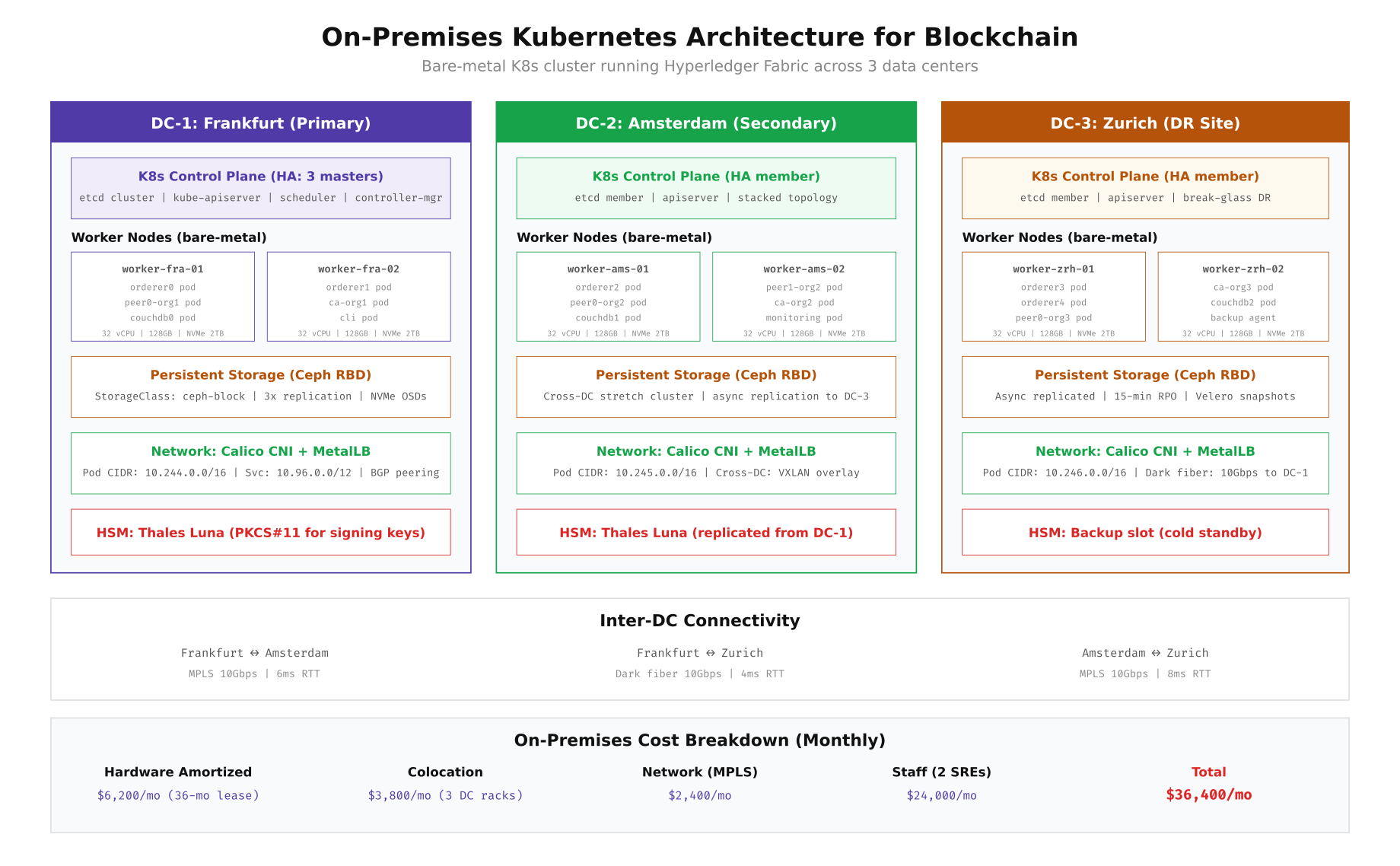
The architecture above shows how EuroSettle distributed Fabric components across the three data centers. Raft orderers are spread across all three sites (2 in Frankfurt, 1 in Amsterdam, 2 in Zurich) to ensure consensus survives any single site failure. Peer nodes and CouchDB state databases are co-located on the same worker nodes to minimize read latency. Each data center runs its own Ceph cluster with NVMe OSDs for high IOPS, and cross-DC replication happens asynchronously with a 15-minute RPO for the DR site.
Bootstrapping an On-Premises K8s Cluster
Setting up a bare-metal Kubernetes cluster for blockchain requires careful attention to kernel parameters, container runtime configuration, and storage driver selection. EuroSettle used kubeadm for cluster bootstrapping with Calico for CNI networking and MetalLB for bare-metal load balancing. The following commands provision the Frankfurt primary cluster from scratch.
# ============================================================
# ON-PREMISES K8S CLUSTER: Frankfurt Data Center
# Bare-metal, 3 masters + 6 workers for blockchain
# ============================================================

# Step 1: Prepare all nodes (run on every server)
# Disable swap (Kubernetes requirement)
sudo swapoff -a
sudo sed -i '/swap/d' /etc/fstab

# Load required kernel modules
cat > /etc/modules-load.d/k8s.conf << 'MODULES'
overlay
br_netfilter
MODULES
sudo modprobe overlay
sudo modprobe br_netfilter

# Set kernel parameters for Kubernetes networking
cat > /etc/sysctl.d/k8s.conf << 'SYSCTL'
net.bridge.bridge-nf-call-iptables  = 1
net.bridge.bridge-nf-call-ip6tables = 1
net.ipv4.ip_forward                 = 1
# Blockchain-specific tuning
net.core.somaxconn = 65535
net.ipv4.tcp_max_syn_backlog = 65535
net.core.netdev_max_backlog = 65535
net.ipv4.tcp_tw_reuse = 1
vm.max_map_count = 262144
SYSCTL
sudo sysctl --system

# Install containerd as the container runtime
sudo apt install -y containerd
sudo mkdir -p /etc/containerd
containerd config default | sudo tee /etc/containerd/config.toml
# Enable SystemdCgroup (required for kubeadm)
sudo sed -i 's/SystemdCgroup = false/SystemdCgroup = true/' /etc/containerd/config.toml
sudo systemctl restart containerd

# Install kubeadm, kubelet, kubectl (v1.29)
sudo apt install -y apt-transport-https ca-certificates curl gpg
curl -fsSL https://pkgs.k8s.io/core:/stable:/v1.29/deb/Release.key | sudo gpg --dearmor -o /etc/apt/keyrings/kubernetes-apt-keyring.gpg
echo 'deb [signed-by=/etc/apt/keyrings/kubernetes-apt-keyring.gpg] https://pkgs.k8s.io/core:/stable:/v1.29/deb/ /' | sudo tee /etc/apt/sources.list.d/kubernetes.list
sudo apt update && sudo apt install -y kubelet kubeadm kubectl
sudo apt-mark hold kubelet kubeadm kubectl

# Step 2: Initialize the first control plane node (master-fra-01)
sudo kubeadm init \
  --control-plane-endpoint "k8s-api.eurosettle.internal:6443" \
  --upload-certs \
  --pod-network-cidr=10.244.0.0/16 \
  --service-cidr=10.96.0.0/12 \
  --kubernetes-version=v1.29.0

# Set up kubectl access
mkdir -p $HOME/.kube
sudo cp /etc/kubernetes/admin.conf $HOME/.kube/config
sudo chown $(id -u):$(id -g) $HOME/.kube/config

# Step 3: Install Calico CNI (with BGP peering for bare-metal)
kubectl apply -f https://raw.githubusercontent.com/projectcalico/calico/v3.27.0/manifests/calico.yaml

# Step 4: Join additional control plane nodes (master-fra-02, master-ams-01)
# Use the join command from kubeadm init output with --control-plane flag

# Step 5: Join worker nodes with blockchain-specific labels
kubeadm join k8s-api.eurosettle.internal:6443 --token  --discovery-token-ca-cert-hash sha256:

# Label worker nodes for blockchain workload scheduling
kubectl label node worker-fra-01 node-role.eurosettle.net/bc-orderer=true
kubectl label node worker-fra-02 node-role.eurosettle.net/bc-orderer=true
kubectl label node worker-fra-01 node-role.eurosettle.net/bc-peer=true
kubectl label node worker-ams-01 node-role.eurosettle.net/bc-peer=true
kubectl label node worker-zrh-01 node-role.eurosettle.net/bc-orderer=true

# Taint blockchain nodes to prevent non-blockchain workloads
kubectl taint nodes worker-fra-01 workload=blockchain:NoSchedule
kubectl taint nodes worker-fra-02 workload=blockchain:NoSchedule
kubectl taint nodes worker-ams-01 workload=blockchain:NoSchedule
kubectl taint nodes worker-zrh-01 workload=blockchain:NoSchedule

# Step 6: Install MetalLB for bare-metal load balancing
kubectl apply -f https://raw.githubusercontent.com/metallb/metallb/v0.14.3/config/manifests/metallb-native.yaml

cat << 'METALLB' | kubectl apply -f -
apiVersion: metallb.io/v1beta1
kind: IPAddressPool
metadata:
  name: blockchain-pool
  namespace: metallb-system
spec:
  addresses:
    - 10.10.1.100-10.10.1.120
---
apiVersion: metallb.io/v1beta1
kind: L2Advertisement
metadata:
  name: blockchain-l2
  namespace: metallb-system
spec:
  ipAddressPools:
    - blockchain-pool
METALLB

# Step 7: Install Ceph CSI driver for persistent storage
kubectl apply -f https://raw.githubusercontent.com/rook/rook/v1.13.0/deploy/examples/operator.yaml
kubectl apply -f https://raw.githubusercontent.com/rook/rook/v1.13.0/deploy/examples/cluster.yaml

# Create StorageClass for blockchain persistent volumes
cat << 'SC' | kubectl apply -f -
apiVersion: storage.k8s.io/v1
kind: StorageClass
metadata:
  name: ceph-block-ssd
provisioner: rook-ceph.rbd.csi.ceph.com
parameters:
  clusterID: rook-ceph
  pool: blockchain-pool
  imageFormat: "2"
  imageFeatures: layering
  csi.storage.k8s.io/provisioner-secret-name: rook-csi-rbd-provisioner
  csi.storage.k8s.io/provisioner-secret-namespace: rook-ceph
reclaimPolicy: Retain
allowVolumeExpansion: true
volumeBindingMode: WaitForFirstConsumer
SC

# Verify the cluster is ready
kubectl get nodes -o wide
kubectl get sc
Cloud Architecture: Managed Kubernetes
EuroSettle's cloud alternative distributed the same Fabric network across three managed Kubernetes services: AWS EKS in Frankfurt, Azure AKS in Amsterdam, and GCP GKE in Zurich. Each cloud provider manages the control plane (etcd, API server, scheduler), while EuroSettle manages the worker node groups sized for blockchain workloads. Cross-cloud connectivity uses VPN gateway peering and partner interconnects. The key advantage is zero control plane management, automatic patching, and the ability to scale node groups independently per region.
Free to use, share it in your presentations, blogs, or learning materials.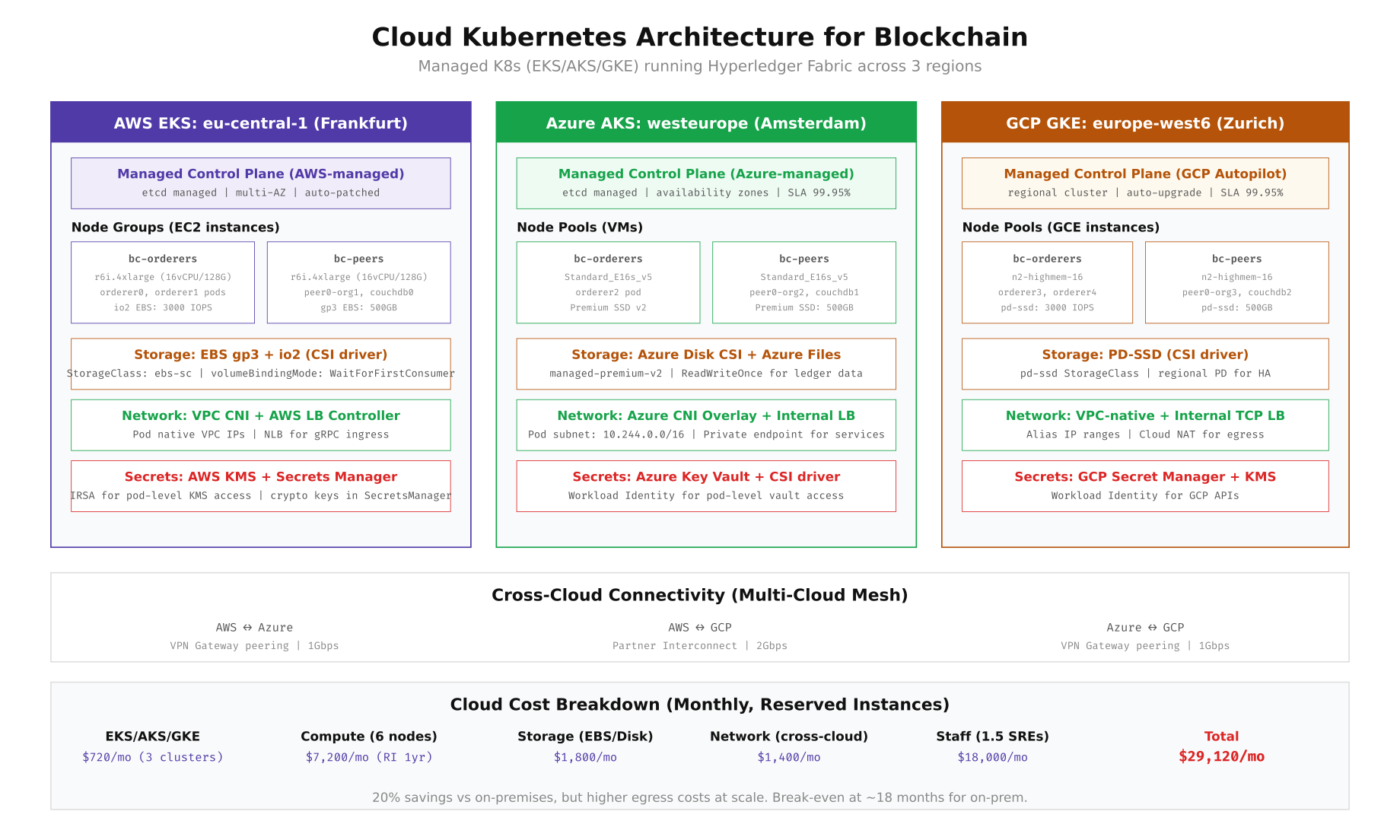
The cloud architecture provides a 99.95% SLA on the control plane across all three providers, compared to the on-premises model where EuroSettle's SRE team must maintain etcd health, API server availability, and certificate rotation themselves. The trade-off is that cross-cloud network latency (15-25ms between regions) is higher than on-premises MPLS links (4-8ms), which impacts Raft consensus round-trip times and orderer block production latency.
Provisioning Cloud K8s Clusters
The following commands create the three managed Kubernetes clusters using each provider's CLI tool. EuroSettle uses reserved instances for worker nodes (1-year commitment) to reduce compute costs, dedicated node groups labeled for blockchain workloads, and provider-native CSI drivers for persistent storage.
# ============================================================
# AWS EKS: Frankfurt (eu-central-1)
# ============================================================
# Create the EKS cluster
eksctl create cluster \
  --name eurosettle-fabric-fra \
  --region eu-central-1 \
  --version 1.29 \
  --vpc-cidr 10.100.0.0/16 \
  --without-nodegroup

# Create dedicated node group for orderers
eksctl create nodegroup \
  --cluster eurosettle-fabric-fra \
  --name bc-orderers \
  --node-type r6i.4xlarge \
  --nodes 2 --nodes-min 2 --nodes-max 4 \
  --node-labels "workload=blockchain,role=orderer" \
  --node-taints "workload=blockchain:NoSchedule" \
  --node-volume-size 200 \
  --node-volume-type gp3 \
  --region eu-central-1

# Create dedicated node group for peers
eksctl create nodegroup \
  --cluster eurosettle-fabric-fra \
  --name bc-peers \
  --node-type r6i.4xlarge \
  --nodes 2 --nodes-min 2 --nodes-max 4 \
  --node-labels "workload=blockchain,role=peer" \
  --node-taints "workload=blockchain:NoSchedule" \
  --node-volume-size 500 \
  --node-volume-type gp3 \
  --region eu-central-1

# Install AWS EBS CSI driver
eksctl create addon \
  --cluster eurosettle-fabric-fra \
  --name aws-ebs-csi-driver \
  --service-account-role-arn arn:aws:iam::ACCOUNT:role/EBS-CSI-Role

# Create StorageClass for blockchain PVCs
cat << 'SC' | kubectl apply -f -
apiVersion: storage.k8s.io/v1
kind: StorageClass
metadata:
  name: ebs-blockchain
provisioner: ebs.csi.aws.com
parameters:
  type: gp3
  iops: "3000"
  throughput: "250"
  encrypted: "true"
  kmsKeyId: "arn:aws:kms:eu-central-1:ACCOUNT:key/KEY_ID"
reclaimPolicy: Retain
allowVolumeExpansion: true
volumeBindingMode: WaitForFirstConsumer
SC

# ============================================================
# AZURE AKS: Amsterdam (westeurope)
# ============================================================
az aks create \
  --resource-group eurosettle-rg \
  --name eurosettle-fabric-ams \
  --location westeurope \
  --kubernetes-version 1.29.0 \
  --network-plugin azure \
  --network-plugin-mode overlay \
  --pod-cidr 10.244.0.0/16 \
  --service-cidr 10.96.0.0/12 \
  --dns-service-ip 10.96.0.10 \
  --enable-managed-identity \
  --enable-workload-identity \
  --nodepool-name system \
  --node-count 2 \
  --node-vm-size Standard_D4s_v5 \
  --tier standard

# Add blockchain orderer node pool
az aks nodepool add \
  --resource-group eurosettle-rg \
  --cluster-name eurosettle-fabric-ams \
  --name bcorderers \
  --node-count 1 \
  --node-vm-size Standard_E16s_v5 \
  --labels workload=blockchain role=orderer \
  --node-taints workload=blockchain:NoSchedule \
  --os-disk-size-gb 200 \
  --os-disk-type Managed \
  --zones 1 2 3

# Add blockchain peer node pool
az aks nodepool add \
  --resource-group eurosettle-rg \
  --cluster-name eurosettle-fabric-ams \
  --name bcpeers \
  --node-count 2 \
  --node-vm-size Standard_E16s_v5 \
  --labels workload=blockchain role=peer \
  --node-taints workload=blockchain:NoSchedule \
  --os-disk-size-gb 500 \
  --zones 1 2 3

# ============================================================
# GCP GKE: Zurich (europe-west6)
# ============================================================
gcloud container clusters create eurosettle-fabric-zrh \
  --region europe-west6 \
  --cluster-version 1.29 \
  --num-nodes 2 \
  --machine-type n2-standard-4 \
  --enable-ip-alias \
  --cluster-ipv4-cidr /16 \
  --services-ipv4-cidr /20 \
  --workload-pool eurosettle-project.svc.id.goog

# Add blockchain orderer node pool
gcloud container node-pools create bc-orderers \
  --cluster eurosettle-fabric-zrh \
  --region europe-west6 \
  --machine-type n2-highmem-16 \
  --num-nodes 1 \
  --disk-type pd-ssd \
  --disk-size 200 \
  --node-labels workload=blockchain,role=orderer \
  --node-taints workload=blockchain:NoSchedule

# Add blockchain peer node pool
gcloud container node-pools create bc-peers \
  --cluster eurosettle-fabric-zrh \
  --region europe-west6 \
  --machine-type n2-highmem-16 \
  --num-nodes 2 \
  --disk-type pd-ssd \
  --disk-size 500 \
  --node-labels workload=blockchain,role=peer \
  --node-taints workload=blockchain:NoSchedule

# ============================================================
# CROSS-CLOUD VPN CONNECTIVITY
# ============================================================
# AWS to Azure: Site-to-Site VPN
aws ec2 create-vpn-gateway --type ipsec.1 --amazon-side-asn 65100
# Configure Azure VPN Gateway with matching PSK and BGP ASN

# AWS to GCP: Partner Interconnect or VPN
gcloud compute vpn-tunnels create aws-to-gcp \
  --region europe-west6 \
  --peer-address  \
  --shared-secret  \
  --ike-version 2 \
  --local-traffic-selector 10.244.0.0/16 \
  --remote-traffic-selector 10.100.0.0/16

# Verify cross-cloud connectivity
kubectl --context eks-fra exec -it debug-pod -- ping 10.244.0.5  # Pod in AKS
kubectl --context aks-ams exec -it debug-pod -- ping 10.246.0.5  # Pod in GKE
Kubernetes Pod Layout and Resource Planning
Every blockchain component runs as a Kubernetes pod with specific resource requests, limits, and scheduling constraints. Orderers use StatefulSets with anti-affinity rules to ensure they land on different availability zones. Peers run as StatefulSets with CouchDB sidecar containers sharing the same pod for minimal network hop between the ledger engine and state database. Certificate Authorities run as Deployments since they are stateless after initial enrollment. The resource planning below ensures each pod gets guaranteed CPU and memory while preventing noisy-neighbor effects from other workloads.
Free to use, share it in your presentations, blogs, or learning materials.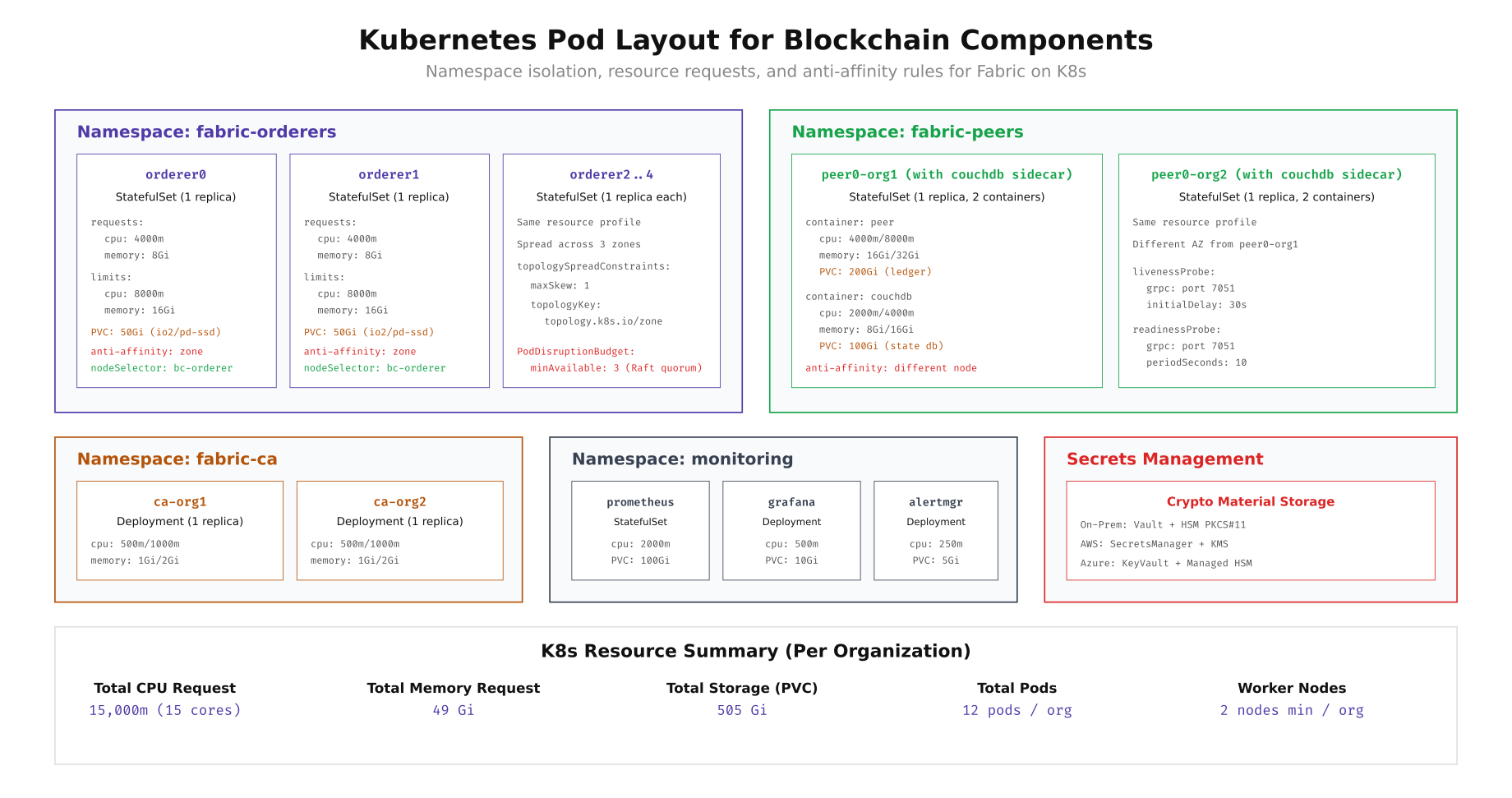
The pod layout diagram shows how EuroSettle organizes Fabric components into four namespaces: fabric-orderers (StatefulSets with zone anti-affinity and PodDisruptionBudget of 3 for Raft quorum), fabric-peers (StatefulSets with CouchDB sidecar containers), fabric-ca (lightweight Deployments), and monitoring (Prometheus, Grafana, Alertmanager). Each orderer requests 4 CPU cores and 8GB memory with limits of 8 cores and 16GB. Peers request more memory (16GB) due to ledger state caching. The total per-organization footprint is 15 CPU cores requested and 49GB memory across 12 pods.
Deploying Fabric Orderers on Kubernetes
The orderer StatefulSet manifest below shows the production configuration EuroSettle uses. Key details include: the orderer binary runs with environment variables pointing to mounted crypto material, persistent volume claims for the orderer ledger, gRPC health probes for Kubernetes liveness/readiness checks, and topology spread constraints that ensure orderers land in different availability zones.
# ============================================================
# FABRIC ORDERER STATEFULSET for Kubernetes
# ============================================================
cat << 'MANIFEST' | kubectl apply -f -
apiVersion: v1
kind: Namespace
metadata:
  name: fabric-orderers
  labels:
    app.kubernetes.io/part-of: eurosettle-fabric
---
apiVersion: apps/v1
kind: StatefulSet
metadata:
  name: orderer0
  namespace: fabric-orderers
spec:
  serviceName: orderer0
  replicas: 1
  selector:
    matchLabels:
      app: orderer0
  template:
    metadata:
      labels:
        app: orderer0
        component: orderer
    spec:
      tolerations:
        - key: "workload"
          operator: "Equal"
          value: "blockchain"
          effect: "NoSchedule"
      nodeSelector:
        workload: blockchain
        role: orderer
      topologySpreadConstraints:
        - maxSkew: 1
          topologyKey: topology.kubernetes.io/zone
          whenUnsatisfiable: DoNotSchedule
          labelSelector:
            matchLabels:
              component: orderer
      containers:
        - name: orderer
          image: hyperledger/fabric-orderer:2.5
          ports:
            - containerPort: 7050
              name: grpc
            - containerPort: 9443
              name: operations
          env:
            - name: ORDERER_GENERAL_LISTENADDRESS
              value: "0.0.0.0"
            - name: ORDERER_GENERAL_LISTENPORT
              value: "7050"
            - name: ORDERER_GENERAL_LOCALMSPID
              value: "OrdererMSP"
            - name: ORDERER_GENERAL_LOCALMSPDIR
              value: "/var/hyperledger/orderer/msp"
            - name: ORDERER_GENERAL_TLS_ENABLED
              value: "true"
            - name: ORDERER_GENERAL_TLS_PRIVATEKEY
              value: "/var/hyperledger/orderer/tls/server.key"
            - name: ORDERER_GENERAL_TLS_CERTIFICATE
              value: "/var/hyperledger/orderer/tls/server.crt"
            - name: ORDERER_GENERAL_TLS_ROOTCAS
              value: "[/var/hyperledger/orderer/tls/ca.crt]"
            - name: ORDERER_GENERAL_CLUSTER_CLIENTCERTIFICATE
              value: "/var/hyperledger/orderer/tls/server.crt"
            - name: ORDERER_GENERAL_CLUSTER_CLIENTPRIVATEKEY
              value: "/var/hyperledger/orderer/tls/server.key"
            - name: ORDERER_GENERAL_CLUSTER_ROOTCAS
              value: "[/var/hyperledger/orderer/tls/ca.crt]"
            - name: ORDERER_GENERAL_BOOTSTRAPMETHOD
              value: "file"
            - name: ORDERER_GENERAL_BOOTSTRAPFILE
              value: "/var/hyperledger/orderer/genesis.block"
            - name: ORDERER_OPERATIONS_LISTENADDRESS
              value: "0.0.0.0:9443"
            - name: ORDERER_METRICS_PROVIDER
              value: "prometheus"
          resources:
            requests:
              cpu: "4000m"
              memory: "8Gi"
            limits:
              cpu: "8000m"
              memory: "16Gi"
          volumeMounts:
            - name: orderer-data
              mountPath: /var/hyperledger/production/orderer
            - name: genesis-block
              mountPath: /var/hyperledger/orderer/genesis.block
              subPath: genesis.block
            - name: msp
              mountPath: /var/hyperledger/orderer/msp
            - name: tls
              mountPath: /var/hyperledger/orderer/tls
          livenessProbe:
            grpc:
              port: 7050
            initialDelaySeconds: 30
            periodSeconds: 10
          readinessProbe:
            grpc:
              port: 7050
            initialDelaySeconds: 15
            periodSeconds: 5
      volumes:
        - name: genesis-block
          configMap:
            name: orderer-genesis
        - name: msp
          secret:
            secretName: orderer0-msp
        - name: tls
          secret:
            secretName: orderer0-tls
  volumeClaimTemplates:
    - metadata:
        name: orderer-data
      spec:
        accessModes: ["ReadWriteOnce"]
        storageClassName: ceph-block-ssd  # or ebs-blockchain for cloud
        resources:
          requests:
            storage: 50Gi
---
apiVersion: v1
kind: Service
metadata:
  name: orderer0
  namespace: fabric-orderers
spec:
  type: ClusterIP
  ports:
    - port: 7050
      targetPort: 7050
      name: grpc
    - port: 9443
      targetPort: 9443
      name: operations
  selector:
    app: orderer0
---
apiVersion: policy/v1
kind: PodDisruptionBudget
metadata:
  name: orderer-pdb
  namespace: fabric-orderers
spec:
  minAvailable: 3
  selector:
    matchLabels:
      component: orderer
MANIFEST

# Verify orderer pods are running
kubectl get pods -n fabric-orderers -o wide
kubectl logs -n fabric-orderers orderer0-0 --tail=20
Storage Performance: Ceph vs Cloud CSI
Storage performance directly impacts blockchain throughput. The orderer's write-ahead log and the peer's block storage both require sustained sequential write IOPS. CouchDB (used as the state database) adds random read/write patterns on top. EuroSettle benchmarked storage performance on both on-premises Ceph and cloud block storage using fio before deploying any blockchain components.
# ============================================================
# STORAGE BENCHMARK: fio on K8s PVCs
# Run inside a test pod bound to each StorageClass
# ============================================================

# Create a benchmark pod
cat << 'POD' | kubectl apply -f -
apiVersion: v1
kind: Pod
metadata:
  name: storage-benchmark
  namespace: fabric-orderers
spec:
  tolerations:
    - key: "workload"
      operator: "Equal"
      value: "blockchain"
      effect: "NoSchedule"
  nodeSelector:
    workload: blockchain
  containers:
    - name: fio
      image: nixery.dev/fio
      command: ["sleep", "infinity"]
      volumeMounts:
        - name: test-vol
          mountPath: /mnt/test
      resources:
        requests:
          cpu: "2000m"
          memory: "4Gi"
  volumes:
    - name: test-vol
      persistentVolumeClaim:
        claimName: benchmark-pvc
---
apiVersion: v1
kind: PersistentVolumeClaim
metadata:
  name: benchmark-pvc
  namespace: fabric-orderers
spec:
  accessModes: ["ReadWriteOnce"]
  storageClassName: ceph-block-ssd
  resources:
    requests:
      storage: 50Gi
POD

# Wait for pod to be ready
kubectl wait --for=condition=Ready pod/storage-benchmark -n fabric-orderers --timeout=120s

# Sequential write (simulates orderer WAL writes)
kubectl exec -n fabric-orderers storage-benchmark -- fio \
  --name=seq-write \
  --ioengine=libaio \
  --direct=1 \
  --rw=write \
  --bs=4k \
  --numjobs=4 \
  --size=1G \
  --runtime=60 \
  --time_based \
  --group_reporting \
  --filename=/mnt/test/seq-write.dat

# Random read/write mix (simulates CouchDB state database)
kubectl exec -n fabric-orderers storage-benchmark -- fio \
  --name=randrw \
  --ioengine=libaio \
  --direct=1 \
  --rw=randrw \
  --rwmixread=70 \
  --bs=8k \
  --numjobs=8 \
  --size=1G \
  --runtime=60 \
  --time_based \
  --group_reporting \
  --filename=/mnt/test/randrw.dat

# Expected results comparison:
# ┌──────────────────┬────────────────┬────────────────┬────────────────┐
# │ Metric           │ Ceph NVMe      │ AWS EBS gp3    │ GCP pd-ssd     │
# ├──────────────────┼────────────────┼────────────────┼────────────────┤
# │ Seq Write IOPS   │ 45,000         │ 3,000          │ 15,000         │
# │ Seq Write BW     │ 180 MB/s       │ 250 MB/s       │ 240 MB/s       │
# │ Random R/W IOPS  │ 38,000/12,000  │ 3,000/3,000    │ 15,000/15,000  │
# │ P99 Latency      │ 0.8ms          │ 2.1ms          │ 1.2ms          │
# └──────────────────┴────────────────┴────────────────┴────────────────┘
# Ceph NVMe wins on raw IOPS but requires operational overhead
# Cloud storage provides predictable performance with zero management

# Clean up
kubectl delete pod storage-benchmark -n fabric-orderers
kubectl delete pvc benchmark-pvc -n fabric-orderers
3-Year Total Cost of Ownership
EuroSettle's finance team modeled the total cost of ownership over three years for both deployment options. The analysis includes hardware (purchase or cloud compute), storage, network connectivity, managed service fees, and engineering staff. Year 1 heavily favors cloud due to the hardware capital expenditure required for on-premises, but the gap narrows in years 2 and 3 as on-premises hardware costs amortize and cloud costs face annual price increases.
Free to use, share it in your presentations, blogs, or learning materials.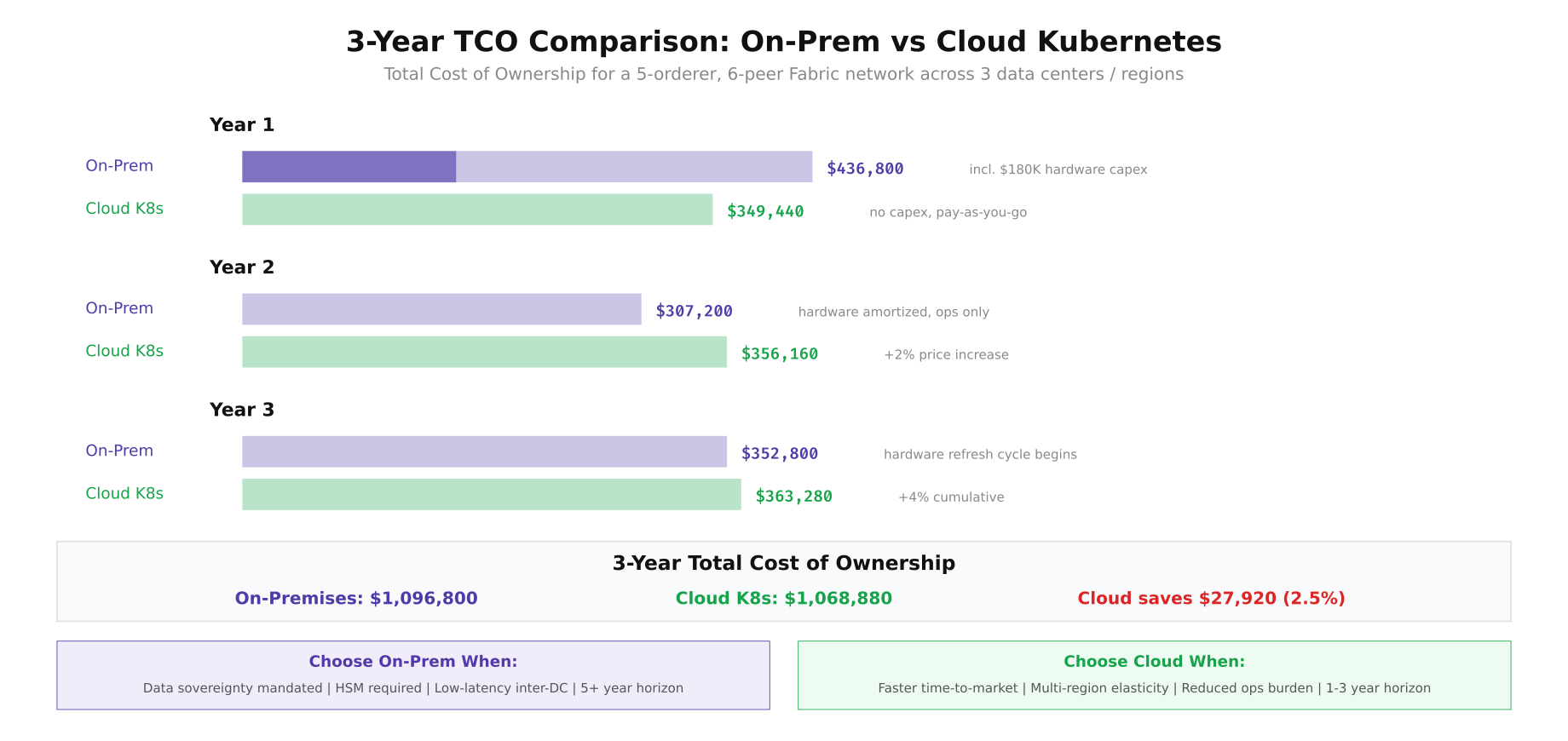
The cost comparison reveals that cloud and on-premises costs converge surprisingly close over a 3-year horizon. Cloud saves approximately 2.5% ($27,920) over three years, but this margin is sensitive to cloud pricing changes, egress costs, and staff efficiency. EuroSettle found that the real differentiator was not cost but control: on-premises provides data sovereignty guarantees, HSM integration, and sub-10ms inter-DC latency, while cloud provides faster provisioning, automatic patching, and reduced operational burden. For blockchain networks where consensus latency directly impacts throughput, the on-premises option's 4-8ms inter-DC latency (versus cloud's 15-25ms) can translate to 30-40% higher Raft consensus throughput.
EuroSettle's Final Decision
After six weeks of evaluation, EuroSettle chose a hybrid approach: on-premises bare-metal Kubernetes in Frankfurt and Amsterdam for the production Fabric network (where data sovereignty and consensus latency matter most), with GKE in Zurich as a warm standby DR site that can be promoted to production within 30 minutes. The hybrid model captures the best of both worlds: the regulatory compliance and low latency of on-premises infrastructure for primary operations, combined with the elasticity and rapid provisioning of cloud for disaster recovery and development/staging environments. Their staging and CI/CD environments run entirely on cloud Kubernetes, allowing developers to spin up complete Fabric test networks in minutes without consuming production hardware capacity.