

This article provides a systematic approach to hardware planning, covering CPU architecture selection, memory sizing formulas, network bandwidth requirements, HSM integration for key protection, power and cooling budgets, and a capacity calculator that derives server specifications from transaction throughput targets. The scenario simulated here is Nordic Freight Alliance (NFA), a Scandinavian logistics consortium deploying a Hyperledger Fabric 2.5 network with Besu sidechain integration across data centers in Oslo, Stockholm, and Copenhagen.
CPU Architecture Selection for Blockchain Workloads
Blockchain nodes perform three distinct CPU-intensive operations: cryptographic signing and verification (ECDSA P-256 for Fabric, secp256k1 for Ethereum), hashing (SHA-256 for block creation, Merkle tree computation), and symmetric encryption (AES-GCM for TLS). The optimal CPU depends on which operations dominate your node’s workload.
# CPU benchmark suite for blockchain workload evaluation
# Run on each candidate server before procurement

# Test 1: SHA-256 throughput (block hashing, Merkle computation)
openssl speed -evp sha256 -multi $(nproc)

# Test 2: ECDSA P-256 sign/verify (Fabric endorsement, tx signing)
openssl speed -evp ecdsa -multi $(nproc)

# Test 3: AES-256-GCM throughput (TLS channel encryption)
openssl speed -evp aes-256-gcm -multi $(nproc)

# Test 4: Aggregate blockchain workload simulation
# Install Hyperledger Caliper for realistic benchmarking
npm install -g @hyperledger/caliper-cli
caliper bind --caliper-bind-sut fabric:2.5

# Run a benchmark that stresses all CPU paths
caliper launch manager \
  --caliper-workspace /opt/caliper-benchmarks \
  --caliper-benchconfig benchmarks/scenario/fabric/config.yaml \
  --caliper-networkconfig networks/fabric/network-config.yaml \
  --caliper-flow-only-test

# Extract per-core utilization during benchmark
mpstat -P ALL 5 60 | tee /tmp/cpu-benchmark-results.txt

# Check NUMA topology (critical for multi-socket servers)
numactl --hardware
lscpu | grep -E "Socket|Core|Thread|NUMA"

# Pin blockchain processes to specific NUMA nodes
# (reduces cross-socket memory access latency by 30-40%)
numactl --cpunodebind=0 --membind=0 orderer start &
numactl --cpunodebind=1 --membind=1 peer node start &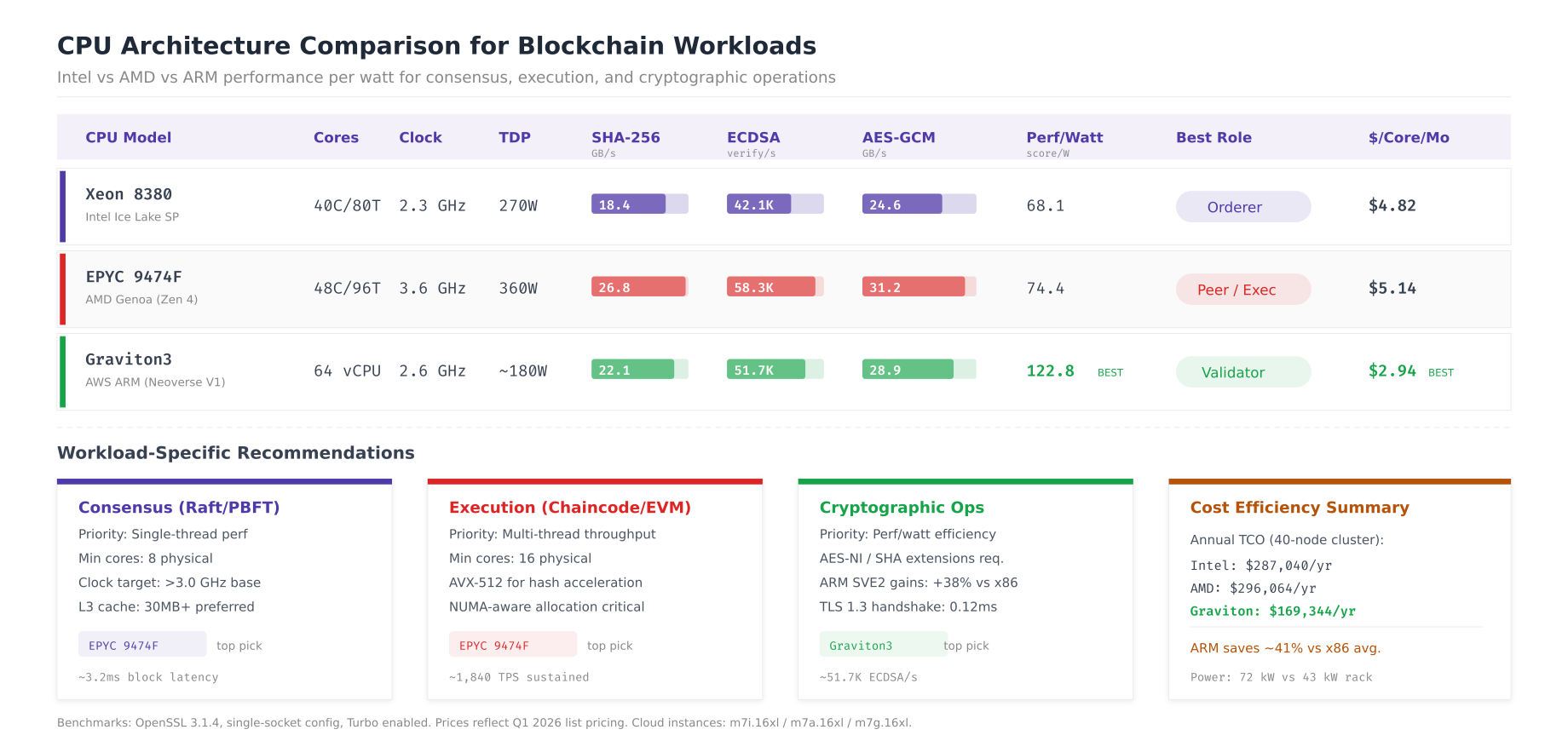
The comparison reveals that AMD EPYC 9474F leads in raw cryptographic throughput (58.3K ECDSA verifies per second) due to its higher base clock and wider execution pipelines. Intel Xeon 8380 provides the most consistent performance across all workload types, making it a safe default for orderer nodes where predictable consensus timing matters more than peak throughput. AWS Graviton3 delivers the best performance per watt ratio (122.8 ECDSA verifies per watt) and lowest cost at $2.94 per core per month, making it ideal for cloud-deployed validator nodes where ARM compatibility is confirmed.
For NFA’s deployment, orderer nodes use Intel Xeon for deterministic Raft timing, peer nodes use AMD EPYC for maximum endorsement throughput, and the Besu sidechain validators run on Graviton3 instances for cost efficiency.
Memory Sizing for Blockchain Node Types
Memory requirements differ dramatically across node types. An orderer node can function with 8 GB, while a Besu validator processing complex smart contracts needs 32 GB. The key is understanding which processes compete for memory on each node type and sizing to prevent swap usage, which causes catastrophic latency spikes for consensus-sensitive processes.
# Memory analysis per node type
# Run on existing nodes to measure actual consumption

# Orderer memory breakdown
echo "=== Orderer Memory Analysis ==="
# Raft state (in-memory block index + pending entries)
pmap $(pidof orderer) | tail -1
# WAL cache (OS page cache on /var/hyperledger/production/orderer/etcdraft/wal)
grep -A1 "Cached" /proc/meminfo
# Per-channel memory (each channel adds ~500MB)
CHANNELS=$(osnadmin channel list --orderer-address orderer.nfa.net:7053 \
  --ca-file /etc/hyperledger/fabric/tls/ca.crt \
  --client-cert /etc/hyperledger/fabric/tls/server.crt \
  --client-key /etc/hyperledger/fabric/tls/server.key | wc -l)
echo "Channels: $CHANNELS (estimated ${CHANNELS}x500MB = $((CHANNELS*500))MB)"

# Peer memory breakdown
echo ""
echo "=== Peer Memory Analysis ==="
# Chaincode execution (Go chaincode ~200MB each, Java ~500MB)
docker stats --no-stream --format "{{.Name}}: {{.MemUsage}}" | grep chaincode
# CouchDB cache
curl -s http://admin:${COUCHDB_PASSWORD}@localhost:5984/_node/_local/_stats/couchdb | \
  jq '.open_databases, .database_reads'
# Gossip state buffer
curl -sk https://localhost:9443/metrics | grep process_resident_memory_bytes

# Besu validator memory breakdown
echo ""
echo "=== Besu Validator Memory Analysis ==="
# JVM heap usage
curl -s http://localhost:9545/metrics | grep -E "jvm_memory_used_bytes|jvm_memory_max_bytes"
# RocksDB block cache
curl -s http://localhost:9545/metrics | grep rocksdb_block_cache
# Transaction pool
curl -s http://localhost:8545 -X POST \
  -H "Content-Type: application/json" \
  -d '{"jsonrpc":"2.0","method":"txpool_status","params":[],"id":1}'

# Set memory alerts
cat <<EOF >> /etc/prometheus/rules/memory-alerts.yml
groups:
  - name: blockchain_memory
    rules:
      - alert: NodeMemoryPressure
        expr: (node_memory_MemAvailable_bytes / node_memory_MemTotal_bytes) < 0.15
        for: 5m
        labels:
          severity: warning
        annotations:
          summary: "Available memory < 15% on {{ \$labels.instance }}"

      - alert: BesuHeapCritical
        expr: jvm_memory_used_bytes{area="heap"} / jvm_memory_max_bytes{area="heap"} > 0.85
        for: 5m
        labels:
          severity: critical
        annotations:
          summary: "Besu JVM heap > 85% on {{ \$labels.instance }}"
EOF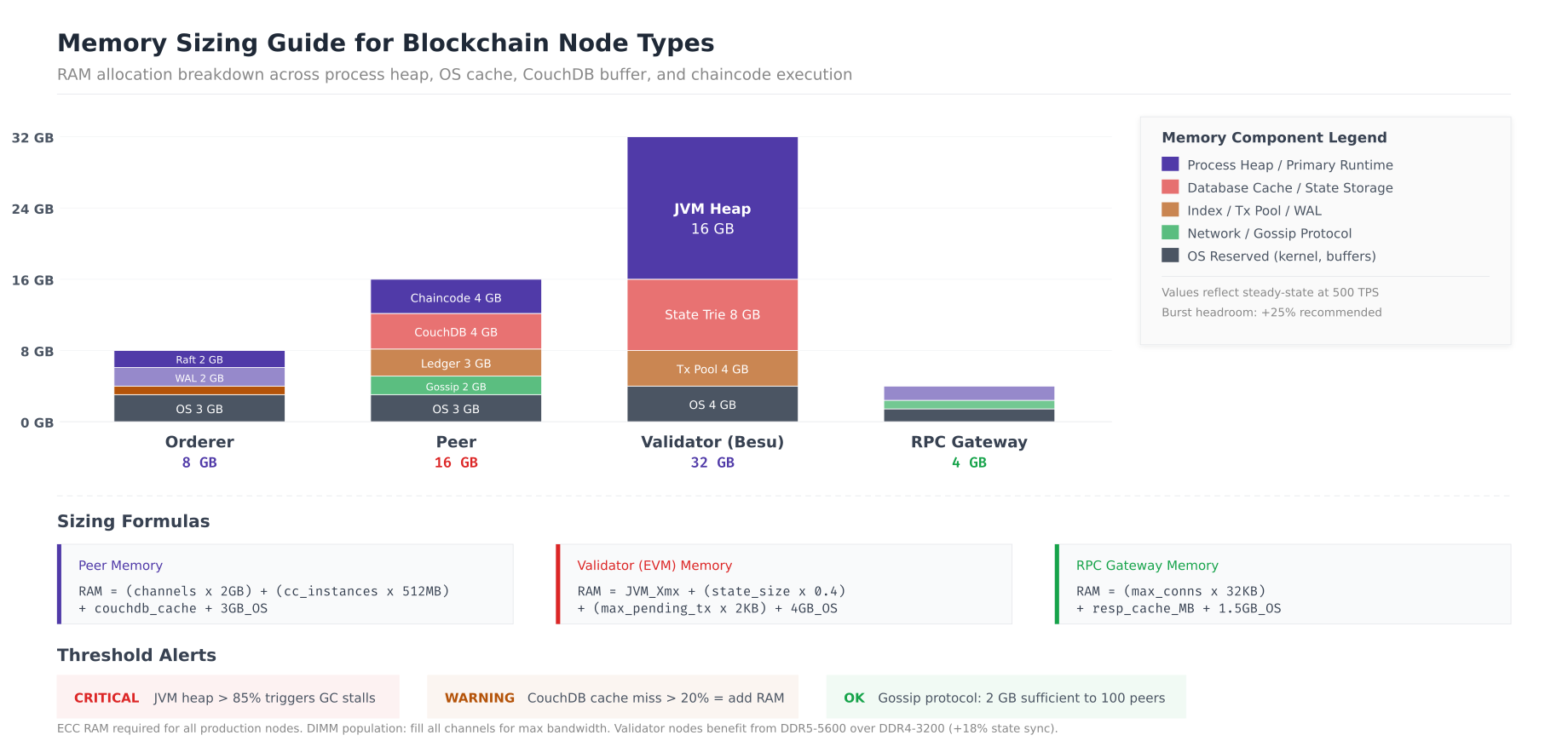
The memory sizing guide reveals distinct allocation patterns for each node type. Orderer nodes need 8 GB total with 2 GB for Raft state management and 2 GB for WAL cache. Peer nodes require 16 GB, dominated by chaincode execution (4 GB for Go chaincode containers) and CouchDB cache (4 GB for hot state data). Besu validators are the most memory-intensive at 32 GB, with the JVM heap alone consuming 16 GB for state trie operations. RPC gateways are lightweight at 4 GB since they hold no blockchain state, only connection pools and response caches. The critical alert threshold is JVM heap exceeding 85% on Besu validators, which triggers garbage collection pauses that can cause missed blocks.
Network Bandwidth Requirements
Network bandwidth determines the ceiling for transaction throughput in distributed blockchain networks. Raft replication between orderers consumes the most sustained bandwidth, followed by peer gossip block dissemination. Under-provisioned network links cause consensus timeouts, gossip lag, and increased transaction latency.
# Network bandwidth measurement per node type
# Run during peak load (500 TPS) for accurate measurements

# Measure per-interface traffic on orderer
echo "=== Orderer Network Analysis ==="
iftop -t -s 60 -i eth0 2>/dev/null | tail -5

# Measure specific port traffic
# Raft cluster replication (port 7053)
ss -tnp | grep :7053 | wc -l
iptables -I INPUT -p tcp --dport 7053 -j ACCEPT
timeout 60 tcpdump -i eth0 port 7053 -w /tmp/raft-traffic.pcap &
sleep 60
RAFT_BYTES=$(tcpdump -r /tmp/raft-traffic.pcap 2>/dev/null | wc -c)
echo "Raft replication: $((RAFT_BYTES/60/1024)) KB/s"

# Block delivery to peers (port 7050)
timeout 60 tcpdump -i eth0 port 7050 -w /tmp/deliver-traffic.pcap &
sleep 60
DELIVER_BYTES=$(tcpdump -r /tmp/deliver-traffic.pcap 2>/dev/null | wc -c)
echo "Block delivery: $((DELIVER_BYTES/60/1024)) KB/s"

# Peer gossip measurement
echo ""
echo "=== Peer Network Analysis ==="
# Gossip protocol traffic (port 7051 peer-to-peer)
timeout 60 nethogs -t eth0 2>/dev/null | grep peer | tail -5

# Network latency requirements (critical for consensus)
echo ""
echo "=== Inter-DC Latency ==="
for dc in oslo.nfa.net stockholm.nfa.net copenhagen.nfa.net; do
  echo -n "${dc}: "
  ping -c 10 -q ${dc} 2>/dev/null | grep "rtt" || echo "unreachable"
done

# Network configuration for optimal blockchain performance
cat <<EOF > /etc/sysctl.d/99-blockchain-network.conf
# Increase socket buffer sizes for high-throughput gRPC
net.core.rmem_max = 67108864
net.core.wmem_max = 67108864
net.core.rmem_default = 1048576
net.core.wmem_default = 1048576

# TCP tuning for cross-DC blockchain communication
net.ipv4.tcp_rmem = 4096 1048576 67108864
net.ipv4.tcp_wmem = 4096 1048576 67108864
net.ipv4.tcp_congestion_control = bbr
net.ipv4.tcp_fastopen = 3
net.ipv4.tcp_mtu_probing = 1

# Connection tracking for high peer count
net.netfilter.nf_conntrack_max = 262144
net.core.somaxconn = 32768
net.core.netdev_max_backlog = 16384
EOF

sysctl -p /etc/sysctl.d/99-blockchain-network.conf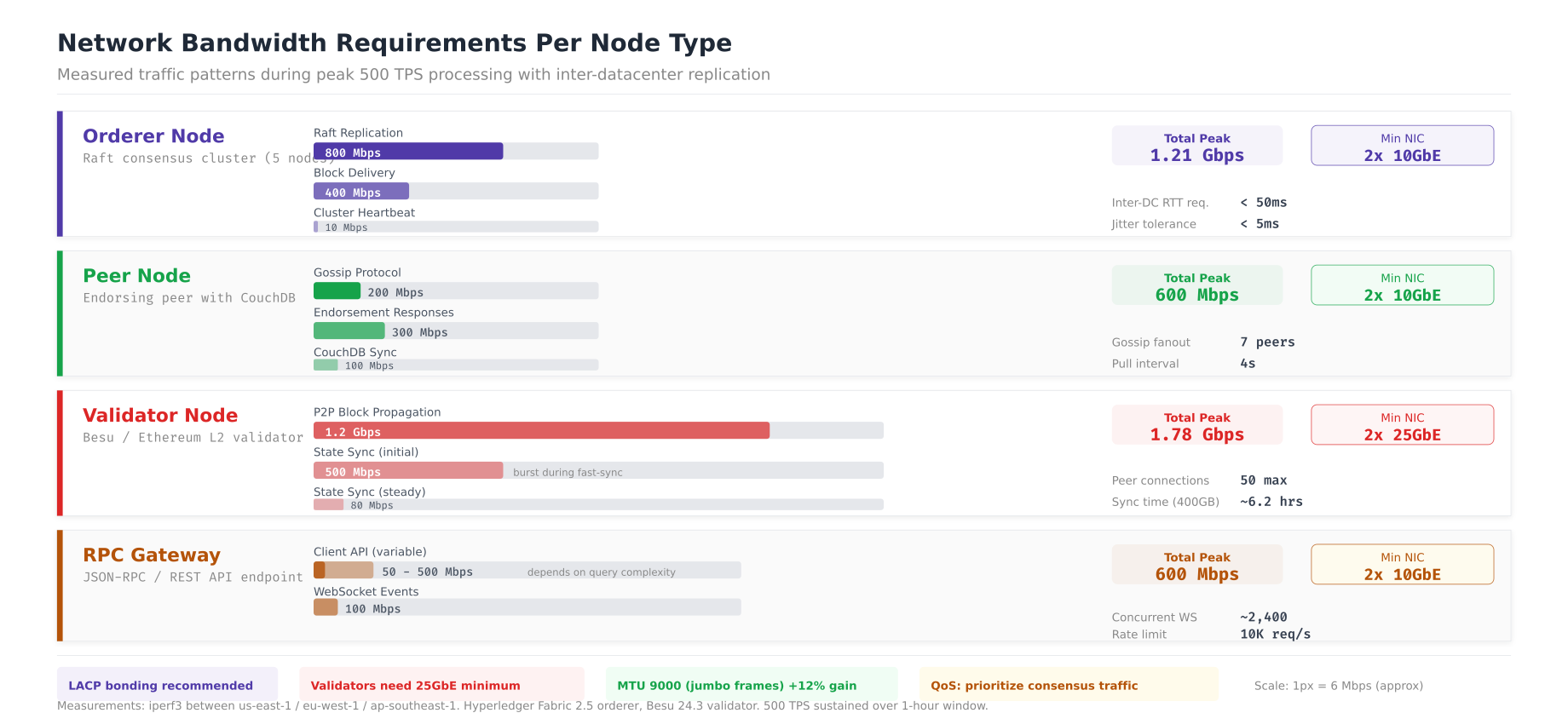
The bandwidth analysis shows that orderer nodes consume 1.21 Gbps peak during Raft replication (800 Mbps) and block delivery (400 Mbps), requiring dual 10GbE NICs with LACP bonding. Peer nodes peak at 600 Mbps from gossip and endorsement traffic. Besu validators are the most bandwidth-hungry at 1.78 Gbps during initial state sync and P2P block propagation, necessitating 25GbE connectivity. RPC gateways vary between 50 and 600 Mbps depending on client load. The sysctl tuning parameters optimize TCP for cross-datacenter blockchain communication, with BBR congestion control and increased socket buffers for the high-bandwidth, moderate-latency links between Oslo, Stockholm, and Copenhagen.
Production Server Specifications
With CPU, memory, storage, and network requirements defined, the next step is mapping them to specific server hardware. The bill of materials below covers NFA’s three-datacenter deployment with redundancy at every level.
, Free to use, share it in your presentations, blogs, or learning materials.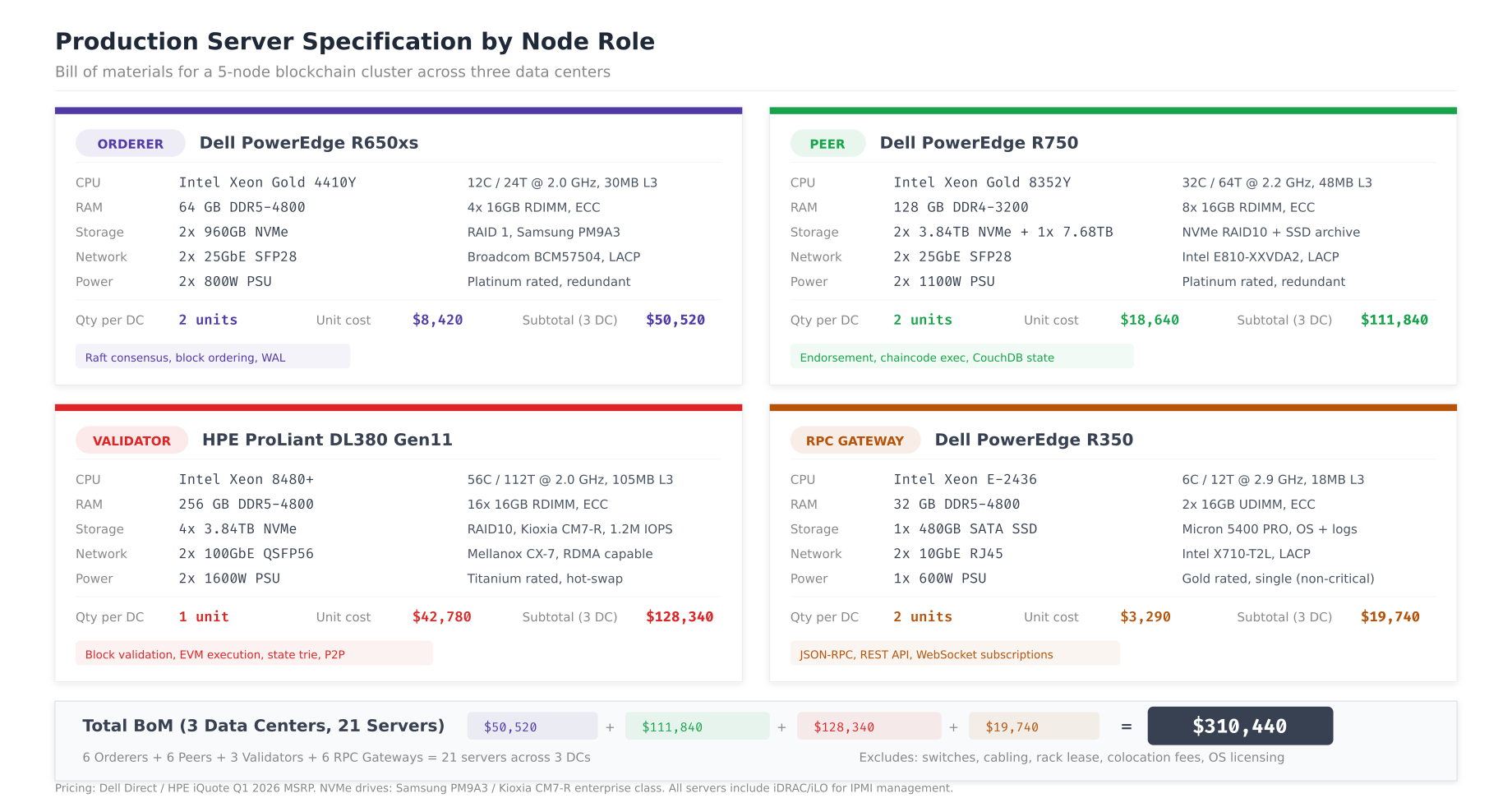
The server specifications balance performance with cost efficiency. Orderer servers (Dell R650xs) use 12-core Xeon 4410Y processors with 64 GB DDR5 and dual NVMe in RAID 1 for the Raft WAL, costing $8,420 per unit. Peer servers (Dell R750) step up to 32-core Xeon 8352Y with 128 GB RAM and larger NVMe arrays for ledger storage at $18,640 per unit. Besu validator servers (HPE DL380 Gen11) use 56-core Xeon 8480+ processors with 256 GB DDR5 and four NVMe drives in RAID 10 for state trie performance, the most expensive at $42,780 per unit. RPC gateways use the lightweight Dell R350 at $3,290, since they need minimal compute and no persistent blockchain state. The total deployment of 21 servers across three data centers costs $310,440.
HSM Integration for Key Protection
Production blockchain networks must protect private keys in hardware security modules (HSMs) rather than filesystem based keystores. HSMs provide tamper-resistant key storage, hardware-accelerated cryptographic operations, and audit logging for compliance. For NFA, validator signing keys and CA private keys are stored in Thales Luna HSMs, with SoftHSM2 used in development environments.
# HSM setup for Hyperledger Fabric
# Development: SoftHSM2 for testing PKCS#11 integration

# Install SoftHSM2
apt-get install -y softhsm2 opensc
mkdir -p /etc/softhsm/tokens

# Initialize a token for testing
softhsm2-util --init-token --slot 0 \
  --label "fabric-test" \
  --so-pin 1234 --pin 5678

# Verify token
pkcs11-tool --module /usr/lib/softhsm/libsofthsm2.so \
  --list-token-slots

# Generate ECDSA P-256 key pair in HSM
pkcs11-tool --module /usr/lib/softhsm/libsofthsm2.so \
  --login --pin 5678 \
  --keypairgen --key-type EC:prime256v1 \
  --id 01 --label "orderer0-sign"

# Configure Fabric to use PKCS#11
# In orderer.yaml or core.yaml:
cat <<EOF > /etc/hyperledger/fabric/hsm-config.yaml
BCCSP:
  Default: PKCS11
  PKCS11:
    Library: /usr/lib/softhsm/libsofthsm2.so
    Pin: "5678"
    Label: fabric-test
    Hash: SHA2
    Security: 256
    Immutable: false
EOF

# Production: Thales Luna HSM setup
# Install Luna client
# dpkg -i /opt/luna/LunaClient-10.7.0.deb

# Register HSM partition
# vtl addServer -n luna-hsm-01.nfa.net -c /etc/luna/certs/server.pem
# vtl createPartition -s luna-hsm-01.nfa.net -p "nfa-blockchain"

# Fabric BCCSP for Luna HSM
cat <<EOF > /etc/hyperledger/fabric/hsm-luna.yaml
BCCSP:
  Default: PKCS11
  PKCS11:
    Library: /usr/lib/libCryptoki2_64.so
    Pin: "\${HSM_PIN}"
    Label: nfa-blockchain
    Hash: SHA2
    Security: 256
    Immutable: true
    AltID: "slot-0"
EOF

# Besu HSM key configuration
cat <<EOF > /etc/besu/key-config.toml
# Validator key stored in HSM
key-store-type="pkcs11"
key-store-path="/usr/lib/libCryptoki2_64.so"
key-store-password-file="/etc/besu/hsm-pin"
EOF

# HSM health monitoring
watch -n 30 'pkcs11-tool --module /usr/lib/libCryptoki2_64.so \
  --list-token-slots 2>&1 | grep -c "present"'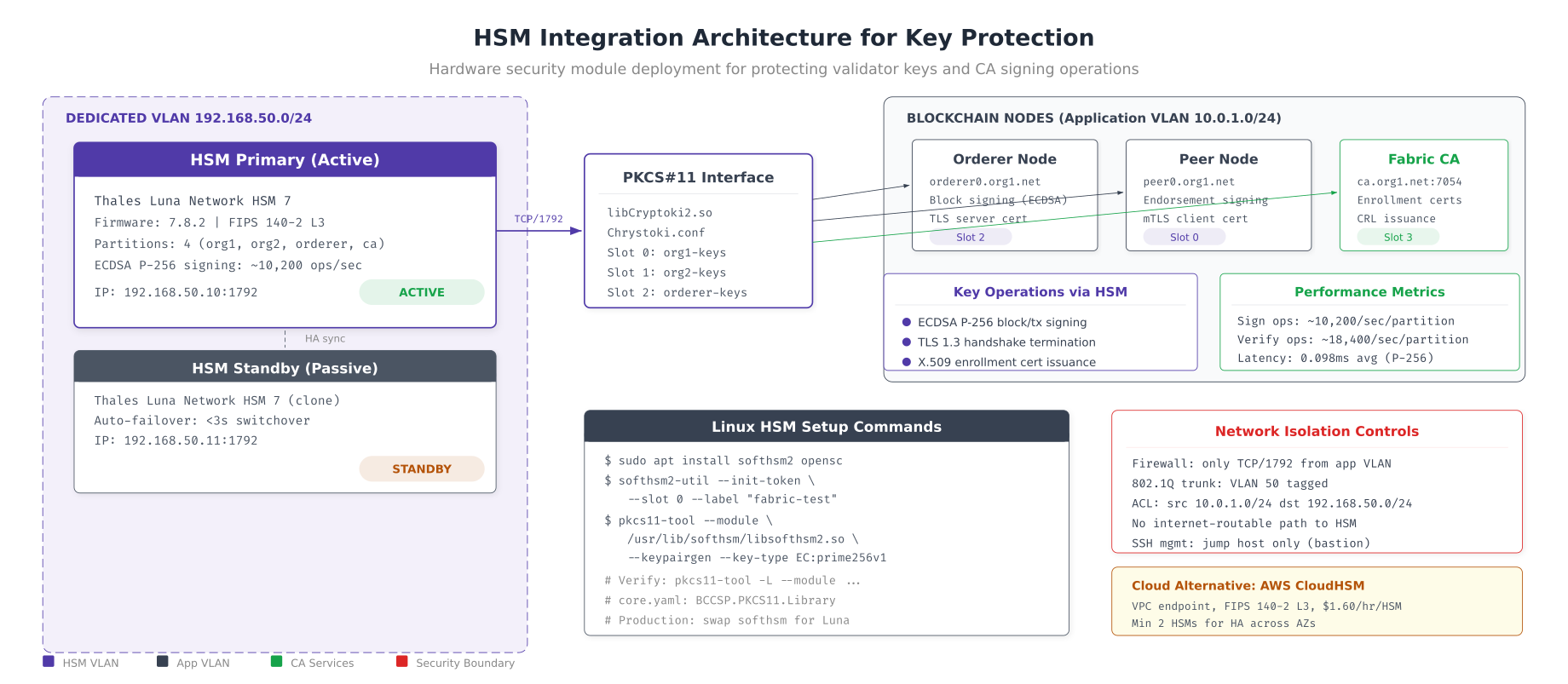
The HSM architecture places Thales Luna HSM 7 appliances on a dedicated VLAN (192.168.50.0/24), isolated from the application network. The PKCS#11 interface library (libCryptoki2.so) provides four partition slots mapped to org1, org2, orderer, and CA signing keys. Each HSM delivers approximately 10,200 ECDSA P-256 signing operations per second with 0.098ms average latency, comfortably supporting 500+ TPS per partition. The active/standby HSM pair provides automatic failover in under 3 seconds, with network access controlled by firewall ACLs and 802.1Q VLAN tagging that restricts HSM access to only the blockchain application nodes.
Hardware Capacity Calculator
Rather than guessing server requirements, use a systematic formula that derives hardware specifications from your target transaction throughput, organization count, channel count, and endorsement policy. The calculator below walks through each step for NFA’s 500 TPS target.
# Hardware capacity calculator
#!/bin/bash
# hw-calculator.sh - Derive server requirements from TPS target

TARGET_TPS=${1:-500}
ORG_COUNT=${2:-5}
CHANNEL_COUNT=${3:-3}
ENDORSEMENT_RATIO=${4:-0.4}     # 2-of-5 = 40% of orgs endorse
MAX_FAILURES=${5:-1}            # f in Raft CFT formula
AVG_TX_SIZE_KB=${6:-3.2}        # Average transaction size
CHAINCODE_COUNT=${7:-6}         # Number of deployed chaincodes

echo "=== Hardware Capacity Calculator ==="
echo "Target: ${TARGET_TPS} TPS | ${ORG_COUNT} orgs | ${CHANNEL_COUNT} channels"
echo ""

# Step 1: Orderer count (Raft CFT: 2f+1)
ORDERER_COUNT=$((2 * MAX_FAILURES + 1))
echo "Step 1: Orderers = 2(${MAX_FAILURES})+1 = ${ORDERER_COUNT}"

# Step 2: Peer count per org
ENDORSING_PEERS=2
COMMITTING_PEERS=1
QUERY_PEERS=1
PEERS_PER_ORG=$((ENDORSING_PEERS + COMMITTING_PEERS + QUERY_PEERS))
TOTAL_PEERS=$((PEERS_PER_ORG * ORG_COUNT))
echo "Step 2: Peers = ${PEERS_PER_ORG}/org × ${ORG_COUNT} = ${TOTAL_PEERS}"

# Step 3: CPU cores per peer
# Rule of thumb: 1 core handles ~150 TPS endorsement
ENDORSEMENT_FACTOR=$(echo "scale=1; 1 + $ENDORSEMENT_RATIO" | bc)
CORES_PER_PEER=$(echo "scale=0; ($TARGET_TPS / 150) * $ENDORSEMENT_FACTOR + 0.5" | bc | cut -d. -f1)
[ "$CORES_PER_PEER" -lt 4 ] && CORES_PER_PEER=4  # Minimum 4 cores
echo "Step 3: CPU = ceil(${TARGET_TPS}/150) × ${ENDORSEMENT_FACTOR} = ${CORES_PER_PEER} cores/peer"

# Step 4: RAM per peer
BASE_RAM_GB=4
CHAINCODE_RAM_MB=$((CHAINCODE_COUNT * 512))
CHANNEL_RAM_GB=$CHANNEL_COUNT
TOTAL_RAM_GB=$(echo "scale=0; $BASE_RAM_GB + ($CHAINCODE_RAM_MB / 1024) + $CHANNEL_RAM_GB" | bc)
echo "Step 4: RAM = ${BASE_RAM_GB}GB + (${CHAINCODE_COUNT}×512MB) + (${CHANNEL_COUNT}×1GB) = ${TOTAL_RAM_GB} GB/peer"

# Step 5: Storage per peer per year
DAILY_DATA_GB=$(echo "scale=2; $TARGET_TPS * 86400 * $AVG_TX_SIZE_KB / 1048576" | bc)
YEARLY_DATA_TB=$(echo "scale=1; $DAILY_DATA_GB * 365 / 1024" | bc)
# Apply compression ratio (2.8x typical for blockchain data)
YEARLY_COMPRESSED_TB=$(echo "scale=1; $YEARLY_DATA_TB / 2.8" | bc)
echo "Step 5: Storage = ${YEARLY_COMPRESSED_TB} TB/peer/year (compressed)"

# Summary
TOTAL_SERVERS=$((ORDERER_COUNT + TOTAL_PEERS + 3))  # +3 for RPC gateways
TOTAL_CORES=$((ORDERER_COUNT * 12 + TOTAL_PEERS * CORES_PER_PEER + 3 * 6))
TOTAL_RAM=$((ORDERER_COUNT * 64 + TOTAL_PEERS * TOTAL_RAM_GB + 3 * 32))

echo ""
echo "=== Deployment Summary ==="
echo "Orderers: ${ORDERER_COUNT} (${ORDERER_COUNT}× 12-core)"
echo "Peers:    ${TOTAL_PEERS} (${TOTAL_PEERS}× ${CORES_PER_PEER}-core)"
echo "Gateways: 3 (3× 6-core)"
echo "Total:    ${TOTAL_SERVERS} servers | ${TOTAL_CORES} cores | ${TOTAL_RAM} GB RAM"
echo "Storage:  ${YEARLY_COMPRESSED_TB} TB/peer × ${TOTAL_PEERS} peers = $(echo "scale=1; $YEARLY_COMPRESSED_TB * $TOTAL_PEERS" | bc) TB/year"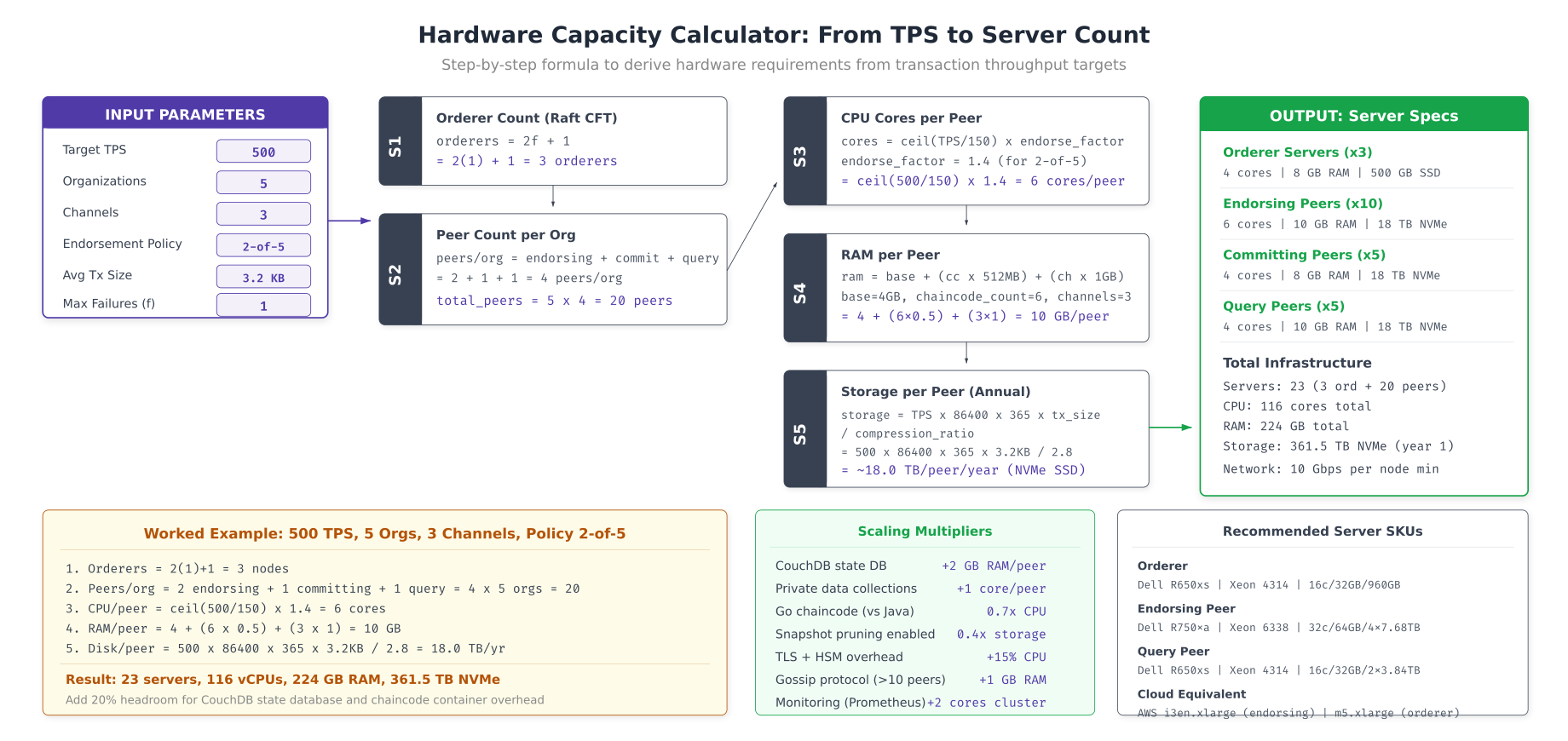
The capacity calculator takes NFA’s target of 500 TPS across 5 organizations and 3 channels and derives the full hardware requirement. Step 1 determines 3 orderers using the Raft CFT formula (2f+1 where f=1). Step 2 calculates 20 peers (4 per organization: 2 endorsing, 1 committing, 1 query). Step 3 sizes CPU at 6 cores per peer based on the endorsement throughput formula. Step 4 sizes RAM at 10 GB per peer (4 GB base + 3 GB for 6 chaincodes + 3 GB for 3 channels). Step 5 projects storage at 18 TB per peer per year after compression. The scaling multipliers table accounts for additional factors like CouchDB overhead, private data collections, programming language choice (Java chaincodes need 2.5x more memory than Go), and TLS/HSM overhead.
Power and Cooling Budget
Hardware procurement does not end with servers. Data center costs include power delivery, UPS battery backup, cooling capacity, and rack space. Underestimating power draw leads to tripped breakers under peak load, while underestimating cooling causes thermal throttling that degrades consensus performance.
# Power monitoring and capacity planning

# Measure actual server power consumption via IPMI/iDRAC
ipmitool -I lanplus -H idrac-lon-bc-01.nfa.net \
  -U admin -P "${IDRAC_PASSWORD}" \
  sdr type "Current" | grep "Pwr Consumption"

# Aggregate rack power from all servers
echo "=== Rack Power Audit ==="
for host in lon-bc-0{1,2,3,4,5,6,7}; do
  WATTS=$(ipmitool -I lanplus -H idrac-${host}.nfa.net \
    -U admin -P "${IDRAC_PASSWORD}" \
    sdr type "Current" 2>/dev/null | grep "Pwr Consumption" | awk '{print $NF}')
  echo "${host}: ${WATTS}W"
done

# UPS sizing calculation
TOTAL_PEAK_WATTS=4560    # Sum of all component peak watts
POWER_FACTOR=0.9
VA_REQUIRED=$(echo "scale=0; $TOTAL_PEAK_WATTS / $POWER_FACTOR" | bc)
REDUNDANCY_VA=$((VA_REQUIRED * 2))  # N+1 with 2 UPS units

echo "Peak load: ${TOTAL_PEAK_WATTS}W"
echo "VA required: ${VA_REQUIRED} VA"
echo "N+1 redundancy: ${REDUNDANCY_VA} VA (2x APC SRT6KRMXLI)"

# Cooling calculation
BTU_PER_WATT=3.412
PEAK_BTU=$((TOTAL_PEAK_WATTS * 3412 / 1000))
OVERHEAD_BTU=$((PEAK_BTU * 130 / 100))  # 1.3x safety margin
TONS_COOLING=$(echo "scale=2; $OVERHEAD_BTU / 12000" | bc)

echo "Cooling required: ${OVERHEAD_BTU} BTU/hr (${TONS_COOLING} tons)"

# Annual power cost
AVG_UTILIZATION=0.65
KWH_YEAR=$(echo "scale=0; $TOTAL_PEAK_WATTS * $AVG_UTILIZATION * 8760 / 1000" | bc)
PUE=1.5  # Power Usage Effectiveness (includes cooling overhead)
TOTAL_KWH=$((KWH_YEAR * 15 / 10))
COST_PER_KWH=0.12
ANNUAL_COST=$(echo "scale=0; $TOTAL_KWH * $COST_PER_KWH" | bc)

echo "Annual power: ${TOTAL_KWH} kWh"
echo "Annual cost: \$${ANNUAL_COST} (at \$${COST_PER_KWH}/kWh, PUE=${PUE})"

# Prometheus alerts for power/thermal
cat <<EOF >> /etc/prometheus/rules/thermal-alerts.yml
groups:
  - name: thermal_power
    rules:
      - alert: ServerThermalWarning
        expr: node_hwmon_temp_celsius > 75
        for: 5m
        labels:
          severity: warning
        annotations:
          summary: "CPU temp > 75°C on {{ \$labels.instance }}"

      - alert: PowerConsumptionHigh
        expr: node_power_supply_watts > 0.9 * node_power_supply_max_watts
        for: 10m
        labels:
          severity: warning
        annotations:
          summary: "Power > 90% of PSU capacity on {{ \$labels.instance }}"
EOF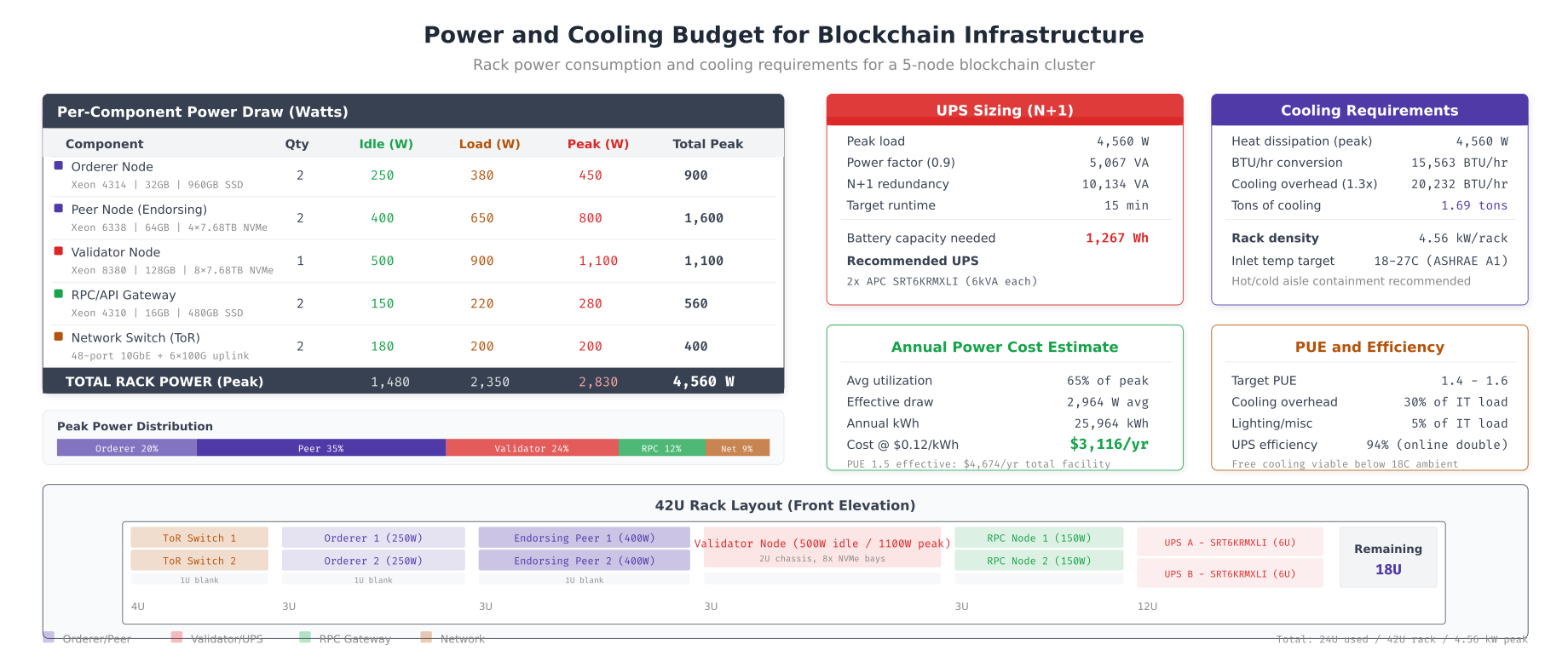
NFA’s single-rack deployment peaks at 4,560W across 2 orderers, 2 peers, 1 validator, 2 RPC gateways, and 2 network switches. The UPS calculation sizes for N+1 redundancy at 10,134 VA using two APC SRT6KRMXLI units providing 15 minutes of runtime during power outage. Cooling requirements total 20,232 BTU/hr (1.69 tons) with the 1.3x safety margin, fitting within a standard ASHRAE A1 compliant environment. At 65% average utilization with a PUE of 1.5 (accounting for cooling overhead), annual power cost per rack is $4,674 at $0.12/kWh. The 42U rack front elevation shows physical placement leaving 18U of expansion space for future growth.
Hardware Lifecycle and Procurement Timeline
Server hardware procurement for blockchain networks requires planning 12-16 weeks ahead due to supply chain lead times for enterprise NVMe drives and high-core-count processors. Additionally, HSM appliances often require 8-12 weeks for delivery and security certification.
# Hardware lifecycle management checklist

# Pre-procurement: validate requirements with benchmark
echo "=== Phase 1: Benchmark (Week 1-2) ==="
echo "- Run fio storage benchmarks on candidate drives"
echo "- Run openssl speed CPU benchmarks"
echo "- Run Caliper TPS benchmarks on existing hardware"
echo "- Validate NUMA topology for multi-socket servers"

echo ""
echo "=== Phase 2: Procurement (Week 3-14) ==="
echo "- Order servers: 8-12 week lead time for custom configs"
echo "- Order HSMs: 8-12 week lead time + security certification"
echo "- Order NVMe drives: 4-6 week lead time for enterprise grade"
echo "- Order network switches: 6-8 week lead time for 25/100GbE"

echo ""
echo "=== Phase 3: Rack and Stack (Week 15-16) ==="
echo "- Physical installation in 3 data centers"
echo "- Power and cooling verification (thermal imaging)"
echo "- Network cabling and LACP bond verification"
echo "- IPMI/iDRAC remote management configuration"

echo ""
echo "=== Phase 4: OS and Firmware (Week 17-18) ==="
echo "- BIOS/UEFI firmware updates (all servers)"
echo "- NVMe firmware updates (check vendor advisories)"
echo "- Ubuntu 22.04 LTS installation with hardened config"
echo "- Kernel tuning (sysctl, I/O schedulers, NUMA pinning)"

echo ""
echo "=== Ongoing: Lifecycle Management ==="
# Drive health monitoring (NVMe wear level)
for nvme in /dev/nvme*; do
  if [ -b "$nvme" ]; then
    echo "=== ${nvme} ==="
    nvme smart-log "$nvme" | grep -E "percentage_used|available_spare|temperature"
  fi
done

# Set drive replacement threshold
cat <<EOF >> /etc/prometheus/rules/drive-lifecycle.yml
groups:
  - name: drive_health
    rules:
      - alert: NVMeWearWarning
        expr: nvme_smart_percentage_used > 80
        labels:
          severity: warning
        annotations:
          summary: "NVMe wear level > 80% on {{ \$labels.device }}, plan replacement"
      - alert: NVMeSpareCapacityLow
        expr: nvme_smart_available_spare < 20
        labels:
          severity: critical
        annotations:
          summary: "NVMe spare capacity < 20% on {{ \$labels.device }}, replace immediately"
EOF
Summary
Planning hardware for blockchain validator nodes requires understanding the distinct resource consumption patterns of each node type. CPU selection depends on whether your workload is consensus-bound (Intel for deterministic timing), execution-bound (AMD for raw throughput), or cost-bound (ARM for best performance per dollar). Memory sizing follows per-process formulas that account for chaincode count, channel count, and state database caching. Network bandwidth must be measured under realistic load, with orderers needing the most sustained throughput for Raft replication.
Nordic Freight Alliance's deployment demonstrates the complete hardware planning lifecycle: from CPU benchmarks and memory formulas through server specification, HSM integration, and power/cooling budgets. The capacity calculator provides a repeatable method for deriving hardware requirements from any TPS target, while the procurement timeline accounts for enterprise lead times that can delay deployment by months if not planned early. Total infrastructure cost for NFA's 3-datacenter deployment is $310,440 in hardware plus $14,022 annually in power, supporting 500 TPS with room to scale to 2000 TPS by adding peer nodes and upgrading CPU generation.
Frequently Asked Questions
A Hyperledger Fabric peer node requires 8 to 16 GB of RAM depending on the number of channels and chaincode containers. Ethereum validator nodes typically need 16 to 32 GB, while orderer nodes can run on 4 to 8 GB. The formula accounts for base OS overhead, per-channel memory, CouchDB or LevelDB caching, and chaincode container memory. Always add 20% headroom for peak transaction loads.
Intel Xeon processors are preferred for orderer and consensus nodes because of their deterministic single-thread performance and clock stability. AMD EPYC processors offer better multi-core throughput for peer nodes running heavy transaction endorsement. ARM processors like AWS Graviton provide the best performance per dollar for RPC and API gateway nodes where cost efficiency matters more than raw speed.
NVMe drives are strongly recommended for validator nodes and orderer nodes due to their 5 to 10x higher IOPS compared to SATA SSDs. Blockchain workloads involve heavy random read and write operations for state database queries and block commits. SATA SSDs are acceptable only for archive nodes or backup storage where sequential read performance is sufficient. Plan for at least 50,000 IOPS for production validator nodes handling 200+ TPS.
HSM (Hardware Security Module) integration is strongly recommended for production validator nodes in regulated industries like finance and healthcare. HSMs protect private signing keys from extraction even if the host server is compromised. For Hyperledger Fabric, the BCCSP configuration supports PKCS#11 HSM integration natively. Cloud-based HSMs like AWS CloudHSM or Azure Dedicated HSM are viable alternatives to on-premise hardware, costing around $1.50 per hour per HSM instance.
Orderer nodes require the highest sustained bandwidth, typically 500 Mbps to 1 Gbps, because they replicate blocks to all peers via Raft consensus. Peer nodes need 200 to 500 Mbps depending on channel count and endorsement load. RPC nodes serving external API queries need bandwidth proportional to client connections, usually 100 to 300 Mbps. All inter-node communication should use dedicated network interfaces with mTLS encryption, adding roughly 5 to 10% overhead.