
This article covers the full TLS and mTLS implementation for blockchain networks: certificate authority hierarchy design, TLS 1.3 handshake mechanics tuned for blockchain traffic, mTLS enforcement at every communication boundary, cipher suite selection based on hardware capabilities, network segmentation using TLS zones, certificate rotation without downtime, and troubleshooting common TLS failures. The scenario simulated here is AsiaPac Clearing House (APCH), a financial clearing consortium operating Hyperledger Fabric 2.5 with a Besu settlement sidechain across data centers in Hong Kong, Sydney, Mumbai, and Seoul.
TLS 1.3 Handshake for Blockchain Node Communication
Blockchain nodes establish hundreds of persistent gRPC connections for orderer clustering, block delivery, Gossip protocol, and client endorsement requests. Each connection begins with a TLS handshake that negotiates encryption parameters and authenticates the remote node. TLS 1.3 reduces this to a single round-trip, which matters significantly when nodes are distributed across regions with 100ms+ latency.
# Generate TLS certificates for all APCH blockchain nodes
# Using Fabric CA for Hyperledger components

# Step 1: Start the root CA (offline, air-gapped for production)
# For APCH, root CA runs on an HSM-backed server in Hong Kong DC
fabric-ca-server start \
  --ca.certfile /opt/fabric-ca/root/ca-cert.pem \
  --ca.keyfile /opt/fabric-ca/root/ca-key.pem \
  --cfg.identities.allowremove \
  --cfg.affiliations.allowremove \
  --csr.cn "APCH Root CA" \
  --csr.hosts "ca.apch.internal" \
  --csr.keyrequest.algo ecdsa \
  --csr.keyrequest.size 384 \
  --tls.enabled \
  --operations.listenAddress 127.0.0.1:9443

# Step 2: Register and enroll intermediate CAs (one per organization)
# Hong Kong intermediate CA
fabric-ca-client register \
  --id.name ica-hongkong \
  --id.secret icahk2026 \
  --id.type client \
  --id.attrs "hf.IntermediateCA=true" \
  -u https://ca.apch.internal:7054 \
  --tls.certfiles /opt/fabric-ca/root/ca-cert.pem

# Enroll intermediate CA with its own key pair
fabric-ca-client enroll \
  -u https://ica-hongkong:icahk2026@ca.apch.internal:7054 \
  -M /opt/fabric-ca/ica-hongkong/msp \
  --csr.cn "APCH Hong Kong Intermediate CA" \
  --csr.hosts "ica-hongkong.apch.internal" \
  --csr.keyrequest.algo ecdsa \
  --csr.keyrequest.size 256 \
  --tls.certfiles /opt/fabric-ca/root/ca-cert.pem

# Step 3: Generate TLS certificates for orderer nodes
# Each orderer gets a TLS server cert + client cert for mTLS
fabric-ca-client enroll \
  -u https://orderer0-hongkong:orderer0pass@ica-hongkong.apch.internal:7054 \
  -M /opt/fabric/orderer0-hongkong/tls \
  --enrollment.profile tls \
  --csr.cn "orderer0-hongkong.apch.internal" \
  --csr.hosts "orderer0-hongkong.apch.internal,orderer0-hongkong,localhost,10.0.1.10" \
  --csr.keyrequest.algo ecdsa \
  --csr.keyrequest.size 256 \
  --tls.certfiles /opt/fabric-ca/root/ca-cert.pem

# Step 4: Generate TLS certificates for peer nodes
fabric-ca-client enroll \
  -u https://peer0-hongkong:peer0pass@ica-hongkong.apch.internal:7054 \
  -M /opt/fabric/peer0-hongkong/tls \
  --enrollment.profile tls \
  --csr.cn "peer0-hongkong.apch.internal" \
  --csr.hosts "peer0-hongkong.apch.internal,peer0-hongkong,localhost,10.0.2.10" \
  --csr.keyrequest.algo ecdsa \
  --csr.keyrequest.size 256 \
  --tls.certfiles /opt/fabric-ca/root/ca-cert.pem

# Verify certificate details
openssl x509 -in /opt/fabric/orderer0-hongkong/tls/signcerts/cert.pem \
  -noout -text | grep -A5 "Subject:\|Subject Alternative Name\|Key Usage"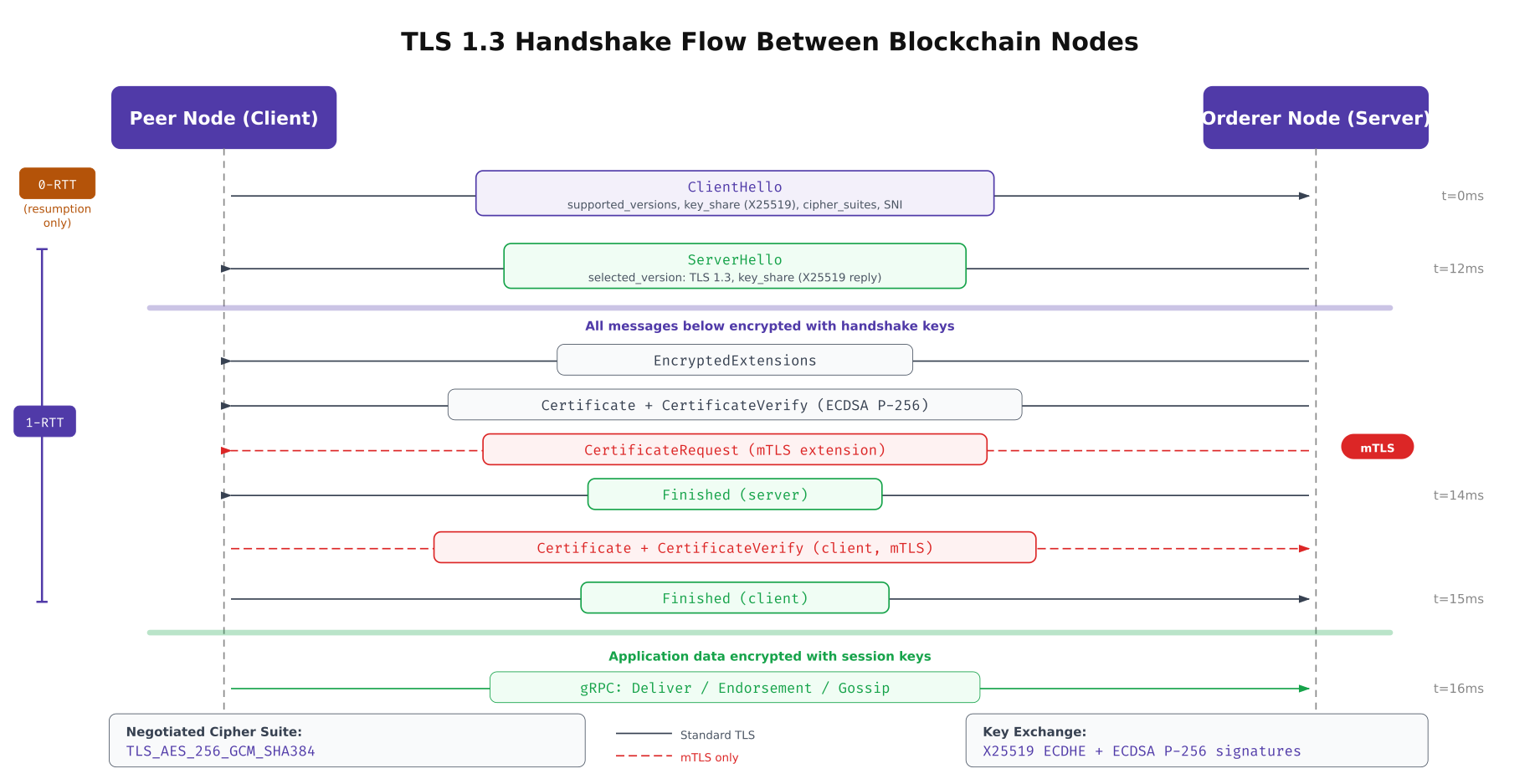
The above illustration traces the complete TLS 1.3 handshake between a peer node (client) and an orderer node (server). The key improvement over TLS 1.2 is the single round-trip negotiation: the client sends its key share in the ClientHello message, allowing the server to derive encryption keys immediately. The mTLS extension adds a CertificateRequest from the server, requiring the client to present its own certificate. This bidirectional authentication is what prevents unauthorized nodes from connecting to the blockchain network.
PKI Certificate Hierarchy for Consortium Networks
A production blockchain network requires a well-designed PKI hierarchy that balances security (long-lived root CA protection) with operational flexibility (frequent leaf certificate rotation). APCH uses a three-tier structure: an offline root CA protected by HSM, per-organization intermediate CAs that issue day-to-day certificates, and leaf certificates scoped to specific node roles with tight expiration windows.
# Root CA configuration, generated once, stored on air-gapped HSM
# /opt/fabric-ca/root/fabric-ca-server-config.yaml

ca:
  name: apch-root-ca
  keyfile: /opt/fabric-ca/root/ca-key.pem
  certfile: /opt/fabric-ca/root/ca-cert.pem
  chainfile: /opt/fabric-ca/root/ca-chain.pem

csr:
  cn: "APCH Consortium Root CA"
  keyrequest:
    algo: ecdsa
    size: 384    # P-384 for root CA (stronger, longer-lived)
  names:
    - C: HK
      ST: Hong Kong
      O: AsiaPac Clearing House
      OU: Blockchain Infrastructure
  hosts:
    - ca.apch.internal
  ca:
    expiry: "175200h"    # 20 years
    pathlength: 2        # Allows root -> intermediate -> leaf

# Intermediate CA configuration, one per organization
# /opt/fabric-ca/ica-hongkong/fabric-ca-server-config.yaml

intermediate:
  parentserver:
    url: https://ca.apch.internal:7054
    caname: apch-root-ca
  enrollment:
    hosts: "ica-hongkong.apch.internal"
  tls:
    certfiles:
      - /opt/fabric-ca/root/ca-cert.pem

ca:
  name: apch-ica-hongkong
  keyfile: /opt/fabric-ca/ica-hongkong/ca-key.pem
  certfile: /opt/fabric-ca/ica-hongkong/ca-cert.pem

csr:
  cn: "APCH Hong Kong Intermediate CA"
  keyrequest:
    algo: ecdsa
    size: 256    # P-256 for intermediate (balance of security/performance)
  ca:
    expiry: "87600h"    # 10 years
    pathlength: 1       # Can only issue leaf certificates

signing:
  default:
    usage:
      - digital signature
      - key encipherment
    expiry: "8760h"    # Default leaf cert: 1 year
  profiles:
    tls:
      usage:
        - digital signature
        - key encipherment
        - server auth
        - client auth    # Required for mTLS
      expiry: "8760h"
    admin:
      usage:
        - digital signature
      expiry: "2160h"    # Admin certs: 90 days
    client:
      usage:
        - digital signature
        - client auth
      expiry: "720h"     # Client SDK certs: 30 days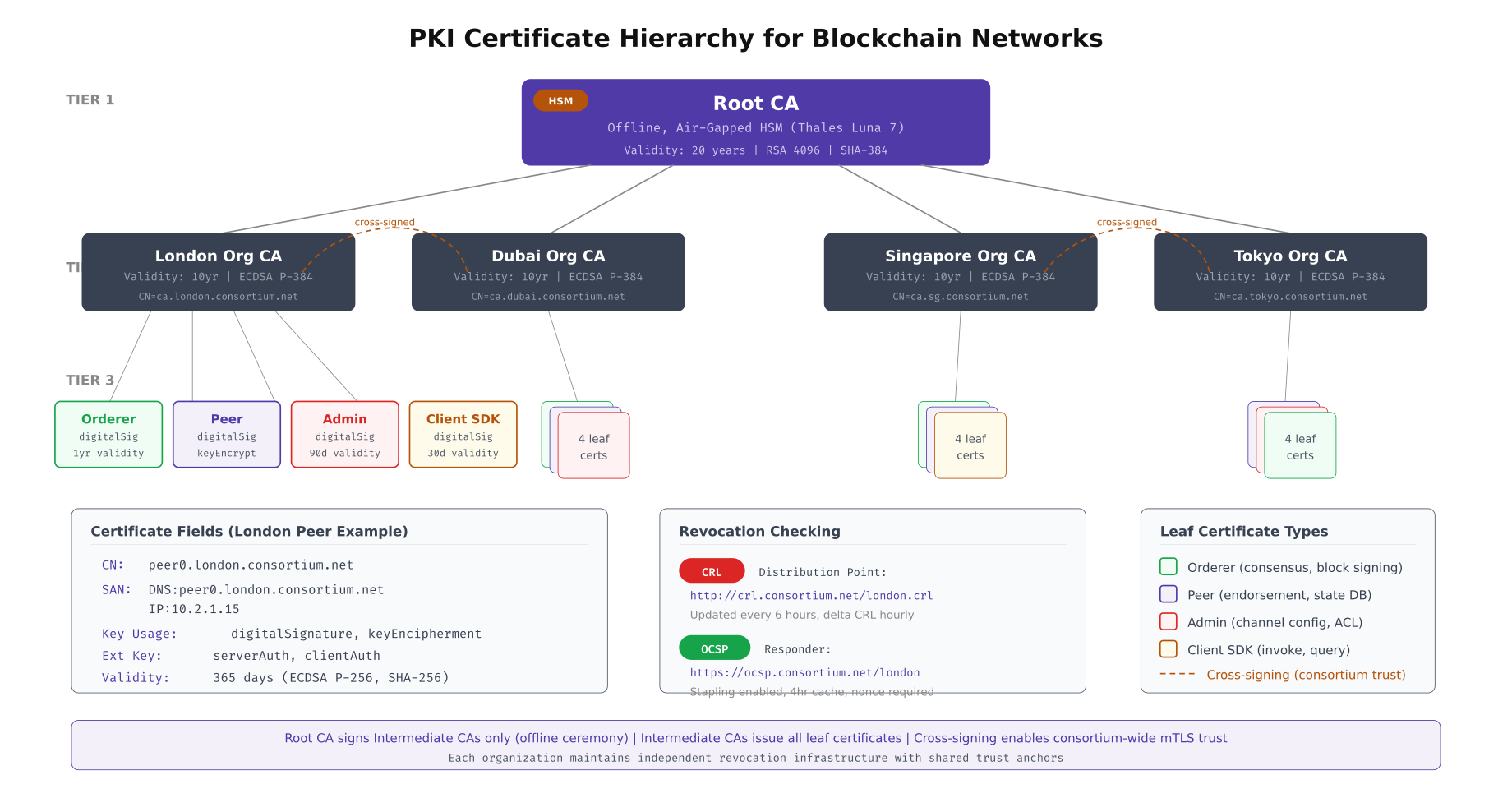
This diagram maps the complete certificate hierarchy used by APCH. The root CA sits at the apex, issued once and stored on an air-gapped HSM with a 20-year validity period. Each organization (Hong Kong, Sydney, Mumbai, Seoul) operates its own intermediate CA with a 10-year lifetime. Leaf certificates are scoped by role: orderer TLS certs carry both server and client auth key usage for mTLS, peer certs include Gossip authentication, admin certs expire after 90 days to limit exposure, and client SDK certs rotate every 30 days. The cross-signing paths between organization CAs enable peers from different organizations to verify each other’s certificates without requiring direct root CA access.
# Set up CRL (Certificate Revocation List) and OCSP responder
# Critical for revoking compromised node certificates

# Generate CRL from Fabric CA
fabric-ca-client gencrl \
  -u https://ica-hongkong.apch.internal:7054 \
  --tls.certfiles /opt/fabric-ca/root/ca-cert.pem \
  -M /opt/fabric-ca/ica-hongkong/msp

# Distribute CRL to all nodes
for NODE in orderer0-hongkong peer0-hongkong peer1-hongkong; do
  scp /opt/fabric-ca/ica-hongkong/msp/crls/crl.pem \
    ${NODE}.apch.internal:/opt/fabric/msp/crls/crl.pem
done

# Revoke a compromised certificate (e.g., stolen peer key)
fabric-ca-client revoke \
  -u https://ica-hongkong.apch.internal:7054 \
  --revoke.name peer0-hongkong \
  --revoke.serial "0A:1B:2C:3D:4E:5F" \
  --revoke.reason keycompromise \
  --tls.certfiles /opt/fabric-ca/root/ca-cert.pem

# Regenerate CRL after revocation
fabric-ca-client gencrl \
  -u https://ica-hongkong.apch.internal:7054 \
  --tls.certfiles /opt/fabric-ca/root/ca-cert.pem \
  -M /opt/fabric-ca/ica-hongkong/msp

# Set up OCSP responder for real-time revocation checking
# Using openssl ocsp responder (production: use a dedicated OCSP service)
openssl ocsp -index /opt/fabric-ca/ica-hongkong/index.txt \
  -port 8888 \
  -rsigner /opt/fabric-ca/ica-hongkong/ocsp-signing-cert.pem \
  -rkey /opt/fabric-ca/ica-hongkong/ocsp-signing-key.pem \
  -CA /opt/fabric-ca/ica-hongkong/ca-cert.pem \
  -text -nmin 240    # Cache responses for 4 hours

# Verify OCSP response for a specific certificate
openssl ocsp \
  -issuer /opt/fabric-ca/ica-hongkong/ca-cert.pem \
  -cert /opt/fabric/peer0-hongkong/tls/signcerts/cert.pem \
  -url http://ocsp.apch.internal:8888 \
  -resp_text
Mutual TLS Enforcement at Every Boundary
A blockchain network has four distinct communication boundaries where mTLS must be enforced independently: orderer-to-orderer (Raft consensus), peer-to-orderer (block delivery), peer-to-peer (Gossip protocol), and client-to-peer (transaction submission). Each boundary has different trust requirements and failure handling. APCH enforces mTLS at all four with zero exceptions.
# Orderer mTLS configuration, orderer.yaml
# Enforces mutual TLS for all Raft cluster communication

General:
  TLS:
    Enabled: true
    # Server TLS certificate and key
    Certificate: /opt/fabric/orderer0-hongkong/tls/signcerts/cert.pem
    PrivateKey: /opt/fabric/orderer0-hongkong/tls/keystore/key.pem
    # Root CAs trusted for incoming client connections
    RootCAs:
      - /opt/fabric/orderer0-hongkong/tls/tlscacerts/tls-ca-cert.pem
    # Require client certificates (mTLS enforcement)
    ClientAuthRequired: true
    # CAs trusted specifically for client certificate verification
    ClientRootCAs:
      - /opt/fabric/orderer0-hongkong/tls/tlscacerts/tls-ca-cert.pem

  Cluster:
    # Separate TLS config for intra-cluster (Raft) communication
    ClientCertificate: /opt/fabric/orderer0-hongkong/tls/signcerts/cert.pem
    ClientPrivateKey: /opt/fabric/orderer0-hongkong/tls/keystore/key.pem
    RootCAs:
      - /opt/fabric/orderer0-hongkong/tls/tlscacerts/tls-ca-cert.pem
    # Strict server hostname verification
    ServerNameOverride: ""

# Peer mTLS configuration, core.yaml
peer:
  tls:
    enabled: true
    cert:
      file: /opt/fabric/peer0-hongkong/tls/signcerts/cert.pem
    key:
      file: /opt/fabric/peer0-hongkong/tls/keystore/key.pem
    rootcert:
      file: /opt/fabric/peer0-hongkong/tls/tlscacerts/tls-ca-cert.pem
    # Require client certs for all incoming connections
    clientAuthRequired: true
    clientRootCAs:
      files:
        - /opt/fabric/peer0-hongkong/tls/tlscacerts/tls-ca-cert.pem
    # Verify TLS certificate hostname matches the connecting node
    clientCert:
      file: /opt/fabric/peer0-hongkong/tls/signcerts/cert.pem
    clientKey:
      file: /opt/fabric/peer0-hongkong/tls/keystore/key.pem

  # Gossip protocol mTLS settings
  gossip:
    useLeaderElection: true
    orgLeader: false
    # External endpoint, must match TLS SAN
    externalEndpoint: peer0-hongkong.apch.internal:7051
    # Use TLS for all Gossip communication
    dialTimeout: 3s
    connTimeout: 2s
    # Peer authentication
    pvtData:
      pullRetryThreshold: 60s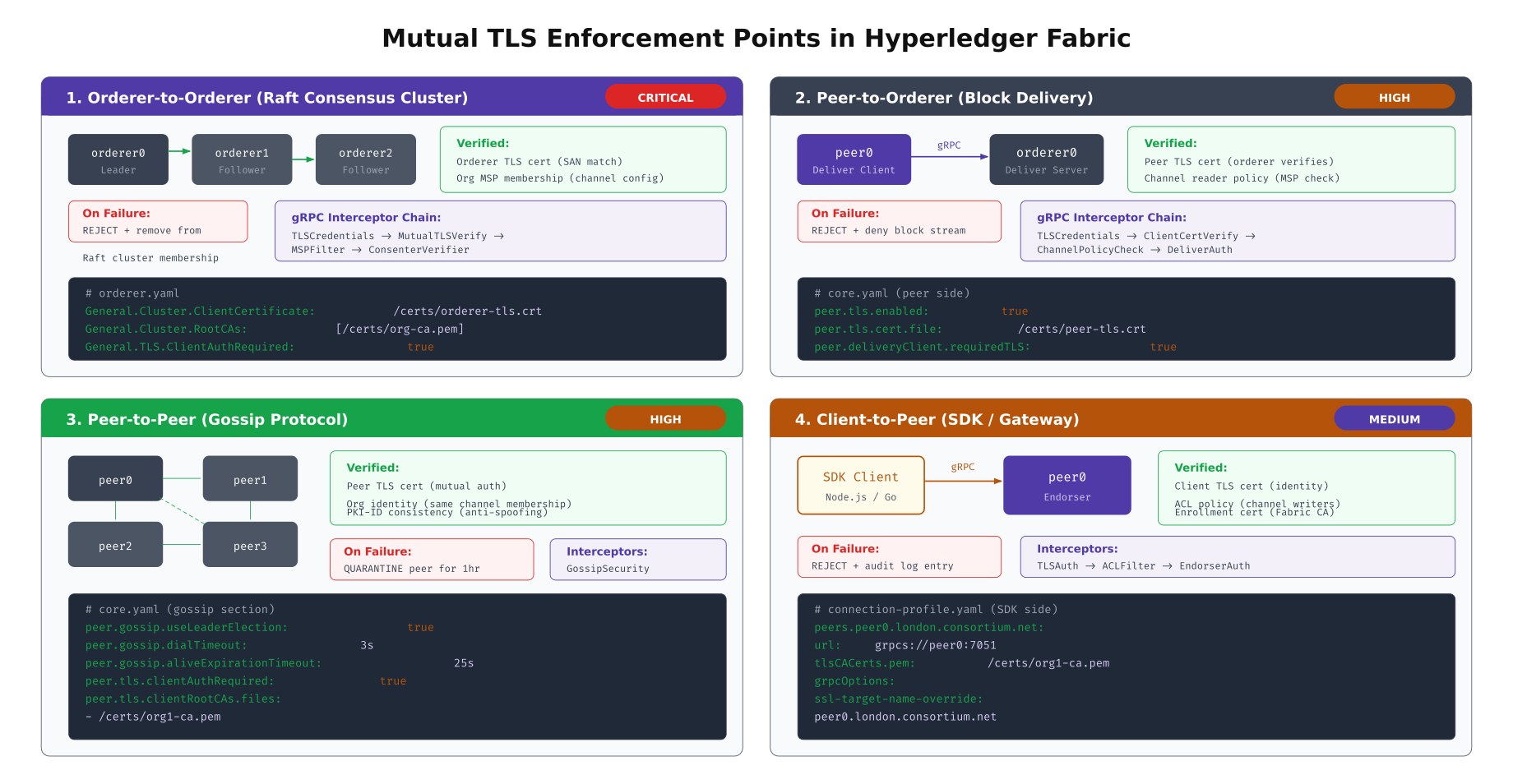
The illustration above details the four mTLS enforcement points across the APCH network. The orderer-to-orderer boundary is the most critical: a compromised orderer could reorder transactions, so Raft cluster membership strictly verifies TLS certificates against the channel configuration. The peer-to-peer Gossip boundary uses a quarantine mechanism, temporarily isolating peers that present invalid certificates for one hour before allowing reconnection. The client-to-peer boundary accepts certificates from any trusted intermediate CA but enforces ACL policies to restrict which enrolled identities can invoke which chaincode functions.
# Verify mTLS is enforced on all endpoints
# Run this audit script periodically to catch misconfigurations

#!/bin/bash
# mtls-audit.sh, Verify mTLS enforcement across all blockchain endpoints

ENDPOINTS=(
  "orderer0-hongkong.apch.internal:7050|orderer"
  "orderer1-sydney.apch.internal:7050|orderer"
  "orderer2-mumbai.apch.internal:7050|orderer"
  "peer0-hongkong.apch.internal:7051|peer"
  "peer0-sydney.apch.internal:7051|peer"
  "peer0-mumbai.apch.internal:7051|peer"
  "peer0-seoul.apch.internal:7051|peer"
)

CA_CERT="/opt/fabric/tls/ca-cert.pem"
CLIENT_CERT="/opt/fabric/admin/tls/cert.pem"
CLIENT_KEY="/opt/fabric/admin/tls/key.pem"

echo "=== mTLS Enforcement Audit, $(date -Iseconds) ==="

for ENTRY in "${ENDPOINTS[@]}"; do
  ENDPOINT=$(echo "$ENTRY" | cut -d'|' -f1)
  TYPE=$(echo "$ENTRY" | cut -d'|' -f2)
  HOST=$(echo "$ENDPOINT" | cut -d: -f1)
  PORT=$(echo "$ENDPOINT" | cut -d: -f2)

  # Test 1: Connection WITHOUT client cert should fail
  RESULT=$(echo | openssl s_client \
    -connect "$ENDPOINT" \
    -CAfile "$CA_CERT" \
    -servername "$HOST" 2>&1)

  if echo "$RESULT" | grep -q "alert handshake failure\|alert certificate required"; then
    echo "[PASS] $ENDPOINT, Rejects connections without client cert"
  else
    echo "[FAIL] $ENDPOINT, Accepts connections WITHOUT client cert!"
  fi

  # Test 2: Connection WITH valid client cert should succeed
  RESULT=$(echo | openssl s_client \
    -connect "$ENDPOINT" \
    -CAfile "$CA_CERT" \
    -cert "$CLIENT_CERT" \
    -key "$CLIENT_KEY" \
    -servername "$HOST" 2>&1)

  if echo "$RESULT" | grep -q "Verify return code: 0"; then
    echo "[PASS] $ENDPOINT, Accepts valid mTLS connection"
  else
    echo "[FAIL] $ENDPOINT, Rejects valid client cert!"
  fi

  # Test 3: Verify TLS version is 1.3
  TLS_VER=$(echo "$RESULT" | grep "Protocol" | awk '{print $NF}')
  if [ "$TLS_VER" = "TLSv1.3" ]; then
    echo "[PASS] $ENDPOINT, Using TLS 1.3"
  else
    echo "[WARN] $ENDPOINT, Using $TLS_VER (expected TLS 1.3)"
  fi

  echo ""
done
Cipher Suite Selection and Performance
Not all cipher suites perform equally across different hardware architectures. Intel/AMD processors with AES-NI instructions can process AES-GCM at near-wire speed, while ARM-based processors (AWS Graviton, Apple Silicon) may perform better with ChaCha20-Poly1305. The choice of cipher suite affects both handshake latency and sustained throughput for ongoing gRPC streams between blockchain nodes.
# Benchmark cipher suites on your specific hardware
# Run on each node type before configuring cipher preferences

# TLS_AES_256_GCM_SHA384, default for most Fabric deployments
openssl speed -evp aes-256-gcm -multi $(nproc)

# TLS_CHACHA20_POLY1305_SHA256, better on ARM without AES-NI
openssl speed -evp chacha20-poly1305 -multi $(nproc)

# TLS_AES_128_GCM_SHA256, faster but shorter key length
openssl speed -evp aes-128-gcm -multi $(nproc)

# Full benchmark comparison script
#!/bin/bash
# cipher-benchmark.sh, Compare TLS cipher suite performance

echo "=== Cipher Suite Benchmark, $(hostname) ==="
echo "CPU: $(lscpu | grep 'Model name' | awk -F: '{print $2}' | xargs)"
echo "AES-NI: $(grep -c aes /proc/cpuinfo) cores with AES-NI"
echo ""

for CIPHER in aes-256-gcm chacha20-poly1305 aes-128-gcm; do
  echo "--- $CIPHER ---"
  RESULT=$(openssl speed -evp $CIPHER -seconds 10 -multi $(nproc) 2>&1 | tail -1)
  echo "  Throughput: $RESULT"

  # Measure handshake performance with this cipher
  HANDSHAKE=$(openssl s_time -connect localhost:7050 \
    -new -time 10 \
    -cipher "TLS_$(echo $CIPHER | tr '[:lower:]' '[:upper:]' | tr '-' '_')_SHA384" \
    2>&1 | grep "connections/user")
  echo "  Handshakes: $HANDSHAKE"
  echo ""
done

# Check for hardware acceleration support
echo "=== Hardware Acceleration ==="
openssl engine -t 2>/dev/null | grep -E "aes|chacha"
echo ""

# On ARM Graviton, check NEON/ARMv8 crypto extensions
if [ "$(uname -m)" = "aarch64" ]; then
  echo "ARM Crypto Extensions:"
  grep -c "aes\|sha2\|pmull" /proc/cpuinfo
fi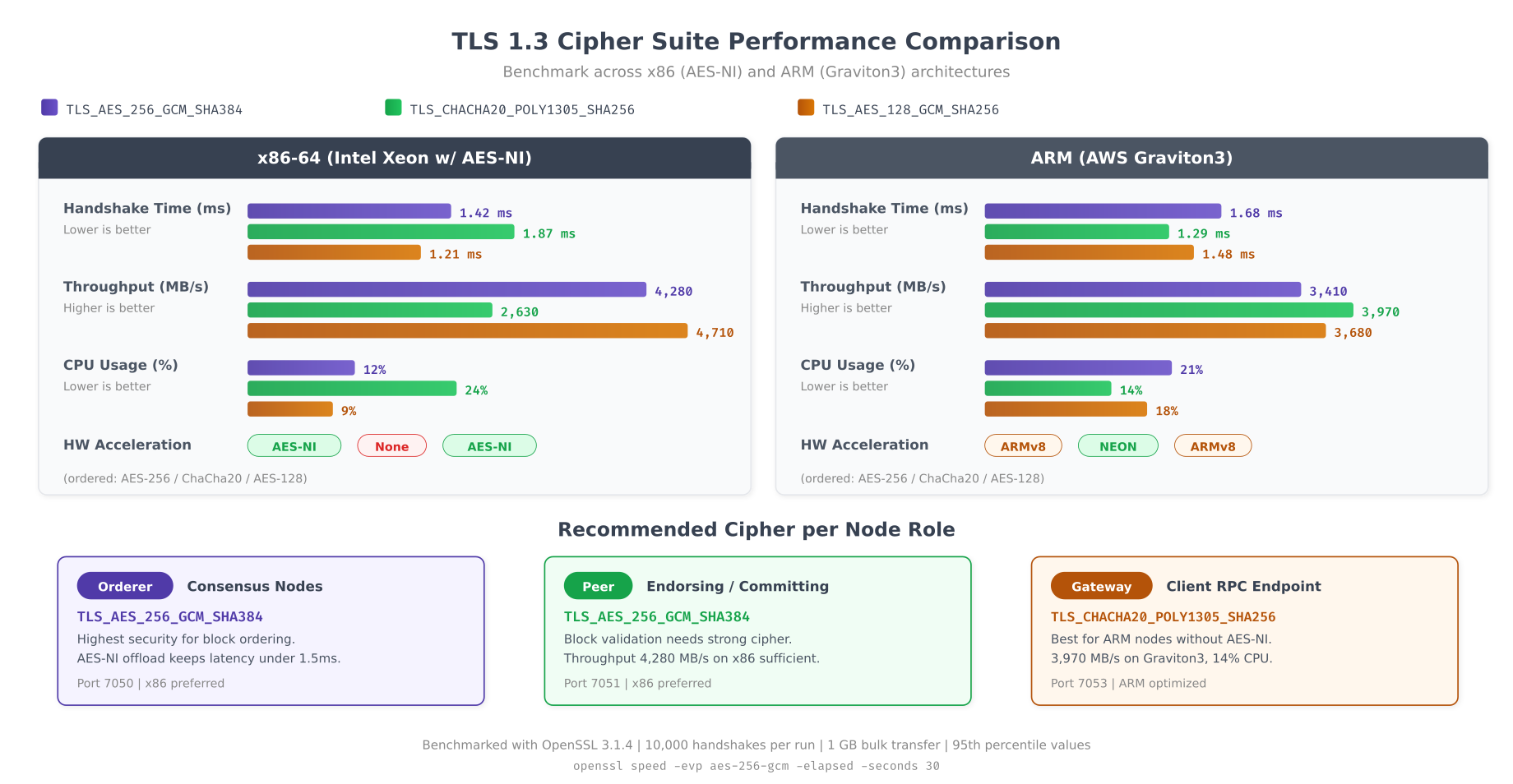
The benchmarks reveal a clear pattern. On x86 processors with AES-NI, AES-256-GCM delivers the highest throughput because the encryption operations execute directly in hardware. On ARM Graviton3 processors, ChaCha20-Poly1305 performs comparably because ARMv8 crypto extensions optimize both algorithms. APCH’s recommendation is straightforward: orderers and peers running on x86 use AES-256-GCM for maximum throughput on their high-volume gRPC streams, while RPC gateways deployed on ARM-based instances use ChaCha20-Poly1305 to serve external client connections efficiently.
# Configure cipher suite preferences in Fabric and Besu

# Fabric orderer/peer, set via environment variables
# The Go TLS library in Fabric respects GODEBUG for cipher control
export ORDERER_GENERAL_TLS_CIPHERSUITES="TLS_AES_256_GCM_SHA384,TLS_CHACHA20_POLY1305_SHA256"
export CORE_PEER_TLS_CIPHERSUITES="TLS_AES_256_GCM_SHA384,TLS_CHACHA20_POLY1305_SHA256"

# Besu, configure in config.toml
# /opt/besu/config/config.toml
[p2p]
tls-protocols = ["TLSv1.3"]
tls-cipher-suites = [
  "TLS_AES_256_GCM_SHA384",
  "TLS_CHACHA20_POLY1305_SHA256"
]

# HAProxy front-end, restrict to TLS 1.3 only
# /etc/haproxy/haproxy.cfg
global
    ssl-default-bind-ciphersuites TLS_AES_256_GCM_SHA384:TLS_CHACHA20_POLY1305_SHA256
    ssl-default-bind-options ssl-min-ver TLSv1.3 no-tls-tickets
    ssl-default-server-ciphersuites TLS_AES_256_GCM_SHA384:TLS_CHACHA20_POLY1305_SHA256
    ssl-default-server-options ssl-min-ver TLSv1.3

# Envoy proxy for gRPC TLS termination
# /etc/envoy/envoy.yaml
static_resources:
  listeners:
    - name: fabric_listener
      address:
        socket_address:
          address: 0.0.0.0
          port_value: 7051
      filter_chains:
        - transport_socket:
            name: envoy.transport_sockets.tls
            typed_config:
              "@type": type.googleapis.com/envoy.extensions.transport_sockets.tls.v3.DownstreamTlsContext
              require_client_certificate: true
              common_tls_context:
                tls_params:
                  tls_minimum_protocol_version: TLSv1_3
                  cipher_suites:
                    - TLS_AES_256_GCM_SHA384
                    - TLS_CHACHA20_POLY1305_SHA256
                tls_certificates:
                  - certificate_chain:
                      filename: /etc/envoy/certs/server-cert.pem
                    private_key:
                      filename: /etc/envoy/certs/server-key.pem
                validation_context:
                  trusted_ca:
                    filename: /etc/envoy/certs/ca-chain.pem
Network Segmentation with TLS Security Zones
APCH divides its blockchain network into four TLS security zones, each with distinct certificate requirements, access controls, and firewall rules. Zone isolation ensures that a compromised client SDK certificate cannot be used to access the Raft consensus channel, and a stolen admin certificate cannot be used from outside the admin VLAN.
# Firewall rules for TLS zone enforcement
# Apply on each blockchain node using iptables or nftables

#!/bin/bash
# tls-zone-firewall.sh, Enforce network segmentation between TLS zones

# Zone CIDRs
CONSENSUS_ZONE="10.0.1.0/24"    # Zone 1: Orderers only
ENDORSEMENT_ZONE="10.0.2.0/24"  # Zone 2: Peers only
CLIENT_ZONE="10.0.3.0/24"       # Zone 3: Gateways + SDK clients
ADMIN_ZONE="10.0.4.0/24"        # Zone 4: Admin consoles + monitoring

# Flush existing rules
sudo iptables -F
sudo iptables -X

# Default policy: deny all
sudo iptables -P INPUT DROP
sudo iptables -P FORWARD DROP
sudo iptables -P OUTPUT ACCEPT

# Allow loopback
sudo iptables -A INPUT -i lo -j ACCEPT

# Allow established connections
sudo iptables -A INPUT -m state --state ESTABLISHED,RELATED -j ACCEPT

# Zone 1 → Zone 1: Orderer Raft communication (port 7050)
sudo iptables -A INPUT -s "$CONSENSUS_ZONE" -d "$CONSENSUS_ZONE" \
  -p tcp --dport 7050 -j ACCEPT
# Orderer cluster port
sudo iptables -A INPUT -s "$CONSENSUS_ZONE" -d "$CONSENSUS_ZONE" \
  -p tcp --dport 7053 -j ACCEPT

# Zone 2 → Zone 1: Peer block delivery from orderer (port 7050)
sudo iptables -A INPUT -s "$ENDORSEMENT_ZONE" -d "$CONSENSUS_ZONE" \
  -p tcp --dport 7050 -j ACCEPT

# Zone 2 → Zone 2: Peer Gossip communication (port 7051)
sudo iptables -A INPUT -s "$ENDORSEMENT_ZONE" -d "$ENDORSEMENT_ZONE" \
  -p tcp --dport 7051 -j ACCEPT

# Zone 3 → Zone 2: Client endorsement requests (port 7051)
sudo iptables -A INPUT -s "$CLIENT_ZONE" -d "$ENDORSEMENT_ZONE" \
  -p tcp --dport 7051 -j ACCEPT

# Zone 3 → Zone 1: Client transaction submission to orderer (port 7050)
sudo iptables -A INPUT -s "$CLIENT_ZONE" -d "$CONSENSUS_ZONE" \
  -p tcp --dport 7050 -j ACCEPT

# Zone 4 → All: Admin operations (port 9443), IP allowlist
sudo iptables -A INPUT -s "$ADMIN_ZONE" -p tcp --dport 9443 -j ACCEPT

# Zone 4 → All: Prometheus metrics scraping (port 9101)
sudo iptables -A INPUT -s "$ADMIN_ZONE" -p tcp --dport 9101 -j ACCEPT

# DENY: Client zone cannot reach orderer cluster port
sudo iptables -A INPUT -s "$CLIENT_ZONE" -d "$CONSENSUS_ZONE" \
  -p tcp --dport 7053 -j DROP

# DENY: No zone can reach admin port except Zone 4
sudo iptables -A INPUT -p tcp --dport 9443 -j DROP

# Log dropped packets for audit
sudo iptables -A INPUT -j LOG --log-prefix "TLS-ZONE-DROP: " --log-level 4
sudo iptables -A INPUT -j DROP

# Save rules
sudo iptables-save > /etc/iptables/rules.v4
echo "TLS zone firewall rules applied"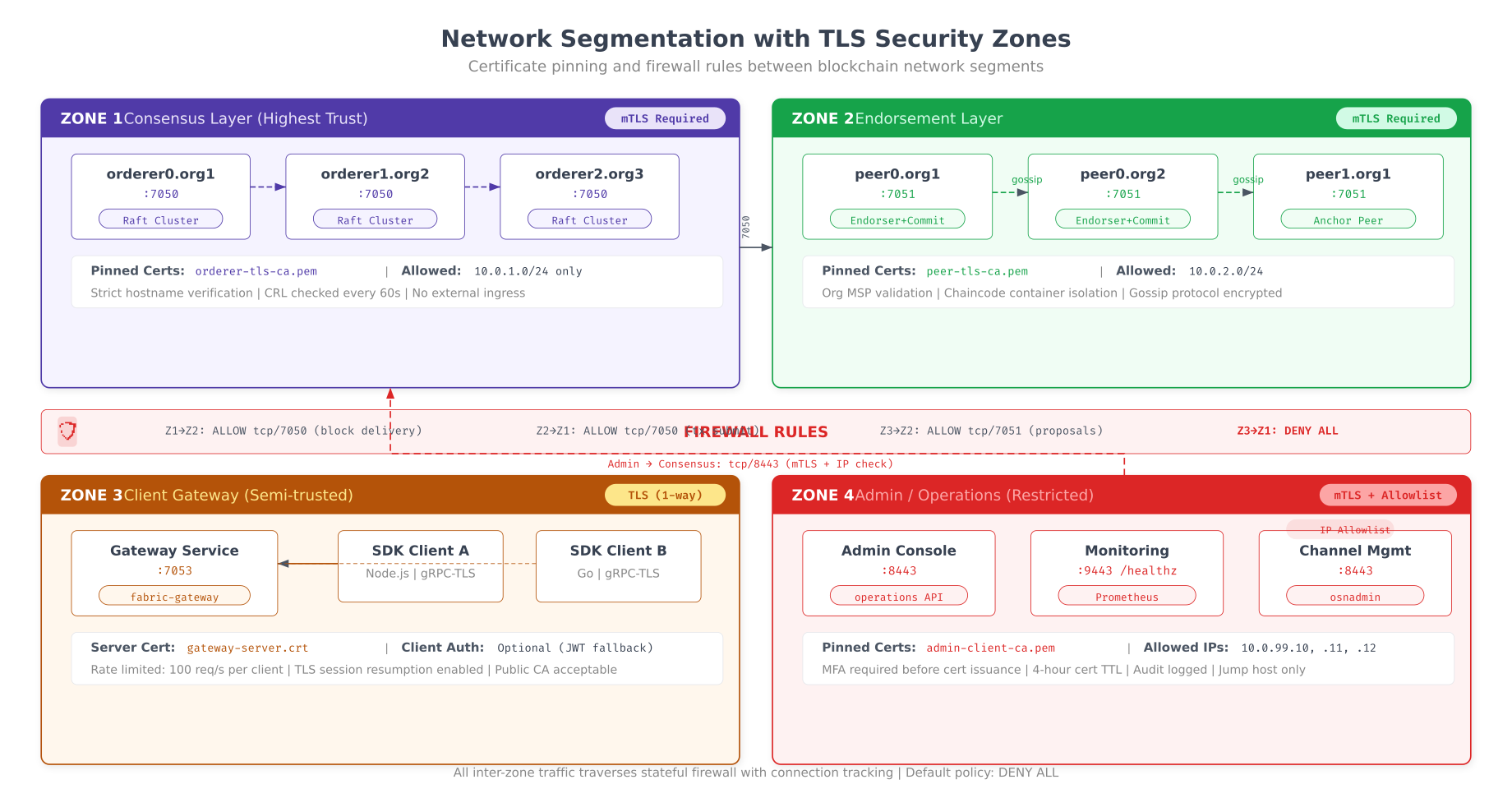
As shown above, the four security zones create clear boundaries between different trust levels. The consensus zone (Zone 1) has the strictest controls: only orderer nodes with certificates signed by verified intermediate CAs can communicate on ports 7050 and 7053. The endorsement zone (Zone 2) allows peer-to-peer Gossip on port 7051 with mutual TLS verification. The client zone (Zone 3) accepts connections from SDK applications through the gateway service, where TLS is required but mTLS is optional depending on the security policy. The admin zone (Zone 4) requires both mTLS and IP allowlisting, with short-lived certificates (4-hour TTL) that limit the exposure window if an admin workstation is compromised.
Certificate Rotation Without Downtime
TLS certificates expire. In a production blockchain network running 24/7, certificate rotation must happen without stopping any node or interrupting transaction processing. The key technique is a dual-certificate acceptance window: for a period before the old certificate expires, both old and new certificates are considered valid. This gives time for all nodes in the consortium to update their trust stores.
# Automated certificate rotation for Hyperledger Fabric
# Run as a cron job 30 days before each certificate expiry

#!/bin/bash
# cert-rotation.sh, Zero-downtime TLS certificate rotation

set -e

NODE_TYPE=$1          # "orderer" or "peer"
NODE_NAME=$2          # e.g., "orderer0-hongkong"
CA_URL=$3             # e.g., "https://ica-hongkong.apch.internal:7054"
CHANNEL=$4            # e.g., "apch-clearing"
DAYS_BEFORE_EXPIRY=30
LOG_FILE="/var/log/fabric/cert-rotation.log"

log() { echo "[$(date -Iseconds)] $1" | tee -a "$LOG_FILE"; }

# Step 1: Check current certificate expiry
CURRENT_CERT="/opt/fabric/${NODE_NAME}/tls/signcerts/cert.pem"
EXPIRY=$(openssl x509 -in "$CURRENT_CERT" -noout -enddate | cut -d= -f2)
EXPIRY_EPOCH=$(date -d "$EXPIRY" +%s)
NOW_EPOCH=$(date +%s)
DAYS_LEFT=$(( (EXPIRY_EPOCH - NOW_EPOCH) / 86400 ))

log "Current cert expires: $EXPIRY ($DAYS_LEFT days remaining)"

if [ "$DAYS_LEFT" -gt "$DAYS_BEFORE_EXPIRY" ]; then
  log "Certificate still valid for $DAYS_LEFT days. No rotation needed."
  exit 0
fi

log "Certificate expires in $DAYS_LEFT days. Starting rotation..."

# Step 2: Generate new certificate from Fabric CA
BACKUP_DIR="/opt/fabric/${NODE_NAME}/tls/backup-$(date +%Y%m%d)"
mkdir -p "$BACKUP_DIR"
cp -r /opt/fabric/${NODE_NAME}/tls/signcerts "$BACKUP_DIR/"
cp -r /opt/fabric/${NODE_NAME}/tls/keystore "$BACKUP_DIR/"
log "Backed up current certificates to $BACKUP_DIR"

fabric-ca-client reenroll \
  -u "$CA_URL" \
  -M /opt/fabric/${NODE_NAME}/tls \
  --enrollment.profile tls \
  --csr.cn "${NODE_NAME}.apch.internal" \
  --csr.hosts "${NODE_NAME}.apch.internal,${NODE_NAME},localhost" \
  --tls.certfiles /opt/fabric-ca/root/ca-cert.pem

NEW_CERT="/opt/fabric/${NODE_NAME}/tls/signcerts/cert.pem"
NEW_SERIAL=$(openssl x509 -in "$NEW_CERT" -noout -serial | cut -d= -f2)
log "New certificate generated. Serial: $NEW_SERIAL"

# Step 3: Update channel configuration to accept new certificate
# (Required for orderer nodes, peers update automatically via Gossip)
if [ "$NODE_TYPE" = "orderer" ]; then
  log "Updating channel config with new orderer TLS certificate..."

  # Fetch current channel config
  peer channel fetch config config_block.pb \
    -o orderer0-hongkong.apch.internal:7050 \
    -c "$CHANNEL" \
    --tls --cafile /opt/fabric/tls/orderer-ca.crt

  # Decode to JSON
  configtxlator proto_decode --input config_block.pb \
    --type common.Block | jq '.data.data[0].payload.data.config' > config.json

  # Add new TLS cert to orderer consenter list (keep old cert too)
  NEW_TLS_B64=$(base64 -w0 "$NEW_CERT")
  jq --arg cert "$NEW_TLS_B64" \
    '.channel_group.groups.Orderer.values.ConsensusType.value.metadata.consenters[0].client_tls_cert = $cert |
     .channel_group.groups.Orderer.values.ConsensusType.value.metadata.consenters[0].server_tls_cert = $cert' \
    config.json > modified_config.json

  # Compute config update delta
  configtxlator proto_encode --input config.json \
    --type common.Config --output config.pb
  configtxlator proto_encode --input modified_config.json \
    --type common.Config --output modified_config.pb
  configtxlator compute_update --channel_id "$CHANNEL" \
    --original config.pb --updated modified_config.pb \
    --output config_update.pb

  # Sign and submit config update
  peer channel signconfigtx -f config_update.pb
  peer channel update -f config_update.pb \
    -c "$CHANNEL" \
    -o orderer0-hongkong.apch.internal:7050 \
    --tls --cafile /opt/fabric/tls/orderer-ca.crt

  log "Channel config updated with new TLS certificate"
fi

# Step 4: Reload node with new certificate (graceful restart)
if [ "$NODE_TYPE" = "orderer" ]; then
  sudo systemctl reload fabric-orderer@${NODE_NAME}.service
else
  sudo systemctl reload fabric-peer@${NODE_NAME}.service
fi

log "Node reloaded with new certificate. Old cert remains valid until $EXPIRY"
log "Rotation complete. Monitor for TLS handshake errors in the next 24 hours."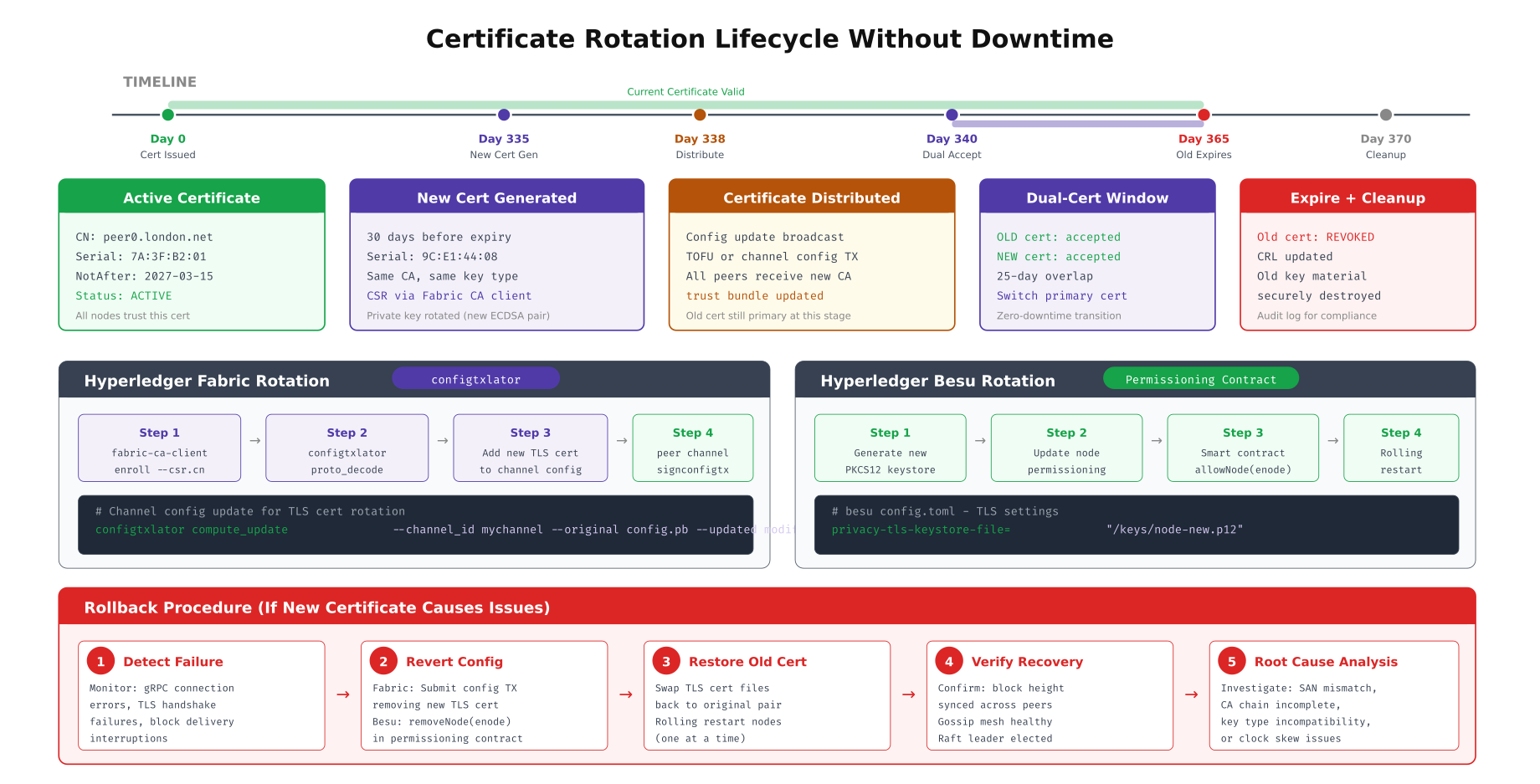
This timeline traces the complete rotation lifecycle. The new certificate is generated 30 days before expiry, giving ample time for distribution and testing. During the dual acceptance window (days 340 to 365), both the old and new certificates are valid, so nodes that have not yet updated their trust stores continue to operate. For Fabric networks, the rotation requires a channel configuration update to replace the TLS certificate in the consenter list. For Besu networks, the permissioning smart contract must be updated with the new node’s enode ID. The rollback procedure at the bottom provides a recovery path if the new certificate causes connection failures.
Besu mTLS Configuration for Settlement Sidechain
APCH’s Besu settlement sidechain enforces mTLS on P2P validator communication and RPC endpoints. Unlike Fabric where TLS configuration is primarily YAML-based, Besu uses PKCS12 keystores and TOML configuration files. The permissioning system adds an additional layer by restricting which enode IDs (derived from the TLS certificate’s public key) can participate in consensus.
# Generate PKCS12 keystore for Besu node TLS
# Each validator needs a separate keystore

# Generate ECDSA key pair
openssl ecparam -name secp256k1 -genkey -noout -out /opt/besu/config/node-key.pem

# Generate CSR with proper SAN entries
openssl req -new -key /opt/besu/config/node-key.pem \
  -out /opt/besu/config/node.csr \
  -subj "/CN=besu-validator0-hongkong.apch.internal/O=APCH/C=HK" \
  -addext "subjectAltName=DNS:besu-validator0-hongkong.apch.internal,IP:10.0.1.50"

# Sign with intermediate CA
openssl x509 -req -in /opt/besu/config/node.csr \
  -CA /opt/fabric-ca/ica-hongkong/ca-cert.pem \
  -CAkey /opt/fabric-ca/ica-hongkong/ca-key.pem \
  -CAcreateserial \
  -out /opt/besu/config/node-cert.pem \
  -days 365 \
  -extfile <(echo "subjectAltName=DNS:besu-validator0-hongkong.apch.internal,IP:10.0.1.50
keyUsage=digitalSignature,keyEncipherment
extendedKeyUsage=serverAuth,clientAuth")

# Create PKCS12 keystore
openssl pkcs12 -export \
  -in /opt/besu/config/node-cert.pem \
  -inkey /opt/besu/config/node-key.pem \
  -certfile /opt/fabric-ca/ica-hongkong/ca-cert.pem \
  -out /opt/besu/config/node-keystore.p12 \
  -name "besu-validator0" \
  -passout pass:changeit

# Create truststore with all consortium CA certificates
keytool -importcert -alias apch-root \
  -file /opt/fabric-ca/root/ca-cert.pem \
  -keystore /opt/besu/config/truststore.p12 \
  -storetype PKCS12 \
  -storepass changeit -noprompt

# Besu TOML configuration with mTLS
# /opt/besu/config/config.toml
[network]
p2p-host = "0.0.0.0"
p2p-port = 30303
p2p-tls-enabled = true
p2p-tls-keystore-type = "PKCS12"
p2p-tls-keystore-file = "/opt/besu/config/node-keystore.p12"
p2p-tls-keystore-password-file = "/opt/besu/config/keystore-password.txt"
p2p-tls-truststore-type = "PKCS12"
p2p-tls-truststore-file = "/opt/besu/config/truststore.p12"
p2p-tls-truststore-password-file = "/opt/besu/config/truststore-password.txt"
p2p-tls-crl-file = "/opt/besu/config/crl.pem"

[rpc]
rpc-http-tls-enabled = true
rpc-http-tls-keystore-file = "/opt/besu/config/node-keystore.p12"
rpc-http-tls-keystore-password-file = "/opt/besu/config/keystore-password.txt"
rpc-http-tls-client-auth-enabled = true
rpc-http-tls-ca-clients-enabled = true
rpc-http-tls-known-clients-file = "/opt/besu/config/known-clients.txt"

# Start Besu with mTLS enforcement
/opt/besu/bin/besu \
  --config-file=/opt/besu/config/config.toml \
  --data-path=/var/besu/data \
  --genesis-file=/opt/besu/config/genesis.json
TLS Troubleshooting Decision Tree
TLS misconfigurations are the most common cause of blockchain node connectivity failures. The symptoms are often cryptic OpenSSL error codes that do not immediately reveal the root cause. APCH's operations team follows a structured troubleshooting decision tree that systematically eliminates each potential failure point, from basic network connectivity through certificate validation to cipher suite negotiation.
# TLS troubleshooting toolkit, run from the failing node

#!/bin/bash
# tls-diagnose.sh, Systematic TLS connection troubleshooting

TARGET=$1    # e.g., "orderer0-hongkong.apch.internal:7050"
CA_CERT=$2   # e.g., "/opt/fabric/tls/ca-cert.pem"

HOST=$(echo "$TARGET" | cut -d: -f1)
PORT=$(echo "$TARGET" | cut -d: -f2)

echo "=== TLS Diagnostic Report for $TARGET ==="
echo "Date: $(date -Iseconds)"
echo ""

# Check 1: Network connectivity (is port reachable?)
echo "--- Check 1: Port Reachability ---"
if nc -zw5 "$HOST" "$PORT" 2>/dev/null; then
  echo "[OK] Port $PORT is reachable on $HOST"
else
  echo "[FAIL] Port $PORT is NOT reachable on $HOST"
  echo "  Fix: Check firewall rules, security groups, and service status"
  echo "  Debug: sudo iptables -L -n | grep $PORT"
  exit 1
fi

# Check 2: TLS handshake (can we establish TLS?)
echo ""
echo "--- Check 2: TLS Handshake ---"
HANDSHAKE=$(echo | openssl s_client -connect "$TARGET" \
  -CAfile "$CA_CERT" -servername "$HOST" 2>&1)
VERIFY_CODE=$(echo "$HANDSHAKE" | grep "Verify return code" | awk -F: '{print $2}' | xargs)

if echo "$VERIFY_CODE" | grep -q "0 (ok)"; then
  echo "[OK] TLS handshake successful"
else
  echo "[FAIL] TLS verification failed: $VERIFY_CODE"
fi

# Check 3: Certificate validity
echo ""
echo "--- Check 3: Certificate Validity ---"
CERT_INFO=$(echo | openssl s_client -connect "$TARGET" \
  -CAfile "$CA_CERT" 2>/dev/null | openssl x509 -noout -dates -subject -issuer 2>/dev/null)

NOT_BEFORE=$(echo "$CERT_INFO" | grep "notBefore" | cut -d= -f2)
NOT_AFTER=$(echo "$CERT_INFO" | grep "notAfter" | cut -d= -f2)
SUBJECT=$(echo "$CERT_INFO" | grep "subject" | cut -d= -f2-)
ISSUER=$(echo "$CERT_INFO" | grep "issuer" | cut -d= -f2-)

echo "  Subject: $SUBJECT"
echo "  Issuer: $ISSUER"
echo "  Valid from: $NOT_BEFORE"
echo "  Valid until: $NOT_AFTER"

EXPIRY_EPOCH=$(date -d "$NOT_AFTER" +%s 2>/dev/null)
NOW_EPOCH=$(date +%s)
if [ -n "$EXPIRY_EPOCH" ] && [ "$EXPIRY_EPOCH" -lt "$NOW_EPOCH" ]; then
  echo "[FAIL] Certificate has EXPIRED"
  echo "  Fix: Rotate certificate using cert-rotation.sh"
else
  DAYS_LEFT=$(( (EXPIRY_EPOCH - NOW_EPOCH) / 86400 ))
  echo "[OK] Certificate valid for $DAYS_LEFT more days"
fi

# Check 4: SAN hostname verification
echo ""
echo "--- Check 4: SAN Hostname Match ---"
SAN=$(echo | openssl s_client -connect "$TARGET" -CAfile "$CA_CERT" 2>/dev/null | \
  openssl x509 -noout -text 2>/dev/null | grep -A1 "Subject Alternative Name" | tail -1)
echo "  SANs: $SAN"

if echo "$SAN" | grep -q "$HOST"; then
  echo "[OK] Hostname $HOST found in SAN"
else
  echo "[FAIL] Hostname $HOST NOT in SAN"
  echo "  Fix: Regenerate certificate with correct --csr.hosts"
fi

# Check 5: Certificate chain verification
echo ""
echo "--- Check 5: Certificate Chain ---"
CHAIN=$(openssl verify -CAfile "$CA_CERT" <(echo | openssl s_client \
  -connect "$TARGET" -CAfile "$CA_CERT" 2>/dev/null | \
  openssl x509 2>/dev/null) 2>&1)

if echo "$CHAIN" | grep -q "OK"; then
  echo "[OK] Certificate chain verified"
else
  echo "[FAIL] Chain verification failed: $CHAIN"
  echo "  Fix: Ensure CA cert chain includes root + intermediate CAs"
fi

# Check 6: Cipher suite compatibility
echo ""
echo "--- Check 6: Cipher Suite Negotiation ---"
CIPHER=$(echo "$HANDSHAKE" | grep "Cipher" | head -1)
PROTOCOL=$(echo "$HANDSHAKE" | grep "Protocol" | head -1)
echo "  $PROTOCOL"
echo "  $CIPHER"

echo ""
echo "=== Diagnostic Complete ==="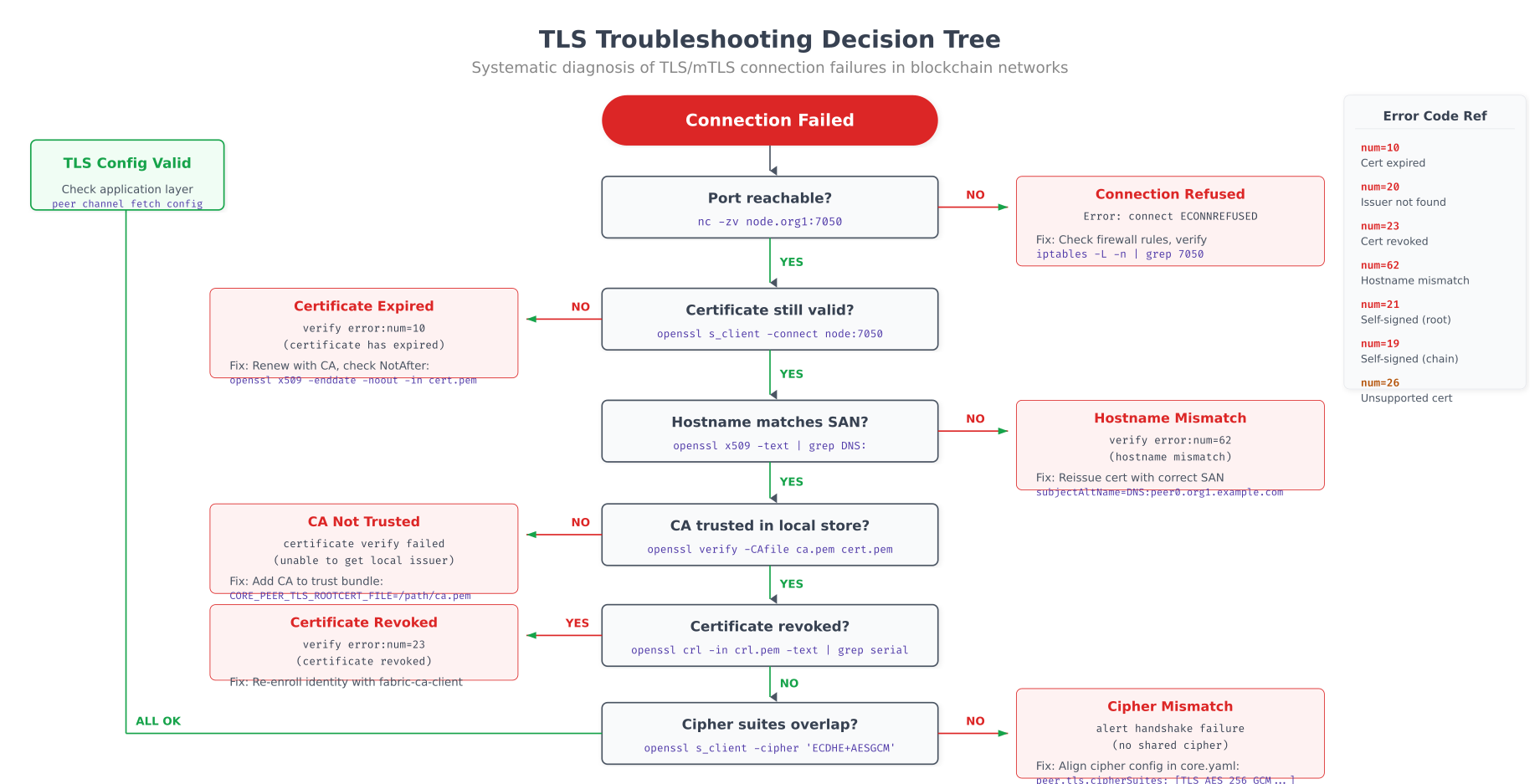
The decision tree above provides a systematic path through the six most common TLS failure modes. Starting with basic port reachability (nc -zv), it progresses through certificate validity, hostname SAN matching, CA trust chain verification, CRL/revocation status, and cipher suite compatibility. Each branch includes the specific openssl command to run and the exact error message to look for. APCH's operations team uses this as a runbook, resolving most TLS connectivity issues within 5 minutes by following the path from symptom to root cause.
# Automated TLS health monitoring, run as a cron job every 5 minutes
# Checks all blockchain endpoints and alerts on any TLS issue

#!/bin/bash
# tls-health-check.sh, Continuous TLS health monitoring

ENDPOINTS=(
  "orderer0-hongkong.apch.internal:7050"
  "orderer1-sydney.apch.internal:7050"
  "orderer2-mumbai.apch.internal:7050"
  "peer0-hongkong.apch.internal:7051"
  "peer0-sydney.apch.internal:7051"
  "peer0-mumbai.apch.internal:7051"
  "peer0-seoul.apch.internal:7051"
  "besu-validator0-hongkong.apch.internal:30303"
  "besu-validator1-sydney.apch.internal:30303"
)

CA_CERT="/opt/fabric/tls/ca-chain.pem"
CLIENT_CERT="/opt/fabric/admin/tls/cert.pem"
CLIENT_KEY="/opt/fabric/admin/tls/key.pem"
METRICS_FILE="/var/lib/node_exporter/textfile_collector/tls_health.prom"
ALERT_THRESHOLD_DAYS=14

echo "# HELP tls_cert_expiry_days Days until TLS certificate expires" > "$METRICS_FILE"
echo "# TYPE tls_cert_expiry_days gauge" >> "$METRICS_FILE"
echo "# HELP tls_connection_success TLS connection success (1) or failure (0)" >> "$METRICS_FILE"
echo "# TYPE tls_connection_success gauge" >> "$METRICS_FILE"

FAILURES=0

for ENDPOINT in "${ENDPOINTS[@]}"; do
  HOST=$(echo "$ENDPOINT" | cut -d: -f1)
  PORT=$(echo "$ENDPOINT" | cut -d: -f2)
  LABEL=$(echo "$HOST" | cut -d. -f1)

  # Check TLS connection with mTLS
  RESULT=$(echo | timeout 10 openssl s_client \
    -connect "$ENDPOINT" \
    -CAfile "$CA_CERT" \
    -cert "$CLIENT_CERT" \
    -key "$CLIENT_KEY" \
    -servername "$HOST" 2>&1)

  if echo "$RESULT" | grep -q "Verify return code: 0"; then
    echo "tls_connection_success{endpoint=\"$LABEL\"} 1" >> "$METRICS_FILE"

    # Check certificate expiry
    EXPIRY=$(echo "$RESULT" | openssl x509 -noout -enddate 2>/dev/null | cut -d= -f2)
    if [ -n "$EXPIRY" ]; then
      EXPIRY_EPOCH=$(date -d "$EXPIRY" +%s)
      NOW_EPOCH=$(date +%s)
      DAYS_LEFT=$(( (EXPIRY_EPOCH - NOW_EPOCH) / 86400 ))
      echo "tls_cert_expiry_days{endpoint=\"$LABEL\"} $DAYS_LEFT" >> "$METRICS_FILE"

      if [ "$DAYS_LEFT" -lt "$ALERT_THRESHOLD_DAYS" ]; then
        echo "[ALERT] $LABEL certificate expires in $DAYS_LEFT days"
        ((FAILURES++))
      fi
    fi
  else
    echo "tls_connection_success{endpoint=\"$LABEL\"} 0" >> "$METRICS_FILE"
    echo "[ALERT] TLS connection to $LABEL failed"
    ((FAILURES++))
  fi
done

if [ "$FAILURES" -gt 0 ]; then
  echo "$FAILURES TLS health check failures detected"
  # Send alert via webhook (Slack, PagerDuty, etc.)
  curl -s -X POST "https://hooks.slack.com/services/APCH/WEBHOOK" \
    -H "Content-Type: application/json" \
    -d "{\"text\":\"TLS Health Alert: $FAILURES endpoints failing. Run tls-diagnose.sh for details.\"}"
fi
The health check script runs every 5 minutes via cron, testing TLS connectivity to all blockchain endpoints with mTLS authentication. It exports Prometheus metrics for certificate expiry days and connection success/failure, enabling Grafana dashboard alerting. When a certificate is within 14 days of expiry or a connection fails, the script fires a Slack webhook alert. APCH's operations team combines this with the cert-rotation.sh script to maintain a zero-downtime certificate lifecycle across their four-datacenter blockchain deployment.