
This article is Part 1 of the OpenClaw High Availability and Scaling series. It covers the theory: why HA matters for AI agents, how the architecture works, what happens when things break, and how to plan capacity before you deploy. Part 2 takes everything discussed here and implements it with Docker Compose, Nginx configuration, Redis setup, health checks, and load testing. If you completed the five-part installation series and the customer support series, you already have a working OpenClaw deployment. This series turns that deployment into something that survives failures without your customers ever knowing.
Introducing VeloCity Logistics
VeloCity Logistics is an Amsterdam-based logistics platform that coordinates last-mile deliveries for e-commerce retailers across the Netherlands, Belgium, and western Germany. The company employs 45 people, operates a fleet of 120 delivery vans, and processes an average of 2,800 packages per day. Their customer communication volume sits at roughly 6,000 messages per day spread across three channels: WhatsApp for delivery recipients checking package status, Telegram for retail partners submitting dispatch requests, and a web chat widget on the VeloCity tracking portal.
VeloCity deployed OpenClaw six months ago as their primary customer-facing agent. The agent handles three categories of inquiries. Tracking inquiries account for about 55% of messages: “Where is my package?”, “When will my delivery arrive?”, “My tracking number shows no updates.” Delivery estimates make up 30%: customers requesting time windows, checking whether weekend delivery is available, or asking about delivery to specific postal codes. Complaint handling covers the remaining 15%: missed deliveries, damaged packages, incorrect addresses, and escalation to a human dispatcher.
For five months, the single OpenClaw container running on a 4 vCPU, 8 GB server handled the load without issues. Average response time sat at 1.2 seconds. Customer satisfaction scores hovered around 4.6 out of 5. Then the holiday logistics season arrived, and the daily message count climbed from 6,000 to over 9,200. On a Tuesday morning at 08:17, the gateway container ran out of memory processing 312 concurrent conversations and crashed. Docker restarted the container at 08:19, but the restart took 47 seconds. During those 47 seconds, 83 WhatsApp messages and 41 Telegram messages received no response. By the time the container came back, the conversation context for all active sessions was gone because OpenClaw stores conversation state in memory by default. Customers had to repeat themselves. The 08:29 surge pushed concurrent users to 340, and the container crashed again. The total downtime that morning was 12 minutes across three crashes. The average response time during the recovery periods spiked from 1.2 seconds to 8.4 seconds as the container struggled under the backlog.
VeloCity’s CTO pulled the incident report that afternoon. The conclusion was straightforward: a single container architecture cannot survive peak traffic, and restarting faster does not solve the fundamental problem. They needed high availability.
The Single-Point-of-Failure Problem
Running one OpenClaw container means every component in that container is a single point of failure. If any one of them fails, the entire messaging pipeline goes dark. Here are the specific failure modes that a single-instance deployment faces.
Container crash from OOM kill. The Linux kernel terminates processes that exceed their memory allocation. When OpenClaw handles hundreds of concurrent conversations, each conversation holds context in memory: message history, active skill references, pending LLM responses, and channel metadata. At 300+ concurrent conversations, a single gateway process can consume 2 GB or more of RAM. If the container memory limit is set to 2 GB in Docker, the kernel kills the process immediately. There is no graceful shutdown and no chance to flush state to disk. Every active conversation is lost.
Docker daemon restart. Operating system updates, security patches, or manual maintenance can trigger a Docker daemon restart. When the daemon restarts, every container on the host stops and restarts. Even with the restart: always policy, the container takes 30 to 60 seconds to come back online. During that window, incoming webhook payloads from WhatsApp and Telegram receive HTTP 502 errors. Both platforms retry failed webhooks, but their retry windows are limited. WhatsApp retries for up to 24 hours with exponential backoff, while Telegram retries for about 48 hours. Messages that arrive during a brief outage will eventually be delivered, but the user experience during those seconds is a dead chat.
Host machine reboot. Kernel updates on Ubuntu require a reboot. Hardware issues like a failing disk or a memory error can trigger an unexpected reboot. Cloud providers occasionally perform live migrations that, despite their name, sometimes restart the VM. A host reboot means the Docker daemon is down for 60 to 120 seconds minimum. VeloCity experienced this during an unattended-upgrades kernel patch at 03:00 on a Wednesday. The server rebooted, Docker started, and the container came back. But the 90-second gap meant their Telegram retail partners in different time zones received no responses to dispatch requests submitted during that window.
LLM provider timeout causing connection pile-up. This is the subtle failure that most teams miss. When the LLM provider (whether Ollama locally or a cloud API) becomes slow or unresponsive, OpenClaw keeps the HTTP connection open waiting for a response. Each pending LLM request holds a connection, a conversation context, and a channel callback. If the LLM provider takes 30 seconds per request instead of the usual 2 seconds, the number of waiting connections multiplies quickly. With 300 concurrent users, even a brief LLM slowdown creates a queue of 300 pending requests, each consuming memory. The container does not crash immediately, but response times degrade from 1.2 seconds to 8, 12, or 20 seconds. Customers start sending duplicate messages because they think their first message was lost, which doubles the load. This cascading effect is exactly what happened to VeloCity at 08:17.
Disk full on the host. Docker container logs, conversation logs, and LLM response caches all write to the host filesystem. If the host disk fills up, the container cannot write logs or temporary files. The OpenClaw gateway logs every incoming message and outgoing response for audit purposes. At 6,000 messages per day with an average log entry of 1.2 KB, that is roughly 7 MB per day or 210 MB per month of log data alone. Combined with Docker image layers, LLM model files from Ollama, and system logs, a 20 GB disk can fill up in weeks if log rotation is not configured.
Each of these failures individually takes the entire operation offline. Combined, they represent a certainty: a single-instance deployment will eventually go down during peak hours. The question is not whether it will happen but when.
The High Availability Architecture
High availability for OpenClaw follows the same principles used by web application load balancing, adapted for the specific requirements of an AI messaging gateway. The architecture has four layers: a load balancer that distributes traffic, multiple gateway replicas that process messages, a shared state store that maintains conversation context, and the LLM provider layer that generates responses.
Free to use, share it in your presentations, blogs, or learning materials.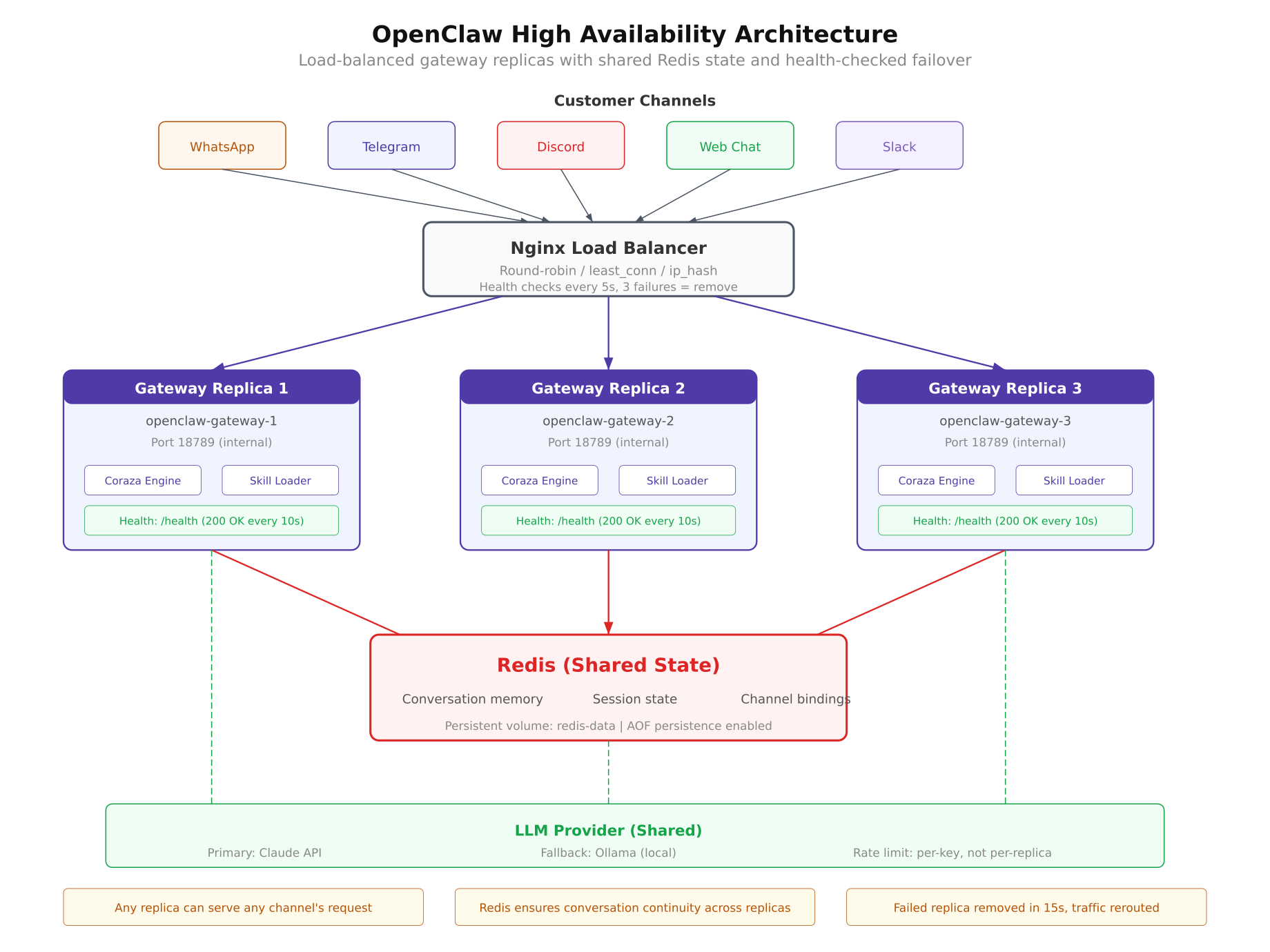
The architecture diagram above shows the full HA topology deployed for VeloCity. Incoming messages from WhatsApp, Telegram, and Web Chat arrive at the Nginx load balancer on port 443. Nginx distributes each request to one of three OpenClaw gateway replicas running on ports 18789, 18790, and 18791. All three replicas connect to a shared Redis instance for conversation state, and all three send inference requests to the same LLM provider. If any single replica crashes, Nginx detects the failure through health checks and stops sending traffic to it within 15 seconds. The remaining two replicas continue serving requests without interruption.
Load Balancer Layer
Nginx acts as the entry point for all incoming traffic. It receives webhook payloads from messaging platforms and proxies them to the gateway replicas. The upstream configuration defines the pool of available replicas, and the load balancing algorithm determines how requests are distributed.
For OpenClaw, the least_conn algorithm works better than the default round-robin. Round-robin distributes requests evenly regardless of how busy each replica is. But LLM-backed applications have highly variable request processing times. A tracking inquiry might take 800 milliseconds, while a complex complaint with conversation history might take 4 seconds. Least-connections sends each new request to whichever replica currently has the fewest active connections, which naturally balances load based on actual processing time rather than request count.
upstream openclaw_cluster {
    least_conn;

    server 127.0.0.1:18789 max_fails=3 fail_timeout=15s;
    server 127.0.0.1:18790 max_fails=3 fail_timeout=15s;
    server 127.0.0.1:18791 max_fails=3 fail_timeout=15s;
}
The max_fails=3 parameter tells Nginx to mark a replica as down after three consecutive failed health checks. The fail_timeout=15s parameter defines two things: the window during which the three failures must occur, and how long Nginx waits before trying the failed replica again. With these settings, if a replica crashes, Nginx removes it from the pool within 15 seconds and rechecks it every 15 seconds to see if it has recovered.
Health checks use the OpenClaw /healthz endpoint. Nginx sends a GET request to each replica every 5 seconds. A healthy replica responds with a 200 status and a JSON body containing uptime and version information. If the endpoint returns a 5xx error or times out, Nginx counts it as a failure.
Gateway Replica Layer
Each OpenClaw replica is an identical Docker container running the same gateway image, the same configuration file, and the same skill files. The key design requirement is that replicas must be stateless. In the default single-instance deployment, OpenClaw stores conversation history in the gateway process memory. This works fine for one container, but it breaks in a multi-replica setup because consecutive messages from the same customer might land on different replicas. If message 1 goes to replica A and message 2 goes to replica B, replica B has no record of message 1 and treats the conversation as new.
The solution is externalizing all state to Redis (covered in the next section). Once conversation memory is moved out of the gateway process, each replica becomes a stateless processor. Any replica can handle any message from any customer on any channel. This stateless design is what makes horizontal scaling possible. Adding a fourth or fifth replica requires only starting another container and adding it to the Nginx upstream pool.
All three replicas share the same configuration. In VeloCity’s deployment, this means all three replicas load the same openclaw.json with the same agent identity, the same skills directory with tracking, estimates, and complaint handling skills, and the same channel configurations for WhatsApp, Telegram, and Web Chat. A volume mount in Docker Compose ensures that updating a skill file on the host filesystem is immediately visible to all replicas without restarting them.
volumes:
  – ./config/openclaw.json:/app/config/openclaw.json:ro
  – ./skills:/app/skills:ro
The :ro flag mounts the volumes as read-only inside the container. The gateway reads configuration and skills at startup and on a configurable reload interval. It never writes to these files, so read-only mounts add a layer of safety against accidental modification.
Shared State Layer
Redis serves as the shared memory for all gateway replicas. Every conversation context, session binding, and message history entry is stored in Redis instead of the gateway process memory. When a customer sends a message, whichever replica receives it retrieves the conversation history from Redis, processes the message, generates a response, and writes the updated context back to Redis. The next message from the same customer can go to any replica, and that replica will find the complete conversation history waiting.
OpenClaw uses Redis keys namespaced by channel and user identifier. A WhatsApp conversation with the phone number +31612345678 is stored under the key oc:conv:whatsapp:31612345678. A Telegram conversation with user ID 987654 is stored under oc:conv:telegram:987654. This namespacing prevents collisions between channels and makes it straightforward to inspect or debug specific conversations.
oc:conv:{channel}:{user_id}     → conversation history (JSON)
oc:session:{channel}:{user_id}  → active session metadata
oc:skills:{skill_name}          → cached skill content
oc:metrics:gateway:{replica_id} → per-replica request counters
The conversation history value is a JSON array of message objects, each containing the role (user or assistant), the message text, the timestamp, and the skill that was used to generate the response. Redis stores this data in memory, which makes reads and writes extremely fast, typically under 1 millisecond. For persistence, Redis is configured with AOF (Append-Only File) logging, which writes every mutation to disk. If Redis restarts, it replays the AOF log and recovers the complete state.
Session metadata includes the active skill for the conversation, whether an escalation is pending, the customer’s language preference, and the timestamp of the last message. This metadata allows any replica to pick up a conversation mid-flow without losing context about what was being discussed.
For VeloCity, Redis memory usage is modest. Each conversation history entry averages 3 KB. With 300 concurrent active conversations, that is roughly 900 KB. Even accounting for session metadata and cached skills, total Redis memory stays well under 50 MB. A Redis instance with 256 MB of allocated memory comfortably handles VeloCity’s volume with room to grow.
LLM Provider Layer
All gateway replicas send inference requests to the same LLM provider. In VeloCity’s setup, the primary provider is a cloud LLM API for production quality responses, with a local Ollama instance as the fallback. The gateway configuration supports a provider chain, which is a prioritized list of LLM providers. If the primary provider returns an error or times out, the gateway automatically falls back to the next provider in the chain.
{
  “llm”: {
    “providers”: [
      {
        “name”: “cloud-primary”,
        “type”: “openai-compatible”,
        “endpoint”: “https://api.llmprovider.com/v1”,
        “apiKey”: “${LLM_API_KEY}”,
        “model”: “gpt-4o-mini”,
        “timeout”: 10000,
        “maxRetries”: 2
      },
      {
        “name”: “local-fallback”,
        “type”: “ollama”,
        “endpoint”: “http://ollama:11434”,
        “model”: “llama3.1:8b”,
        “timeout”: 30000,
        “maxRetries”: 1
      }
    ],
    “rateLimiting”: {
      “requestsPerMinute”: 60,
      “requestsPerKey”: 30,
      “burstAllowed”: 10
    }
  }
}
The timeout for the cloud provider is set to 10 seconds. If the cloud API does not respond within 10 seconds, the gateway marks it as a failure and tries Ollama. The local Ollama instance has a longer timeout of 30 seconds because local inference on a CPU is inherently slower than a cloud GPU. The rateLimiting section prevents any single replica from exhausting the API key quota. With three replicas and a limit of 60 requests per minute, each replica effectively gets 20 requests per minute to the cloud provider.
The fallback to Ollama is a critical safety net. Cloud LLM providers experience outages, rate limiting during peak usage, and occasional latency spikes. Having a local model that can serve responses, even if the quality is slightly lower, means VeloCity’s customers always get an answer. A slightly less polished response is infinitely better than no response at all.
Failure Scenarios and Recovery
Understanding how the HA architecture responds to specific failure types is what separates a confident deployment from an anxious one. Each failure scenario below describes what breaks, what happens automatically, what the customer experiences, and how long recovery takes.
Free to use, share it in your presentations, blogs, or learning materials.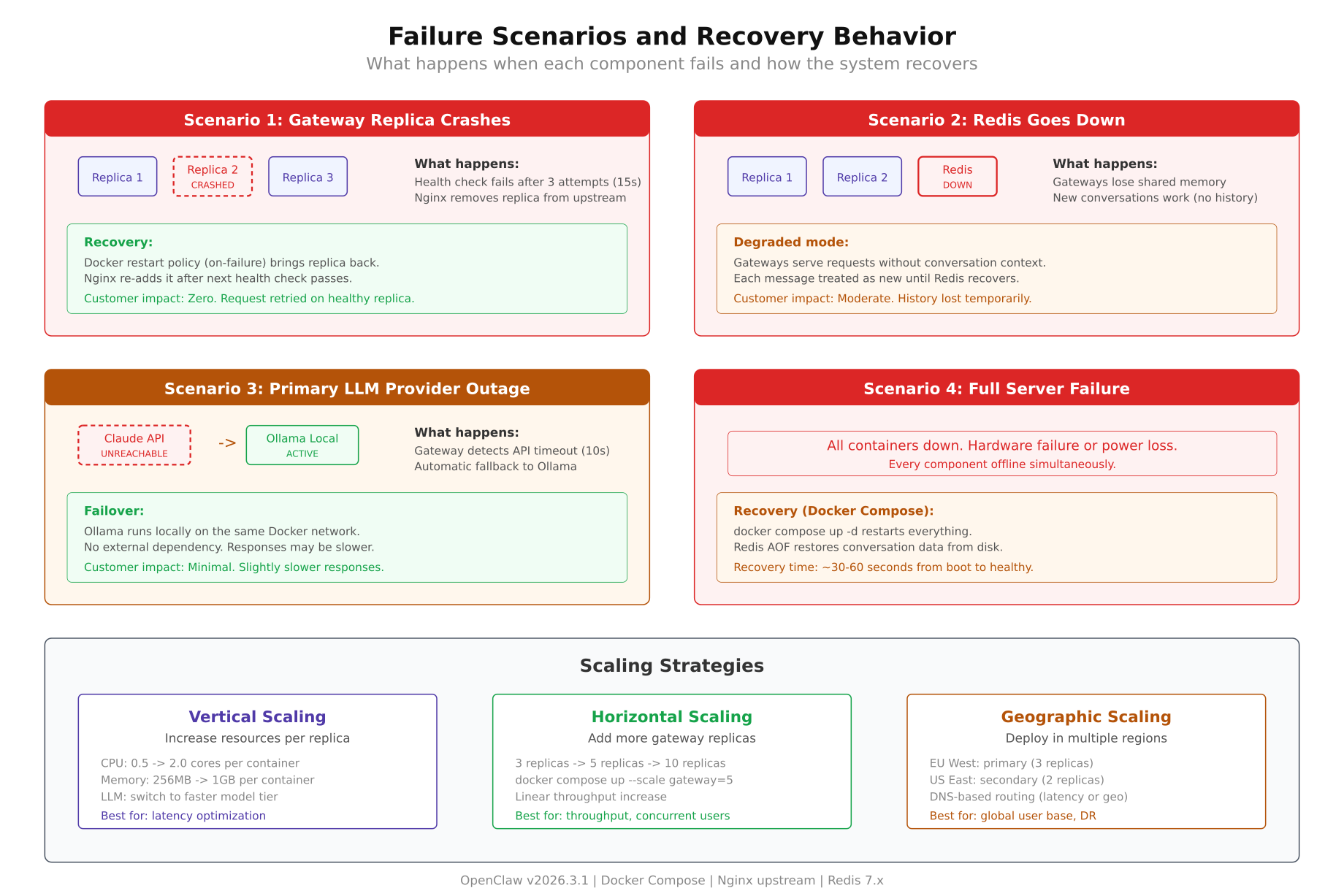
The failure scenario diagram above maps each failure type to its detection mechanism, automatic recovery action, customer impact, and recovery timeline. The leftmost scenario (gateway crash) has near-zero customer impact because Nginx redistributes traffic instantly. The rightmost scenario (full server failure) has the longest recovery time but is also the rarest occurrence.
Gateway Replica Crash
When one of the three gateway replicas crashes, whether from an OOM kill, an unhandled exception, or a segfault, two things happen simultaneously. Docker detects that the container exited and begins restarting it based on the restart: always policy. Nginx detects that health checks to that replica are failing and marks it as down after the fail_timeout window (15 seconds in the configuration above).
During the 15-second detection window, some requests may still be routed to the failing replica. Nginx handles this with the proxy_next_upstream directive, which automatically retries the request on a different replica if the first one returns an error. The customer never sees the error because Nginx transparently redirects the request.
location / {
    proxy_pass http://openclaw_cluster;
    proxy_next_upstream error timeout http_502 http_503;
    proxy_next_upstream_timeout 5s;
    proxy_next_upstream_tries 2;
}
Customer impact: None. Requests are served by the remaining two replicas. If the customer was mid-conversation, their context is preserved in Redis and the next replica picks it up without interruption.
Recovery time: Docker restarts the container in 15 to 30 seconds. Nginx reintroduces it to the pool once health checks pass again. Total time from crash to full recovery is typically under 45 seconds, and no requests are dropped during that window.
Redis Outage
A Redis outage is more impactful than a gateway crash because Redis is the shared state store. If Redis goes down, all three replicas lose access to conversation history simultaneously. They can still receive and process messages, but they cannot retrieve previous conversation context. New conversations work normally. Ongoing conversations lose their history.
The gateway handles this through a degraded mode. When a Redis connection fails, the gateway falls back to in-process memory for new conversations and logs a warning. Existing conversations appear to start fresh from the customer’s perspective. The agent responds correctly to the current message but may ask questions that were already answered earlier in the conversation.
Customer impact: Moderate. New conversations are unaffected. Ongoing conversations lose context. A customer who was mid-complaint may need to re-explain their issue. This is annoying but not catastrophic. The agent still responds, just without the benefit of history.
Recovery time: Redis with AOF persistence restarts in 5 to 15 seconds. Once Redis is back, the gateway reconnects automatically and resumes reading and writing state. Conversations that were in degraded mode during the outage lose the messages exchanged during that window, but all subsequent messages are properly persisted.
For VeloCity, a Redis outage is the most operationally concerning failure because it affects every active conversation at once. The mitigation is straightforward: Redis is deployed with AOF persistence set to appendfsync everysec, which syncs to disk every second. At most, one second of state is lost on crash. Redis is also configured with a memory limit and eviction policy (allkeys-lru) to prevent it from consuming all available host memory.
LLM Provider Outage
When the primary LLM provider goes down or becomes unacceptably slow, the gateway switches to the fallback provider. The provider chain configuration handles this automatically. If the cloud API returns a 5xx error or times out after 10 seconds, the gateway sends the same prompt to Ollama locally.
The local Ollama model is smaller and less capable than the cloud model, so response quality may decrease slightly. For VeloCity’s use case, this means tracking inquiries and delivery estimates are answered correctly (these rely primarily on skill data, not LLM reasoning), but complex complaint responses might lack the nuance of the cloud model. The important thing is that the customer gets an answer.
Customer impact: Minimal to moderate. Response times increase because local inference is slower (3 to 5 seconds vs 1 to 2 seconds). Response quality for simple queries is identical. Complex multi-turn conversations may feel slightly less natural.
Recovery time: Automatic. The gateway checks the primary provider on every new request. Once the cloud API starts responding again, the gateway routes new requests to it. There is no manual intervention required. VeloCity’s ops team receives an alert when the fallback activates, but they do not need to do anything unless the outage persists for hours.
Full Server Failure
This is the worst-case scenario. The entire host machine goes down: hardware failure, data center power outage, cloud provider region failure. Every container on the machine stops. Nginx, all three replicas, and Redis all go offline simultaneously.
Recovery depends on the deployment model. On a single server with Docker Compose, recovery means waiting for the server to come back. Once the host boots, Docker starts all containers in dependency order. Redis starts first and replays its AOF log. The three gateway replicas start next and connect to Redis. Nginx starts last and begins accepting traffic. The entire stack is back online within 60 to 120 seconds after the server boots.
Customer impact: High. All messages during the outage receive no response. WhatsApp and Telegram queue messages for retry, so customers eventually get responses once the system recovers. Web chat visitors see an unresponsive widget and leave.
Recovery time: 2 to 5 minutes for a server reboot. 5 to 15 minutes for a hardware issue requiring manual intervention. For true disaster recovery, geographic scaling (covered in the Scaling Strategies section below) deploys a second server in a different data center that takes over automatically.
VeloCity’s current deployment runs on a single server, which means full server failure is a real risk. Their roadmap includes a second server in a different Amsterdam data center, but for most deployments, the single-server HA setup with three replicas eliminates 95% of downtime incidents. The remaining 5% are infrastructure-level failures that require either geographic redundancy or a very fast cloud provider.
Scaling Strategies
Scaling and high availability are related but distinct concerns. HA ensures the system survives failures. Scaling ensures the system handles growth. VeloCity needs both: their message volume is growing 15% month over month as they onboard new retail partners, and their peak hours are becoming more intense as the delivery network expands into new postal code zones.
Vertical Scaling
Vertical scaling means giving each container more resources: more CPU cores, more RAM, higher memory limits. This is the simplest form of scaling and requires no architectural changes. In Docker Compose, you adjust the deploy.resources.limits for each replica.
services:
  gateway-1:
    image: openclaw/gateway:latest
    deploy:
      resources:
        limits:
          cpus: “2.0”
          memory: 2G
        reservations:
          cpus: “1.0”
          memory: 1G
VeloCity started with 1 vCPU and 1 GB per replica. After the peak hour incident, they doubled it to 2 vCPU and 2 GB per replica. This gave each container room to handle 150 concurrent conversations instead of 80. With three replicas, the cluster can handle 450 concurrent conversations, which covers VeloCity’s current peak of 340 with comfortable headroom.
Vertical scaling has a ceiling. A single container cannot effectively use more than 4 vCPUs for OpenClaw because the gateway is largely I/O-bound (waiting for LLM responses, Redis reads/writes, and webhook deliveries). Adding more CPU beyond 4 cores yields diminishing returns. Memory scaling is more linear: more memory means more concurrent conversations before OOM risk, but eventually the bottleneck shifts to LLM provider throughput.
Horizontal Scaling
Horizontal scaling means adding more replicas. Since the gateway is stateless (with Redis handling state), adding replicas is as simple as defining another service in Docker Compose and adding the new port to the Nginx upstream pool. Each replica is identical, so there is no special configuration for the fourth, fifth, or tenth replica.
The capacity increase is roughly linear. Three replicas at 150 concurrent conversations each gives 450 total. Five replicas gives 750. Ten replicas gives 1,500. The bottleneck eventually shifts to Redis throughput (around 100,000 operations per second for a single Redis instance) or LLM provider rate limits (which are per-API-key, not per-replica).
$ $ docker compose up -d –scale gateway=5Docker Compose’s --scale flag dynamically adjusts the number of replicas without modifying the compose file. Nginx still needs to know about the new replicas though. In a static Nginx configuration, you must add the new upstream servers manually. In a dynamic setup with a service mesh or Docker Swarm overlay network, Nginx (or a compatible proxy like Traefik) discovers new replicas automatically. Part 2 covers the static approach because it is simpler and sufficient for most deployments.
For VeloCity, three replicas handle today’s load with 30% headroom. Their scaling plan adds a fourth replica when average peak concurrent conversations exceed 400, and a fifth when it exceeds 550. Each scaling step requires adding one line to the Nginx upstream block and starting one more container. The total scaling operation takes under 2 minutes.
Geographic Scaling
Geographic scaling deploys gateway replicas in multiple physical locations. This serves two purposes: disaster recovery (if one data center goes down, the other continues serving) and latency reduction (customers closer to a specific data center get faster responses).
For AI gateways like OpenClaw, geographic scaling introduces a complexity that traditional web applications do not face: conversation state must be shared across regions. If a customer sends message 1 to the Amsterdam cluster and message 2 gets routed to the Frankfurt cluster, both clusters need access to the same conversation history. Redis supports this through Redis Cluster or Redis Sentinel with cross-region replication, but the latency between regions (typically 5 to 15 milliseconds within Europe) adds to every Redis operation.
VeloCity’s customer base is concentrated in the Benelux region and western Germany. Geographic scaling to a second Amsterdam data center provides disaster recovery without the cross-region state synchronization complexity. True multi-region deployment with clusters in Amsterdam and Frankfurt is on their 12-month roadmap, primarily to reduce latency for their growing German customer base.
Most OpenClaw deployments do not need geographic scaling in the first year. Single-server HA with horizontal scaling handles the vast majority of use cases. Geographic scaling becomes relevant when the deployment serves customers across continents or when regulatory requirements demand data residency in specific regions.
Capacity Planning
Capacity planning for an OpenClaw HA deployment requires estimating four dimensions: concurrent conversations, requests per second, memory consumption, and CPU utilization. The following reference table is based on VeloCity’s production metrics and load testing results from their staging environment.
Assumptions: Each replica is allocated 2 vCPU and 2 GB RAM. The LLM provider averages 1.5 seconds per inference request. Redis is running on the same host with 256 MB allocated. Average conversation length is 6 messages (3 user + 3 assistant). Conversation TTL in Redis is 30 minutes.
| Replicas | Concurrent Users | Requests/sec | Total Memory | CPU per Replica | Notes |
|---|---|---|---|---|---|
| 1 | 150 | 25 | 1.2 GB | 60% | Development and testing only |
| 2 | 300 | 50 | 2.4 GB | 55% | Minimum production; no headroom during single replica failure |
| 3 | 450 | 75 | 3.6 GB | 50% | Recommended production; survives 1 failure with 33% headroom (VeloCity current) |
| 5 | 750 | 125 | 6 GB | 45% | High traffic; survives 2 simultaneous replica failures |
| 10 | 1,500 | 250 | 12 GB | 40% | Enterprise scale; requires Redis Cluster for state management |
The CPU utilization decreases as replicas increase because the load is distributed more evenly. At 10 replicas, each container handles only 150 concurrent conversations (the same as a single replica at maximum capacity), but the system-wide throughput is 10x higher. The memory numbers are cumulative across all replicas and do not include Redis or Nginx memory, which together add approximately 300 MB.
For VeloCity, the 3-replica configuration was chosen based on their peak concurrent user count of 340 during the 08:00 to 10:00 morning rush. Three replicas provide 450 concurrent user capacity, leaving 110 users of headroom (24%) for traffic spikes. Their server has 8 vCPU and 16 GB RAM, which accommodates three replicas (6 vCPU, 6 GB), Redis (256 MB), Nginx (64 MB), Ollama with an 8B model (5 GB), and the operating system with comfortable margins.
Total Server: 8 vCPU / 16 GB RAM / 100 GB NVMe

Gateway Replicas (3x):  6 vCPU / 6 GB RAM
Redis:                   –      / 256 MB RAM
Nginx:                   –      / 64 MB RAM
Ollama (llama3.1:8b):   –      / 5 GB RAM
OS + Docker overhead:    2 vCPU / 4.7 GB RAM

Peak utilization:        75%    / 88%
The memory allocation shows that VeloCity is running at 88% memory utilization at peak. This is tight. Their next scaling step, when they add a fourth gateway replica, will require upgrading the server to 32 GB RAM or moving the Ollama instance to a separate machine. Capacity planning is not just about today’s numbers. It is about knowing exactly when the next upgrade is needed and having the plan ready before the system tells you the hard way.
What Comes Next
This article covered the theory behind making OpenClaw highly available: why a single instance is a liability, how the four-layer architecture eliminates single points of failure, what happens when each component fails, and how to plan capacity as message volume grows. VeloCity’s real-world incident and their subsequent architecture redesign illustrate that HA is not optional for production AI agents. It is the minimum viable infrastructure.
Part 2 turns all of this into running code. You will build the complete Docker Compose file with three gateway replicas, configure Nginx as a load balancer with health checks and upstream failover, deploy Redis with AOF persistence for shared conversation state, set up the LLM provider chain with cloud primary and Ollama fallback, run load tests to verify capacity thresholds, and configure monitoring to alert on replica failures, Redis memory, and LLM latency. Everything discussed in this article becomes a working deployment that you can adapt for your own OpenClaw installation.