

This part changes that. By the end, KryptoLedger’s 12 remote developers will connect to PostgreSQL through the overlay using a DNS name that only exists inside the Ziti network. The admin dashboard will be accessible to operations staff through the same overlay. Both services will have identity-based policies controlling exactly who can reach what. And every connection will be logged with the identity, timestamp, and service name for the audit trail their compliance team has been asking for.
Before You Start: Setting Up OpenZiti
This article picks up directly from Part 1 where the controller and edge router are installed and verified. If you skipped Part 1, go back and complete it first. You need a running controller on port 1280, an online edge router on port 3022, and admin CLI access via ziti edge login. Without those, nothing in this article will work.
If you are completely new to Software-Defined Perimeter and wondering why any of this matters, the SDP introduction explains the authenticate-first-connect-second model. The SDP vs VPN comparison shows why KryptoLedger abandoned their WireGuard setup after a credential theft incident.
Understanding Services and Policies
Before creating anything, you need to understand how OpenZiti maps access. The model has four pieces: identities, services, policies, and routers. An identity is a certificate-backed entity (a user, a server, a device). A service is a named resource (PostgreSQL, admin dashboard). A policy connects identities to services with a specific permission: dial (connect to) or bind (host). The edge router handles the actual traffic.
Free to use, share it in your presentations, blogs, or learning materials.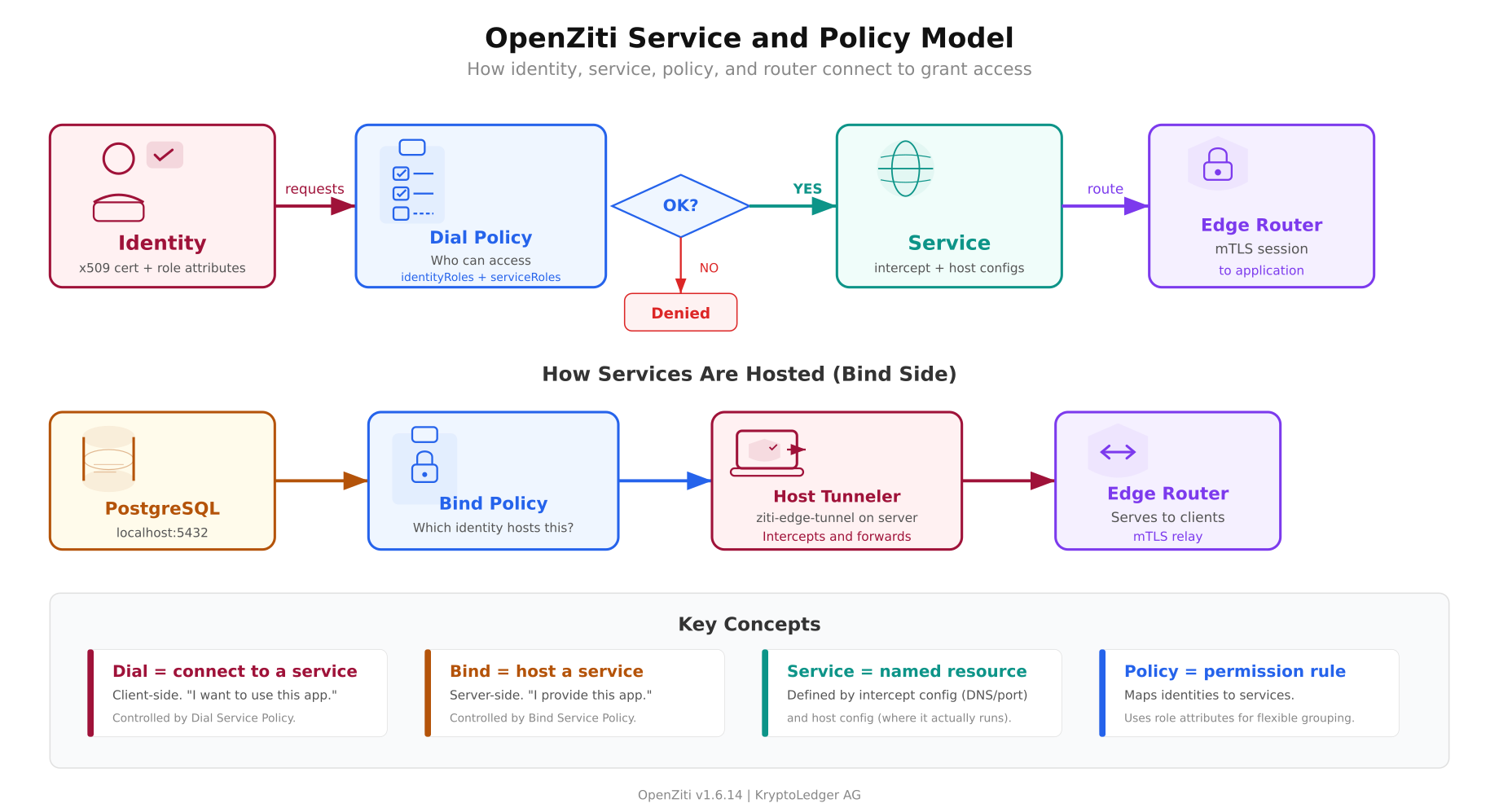
The diagram shows both sides of the connection. The top flow is the client side: an identity with a valid certificate requests a service. The controller evaluates the dial policy (does this identity have permission to dial this service?). If approved, the edge router creates an mTLS session to the application. The bottom flow is the server side: the PostgreSQL server runs a tunneler that binds to the service. The bind policy controls which identity is allowed to host which service. Both sides must have valid policies or the connection fails.
Creating the PostgreSQL Service
A service in OpenZiti consists of two configurations: an intercept config (what DNS name and port the client uses) and a host config (where the service actually runs). The intercept config tells the client-side tunneler “when the user connects to postgres.kryptoledger.ziti on port 5432, route it through the overlay.” The host config tells the server-side tunneler “forward overlay traffic to localhost:5432.”
Create the intercept configuration first. This defines how clients will address the service.
$ ziti edge create config postgres-intercept intercept.v1

$   ‘{“protocols”:[“tcp”],”addresses”:[“postgres.kryptoledger.ziti”],”portRanges”:[{“low”:5432,”high”:5432}]}’
The addresses field defines the DNS name that clients will use. This name only resolves inside the Ziti network. It does not exist in public DNS. The portRanges field maps to the port the client application expects. When a developer types psql -h postgres.kryptoledger.ziti -p 5432, the tunneler intercepts the DNS query, resolves it to an overlay address, and routes the TCP connection through the edge router.
Now create the host configuration. This tells the server-side tunneler where to forward the traffic.
$ ziti edge create config postgres-host host.v1

$   ‘{“protocol”:”tcp”,”address”:”localhost”,”port”:5432}’
The host config points to localhost:5432 because PostgreSQL runs on the same machine as the server-side tunneler. The database only needs to listen on 127.0.0.1. It does not need to bind to 0.0.0.0 or accept connections from any external IP. The tunneler handles the overlay-to-localhost translation.
Create the service that ties both configs together.
$ ziti edge create service postgres-service

$   –configs postgres-intercept,postgres-host

$   -a “database,production”
The -a flag sets role attributes. These are tags used by policies to group services. Any policy that targets the database or production role will apply to this service. Role attributes are how you avoid writing one policy per service per identity.
Creating the Admin Dashboard Service
The admin dashboard follows the same pattern. Different DNS name, different port, different role attributes.
$ ziti edge create config admin-intercept intercept.v1

$   ‘{“protocols”:[“tcp”],”addresses”:[“admin.kryptoledger.ziti”],”portRanges”:[{“low”:443,”high”:443}]}’
$ ziti edge create config admin-host host.v1

$   ‘{“protocol”:”tcp”,”address”:”localhost”,”port”:3000}’
$ ziti edge create service admin-dashboard

$   –configs admin-intercept,admin-host

$   -a “admin-tools,production”
Notice that the intercept port is 443 (what the client sees) but the host port is 3000 (where the Node.js dashboard actually runs). The overlay handles the port translation. Clients connect to admin.kryptoledger.ziti:443 and the tunneler forwards to localhost:3000 on the server side. This means the dashboard does not need to run on a privileged port. It runs on 3000 as a regular user process while clients access it on 443 through the overlay.
Defining Access Policies
Services exist but nobody can reach them yet. Policies connect identities to services. OpenZiti has two types: dial policies (who can connect to a service) and bind policies (who can host a service).
Dial Policies: Who Can Connect
Create a dial policy that allows identities with the developers role to access services with the database role.
$ ziti edge create service-policy postgres-dial-policy Dial

$   –identity-roles ‘#developers’

$   –service-roles ‘#database’
The # prefix means “match by role attribute.” Any identity tagged with developers can dial any service tagged with database. When KryptoLedger hires developer number 13, they create the identity with the developers role and the policy applies automatically. No per-user rules to maintain.
Create a separate policy for the admin dashboard. Only operations staff should access it.
$ ziti edge create service-policy admin-dial-policy Dial

$   –identity-roles ‘#operations’

$   –service-roles ‘#admin-tools’
A developer identity tagged with developers but not operations can reach PostgreSQL but cannot reach the admin dashboard. An operations identity tagged with operations can reach the dashboard but not the database. This is per-service access control that VPNs cannot provide.
Bind Policies: Who Can Host
The server-side tunneler needs permission to host the services. Create bind policies for the server identity.
$ ziti edge create service-policy postgres-bind-policy Bind

$   –identity-roles ‘#db-servers’

$   –service-roles ‘#database’
$ ziti edge create service-policy admin-bind-policy Bind

$   –identity-roles ‘#app-servers’

$   –service-roles ‘#admin-tools’
The server running PostgreSQL will be enrolled with the db-servers role. The server running the admin dashboard gets the app-servers role. If both services run on the same machine, the server identity gets both roles.
Enrolling the Server-Side Tunneler
The server that runs PostgreSQL and the admin dashboard needs a Ziti tunneler to bind the services to the overlay. Create a server identity and enroll it.
$ ziti edge create identity device zurich-db-server

$   -a “db-servers,app-servers”

$   -o /tmp/zurich-db-server.jwt
The -o flag writes the enrollment JWT to a file. The -a flag assigns both db-servers and app-servers roles since this machine hosts both services.
Install the tunneler on the server and enroll using the JWT.
$ curl -sL https://get.openziti.io/install/linux | sudo bash

$ sudo ziti-edge-tunnel enroll –jwt /tmp/zurich-db-server.jwt –identity /opt/openziti/zurich-db-server.json

$ sudo ziti-edge-tunnel run –identity /opt/openziti/zurich-db-server.json &
The enroll command presents the JWT to the controller, receives an x509 client certificate in return, and stores it in the identity JSON file. The JWT is consumed and cannot be reused. The run command starts the tunneler, which connects to the edge router, binds the PostgreSQL and admin dashboard services, and begins accepting overlay connections.
Enrolling the First Client
Free to use, share it in your presentations, blogs, or learning materials.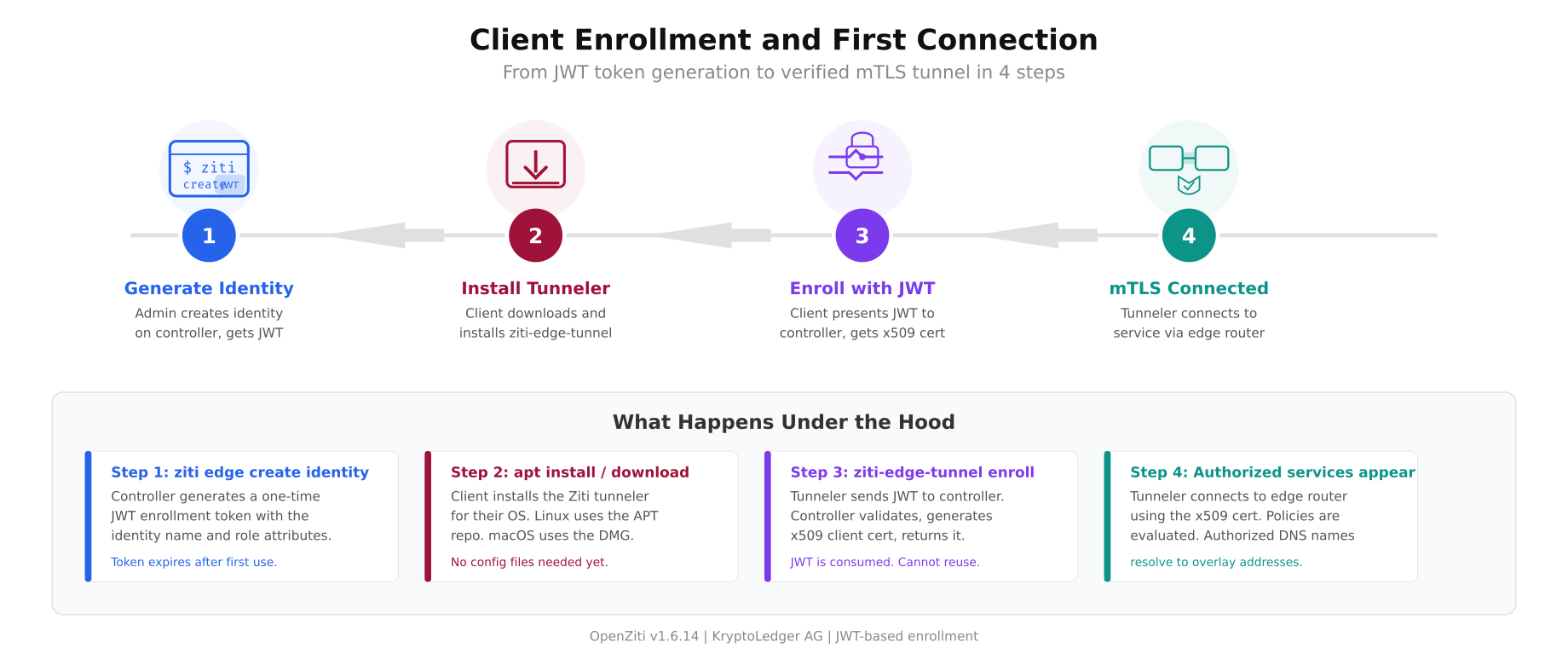
The enrollment flow above walks through the four steps every new client goes through. The JWT is a one-time token. Once consumed during enrollment, the client identity is bound to the x509 certificate stored locally. If the JWT is intercepted before enrollment, it can be revoked from the controller without affecting any enrolled identities.
Create an identity for KryptoLedger’s first remote developer.
$ ziti edge create identity user dev-maria

$   -a “developers”

$   -o /tmp/dev-maria.jwt
Send the JWT file to Maria through a secure channel (encrypted email, password manager shared vault, or in-person USB handoff). Maria installs the tunneler on her Ubuntu laptop and enrolls.
$ sudo ziti-edge-tunnel enroll –jwt ~/Downloads/dev-maria.jwt –identity ~/.ziti/dev-maria.json

$ sudo ziti-edge-tunnel run –identity ~/.ziti/dev-maria.jsonenrolled successfully
identity: dev-maria
controller: https://ziti.kryptoledger.internal:1280
services available:
postgres.kryptoledger.ziti:5432 (postgres-service)
[INFO] connected to edge router: ziti-ctrl-edge-routerMaria sees only the PostgreSQL service because her identity has the developers role, which matches the postgres-dial-policy. She does not see the admin dashboard because she does not have the operations role. The service literally does not exist in her tunneler’s service list.
Testing Dark Server Access
Maria connects to PostgreSQL through the overlay using the Ziti DNS name.
$ psql -h postgres.kryptoledger.ziti -p 5432 -U maria -d transactionspsql (16.2)
SSL connection (protocol: TLSv1.3, cipher: TLS_AES_256_GCM_SHA384)
Type “help” for help.
transactions=> SELECT count(*) FROM ledger_entries;
count
——–
840123
(1 row)The connection works. Maria is querying the same PostgreSQL database that was breached three months ago, but the path is completely different. Her laptop’s tunneler intercepted the DNS query for postgres.kryptoledger.ziti, resolved it to an overlay address, established an mTLS connection to the edge router using her x509 client certificate, and the edge router forwarded the traffic to the server-side tunneler which delivered it to localhost:5432.
Now verify that the database is truly invisible from outside the overlay.
$ nmap -sS -p 5432 ziti.kryptoledger.internalPORT STATE SERVICE
5432/tcp filtered postgresql
Nmap done: 1 IP address (1 host up) — 0 open portsMaria can query 840,000 transaction records through the overlay. An attacker scanning the same server sees zero open ports. That is the dark cloud effect in action.
Verifying Policy Enforcement
Test that Maria cannot reach the admin dashboard. Her identity has the developers role but not the operations role.
$ curl -k https://admin.kryptoledger.ziti:443curl: (6) Could not resolve host: admin.kryptoledger.zitiThe DNS name does not resolve. The tunneler does not even know the admin dashboard exists because the controller never sent Maria’s tunneler the service definition. It is not that the connection is denied. The service is invisible to her identity. This is the difference between access control (deny the connection) and zero trust (the resource does not exist in your view of the network).
Production Hardening
The quickstart deployment works for testing but needs several hardening steps before KryptoLedger can run it in production.
Run as systemd services. The controller and edge router should run under systemd with proper restart policies, log rotation, and resource limits. Create unit files that start on boot and restart on failure.
[Unit]

Description=OpenZiti Controller

After=network.target
[Service]

Type=simple

ExecStart=/opt/openziti/ziti controller run /opt/openziti/ctrl.yaml

Restart=on-failure

RestartSec=5

User=ziti

WorkingDirectory=/opt/openziti

StandardOutput=journal

StandardError=journal
[Install]

WantedBy=multi-user.target
Certificate rotation. The quickstart PKI generates certificates with a 1-year expiry. Set up a cron job or use the Ziti CLI to rotate server certificates every 90 days. Client certificates should be rotated every 180 days. The controller tracks certificate expiry and can be configured to deny connections from expired certificates.
High availability controller. OpenZiti v2.0 (currently in pre-release) makes HA controllers production-ready. For v1.6.x, run the controller with automated backup and a warm standby. The controller database is a BoltDB file that can be snapshotted and restored.
Monitoring. The controller exposes Prometheus metrics on a configurable endpoint. Key metrics to watch: active sessions, enrollment count, policy evaluation latency, edge router connection count, and certificate expiry dates.
$ ziti edge list sessions | wc -l$ ziti edge list identities –filter ‘hasApiSession=true’Backup. Back up the controller database, PKI certificates, and configuration files daily. The critical files are the controller’s BoltDB database, the root CA private key (store offline), and the identity JSON files for all enrolled entities.
What KryptoLedger Achieved
Three months after deploying OpenZiti, KryptoLedger’s security posture is unrecognizable from the VPN era.
- Zero open ports. PostgreSQL port 5432 and admin dashboard port 443 are closed on the server firewall. nmap scans return zero results. Shodan has nothing to index.
- Per-service access control. Developers reach the database. Operations staff reach the dashboard. Nobody reaches both unless explicitly granted both roles. The VPN’s “everyone sees everything” model is gone.
- Lateral movement eliminated. A compromised developer laptop can reach exactly one service (PostgreSQL). It cannot scan the subnet, discover other hosts, or pivot to the admin dashboard. The overlay does not expose a network.
- Device-bound certificates. Each identity is tied to an x509 certificate stored on the enrolled device. Stealing a password is not enough. The attacker needs the certificate file and the device it was enrolled on.
- Audit trail. Every connection is logged with the identity name, service name, edge router, timestamp, and duration. The compliance team can pull reports showing exactly who accessed the transaction ledger and when.
- VPN decommissioned. The WireGuard gateway on UDP 51820 is shut down. One less attack surface, one less service to manage, one less credential to protect.
The Tuesday afternoon breach could not happen again. Even if an attacker steals a developer’s credentials, they would also need the x509 certificate from the enrolled device, and the access would be limited to one service, not the entire network.
References
- OpenZiti Documentation: https://openziti.io/docs
- OpenZiti GitHub: https://github.com/openziti/ziti
- Ziti Edge Tunnel: https://github.com/openziti/ziti-tunnel-sdk-c
- Part 1: Architecture and Installation
- SDP Introduction: What Is a Software-Defined Perimeter
- SDP vs VPN: Performance and Security Comparison