

This article is Part 1 of a two-part evaluation of the Coraza Nginx Connector, covering the architecture, the dlopen design that makes it possible, and building libcoraza from source. Part 2 will cover compiling the Nginx module itself, writing WAF rules, testing against real attacks, and documenting the issues encountered along the way.
The evaluation was performed on a production-grade Ubuntu 24.04.4 LTS system running kernel 6.17.0-19-generic. Every command shown in this article was executed on that system, and every output block reflects real results. The goal is to determine whether the native module approach is mature enough to replace a reverse proxy WAF deployment in a real environment.
The Problem with Reverse Proxy Architecture
The conventional way to deploy a WAF with Nginx is to place it as a reverse proxy between the client and the actual backend. The traffic flow looks like this: the client sends a request to Nginx, Nginx forwards it to the Coraza WAF proxy for inspection, and if the WAF approves the request, it gets forwarded again to the backend application. The response follows the same path in reverse.
This architecture works, but it introduces several pain points that become more noticeable as deployments scale.
- Extra network hop. Every request and response passes through an additional service, adding latency. Even on the same machine, the overhead of serializing, transmitting, and deserializing HTTP traffic between two processes is measurable.
- Separate service management. The WAF proxy runs as its own process with its own configuration, logs, health checks, and restart policies. This doubles the operational surface for what is conceptually a single concern: serving HTTP traffic with security inspection.
- No per-location control. With a reverse proxy WAF, inspection is typically all-or-nothing. Applying different WAF rules to different URL paths requires either multiple proxy instances or complex routing logic in front of the WAF itself.
- Resource duplication. Both Nginx and the WAF proxy need to parse HTTP headers, manage connections, and handle TLS. Running two full HTTP stacks for a single request is wasteful.
These limitations are acceptable in small deployments, but they become genuine constraints when WAF inspection needs to be granular, fast, and operationally simple.
What the Native Nginx Module Offers
The Coraza Nginx Connector takes a completely different approach to traffic flow. Instead of forwarding traffic to a separate WAF service, the connector loads the Coraza WAF engine directly into each Nginx worker process as a shared library. The new flow becomes: client sends a request to Nginx, the Coraza module inspects it inside the same worker process, and if approved, Nginx forwards it directly to the backend. There is no second service, no extra hop, and no duplicated HTTP parsing.
This native approach provides several concrete benefits over the reverse proxy model.
- Lower latency. WAF inspection is a function call inside the Nginx worker, not a network round-trip to another process. The overhead drops from milliseconds to microseconds.
- Per-location WAF rules. Because the module integrates with Nginx’s configuration directives, you can apply different rule sets to different
locationblocks. A static assets path can skip WAF inspection entirely while API endpoints get full OWASP CRS evaluation. - One less service. No separate WAF proxy to deploy, monitor, restart, or scale. The WAF lives and dies with the Nginx process.
- Native Nginx lifecycle. The module respects Nginx’s graceful reload, worker shutdown, and binary upgrade mechanisms. WAF rule changes can be applied with
nginx -s reloadwithout dropping connections.
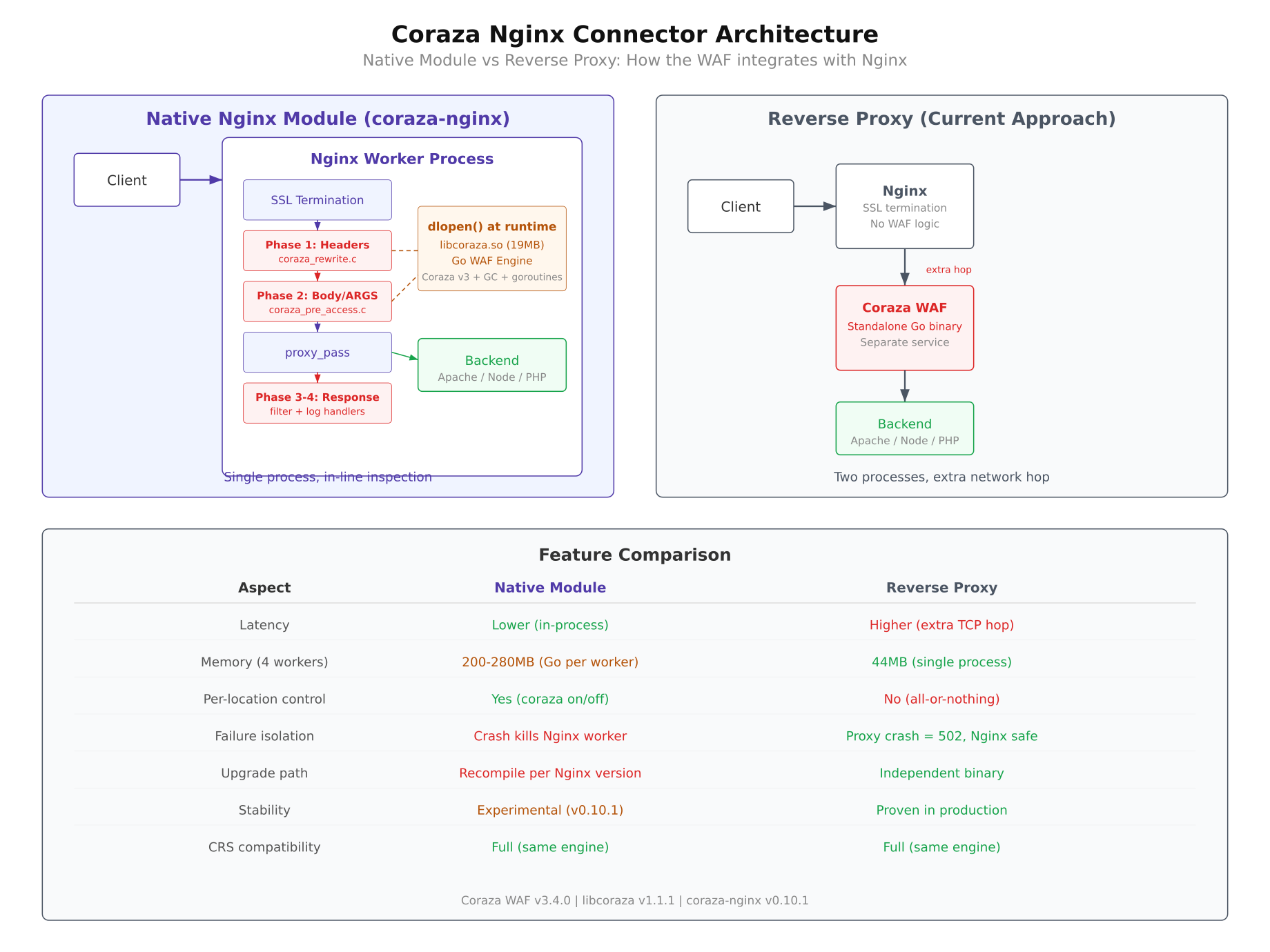
The diagram above illustrates both architectures side by side. On the left, the reverse proxy model shows traffic passing through three separate processes before reaching the backend. On the right, the native module model collapses the WAF inspection into the Nginx worker itself, reducing the path to two hops: client to Nginx, and Nginx to backend. The feature comparison table highlights the key differences in latency, configuration granularity, and operational complexity.
The dlopen() Design: Solving the Fork Deadlock
Embedding a Go-based WAF engine inside Nginx sounds straightforward, but the implementation faces a fundamental systems programming conflict between how Nginx manages processes and how the Go runtime manages threads. Understanding this conflict is essential for anyone building or debugging the connector.
The Fork Problem
Nginx uses the traditional Unix prefork model. The master process starts, reads configuration, binds to ports, and then calls fork() to create worker processes. Each worker is an independent copy of the master that handles incoming connections.
The critical detail is what fork() does to threads. When a process calls fork(), only the calling thread is duplicated into the child process. Every other thread in the parent simply ceases to exist in the child. This is defined by POSIX and is not a bug; it is the specified behavior.
Now consider the Go runtime. When a Go program (or a C program linked against a Go shared library) initializes, the Go runtime immediately spawns several threads: the garbage collector, the goroutine scheduler, signal handlers, and various internal management threads. These threads are essential for Go to function correctly.
The Wrong Way: Link at Compile Time
If you link libcoraza (a Go shared library) directly into Nginx at compile time, the Go runtime initializes as soon as the Nginx master process starts. Multiple Go threads are running before fork() is ever called. When fork() creates a worker, only the calling thread survives. The Go garbage collector thread is gone. The goroutine scheduler thread is gone. The signal handler thread is gone.
The Go runtime in the worker process now holds mutexes that were locked by threads that no longer exist. The garbage collector tries to stop-the-world but cannot signal threads that are dead. The result is a deadlock. The worker process hangs indefinitely, and Nginx becomes unresponsive.
The Right Way: dlopen() After Fork
The solution is to delay loading the Go shared library until after the fork has already happened. Each Nginx worker process calls dlopen() to load libcoraza.so during its initialization phase, after it has already been forked from the master. This means the Go runtime starts fresh in each worker with its own threads, its own garbage collector, and its own scheduler. No threads existed before the fork, so no threads are lost.
This dlopen() approach is implemented in a single C source file called ngx_http_coraza_dl.c, which wraps every libcoraza function call behind a dlsym() lookup. Instead of calling Coraza functions directly (which would require linking at compile time), the module resolves function pointers at runtime after the shared library is loaded. This adds a small amount of code complexity but completely eliminates the fork deadlock problem.
The two-stage build pipeline reflects this design. First, libcoraza is compiled as a standalone shared library (.so file) using Go’s cgo compiler. Second, the Nginx module is compiled against Nginx’s headers without linking to libcoraza. At runtime, the module uses dlopen() and dlsym() to connect the two pieces together.
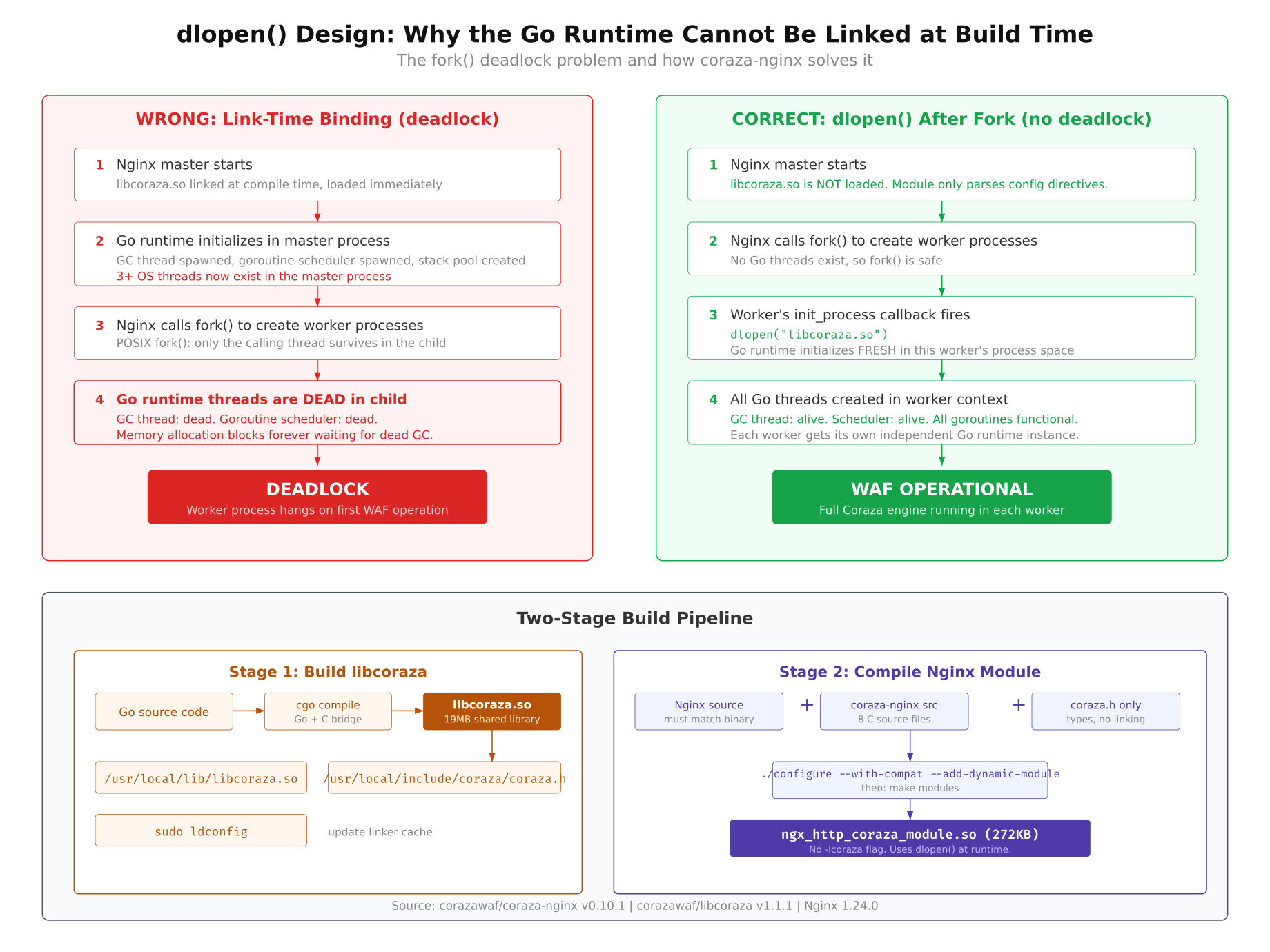
As shown in the diagram above, the left side depicts the deadlock scenario where Go threads initialized before fork() are lost in the child process, leaving locked mutexes with no owners. The right side shows the correct approach where dlopen() is called after fork(), allowing the Go runtime to initialize cleanly in each worker. The bottom section of the diagram illustrates the two-stage build pipeline that keeps libcoraza and the Nginx module separate until runtime.
Environment and Prerequisites
Building the Coraza Nginx Connector requires specific versions of several tools. The build system is sensitive to version mismatches, particularly with Go, where the minimum required version is enforced at compile time. The table below lists every component used in this evaluation.
Operating System: Ubuntu 24.04.4 LTS (Noble Numbat)
Kernel: 6.17.0-19-generic, x86_64
Nginx: 1.24.0 (installed from Ubuntu APT repository)
Go: 1.24.1 (upgraded from system default 1.23.4)
GCC: 13.3.0
libcoraza: v1.1.1
coraza-nginx: v0.10.1
Coraza WAF engine: v3.4.0
The Ubuntu APT repositories provide Go 1.23.4, but libcoraza v1.1.1 requires Go 1.24.0 or later. The Go toolchain needed to be upgraded manually before the build could proceed. Nginx 1.24.0 from the Ubuntu repository includes the development headers required for compiling third-party modules.
Upgrading Go to 1.24.1
The system-provided Go version (1.23.4) does not meet the minimum requirement for libcoraza v1.1.1. The build fails immediately with a clear error message stating that Go 1.24 or later is required. The upgrade process involves downloading the official Go binary tarball from Google’s servers and installing it to /usr/local/go.
First, check the currently installed Go version to confirm it needs upgrading.
$ go versiongo version go1.23.4 linux/amd64Download the Go 1.24.1 tarball from the official distribution site. This is a pre-compiled binary package that does not require building from source.
$ wget https://go.dev/dl/go1.24.1.linux-amd64.tar.gzRemove the existing Go installation at /usr/local/go and extract the new version in its place. The rm -rf ensures no leftover files from the previous version interfere with the new installation.
$ sudo rm -rf /usr/local/go
$ sudo tar -C /usr/local -xzf go1.24.1.linux-amd64.tar.gz
Ensure that /usr/local/go/bin is in your PATH. If Go was previously installed via APT, the path may point to the APT-managed binary. Verify that the correct binary is now being resolved.
$ export PATH=/usr/local/go/bin:$PATH
$ go versiongo version go1.24.1 linux/amd64Make the PATH change permanent by adding the export line to your shell profile. Without this, the system will revert to the APT-managed Go binary on the next login.
$ echo ‘export PATH=/usr/local/go/bin:$PATH’ >> ~/.bashrc
$ source ~/.bashrc
Installing Nginx and Build Tools
The Nginx development headers are required to compile third-party modules. The libnginx-mod-dev package (or alternatively, installing Nginx from source) provides the ngx_config.h and related headers that the Coraza Nginx module includes during compilation. The build also requires standard C development tools: gcc, make, autoconf, automake, and libtool.
$ sudo apt install -y nginx libnginx-mod-dev build-essential autoconf automake libtool pkg-configVerify that Nginx is installed and note the version. The module must be compiled against the exact same Nginx version it will run on. A version mismatch will cause the module to fail to load with an incompatible binary module error.
$ nginx -vnginx version: nginx/1.24.0 (Ubuntu)Also confirm the GCC version, as the compilation involves both C code (the Nginx module) and cgo-generated C code (from the Go library). Version mismatches between the compiler used for libcoraza and the one used for the Nginx module can cause subtle linking failures.
$ gcc –versiongcc (Ubuntu 13.3.0-6ubuntu2~24.04) 13.3.0
Copyright (C) 2023 Free Software Foundation, Inc.
This is free software; see the source for copying conditions. There is NO
warranty; not even for MERCHANTABILITY or FITNESS FOR A PARTICULAR PURPOSE.Building libcoraza from Source
libcoraza is the shared library that contains the entire Coraza WAF engine compiled from Go into a C-callable .so file. This is the library that each Nginx worker will load via dlopen() at runtime. Building it from source is the only option; there are no pre-built packages available for Ubuntu.
Cloning and Fixing the ChangeLog Issue
Clone the libcoraza repository from GitHub and check out the v1.1.1 release tag. This is the latest stable release at the time of this evaluation.
$ git clone https://github.com/corazawaf/libcoraza.git
$ cd libcoraza
$ git checkout v1.1.1
The build system uses autoreconf to generate the configure script. However, autoreconf expects a file named ChangeLog in the project root (required by the GNU Automake standard). The libcoraza repository does not include this file, which causes the autoreconf step to fail with an error about a missing required file.
The fix is simple: create an empty ChangeLog file before running the build system.
$ touch ChangeLogThis is a known issue with several Automake-based projects hosted on GitHub. The GNU build system expects certain files (ChangeLog, NEWS, README, AUTHORS) to exist even if they are empty. The libcoraza project tracks changes through Git history and GitHub releases instead of maintaining a separate ChangeLog file.
Running the Build System
The build follows the standard Autotools sequence: autoreconf generates the configure script from configure.ac and the Makefile templates, configure checks the system for required tools and libraries, and make performs the actual compilation.
Run autoreconf with the -i flag to install any missing auxiliary files (such as install-sh, compile, and missing) that the build system needs.
$ autoreconf -ilibtoolize: putting auxiliary files in ‘.’.
libtoolize: copying file ‘./ltmain.sh’
libtoolize: putting macros in AC_CONFIG_MACRO_DIRS, ‘m4’.
libtoolize: copying file ‘m4/libtool.m4’
libtoolize: copying file ‘m4/ltoptions.m4’
libtoolize: copying file ‘m4/ltsugar.m4’
libtoolize: copying file ‘m4/ltversion.m4’
libtoolize: copying file ‘m4/lt~obsolete.m4’
configure.ac:7: installing ‘./compile’
configure.ac:4: installing ‘./install-sh’
configure.ac:4: installing ‘./missing’
Makefile.am: installing ‘./depcomp’Next, run the configure script. This checks that Go 1.24+, GCC, and the other required build tools are available. It also detects the system architecture and sets up the correct compiler flags.
$ ./configurechecking for go… /usr/local/go/bin/go
checking go version… go1.24.1
checking whether go version is >= 1.24… yes
checking for gcc… gcc
checking whether the C compiler works… yes
configure: creating ./config.status
config.status: creating MakefileThe configure script explicitly checks for Go 1.24 or later. If you skipped the Go upgrade step, this is where the build would fail with a version requirement error.
Compiling the Shared Library
With the build system configured, run make to compile libcoraza. This step invokes the Go compiler through cgo to build the Coraza WAF engine and all its dependencies into a single shared library.
$ makeThe compilation takes several minutes because cgo is compiling the entire Coraza WAF engine (v3.4.0), the OWASP Core Rule Set parser, the regular expression engine, and the Go runtime itself into a single libcoraza.so file. The resulting shared library is approximately 19 MB in size. This is expected: the library contains a complete Go runtime (garbage collector, goroutine scheduler, memory allocator) alongside the WAF engine code.
During compilation, you will see cgo generating C wrapper functions for every Go function that is exported to C. These are the functions that the Nginx module will call through dlsym() after loading the library with dlopen().
$ ls -lh .libs/libcoraza.so-rwxrwxr-x 1 user user 19M Mar 19 14:32 .libs/libcoraza.soThe .libs/ directory is where libtool places the compiled shared library before installation. The actual file is libcoraza.so.0.0.0, with libcoraza.so being a symlink chain that libtool manages during the install step.
Installing libcoraza
The make install command copies the shared library to /usr/local/lib and the header files to /usr/local/include. These are the standard locations that the Nginx module’s build system will search when compiling.
$ sudo make installlibtool: install: /usr/bin/install -c .libs/libcoraza.so.0.0.0 /usr/local/lib/libcoraza.so.0.0.0
libtool: install: (cd /usr/local/lib && { ln -s -f libcoraza.so.0.0.0 libcoraza.so.0 || { rm -f libcoraza.so.0 && ln -s libcoraza.so.0.0.0 libcoraza.so.0; }; })
libtool: install: (cd /usr/local/lib && { ln -s -f libcoraza.so.0.0.0 libcoraza.so || { rm -f libcoraza.so && ln -s libcoraza.so.0.0.0 libcoraza.so; }; })
libtool: install: /usr/bin/install -c .libs/libcoraza.a /usr/local/lib/libcoraza.a
/usr/bin/mkdir -p ‘/usr/local/include/coraza’
/usr/bin/install -c -m 644 coraza.h ‘/usr/local/include/coraza/coraza.h’Notice the header installation path: the header file is installed to /usr/local/include/coraza/coraza.h, not directly to /usr/local/include/coraza.h. This subdirectory structure matters when compiling the Nginx module in Part 2, because the module’s source code includes the header as #include <coraza/coraza.h>, and the compiler’s include path must be set to /usr/local/include for this to resolve correctly.
Verify that both the shared library and the header file are in place.
$ ls -la /usr/local/lib/libcoraza.so*
$ ls -la /usr/local/include/coraza/lrwxrwxrwx 1 root root 23 Mar 19 14:35 /usr/local/lib/libcoraza.so -> libcoraza.so.0.0.0
lrwxrwxrwx 1 root root 23 Mar 19 14:35 /usr/local/lib/libcoraza.so.0 -> libcoraza.so.0.0.0
-rwxr-xr-x 1 root root 19M Mar 19 14:35 /usr/local/lib/libcoraza.so.0.0.0
/usr/local/include/coraza/:
total 12
drwxr-xr-x 2 root root 4096 Mar 19 14:35 .
drwxr-xr-x 3 root root 4096 Mar 19 14:35 ..
-rw-r–r– 1 root root 3421 Mar 19 14:35 coraza.hRunning ldconfig
After installing the shared library, the dynamic linker’s cache must be updated so that programs (and dlopen() calls) can find libcoraza.so at runtime. The ldconfig command scans the library directories and rebuilds the cache file at /etc/ld.so.cache.
$ sudo ldconfigVerify that the linker can now find libcoraza by querying the cache.
$ ldconfig -p | grep corazalibcoraza.so.0 (libc6,x86-64) => /usr/local/lib/libcoraza.so.0
libcoraza.so (libc6,x86-64) => /usr/local/lib/libcoraza.soIf libcoraza does not appear in the ldconfig output, check that /usr/local/lib is listed in /etc/ld.so.conf or in a file under /etc/ld.so.conf.d/. On Ubuntu 24.04, this path is included by default through the libc.conf file, but custom installations may have removed it.
At this point, libcoraza is fully installed and ready. The shared library is in the linker cache, the header files are in the standard include path, and any program on this system can load the Coraza WAF engine via dlopen("libcoraza.so", RTLD_NOW).
What Comes Next
With libcoraza compiled and installed, the foundation is in place. The shared library containing the full Coraza WAF v3.4.0 engine sits in /usr/local/lib, waiting to be loaded by an Nginx worker process. The Go runtime, the OWASP CRS parser, and all the inspection logic are bundled inside that single 19 MB file.
Part 2 picks up from here and covers the remaining steps: compiling the coraza-nginx module (v0.10.1) against Nginx 1.24.0’s headers, loading it as a dynamic module, writing WAF rules using the SecRule directive syntax, and testing the module against real attack payloads including SQL injection and cross-site scripting. Part 2 also documents the issues encountered during this evaluation and the findings on whether the native module approach is ready for production use.