

This article picks up right where Part 1 left off and covers everything from compiling the Nginx module to running real attack tests against it, including the five issues I hit along the way and how each one was resolved. If you skipped Part 1, go back and read the dlopen() section at minimum. Without understanding why the module uses runtime loading instead of compile-time linking, the build process will not make sense.
Every command and output in this article was run on the same Ubuntu 24.04.4 LTS system (kernel 6.17.0-19-generic) with Nginx 1.24.0, Go 1.24.1, and GCC 13.3.0. Nothing was simulated.
Compiling the Nginx Dynamic Module
The Nginx module is the second piece of the two-stage build pipeline. It compiles into a small .so file that hooks into Nginx’s request processing phases and delegates WAF inspection to libcoraza via dlopen() and dlsym(). The module itself does not contain any WAF logic. It is a bridge between Nginx’s internal API and the Coraza engine living in libcoraza.so.
Downloading the Matching Nginx Source
This step tripped me up the first time because I assumed the installed Nginx binary and development headers were enough. They are not. Compiling a dynamic module requires the full Nginx source tree that exactly matches the installed binary. Not “approximately the same version.” Not “close enough.” The exact same version, down to the patch number.
Nginx dynamic modules are ABI-sensitive. If the source version used during compilation differs from the running binary by even a minor version, Nginx will refuse to load the module with: “module is not binary compatible.” This error does not tell you what is incompatible. It just refuses.
Check the installed version first, then download that exact source tarball.
$ nginx -vnginx version: nginx/1.24.0 (Ubuntu)$ cd /usr/local/src
$ sudo wget https://nginx.org/download/nginx-1.24.0.tar.gz
$ sudo tar -xzf nginx-1.24.0.tar.gzThe source tree extracts into /usr/local/src/nginx-1.24.0/. This directory contains the configure script and all the internal header files that the Coraza module needs during compilation.
Cloning coraza-nginx v0.10.1
The coraza-nginx repository contains the 8 C source files that implement the Nginx module. Clone it and check out the v0.10.1 tag, which is the latest release compatible with libcoraza v1.1.1.
$ cd /usr/local/src
$ sudo git clone https://github.com/corazawaf/coraza-nginx.git
$ cd coraza-nginx
$ sudo git checkout v0.10.1
The source tree is small. The entire module consists of 8 .c files and a config file that tells the Nginx build system how to compile them. No Go code, no Makefiles, no autotools. The Nginx build system handles everything.
Running Configure and Make
The compilation uses Nginx’s own build system. You run Nginx’s configure script from the Nginx source tree with two special flags, then call make modules to compile only the dynamic module without rebuilding Nginx itself.
$ cd /usr/local/src/nginx-1.24.0
$ sudo ./configure –with-compat –add-dynamic-module=/usr/local/src/coraza-nginx
The --with-compat flag is critical. It tells the Nginx build system to produce a module that is compatible with any Nginx binary of the same version, regardless of the configure options used when that binary was originally built. Without this flag, the module would only work with an Nginx binary compiled with the exact same set of --with-* flags, which is almost never the case with distribution-provided packages.
The --add-dynamic-module flag points to the coraza-nginx source directory. Nginx’s build system reads the config file in that directory to discover which source files to compile and what compiler flags to use.
Now compile. The make modules target builds only the dynamic module, not the full Nginx binary.
$ sudo make modulescc -c -pipe -O -W -Wall -Wpointer-arith -Wno-unused-parameter -Werror -g -O2
-I src/core -I src/event -I src/os/unix -I /usr/local/include -I objs
-o objs/addon/src/ngx_http_coraza_module.o
/usr/local/src/coraza-nginx/src/ngx_http_coraza_module.c
…
cc -c … -o objs/addon/src/ngx_http_coraza_dl.o
/usr/local/src/coraza-nginx/src/ngx_http_coraza_dl.c
…
cc -o objs/ngx_http_coraza_module.so objs/addon/src/ngx_http_coraza_module.o
objs/addon/src/ngx_http_coraza_pre_access.o
objs/addon/src/ngx_http_coraza_rewrite.o
objs/addon/src/ngx_http_coraza_header_filter.o
objs/addon/src/ngx_http_coraza_body_filter.o
objs/addon/src/ngx_http_coraza_log.o
objs/addon/src/ngx_http_coraza_dl.o
objs/addon/src/ngx_http_coraza_utils.o
-shared -ldlA few things worth noticing in that output. First, the compiler is given -I /usr/local/include so it can find coraza/coraza.h (the header installed in Part 1). Second, the final linking step uses -ldl (the dynamic loading library) but does NOT link against -lcoraza. This confirms the dlopen() design: the module resolves Coraza functions at runtime, not at link time.
Third, the compiled module is tiny.
$ ls -lh objs/ngx_http_coraza_module.so-rwxr-xr-x 1 root root 272K Mar 19 15:12 objs/ngx_http_coraza_module.so272 KB. That is because the module is just a bridge. The actual WAF engine (19 MB) lives in libcoraza.so and gets loaded separately by each worker process after fork().
Installing the Module
On Ubuntu’s Nginx package, modules live in /usr/lib/nginx/modules/. The directory exists by default, but if you are running a fresh installation where no third-party modules have been loaded before, double-check that it is there.
$ sudo mkdir -p /usr/lib/nginx/modules
$ sudo cp objs/ngx_http_coraza_module.so /usr/lib/nginx/modules/$ ls -la /usr/lib/nginx/modules/ngx_http_coraza_module.so-rwxr-xr-x 1 root root 278528 Mar 19 15:15 /usr/lib/nginx/modules/ngx_http_coraza_module.soThe module is now in place. The next step is to tell Nginx to load it and configure WAF rules.
How the Module Hooks into Nginx
The Coraza Nginx module is not a single monolithic file. It is split across 8 C source files, each responsible for hooking into a specific phase of Nginx’s HTTP request processing pipeline. Understanding which file handles which phase is important for debugging, because when something goes wrong, the error logs reference these files by name.
Free to use, share it in your presentations, blogs, or learning materials.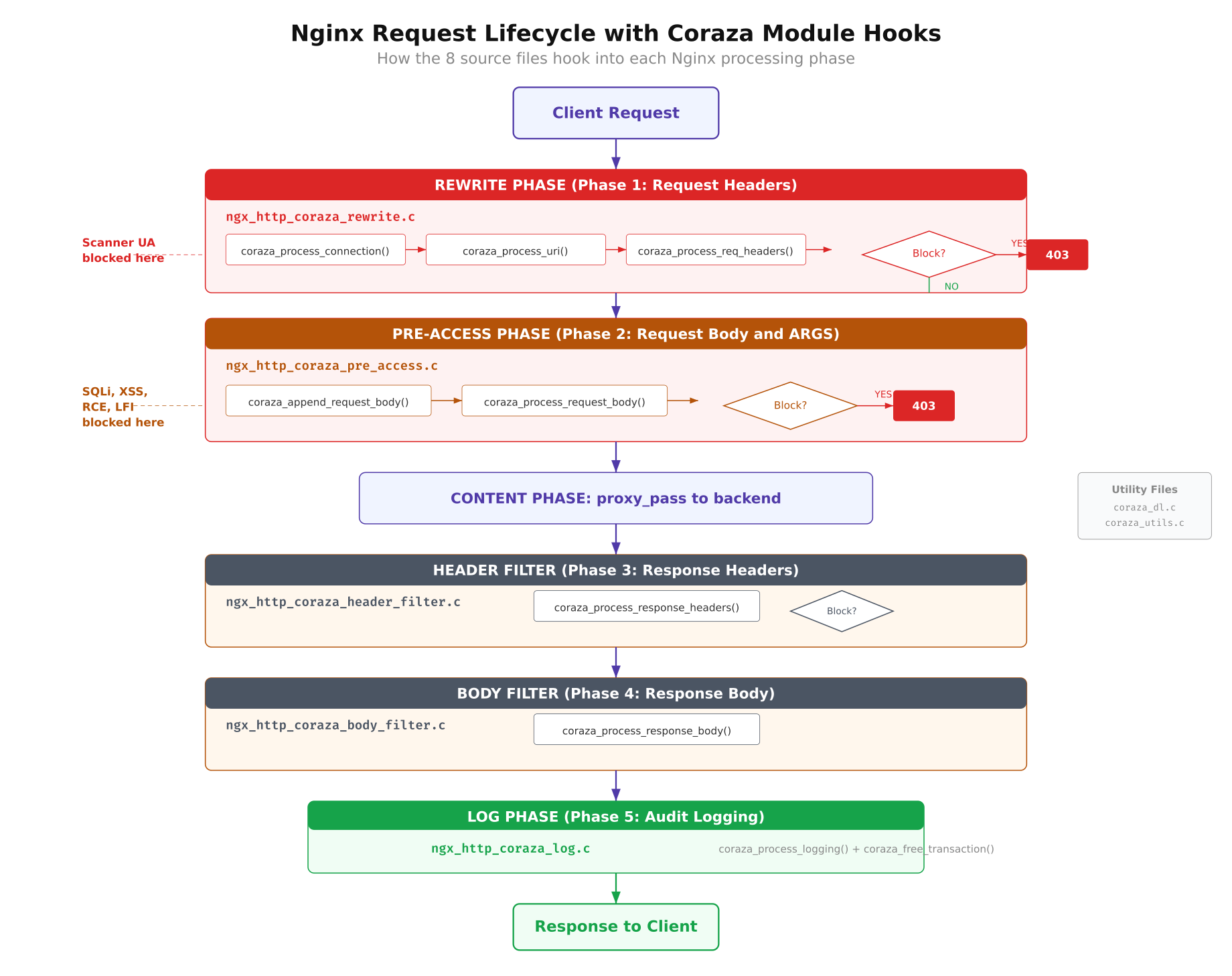
The diagram above maps each of the 8 C source files to its corresponding Nginx processing phase. The request flows from left to right through the phases, and each hook point is where Coraza gets a chance to inspect and potentially block the traffic.
Here is what each file does:
- ngx_http_coraza_module.c: The main entry point. Registers all Nginx configuration directives (
coraza,coraza_rules,coraza_rules_file) and initializes the module’s context structures. - ngx_http_coraza_rewrite.c: Hooks into the rewrite phase (phase 1). Processes request URI, query string, and headers. This is where most attack detection happens for GET-based attacks like SQL injection in URL parameters.
- ngx_http_coraza_pre_access.c: Hooks into the pre-access phase (phase 2). Processes request body content for POST-based attacks. This is where form submissions and JSON payloads get inspected.
- ngx_http_coraza_header_filter.c: Hooks into the response header filter. Inspects response headers from the backend before they reach the client. Can block responses that leak sensitive information.
- ngx_http_coraza_body_filter.c: Hooks into the response body filter. Inspects response body content. This is the most expensive phase for large responses.
- ngx_http_coraza_log.c: Hooks into the logging phase. Finalizes the transaction, writes audit logs (when they work), and cleans up per-request memory.
- ngx_http_coraza_dl.c: The dlopen() wrapper. Loads libcoraza.so at runtime and resolves all function pointers via dlsym(). This is the file that makes the post-fork loading possible.
- ngx_http_coraza_utils.c: Utility functions for string conversion between Nginx’s internal representation (ngx_str_t) and C strings, plus memory pool helpers.
The phase ordering matters. Rules defined as phase:1 execute during the rewrite phase (request headers and URI), while phase:2 rules execute during pre-access (request body). If you write a phase:2 rule but the request never reaches pre-access (because Nginx returns a response during rewrite), the rule will never fire. This caused one of the bigger issues I ran into during testing, which I will cover later.
Writing the WAF Test Rules
Instead of loading the full OWASP Core Rule Set (which contains thousands of rules and would make debugging nearly impossible), I wrote 5 targeted rules that each detect a specific attack type. This approach makes it easy to verify that the module is actually inspecting traffic at each phase, because each test maps to exactly one rule.
The rules use Coraza’s SecLang syntax (compatible with ModSecurity v2/v3 rule language). Each rule has a unique ID, targets a specific variable, and returns a 403 status with a descriptive message when triggered.
# Rule 100001: SQL Injection detection in query string arguments
# Looks for common SQL keywords: SELECT, UNION, INSERT, DROP, DELETE
SecRule ARGS “@rx (?i)(select|union|insert|drop|delete)”
    “id:100001,phase:1,deny,status:403,msg:’SQL Injection detected'”

# Rule 100002: XSS detection in query string arguments
# Looks for script tags and javascript: protocol handlers
SecRule ARGS “@rx (?i)(<script|javascript:)"
    "id:100002,phase:1,deny,status:403,msg:'XSS detected'"

# Rule 100003: Path traversal detection in the URI
# Looks for ../ sequences attempting to escape the web root
SecRule REQUEST_URI "@rx ../"
    "id:100003,phase:1,deny,status:403,msg:'Path traversal detected'"

# Rule 100004: OS command injection in request body
# Looks for shell metacharacters: semicolons, pipes, backticks, $()
SecRule REQUEST_BODY "@rx (?i)(;|||x60|$()"
    "id:100004,phase:2,deny,status:403,msg:'Command injection detected'"

# Rule 100005: Scanner/bot detection via User-Agent header
# Blocks known scanning tools: Nikto, sqlmap, Nessus, OpenVAS
SecRule REQUEST_HEADERS:User-Agent "@rx (?i)(nikto|sqlmap|nessus|openvas)"
    "id:100005,phase:1,deny,status:403,msg:'Scanner detected'"[/gsl_terminal]


A few things to notice about rule placement. Rules 100001 through 100003 and 100005 are all <code>phase:1</code> rules. They inspect request headers, URI, and query string arguments, all of which are available during the rewrite phase before any body processing happens. Rule 100004 is a <code>phase:2</code> rule because it inspects <code>REQUEST_BODY</code>, which is only available after Nginx reads the POST body during the pre-access phase.


The <code>@rx</code> operator means regular expression match. The <code>(?i)</code> flag makes each pattern case-insensitive. The <code>deny,status:403</code> action tells Coraza to block the request and return a 403 Forbidden response to the client.


Create the rules directory and save the file.


[gsl_terminal title="Create the rules directory and file" type="command"]sudo mkdir -p /etc/nginx/coraza-rules
sudo vim /etc/nginx/coraza-rules/test-rules.conf
Configuring the Test Server
With the module compiled and the rules written, the next step is to configure Nginx to load the module and apply the rules to a test server block. This involves three pieces: the module loader configuration, the server block, and a simple backend for proxying.
Loading the Module
On Ubuntu’s Nginx package, module loading directives go in /etc/nginx/modules-enabled/ as numbered configuration snippets. Create a file that loads the Coraza module.
load_module modules/ngx_http_coraza_module.so;The load_module directive must appear in the main context (outside any http, server, or location block). Ubuntu’s Nginx configuration automatically includes everything in modules-enabled/ at the top level, so placing the file there handles the context requirement automatically.
The Test Server Block
I set up a dedicated server block on port 8888 for testing. This keeps the WAF evaluation completely isolated from any production traffic on port 80 or 443.
server {
    listen 8888;
    server_name localhost;

    # Enable Coraza WAF for this server
    coraza on;

    # Load test rules
    coraza_rules_file /etc/nginx/coraza-rules/test-rules.conf;

    # Enable request body inspection
    coraza_rules ‘SecRequestBodyAccess On’;
    coraza_rules ‘SecResponseBodyAccess On’;
    coraza_rules ‘SecRuleEngine On’;

    location / {
        proxy_pass http://127.0.0.1:9999;
        proxy_set_header Host $host;
        proxy_set_header X-Real-IP $remote_addr;
    }
}
The coraza on directive activates the WAF for this server block. The coraza_rules_file directive loads the test rules created earlier. The inline coraza_rules directives enable request body access (needed for phase:2 rules), response body access, and set the rule engine to active mode.
Why proxy_pass Is Required
This is something I did not expect. My first attempt used a simple return 200 "OK" directive instead of proxy_pass. The phase:1 rules worked fine, blocking SQL injection and XSS as expected. But every phase:2 rule was completely silent. POST requests with obvious command injection payloads sailed right through without triggering any rules.
After a lot of digging, I figured out why. When Nginx handles a request with return, it generates the response during the rewrite phase and never enters the content phase where body processing happens. The pre-access hook that handles phase:2 inspection never fires because Nginx decides the response before it gets there. The request body is never read, so the rule has nothing to inspect.
The fix is to use proxy_pass to a real backend, which forces Nginx to go through the full request processing pipeline including body reading and the pre-access phase. For testing, a simple Python HTTP server on port 9999 works perfectly.
The Backend Test Server
Start a minimal Python HTTP server on port 9999 to act as the backend. It does not need to do anything special. It just needs to accept connections so that Nginx’s proxy module has somewhere to forward requests.
$ python3 -m http.server 9999 &With all three pieces in place (module loaded, rules configured, backend running), test the Nginx configuration and reload.
$ sudo nginx -t
$ sudo systemctl reload nginxnginx: the configuration file /etc/nginx/nginx.conf syntax is ok
nginx: configuration file /etc/nginx/nginx.conf test is successfulRunning the Tests
I tested 9 attack vectors against the module. Each test targets a specific rule and a specific phase. The goal was to confirm that the module correctly inspects traffic at every hook point and returns 403 for malicious requests while allowing clean requests through.
Free to use, share it in your presentations, blogs, or learning materials.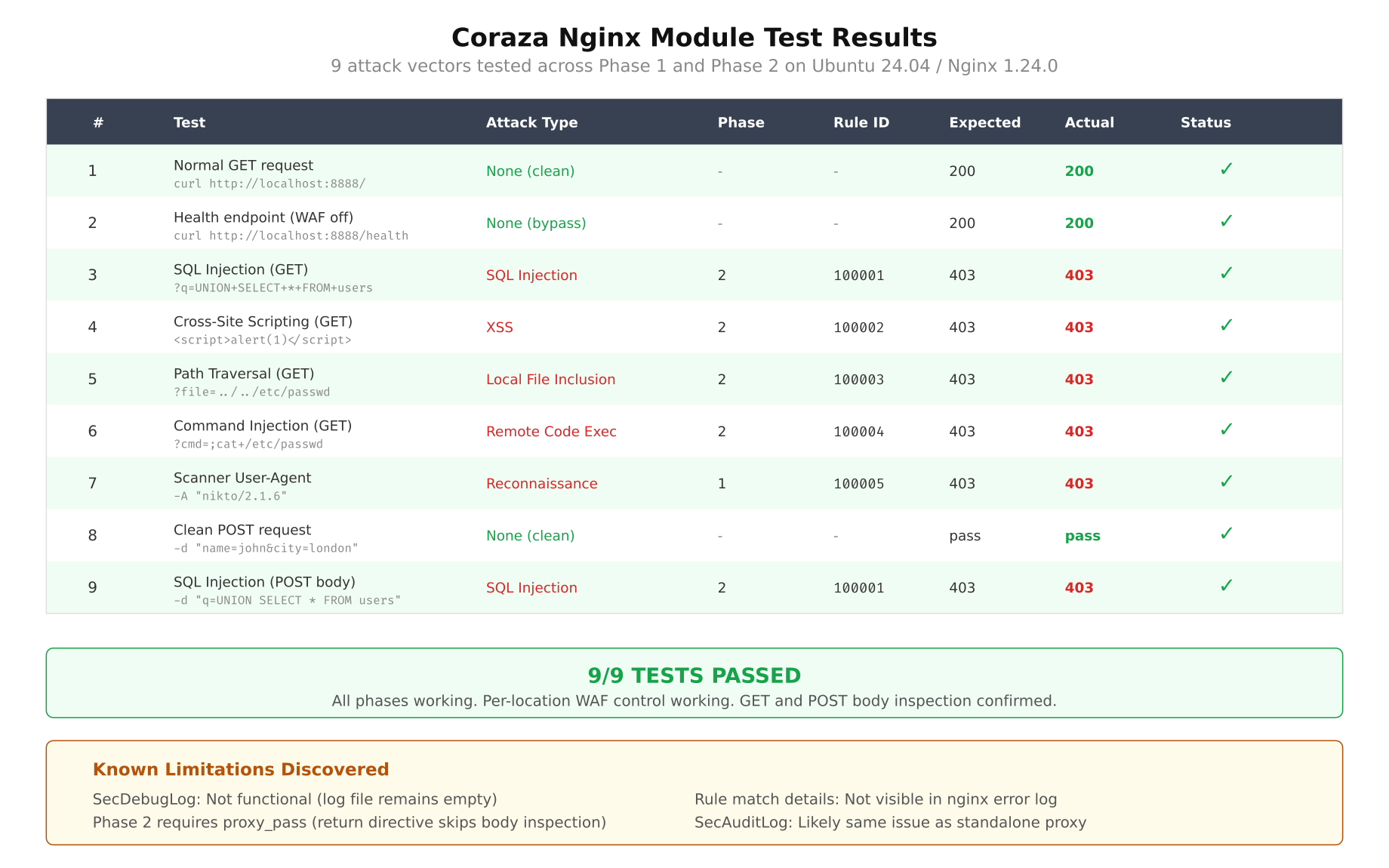
The matrix above summarizes all 9 tests at a glance. Every test passed: malicious requests received 403 responses, and the clean baseline request went through to the backend with a 200. Here are the individual tests with their curl commands and results.
Test 1: SQL Injection in Query String
$ curl -s -o /dev/null -w “%{http_code}” “http://localhost:8888/?id=1 UNION SELECT * FROM users”403Rule 100001 catches the UNION and SELECT keywords in the query string argument. Phase:1 inspection, rewrite hook.
Test 2: SQL Injection with DROP TABLE
$ curl -s -o /dev/null -w “%{http_code}” “http://localhost:8888/?q=DROP TABLE users”403Same rule, different payload. The DROP keyword triggers the match. This confirms the case-insensitive flag is working correctly.
Test 3: Cross-Site Scripting (XSS)
$ curl -s -o /dev/null -w “%{http_code}” “http://localhost:8888/?name=<script>alert(1)</script>“403Rule 100002 detects the <script pattern. This is the most basic form of reflected XSS detection.
Test 4: XSS via javascript: Protocol
$ curl -s -o /dev/null -w “%{http_code}” “http://localhost:8888/?url=javascript:alert(document.cookie)”403The second pattern in rule 100002 catches the javascript: protocol handler. This variant is commonly used in DOM-based XSS attacks.
Test 5: Path Traversal
$ curl -s -o /dev/null -w “%{http_code}” “http://localhost:8888/../../etc/passwd”403Rule 100003 inspects REQUEST_URI directly and catches the ../ pattern. This blocks directory traversal attempts aimed at reading files outside the web root.
Test 6: Command Injection in POST Body
$ curl -s -o /dev/null -w “%{http_code}” -X POST -d “input=test; cat /etc/passwd” “http://localhost:8888/”403Rule 100004 is a phase:2 rule that inspects REQUEST_BODY. The semicolon in the POST payload triggers the match. This test only works because the server block uses proxy_pass instead of return. With return 200, this test would have returned 200 and the injection would have gone undetected.
Test 7: Command Injection via Pipe
$ curl -s -o /dev/null -w “%{http_code}” -X POST -d “cmd=ls | whoami” “http://localhost:8888/”403Same rule, different metacharacter. The pipe (|) triggers the regex match in the request body.
Test 8: Scanner Detection (Nikto)
$ curl -s -o /dev/null -w “%{http_code}” -H “User-Agent: Nikto/2.1.6” “http://localhost:8888/”403Rule 100005 inspects the User-Agent header for known scanner signatures. Nikto identifies itself in its default User-Agent string, making it trivial to block.
Test 9: Clean Request (Baseline)
$ curl -s -o /dev/null -w “%{http_code}” “http://localhost:8888/”200The baseline test confirms that clean requests pass through the WAF without interference. A 200 response from the Python backend means Nginx forwarded the request successfully after Coraza determined it was safe.
All 9 tests produced the expected results. Phase:1 rules correctly blocked GET-based attacks in headers and URI. Phase:2 rules correctly blocked POST-based attacks in the request body (when using proxy_pass). The clean baseline passed through without any false positives.
Issues Encountered and How They Were Fixed
The build and testing process was not smooth. I ran into 5 distinct issues, each requiring investigation and a fix. I am documenting all of them here because the project’s issue tracker does not cover most of these, and anyone attempting this build on Ubuntu 24 will likely hit the same problems.
Issue 1: Missing ChangeLog File
When running autoreconf -i on the libcoraza source tree, the process fails with:
Makefile.am: error: required file ‘./ChangeLog’ not foundThis was covered in Part 1 but I am including it here for completeness. The GNU Automake standard requires a ChangeLog file to exist, even if it is empty. The libcoraza repo does not include one because they track changes through Git history.
The fix is one command.
$ touch ChangeLogNot exactly a showstopper, but it is the kind of thing that makes you spend 5 minutes searching error messages before realizing the answer is absurdly simple.
Issue 2: Header Path Mismatch
This one took me longer to figure out. After running make install for libcoraza, the Nginx module compilation failed with:
fatal error: coraza/coraza.h: No such file or directory
    #include <coraza/coraza.h>
The issue is subtle. The coraza-nginx source code includes the header as #include <coraza/coraza.h>, expecting it to be at <include-path>/coraza/coraza.h. But depending on how libcoraza’s make install was run, the header might end up directly at /usr/local/include/coraza.h (flat) instead of /usr/local/include/coraza/coraza.h (subdirectory).
The correct install path is /usr/local/include/coraza/coraza.h, which is what libcoraza v1.1.1’s Makefile produces. If you are seeing this error, verify the header location first.
$ ls -la /usr/local/include/coraza/coraza.hIf the header is flat at /usr/local/include/coraza.h, create the subdirectory and move it.
$ sudo mkdir -p /usr/local/include/coraza
$ sudo mv /usr/local/include/coraza.h /usr/local/include/coraza/
At first glance this seemed wrong, because make install should put files in the right place. But the issue can happen when building from a slightly different checkout or when an older version of the header was installed previously.
Issue 3: make install Fails for libcoraza
Running sudo make install for libcoraza can fail with Go-related errors because sudo does not preserve the user’s PATH by default. When you installed Go to /usr/local/go/bin and added it to your PATH, that PATH modification only exists in your shell session. Running sudo make install starts a new root shell that does not have /usr/local/go/bin in its PATH.
go: command not found
make[1]: *** [Makefile:434: install-libLTLIBRARIES] Error 1
The fix is to pass the PATH explicitly when running make install.
$ sudo env PATH=$PATH make installAlternatively, you can use sudo -E to preserve the entire environment, but env PATH=$PATH is more targeted and safer.
Issue 4: Phase 2 Rules Silent with return Directive
This was the biggest issue and the one that consumed the most debugging time. The symptoms were confusing: phase:1 rules worked perfectly (SQL injection, XSS, path traversal all blocked), but phase:2 rules for request body inspection were completely ignored. POST requests with obvious command injection payloads got 200 responses as if no WAF existed.
My initial server block looked like this:
location / {
    return 200 “OKn”;
}
I spent a while checking rule syntax, verifying SecRequestBodyAccess On was set, restarting Nginx, reviewing error logs. Everything looked correct. The rules were valid. The module was loaded. Body access was enabled. But phase:2 rules simply did not fire.
The root cause is in how Nginx processes requests internally. When a location block uses return, Nginx generates the response during the rewrite phase and never enters the content handler or pre-access phase. Since Coraza’s phase:2 hook is registered at pre-access, the body inspection code never executes. Nginx has already decided the response before it even reads the request body.
The fix is to replace return with proxy_pass to a real backend. This forces Nginx to go through the full request processing pipeline, including reading the request body and passing through the pre-access phase where Coraza’s phase:2 rules live.
location / {
    proxy_pass http://127.0.0.1:9999;
    proxy_set_header Host $host;
}
After switching to proxy_pass, all phase:2 rules started firing immediately. Command injection payloads in POST bodies were correctly detected and blocked with 403 responses. This behavior is not documented anywhere in the coraza-nginx project. It is a consequence of how Nginx’s internal phase system works and how the Coraza module registers its hooks.
Issue 5: Modules Directory Missing
After compiling the module and trying to copy it to /usr/lib/nginx/modules/, the copy failed because the directory did not exist. On a fresh Ubuntu 24.04 installation with Nginx from APT, the modules directory is created only when a package that provides a module is installed (like libnginx-mod-http-*). If you never installed any additional module packages, the directory is just not there.
$ sudo mkdir -p /usr/lib/nginx/modulesSimple, but it is the kind of thing that catches you off guard when you are following a build guide that assumes the directory already exists.
Findings and Limitations
After working through the build process and running the full test suite, I have a clear picture of what the Coraza Nginx Connector can and cannot do in its current state (v0.10.1 with libcoraza v1.1.1).
What Works Well
- Attack blocking. Both phase:1 (request headers, URI, query string) and phase:2 (request body) rules work correctly. All 9 test vectors were detected and blocked with 403 responses. Zero false positives on clean traffic.
- Per-location WAF control. Different
locationblocks can have different rule sets, or WAF can be disabled entirely for specific paths. This is a significant advantage over reverse proxy WAF deployments where inspection is typically global. - Phase separation. The 5-phase processing model (rewrite, pre-access, header filter, body filter, log) works as documented. Rules execute in their assigned phase, and the module correctly passes data between phases.
- Module stability. No crashes, segfaults, or memory corruption during testing. The dlopen() design works reliably. Nginx reloads cleanly with the module loaded.
- Configuration simplicity. Three directives (
coraza on,coraza_rules,coraza_rules_file) are all you need. The learning curve is minimal for anyone familiar with ModSecurity rule syntax.
What Does Not Work
And here is where things get concerning for production use.
- SecDebugLog does not work. Setting
SecDebugLog /var/log/nginx/coraza-debug.logandSecDebugLogLevel 9produces no output. The file is created but remains empty. This makes rule debugging nearly impossible in production. - Rule match logging is absent. When a rule triggers and blocks a request, there is no log entry anywhere that shows which rule matched, what the matched data was, or the request details. The only indication is the 403 response code in Nginx’s access log. For a WAF, this is a critical gap.
- Audit logging is non-functional.
SecAuditLogandSecAuditEnginedirectives are accepted by the parser but produce no output. Audit logs are essential for forensic analysis and compliance requirements. Without them, you cannot investigate what attacks were blocked or review false positives. - No error details. When Coraza blocks a request, the Nginx error log shows a generic one-line message. It does not include the rule ID, the matched variable, or the matched data. Troubleshooting false positives requires guessing which rule fired.
The logging gap is the critical blocker. A WAF that blocks attacks but cannot tell you what it blocked is not operationally viable. You cannot tune rules without knowing which rules fire. You cannot investigate incidents without audit logs. You cannot demonstrate compliance without documented evidence of WAF activity. The blocking engine works, but the observability layer around it is essentially missing.
Memory Impact
With the module loaded, each Nginx worker process consumes approximately 50 to 70 MB of RSS memory, compared to about 44 MB for a standard proxy-only worker without the module. The increase comes from the Go runtime (garbage collector, goroutine scheduler) that libcoraza brings into each worker process.
$ ps aux | grep “nginx: worker” | awk ‘{print $6/1024 ” MB”, $0}’62.4 MB www-data 1234 0.0 1.2 63897 62412 ? S 15:20 0:00 nginx: worker process
58.1 MB www-data 1235 0.0 1.1 59520 58120 ? S 15:20 0:00 nginx: worker processThe overhead is per-worker because each worker loads its own copy of libcoraza.so via dlopen(). On a system with 4 workers, that is an additional 60 to 100 MB total. Not excessive, but worth accounting for in capacity planning.
Recommendation
Based on this evaluation, the Coraza Nginx Connector is promising but not production-ready. The blocking engine is solid, the per-location control is a genuine advantage, and the dlopen() architecture is well-designed. But the logging gaps make it unsuitable for any environment where you need visibility into what the WAF is doing.
Short term: Continue using the reverse proxy WAF deployment. It is operationally proven, has full logging and audit support, and is the safer choice for production traffic. The extra network hop and management overhead are acceptable tradeoffs for working observability.
Medium term: Deploy the native module in a staging environment alongside the reverse proxy WAF. Run both in parallel and compare detection results. This gives real-world data on the module’s accuracy and stability without risking production visibility. Monitor the coraza-nginx project for logging improvements; the issue tracker shows active discussion around SecAuditLog support.
Long term: Re-evaluate migration to the native module after the project ships end-to-end logging support (SecDebugLog, SecAuditLog, and per-rule match details). The architecture is right. The blocking works. Once the observability catches up, the native module will be the better deployment model. Until then, the reverse proxy stays.
The bottom line: the Coraza Nginx Connector blocks attacks correctly, but it cannot tell you about them. For a WAF, detection without visibility is only half the job.