
Side-by-Side Feature Matrix
The evaluation begins with a structured feature comparison. Each framework occupies a distinct niche: Hyperledger Fabric excels at multi-organization channel isolation, Go-Ethereum (Geth) serves as the reference client for public Ethereum, Hyperledger Besu brings enterprise Java tooling to the EVM world, and GoQuorum extends Geth with Tessera-based private transactions. The comparison table below captures the critical dimensions that NordBank’s team scored during their first evaluation sprint.
Free to use, share it in your presentations, blogs, or learning materials.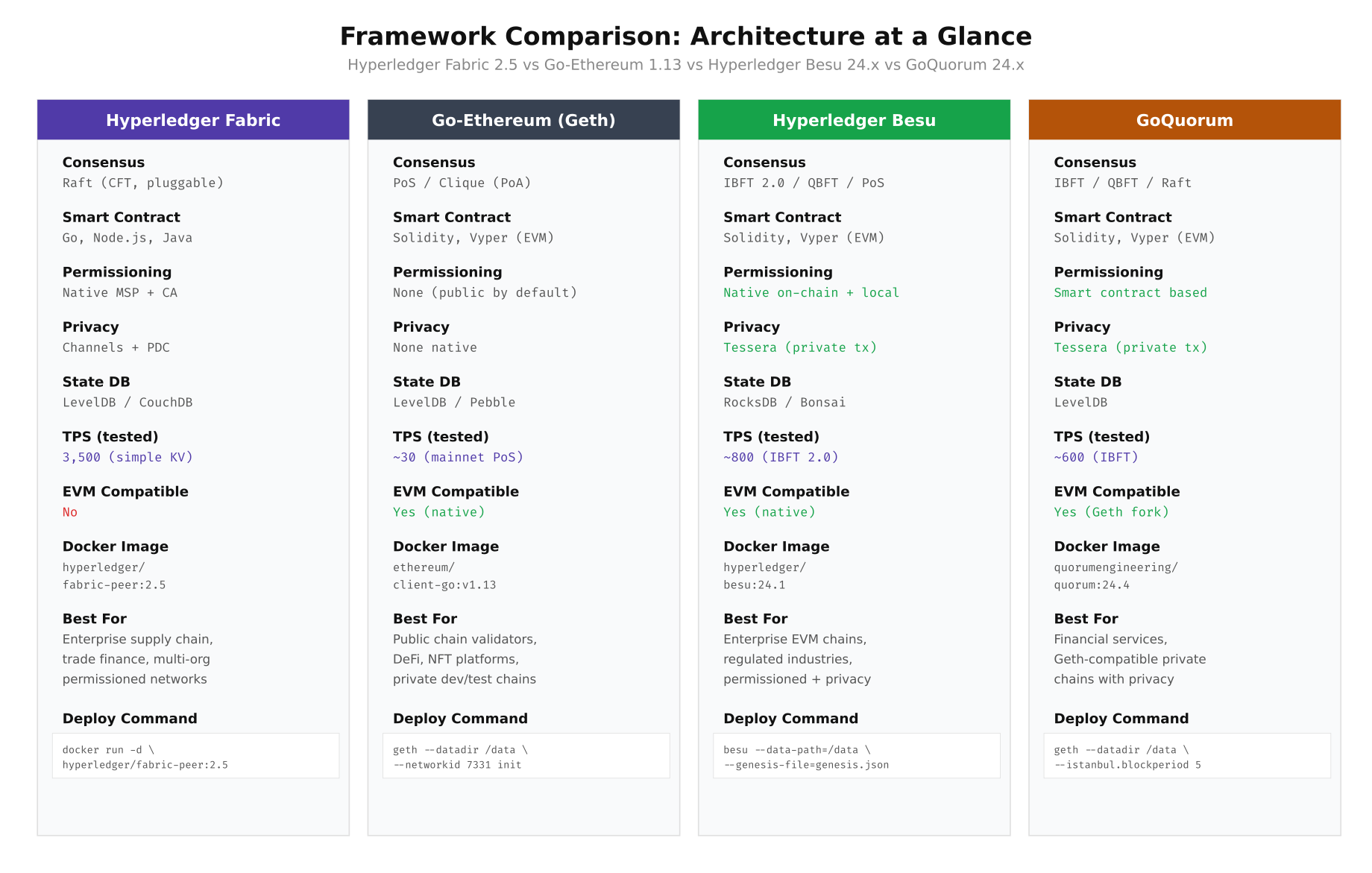
The comparison above highlights a fundamental architectural split. Fabric uses an execute-order-validate pipeline with pluggable consensus, while the three Ethereum-based frameworks share the EVM execution model but differ in their consensus and privacy layers. Fabric’s channel architecture provides native data isolation that the EVM-based frameworks achieve through add-on privacy managers like Tessera.
Setting Up the Evaluation Environment
NordBank provisioned a dedicated evaluation cluster on their existing bare-metal infrastructure in the Stockholm data center. Four identical servers handle validator nodes, a dedicated load generator runs Hyperledger Caliper, and a monitoring stack captures resource utilization throughout each test run. The entire evaluation environment is automated through Ansible playbooks to ensure reproducibility across frameworks.
# Provision the evaluation directory on each test server
sudo mkdir -p /opt/nordbank-eval/{fabric,geth,besu,quorum,caliper,monitoring,results,scripts}
sudo chown -R bcops:bcops /opt/nordbank-eval
chmod 750 /opt/nordbank-eval

# Verify Docker and Docker Compose versions (must be identical across all nodes)
docker --version
# Docker version 24.0.7, build afdd53b

docker compose version
# Docker Compose version v2.23.3

# Pull all framework images ahead of time to avoid download during benchmarks
docker pull hyperledger/fabric-orderer:2.5
docker pull hyperledger/fabric-peer:2.5
docker pull hyperledger/fabric-ca:1.5.7
docker pull couchdb:3.3
docker pull ethereum/client-go:v1.13.14
docker pull hyperledger/besu:24.1.0
docker pull quorumengineering/quorum:24.4
docker pull quorumengineering/tessera:24.4

# Verify all images are available
docker images --format "table {{.Repository}}\t{{.Tag}}\t{{.Size}}" | grep -E "(fabric|ethereum|besu|quorum|tessera|couchdb)"
Deploying Hyperledger Fabric 2.5
Fabric requires the most initial setup of the four frameworks because of its certificate authority infrastructure and channel configuration. NordBank’s evaluation used a three-organization topology: NordBank Norway (Org1), NordBank Sweden (Org2), and NordBank Finland (Org3), each with one peer and one CA, plus three Raft orderers distributed across all organizations.
# Navigate to the Fabric evaluation directory
cd /opt/nordbank-eval/fabric

# Download Fabric binaries and Docker images
curl -sSL https://raw.githubusercontent.com/hyperledger/fabric/main/scripts/install-fabric.sh | bash -s -- docker binary

# Generate the crypto material using cryptogen
cat > crypto-config.yaml << 'YAML'
OrdererOrgs:
  - Name: OrdererOrg
    Domain: orderer.nordbank.net
    EnableNodeOUs: true
    Specs:
      - Hostname: orderer0
      - Hostname: orderer1
      - Hostname: orderer2

PeerOrgs:
  - Name: NordBankNO
    Domain: no.nordbank.net
    EnableNodeOUs: true
    Template:
      Count: 1
    Users:
      Count: 1
  - Name: NordBankSE
    Domain: se.nordbank.net
    EnableNodeOUs: true
    Template:
      Count: 1
    Users:
      Count: 1
  - Name: NordBankFI
    Domain: fi.nordbank.net
    EnableNodeOUs: true
    Template:
      Count: 1
    Users:
      Count: 1
YAML

# Generate crypto material
./bin/cryptogen generate --config=crypto-config.yaml --output=crypto-config

# Verify the generated structure
find crypto-config -name "*.pem" | wc -l
# Expected: 45+ certificate files

# Create the channel configuration transaction
cat > configtx.yaml << 'YAML'
Organizations:
  - &OrdererOrg
    Name: OrdererOrg
    ID: OrdererMSP
    MSPDir: crypto-config/ordererOrganizations/orderer.nordbank.net/msp
    Policies:
      Readers:
        Type: Signature
        Rule: "OR('OrdererMSP.member')"
      Writers:
        Type: Signature
        Rule: "OR('OrdererMSP.member')"
      Admins:
        Type: Signature
        Rule: "OR('OrdererMSP.admin')"

  - &NordBankNO
    Name: NordBankNO
    ID: NordBankNOMSP
    MSPDir: crypto-config/peerOrganizations/no.nordbank.net/msp
    AnchorPeers:
      - Host: peer0.no.nordbank.net
        Port: 7051
    Policies:
      Readers:
        Type: Signature
        Rule: "OR('NordBankNOMSP.admin', 'NordBankNOMSP.peer', 'NordBankNOMSP.client')"
      Writers:
        Type: Signature
        Rule: "OR('NordBankNOMSP.admin', 'NordBankNOMSP.client')"
      Admins:
        Type: Signature
        Rule: "OR('NordBankNOMSP.admin')"
      Endorsement:
        Type: Signature
        Rule: "OR('NordBankNOMSP.peer')"

  - &NordBankSE
    Name: NordBankSE
    ID: NordBankSEMSP
    MSPDir: crypto-config/peerOrganizations/se.nordbank.net/msp
    AnchorPeers:
      - Host: peer0.se.nordbank.net
        Port: 7051

  - &NordBankFI
    Name: NordBankFI
    ID: NordBankFIMSP
    MSPDir: crypto-config/peerOrganizations/fi.nordbank.net/msp
    AnchorPeers:
      - Host: peer0.fi.nordbank.net
        Port: 7051

Capabilities:
  Channel: &ChannelCapabilities
    V2_0: true
  Orderer: &OrdererCapabilities
    V2_0: true
  Application: &ApplicationCapabilities
    V2_0: true

Application: &ApplicationDefaults
  Organizations:
  Policies:
    Readers:
      Type: ImplicitMeta
      Rule: "ANY Readers"
    Writers:
      Type: ImplicitMeta
      Rule: "ANY Writers"
    Admins:
      Type: ImplicitMeta
      Rule: "MAJORITY Admins"
    LifecycleEndorsement:
      Type: ImplicitMeta
      Rule: "MAJORITY Endorsement"
    Endorsement:
      Type: ImplicitMeta
      Rule: "MAJORITY Endorsement"

Orderer: &OrdererDefaults
  OrdererType: etcdraft
  BatchTimeout: 1s
  BatchSize:
    MaxMessageCount: 500
    AbsoluteMaxBytes: 99 MB
    PreferredMaxBytes: 2 MB
  EtcdRaft:
    Consenters:
      - Host: orderer0.orderer.nordbank.net
        Port: 7050
        ClientTLSCert: crypto-config/ordererOrganizations/orderer.nordbank.net/orderers/orderer0.orderer.nordbank.net/tls/server.crt
        ServerTLSCert: crypto-config/ordererOrganizations/orderer.nordbank.net/orderers/orderer0.orderer.nordbank.net/tls/server.crt
      - Host: orderer1.orderer.nordbank.net
        Port: 7050
        ClientTLSCert: crypto-config/ordererOrganizations/orderer.nordbank.net/orderers/orderer1.orderer.nordbank.net/tls/server.crt
        ServerTLSCert: crypto-config/ordererOrganizations/orderer.nordbank.net/orderers/orderer1.orderer.nordbank.net/tls/server.crt
      - Host: orderer2.orderer.nordbank.net
        Port: 7050
        ClientTLSCert: crypto-config/ordererOrganizations/orderer.nordbank.net/orderers/orderer2.orderer.nordbank.net/tls/server.crt
        ServerTLSCert: crypto-config/ordererOrganizations/orderer.nordbank.net/orderers/orderer2.orderer.nordbank.net/tls/server.crt

Channel: &ChannelDefaults
  Policies:
    Readers:
      Type: ImplicitMeta
      Rule: "ANY Readers"
    Writers:
      Type: ImplicitMeta
      Rule: "ANY Writers"
    Admins:
      Type: ImplicitMeta
      Rule: "MAJORITY Admins"

Profiles:
  NordBankOrdererGenesis:
    <<: *ChannelDefaults
    Orderer:
      <<: *OrdererDefaults
      Organizations:
        - *OrdererOrg
    Consortiums:
      NordBankConsortium:
        Organizations:
          - *NordBankNO
          - *NordBankSE
          - *NordBankFI
  NordBankChannel:
    Consortium: NordBankConsortium
    <<: *ChannelDefaults
    Application:
      <<: *ApplicationDefaults
      Organizations:
        - *NordBankNO
        - *NordBankSE
        - *NordBankFI
YAML

# Generate genesis block and channel transaction
./bin/configtxgen -profile NordBankOrdererGenesis -channelID system-channel -outputBlock ./channel-artifacts/genesis.block
./bin/configtxgen -profile NordBankChannel -outputCreateChannelTx ./channel-artifacts/settlement-channel.tx -channelID settlement

# Verify artifacts
ls -la channel-artifacts/
# genesis.block       ~25 KB
# settlement-channel.tx  ~5 KB
Deploying Go-Ethereum with Clique PoA
Geth requires the least infrastructure of any framework. A Clique Proof-of-Authority setup needs only a genesis file with pre-authorized signer addresses and a bootnode for peer discovery. NordBank's evaluation used four signer nodes and one bootnode. The simplicity of Geth's deployment is both its greatest strength and its limitation: there is no built-in private transaction support or fine-grained access control.
# Navigate to the Geth evaluation directory
cd /opt/nordbank-eval/geth

# Create accounts for each signer node
for i in 1 2 3 4; do
  mkdir -p data/node${i}
  geth --datadir data/node${i} account new --password password.txt
done

# Record the generated addresses (example output)
# Node 1: 0x1a2b3c4d5e6f7a8b9c0d1e2f3a4b5c6d7e8f9a0b
# Node 2: 0x2b3c4d5e6f7a8b9c0d1e2f3a4b5c6d7e8f9a0b1c
# Node 3: 0x3c4d5e6f7a8b9c0d1e2f3a4b5c6d7e8f9a0b1c2d
# Node 4: 0x4d5e6f7a8b9c0d1e2f3a4b5c6d7e8f9a0b1c2d3e

# Create the Clique genesis file
# The extradata field encodes the initial signer set:
# 32 zero bytes + concatenated signer addresses + 65 zero bytes (signature)
cat > genesis.json << 'JSON'
{
  "config": {
    "chainId": 31337,
    "homesteadBlock": 0,
    "eip150Block": 0,
    "eip155Block": 0,
    "eip158Block": 0,
    "byzantiumBlock": 0,
    "constantinopleBlock": 0,
    "petersburgBlock": 0,
    "istanbulBlock": 0,
    "berlinBlock": 0,
    "londonBlock": 0,
    "clique": {
      "period": 5,
      "epoch": 30000
    }
  },
  "difficulty": "1",
  "gasLimit": "30000000",
  "extradata": "0x00000000000000000000000000000000000000000000000000000000000000001a2b3c4d5e6f7a8b9c0d1e2f3a4b5c6d7e8f9a0b2b3c4d5e6f7a8b9c0d1e2f3a4b5c6d7e8f9a0b1c3c4d5e6f7a8b9c0d1e2f3a4b5c6d7e8f9a0b1c2d0000000000000000000000000000000000000000000000000000000000000000000000000000000000000000000000000000000000000000000000000000000000",
  "alloc": {
    "1a2b3c4d5e6f7a8b9c0d1e2f3a4b5c6d7e8f9a0b": { "balance": "1000000000000000000000" },
    "2b3c4d5e6f7a8b9c0d1e2f3a4b5c6d7e8f9a0b1c": { "balance": "1000000000000000000000" },
    "3c4d5e6f7a8b9c0d1e2f3a4b5c6d7e8f9a0b1c2d": { "balance": "1000000000000000000000" },
    "4d5e6f7a8b9c0d1e2f3a4b5c6d7e8f9a0b1c2d3e": { "balance": "1000000000000000000000" }
  }
}
JSON

# Initialize each node with the genesis block
for i in 1 2 3 4; do
  geth --datadir data/node${i} init genesis.json
done

# Generate bootnode key
bootnode -genkey bootnode.key
bootnode -nodekey bootnode.key -writeaddress > bootnode.enode

# Create Docker Compose for the Geth cluster
cat > docker-compose.yml << 'COMPOSE'
version: "3.8"
services:
  bootnode:
    image: ethereum/client-go:v1.13.14
    command: >
      bootnode
      --nodekey=/bootnode.key
      --addr=:30301
    volumes:
      - ./bootnode.key:/bootnode.key:ro
    ports:
      - "30301:30301/udp"
    networks:
      - nordbank-geth

  geth-node-1:
    image: ethereum/client-go:v1.13.14
    command: >
      geth
      --datadir=/data
      --networkid=31337
      --port=30303
      --http --http.addr=0.0.0.0 --http.port=8545
      --http.api=eth,net,web3,txpool,clique
      --http.corsdomain="*"
      --ws --ws.addr=0.0.0.0 --ws.port=8546
      --bootnodes=enode://BOOTNODE_ENODE@bootnode:30301
      --unlock=0x1a2b3c4d5e6f7a8b9c0d1e2f3a4b5c6d7e8f9a0b
      --password=/password.txt
      --mine
      --miner.etherbase=0x1a2b3c4d5e6f7a8b9c0d1e2f3a4b5c6d7e8f9a0b
      --allow-insecure-unlock
      --syncmode=full
      --verbosity=3
    volumes:
      - ./data/node1:/data
      - ./password.txt:/password.txt:ro
    ports:
      - "8545:8545"
      - "8546:8546"
      - "30303:30303"
    depends_on:
      - bootnode
    networks:
      - nordbank-geth

networks:
  nordbank-geth:
    driver: bridge
    ipam:
      config:
        - subnet: 172.25.0.0/16
COMPOSE

# Start the Geth cluster
docker compose up -d
docker compose ps

# Verify the signer set through the Clique API
curl -s -X POST http://localhost:8545 \
  -H "Content-Type: application/json" \
  -d '{"jsonrpc":"2.0","method":"clique_getSigners","params":[],"id":1}' | jq '.result'
Decision Tree: Navigating Framework Selection
With the raw feature data collected, NordBank's architecture team built a decision tree that maps business requirements to the right framework. The tree starts with the most fundamental question, whether you need a permissioned network, and branches through EVM compatibility, channel-based isolation, private transactions, and technology stack preferences. Each leaf node represents a concrete recommendation backed by production deployment references from major enterprises.
Free to use, share it in your presentations, blogs, or learning materials.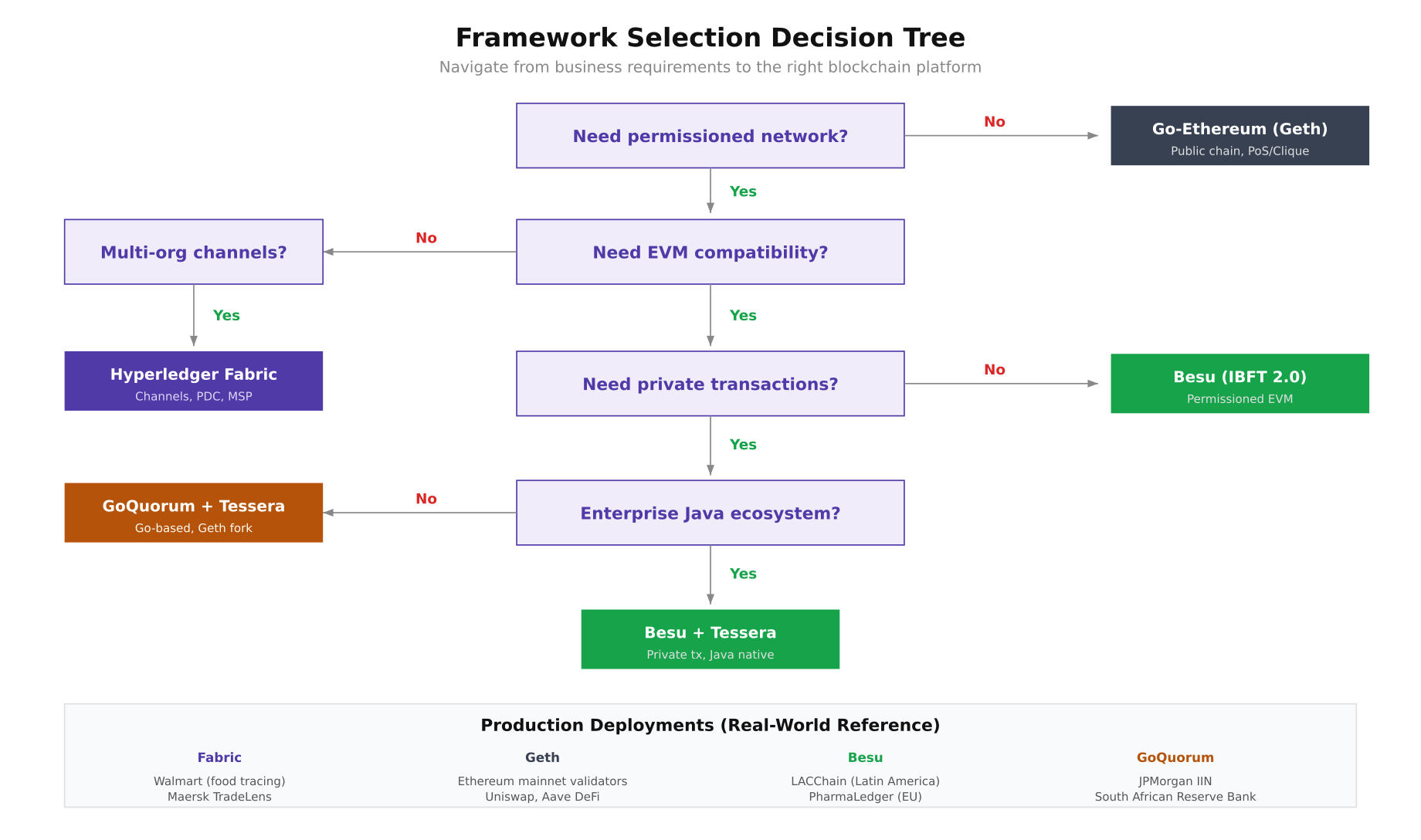
This decision tree reflects the evaluation path that NordBank followed. Starting from the top, they confirmed the need for a permissioned network (eliminating public Geth), required EVM compatibility for their existing Solidity contracts, needed private transactions for bilateral settlement agreements, and preferred Java-based tooling to integrate with their Spring Boot middleware. The tree led them to Besu with Tessera as the recommended stack.
Deploying Hyperledger Besu with IBFT 2.0
Besu is a Java-based Ethereum client maintained by the Hyperledger Foundation. It supports multiple consensus mechanisms including IBFT 2.0 (Istanbul BFT), QBFT, Clique, and Proof of Stake. For enterprise permissioned networks, IBFT 2.0 provides Byzantine fault tolerance where the network can tolerate up to (n-1)/3 faulty validators. NordBank's four-validator setup can therefore tolerate one faulty or offline node.
# Navigate to the Besu evaluation directory
cd /opt/nordbank-eval/besu

# Generate IBFT 2.0 configuration and node keys using the Besu operator tool
# This generates keys for 4 validators and the genesis.json
cat > ibft-config.json << 'JSON'
{
  "genesis": {
    "config": {
      "chainId": 31338,
      "berlinBlock": 0,
      "ibft2": {
        "blockperiodseconds": 2,
        "epochlength": 30000,
        "requesttimeoutseconds": 4
      }
    },
    "nonce": "0x0",
    "timestamp": "0x0",
    "gasLimit": "0x1C9C380",
    "difficulty": "0x1",
    "mixHash": "0x63746963616c2062797a616e74696e65206661756c7420746f6c6572616e6365",
    "coinbase": "0x0000000000000000000000000000000000000000",
    "alloc": {}
  },
  "blockchain": {
    "nodes": {
      "generate": true,
      "count": 4
    }
  }
}
JSON

# Run the Besu operator to generate network configuration
docker run --rm -v $(pwd):/data hyperledger/besu:24.1.0 operator generate-blockchain-config \
  --config-file=/data/ibft-config.json \
  --to=/data/networkFiles

# Examine the generated structure
tree networkFiles/
# networkFiles/
# ├── genesis.json
# └── keys/
#     ├── 0x/
#     │   ├── key
#     │   └── key.pub
#     ├── 0x/
#     ├── 0x/
#     └── 0x/

# Copy each validator's key pair to its data directory
VALIDATORS=($(ls networkFiles/keys/))
for i in 0 1 2 3; do
  mkdir -p data/validator$((i+1))
  cp networkFiles/keys/${VALIDATORS[$i]}/key data/validator$((i+1))/
  cp networkFiles/keys/${VALIDATORS[$i]}/key.pub data/validator$((i+1))/
done

# Move the generated genesis file
cp networkFiles/genesis.json .

# Create the node permissioning configuration
cat > permissions_config.toml << 'TOML'
# On-chain permissioning is preferred for production
# This file-based config is for the initial evaluation
accounts-allowlist=["0x0000000000000000000000000000000000000000"]
nodes-allowlist=[]
TOML

# Create Docker Compose for 4-validator Besu network
cat > docker-compose.yml << 'COMPOSE'
version: "3.8"
services:
  besu-validator-1:
    image: hyperledger/besu:24.1.0
    command: >
      --data-path=/data
      --genesis-file=/genesis.json
      --node-private-key-file=/data/key
      --rpc-http-enabled
      --rpc-http-api=ETH,NET,IBFT,WEB3,TXPOOL
      --rpc-http-host=0.0.0.0
      --rpc-http-port=8545
      --rpc-http-cors-origins="*"
      --rpc-ws-enabled
      --rpc-ws-host=0.0.0.0
      --rpc-ws-port=8546
      --host-allowlist="*"
      --p2p-host=0.0.0.0
      --p2p-port=30303
      --min-gas-price=0
      --metrics-enabled
      --metrics-host=0.0.0.0
      --metrics-port=9545
    volumes:
      - ./data/validator1:/data
      - ./genesis.json:/genesis.json:ro
    ports:
      - "8545:8545"
      - "8546:8546"
      - "30303:30303"
      - "9545:9545"
    networks:
      nordbank-besu:
        ipv4_address: 172.26.0.11

  besu-validator-2:
    image: hyperledger/besu:24.1.0
    command: >
      --data-path=/data
      --genesis-file=/genesis.json
      --node-private-key-file=/data/key
      --rpc-http-enabled
      --rpc-http-api=ETH,NET,IBFT,WEB3
      --rpc-http-host=0.0.0.0
      --rpc-http-port=8545
      --host-allowlist="*"
      --p2p-host=0.0.0.0
      --p2p-port=30303
      --bootnodes=enode://VALIDATOR1_PUBKEY@172.26.0.11:30303
      --min-gas-price=0
    volumes:
      - ./data/validator2:/data
      - ./genesis.json:/genesis.json:ro
    ports:
      - "8555:8545"
      - "30313:30303"
    networks:
      nordbank-besu:
        ipv4_address: 172.26.0.12

  besu-validator-3:
    image: hyperledger/besu:24.1.0
    command: >
      --data-path=/data
      --genesis-file=/genesis.json
      --node-private-key-file=/data/key
      --rpc-http-enabled
      --rpc-http-api=ETH,NET,IBFT,WEB3
      --rpc-http-host=0.0.0.0
      --rpc-http-port=8545
      --host-allowlist="*"
      --p2p-host=0.0.0.0
      --p2p-port=30303
      --bootnodes=enode://VALIDATOR1_PUBKEY@172.26.0.11:30303
      --min-gas-price=0
    volumes:
      - ./data/validator3:/data
      - ./genesis.json:/genesis.json:ro
    ports:
      - "8565:8545"
      - "30323:30303"
    networks:
      nordbank-besu:
        ipv4_address: 172.26.0.13

  besu-validator-4:
    image: hyperledger/besu:24.1.0
    command: >
      --data-path=/data
      --genesis-file=/genesis.json
      --node-private-key-file=/data/key
      --rpc-http-enabled
      --rpc-http-api=ETH,NET,IBFT,WEB3
      --rpc-http-host=0.0.0.0
      --rpc-http-port=8545
      --host-allowlist="*"
      --p2p-host=0.0.0.0
      --p2p-port=30303
      --bootnodes=enode://VALIDATOR1_PUBKEY@172.26.0.11:30303
      --min-gas-price=0
    volumes:
      - ./data/validator4:/data
      - ./genesis.json:/genesis.json:ro
    ports:
      - "8575:8545"
      - "30333:30303"
    networks:
      nordbank-besu:
        ipv4_address: 172.26.0.14

networks:
  nordbank-besu:
    driver: bridge
    ipam:
      config:
        - subnet: 172.26.0.0/16

COMPOSE

# Start the Besu network
docker compose up -d
docker compose logs -f --tail=20 besu-validator-1 &

# Wait for block production and verify IBFT 2.0 consensus
sleep 10
curl -s -X POST http://localhost:8545 \
  -H "Content-Type: application/json" \
  -d '{"jsonrpc":"2.0","method":"ibft_getValidatorsByBlockNumber","params":["latest"],"id":1}' | jq '.result'

# Check peer count (should show 3 peers for each validator)
curl -s -X POST http://localhost:8545 \
  -H "Content-Type: application/json" \
  -d '{"jsonrpc":"2.0","method":"net_peerCount","params":[],"id":1}' | jq '.result'
# Expected: "0x3" (3 peers)
Deploying GoQuorum with Tessera
GoQuorum is a fork of Go-Ethereum maintained by ConsenSys. It extends Geth with private transaction support through Tessera (a Java-based privacy manager that uses Nacl box encryption), Istanbul BFT consensus, and node-level permissioning. Since GoQuorum inherits Geth's codebase, it maintains full EVM compatibility while adding enterprise features. The trade-off is that GoQuorum's development cadence has slowed since ConsenSys shifted focus to Besu.
# Navigate to GoQuorum evaluation directory
cd /opt/nordbank-eval/quorum

# Generate node keys for 4 validators using the Istanbul extra data tool
mkdir -p keys/{node1,node2,node3,node4}

# Generate node keys and extract addresses
for i in 1 2 3 4; do
  docker run --rm -v $(pwd)/keys/node${i}:/data \
    quorumengineering/quorum:24.4 \
    geth account new --datadir /data --password <(echo "nordbank-eval-2024")

  # Generate node key for P2P identity
  docker run --rm -v $(pwd)/keys/node${i}:/data \
    quorumengineering/quorum:24.4 \
    bootnode --genkey=/data/nodekey
done

# Create the Istanbul genesis using istanbul-tools
# Extract addresses from each node's keystore
ADDRESSES=()
for i in 1 2 3 4; do
  ADDR=$(ls keys/node${i}/keystore/ | head -1 | sed 's/.*--//')
  ADDRESSES+=("0x${ADDR}")
done

# Create genesis with Istanbul BFT configuration
cat > genesis.json << 'JSON'
{
  "config": {
    "chainId": 31339,
    "homesteadBlock": 0,
    "eip150Block": 0,
    "eip155Block": 0,
    "eip158Block": 0,
    "byzantiumBlock": 0,
    "constantinopleBlock": 0,
    "petersburgBlock": 0,
    "istanbulBlock": 0,
    "istanbul": {
      "epoch": 30000,
      "policy": 0,
      "ceil2Nby3Block": 0
    },
    "isQuorum": true,
    "maxCodeSizeConfig": [
      { "block": 0, "size": 128 }
    ]
  },
  "nonce": "0x0",
  "timestamp": "0x0",
  "gasLimit": "0xE0000000",
  "difficulty": "0x1",
  "mixHash": "0x63746963616c2062797a616e74696e65206661756c7420746f6c6572616e6365",
  "coinbase": "0x0000000000000000000000000000000000000000",
  "alloc": {}
}
JSON

# Configure Tessera for private transaction support
mkdir -p tessera/{node1,node2,node3,node4}

# Generate Tessera key pairs for each node
for i in 1 2 3 4; do
  docker run --rm -v $(pwd)/tessera/node${i}:/data \
    quorumengineering/tessera:24.4 \
    -keygen -filename /data/tessera-key <<< $'\n\n'
done

# Create Tessera configuration for node 1
cat > tessera/node1/tessera-config.json << 'JSON'
{
  "useWhiteList": false,
  "jdbc": {
    "url": "jdbc:h2:./target/h2/tessera-node1",
    "autoCreateTables": true
  },
  "serverConfigs": [
    {
      "app": "ThirdParty",
      "serverAddress": "http://tessera-1:9080",
      "communicationType": "REST"
    },
    {
      "app": "Q2T",
      "serverAddress": "http://tessera-1:9101",
      "communicationType": "REST"
    },
    {
      "app": "P2P",
      "serverAddress": "http://tessera-1:9000",
      "communicationType": "REST"
    }
  ],
  "peer": [
    { "url": "http://tessera-2:9000" },
    { "url": "http://tessera-3:9000" },
    { "url": "http://tessera-4:9000" }
  ],
  "keys": {
    "passwords": [],
    "keyData": [
      {
        "privateKeyPath": "/data/tessera-key.key",
        "publicKeyPath": "/data/tessera-key.pub"
      }
    ]
  },
  "alwaysSendTo": []
}
JSON

# Create Docker Compose for GoQuorum + Tessera
cat > docker-compose.yml << 'COMPOSE'
version: "3.8"
services:
  tessera-1:
    image: quorumengineering/tessera:24.4
    command: >
      --configfile /data/tessera-config.json
    volumes:
      - ./tessera/node1:/data
    ports:
      - "9080:9080"
      - "9000:9000"
    networks:
      nordbank-quorum:
        ipv4_address: 172.27.0.101

  quorum-node-1:
    image: quorumengineering/quorum:24.4
    command: >
      geth
      --datadir /data
      --networkid 31339
      --nodiscover
      --verbosity 3
      --istanbul.blockperiod 2
      --http --http.addr 0.0.0.0 --http.port 8545
      --http.api admin,db,eth,debug,miner,net,shh,txpool,personal,web3,quorum,istanbul
      --http.corsdomain "*"
      --ws --ws.addr 0.0.0.0 --ws.port 8546
      --port 30303
      --unlock 0 --password /data/password.txt
      --allow-insecure-unlock
      --mine --miner.threads 1
      --ptm.url=http://tessera-1:9101
    volumes:
      - ./keys/node1:/data
      - ./genesis.json:/genesis.json:ro
    ports:
      - "8545:8545"
      - "8546:8546"
      - "30303:30303"
    depends_on:
      - tessera-1
    networks:
      nordbank-quorum:
        ipv4_address: 172.27.0.11

networks:
  nordbank-quorum:
    driver: bridge
    ipam:
      config:
        - subnet: 172.27.0.0/16
COMPOSE

# Initialize and start the GoQuorum network
for i in 1 2 3 4; do
  docker run --rm -v $(pwd)/keys/node${i}:/data -v $(pwd)/genesis.json:/genesis.json:ro \
    quorumengineering/quorum:24.4 geth init --datadir /data /genesis.json
done

docker compose up -d
docker compose ps

# Verify Istanbul consensus is running
curl -s -X POST http://localhost:8545 \
  -H "Content-Type: application/json" \
  -d '{"jsonrpc":"2.0","method":"istanbul_getValidators","params":["latest"],"id":1}' | jq '.result'

# Test a private transaction between node 1 and node 2
# Get Tessera public keys
TESSERA_KEY_1=$(cat tessera/node1/tessera-key.pub)
TESSERA_KEY_2=$(cat tessera/node2/tessera-key.pub)

# Send a private transaction (visible only to node 1 and node 2)
curl -s -X POST http://localhost:8545 \
  -H "Content-Type: application/json" \
  -d "{
    \"jsonrpc\":\"2.0\",
    \"method\":\"eth_sendTransaction\",
    \"params\":[{
      \"from\":\"$(cat keys/node1/address)\",
      \"data\":\"0x6060604052341561000f57600080fd5b60...\",
      \"gas\":\"0x47b760\",
      \"privateFor\":[\"${TESSERA_KEY_2}\"]
    }],
    \"id\":1
  }" | jq '.'
Benchmark Test Infrastructure and Results
With all four frameworks deployed on identical hardware (16 vCPU, 64GB RAM, NVMe storage per validator node), NordBank ran a standardized benchmark using Hyperledger Caliper. Each framework executed the same simple key-value write smart contract under sustained load for 10 minutes. The load generator node (32 vCPU, 128GB RAM) drove transactions at increasing rates until each framework reached its throughput ceiling, while Prometheus and Grafana captured CPU, memory, disk I/O, and network utilization throughout each run.
Free to use, share it in your presentations, blogs, or learning materials.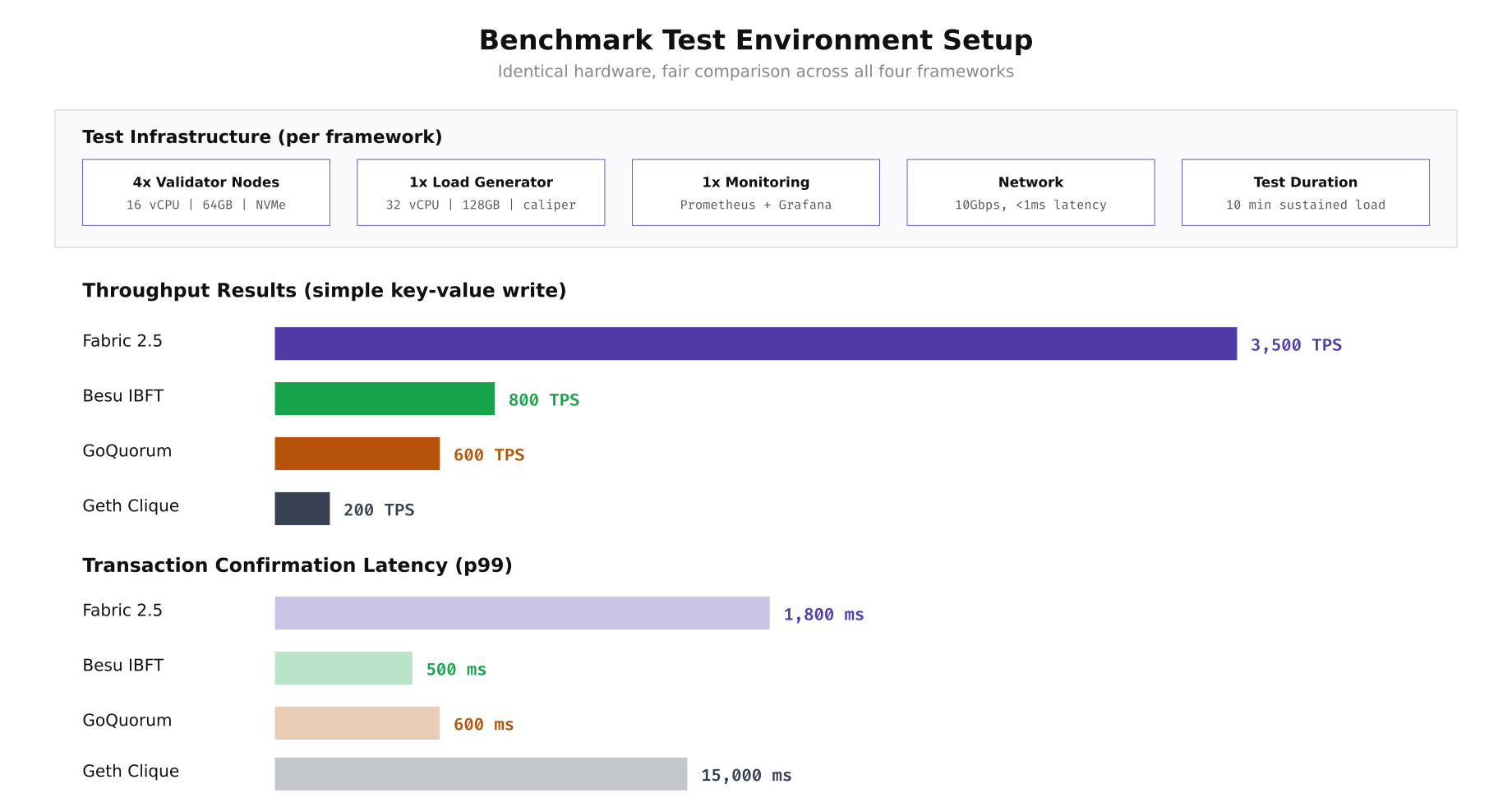
The benchmark results reveal a clear throughput hierarchy. Fabric's execute-order-validate architecture with batched block processing achieves the highest raw throughput at 3,500 TPS, though with a higher p99 latency of 1,800ms due to the endorsement and ordering pipeline. Besu's IBFT 2.0 delivers 800 TPS with a much tighter 500ms confirmation latency, making it the best choice for latency-sensitive workloads. GoQuorum's IBFT implementation reaches 600 TPS at comparable latency. Geth's Clique PoA is constrained by its single-threaded block production, managing 200 TPS with a 15-second block time producing the highest latency.
Running the Caliper Benchmarks
Hyperledger Caliper provides a unified benchmarking framework that works across all four platforms. The following commands install Caliper and configure it to test each framework with the same workload definition. The benchmark deploys a simple key-value store contract, then drives write and read operations at increasing transaction rates.
# Navigate to the Caliper directory
cd /opt/nordbank-eval/caliper

# Install Caliper CLI globally
npm install -g --only=prod @hyperledger/caliper-cli@0.6.0

# Bind Caliper to each framework SDK
caliper bind --caliper-bind-sds fabric:2.5
caliper bind --caliper-bind-sds ethereum:1.3

# Create the benchmark workload configuration
cat > benchmark-config.yaml << 'YAML'
test:
  name: nordbank-framework-eval
  description: Standardized key-value write benchmark across all 4 frameworks
  workers:
    number: 10
  rounds:
    - label: write-100tps
      txNumber: 6000
      rateControl:
        type: fixed-rate
        opts:
          tps: 100
      workload:
        module: workloads/write-kv.js
    - label: write-500tps
      txNumber: 30000
      rateControl:
        type: fixed-rate
        opts:
          tps: 500
      workload:
        module: workloads/write-kv.js
    - label: write-1000tps
      txNumber: 60000
      rateControl:
        type: fixed-rate
        opts:
          tps: 1000
      workload:
        module: workloads/write-kv.js
    - label: write-max
      txDuration: 600
      rateControl:
        type: maximum-rate
        opts:
          startingTps: 1000
          finishingTps: 5000
      workload:
        module: workloads/write-kv.js
    - label: read-after-write
      txNumber: 10000
      rateControl:
        type: fixed-rate
        opts:
          tps: 500
      workload:
        module: workloads/read-kv.js
YAML

# Create the Fabric network configuration for Caliper
cat > network-fabric.yaml << 'YAML'
name: NordBank Fabric Network
version: "2.0.0"
caliper:
  blockchain: fabric
channels:
  - channelName: settlement
    contracts:
      - id: kv-store
        version: v1
        language: golang
        path: ../fabric/chaincode/kv-store
peers:
  peer0.no.nordbank.net:
    url: grpcs://localhost:7051
    tlsCACerts:
      path: ../fabric/crypto-config/peerOrganizations/no.nordbank.net/tlsca/tlsca.no.nordbank.net-cert.pem
YAML

# Create the Besu network configuration for Caliper
cat > network-besu.yaml << 'YAML'
name: NordBank Besu Network
version: "1.0"
caliper:
  blockchain: ethereum
  command:
    start: echo "Besu already running"
    end: echo "Keeping Besu alive"
ethereum:
  url: http://localhost:8545
  contractDeployerAddress: "0x"
  contractDeployerAddressPassword: ""
  fromAddress: "0x"
  fromAddressPassword: ""
  transactionConfirmationBlocks: 2
  contracts:
    kv-store:
      path: contracts/KVStore.json
      gas:
        open: 100000
        query: 100000
YAML

# Run benchmarks sequentially (each takes ~15 minutes)
echo "=== Fabric Benchmark ===" | tee results/fabric.log
caliper launch manager \
  --caliper-workspace . \
  --caliper-benchconfig benchmark-config.yaml \
  --caliper-networkconfig network-fabric.yaml \
  --caliper-report-path results/report-fabric.html 2>&1 | tee -a results/fabric.log

echo "=== Besu Benchmark ===" | tee results/besu.log
caliper launch manager \
  --caliper-workspace . \
  --caliper-benchconfig benchmark-config.yaml \
  --caliper-networkconfig network-besu.yaml \
  --caliper-report-path results/report-besu.html 2>&1 | tee -a results/besu.log

# Parse results: extract TPS and latency from Caliper reports
for fw in fabric besu geth quorum; do
  echo "=== ${fw} ==="
  grep -A5 "write-max" results/${fw}.log | grep -E "(Succ|Fail|Send|Max Latency|Avg Latency|Throughput)"
done
Container Deployment Topology Comparison
The number of containers and supporting services varies significantly between frameworks. Fabric requires the most containers due to its separate orderer, peer, CA, and state database components. Besu and GoQuorum both need Tessera sidecars for private transactions. Geth has the simplest topology with just validator nodes and a bootnode. Understanding these deployment stacks helps estimate infrastructure costs and operational complexity before committing to a framework.
Free to use, share it in your presentations, blogs, or learning materials.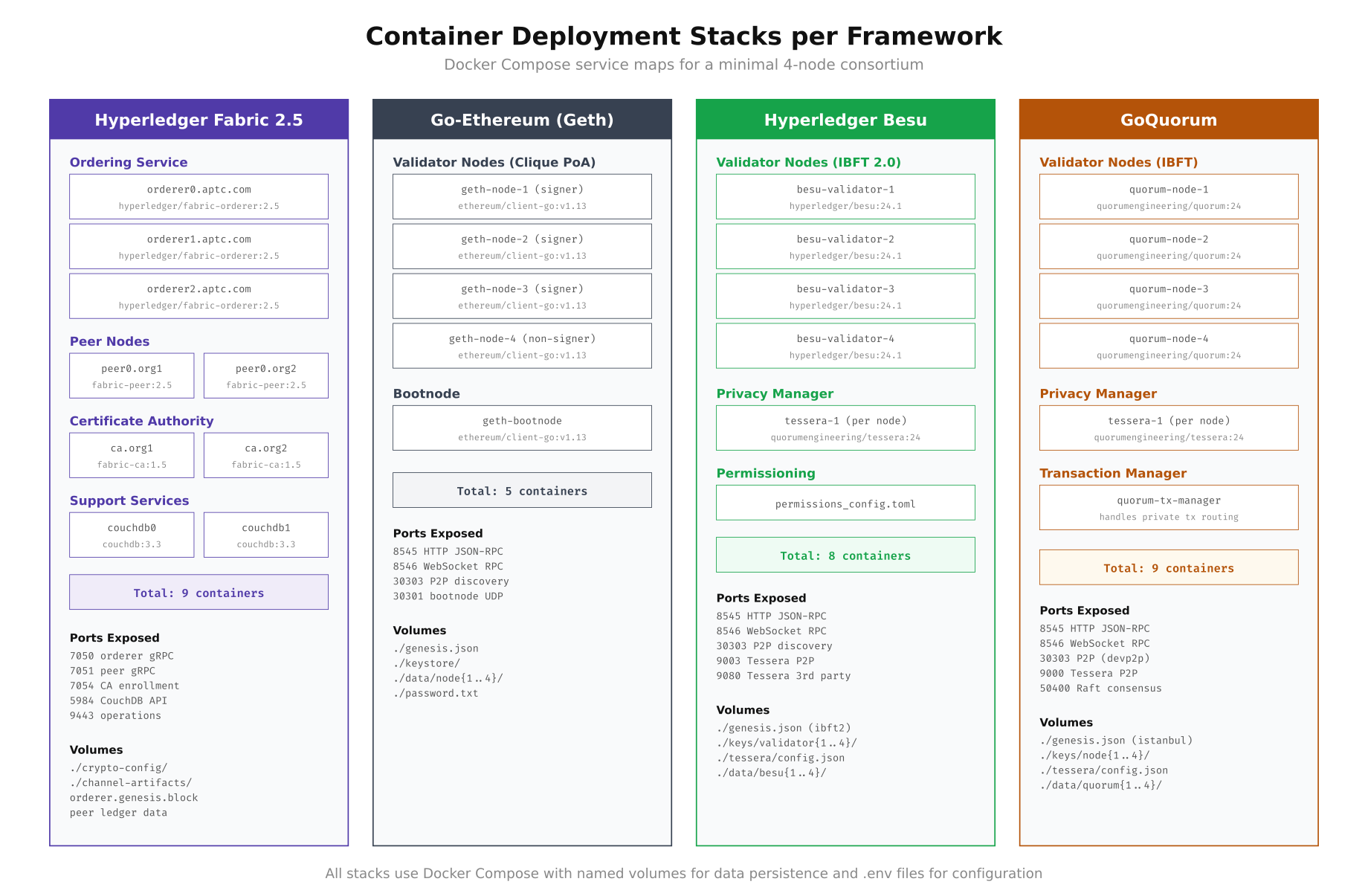
As shown above, Fabric and GoQuorum both require 9 containers for a minimal two-organization deployment, while Besu requires 8 (4 validators plus 4 Tessera instances) and Geth needs only 5. The port landscape also differs: Fabric uses gRPC ports (7050, 7051, 7054) while the Ethereum-based frameworks share JSON-RPC (8545, 8546) and devp2p (30303) ports. Tessera adds additional P2P ports (9000, 9003) for private transaction propagation on both Besu and GoQuorum stacks.
Resource Monitoring During Benchmarks
NordBank deployed a Prometheus and Grafana stack alongside each framework to capture resource utilization during the Caliper benchmark runs. The monitoring configuration collects CPU, memory, disk IOPS, and network throughput at 5-second intervals. This data proved essential for understanding why each framework hits its throughput ceiling at different points.
# Create monitoring stack in the shared monitoring directory
cd /opt/nordbank-eval/monitoring

# Prometheus configuration targeting all framework endpoints
cat > prometheus.yml << 'YAML'
global:
  scrape_interval: 5s
  evaluation_interval: 5s

scrape_configs:
  - job_name: 'fabric-peer'
    static_configs:
      - targets: ['peer0.no.nordbank.net:9443']
    metrics_path: /metrics

  - job_name: 'besu-validators'
    static_configs:
      - targets:
        - '172.26.0.11:9545'
        - '172.26.0.12:9545'
        - '172.26.0.13:9545'
        - '172.26.0.14:9545'

  - job_name: 'node-exporter'
    static_configs:
      - targets:
        - 'node1:9100'
        - 'node2:9100'
        - 'node3:9100'
        - 'node4:9100'

  - job_name: 'cadvisor'
    static_configs:
      - targets:
        - 'node1:8080'
        - 'node2:8080'
        - 'node3:8080'
        - 'node4:8080'
YAML

# Docker Compose for monitoring stack
cat > docker-compose.yml << 'COMPOSE'
version: "3.8"
services:
  prometheus:
    image: prom/prometheus:v2.48.0
    command:
      - '--config.file=/etc/prometheus/prometheus.yml'
      - '--storage.tsdb.path=/prometheus'
      - '--storage.tsdb.retention.time=30d'
    volumes:
      - ./prometheus.yml:/etc/prometheus/prometheus.yml:ro
      - prometheus-data:/prometheus
    ports:
      - "9090:9090"
    networks:
      - monitoring

  grafana:
    image: grafana/grafana:10.2.0
    environment:
      GF_SECURITY_ADMIN_PASSWORD: nordbank-eval-2024
      GF_USERS_ALLOW_SIGN_UP: "false"
    volumes:
      - grafana-data:/var/lib/grafana
      - ./dashboards:/etc/grafana/provisioning/dashboards:ro
      - ./datasources:/etc/grafana/provisioning/datasources:ro
    ports:
      - "3000:3000"
    depends_on:
      - prometheus
    networks:
      - monitoring

  node-exporter:
    image: prom/node-exporter:v1.7.0
    command:
      - '--path.rootfs=/host'
      - '--collector.filesystem.mount-points-exclude=^/(sys|proc|dev)($$|/)'
    volumes:
      - /:/host:ro,rslave
    ports:
      - "9100:9100"
    networks:
      - monitoring

  cadvisor:
    image: gcr.io/cadvisor/cadvisor:v0.47.2
    volumes:
      - /:/rootfs:ro
      - /var/run:/var/run:ro
      - /sys:/sys:ro
      - /var/lib/docker/:/var/lib/docker:ro
    ports:
      - "8080:8080"
    networks:
      - monitoring

volumes:
  prometheus-data:
  grafana-data:

networks:
  monitoring:
    driver: bridge
COMPOSE

# Start monitoring
docker compose up -d

# Query key metrics after a benchmark run
# CPU utilization during write-max phase
curl -s "http://localhost:9090/api/v1/query?query=avg(rate(container_cpu_usage_seconds_total{name=~'.*besu.*'}[5m]))*100" | jq '.data.result[0].value[1]'

# Memory utilization
curl -s "http://localhost:9090/api/v1/query?query=container_memory_usage_bytes{name=~'.*besu.*'}/1024/1024/1024" | jq '.data.result[].value[1]'

# Disk IOPS
curl -s "http://localhost:9090/api/v1/query?query=rate(container_fs_reads_total{name=~'.*besu.*'}[5m])+rate(container_fs_writes_total{name=~'.*besu.*'}[5m])" | jq '.'
Smart Contract Deployment Across Frameworks
One of the most practical differences between these frameworks is how you deploy and interact with smart contracts. Fabric uses chaincode (Go, Java, or Node.js) deployed through a lifecycle process involving packaging, installation, approval, and commitment. The Ethereum-based frameworks all use Solidity compiled to EVM bytecode, but the deployment tooling differs. Below are the deployment commands for the same key-value store logic on each platform.
# ============================================================
# FABRIC: Chaincode Lifecycle Deployment (Go)
# ============================================================
cd /opt/nordbank-eval/fabric

# Package the chaincode
peer lifecycle chaincode package kv-store.tar.gz \
  --path ./chaincode/kv-store \
  --lang golang \
  --label kv-store_1.0

# Install on both organizations' peers
export CORE_PEER_MSPCONFIGPATH=/opt/nordbank-eval/fabric/crypto-config/peerOrganizations/no.nordbank.net/users/Admin@no.nordbank.net/msp
export CORE_PEER_ADDRESS=peer0.no.nordbank.net:7051
peer lifecycle chaincode install kv-store.tar.gz

export CORE_PEER_MSPCONFIGPATH=/opt/nordbank-eval/fabric/crypto-config/peerOrganizations/se.nordbank.net/users/Admin@se.nordbank.net/msp
export CORE_PEER_ADDRESS=peer0.se.nordbank.net:7051
peer lifecycle chaincode install kv-store.tar.gz

# Query installed chaincodes to get the package ID
peer lifecycle chaincode queryinstalled
# Package ID: kv-store_1.0:a1b2c3d4e5f6...

PACKAGE_ID="kv-store_1.0:a1b2c3d4e5f6..."

# Approve for each organization
for ORG in NordBankNO NordBankSE NordBankFI; do
  peer lifecycle chaincode approveformyorg \
    --channelID settlement \
    --name kv-store \
    --version 1.0 \
    --package-id $PACKAGE_ID \
    --sequence 1 \
    --orderer orderer0.orderer.nordbank.net:7050 \
    --tls --cafile /opt/nordbank-eval/fabric/crypto-config/ordererOrganizations/orderer.nordbank.net/orderers/orderer0.orderer.nordbank.net/msp/tlscacerts/tlsca.orderer.nordbank.net-cert.pem
done

# Commit the chaincode definition
peer lifecycle chaincode commit \
  --channelID settlement \
  --name kv-store \
  --version 1.0 \
  --sequence 1 \
  --orderer orderer0.orderer.nordbank.net:7050 \
  --tls --cafile /opt/nordbank-eval/fabric/crypto-config/ordererOrganizations/orderer.nordbank.net/orderers/orderer0.orderer.nordbank.net/msp/tlscacerts/tlsca.orderer.nordbank.net-cert.pem

# Invoke a test transaction
peer chaincode invoke \
  -o orderer0.orderer.nordbank.net:7050 \
  -C settlement -n kv-store \
  -c '{"function":"put","Args":["testKey","testValue"]}' \
  --tls --cafile /opt/nordbank-eval/fabric/crypto-config/ordererOrganizations/orderer.nordbank.net/orderers/orderer0.orderer.nordbank.net/msp/tlscacerts/tlsca.orderer.nordbank.net-cert.pem

# ============================================================
# BESU / GETH / QUORUM: Solidity Deployment (shared process)
# ============================================================
cd /opt/nordbank-eval/besu

# Install Solidity compiler
npm install -g solc@0.8.21

# Write the KV Store contract in Solidity
cat > contracts/KVStore.sol << 'SOL'
// SPDX-License-Identifier: MIT
pragma solidity ^0.8.21;

contract KVStore {
    mapping(string => string) private store;
    event ValueSet(string indexed key, string value);

    function put(string calldata key, string calldata value) external {
        store[key] = value;
        emit ValueSet(key, value);
    }

    function get(string calldata key) external view returns (string memory) {
        return store[key];
    }
}
SOL

# Compile
solcjs --abi --bin contracts/KVStore.sol -o contracts/build/

# Deploy using cast (from Foundry toolkit)
curl -L https://foundry.paradigm.xyz | bash
source ~/.bashrc
foundryup

# Deploy to Besu
cast send --rpc-url http://localhost:8545 \
  --private-key 0x$(cat data/validator1/key) \
  --create $(cat contracts/build/KVStore.bin) \
  --gas-limit 3000000

# Deploy to GoQuorum (same JSON-RPC interface)
cast send --rpc-url http://localhost:8545 \
  --private-key 0x$(cat ../quorum/keys/node1/nodekey) \
  --create $(cat contracts/build/KVStore.bin) \
  --gas-limit 3000000

# Deploy to Geth Clique
cast send --rpc-url http://localhost:8545 \
  --private-key 0x$(cat ../geth/data/node1/nodekey) \
  --create $(cat contracts/build/KVStore.bin) \
  --gas-limit 3000000
NordBank's Final Verdict and Migration Checklist
After three weeks of hands-on evaluation, NordBank selected Hyperledger Besu with Tessera for their interbank settlement network. The decision was driven by three factors: EVM compatibility allowed reuse of their existing Solidity smart contracts developed for a proof-of-concept on public Ethereum, Tessera's private transactions met their regulatory requirement for bilateral settlement confidentiality, and Besu's Java-native architecture integrated cleanly with their Spring Boot middleware and existing monitoring through JMX and Micrometer. Below is the post-evaluation checklist they used to validate their selection before proceeding to production design.
# NordBank Framework Evaluation Summary Script
# Generates a structured comparison report from benchmark results

cd /opt/nordbank-eval

cat > scripts/generate-eval-report.sh << 'SCRIPT'
#!/bin/bash
# Post-evaluation validation checklist
set -euo pipefail

echo "=============================================="
echo "  NordBank Framework Evaluation Report"
echo "  Generated: $(date -u +"%Y-%m-%d %H:%M:%S UTC")"
echo "=============================================="

# 1. Verify all frameworks produced blocks
echo -e "\n[1/6] Block Production Verification"
echo "  Fabric:   $(docker exec fabric-peer0-org1 peer channel getinfo -c settlement 2>/dev/null | grep -o 'height:[0-9]*' || echo 'N/A')"
echo "  Geth:     $(curl -s -X POST http://localhost:8545 -H 'Content-Type: application/json' -d '{"jsonrpc":"2.0","method":"eth_blockNumber","params":[],"id":1}' 2>/dev/null | jq -r '.result' || echo 'N/A')"
echo "  Besu:     $(curl -s -X POST http://localhost:8555 -H 'Content-Type: application/json' -d '{"jsonrpc":"2.0","method":"eth_blockNumber","params":[],"id":1}' 2>/dev/null | jq -r '.result' || echo 'N/A')"
echo "  Quorum:   $(curl -s -X POST http://localhost:8565 -H 'Content-Type: application/json' -d '{"jsonrpc":"2.0","method":"eth_blockNumber","params":[],"id":1}' 2>/dev/null | jq -r '.result' || echo 'N/A')"

# 2. Resource utilization summary
echo -e "\n[2/6] Peak Resource Utilization (from Prometheus)"
for fw in fabric besu geth quorum; do
  CPU=$(curl -s "http://localhost:9090/api/v1/query?query=max_over_time(avg(rate(container_cpu_usage_seconds_total{name=~\".*${fw}.*\"}[1m]))[30m:])*100" 2>/dev/null | jq -r '.data.result[0].value[1] // "N/A"')
  MEM=$(curl -s "http://localhost:9090/api/v1/query?query=max_over_time(container_memory_usage_bytes{name=~\".*${fw}.*\"}[30m])/1073741824" 2>/dev/null | jq -r '.data.result[0].value[1] // "N/A"')
  echo "  ${fw}: CPU=${CPU}% | Memory=${MEM}GB"
done

# 3. Private transaction support
echo -e "\n[3/6] Private Transaction Support"
echo "  Fabric:   Channels + PDC (native)"
echo "  Geth:     Not supported"
echo "  Besu:     Tessera (requires sidecar)"
echo "  Quorum:   Tessera (requires sidecar)"

# 4. Consensus fault tolerance
echo -e "\n[4/6] Byzantine Fault Tolerance"
echo "  Fabric:   Raft CFT (f < n/2 crash faults)"
echo "  Geth:     Clique PoA (f < n/2 crash faults)"
echo "  Besu:     IBFT 2.0 BFT (f < n/3 Byzantine faults)"
echo "  Quorum:   IBFT BFT (f < n/3 Byzantine faults)"

# 5. Docker image sizes
echo -e "\n[5/6] Docker Image Sizes"
docker images --format "table {{.Repository}}\t{{.Tag}}\t{{.Size}}" | grep -E "(fabric|ethereum|besu|quorum|tessera|couchdb)" | sort

# 6. Selection matrix
echo -e "\n[6/6] Weighted Selection Matrix (NordBank criteria)"
echo "  Criteria              Weight  Fabric  Geth  Besu  Quorum"
echo "  EVM compatibility       25%     0       10    10     10"
echo "  Private transactions    25%     10       0     8      8"
echo "  Java integration        20%     3        0    10      0"
echo "  Throughput (TPS)        15%     10       2     7      5"
echo "  Operational simplicity  15%     4        9     7      6"
echo "  -------------------------------------------------------"
echo "  Weighted Total         100%    5.45    4.05   8.75   5.80"
echo ""
echo "  RECOMMENDATION: Hyperledger Besu + Tessera"

echo -e "\n=============================================="
echo "  Report complete."
echo "=============================================="
SCRIPT

chmod +x scripts/generate-eval-report.sh

# Run the evaluation report
./scripts/generate-eval-report.sh 2>&1 | tee results/final-evaluation-report.txt

# Archive all benchmark results
tar -czf results/nordbank-eval-archive-$(date +%Y%m%d).tar.gz \
  results/*.log results/*.html results/*.txt \
  fabric/configtx.yaml fabric/crypto-config.yaml \
  besu/ibft-config.json besu/genesis.json \
  geth/genesis.json \
  quorum/genesis.json \
  caliper/benchmark-config.yaml
Frequently Asked Questions
The best framework depends on your use case. Hyperledger Fabric suits permissioned networks requiring private data collections, fine-grained access control, and modular consensus. Go-Ethereum with Clique PoA works for organizations already invested in the Ethereum ecosystem needing simple private networks. Hyperledger Besu fits enterprises needing Ethereum compatibility with IBFT 2.0 consensus and enterprise features like permissioning. GoQuorum is ideal for financial institutions needing private transaction support via Tessera alongside EVM compatibility.
In benchmark tests using Hyperledger Caliper, Fabric 2.5 achieves 800 to 2000 TPS for simple asset transfers depending on endorsement policy and block size configuration. Private Ethereum networks using Clique PoA typically achieve 100 to 400 TPS. Besu with IBFT 2.0 reaches 200 to 600 TPS. GoQuorum with Raft consensus can reach 400 to 800 TPS for private transactions. Fabric's higher throughput comes from its execute-order-validate architecture which parallelizes transaction endorsement across peers.
Yes. Hyperledger Besu supports private transactions through its privacy groups feature, which uses Tessera as a private transaction manager. Private transactions are encrypted and only shared with specified participants, while a privacy marker transaction is recorded on the public chain. This is similar to GoQuorum's approach since Besu adopted the same Tessera integration. Besu also supports on-chain privacy groups for dynamic membership management without restarting nodes.
Both are strong choices for financial services. GoQuorum was purpose-built by JPMorgan for financial applications and offers native private transaction support, EVM compatibility, and Tessera-based confidentiality. Hyperledger Fabric provides more granular data isolation through channels and private data collections, allowing complex multi-party workflows where different participants see different data. Financial institutions handling interbank settlement often prefer Fabric for its flexible endorsement policies, while those needing Ethereum tooling compatibility lean toward GoQuorum.
Hyperledger Caliper is the standard benchmarking tool for enterprise blockchain frameworks. It supports Fabric, Besu, and Ethereum out of the box. A proper benchmark requires defining workload modules that simulate real transaction patterns, configuring workers to generate concurrent load, and measuring TPS, latency (p50, p95, p99), and resource consumption. Run benchmarks across multiple block sizes, endorsement policies, and batch timeouts. Test both read-heavy and write-heavy scenarios, and always benchmark on hardware matching your production specification.