
Most companies solve this by running separate chatbot instances for each language, one for Spanish, one for French, one for German, one for English. This works until you realize you are paying for four LLM subscriptions, maintaining four separate skill files, training four different bots, and losing all shared context when a customer switches between languages mid-conversation. Modern LLMs can read and write in 50+ languages natively, which means the entire multi-bot approach is unnecessary. One gateway, one set of skills written in English, one LLM that detects the customer’s language and responds in kind. This article shows you how to set that up with OpenClaw.
Introducing MeridianTravel
MeridianTravel is a Barcelona-based travel agency specializing in flights, hotels, holiday packages, airport transfers, and travel insurance across four European markets: Spain, France, Germany, and the United Kingdom. The company has a 12-person team, with 3 agents dedicated to customer support. On an average day, the support team handles over 200 inquiries across four languages. During peak seasons (June through August for summer holidays, December for Christmas travel, and Easter week), that number climbs past 350.
Before discovering OpenClaw, MeridianTravel ran four separate chatbot instances. One WhatsApp bot for Spanish customers on the +34 number. A second WhatsApp bot for UK customers on the +44 number. A Telegram bot for French customers. A web chat widget for German customers visiting the .de domain. Each bot had its own LLM subscription, its own set of skill files translated manually by staff, and its own conversation memory. The cost was quadruple what a single instance would require, and the inconsistency was visible to customers. A Spanish customer who had discussed a Madrid-to-Paris flight on WhatsApp would get a blank slate if they later messaged the French Telegram bot from Paris. No shared context. No memory of the previous conversation.
The MeridianTravel product catalog includes direct flights on 28 routes across Europe, partnerships with 140+ hotels in Spain, France, Germany, and the UK, pre-built holiday packages for popular destinations like Costa Brava, Provence, Bavaria, and the Scottish Highlands, airport transfer services at 12 airports, and travel insurance plans covering medical emergencies, trip cancellation, and luggage loss. All of this product data lived in four duplicated skill files, each manually translated and frequently out of sync.
This article applies those same principles to a multi-language travel agency, consolidating MeridianTravel’s four bots into a single OpenClaw gateway.
How LLM-Based Language Detection Works
The traditional approach to multi-language chatbots involves a translation API sitting between the customer and the bot. The customer sends a message in French, the system calls Google Translate to convert it to English, the English text goes to the bot for processing, the bot generates an English response, and then another translation API call converts the response back to French. Two API calls per message, added latency, and translation artifacts that make the response sound robotic.
OpenClaw skips all of that because the LLM itself handles language detection and response generation in one step. When a customer writes “Je cherche un vol Paris-Barcelone pour le 15 juillet,” the LLM reads the French input, understands the intent (flight search), retrieves the relevant skill data (written in English), and generates a complete response in French. No Google Translate. No DeepL. No translation API calls. The system prompt simply instructs: “Detect the language of the customer’s message. Reply in that same language.” One prompt, one response, zero translation API overhead.
This works because modern LLMs like Claude and GPT-4 were trained on multilingual datasets spanning hundreds of languages. They do not translate internally; they genuinely understand and produce text in each language. The quality is noticeably better than translation APIs for conversational text because the LLM generates contextually appropriate phrases rather than doing word-by-word substitution.
Free to use, share it in your presentations, blogs, or learning materials.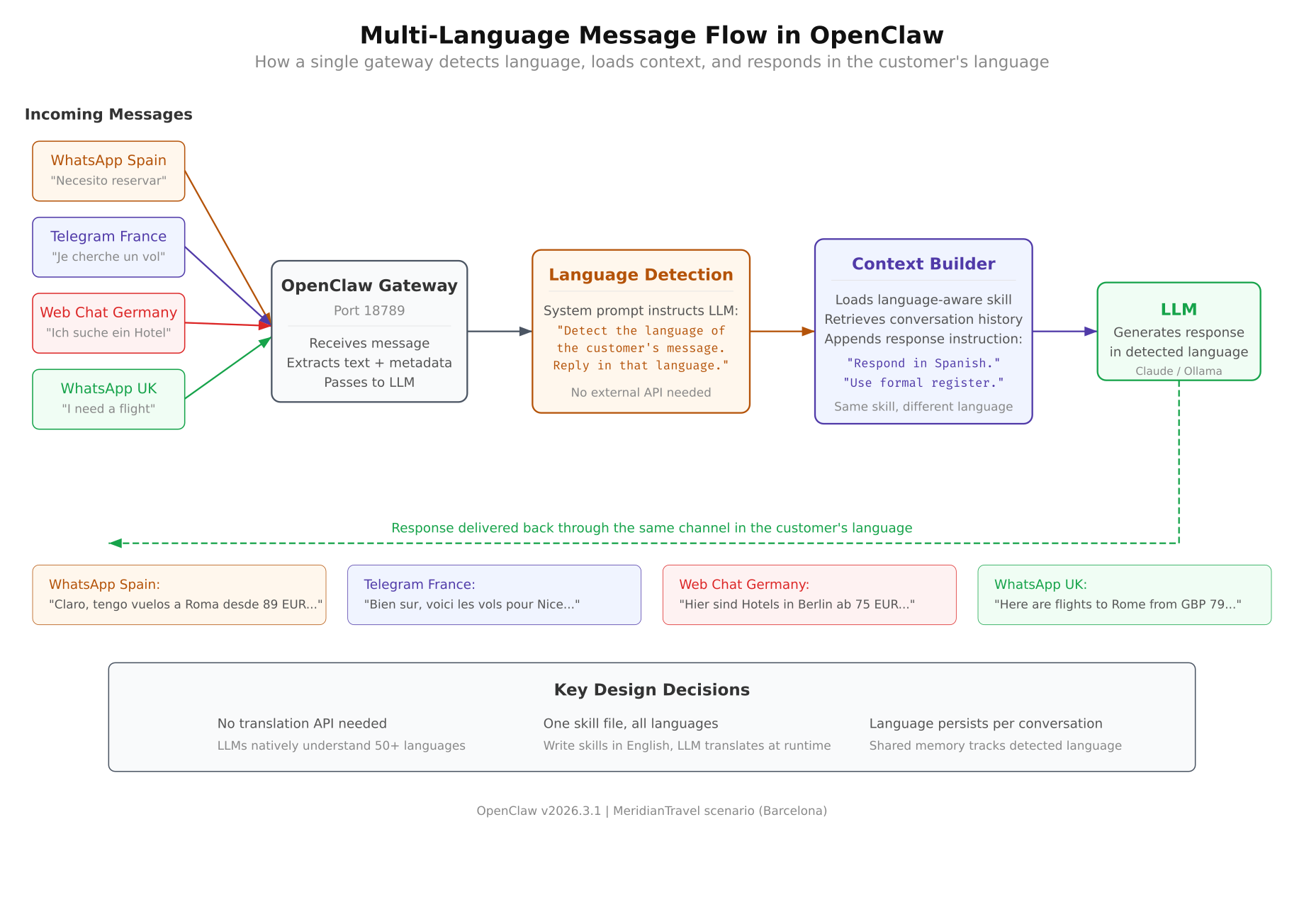
The flow diagram above traces a single customer message through the detection pipeline. The message arrives in any of the four supported languages. The LLM identifies the language as part of its initial processing pass, not through a separate detection call. It then loads conversation context from shared memory, retrieves product data from the English-language skill files, and generates a response in the detected language. The first thing customers notice is that the response sounds natural, not translated. The phrasing follows local conventions, uses appropriate formality levels, and reads like it was written by a native speaker.
The Multi-Language Architecture
MeridianTravel’s consolidated architecture replaces four separate bots with a single OpenClaw gateway. Four customer channels feed into one gateway process, which maintains one shared memory pool, one set of skill files, and one LLM connection. The language is handled entirely at the LLM layer, which means adding a fifth language (Portuguese, for example) requires zero infrastructure changes. You just update the system prompt.
Free to use, share it in your presentations, blogs, or learning materials.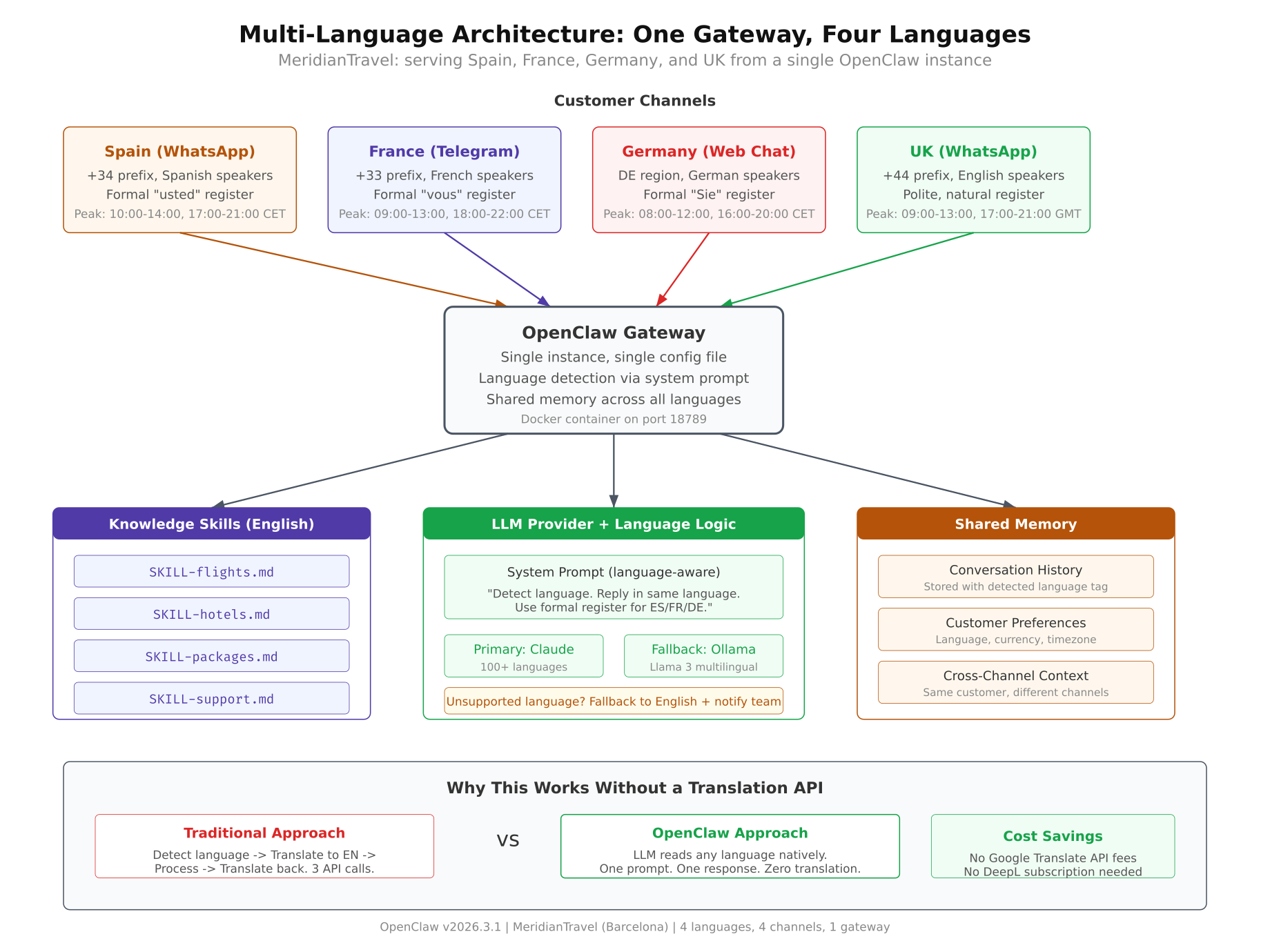
As shown above, the architecture has three distinct layers. The channel layer handles four input sources: WhatsApp Spain (+34), Telegram France, Web Chat Germany, and WhatsApp UK (+44). The gateway layer processes every message through a single agent identity named “Meridian,” applies the multi-language system prompt, retrieves conversation memory, and routes to the appropriate knowledge skill. The LLM layer at the bottom generates the response in the detected language using skill data written entirely in English. Shared memory means a French customer who starts a conversation on Telegram and later contacts via the web chat retains full context.
Before You Start: Setting Up OpenClaw
For those jumping in here for the first time, the configuration steps below assume you already have a working OpenClaw gateway running in Docker with at least one messaging channel connected. If you have not set that up yet, start with the five-part installation series which walks you through system preparation, Docker setup, the onboarding wizard, channel configuration, skills, and local LLM integration on Ubuntu 24. Once your gateway is running and healthy, come back here to add multi-language support.
If you are also interested in building a full customer support agent with knowledge skills, behavior rules, and escalation logic, the four-part customer support series covers that in detail using a web hosting company scenario. The multi-language techniques in this article work on top of any existing OpenClaw deployment, whether it is a fresh install or an established support agent.
Configuring the System Prompt for Language Detection
The system prompt is where multi-language behavior is defined. Unlike traditional translation setups that require language-specific routing rules, OpenClaw handles everything through a single instruction block in the agent section of openclaw.json. Open the configuration file to begin editing.
$ vim ~/.openclaw/openclaw.jsonThe agent section defines who the bot is, what languages it supports, and how it should handle formality in each language. Replace the default agent section with the following configuration for MeridianTravel.
{
  “agent”: {
    “name”: “Meridian”,
    “company”: “MeridianTravel”,
    “location”: “Barcelona, Spain”,
    “role”: “Travel Assistant”,
    “supportedLanguages”: [“es”, “fr”, “de”, “en”],
    “personality”: [
      “Warm and enthusiastic about travel”,
      “Knowledgeable about European destinations”,
      “Concise but thorough when listing options”,
      “Patient with customers comparing packages”,
      “Always provides pricing in the correct local currency”
    ],
    “systemPrompt”: “You are Meridian, the AI travel assistant for MeridianTravel, a Barcelona-based travel agency serving customers in Spain, France, Germany, and the United Kingdom. You help customers with flights, hotels, holiday packages, airport transfers, and travel insurance across Europe. LANGUAGE RULES: 1. Detect the language of each customer message. 2. Always reply in the same language the customer used. 3. For Spanish, use the formal ‘usted’ register. 4. For French, use the formal ‘vous’ register. 5. For German, use the formal ‘Sie’ register. 6. For English, use polite and natural language. 7. If the customer switches language mid-conversation, switch with them. 8. Display prices in EUR for Spanish, French, and German customers. Display prices in GBP for English-speaking customers. 9. If a customer writes in an unsupported language, respond in English and let them know you currently support Spanish, French, German, and English. You are professional, helpful, and always provide clear next steps. You never process payments directly, modify bookings in the backend system, or share other customers’ data. When you cannot resolve an issue, you escalate to the human support team.”
  }
}
The name field sets “Meridian” as the agent identity that customers see in greetings. The supportedLanguages array lists the four ISO 639-1 language codes that the agent actively supports. This field is informational for logging and channel routing; the actual language behavior comes from the system prompt instructions. The personality array shapes the tone of responses, making the agent sound like a travel professional rather than a generic chatbot.
The systemPrompt contains nine numbered language rules. Rules 1 and 2 handle detection and response matching. Rules 3 through 6 set formality registers for each language. This matters because a Spanish customer addressed with “tu” instead of “usted” may feel the interaction is too casual for a business context. Rule 7 handles the edge case where a French customer starts typing in English mid-conversation, perhaps because they cannot find the right word. Rule 8 is particularly important for a travel agency because showing EUR 349 to a UK customer or GBP 299 to a Spanish customer creates confusion and erodes trust. Rule 9 defines the fallback behavior for unsupported languages.
Setting Up Four Channels
MeridianTravel uses three different platforms across four channels. WhatsApp serves two markets (Spain and UK) with separate phone numbers. Telegram serves the French market. A web chat widget embedded on the German website serves German customers. Each channel has its own welcome message written in the local language to set the right tone from the first interaction.
WhatsApp Spain (+34)
The Spanish WhatsApp channel uses a +34 country code number registered with the WhatsApp Business API. Spanish customers find this number on the MeridianTravel.es website, on booking confirmation emails, and on printed materials at partner hotels. The welcome message uses the formal “usted” register to match the system prompt configuration.
“channels”: {
  “whatsapp-es”: {
    “enabled”: true,
    “platform”: “whatsapp”,
    “phoneNumber”: “+34612345678”,
    “apiKey”: “${WHATSAPP_ES_API_KEY}”,
    “welcomeMessage”: “Bienvenido a MeridianTravel. Soy Meridian, su asistente de viajes. Puedo ayudarle con vuelos, hoteles, paquetes vacacionales, traslados al aeropuerto y seguros de viaje. ¿En que puedo ayudarle hoy?”,
    “defaultCurrency”: “EUR”,
    “defaultLanguage”: “es”,
    “businessHours”: {
      “timezone”: “Europe/Madrid”,
      “weekdays”: “09:00-20:00”,
      “saturday”: “10:00-14:00”,
      “sunday”: “closed”
    }
  }
}
The welcomeMessage is the first thing a customer sees when they message the +34 number for the first time. It introduces Meridian by name and lists the five service categories so the customer knows exactly what they can ask about. The defaultCurrency and defaultLanguage fields provide hints to the LLM for the first message before it has detected the customer’s language from their input. The businessHours section uses the Europe/Madrid timezone so the after-hours auto-response triggers at the correct local time.
Telegram France
French customers reach MeridianTravel through a Telegram bot. The French market was put on Telegram because MeridianTravel’s analytics showed that 68% of their French customers under 35 preferred Telegram over WhatsApp. The welcome message uses the formal “vous” register.
“telegram-fr”: {
  “enabled”: true,
  “platform”: “telegram”,
  “botToken”: “${TELEGRAM_FR_BOT_TOKEN}”,
  “requireMention”: false,
  “dmPolicy”: “allow”,
  “welcomeMessage”: “Bienvenue chez MeridianTravel. Je suis Meridian, votre assistant de voyage. Je peux vous aider avec les vols, les hotels, les forfaits vacances, les transferts aeroport et les assurances voyage. Comment puis-je vous aider aujourd’hui?”,
  “defaultCurrency”: “EUR”,
  “defaultLanguage”: “fr”,
  “businessHours”: {
    “timezone”: “Europe/Paris”,
    “weekdays”: “09:00-20:00”,
    “saturday”: “10:00-14:00”,
    “sunday”: “closed”
  }
}
The requireMention is set to false because MeridianTravel uses the Telegram bot exclusively for customer direct messages, not group chats. Every message sent to the bot gets a response. The dmPolicy set to allow permits any Telegram user to start a conversation, which is important for a public-facing travel service. The timezone is set to Europe/Paris so French customers see accurate business hour references.
Web Chat Germany
German customers interact through a web chat widget embedded on meridiantravel.de. The widget appears as a floating button in the bottom-right corner and proactively greets visitors after 20 seconds of browsing. The welcome message uses the formal “Sie” register, which is the expected default in German business communication.
“webchat-de”: {
  “enabled”: true,
  “platform”: “webchat”,
  “apiEndpoint”: “https://meridiantravel.de/chat”,
  “corsOrigins”: [“https://meridiantravel.de”, “https://www.meridiantravel.de”],
  “welcomeMessage”: “Willkommen bei MeridianTravel. Ich bin Meridian, Ihr Reiseassistent. Ich kann Ihnen bei Flugen, Hotels, Urlaubspaketen, Flughafentransfers und Reiseversicherungen helfen. Wie kann ich Ihnen heute behilflich sein?”,
  “proactiveGreeting”: {
    “enabled”: true,
    “delaySeconds”: 20,
    “message”: “Planen Sie eine Reise? Ich kann Ihnen helfen, die besten Angebote zu finden.”
  },
  “defaultCurrency”: “EUR”,
  “defaultLanguage”: “de”,
  “businessHours”: {
    “timezone”: “Europe/Berlin”,
    “weekdays”: “09:00-20:00”,
    “saturday”: “10:00-14:00”,
    “sunday”: “closed”
  }
}
The corsOrigins array restricts which domains can embed the chat widget, preventing unauthorized sites from using MeridianTravel’s bot. The proactiveGreeting section triggers after 20 seconds of browsing with a friendly prompt in German: “Planen Sie eine Reise? Ich kann Ihnen helfen, die besten Angebote zu finden.” This translates to “Planning a trip? I can help you find the best deals.” Proactive greetings convert 15-20% more website visitors into conversations compared to a passive chat icon.
WhatsApp UK (+44)
The UK market uses a separate WhatsApp Business number with a +44 country code. This channel is the only one that defaults to GBP instead of EUR. The welcome message is in natural English without the formal register required by the other three languages.
“whatsapp-uk”: {
  “enabled”: true,
  “platform”: “whatsapp”,
  “phoneNumber”: “+447912345678”,
  “apiKey”: “${WHATSAPP_UK_API_KEY}”,
  “welcomeMessage”: “Welcome to MeridianTravel! I’m Meridian, your travel assistant. I can help you with flights, hotels, holiday packages, airport transfers, and travel insurance across Europe. How can I help you today?”,
  “defaultCurrency”: “GBP”,
  “defaultLanguage”: “en”,
  “businessHours”: {
    “timezone”: “Europe/London”,
    “weekdays”: “09:00-20:00”,
    “saturday”: “10:00-14:00”,
    “sunday”: “closed”
  }
}
The defaultCurrency is set to GBP here, while the other three channels use EUR. This default gets passed to the LLM as context, so when a UK customer asks “How much is a flight to Barcelona?” the response shows the price in pounds sterling. If that same customer switches to Spanish mid-conversation, the currency also switches to EUR following the system prompt rules. The timezone uses Europe/London, which accounts for BST (British Summer Time) during the peak summer booking season.
After adding all four channel configurations, restart the gateway to load the new channels.
$ docker restart openclaw-gateway$ curl -s http://127.0.0.1:18789/healthz | jq .channels{
“configured”: 4,
“active”: 4
}Writing Language-Aware Knowledge Skills
The most common question about multi-language setups is whether you need to write separate skill files for each language. The answer is no. You write all skills in English, and the LLM translates the product data into the customer’s language at response time. This means you maintain one source of truth for every product, price, schedule, and policy. When the summer flight schedule changes, you update one file instead of four.
Create a skill directory for MeridianTravel’s product catalog. Each service category gets its own SKILL.md file.
$ mkdir -p ~/.openclaw/workspace/skills/meridiantravelThe flights skill is the most frequently accessed skill in MeridianTravel’s catalog, accounting for roughly 45% of all customer inquiries. The file contains route information, pricing, schedules, and booking rules, all written in English.
Notice that the skill file uses dual currency notation for UK-bound routes (GBP) and EUR for everything else. The LLM uses the channel’s <code>defaultCurrency</code> setting to determine which price to display. When a Spanish customer asks about Barcelona to London flights, the LLM shows the GBP price converted contextually. When a UK customer asks the same question, it shows the GBP price directly. Booking rules, peak surcharges, and FAQ entries are all in English, but the LLM translates them into the customer’s language when generating the response.


The same approach applies to hotel, holiday package, airport transfer, and travel insurance skills. Each file is written once in English with accurate product data, and the LLM handles the language conversion at runtime.


<h2 class="wp-block-heading">Configuring Formal vs Informal Register</h2>


Language register is the difference between sounding professional and sounding like a teenager texting a friend. In English, the distinction is subtle. You can write “How can I help you?” or “What do you need?” and both are acceptable in a business context. In Spanish, French, and German, the distinction is grammatically explicit and culturally significant.


Spanish has two forms of “you”: “tu” (informal) and “usted” (formal). A travel agency addressing a customer as “tu” in Spain feels inappropriately casual, like a hotel receptionist calling a guest “mate” instead of “sir.” French has the same distinction with “tu” (informal) and “vous” (formal). German distinguishes between “du” (informal) and “Sie” (formal, always capitalized). In all three languages, using the informal register with a stranger in a business context is a social error that signals either carelessness or disrespect.


The register rules are defined in a dedicated section of openclaw.json that gives the LLM explicit instructions for each language.


[gsl_terminal title="Register rules section in openclaw.json" type="config"]“languageRules”: {
  “es”: {
    “register”: “formal”,
    “pronouns”: “Use ‘usted’ and ‘su’ instead of ‘tu’ and ‘tu’. Conjugate verbs in the third person formal.”,
    “greetingStyle”: “Buenos dias / Buenas tardes based on time of day”,
    “currencyFormat”: “EUR with comma as decimal separator (e.g., EUR 149,00)”,
    “dateFormat”: “DD/MM/YYYY”
  },
  “fr”: {
    “register”: “formal”,
    “pronouns”: “Use ‘vous’ and ‘votre’ instead of ‘tu’ and ‘ton’. Always maintain vouvoiement.”,
    “greetingStyle”: “Bonjour / Bonsoir based on time of day”,
    “currencyFormat”: “EUR with comma as decimal separator (e.g., 149,00 EUR)”,
    “dateFormat”: “DD/MM/YYYY”
  },
  “de”: {
    “register”: “formal”,
    “pronouns”: “Use ‘Sie’ (capitalized) and ‘Ihr/Ihre’ instead of ‘du’ and ‘dein’. Maintain Siezen throughout.”,
    “greetingStyle”: “Guten Tag / Guten Abend based on time of day”,
    “currencyFormat”: “EUR with comma as decimal separator (e.g., 149,00 EUR)”,
    “dateFormat”: “DD.MM.YYYY”
  },
  “en”: {
    “register”: “polite-natural”,
    “pronouns”: “Standard English ‘you’. No special formality rules.”,
    “greetingStyle”: “Hello / Good morning / Good afternoon based on time of day”,
    “currencyFormat”: “GBP with period as decimal separator (e.g., GBP 129.00)”,
    “dateFormat”: “DD/MM/YYYY”
  }
}
Each language entry specifies five dimensions of communication style. The register field tells the LLM the overall formality level. The pronouns field provides explicit grammatical instructions, which is critical because LLMs sometimes default to informal pronouns without clear guidance. The greetingStyle adapts the opening based on local convention and time of day. The currencyFormat ensures prices are displayed the way customers expect to see them; note that continental Europe uses a comma as the decimal separator (149,00) while the UK uses a period (129.00). The dateFormat is particularly important for a travel agency because a date shown as 03/04/2026 means March 4th in the US but April 3rd in Europe. Germany uses dots (03.04.2026) while Spain, France, and the UK use slashes (03/04/2026).
Testing Multi-Language Responses
With the system prompt, channels, skills, and register rules configured, it is time to verify that the gateway responds correctly in all four languages. The following curl commands simulate customer messages through the gateway API. Each test sends a message in a different language and verifies that the response comes back in the same language with the correct formality register.
Test 1: Spanish Customer
This test simulates a Spanish customer asking about flights from Barcelona to Mallorca. The response should use the formal “usted” register and show prices in EUR with a comma decimal separator.
$ curl -s -X POST http://127.0.0.1:18789/api/v1/chat
$   -H “Content-Type: application/json”
$   -H “Authorization: Bearer a4f8c2e19b7d3a6f0e5c8b1d4a7f9e2c3b6d8a1f4e7c0b3d”
$   -d ‘{
$     “channel”: “whatsapp-es”,
$     “message”: “Hola, busco un vuelo de Barcelona a Mallorca para el 15 de julio. Somos 2 adultos y 1 nino de 8 anos.”,
$     “userId”: “test-es-001”
$ }’ | jq -r .responseThe response uses “su viaje” (your trip, formal), “tenga en cuenta” (please note, formal), and “le gustaria” (would you like, formal). Prices appear with comma decimal separators in EUR. The child discount is calculated correctly at 25% off the adult fare. This saves MeridianTravel roughly 3 minutes of agent time that would otherwise go to looking up fares, calculating child discounts, and translating the response manually.
<h3 class="wp-block-heading">Test 2: French Customer</h3>
This test sends a French inquiry about a Paris to Barcelona flight. The response should use “vous” throughout and follow French currency formatting conventions.
[gsl_terminal title="Send a French language test message"]curl -s -X POST http://127.0.0.1:18789/api/v1/chat
-H “Content-Type: application/json”
-H “Authorization: Bearer a4f8c2e19b7d3a6f0e5c8b1d4a7f9e2c3b6d8a1f4e7c0b3d”
-d ‘{
“channel”: “telegram-fr”,
“message”: “Bonjour, je cherche un vol Paris-Barcelone pour le 20 aout. Quel est le prix?”,
“userId”: “test-fr-001”
}’ | jq -r .responseThe response uses “votre vol” (your flight, formal), “veuillez noter” (please note, formal), and “souhaitez-vous” (do you wish, formal). The LLM correctly identified the August date as peak season and applied the 20% surcharge to the price range. Currency is shown in the French convention with the EUR symbol after the amount.
<h3 class="wp-block-heading">Test 3: German Customer</h3>
This test sends a German inquiry through the web chat channel asking about hotel options in Barcelona. The response should use “Sie” capitalized and German date formatting with dots.
[gsl_terminal title="Send a German language test message"]curl -s -X POST http://127.0.0.1:18789/api/v1/chat
-H “Content-Type: application/json”
-H “Authorization: Bearer a4f8c2e19b7d3a6f0e5c8b1d4a7f9e2c3b6d8a1f4e7c0b3d”
-d ‘{
“channel”: “webchat-de”,
“message”: “Guten Tag, ich suche ein Hotel in Barcelona fur 3 Nachte im September. Wir sind 2 Personen.”,
“userId”: “test-de-001”
}’ | jq -r .responseThe response uses “Ihre Anfrage” (your inquiry, formal), “Ihren Aufenthalt” (your stay, formal), and “Mochten Sie” (would you like, formal with capitalized “Sie”). The dates follow German convention with no peak surcharge correctly noted for September. The LLM cross-referenced the peak season dates from the flights skill and determined that September falls outside all surcharge periods.
<h3 class="wp-block-heading">Test 4: English Customer</h3>
This test simulates a UK customer on the +44 WhatsApp number asking about travel insurance. The response should show prices in GBP with period decimal separators.
[gsl_terminal title="Send an English language test message"]curl -s -X POST http://127.0.0.1:18789/api/v1/chat
-H “Content-Type: application/json”
-H “Authorization: Bearer a4f8c2e19b7d3a6f0e5c8b1d4a7f9e2c3b6d8a1f4e7c0b3d”
-d ‘{
“channel”: “whatsapp-uk”,
“message”: “Hi, I am flying to Barcelona next month with my family. Do you offer travel insurance?”,
“userId”: “test-en-001”
}’ | jq -r .responseThe English response uses natural, polite language without forced formality. Prices are in GBP with period decimal separators. The agent proactively asks about the family size and offers to help with flights and hotels, which is the cross-selling behavior defined in the personality rules.
<h2 class="wp-block-heading">Handling Unsupported Languages</h2>
MeridianTravel’s customer base is primarily Spanish, French, German, and English. But Barcelona is a tourist hub, and occasionally a customer will write in Portuguese, Italian, Dutch, or another language. The system prompt already includes rule 9 for this scenario, but you can reinforce it with a dedicated fallback configuration section that also notifies the support team.
[gsl_terminal title="Language fallback configuration in openclaw.json" type="config"]“languageFallback”: {
“behavior”: “respond-in-english”,
“notifyTeam”: true,
“notificationChannel”: “telegram-support-team”,
“fallbackMessage”: “Thank you for contacting MeridianTravel. I currently support conversations in Spanish, French, German, and English. I will respond in English, and if you need assistance in another language, our support team can help. How can I assist you today?”,
“logUnsupported”: true,
“trackLanguageRequests”: true
}The behavior field tells the LLM to default to English when it encounters an unsupported language. The notifyTeam flag triggers a notification to the support team’s Telegram group so a human agent can follow up if needed. The trackLanguageRequests field is strategic: it logs every unsupported language request, and if MeridianTravel sees 50 Portuguese inquiries per month, that data justifies adding Portuguese as a fifth supported language. Adding it would require nothing more than updating the system prompt and the register rules, with zero infrastructure changes.
Test the fallback behavior by sending a message in Italian.
$ curl -s -X POST http://127.0.0.1:18789/api/v1/chat
$   -H “Content-Type: application/json”
$   -H “Authorization: Bearer a4f8c2e19b7d3a6f0e5c8b1d4a7f9e2c3b6d8a1f4e7c0b3d”
$   -d ‘{
$     “channel”: “webchat-de”,
$     “message”: “Buongiorno, cerco un volo da Milano a Barcellona per settembre.”,
$     “userId”: “test-it-001”
$ }’ | jq -r .responseThe response correctly identifies the language as unsupported, falls back to English, and still attempts to help with the actual inquiry. The suggestion to switch to Spanish is a smart touch that the LLM generates on its own because it recognizes the linguistic proximity between Italian and Spanish. Meanwhile, the support team receives a notification in their Telegram group with the customer’s channel, language detected, and conversation ID.
<h2 class="wp-block-heading">Currency and Timezone Awareness</h2>
A multi-language setup is incomplete without matching currency and timezone handling. MeridianTravel operates across two currency zones (EUR and GBP) and four timezones (CET for Spain, CET for France, CET for Germany, and GMT/BST for the UK). Getting these wrong creates confusion. A UK customer seeing “149,00 EUR” has to mentally convert the amount, and a Spanish customer receiving a “9:00 AM” reference without specifying the timezone does not know if that is Madrid time or London time.
The per-channel currency and timezone settings in the channel configurations handle most of this automatically. The LLM receives the channel’s <code>defaultCurrency</code> and <code>businessHours.timezone</code> as context and uses them in every response. But you can add an explicit currency mapping section for situations where the LLM needs to convert between currencies, such as when a Spanish customer asks about a London hotel priced in GBP.
[gsl_terminal title="Currency and timezone section in openclaw.json" type="config"]“localization”: {
“currencies”: {
“EUR”: {
“symbol”: “EUR”,
“decimalSeparator”: “,”,
“thousandsSeparator”: “.”,
“markets”: [“es”, “fr”, “de”]
},
“GBP”: {
“symbol”: “GBP”,
“decimalSeparator”: “.”,
“thousandsSeparator”: “,”,
“markets”: [“en”]
}
},
“conversionNote”: “When a customer asks about a product priced in a different currency, show the original price and add an approximate conversion. Example: ‘The hotel is priced at GBP 120.00 per night (approximately EUR 139,00).'”,
“timezones”: {
“es”: “Europe/Madrid”,
“fr”: “Europe/Paris”,
“de”: “Europe/Berlin”,
“en”: “Europe/London”
}
}The conversionNote field instructs the LLM on how to handle cross-currency scenarios. Instead of silently converting and potentially showing an inaccurate rate, the agent shows both the original price and an approximate conversion. This approach is honest and avoids liability issues if the conversion rate changes between the quote and the actual booking. The timezone mapping ensures that when the agent mentions business hours or appointment times, it references the correct local time for the customer’s market.
What MeridianTravel Gained
After migrating from four separate chatbot instances to a single multi-language OpenClaw gateway, MeridianTravel measured the impact over the first 30 days. The results validated every assumption that drove the consolidation.
- Consolidated from 4 bots to 1. One OpenClaw gateway handles all four languages through a single Docker container. One config file, one set of skills, one LLM connection. Infrastructure management dropped from 12 hours per week to 3.
- 60% reduction in LLM API costs. Four separate LLM subscriptions were replaced by a single subscription. The per-message cost also dropped because the shared memory pool reduced redundant context loading across conversations.
- Shared customer context across languages. A French customer who discussed a Barcelona hotel on Telegram and later messaged via the web chat in English retained full conversation history. No more “Can you repeat what you told me yesterday?” moments.
- Consistent brand voice in every language. The formal register rules ensure that Spanish, French, and German customers receive the same level of professional communication. Before the migration, the manually translated French bot often used informal “tu” because the translator was a native Spanish speaker more comfortable with informal French.
- Support team freed from translation work. The 3 support agents no longer spend time translating responses manually. They focus on complex bookings, complaint resolution, and VIP customer relationships. The team estimates they recovered 15 hours per week that was previously spent on routine translation tasks.
- Single skill file maintenance. When MeridianTravel added 6 new routes for summer 2026, they updated one SKILL-flights.md file. Previously, this meant updating four separate files in four languages, a process that took a full day and inevitably introduced inconsistencies.
- Language analytics. The tracking system identified 47 Portuguese-language inquiries in the first month, mostly from Brazilian tourists in Barcelona. MeridianTravel is evaluating whether to add Portuguese as a fifth supported language.
- Peak season readiness. During the Easter booking rush, the single gateway handled 380 daily conversations across all four languages without any performance degradation. The previous four-bot setup would have required scaling each instance independently.
The total migration took MeridianTravel’s IT contractor 2 days: one day for configuration and testing, one day for staff training and go-live monitoring. No code was written. Every change was a configuration edit in openclaw.json and a skill file update in SKILL.md. The old four-bot infrastructure was decommissioned at the end of the first successful week.
References
- OpenClaw Documentation: https://docs.openclaw.ai
- OpenClaw GitHub Repository: https://github.com/openclaw/openclaw
- OpenClaw Installation Series: Part 1: System Preparation and Docker Installation
- OpenClaw Customer Support Series: Part 1: Architecture and Use Case Overview
- ISO 639-1 Language Codes: Wikipedia Reference