
In Part 3, you generated all the cryptographic material and channel artifacts that these containers need: MSP certificates, TLS certificates, private keys, the genesis block, and the channel creation transaction. This part takes those artifacts and wires them into Docker Compose files that define every container, its environment variables, volume mounts, port mappings, and startup dependencies. By the end, all 13 FjordTrade containers will be running: 3 orderers forming a Raft cluster, 4 peers with CouchDB sidecars, and 2 certificate authority services.
FjordTrade is the scenario company used throughout this series. FjordTrade is a Nordic commodity trading platform that facilitates cross-border trade settlement across three offices: Oslo (Org1), Helsinki (Org2), and Tallinn (Org3, added later). Each office operates its own organization node within a permissioned Hyperledger Fabric network.
Free to use, share it in your presentations, blogs, or learning materials.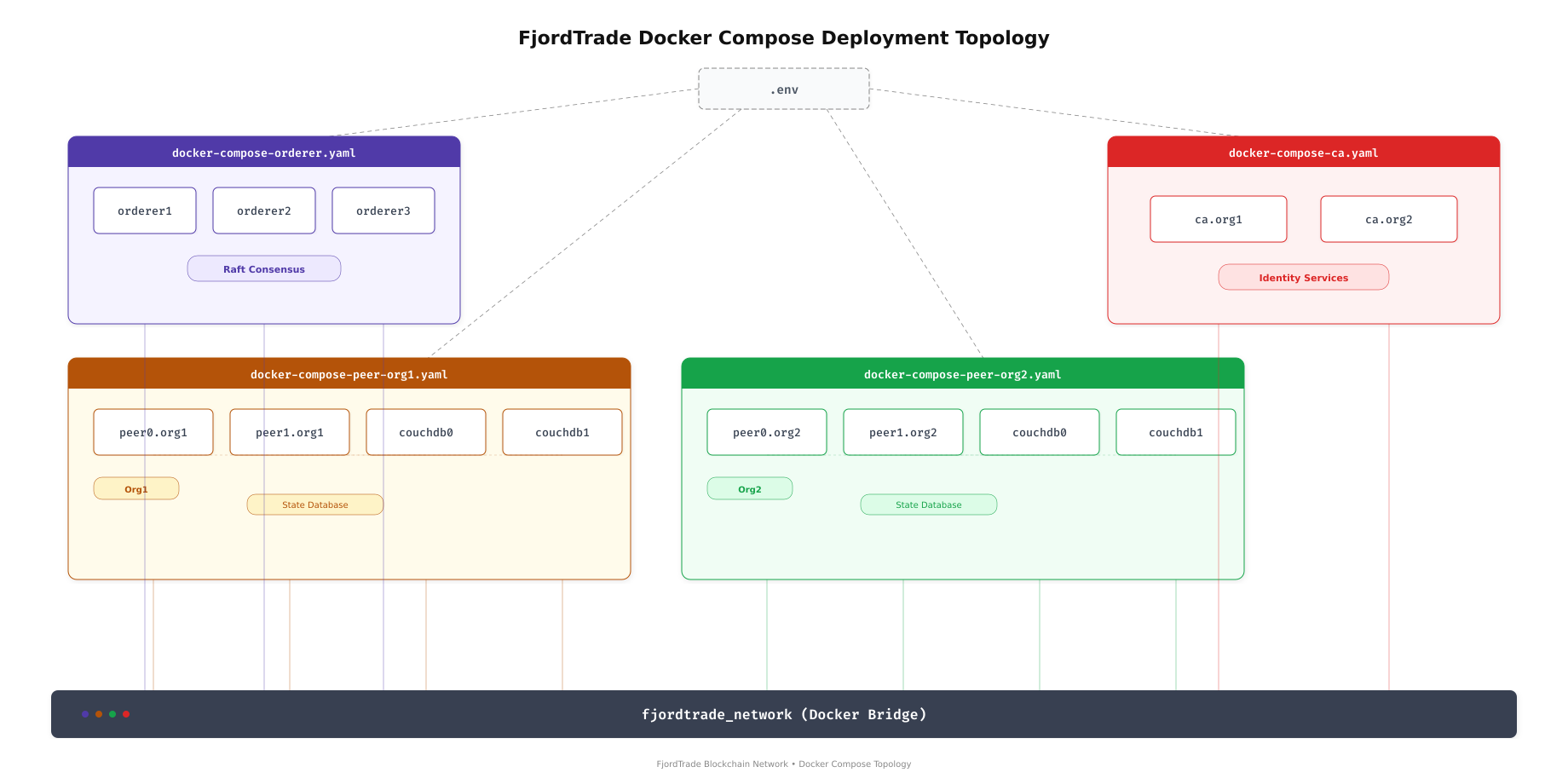
The topology above shows how the FjordTrade deployment is split across four Docker Compose files. The orderer compose file manages the three-node Raft consensus cluster. Each peer organization has its own compose file containing two peers and two CouchDB instances. A separate compose file handles the certificate authorities. All 13 containers connect to a single Docker bridge network, allowing them to communicate using container hostnames.
Prerequisites
Before proceeding, confirm the following.
Completed Parts 1 through 3: Docker CE is running, all Fabric CLI tools are installed, and the crypto-config/ and channel-artifacts/ directories contain the generated material from Part 3.
$ ls ~/fjordtrade-network/channel-artifacts/
$ ls ~/fjordtrade-network/crypto-config/peerOrganizations/
$ ls ~/fjordtrade-network/crypto-config/ordererOrganizations/Org1MSPanchors.tx Org2MSPanchors.tx fjordtradechannel.tx genesis.block
org1.fjordtrade.com org2.fjordtrade.com
orderer.fjordtrade.comCreating the Shared Environment File
All four compose files share common variables like the project name, Fabric image tags, and CA image versions. Rather than duplicating these values in every file, define them once in a .env file that Docker Compose reads automatically.
$ vim ~/fjordtrade-network/docker/.envCOMPOSE_PROJECT_NAME=fjordtrade
IMAGE_TAG=2.5.10
CA_IMAGE_TAG=1.5.12
COUCHDB_IMAGE_TAG=3.3.3
FABRIC_CFG_PATH=/etc/hyperledger/fabricPress Esc, type :wq, press Enter to save and exit.
The COMPOSE_PROJECT_NAME sets the prefix for all container names and volumes. IMAGE_TAG controls which Fabric peer and orderer image versions are pulled. These values are referenced in compose files using ${IMAGE_TAG} syntax.
Writing the Orderer Compose File
The orderer compose file defines three Raft consensus nodes. Each orderer mounts the genesis block, its own MSP directory, and its TLS certificates. The three orderers communicate with each other to elect a leader and replicate the transaction log.
Free to use, share it in your presentations, blogs, or learning materials.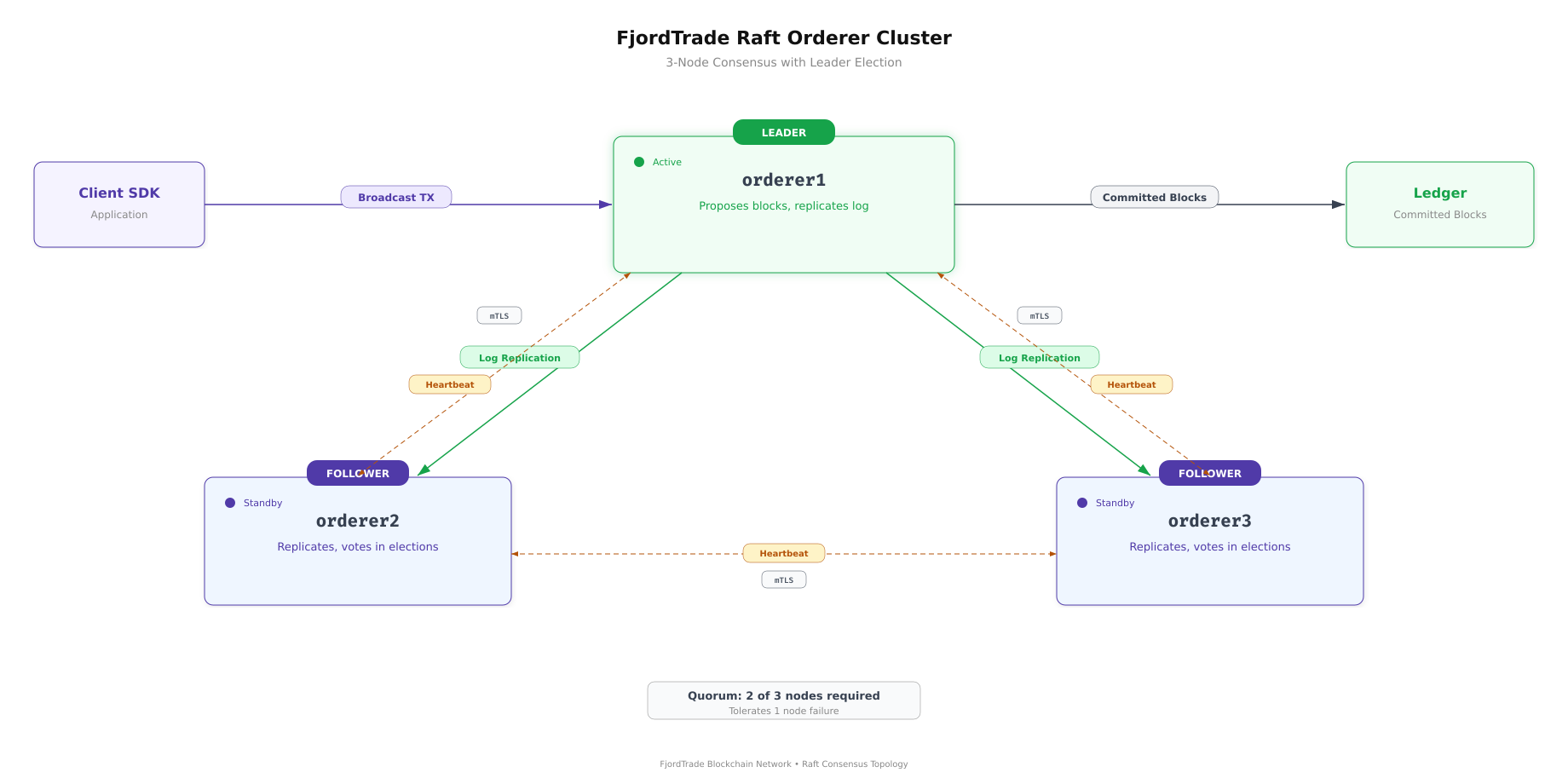
The Raft cluster above shows how orderer1 acts as the initial leader, replicating committed log entries to orderer2 and orderer3. If orderer1 goes down, the remaining two nodes hold an election and promote a new leader. This requires a quorum of 2 out of 3 nodes, meaning the cluster tolerates one node failure without losing availability.
$ vim ~/fjordtrade-network/docker/docker-compose-orderer.yamlversion: ‘3.7’
volumes:
orderer1_data:
orderer2_data:
orderer3_data:
networks:
fjordtrade_network:
name: fjordtrade_network
services:
orderer1.orderer.fjordtrade.com:
container_name: orderer1.orderer.fjordtrade.com
image: hyperledger/fabric-orderer:${IMAGE_TAG}
environment:
– FABRIC_LOGGING_SPEC=INFO
– ORDERER_GENERAL_LISTENADDRESS=0.0.0.0
– ORDERER_GENERAL_LISTENPORT=7050
– ORDERER_GENERAL_LOCALMSPID=OrdererMSP
– ORDERER_GENERAL_LOCALMSPDIR=/var/hyperledger/orderer/msp
– ORDERER_GENERAL_TLS_ENABLED=true
– ORDERER_GENERAL_TLS_PRIVATEKEY=/var/hyperledger/orderer/tls/server.key
– ORDERER_GENERAL_TLS_CERTIFICATE=/var/hyperledger/orderer/tls/server.crt
– ORDERER_GENERAL_TLS_ROOTCAS=[/var/hyperledger/orderer/tls/ca.crt]
– ORDERER_GENERAL_CLUSTER_CLIENTCERTIFICATE=/var/hyperledger/orderer/tls/server.crt
– ORDERER_GENERAL_CLUSTER_CLIENTPRIVATEKEY=/var/hyperledger/orderer/tls/server.key
– ORDERER_GENERAL_CLUSTER_ROOTCAS=[/var/hyperledger/orderer/tls/ca.crt]
– ORDERER_GENERAL_BOOTSTRAPMETHOD=file
– ORDERER_GENERAL_BOOTSTRAPFILE=/var/hyperledger/orderer/orderer.genesis.block
– ORDERER_CHANNELPARTICIPATION_ENABLED=true
– ORDERER_ADMIN_TLS_ENABLED=true
– ORDERER_ADMIN_TLS_CERTIFICATE=/var/hyperledger/orderer/tls/server.crt
– ORDERER_ADMIN_TLS_PRIVATEKEY=/var/hyperledger/orderer/tls/server.key
– ORDERER_ADMIN_TLS_ROOTCAS=[/var/hyperledger/orderer/tls/ca.crt]
– ORDERER_ADMIN_TLS_CLIENTROOTCAS=[/var/hyperledger/orderer/tls/ca.crt]
– ORDERER_ADMIN_LISTENADDRESS=0.0.0.0:7053
– ORDERER_OPERATIONS_LISTENADDRESS=0.0.0.0:9443
– ORDERER_METRICS_PROVIDER=prometheus
working_dir: /root
command: orderer
volumes:
– ../channel-artifacts/genesis.block:/var/hyperledger/orderer/orderer.genesis.block
– ../crypto-config/ordererOrganizations/orderer.fjordtrade.com/orderers/orderer1.orderer.fjordtrade.com/msp:/var/hyperledger/orderer/msp
– ../crypto-config/ordererOrganizations/orderer.fjordtrade.com/orderers/orderer1.orderer.fjordtrade.com/tls:/var/hyperledger/orderer/tls
– orderer1_data:/var/hyperledger/production/orderer
ports:
– “7050:7050”
– “7053:7053”
– “9443:9443”
networks:
– fjordtrade_network
orderer2.orderer.fjordtrade.com:
container_name: orderer2.orderer.fjordtrade.com
image: hyperledger/fabric-orderer:${IMAGE_TAG}
environment:
– FABRIC_LOGGING_SPEC=INFO
– ORDERER_GENERAL_LISTENADDRESS=0.0.0.0
– ORDERER_GENERAL_LISTENPORT=7050
– ORDERER_GENERAL_LOCALMSPID=OrdererMSP
– ORDERER_GENERAL_LOCALMSPDIR=/var/hyperledger/orderer/msp
– ORDERER_GENERAL_TLS_ENABLED=true
– ORDERER_GENERAL_TLS_PRIVATEKEY=/var/hyperledger/orderer/tls/server.key
– ORDERER_GENERAL_TLS_CERTIFICATE=/var/hyperledger/orderer/tls/server.crt
– ORDERER_GENERAL_TLS_ROOTCAS=[/var/hyperledger/orderer/tls/ca.crt]
– ORDERER_GENERAL_CLUSTER_CLIENTCERTIFICATE=/var/hyperledger/orderer/tls/server.crt
– ORDERER_GENERAL_CLUSTER_CLIENTPRIVATEKEY=/var/hyperledger/orderer/tls/server.key
– ORDERER_GENERAL_CLUSTER_ROOTCAS=[/var/hyperledger/orderer/tls/ca.crt]
– ORDERER_GENERAL_BOOTSTRAPMETHOD=file
– ORDERER_GENERAL_BOOTSTRAPFILE=/var/hyperledger/orderer/orderer.genesis.block
– ORDERER_CHANNELPARTICIPATION_ENABLED=true
– ORDERER_ADMIN_TLS_ENABLED=true
– ORDERER_ADMIN_TLS_CERTIFICATE=/var/hyperledger/orderer/tls/server.crt
– ORDERER_ADMIN_TLS_PRIVATEKEY=/var/hyperledger/orderer/tls/server.key
– ORDERER_ADMIN_TLS_ROOTCAS=[/var/hyperledger/orderer/tls/ca.crt]
– ORDERER_ADMIN_TLS_CLIENTROOTCAS=[/var/hyperledger/orderer/tls/ca.crt]
– ORDERER_ADMIN_LISTENADDRESS=0.0.0.0:8053
– ORDERER_OPERATIONS_LISTENADDRESS=0.0.0.0:9444
– ORDERER_METRICS_PROVIDER=prometheus
working_dir: /root
command: orderer
volumes:
– ../channel-artifacts/genesis.block:/var/hyperledger/orderer/orderer.genesis.block
– ../crypto-config/ordererOrganizations/orderer.fjordtrade.com/orderers/orderer2.orderer.fjordtrade.com/msp:/var/hyperledger/orderer/msp
– ../crypto-config/ordererOrganizations/orderer.fjordtrade.com/orderers/orderer2.orderer.fjordtrade.com/tls:/var/hyperledger/orderer/tls
– orderer2_data:/var/hyperledger/production/orderer
ports:
– “8050:7050”
– “8053:8053”
– “9444:9444”
networks:
– fjordtrade_network
orderer3.orderer.fjordtrade.com:
container_name: orderer3.orderer.fjordtrade.com
image: hyperledger/fabric-orderer:${IMAGE_TAG}
environment:
– FABRIC_LOGGING_SPEC=INFO
– ORDERER_GENERAL_LISTENADDRESS=0.0.0.0
– ORDERER_GENERAL_LISTENPORT=7050
– ORDERER_GENERAL_LOCALMSPID=OrdererMSP
– ORDERER_GENERAL_LOCALMSPDIR=/var/hyperledger/orderer/msp
– ORDERER_GENERAL_TLS_ENABLED=true
– ORDERER_GENERAL_TLS_PRIVATEKEY=/var/hyperledger/orderer/tls/server.key
– ORDERER_GENERAL_TLS_CERTIFICATE=/var/hyperledger/orderer/tls/server.crt
– ORDERER_GENERAL_TLS_ROOTCAS=[/var/hyperledger/orderer/tls/ca.crt]
– ORDERER_GENERAL_CLUSTER_CLIENTCERTIFICATE=/var/hyperledger/orderer/tls/server.crt
– ORDERER_GENERAL_CLUSTER_CLIENTPRIVATEKEY=/var/hyperledger/orderer/tls/server.key
– ORDERER_GENERAL_CLUSTER_ROOTCAS=[/var/hyperledger/orderer/tls/ca.crt]
– ORDERER_GENERAL_BOOTSTRAPMETHOD=file
– ORDERER_GENERAL_BOOTSTRAPFILE=/var/hyperledger/orderer/orderer.genesis.block
– ORDERER_CHANNELPARTICIPATION_ENABLED=true
– ORDERER_ADMIN_TLS_ENABLED=true
– ORDERER_ADMIN_TLS_CERTIFICATE=/var/hyperledger/orderer/tls/server.crt
– ORDERER_ADMIN_TLS_PRIVATEKEY=/var/hyperledger/orderer/tls/server.key
– ORDERER_ADMIN_TLS_ROOTCAS=[/var/hyperledger/orderer/tls/ca.crt]
– ORDERER_ADMIN_TLS_CLIENTROOTCAS=[/var/hyperledger/orderer/tls/ca.crt]
– ORDERER_ADMIN_LISTENADDRESS=0.0.0.0:9053
– ORDERER_OPERATIONS_LISTENADDRESS=0.0.0.0:9445
– ORDERER_METRICS_PROVIDER=prometheus
working_dir: /root
command: orderer
volumes:
– ../channel-artifacts/genesis.block:/var/hyperledger/orderer/orderer.genesis.block
– ../crypto-config/ordererOrganizations/orderer.fjordtrade.com/orderers/orderer3.orderer.fjordtrade.com/msp:/var/hyperledger/orderer/msp
– ../crypto-config/ordererOrganizations/orderer.fjordtrade.com/orderers/orderer3.orderer.fjordtrade.com/tls:/var/hyperledger/orderer/tls
– orderer3_data:/var/hyperledger/production/orderer
ports:
– “9050:7050”
– “9053:9053”
– “9445:9445”
networks:
– fjordtrade_networkPress Esc, type :wq, press Enter to save and exit.
Each orderer service follows the same pattern. The key environment variables control TLS (enabled for all connections), the MSP identity (OrdererMSP for all three), and the bootstrap method (file-based, reading the genesis block). The volume mounts connect three host directories into each container: the genesis block file, the node’s MSP directory (signing certificates and CA roots), and the node’s TLS directory (server certificate and key). A named volume persists the orderer’s production data across container restarts.
The port mappings differ for each orderer because all three run on the same host machine. Orderer1 maps host port 7050 to container port 7050, orderer2 maps 8050 to 7050, and orderer3 maps 9050 to 7050. Inside the container, each orderer listens on 7050, but the host-side ports must be unique.
Port Allocation Summary
The following port allocation applies across all FjordTrade services. Each service listens on a standard internal port, mapped to a unique host port.
# Orderer Services
orderer1    Host 7050  -> Container 7050  (gRPC)
orderer1    Host 7053  -> Container 7053  (Admin)
orderer1    Host 9443  -> Container 9443  (Operations)
orderer2    Host 8050  -> Container 7050  (gRPC)
orderer2    Host 8053  -> Container 8053  (Admin)
orderer2    Host 9444  -> Container 9444  (Operations)
orderer3    Host 9050  -> Container 7050  (gRPC)
orderer3    Host 9053  -> Container 9053  (Admin)
orderer3    Host 9445  -> Container 9445  (Operations)

# Peer Services
peer0.org1  Host 7051  -> Container 7051  (gRPC)
peer1.org1  Host 8051  -> Container 7051  (gRPC)
peer0.org2  Host 9051  -> Container 7051  (gRPC)
peer1.org2  Host 10051 -> Container 7051  (gRPC)

# CouchDB Instances
couchdb0.org1  Host 5984  -> Container 5984  (HTTP)
couchdb1.org1  Host 6984  -> Container 5984  (HTTP)
couchdb0.org2  Host 7984  -> Container 5984  (HTTP)
couchdb1.org2  Host 8984  -> Container 5984  (HTTP)

# Certificate Authorities
ca.org1     Host 7054  -> Container 7054  (HTTP)
ca.org2     Host 8054  -> Container 8054  (HTTP)
Writing the Peer Org1 Compose File
The Org1 compose file defines two peer nodes and their CouchDB sidecar databases. Each peer mounts its own MSP and TLS directories from the crypto material generated in Part 3. The CouchDB containers provide rich query support against the world state, allowing chaincode to perform complex queries beyond simple key lookups.
$ vim ~/fjordtrade-network/docker/docker-compose-peer-org1.yamlversion: ‘3.7’
volumes:
peer0_org1_data:
peer1_org1_data:
couchdb0_org1_data:
couchdb1_org1_data:
networks:
fjordtrade_network:
external: true
services:
couchdb0.org1.fjordtrade.com:
container_name: couchdb0.org1.fjordtrade.com
image: couchdb:${COUCHDB_IMAGE_TAG}
environment:
– COUCHDB_USER=fjordtradeadmin
– COUCHDB_PASSWORD=fjordtrade_couchdb_pw
volumes:
– couchdb0_org1_data:/opt/couchdb/data
ports:
– “5984:5984”
networks:
– fjordtrade_network
couchdb1.org1.fjordtrade.com:
container_name: couchdb1.org1.fjordtrade.com
image: couchdb:${COUCHDB_IMAGE_TAG}
environment:
– COUCHDB_USER=fjordtradeadmin
– COUCHDB_PASSWORD=fjordtrade_couchdb_pw
volumes:
– couchdb1_org1_data:/opt/couchdb/data
ports:
– “6984:5984”
networks:
– fjordtrade_network
peer0.org1.fjordtrade.com:
container_name: peer0.org1.fjordtrade.com
image: hyperledger/fabric-peer:${IMAGE_TAG}
environment:
– FABRIC_LOGGING_SPEC=INFO
– CORE_PEER_ID=peer0.org1.fjordtrade.com
– CORE_PEER_ADDRESS=peer0.org1.fjordtrade.com:7051
– CORE_PEER_LISTENADDRESS=0.0.0.0:7051
– CORE_PEER_CHAINCODEADDRESS=peer0.org1.fjordtrade.com:7052
– CORE_PEER_CHAINCODELISTENADDRESS=0.0.0.0:7052
– CORE_PEER_GOSSIP_BOOTSTRAP=peer1.org1.fjordtrade.com:8051
– CORE_PEER_GOSSIP_EXTERNALENDPOINT=peer0.org1.fjordtrade.com:7051
– CORE_PEER_LOCALMSPID=Org1MSP
– CORE_PEER_MSPCONFIGPATH=/etc/hyperledger/fabric/msp
– CORE_PEER_TLS_ENABLED=true
– CORE_PEER_TLS_CERT_FILE=/etc/hyperledger/fabric/tls/server.crt
– CORE_PEER_TLS_KEY_FILE=/etc/hyperledger/fabric/tls/server.key
– CORE_PEER_TLS_ROOTCERT_FILE=/etc/hyperledger/fabric/tls/ca.crt
– CORE_LEDGER_STATE_STATEDATABASE=CouchDB
– CORE_LEDGER_STATE_COUCHDBCONFIG_COUCHDBADDRESS=couchdb0.org1.fjordtrade.com:5984
– CORE_LEDGER_STATE_COUCHDBCONFIG_USERNAME=fjordtradeadmin
– CORE_LEDGER_STATE_COUCHDBCONFIG_PASSWORD=fjordtrade_couchdb_pw
– CORE_OPERATIONS_LISTENADDRESS=0.0.0.0:9446
– CORE_METRICS_PROVIDER=prometheus
working_dir: /root
command: peer node start
volumes:
– ../crypto-config/peerOrganizations/org1.fjordtrade.com/peers/peer0.org1.fjordtrade.com/msp:/etc/hyperledger/fabric/msp
– ../crypto-config/peerOrganizations/org1.fjordtrade.com/peers/peer0.org1.fjordtrade.com/tls:/etc/hyperledger/fabric/tls
– peer0_org1_data:/var/hyperledger/production
– /var/run/docker.sock:/var/run/docker.sock
ports:
– “7051:7051”
depends_on:
– couchdb0.org1.fjordtrade.com
networks:
– fjordtrade_network
peer1.org1.fjordtrade.com:
container_name: peer1.org1.fjordtrade.com
image: hyperledger/fabric-peer:${IMAGE_TAG}
environment:
– FABRIC_LOGGING_SPEC=INFO
– CORE_PEER_ID=peer1.org1.fjordtrade.com
– CORE_PEER_ADDRESS=peer1.org1.fjordtrade.com:8051
– CORE_PEER_LISTENADDRESS=0.0.0.0:7051
– CORE_PEER_CHAINCODEADDRESS=peer1.org1.fjordtrade.com:7052
– CORE_PEER_CHAINCODELISTENADDRESS=0.0.0.0:7052
– CORE_PEER_GOSSIP_BOOTSTRAP=peer0.org1.fjordtrade.com:7051
– CORE_PEER_GOSSIP_EXTERNALENDPOINT=peer1.org1.fjordtrade.com:8051
– CORE_PEER_LOCALMSPID=Org1MSP
– CORE_PEER_MSPCONFIGPATH=/etc/hyperledger/fabric/msp
– CORE_PEER_TLS_ENABLED=true
– CORE_PEER_TLS_CERT_FILE=/etc/hyperledger/fabric/tls/server.crt
– CORE_PEER_TLS_KEY_FILE=/etc/hyperledger/fabric/tls/server.key
– CORE_PEER_TLS_ROOTCERT_FILE=/etc/hyperledger/fabric/tls/ca.crt
– CORE_LEDGER_STATE_STATEDATABASE=CouchDB
– CORE_LEDGER_STATE_COUCHDBCONFIG_COUCHDBADDRESS=couchdb1.org1.fjordtrade.com:5984
– CORE_LEDGER_STATE_COUCHDBCONFIG_USERNAME=fjordtradeadmin
– CORE_LEDGER_STATE_COUCHDBCONFIG_PASSWORD=fjordtrade_couchdb_pw
– CORE_OPERATIONS_LISTENADDRESS=0.0.0.0:9447
– CORE_METRICS_PROVIDER=prometheus
working_dir: /root
command: peer node start
volumes:
– ../crypto-config/peerOrganizations/org1.fjordtrade.com/peers/peer1.org1.fjordtrade.com/msp:/etc/hyperledger/fabric/msp
– ../crypto-config/peerOrganizations/org1.fjordtrade.com/peers/peer1.org1.fjordtrade.com/tls:/etc/hyperledger/fabric/tls
– peer1_org1_data:/var/hyperledger/production
– /var/run/docker.sock:/var/run/docker.sock
ports:
– “8051:7051”
depends_on:
– couchdb1.org1.fjordtrade.com
networks:
– fjordtrade_networkPress Esc, type :wq, press Enter to save and exit.
The CouchDB services start first because peers depend on them via the depends_on directive. Each peer points to its specific CouchDB instance through the CORE_LEDGER_STATE_COUCHDBCONFIG_COUCHDBADDRESS variable. The gossip bootstrap configuration cross-references the other peer in the same organization: peer0 bootstraps from peer1, and peer1 bootstraps from peer0. This ensures block dissemination works even if a peer restarts.
The Docker socket mount (/var/run/docker.sock) allows peers to launch chaincode containers when chaincode is invoked. Without this mount, chaincode deployment will fail with permission errors.
Note that the network is declared as external: true because the orderer compose file creates it. The peer compose files join the existing network rather than creating a new one.
Writing the Peer Org2 Compose File
The Org2 compose file follows the identical structure as Org1 but with different hostnames, MSP paths, port mappings, and the Org2MSP identity. Helsinki’s peers connect to their own CouchDB instances and bootstrap gossip within Org2.
$ vim ~/fjordtrade-network/docker/docker-compose-peer-org2.yamlversion: ‘3.7’
volumes:
peer0_org2_data:
peer1_org2_data:
couchdb0_org2_data:
couchdb1_org2_data:
networks:
fjordtrade_network:
external: true
services:
couchdb0.org2.fjordtrade.com:
container_name: couchdb0.org2.fjordtrade.com
image: couchdb:${COUCHDB_IMAGE_TAG}
environment:
– COUCHDB_USER=fjordtradeadmin
– COUCHDB_PASSWORD=fjordtrade_couchdb_pw
volumes:
– couchdb0_org2_data:/opt/couchdb/data
ports:
– “7984:5984”
networks:
– fjordtrade_network
couchdb1.org2.fjordtrade.com:
container_name: couchdb1.org2.fjordtrade.com
image: couchdb:${COUCHDB_IMAGE_TAG}
environment:
– COUCHDB_USER=fjordtradeadmin
– COUCHDB_PASSWORD=fjordtrade_couchdb_pw
volumes:
– couchdb1_org2_data:/opt/couchdb/data
ports:
– “8984:5984”
networks:
– fjordtrade_network
peer0.org2.fjordtrade.com:
container_name: peer0.org2.fjordtrade.com
image: hyperledger/fabric-peer:${IMAGE_TAG}
environment:
– FABRIC_LOGGING_SPEC=INFO
– CORE_PEER_ID=peer0.org2.fjordtrade.com
– CORE_PEER_ADDRESS=peer0.org2.fjordtrade.com:9051
– CORE_PEER_LISTENADDRESS=0.0.0.0:7051
– CORE_PEER_CHAINCODEADDRESS=peer0.org2.fjordtrade.com:7052
– CORE_PEER_CHAINCODELISTENADDRESS=0.0.0.0:7052
– CORE_PEER_GOSSIP_BOOTSTRAP=peer1.org2.fjordtrade.com:10051
– CORE_PEER_GOSSIP_EXTERNALENDPOINT=peer0.org2.fjordtrade.com:9051
– CORE_PEER_LOCALMSPID=Org2MSP
– CORE_PEER_MSPCONFIGPATH=/etc/hyperledger/fabric/msp
– CORE_PEER_TLS_ENABLED=true
– CORE_PEER_TLS_CERT_FILE=/etc/hyperledger/fabric/tls/server.crt
– CORE_PEER_TLS_KEY_FILE=/etc/hyperledger/fabric/tls/server.key
– CORE_PEER_TLS_ROOTCERT_FILE=/etc/hyperledger/fabric/tls/ca.crt
– CORE_LEDGER_STATE_STATEDATABASE=CouchDB
– CORE_LEDGER_STATE_COUCHDBCONFIG_COUCHDBADDRESS=couchdb0.org2.fjordtrade.com:5984
– CORE_LEDGER_STATE_COUCHDBCONFIG_USERNAME=fjordtradeadmin
– CORE_LEDGER_STATE_COUCHDBCONFIG_PASSWORD=fjordtrade_couchdb_pw
– CORE_OPERATIONS_LISTENADDRESS=0.0.0.0:9448
– CORE_METRICS_PROVIDER=prometheus
working_dir: /root
command: peer node start
volumes:
– ../crypto-config/peerOrganizations/org2.fjordtrade.com/peers/peer0.org2.fjordtrade.com/msp:/etc/hyperledger/fabric/msp
– ../crypto-config/peerOrganizations/org2.fjordtrade.com/peers/peer0.org2.fjordtrade.com/tls:/etc/hyperledger/fabric/tls
– peer0_org2_data:/var/hyperledger/production
– /var/run/docker.sock:/var/run/docker.sock
ports:
– “9051:7051”
depends_on:
– couchdb0.org2.fjordtrade.com
networks:
– fjordtrade_network
peer1.org2.fjordtrade.com:
container_name: peer1.org2.fjordtrade.com
image: hyperledger/fabric-peer:${IMAGE_TAG}
environment:
– FABRIC_LOGGING_SPEC=INFO
– CORE_PEER_ID=peer1.org2.fjordtrade.com
– CORE_PEER_ADDRESS=peer1.org2.fjordtrade.com:10051
– CORE_PEER_LISTENADDRESS=0.0.0.0:7051
– CORE_PEER_CHAINCODEADDRESS=peer1.org2.fjordtrade.com:7052
– CORE_PEER_CHAINCODELISTENADDRESS=0.0.0.0:7052
– CORE_PEER_GOSSIP_BOOTSTRAP=peer0.org2.fjordtrade.com:9051
– CORE_PEER_GOSSIP_EXTERNALENDPOINT=peer1.org2.fjordtrade.com:10051
– CORE_PEER_LOCALMSPID=Org2MSP
– CORE_PEER_MSPCONFIGPATH=/etc/hyperledger/fabric/msp
– CORE_PEER_TLS_ENABLED=true
– CORE_PEER_TLS_CERT_FILE=/etc/hyperledger/fabric/tls/server.crt
– CORE_PEER_TLS_KEY_FILE=/etc/hyperledger/fabric/tls/server.key
– CORE_PEER_TLS_ROOTCERT_FILE=/etc/hyperledger/fabric/tls/ca.crt
– CORE_LEDGER_STATE_STATEDATABASE=CouchDB
– CORE_LEDGER_STATE_COUCHDBCONFIG_COUCHDBADDRESS=couchdb1.org2.fjordtrade.com:5984
– CORE_LEDGER_STATE_COUCHDBCONFIG_USERNAME=fjordtradeadmin
– CORE_LEDGER_STATE_COUCHDBCONFIG_PASSWORD=fjordtrade_couchdb_pw
– CORE_OPERATIONS_LISTENADDRESS=0.0.0.0:9449
– CORE_METRICS_PROVIDER=prometheus
working_dir: /root
command: peer node start
volumes:
– ../crypto-config/peerOrganizations/org2.fjordtrade.com/peers/peer1.org2.fjordtrade.com/msp:/etc/hyperledger/fabric/msp
– ../crypto-config/peerOrganizations/org2.fjordtrade.com/peers/peer1.org2.fjordtrade.com/tls:/etc/hyperledger/fabric/tls
– peer1_org2_data:/var/hyperledger/production
– /var/run/docker.sock:/var/run/docker.sock
ports:
– “10051:7051”
depends_on:
– couchdb1.org2.fjordtrade.com
networks:
– fjordtrade_networkPress Esc, type :wq, press Enter to save and exit.
The structure mirrors Org1 exactly. The differences are the MSP identity (Org2MSP), the crypto material paths (under org2.fjordtrade.com), and the port allocations (9051/10051 for peers, 7984/8984 for CouchDB). This consistency makes it straightforward to add additional organizations later.
Writing the CA Compose File
The certificate authority compose file defines CA servers for both organizations. These CAs can issue new identities at runtime, which is useful for registering additional users or renewing certificates without regenerating the entire crypto material tree.
$ vim ~/fjordtrade-network/docker/docker-compose-ca.yamlversion: ‘3.7’
networks:
fjordtrade_network:
external: true
services:
ca.org1.fjordtrade.com:
container_name: ca.org1.fjordtrade.com
image: hyperledger/fabric-ca:${CA_IMAGE_TAG}
environment:
– FABRIC_CA_HOME=/etc/hyperledger/fabric-ca-server
– FABRIC_CA_SERVER_CA_NAME=ca-org1
– FABRIC_CA_SERVER_TLS_ENABLED=true
– FABRIC_CA_SERVER_TLS_CERTFILE=/etc/hyperledger/fabric-ca-server-config/ca.org1.fjordtrade.com-cert.pem
– FABRIC_CA_SERVER_TLS_KEYFILE=/etc/hyperledger/fabric-ca-server-config/priv_sk
– FABRIC_CA_SERVER_PORT=7054
command: sh -c ‘fabric-ca-server start -b admin:adminpw -d’
volumes:
– ../crypto-config/peerOrganizations/org1.fjordtrade.com/ca/:/etc/hyperledger/fabric-ca-server-config
ports:
– “7054:7054”
networks:
– fjordtrade_network
ca.org2.fjordtrade.com:
container_name: ca.org2.fjordtrade.com
image: hyperledger/fabric-ca:${CA_IMAGE_TAG}
environment:
– FABRIC_CA_HOME=/etc/hyperledger/fabric-ca-server
– FABRIC_CA_SERVER_CA_NAME=ca-org2
– FABRIC_CA_SERVER_TLS_ENABLED=true
– FABRIC_CA_SERVER_TLS_CERTFILE=/etc/hyperledger/fabric-ca-server-config/ca.org2.fjordtrade.com-cert.pem
– FABRIC_CA_SERVER_TLS_KEYFILE=/etc/hyperledger/fabric-ca-server-config/priv_sk
– FABRIC_CA_SERVER_PORT=8054
command: sh -c ‘fabric-ca-server start -b admin:adminpw -d’
volumes:
– ../crypto-config/peerOrganizations/org2.fjordtrade.com/ca/:/etc/hyperledger/fabric-ca-server-config
ports:
– “8054:8054”
networks:
– fjordtrade_networkPress Esc, type :wq, press Enter to save and exit.
Each CA server mounts the organization’s CA directory, which contains the CA certificate and private key generated by cryptogen. The -b admin:adminpw flag sets the bootstrap admin credentials used for the first enrollment. In a production deployment, these credentials should be changed immediately after initial setup and stored securely.
Launching the Network
The containers must start in a specific order. CouchDB and orderers have no dependencies and can start first. Peers depend on both CouchDB (for state storage) and orderers (for block delivery). The CA services are independent and can start at any time.
Starting the Orderer Cluster
Start the orderer cluster first. The three orderers will form a Raft cluster and elect a leader.
$ cd ~/fjordtrade-network/docker
$ docker compose -f docker-compose-orderer.yaml up -d[+] Running 4/4
✔ Network fjordtrade_network Created
✔ Container orderer1.orderer.fjordtrade.com Started
✔ Container orderer2.orderer.fjordtrade.com Started
✔ Container orderer3.orderer.fjordtrade.com StartedThe orderer compose file creates the fjordtrade_network Docker bridge network. All subsequent compose files join this existing network.
$ docker logs orderer1.orderer.fjordtrade.com 2>&1 | grep -i “leader”2026-03-02 11:00:15.234 UTC [orderer.consensus.etcdraft] becomeLeader -> INFO 012 1 became leader at term 2 channel=system-channelThe log entry confirms that orderer1 (node ID 1) was elected leader for the system channel. If you do not see this message within 10 seconds, check that all three orderers are running with docker ps and inspect the logs of each orderer for errors.
Starting the Peer Nodes
Start Org1 and Org2 peer nodes. Each compose file also starts the CouchDB instances that the peers depend on.
$ docker compose -f docker-compose-peer-org1.yaml up -d[+] Running 4/4
✔ Container couchdb0.org1.fjordtrade.com Started
✔ Container couchdb1.org1.fjordtrade.com Started
✔ Container peer0.org1.fjordtrade.com Started
✔ Container peer1.org1.fjordtrade.com Started$ docker compose -f docker-compose-peer-org2.yaml up -d[+] Running 4/4
✔ Container couchdb0.org2.fjordtrade.com Started
✔ Container couchdb1.org2.fjordtrade.com Started
✔ Container peer0.org2.fjordtrade.com Started
✔ Container peer1.org2.fjordtrade.com StartedStarting the Certificate Authorities
$ docker compose -f docker-compose-ca.yaml up -d[+] Running 2/2
✔ Container ca.org1.fjordtrade.com Started
✔ Container ca.org2.fjordtrade.com StartedVerifying All Containers
With all compose files started, verify that all 13 containers are running and healthy.
$ docker ps –format “table {{.Names}}\t{{.Status}}\t{{.Ports}}” | sortNAMES STATUS PORTS
ca.org1.fjordtrade.com Up 30 seconds 0.0.0.0:7054->7054/tcp
ca.org2.fjordtrade.com Up 28 seconds 0.0.0.0:8054->8054/tcp
couchdb0.org1.fjordtrade.com Up 45 seconds 0.0.0.0:5984->5984/tcp
couchdb0.org2.fjordtrade.com Up 40 seconds 0.0.0.0:7984->5984/tcp
couchdb1.org1.fjordtrade.com Up 44 seconds 0.0.0.0:6984->5984/tcp
couchdb1.org2.fjordtrade.com Up 39 seconds 0.0.0.0:8984->5984/tcp
orderer1.orderer.fjordtrade.com Up 1 minute 0.0.0.0:7050->7050/tcp, 0.0.0.0:7053->7053/tcp, 0.0.0.0:9443->9443/tcp
orderer2.orderer.fjordtrade.com Up 1 minute 0.0.0.0:8050->7050/tcp, 0.0.0.0:8053->8053/tcp, 0.0.0.0:9444->9444/tcp
orderer3.orderer.fjordtrade.com Up 1 minute 0.0.0.0:9050->7050/tcp, 0.0.0.0:9053->9053/tcp, 0.0.0.0:9445->9445/tcp
peer0.org1.fjordtrade.com Up 43 seconds 0.0.0.0:7051->7051/tcp
peer0.org2.fjordtrade.com Up 38 seconds 0.0.0.0:9051->7051/tcp
peer1.org1.fjordtrade.com Up 42 seconds 0.0.0.0:8051->7051/tcp
peer1.org2.fjordtrade.com Up 37 seconds 0.0.0.0:10051->7051/tcpAll 13 containers should show “Up” status. If any container shows “Restarting” or is missing, inspect its logs to identify the issue.
$ docker ps -q | wc -l13Verifying Peer Startup
$ docker logs peer0.org1.fjordtrade.com 2>&1 | grep “Started peer”2026-03-02 11:00:45.678 UTC [nodeCmd] serve -> INFO 01a Started peer with ID=[peer0.org1.fjordtrade.com], network ID=[dev], address=[peer0.org1.fjordtrade.com:7051]$ curl -s http://localhost:5984/ | python3 -m json.tool{
“couchdb”: “Welcome”,
“version”: “3.3.3”,
“git_sha”: “40afbcfc7”,
“uuid”: “a1b2c3d4e5f6…”,
“features”: [
“access-ready”,
“partitioned”,
“pluggable-storage-engines”,
“reshard”,
“scheduler”
],
“vendor”: {
“name”: “The Apache Software Foundation”
}
}The CouchDB welcome response confirms that the database is running and accessible on port 5984. Each CouchDB instance can be accessed on its respective host port (5984, 6984, 7984, 8984) using the same URL pattern.
Verifying the Docker Network
$ docker network inspect fjordtrade_network –format ‘{{range .Containers}}{{.Name}} {{end}}’orderer1.orderer.fjordtrade.com orderer2.orderer.fjordtrade.com orderer3.orderer.fjordtrade.com peer0.org1.fjordtrade.com peer1.org1.fjordtrade.com peer0.org2.fjordtrade.com peer1.org2.fjordtrade.com couchdb0.org1.fjordtrade.com couchdb1.org1.fjordtrade.com couchdb0.org2.fjordtrade.com couchdb1.org2.fjordtrade.com ca.org1.fjordtrade.com ca.org2.fjordtrade.comAll 13 containers are connected to the fjordtrade_network bridge. This means every container can reach every other container by hostname, which is essential for peer-to-orderer communication, gossip between peers, and peer-to-CouchDB connections.
Troubleshooting
Container Exits Immediately
If a container starts and exits within seconds, the most common cause is incorrect volume mount paths. The MSP or TLS directory does not exist at the path specified in the compose file.
$ docker logs orderer1.orderer.fjordtrade.com 2>&1 | tail -20Look for errors mentioning “cannot find” or “no such file or directory”. Verify that the relative paths in the compose file correctly resolve from the docker/ directory to the crypto-config/ and channel-artifacts/ directories.
Port Already in Use
If Docker reports “port is already allocated”, another service is using that port on the host.
$ sudo ss -tlnp | grep :7050Stop the conflicting process with sudo kill <PID> or change the host port in the compose file to an unused port.
Raft Leader Election Fails
If no orderer becomes leader, the TLS certificates may be incorrect. Each orderer’s TLS certificate must match what is listed in the genesis block’s consenter set. Regenerate the genesis block after any changes to crypto material (as described in the Part 3 troubleshooting section).
CouchDB Connection Refused
If a peer logs “connection refused” for CouchDB, the CouchDB container may not have started yet. Although depends_on ensures the container starts, it does not wait for the application inside to be ready. Restart the peer after CouchDB is fully up.
$ docker restart peer0.org1.fjordtrade.comStopping and Restarting the Network
To stop all containers without deleting data volumes, use the down command on each compose file.
$ cd ~/fjordtrade-network/docker
$ docker compose -f docker-compose-ca.yaml down
$ docker compose -f docker-compose-peer-org2.yaml down
$ docker compose -f docker-compose-peer-org1.yaml down
$ docker compose -f docker-compose-orderer.yaml down
To restart, launch them again in the same order: orderers first, then peers, then CAs. The named volumes persist the ledger data and CouchDB state across restarts.
To completely reset the network and remove all data, add the -v flag to each down command. This deletes the named volumes, requiring you to rejoin channels and reinstall chaincode.
Summary
This part created all Docker Compose configuration files for the FjordTrade blockchain network and launched every container. Here is what was accomplished.
Environment file: Created .env with shared variables for Fabric image tags, CouchDB version, and project naming used across all compose files.
Orderer cluster: Wrote docker-compose-orderer.yaml defining three Raft orderer nodes with TLS enabled, genesis block volume mounts, MSP identity configuration, and unique host port mappings (7050, 8050, 9050). Verified Raft leader election in logs.
Org1 peers: Wrote docker-compose-peer-org1.yaml with two peer nodes (peer0, peer1) and two CouchDB sidecar instances. Configured gossip cross-bootstrap, CouchDB state database integration, Docker socket mounting for chaincode, and TLS settings.
Org2 peers: Wrote docker-compose-peer-org2.yaml mirroring Org1’s structure with Org2-specific hostnames, crypto paths, and port allocations (9051, 10051 for peers; 7984, 8984 for CouchDB).
Certificate authorities: Wrote docker-compose-ca.yaml with CA servers for both organizations, mounting the CA certificates and keys from the crypto material tree.
Network launch: Started all 13 containers in dependency order (orderers first, then org peers with CouchDB, then CAs). Verified that all containers are running, the Raft cluster elected a leader, peers started successfully, CouchDB is accessible, and all containers are connected to the shared Docker bridge network.
What Comes Next
In Part 5: Creating a Channel and Joining Peers to the Network, you will use the running orderer cluster to create the fjordtradechannel application channel using the channel creation transaction generated in Part 3. All four peers will join the channel, anchor peers will be updated for cross-organization gossip discovery, and block synchronization will be verified across both organizations. By the end of Part 5, Org1 and Org2 peers will share a common ledger and be ready for chaincode deployment.