
In Part 5, you created the fjordtradechannel application channel, joined all four peers, and configured anchor peers for cross-organization gossip discovery. This part deploys chaincode onto that channel using the Fabric 2.x lifecycle process, then invokes real transactions to create, query, and transfer commodity trade assets between the Oslo and Helsinki offices.
FjordTrade is the scenario company used throughout this series. FjordTrade is a Nordic commodity trading platform with offices in Oslo (Org1), Helsinki (Org2), and Tallinn (Org3, added later). Each office operates its own peer nodes within the permissioned Fabric network.
Free to use, share it in your presentations, blogs, or learning materials.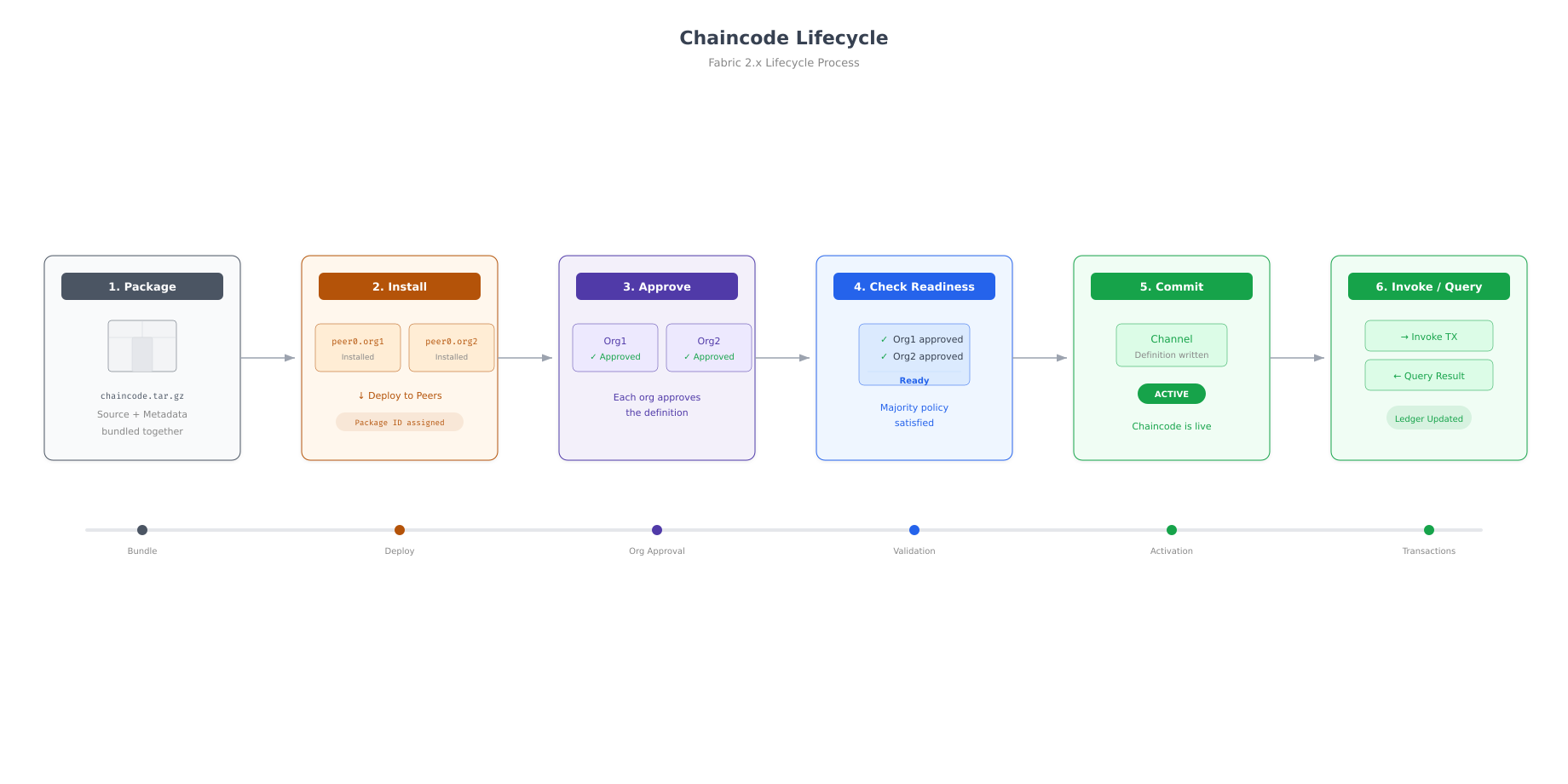
The lifecycle above shows the complete deployment process. Chaincode is first packaged into a tar archive, then installed on peers from each organization. Each organization independently approves the chaincode definition. A readiness check confirms all required approvals are in place. The definition is then committed to the channel, making the chaincode active. Only after commitment can clients invoke transactions and query the ledger.
Prerequisites
Before proceeding, confirm that the fjordtradechannel is operational and all four peers have joined it.
$ cd ~/fjordtrade-network/docker

$ export CORE_PEER_TLS_ENABLED=true
$ export CORE_PEER_LOCALMSPID=”Org1MSP”
$ export CORE_PEER_TLS_ROOTCERT_FILE=${PWD}/../crypto-config/peerOrganizations/org1.fjordtrade.com/peers/peer0.org1.fjordtrade.com/tls/ca.crt
$ export CORE_PEER_MSPCONFIGPATH=${PWD}/../crypto-config/peerOrganizations/org1.fjordtrade.com/users/Admin@org1.fjordtrade.com/msp
$ export CORE_PEER_ADDRESS=localhost:7051
$ export ORDERER_CA=${PWD}/../crypto-config/ordererOrganizations/orderer.fjordtrade.com/orderers/orderer1.orderer.fjordtrade.com/msp/tlscacerts/tlsca.orderer.fjordtrade.com-cert.pem

$ peer channel listChannels peers has joined:
fjordtradechannelWriting the Chaincode
FjordTrade’s chaincode manages commodity trade assets. Each asset has an ID, commodity type, quantity, owner organization, and value. The chaincode provides five functions: InitLedger (seed initial assets), CreateAsset (add a new asset), ReadAsset (query a single asset), TransferAsset (change ownership), and GetAllAssets (list everything on the ledger).
$ mkdir -p ~/fjordtrade-network/chaincode/fjordtrade-cc/
$ cd ~/fjordtrade-network/chaincode/fjordtrade-cc/$ go mod init fjordtrade-ccgo: creating new go.mod: module fjordtrade-cc$ vim fjordtrade-cc.gopackage main
import (
“encoding/json”
“fmt”
“log”
“github.com/hyperledger/fabric-contract-api-go/contractapi”
)
// TradeAsset represents a commodity trade on the FjordTrade platform.
type TradeAsset struct {
ID string `json:”ID”`
Commodity string `json:”Commodity”`
Quantity int `json:”Quantity”`
Owner string `json:”Owner”`
Value float64 `json:”Value”`
}
// FjordTradeContract provides the smart contract functions.
type FjordTradeContract struct {
contractapi.Contract
}
// InitLedger seeds the ledger with sample FjordTrade commodity assets.
func (c *FjordTradeContract) InitLedger(ctx contractapi.TransactionContextInterface) error {
assets := []TradeAsset{
{ID: “TRADE001”, Commodity: “Grain”, Quantity: 5000, Owner: “Oslo”, Value: 125000.00},
{ID: “TRADE002”, Commodity: “Timber”, Quantity: 3200, Owner: “Helsinki”, Value: 96000.00},
{ID: “TRADE003”, Commodity: “Iron Ore”, Quantity: 8000, Owner: “Oslo”, Value: 240000.00},
{ID: “TRADE004”, Commodity: “Copper”, Quantity: 1500, Owner: “Helsinki”, Value: 67500.00},
{ID: “TRADE005”, Commodity: “Nickel”, Quantity: 2000, Owner: “Oslo”, Value: 110000.00},
}
for _, asset := range assets {
assetJSON, err := json.Marshal(asset)
if err != nil {
return err
}
err = ctx.GetStub().PutState(asset.ID, assetJSON)
if err != nil {
return fmt.Errorf(“failed to put asset %s: %v”, asset.ID, err)
}
}
return nil
}
// CreateAsset adds a new commodity trade asset to the ledger.
func (c *FjordTradeContract) CreateAsset(ctx contractapi.TransactionContextInterface, id string, commodity string, quantity int, owner string, value float64) error {
exists, err := c.AssetExists(ctx, id)
if err != nil {
return err
}
if exists {
return fmt.Errorf(“asset %s already exists”, id)
}
asset := TradeAsset{
ID: id,
Commodity: commodity,
Quantity: quantity,
Owner: owner,
Value: value,
}
assetJSON, err := json.Marshal(asset)
if err != nil {
return err
}
return ctx.GetStub().PutState(id, assetJSON)
}
// ReadAsset retrieves a single asset by its ID.
func (c *FjordTradeContract) ReadAsset(ctx contractapi.TransactionContextInterface, id string) (*TradeAsset, error) {
assetJSON, err := ctx.GetStub().GetState(id)
if err != nil {
return nil, fmt.Errorf(“failed to read asset %s: %v”, id, err)
}
if assetJSON == nil {
return nil, fmt.Errorf(“asset %s does not exist”, id)
}
var asset TradeAsset
err = json.Unmarshal(assetJSON, &asset)
if err != nil {
return nil, err
}
return &asset, nil
}
// TransferAsset changes the owner of a commodity trade asset.
func (c *FjordTradeContract) TransferAsset(ctx contractapi.TransactionContextInterface, id string, newOwner string) (string, error) {
asset, err := c.ReadAsset(ctx, id)
if err != nil {
return “”, err
}
oldOwner := asset.Owner
asset.Owner = newOwner
assetJSON, err := json.Marshal(asset)
if err != nil {
return “”, err
}
err = ctx.GetStub().PutState(id, assetJSON)
if err != nil {
return “”, err
}
return oldOwner, nil
}
// GetAllAssets returns all commodity trade assets on the ledger.
func (c *FjordTradeContract) GetAllAssets(ctx contractapi.TransactionContextInterface) ([]*TradeAsset, error) {
resultsIterator, err := ctx.GetStub().GetStateByRange(“”, “”)
if err != nil {
return nil, err
}
defer resultsIterator.Close()
var assets []*TradeAsset
for resultsIterator.HasNext() {
queryResponse, err := resultsIterator.Next()
if err != nil {
return nil, err
}
var asset TradeAsset
err = json.Unmarshal(queryResponse.Value, &asset)
if err != nil {
return nil, err
}
assets = append(assets, &asset)
}
return assets, nil
}
// AssetExists checks whether an asset with the given ID exists on the ledger.
func (c *FjordTradeContract) AssetExists(ctx contractapi.TransactionContextInterface, id string) (bool, error) {
assetJSON, err := ctx.GetStub().GetState(id)
if err != nil {
return false, fmt.Errorf(“failed to read from world state: %v”, err)
}
return assetJSON != nil, nil
}
func main() {
chaincode, err := contractapi.NewChaincode(&FjordTradeContract{})
if err != nil {
log.Panicf(“Error creating FjordTrade chaincode: %v”, err)
}
if err := chaincode.Start(); err != nil {
log.Panicf(“Error starting FjordTrade chaincode: %v”, err)
}
}Press Esc, type :wq, press Enter to save and exit.
The chaincode uses Fabric’s Go contract API. The TradeAsset struct defines the data model with JSON tags for serialization. Each function receives a TransactionContextInterface that provides access to the ledger stub for reading and writing state. The InitLedger function creates five sample trade assets representing grain, timber, iron ore, copper, and nickel contracts between the Oslo and Helsinki offices.
$ go mod tidy
$ go mod vendorgo: downloading github.com/hyperledger/fabric-contract-api-go v1.2.2
go: downloading github.com/hyperledger/fabric-protos-go-apiv2 v0.3.3
go: downloading google.golang.org/grpc v1.62.1
go: downloading google.golang.org/protobuf v1.33.0The go mod vendor command downloads all dependencies into a vendor/ directory inside the chaincode folder. Fabric requires vendored dependencies because the peer builds the chaincode inside a Docker container that does not have internet access.
Packaging the Chaincode
Packaging creates a tar archive containing the chaincode source code, Go module files, and vendored dependencies. The package is what gets installed on peers.
$ cd ~/fjordtrade-network/docker

$ peer lifecycle chaincode package ../chaincode/fjordtrade-cc.tar.gz \
$   –path ../chaincode/fjordtrade-cc/ \
$   –lang golang \
$ –label fjordtrade_1.0$ ls -lh ~/fjordtrade-network/chaincode/fjordtrade-cc.tar.gz-rw-r–r– 1 fjordtrade fjordtrade 1.2M Mar 2 11:15 /home/fjordtrade/fjordtrade-network/chaincode/fjordtrade-cc.tar.gzThe --label fjordtrade_1.0 assigns a human-readable identifier used during the approval and commit steps. The label must be identical across all organizations when they approve the same chaincode definition.
Installing Chaincode on Peers
Chaincode must be installed on every peer that will endorse transactions. For FjordTrade, install on peer0 of each organization (the endorsing peers).
Install on Org1 Peer
$ export CORE_PEER_LOCALMSPID=”Org1MSP”
$ export CORE_PEER_TLS_ROOTCERT_FILE=${PWD}/../crypto-config/peerOrganizations/org1.fjordtrade.com/peers/peer0.org1.fjordtrade.com/tls/ca.crt
$ export CORE_PEER_MSPCONFIGPATH=${PWD}/../crypto-config/peerOrganizations/org1.fjordtrade.com/users/Admin@org1.fjordtrade.com/msp
$ export CORE_PEER_ADDRESS=localhost:7051

$ peer lifecycle chaincode install ../chaincode/fjordtrade-cc.tar.gz2026-03-02 11:16:32.456 UTC [cli.lifecycle.chaincode] submitInstallProposal -> INFO 001 Installed remotely: response:<status:200 payload:"\nRfjordtrade_1.0:a1b2c3d4e5f6a1b2c3d4e5f6a1b2c3d4e5f6a1b2c3d4e5f6a1b2c3d4\022\017fjordtrade_1.0" >
2026-03-02 11:16:32.456 UTC [cli.lifecycle.chaincode] submitInstallProposal -> INFO 002 Chaincode code package identifier: fjordtrade_1.0:a1b2c3d4e5f6a1b2c3d4e5f6a1b2c3d4e5f6a1b2c3d4e5f6a1b2c3d4Save the package identifier from the output. It is the label followed by a colon and a hash. This identifier is needed for the approval step. You can also query it later.
Install on Org2 Peer
$ export CORE_PEER_LOCALMSPID=”Org2MSP”
$ export CORE_PEER_TLS_ROOTCERT_FILE=${PWD}/../crypto-config/peerOrganizations/org2.fjordtrade.com/peers/peer0.org2.fjordtrade.com/tls/ca.crt
$ export CORE_PEER_MSPCONFIGPATH=${PWD}/../crypto-config/peerOrganizations/org2.fjordtrade.com/users/Admin@org2.fjordtrade.com/msp
$ export CORE_PEER_ADDRESS=localhost:9051

$ peer lifecycle chaincode install ../chaincode/fjordtrade-cc.tar.gz2026-03-02 11:17:05.789 UTC [cli.lifecycle.chaincode] submitInstallProposal -> INFO 001 Installed remotely: response:<status:200 payload:"\nRfjordtrade_1.0:a1b2c3d4e5f6a1b2c3d4e5f6a1b2c3d4e5f6a1b2c3d4e5f6a1b2c3d4\022\017fjordtrade_1.0" >
2026-03-02 11:17:05.789 UTC [cli.lifecycle.chaincode] submitInstallProposal -> INFO 002 Chaincode code package identifier: fjordtrade_1.0:a1b2c3d4e5f6a1b2c3d4e5f6a1b2c3d4e5f6a1b2c3d4e5f6a1b2c3d4Query Installed Chaincode
$ peer lifecycle chaincode queryinstalledInstalled chaincodes on peer:
Package ID: fjordtrade_1.0:a1b2c3d4e5f6a1b2c3d4e5f6a1b2c3d4e5f6a1b2c3d4e5f6a1b2c3d4, Label: fjordtrade_1.0$ export CC_PACKAGE_ID=$(peer lifecycle chaincode queryinstalled –output json | jq -r ‘.installed_chaincodes[0].package_id’)
$ echo $CC_PACKAGE_IDfjordtrade_1.0:a1b2c3d4e5f6a1b2c3d4e5f6a1b2c3d4e5f6a1b2c3d4e5f6a1b2c3d4Approving the Chaincode Definition
Each organization must independently approve the chaincode definition before it can be committed to the channel. The approval specifies the chaincode name, version, package ID, and endorsement policy. Both Org1 and Org2 must approve with identical parameters.
Approve for Org2
Since the environment is already set to Org2, approve from Org2 first.
$ peer lifecycle chaincode approveformyorg \
$   -o localhost:7050 \
$   –channelID fjordtradechannel \
$   –name fjordtrade-cc \
$   –version 1.0 \
$   –package-id $CC_PACKAGE_ID \
$   –sequence 1 \
$   –tls \
$ –cafile $ORDERER_CA2026-03-02 11:18:15.234 UTC [chaincodeCmd] ClientWait -> INFO 001 txid [abc123…] committed with status (VALID) at localhost:9051Approve for Org1
$ export CORE_PEER_LOCALMSPID=”Org1MSP”
$ export CORE_PEER_TLS_ROOTCERT_FILE=${PWD}/../crypto-config/peerOrganizations/org1.fjordtrade.com/peers/peer0.org1.fjordtrade.com/tls/ca.crt
$ export CORE_PEER_MSPCONFIGPATH=${PWD}/../crypto-config/peerOrganizations/org1.fjordtrade.com/users/Admin@org1.fjordtrade.com/msp
$ export CORE_PEER_ADDRESS=localhost:7051

$ peer lifecycle chaincode approveformyorg \
$   -o localhost:7050 \
$   –channelID fjordtradechannel \
$   –name fjordtrade-cc \
$   –version 1.0 \
$   –package-id $CC_PACKAGE_ID \
$   –sequence 1 \
$   –tls \
$ –cafile $ORDERER_CA2026-03-02 11:18:45.567 UTC [chaincodeCmd] ClientWait -> INFO 001 txid [def456…] committed with status (VALID) at localhost:7051Check Commit Readiness
$ peer lifecycle chaincode checkcommitreadiness \
$   –channelID fjordtradechannel \
$   –name fjordtrade-cc \
$   –version 1.0 \
$   –sequence 1 \
$ –output json{
“approvals”: {
“Org1MSP”: true,
“Org2MSP”: true
}
}Both organizations show true. The chaincode definition is ready to be committed.
Committing the Chaincode Definition
The commit step writes the chaincode definition to the channel. This requires endorsement from peers in both organizations, so the command specifies peer endpoints and TLS root certificates for both Org1 and Org2.
$ peer lifecycle chaincode commit \
$   -o localhost:7050 \
$   –channelID fjordtradechannel \
$   –name fjordtrade-cc \
$   –version 1.0 \
$   –sequence 1 \
$   –tls \
$   –cafile $ORDERER_CA \
$   –peerAddresses localhost:7051 \
$   –tlsRootCertFiles ${PWD}/../crypto-config/peerOrganizations/org1.fjordtrade.com/peers/peer0.org1.fjordtrade.com/tls/ca.crt \
$   –peerAddresses localhost:9051 \
$ –tlsRootCertFiles ${PWD}/../crypto-config/peerOrganizations/org2.fjordtrade.com/peers/peer0.org2.fjordtrade.com/tls/ca.crt2026-03-02 11:19:32.890 UTC [chaincodeCmd] ClientWait -> INFO 001 txid [ghi789…] committed with status (VALID) at localhost:7051
2026-03-02 11:19:32.912 UTC [chaincodeCmd] ClientWait -> INFO 002 txid [ghi789…] committed with status (VALID) at localhost:9051$ peer lifecycle chaincode querycommitted –channelID fjordtradechannel –name fjordtrade-ccCommitted chaincode definition for chaincode ‘fjordtrade-cc’ on channel ‘fjordtradechannel’:
Version: 1.0, Sequence: 1, Endorsement Plugin: escc, Validation Plugin: vscc, Approvals: [Org1MSP: true, Org2MSP: true]Invoking Transactions
Free to use, share it in your presentations, blogs, or learning materials.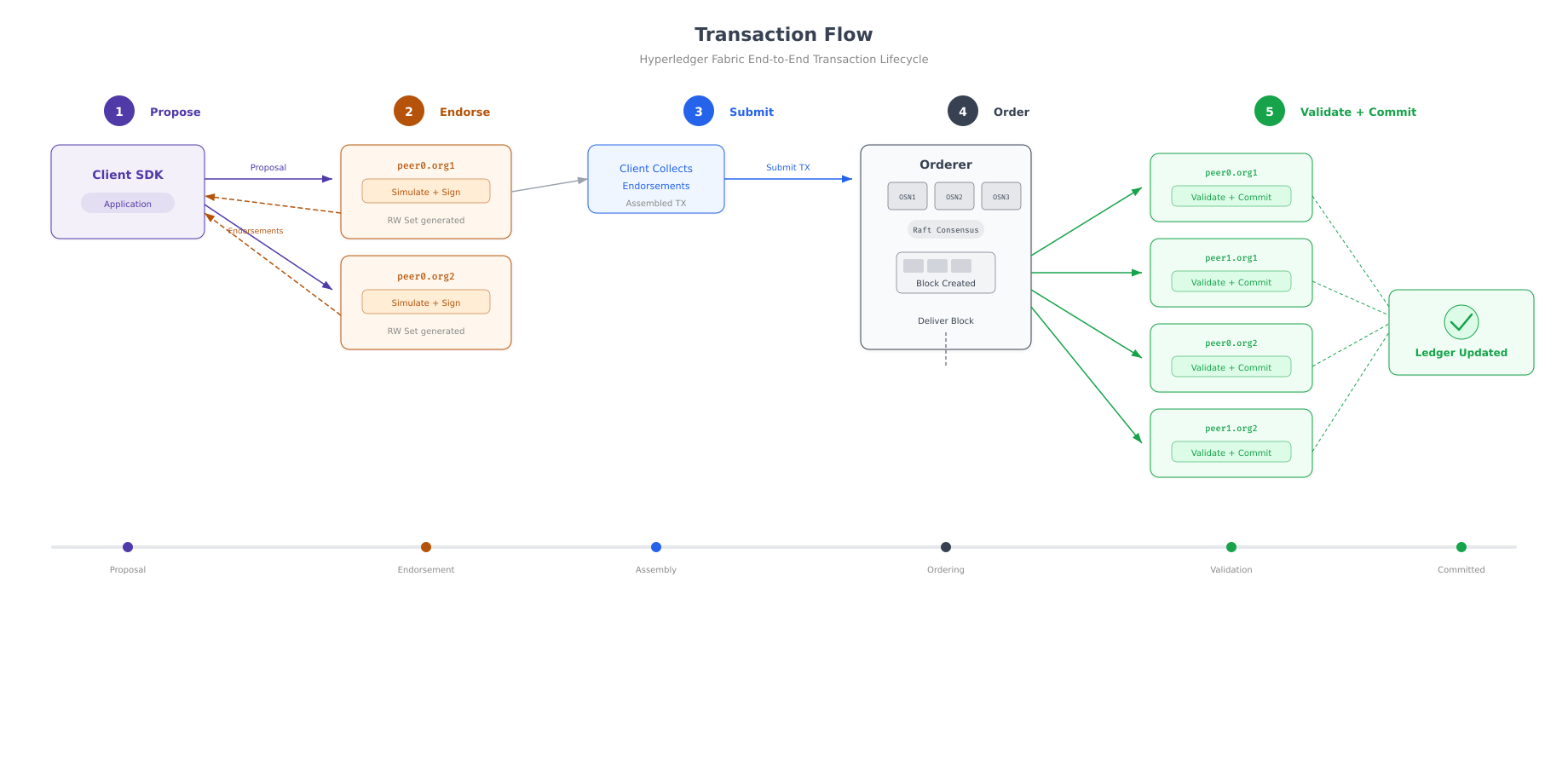
The diagram above shows what happens behind the scenes with every invoke command. The client sends a proposal to endorsing peers. Each peer simulates the transaction against its current state and signs the result. The client collects the endorsements and submits the transaction to the orderer. The orderer adds it to a block and delivers the block to all peers. Each peer validates the transaction and commits the state changes to its ledger and CouchDB world state.
Initializing the Ledger
Run the InitLedger function to seed the ledger with five sample commodity trade assets.
$ peer chaincode invoke \
$   -o localhost:7050 \
$   –ordererTLSHostnameOverride orderer1.orderer.fjordtrade.com \
$   -C fjordtradechannel \
$   -n fjordtrade-cc \
$   -c ‘{“function”:”InitLedger”,”Args”:[]}’ \
$   –tls \
$   –cafile $ORDERER_CA \
$   –peerAddresses localhost:7051 \
$   –tlsRootCertFiles ${PWD}/../crypto-config/peerOrganizations/org1.fjordtrade.com/peers/peer0.org1.fjordtrade.com/tls/ca.crt \
$   –peerAddresses localhost:9051 \
$ –tlsRootCertFiles ${PWD}/../crypto-config/peerOrganizations/org2.fjordtrade.com/peers/peer0.org2.fjordtrade.com/tls/ca.crt2026-03-02 11:20:15.234 UTC [chaincodeCmd] chaincodeInvokeOrQuery -> INFO 001 Chaincode invoke successful. result: status:200Querying All Assets
$ peer chaincode query \
$   -C fjordtradechannel \
$   -n fjordtrade-cc \
$ -c ‘{“function”:”GetAllAssets”,”Args”:[]}’[
{“ID”:”TRADE001″,”Commodity”:”Grain”,”Quantity”:5000,”Owner”:”Oslo”,”Value”:125000},
{“ID”:”TRADE002″,”Commodity”:”Timber”,”Quantity”:3200,”Owner”:”Helsinki”,”Value”:96000},
{“ID”:”TRADE003″,”Commodity”:”Iron Ore”,”Quantity”:8000,”Owner”:”Oslo”,”Value”:240000},
{“ID”:”TRADE004″,”Commodity”:”Copper”,”Quantity”:1500,”Owner”:”Helsinki”,”Value”:67500},
{“ID”:”TRADE005″,”Commodity”:”Nickel”,”Quantity”:2000,”Owner”:”Oslo”,”Value”:110000}
]All five seed assets are on the ledger. Oslo owns three contracts (Grain, Iron Ore, Nickel) and Helsinki owns two (Timber, Copper).
Creating a New Asset
$ peer chaincode invoke \
$   -o localhost:7050 \
$   –ordererTLSHostnameOverride orderer1.orderer.fjordtrade.com \
$   -C fjordtradechannel \
$   -n fjordtrade-cc \
$   -c ‘{“function”:”CreateAsset”,”Args”:[“TRADE006″,”Zinc”,”4500″,”Helsinki”,”135000″]}’ \
$   –tls \
$   –cafile $ORDERER_CA \
$   –peerAddresses localhost:7051 \
$   –tlsRootCertFiles ${PWD}/../crypto-config/peerOrganizations/org1.fjordtrade.com/peers/peer0.org1.fjordtrade.com/tls/ca.crt \
$   –peerAddresses localhost:9051 \
$ –tlsRootCertFiles ${PWD}/../crypto-config/peerOrganizations/org2.fjordtrade.com/peers/peer0.org2.fjordtrade.com/tls/ca.crt2026-03-02 11:21:05.678 UTC [chaincodeCmd] chaincodeInvokeOrQuery -> INFO 001 Chaincode invoke successful. result: status:200$ peer chaincode query \
$ -C fjordtradechannel \
$ -n fjordtrade-cc \
$ -c ‘{“function”:”ReadAsset”,”Args”:[“TRADE006”]}’{“ID”:”TRADE006″,”Commodity”:”Zinc”,”Quantity”:4500,”Owner”:”Helsinki”,”Value”:135000}Transferring an Asset Between Organizations
Transfer the Grain contract (TRADE001) from Oslo to Helsinki to demonstrate cross-organization ownership changes on the shared ledger.
$ peer chaincode invoke \
$   -o localhost:7050 \
$   –ordererTLSHostnameOverride orderer1.orderer.fjordtrade.com \
$   -C fjordtradechannel \
$   -n fjordtrade-cc \
$   -c ‘{“function”:”TransferAsset”,”Args”:[“TRADE001″,”Helsinki”]}’ \
$   –tls \
$   –cafile $ORDERER_CA \
$   –peerAddresses localhost:7051 \
$   –tlsRootCertFiles ${PWD}/../crypto-config/peerOrganizations/org1.fjordtrade.com/peers/peer0.org1.fjordtrade.com/tls/ca.crt \
$   –peerAddresses localhost:9051 \
$ –tlsRootCertFiles ${PWD}/../crypto-config/peerOrganizations/org2.fjordtrade.com/peers/peer0.org2.fjordtrade.com/tls/ca.crt2026-03-02 11:22:15.890 UTC [chaincodeCmd] chaincodeInvokeOrQuery -> INFO 001 Chaincode invoke successful. result: status:200 payload:”Oslo”The result payload “Oslo” confirms the previous owner. Now verify the transfer by reading the asset.
$ peer chaincode query \
$   -C fjordtradechannel \
$   -n fjordtrade-cc \
$ -c ‘{“function”:”ReadAsset”,”Args”:[“TRADE001”]}’{“ID”:”TRADE001″,”Commodity”:”Grain”,”Quantity”:5000,”Owner”:”Helsinki”,”Value”:125000}The Owner field has changed from “Oslo” to “Helsinki”. This state change is now committed to the ledger on every peer in both organizations.
Verifying Data in CouchDB
CouchDB provides a web interface called Fauxton that lets you browse the world state directly. Open a browser and navigate to the CouchDB instance for peer0.org1.
URL: http://localhost:5984/_utils
Username: fjordtradeadmin
Password: fjordtrade_couchdb_pw
After logging in, you will see databases named after the channel. The fjordtradechannel_ database contains the world state documents. Click on it to browse all six trade assets. Each document corresponds to a key-value pair in the ledger, with the asset ID as the document key and the full JSON asset as the document body.
$ curl -s http://fjordtradeadmin:fjordtrade_couchdb_pw@localhost:5984/fjordtradechannel_/_all_docs?include_docs=true | python3 -m json.tool | head -30{
“total_rows”: 6,
“offset”: 0,
“rows”: [
{
“id”: “TRADE001”,
“key”: “TRADE001”,
“value”: {
“rev”: “2-abc123…”
},
“doc”: {
“_id”: “TRADE001”,
“_rev”: “2-abc123…”,
“ID”: “TRADE001”,
“Commodity”: “Grain”,
“Quantity”: 5000,
“Owner”: “Helsinki”,
“Value”: 125000
}
}
]
}The CouchDB response shows 6 total rows (5 initial assets plus the Zinc asset created earlier). TRADE001 shows “Owner”: “Helsinki” with revision “2-…” (revision 2 because the initial creation was revision 1, and the transfer updated it to revision 2). This confirms that the blockchain state and CouchDB world state are synchronized.
Troubleshooting
Chaincode Install Times Out
The first chaincode installation takes longer because the peer must download the Go chaincode builder image and compile the code. If the install command times out, increase the CLI timeout and retry.
$ export CORE_PEER_CLIENT_CONNTIMEOUT=300s
$ peer lifecycle chaincode install ../chaincode/fjordtrade-cc.tar.gz
Endorsement Policy Failure on Invoke
If an invoke fails with “endorsement policy not satisfied”, verify that you are targeting peers from both organizations in the --peerAddresses flags. The default endorsement policy requires a majority of organizations (both Org1 and Org2) to endorse each transaction.
Go Module Errors During Build
If the chaincode build fails with Go module errors, ensure that go mod vendor was run successfully and the vendor/ directory contains all required packages. Delete the vendor directory and re-run go mod tidy && go mod vendor to regenerate it.
Summary
This part deployed the FjordTrade commodity trading chaincode and executed real transactions on the blockchain network. Here is what was accomplished.
Chaincode development: Wrote a Go chaincode with six functions (InitLedger, CreateAsset, ReadAsset, TransferAsset, GetAllAssets, AssetExists) using the Fabric contract API. Downloaded and vendored all Go dependencies.
Packaging and installation: Packaged the chaincode into a tar archive with the label fjordtrade_1.0. Installed the package on peer0 of both Org1 and Org2. Verified the installed package ID.
Lifecycle approval and commit: Approved the chaincode definition independently from both organizations. Verified commit readiness showing both Org1MSP and Org2MSP approved. Committed the chaincode definition to the fjordtradechannel with endorsement from both organizations.
Ledger initialization: Invoked InitLedger to create five commodity trade assets (Grain, Timber, Iron Ore, Copper, Nickel) distributed between the Oslo and Helsinki offices.
Transaction testing: Created a sixth asset (Zinc) owned by Helsinki. Transferred ownership of the Grain contract from Oslo to Helsinki. Verified the ownership change through both the peer CLI query and the CouchDB Fauxton interface. Confirmed that CouchDB world state reflects all six assets with correct ownership values.
What Comes Next
In Part 7: Adding a New Organization Node and Cross-Org Validation, you will add FjordTrade’s Tallinn office (Org3) to the running network. This involves generating new crypto material for Org3, modifying the channel configuration to include the new organization, obtaining signatures from the existing organizations (Org1 and Org2), starting Org3 containers, joining them to the channel, installing and approving chaincode on the new peers, and verifying that cross-organization transactions work seamlessly across all three offices.