
In Part 6, you deployed the fjordtrade-cc chaincode to the fjordtradechannel, invoked transactions to create commodity trade assets, transferred ownership between Org1 (Oslo) and Org2 (Helsinki), and verified the world state through both CLI queries and the CouchDB Fauxton interface. This part adds FjordTrade’s Tallinn office as Org3 to the live network, deploys chaincode on the new organization’s peers, and validates cross-organization data consistency.
FjordTrade is the scenario company used throughout this series. FjordTrade is a Nordic commodity trading platform with offices in Oslo (Org1), Helsinki (Org2), and Tallinn (Org3). Each office operates its own peer nodes within the permissioned Fabric network.
Free to use, share it in your presentations, blogs, or learning materials.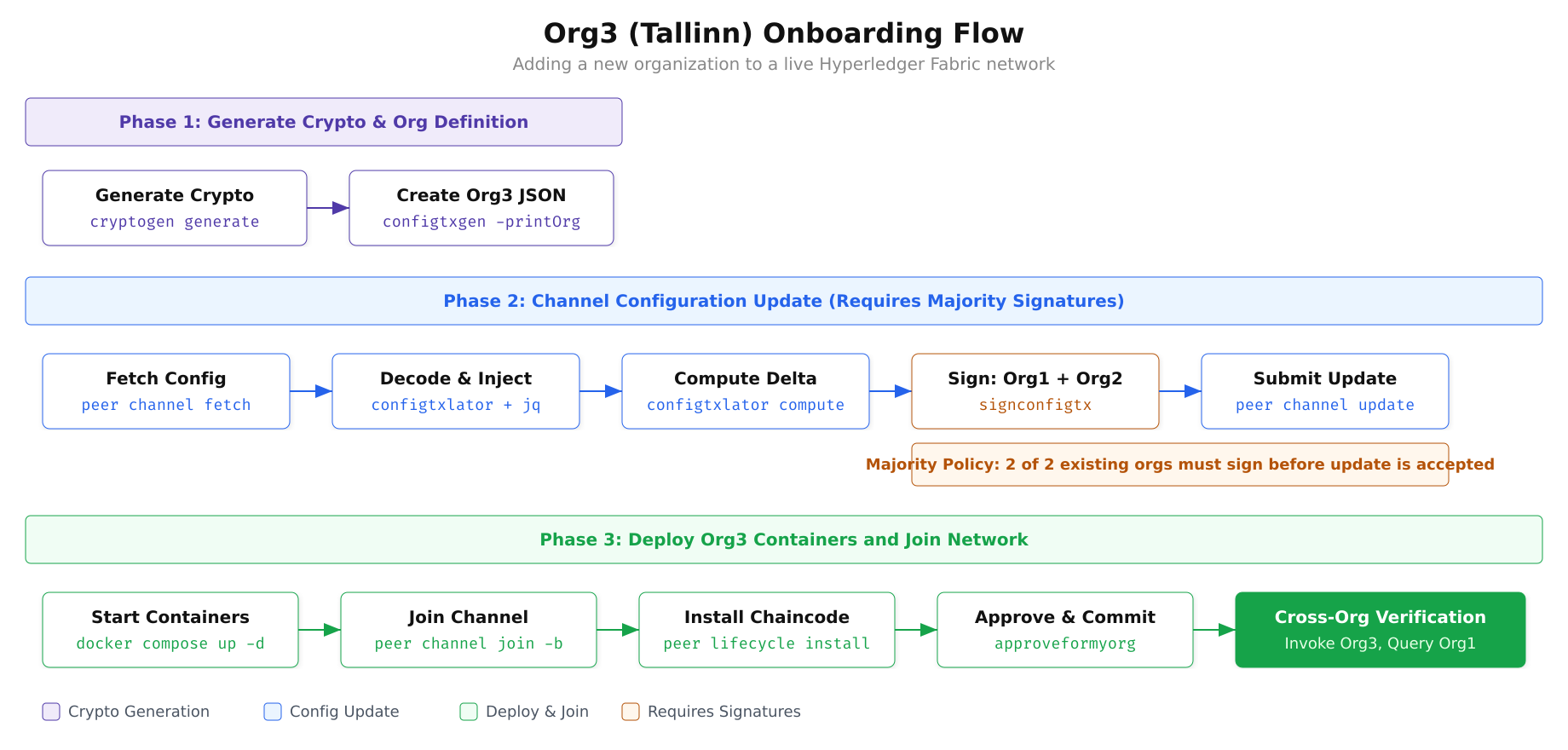
The diagram above outlines the complete onboarding flow. Phase 1 generates Org3’s certificates and creates a JSON definition of the organization. Phase 2 handles the governance process: fetching the current channel configuration, injecting the Org3 definition, computing the delta between old and new configs, collecting signatures from both existing organizations, and submitting the update to the orderer. Phase 3 deploys Org3’s Docker containers, joins them to the channel, and installs the chaincode so Org3 can participate in transactions.
Prerequisites
Before proceeding, confirm that the chaincode is operational and the two-organization network from the previous parts is fully functional.
$ cd ~/fjordtrade-network/docker

$ export CORE_PEER_TLS_ENABLED=true
$ export CORE_PEER_LOCALMSPID=”Org1MSP”
$ export CORE_PEER_TLS_ROOTCERT_FILE=${PWD}/../crypto-config/peerOrganizations/org1.fjordtrade.com/peers/peer0.org1.fjordtrade.com/tls/ca.crt
$ export CORE_PEER_MSPCONFIGPATH=${PWD}/../crypto-config/peerOrganizations/org1.fjordtrade.com/users/Admin@org1.fjordtrade.com/msp
$ export CORE_PEER_ADDRESS=localhost:7051
$ export ORDERER_CA=${PWD}/../crypto-config/ordererOrganizations/orderer.fjordtrade.com/orderers/orderer1.orderer.fjordtrade.com/msp/tlscacerts/tlsca.orderer.fjordtrade.com-cert.pem

$ peer lifecycle chaincode querycommitted -C fjordtradechannel -n fjordtrade-ccCommitted chaincode definition for chaincode ‘fjordtrade-cc’ on channel ‘fjordtradechannel’:
Version: 1.0, Sequence: 1, Endorsement Plugin: escc, Validation Plugin: vscc, Approvals: [Org1MSP: true, Org2MSP: true]Generating Org3 Cryptographic Material
Org3 needs its own set of certificates, private keys, and TLS credentials. These are generated using the same cryptogen tool used for Org1 and Org2, but with a separate configuration file that defines only the Org3 structure.
$ vim ~/fjordtrade-network/crypto-config-org3.yamlPeerOrgs:
– Name: Org3
Domain: org3.fjordtrade.com
EnableNodeOUs: true
Template:
Count: 2
SANS:
– localhost
Users:
Count: 1Press Esc, type :wq, press Enter to save and exit.
The configuration creates two peer nodes for the Tallinn office (peer0.org3 and peer1.org3) along with one admin user. The EnableNodeOUs flag ensures that certificate-based role classification (admin, peer, client, orderer) is enforced, matching the configuration used for Org1 and Org2.
$ cd ~/fjordtrade-network

$ cryptogen generate –config=crypto-config-org3.yaml –output=crypto-configorg3.fjordtrade.com$ tree crypto-config/peerOrganizations/org3.fjordtrade.com/ -L 2crypto-config/peerOrganizations/org3.fjordtrade.com/
├── ca
│ ├── ca.org3.fjordtrade.com-cert.pem
│ └── priv_sk
├── msp
│ ├── admincerts
│ ├── cacerts
│ ├── config.yaml
│ └── tlscacerts
├── peers
│ ├── peer0.org3.fjordtrade.com
│ └── peer1.org3.fjordtrade.com
├── tlsca
│ ├── priv_sk
│ └── tlsca.org3.fjordtrade.com-cert.pem
└── users
├── Admin@org3.fjordtrade.com
└── User1@org3.fjordtrade.comCreating the Org3 Organization Definition
Before Org3 can be added to the channel, its organization definition must be expressed as a JSON document that the channel configuration can consume. The configtxgen tool generates this JSON from a configtx.yaml that includes the Org3 definition. You need a separate configtx file (or an updated version of the existing one) that contains the Org3MSP definition.
$ vim ~/fjordtrade-network/configtx-org3.yamlOrganizations:
– &Org3
Name: Org3MSP
ID: Org3MSP
MSPDir: crypto-config/peerOrganizations/org3.fjordtrade.com/msp
Policies:
Readers:
Type: Signature
Rule: “OR(‘Org3MSP.admin’, ‘Org3MSP.peer’, ‘Org3MSP.client’)”
Writers:
Type: Signature
Rule: “OR(‘Org3MSP.admin’, ‘Org3MSP.client’)”
Admins:
Type: Signature
Rule: “OR(‘Org3MSP.admin’)”
Endorsement:
Type: Signature
Rule: “OR(‘Org3MSP.peer’)”
AnchorPeers:
– Host: peer0.org3.fjordtrade.com
Port: 11051Press Esc, type :wq, press Enter to save and exit.
$ cd ~/fjordtrade-network

$ export FABRIC_CFG_PATH=${PWD}

$ configtxgen -printOrg Org3MSP -configPath ./ -profile “” > org3-definition.json 2>/dev/null

$ cat org3-definition.json | python3 -m json.tool | head -20{
“groups”: {},
“mod_policy”: “Admins”,
“policies”: {
“Admins”: {
“mod_policy”: “Admins”,
“policy”: {
“type”: 1,
“value”: {
“identities”: [
{
“principal”: {
“msp_identifier”: “Org3MSP”,
“role”: “ADMIN”
},
“principal_classification”: “ROLE”
}
],
“rule”: {
“n_out_of”: {Fetching and Decoding the Current Channel Configuration
The channel configuration is stored on the ledger as a protobuf-encoded block. To modify it, you must fetch the latest configuration block, decode it to JSON, make changes, encode the modified version back to protobuf, compute the delta between old and new, and then submit that delta as a configuration update transaction. This process ensures that only the intended changes are applied.
$ cd ~/fjordtrade-network/docker

$ peer channel fetch config config_block.pb \
$   -o localhost:7050 \
$   -c fjordtradechannel \
$ –tls –cafile $ORDERER_CA2026-03-02 14:00:00.000 UTC 0001 INFO [channelCmd] InitCmdFactory -> Endorser and orderer connections initialized
2026-03-02 14:00:00.100 UTC 0002 INFO [cli.common] readBlock -> Received block: 5
2026-03-02 14:00:00.100 UTC 0003 INFO [channelCmd] fetch -> Retrieving last config block: 4$ configtxlator proto_decode –input config_block.pb –type common.Block \
$ | jq ‘.data.data[0].payload.data.config’ > config.json
$ ls -lh config.json-rw-r–r– 1 user user 38K Mar 2 14:00 config.jsonInjecting Org3 into the Channel Configuration
With the current channel config decoded as JSON, you can use jq to inject the Org3 definition into the Application groups section. The key path where organizations are defined is .channel_group.groups.Application.groups. After injection, you will have a modified configuration that includes all three organizations.
$ jq -s ‘.[0] * {“channel_group”:{“groups”:{“Application”:{“groups”:{“Org3MSP”:.[1]}}}}}’ \
$   config.json ../org3-definition.json > modified_config.json

$ # Verify Org3 is present
$ jq ‘.channel_group.groups.Application.groups | keys’ modified_config.json[
“Org1MSP”,
“Org2MSP”,
“Org3MSP”
]Computing the Configuration Update Delta
Rather than submitting the entire modified configuration, Fabric requires you to submit only the difference (delta) between the original and modified configurations. The configtxlator tool computes this delta by comparing the two protobuf-encoded configs.
$ configtxlator proto_encode –input config.json –type common.Config –output config.pb

$ configtxlator proto_encode –input modified_config.json –type common.Config –output modified_config.pb$ configtxlator compute_update –channel_id fjordtradechannel \
$ –original config.pb \
$ –updated modified_config.pb \
$ –output org3_update.pb$ configtxlator proto_decode –input org3_update.pb –type common.ConfigUpdate \
$ | jq ‘.’ > org3_update.json
$ # Wrap the update in an envelope
$ echo ‘{“payload”:{“header”:{“channel_header”:{“channel_id”:”fjordtradechannel”,”type”:2}},”data”:{“config_update”:’$(cat org3_update.json)’}}}’ \
$ | jq ‘.’ > org3_update_envelope.json
$ # Encode the envelope back to protobuf
$ configtxlator proto_encode –input org3_update_envelope.json \
$ –type common.Envelope –output org3_update_envelope.pb
$ ls -lh org3_update_envelope.pb-rw-r–r– 1 user user 6.2K Mar 2 14:01 org3_update_envelope.pbCollecting Signatures from Existing Organizations
The channel’s modification policy requires a majority of existing organizations to sign any configuration update. With two existing organizations (Org1 and Org2), both must sign. Org1 signs first, then Org2 signs and submits the update to the orderer.
$ # Environment is already set to Org1 from the prerequisites step
$ # Org1 signs the config update envelope
$ peer channel signconfigtx -f org3_update_envelope.pb2026-03-02 14:02:00.000 UTC 0001 INFO [channelCmd] InitCmdFactory -> Endorser and orderer connections initializedNow switch the environment to Org2 and submit the update. When Org2 submits the update using peer channel update, the Org2 signature is automatically appended. Combined with Org1’s signature already embedded in the envelope, this satisfies the majority requirement.
$ export CORE_PEER_LOCALMSPID=”Org2MSP”
$ export CORE_PEER_TLS_ROOTCERT_FILE=${PWD}/../crypto-config/peerOrganizations/org2.fjordtrade.com/peers/peer0.org2.fjordtrade.com/tls/ca.crt
$ export CORE_PEER_MSPCONFIGPATH=${PWD}/../crypto-config/peerOrganizations/org2.fjordtrade.com/users/Admin@org2.fjordtrade.com/msp
$ export CORE_PEER_ADDRESS=localhost:9051

$ peer channel update -f org3_update_envelope.pb \
$   -o localhost:7050 \
$   -c fjordtradechannel \
$ –tls –cafile $ORDERER_CA2026-03-02 14:02:30.000 UTC 0001 INFO [channelCmd] InitCmdFactory -> Endorser and orderer connections initialized
2026-03-02 14:02:30.200 UTC 0002 INFO [channelCmd] update -> Successfully submitted channel updateThe channel configuration now recognizes Org3MSP as a valid member. Any peer presenting Org3MSP credentials can join the channel, and Org3 can participate in the endorsement and chaincode lifecycle processes.
Writing the Docker Compose File for Org3
Org3 needs its own Docker Compose file that defines two peer containers, two CouchDB state database containers, and a Fabric CA container. The port assignments continue from where Org2 left off, avoiding any conflicts with existing services.
$ vim ~/fjordtrade-network/docker/docker-compose-org3.yamlversion: ‘3.7’
networks:
fjordtrade:
external: true
name: fjordtrade_network
volumes:
peer0.org3.fjordtrade.com:
peer1.org3.fjordtrade.com:
couchdb4:
couchdb5:
services:
couchdb4:
container_name: couchdb4
image: couchdb:3.3.3
labels:
service: hyperledger-fabric
environment:
– COUCHDB_USER=admin
– COUCHDB_PASSWORD=adminpw
ports:
– “9984:5984”
volumes:
– couchdb4:/opt/couchdb/data
networks:
– fjordtrade
couchdb5:
container_name: couchdb5
image: couchdb:3.3.3
labels:
service: hyperledger-fabric
environment:
– COUCHDB_USER=admin
– COUCHDB_PASSWORD=adminpw
ports:
– “10984:5984”
volumes:
– couchdb5:/opt/couchdb/data
networks:
– fjordtrade
peer0.org3.fjordtrade.com:
container_name: peer0.org3.fjordtrade.com
image: hyperledger/fabric-peer:2.5
labels:
service: hyperledger-fabric
environment:
– FABRIC_CFG_PATH=/etc/hyperledger/peercfg
– FABRIC_LOGGING_SPEC=INFO
– CORE_PEER_TLS_ENABLED=true
– CORE_PEER_PROFILE_ENABLED=false
– CORE_PEER_TLS_CERT_FILE=/etc/hyperledger/fabric/tls/server.crt
– CORE_PEER_TLS_KEY_FILE=/etc/hyperledger/fabric/tls/server.key
– CORE_PEER_TLS_ROOTCERT_FILE=/etc/hyperledger/fabric/tls/ca.crt
– CORE_PEER_ID=peer0.org3.fjordtrade.com
– CORE_PEER_ADDRESS=peer0.org3.fjordtrade.com:11051
– CORE_PEER_LISTENADDRESS=0.0.0.0:11051
– CORE_PEER_CHAINCODEADDRESS=peer0.org3.fjordtrade.com:11052
– CORE_PEER_CHAINCODELISTENADDRESS=0.0.0.0:11052
– CORE_PEER_GOSSIP_BOOTSTRAP=peer1.org3.fjordtrade.com:12051
– CORE_PEER_GOSSIP_EXTERNALENDPOINT=peer0.org3.fjordtrade.com:11051
– CORE_PEER_LOCALMSPID=Org3MSP
– CORE_PEER_MSPCONFIGPATH=/etc/hyperledger/fabric/msp
– CORE_OPERATIONS_LISTENADDRESS=peer0.org3.fjordtrade.com:9450
– CORE_METRICS_PROVIDER=prometheus
– CHAINCODE_AS_A_SERVICE_BUILDER_CONFIG={“peername”:”peer0org3″}
– CORE_CHAINCODE_EXECUTETIMEOUT=300s
– CORE_LEDGER_STATE_STATEDATABASE=CouchDB
– CORE_LEDGER_STATE_COUCHDBCONFIG_COUCHDBADDRESS=couchdb4:5984
– CORE_LEDGER_STATE_COUCHDBCONFIG_USERNAME=admin
– CORE_LEDGER_STATE_COUCHDBCONFIG_PASSWORD=adminpw
depends_on:
– couchdb4
volumes:
– ../crypto-config/peerOrganizations/org3.fjordtrade.com/peers/peer0.org3.fjordtrade.com:/etc/hyperledger/fabric
– peer0.org3.fjordtrade.com:/var/hyperledger/production
– ../config/:/etc/hyperledger/peercfg
working_dir: /root
command: peer node start
ports:
– “11051:11051”
– “9450:9450”
networks:
– fjordtrade
peer1.org3.fjordtrade.com:
container_name: peer1.org3.fjordtrade.com
image: hyperledger/fabric-peer:2.5
labels:
service: hyperledger-fabric
environment:
– FABRIC_CFG_PATH=/etc/hyperledger/peercfg
– FABRIC_LOGGING_SPEC=INFO
– CORE_PEER_TLS_ENABLED=true
– CORE_PEER_PROFILE_ENABLED=false
– CORE_PEER_TLS_CERT_FILE=/etc/hyperledger/fabric/tls/server.crt
– CORE_PEER_TLS_KEY_FILE=/etc/hyperledger/fabric/tls/server.key
– CORE_PEER_TLS_ROOTCERT_FILE=/etc/hyperledger/fabric/tls/ca.crt
– CORE_PEER_ID=peer1.org3.fjordtrade.com
– CORE_PEER_ADDRESS=peer1.org3.fjordtrade.com:12051
– CORE_PEER_LISTENADDRESS=0.0.0.0:12051
– CORE_PEER_CHAINCODEADDRESS=peer1.org3.fjordtrade.com:12052
– CORE_PEER_CHAINCODELISTENADDRESS=0.0.0.0:12052
– CORE_PEER_GOSSIP_BOOTSTRAP=peer0.org3.fjordtrade.com:11051
– CORE_PEER_GOSSIP_EXTERNALENDPOINT=peer1.org3.fjordtrade.com:12051
– CORE_PEER_LOCALMSPID=Org3MSP
– CORE_PEER_MSPCONFIGPATH=/etc/hyperledger/fabric/msp
– CORE_OPERATIONS_LISTENADDRESS=peer1.org3.fjordtrade.com:9451
– CORE_METRICS_PROVIDER=prometheus
– CHAINCODE_AS_A_SERVICE_BUILDER_CONFIG={“peername”:”peer1org3″}
– CORE_CHAINCODE_EXECUTETIMEOUT=300s
– CORE_LEDGER_STATE_STATEDATABASE=CouchDB
– CORE_LEDGER_STATE_COUCHDBCONFIG_COUCHDBADDRESS=couchdb5:5984
– CORE_LEDGER_STATE_COUCHDBCONFIG_USERNAME=admin
– CORE_LEDGER_STATE_COUCHDBCONFIG_PASSWORD=adminpw
depends_on:
– couchdb5
volumes:
– ../crypto-config/peerOrganizations/org3.fjordtrade.com/peers/peer1.org3.fjordtrade.com:/etc/hyperledger/fabric
– peer1.org3.fjordtrade.com:/var/hyperledger/production
– ../config/:/etc/hyperledger/peercfg
working_dir: /root
command: peer node start
ports:
– “12051:12051”
– “9451:9451”
networks:
– fjordtrade
ca_org3:
container_name: ca_org3
image: hyperledger/fabric-ca:1.5
labels:
service: hyperledger-fabric
environment:
– FABRIC_CA_HOME=/etc/hyperledger/fabric-ca-server
– FABRIC_CA_SERVER_CA_NAME=ca-org3
– FABRIC_CA_SERVER_TLS_ENABLED=true
– FABRIC_CA_SERVER_PORT=9054
– FABRIC_CA_SERVER_OPERATIONS_LISTENADDRESS=0.0.0.0:19054
ports:
– “9054:9054”
– “19054:19054”
command: sh -c ‘fabric-ca-server start -b admin:adminpw -d’
volumes:
– ../crypto-config/peerOrganizations/org3.fjordtrade.com/ca/:/etc/hyperledger/fabric-ca-server
networks:
– fjordtradePress Esc, type :wq, press Enter to save and exit.
The port assignments for Org3 are: peer0 on 11051, peer1 on 12051, CouchDB instances on 9984 and 10984, and Fabric CA on 9054. This continues the sequential allocation established in Part 4 for Org1 (7051, 8051) and Org2 (9051, 10051).
Starting Org3 Containers
$ cd ~/fjordtrade-network/docker

$ docker compose -f docker-compose-org3.yaml up -d[+] Running 6/6
✔ Volume “docker_peer0.org3.fjordtrade.com” Created
✔ Volume “docker_peer1.org3.fjordtrade.com” Created
✔ Volume “docker_couchdb4” Created
✔ Volume “docker_couchdb5” Created
✔ Container couchdb4 Started
✔ Container couchdb5 Started
✔ Container peer0.org3.fjordtrade.com Started
✔ Container peer1.org3.fjordtrade.com Started
✔ Container ca_org3 Started$ docker ps –format “table {{.Names}}\t{{.Status}}\t{{.Ports}}” | grep -E “org3|couchdb[45]|ca_org3”peer0.org3.fjordtrade.com Up 10 seconds 0.0.0.0:11051->11051/tcp, 0.0.0.0:9450->9450/tcp
peer1.org3.fjordtrade.com Up 10 seconds 0.0.0.0:12051->12051/tcp, 0.0.0.0:9451->9451/tcp
couchdb4 Up 12 seconds 0.0.0.0:9984->5984/tcp
couchdb5 Up 12 seconds 0.0.0.0:10984->5984/tcp
ca_org3 Up 10 seconds 0.0.0.0:9054->9054/tcp, 0.0.0.0:19054->19054/tcp$ docker logs peer0.org3.fjordtrade.com 2>&1 | tail -52026-03-02 14:05:00.123 UTC [nodeCmd] serve -> INFO 01a Started peer with ID=[peer0.org3.fjordtrade.com], network ID=[dev], address=[peer0.org3.fjordtrade.com:11051]
2026-03-02 14:05:00.124 UTC [nodeCmd] serve -> INFO 01b Started peer operations server, listening on peer0.org3.fjordtrade.com:9450Joining Org3 Peers to the Channel
With Org3 recognized in the channel configuration and containers running, the peers need to join the fjordtradechannel. First, fetch the channel genesis block using Org1 credentials (since Org3 cannot fetch it directly until it has joined), then use Org3 credentials to join each peer.
$ # Switch back to Org1 environment
$ export CORE_PEER_LOCALMSPID=”Org1MSP”
$ export CORE_PEER_TLS_ROOTCERT_FILE=${PWD}/../crypto-config/peerOrganizations/org1.fjordtrade.com/peers/peer0.org1.fjordtrade.com/tls/ca.crt
$ export CORE_PEER_MSPCONFIGPATH=${PWD}/../crypto-config/peerOrganizations/org1.fjordtrade.com/users/Admin@org1.fjordtrade.com/msp
$ export CORE_PEER_ADDRESS=localhost:7051

$ peer channel fetch 0 fjordtradechannel.block \
$   -o localhost:7050 \
$   -c fjordtradechannel \
$ –tls –cafile $ORDERER_CA2026-03-02 14:06:00.000 UTC 0001 INFO [channelCmd] InitCmdFactory -> Endorser and orderer connections initialized
2026-03-02 14:06:00.100 UTC 0002 INFO [cli.common] readBlock -> Received block: 0$ export CORE_PEER_LOCALMSPID=”Org3MSP”
$ export CORE_PEER_TLS_ROOTCERT_FILE=${PWD}/../crypto-config/peerOrganizations/org3.fjordtrade.com/peers/peer0.org3.fjordtrade.com/tls/ca.crt
$ export CORE_PEER_MSPCONFIGPATH=${PWD}/../crypto-config/peerOrganizations/org3.fjordtrade.com/users/Admin@org3.fjordtrade.com/msp
$ export CORE_PEER_ADDRESS=localhost:11051
$ peer channel join -b fjordtradechannel.block2026-03-02 14:06:30.000 UTC 0001 INFO [channelCmd] InitCmdFactory -> Endorser and orderer connections initialized
2026-03-02 14:06:30.500 UTC 0002 INFO [channelCmd] executeJoin -> Successfully submitted proposal to join channel$ export CORE_PEER_ADDRESS=localhost:12051
$ export CORE_PEER_TLS_ROOTCERT_FILE=${PWD}/../crypto-config/peerOrganizations/org3.fjordtrade.com/peers/peer1.org3.fjordtrade.com/tls/ca.crt
$ peer channel join -b fjordtradechannel.block2026-03-02 14:07:00.000 UTC 0001 INFO [channelCmd] InitCmdFactory -> Endorser and orderer connections initialized
2026-03-02 14:07:00.400 UTC 0002 INFO [channelCmd] executeJoin -> Successfully submitted proposal to join channel$ export CORE_PEER_ADDRESS=localhost:11051
$ export CORE_PEER_TLS_ROOTCERT_FILE=${PWD}/../crypto-config/peerOrganizations/org3.fjordtrade.com/peers/peer0.org3.fjordtrade.com/tls/ca.crt
$ peer channel listChannels peers has joined:
fjordtradechannelUpdating Anchor Peers for Org3
Anchor peers enable cross-organization gossip discovery. Without an anchor peer configured, Org3’s peers will communicate with each other via gossip but will not automatically discover peers from Org1 or Org2. The anchor peer update follows the same fetch-decode-modify-encode-submit pattern used for the Org3 addition itself.
$ export CORE_PEER_ADDRESS=localhost:11051

$ peer channel fetch config config_block_anchor.pb \
$   -o localhost:7050 \
$   -c fjordtradechannel \
$ –tls –cafile $ORDERER_CA$ # Decode to JSON
$ configtxlator proto_decode –input config_block_anchor.pb –type common.Block \
$ | jq ‘.data.data[0].payload.data.config’ > config_anchor.json
$ # Add anchor peer for Org3
$ jq ‘.channel_group.groups.Application.groups.Org3MSP.values += {“AnchorPeers”:{“mod_policy”:”Admins”,”value”:{“anchor_peers”:[{“host”:”peer0.org3.fjordtrade.com”,”port”:11051}]},”version”:”0″}}’ \
$ config_anchor.json > modified_anchor.json
$ # Encode both configs
$ configtxlator proto_encode –input config_anchor.json –type common.Config –output config_anchor.pb
$ configtxlator proto_encode –input modified_anchor.json –type common.Config –output modified_anchor.pb
$ # Compute delta
$ configtxlator compute_update –channel_id fjordtradechannel \
$ –original config_anchor.pb \
$ –updated modified_anchor.pb \
$ –output anchor_update.pb
$ # Decode delta and wrap in envelope
$ configtxlator proto_decode –input anchor_update.pb –type common.ConfigUpdate \
$ | jq ‘.’ > anchor_update.json
$ echo ‘{“payload”:{“header”:{“channel_header”:{“channel_id”:”fjordtradechannel”,”type”:2}},”data”:{“config_update”:’$(cat anchor_update.json)’}}}’ \
$ | jq ‘.’ > anchor_update_envelope.json
$ configtxlator proto_encode –input anchor_update_envelope.json \
$ –type common.Envelope –output anchor_update_envelope.pb$ peer channel update -f anchor_update_envelope.pb \
$ -o localhost:7050 \
$ -c fjordtradechannel \
$ –tls –cafile $ORDERER_CA2026-03-02 14:08:00.000 UTC 0001 INFO [channelCmd] InitCmdFactory -> Endorser and orderer connections initialized
2026-03-02 14:08:00.300 UTC 0002 INFO [channelCmd] update -> Successfully submitted channel updateInstalling and Approving Chaincode on Org3
Org3 must install the same chaincode package that Org1 and Org2 are already running. The chaincode package file (fjordtrade-cc.tar.gz) created in Part 6 is reused here. After installation, Org3 approves the chaincode definition. Since the definition is already committed to the channel, Org3’s approval simply enables its peers to endorse transactions.
$ export CORE_PEER_ADDRESS=localhost:11051
$ export CORE_PEER_TLS_ROOTCERT_FILE=${PWD}/../crypto-config/peerOrganizations/org3.fjordtrade.com/peers/peer0.org3.fjordtrade.com/tls/ca.crt

$ peer lifecycle chaincode install ../chaincode/fjordtrade-cc.tar.gz2026-03-02 14:09:00.000 UTC 0001 INFO [cli.lifecycle.chaincode] submitInstallProposal -> Installed remotely: response:<status:200 payload:"\nRfjordtrade-cc_1.0:a1b2c3d4e5f6..." >
2026-03-02 14:09:00.000 UTC 0002 INFO [cli.lifecycle.chaincode] submitInstallProposal -> Chaincode code package identifier: fjordtrade-cc_1.0:a1b2c3d4e5f6…$ export CORE_PEER_ADDRESS=localhost:12051
$ export CORE_PEER_TLS_ROOTCERT_FILE=${PWD}/../crypto-config/peerOrganizations/org3.fjordtrade.com/peers/peer1.org3.fjordtrade.com/tls/ca.crt
$ peer lifecycle chaincode install ../chaincode/fjordtrade-cc.tar.gz$ export CORE_PEER_ADDRESS=localhost:11051
$ export CORE_PEER_TLS_ROOTCERT_FILE=${PWD}/../crypto-config/peerOrganizations/org3.fjordtrade.com/peers/peer0.org3.fjordtrade.com/tls/ca.crt
$ peer lifecycle chaincode queryinstalledInstalled chaincodes on peer:
Package ID: fjordtrade-cc_1.0:a1b2c3d4e5f67890abcdef1234567890abcdef1234567890abcdef12345678, Label: fjordtrade-cc_1.0$ export CC_PACKAGE_ID=$(peer lifecycle chaincode queryinstalled –output json | jq -r ‘.installed_chaincodes[0].package_id’)
$ echo $CC_PACKAGE_ID$ peer lifecycle chaincode approveformyorg \
$ -o localhost:7050 \
$ –tls –cafile $ORDERER_CA \
$ –channelID fjordtradechannel \
$ –name fjordtrade-cc \
$ –version 1.0 \
$ –package-id $CC_PACKAGE_ID \
$ –sequence 12026-03-02 14:10:00.000 UTC 0001 INFO [chaincodeCmd] ClientWait -> txid [abc123…] committed with status (VALID) at localhost:11051$ peer lifecycle chaincode checkcommitreadiness \
$ –channelID fjordtradechannel \
$ –name fjordtrade-cc \
$ –version 1.0 \
$ –sequence 1 \
$ –output json | jq ‘.’{
“approvals”: {
“Org1MSP”: true,
“Org2MSP”: true,
“Org3MSP”: true
}
}All three organizations have now approved the chaincode definition. Because the definition was already committed in Part 6, no additional commit step is needed. Org3’s peers are immediately ready to endorse transactions.
Cross-Organization Transaction Verification
The most meaningful validation of Org3’s integration is proving that data written by one organization is immediately readable by any other organization on the channel. This section creates an asset from Org3 (Tallinn), queries it from Org1 (Oslo), transfers it to Org2 (Helsinki), and verifies the transfer from Org3 again.
Free to use, share it in your presentations, blogs, or learning materials.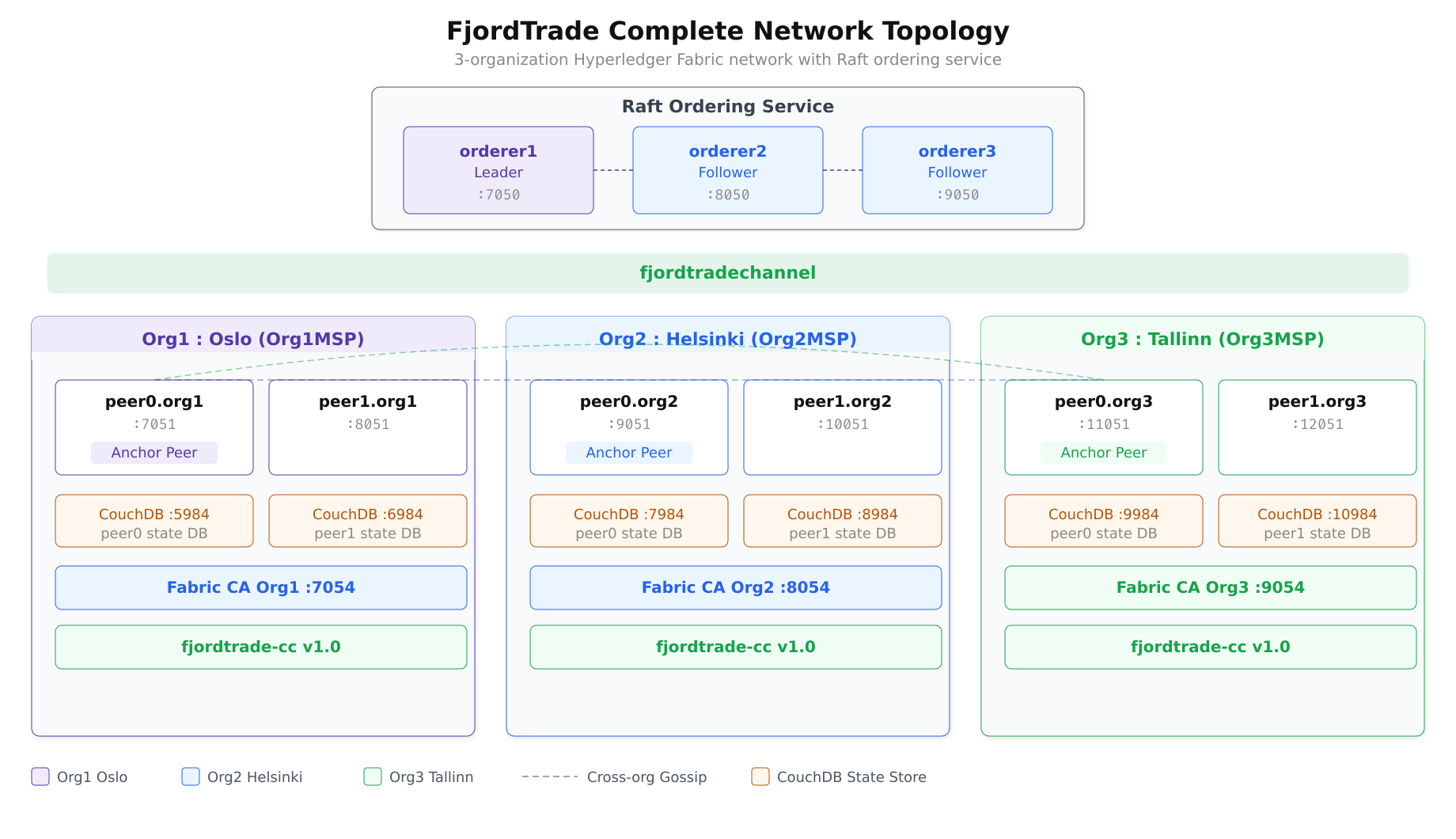
The topology above shows the final state of the FjordTrade network. Three organizations, each with two peers and dedicated CouchDB instances, share the fjordtradechannel. The Raft ordering cluster provides consensus, and cross-organization gossip (via anchor peers) enables peer discovery across organizational boundaries.
$ export CORE_PEER_LOCALMSPID=”Org3MSP”
$ export CORE_PEER_TLS_ROOTCERT_FILE=${PWD}/../crypto-config/peerOrganizations/org3.fjordtrade.com/peers/peer0.org3.fjordtrade.com/tls/ca.crt
$ export CORE_PEER_MSPCONFIGPATH=${PWD}/../crypto-config/peerOrganizations/org3.fjordtrade.com/users/Admin@org3.fjordtrade.com/msp
$ export CORE_PEER_ADDRESS=localhost:11051

$ peer chaincode invoke \
$   -o localhost:7050 \
$   –tls –cafile $ORDERER_CA \
$   -C fjordtradechannel \
$   -n fjordtrade-cc \
$   –peerAddresses localhost:7051 \
$   –tlsRootCertFiles ${PWD}/../crypto-config/peerOrganizations/org1.fjordtrade.com/peers/peer0.org1.fjordtrade.com/tls/ca.crt \
$   –peerAddresses localhost:9051 \
$   –tlsRootCertFiles ${PWD}/../crypto-config/peerOrganizations/org2.fjordtrade.com/peers/peer0.org2.fjordtrade.com/tls/ca.crt \
$ -c ‘{“function”:”CreateAsset”,”Args”:[“ASSET-T001″,”Timber”,”5000″,”Tallinn”,”125000″]}’2026-03-02 14:12:00.000 UTC 0001 INFO [chaincodeCmd] chaincodeInvokeOrQuery -> Chaincode invoke successful. result: status:200$ export CORE_PEER_LOCALMSPID=”Org1MSP”
$ export CORE_PEER_TLS_ROOTCERT_FILE=${PWD}/../crypto-config/peerOrganizations/org1.fjordtrade.com/peers/peer0.org1.fjordtrade.com/tls/ca.crt
$ export CORE_PEER_MSPCONFIGPATH=${PWD}/../crypto-config/peerOrganizations/org1.fjordtrade.com/users/Admin@org1.fjordtrade.com/msp
$ export CORE_PEER_ADDRESS=localhost:7051
$ peer chaincode query \
$ -C fjordtradechannel \
$ -n fjordtrade-cc \
$ -c ‘{“function”:”ReadAsset”,”Args”:[“ASSET-T001”]}’{“ID”:”ASSET-T001″,”Commodity”:”Timber”,”Quantity”:”5000″,”Owner”:”Tallinn”,”Value”:”125000″}The asset created by Org3 in Tallinn is immediately visible to Org1 in Oslo. The ledger state is consistent across all organizations.
$ export CORE_PEER_LOCALMSPID=”Org2MSP”
$ export CORE_PEER_TLS_ROOTCERT_FILE=${PWD}/../crypto-config/peerOrganizations/org2.fjordtrade.com/peers/peer0.org2.fjordtrade.com/tls/ca.crt
$ export CORE_PEER_MSPCONFIGPATH=${PWD}/../crypto-config/peerOrganizations/org2.fjordtrade.com/users/Admin@org2.fjordtrade.com/msp
$ export CORE_PEER_ADDRESS=localhost:9051

$ peer chaincode invoke \
$   -o localhost:7050 \
$   –tls –cafile $ORDERER_CA \
$   -C fjordtradechannel \
$   -n fjordtrade-cc \
$   –peerAddresses localhost:7051 \
$   –tlsRootCertFiles ${PWD}/../crypto-config/peerOrganizations/org1.fjordtrade.com/peers/peer0.org1.fjordtrade.com/tls/ca.crt \
$   –peerAddresses localhost:9051 \
$   –tlsRootCertFiles ${PWD}/../crypto-config/peerOrganizations/org2.fjordtrade.com/peers/peer0.org2.fjordtrade.com/tls/ca.crt \
$ -c ‘{“function”:”TransferAsset”,”Args”:[“ASSET-T001″,”Helsinki”]}’2026-03-02 14:13:00.000 UTC 0001 INFO [chaincodeCmd] chaincodeInvokeOrQuery -> Chaincode invoke successful. result: status:200$ export CORE_PEER_LOCALMSPID=”Org3MSP”
$ export CORE_PEER_TLS_ROOTCERT_FILE=${PWD}/../crypto-config/peerOrganizations/org3.fjordtrade.com/peers/peer0.org3.fjordtrade.com/tls/ca.crt
$ export CORE_PEER_MSPCONFIGPATH=${PWD}/../crypto-config/peerOrganizations/org3.fjordtrade.com/users/Admin@org3.fjordtrade.com/msp
$ export CORE_PEER_ADDRESS=localhost:11051
$ peer chaincode query \
$ -C fjordtradechannel \
$ -n fjordtrade-cc \
$ -c ‘{“function”:”ReadAsset”,”Args”:[“ASSET-T001”]}’{“ID”:”ASSET-T001″,”Commodity”:”Timber”,”Quantity”:”5000″,”Owner”:”Helsinki”,”Value”:”125000″}The ownership has changed from Tallinn to Helsinki, and Org3 can read the updated state. This confirms that all three organizations share a consistent view of the ledger.
$ # Asset from Org1 (Oslo)
$ export CORE_PEER_LOCALMSPID=”Org1MSP”
$ export CORE_PEER_TLS_ROOTCERT_FILE=${PWD}/../crypto-config/peerOrganizations/org1.fjordtrade.com/peers/peer0.org1.fjordtrade.com/tls/ca.crt
$ export CORE_PEER_MSPCONFIGPATH=${PWD}/../crypto-config/peerOrganizations/org1.fjordtrade.com/users/Admin@org1.fjordtrade.com/msp
$ export CORE_PEER_ADDRESS=localhost:7051

$ peer chaincode invoke \
$   -o localhost:7050 –tls –cafile $ORDERER_CA \
$   -C fjordtradechannel -n fjordtrade-cc \
$   –peerAddresses localhost:7051 \
$   –tlsRootCertFiles ${PWD}/../crypto-config/peerOrganizations/org1.fjordtrade.com/peers/peer0.org1.fjordtrade.com/tls/ca.crt \
$   –peerAddresses localhost:9051 \
$   –tlsRootCertFiles ${PWD}/../crypto-config/peerOrganizations/org2.fjordtrade.com/peers/peer0.org2.fjordtrade.com/tls/ca.crt \
$   -c ‘{“function”:”CreateAsset”,”Args”:[“ASSET-O002″,”Salmon”,”8000″,”Oslo”,”340000″]}’

$ # Asset from Org2 (Helsinki)
$ export CORE_PEER_LOCALMSPID=”Org2MSP”
$ export CORE_PEER_TLS_ROOTCERT_FILE=${PWD}/../crypto-config/peerOrganizations/org2.fjordtrade.com/peers/peer0.org2.fjordtrade.com/tls/ca.crt
$ export CORE_PEER_MSPCONFIGPATH=${PWD}/../crypto-config/peerOrganizations/org2.fjordtrade.com/users/Admin@org2.fjordtrade.com/msp
$ export CORE_PEER_ADDRESS=localhost:9051

$ peer chaincode invoke \
$   -o localhost:7050 –tls –cafile $ORDERER_CA \
$   -C fjordtradechannel -n fjordtrade-cc \
$   –peerAddresses localhost:7051 \
$   –tlsRootCertFiles ${PWD}/../crypto-config/peerOrganizations/org1.fjordtrade.com/peers/peer0.org1.fjordtrade.com/tls/ca.crt \
$   –peerAddresses localhost:9051 \
$   –tlsRootCertFiles ${PWD}/../crypto-config/peerOrganizations/org2.fjordtrade.com/peers/peer0.org2.fjordtrade.com/tls/ca.crt \
$   -c ‘{“function”:”CreateAsset”,”Args”:[“ASSET-H003″,”Pulp”,”12000″,”Helsinki”,”560000″]}’

$ # Asset from Org3 (Tallinn)
$ export CORE_PEER_LOCALMSPID=”Org3MSP”
$ export CORE_PEER_TLS_ROOTCERT_FILE=${PWD}/../crypto-config/peerOrganizations/org3.fjordtrade.com/peers/peer0.org3.fjordtrade.com/tls/ca.crt
$ export CORE_PEER_MSPCONFIGPATH=${PWD}/../crypto-config/peerOrganizations/org3.fjordtrade.com/users/Admin@org3.fjordtrade.com/msp
$ export CORE_PEER_ADDRESS=localhost:11051

$ peer chaincode invoke \
$   -o localhost:7050 –tls –cafile $ORDERER_CA \
$   -C fjordtradechannel -n fjordtrade-cc \
$   –peerAddresses localhost:7051 \
$   –tlsRootCertFiles ${PWD}/../crypto-config/peerOrganizations/org1.fjordtrade.com/peers/peer0.org1.fjordtrade.com/tls/ca.crt \
$   –peerAddresses localhost:9051 \
$   –tlsRootCertFiles ${PWD}/../crypto-config/peerOrganizations/org2.fjordtrade.com/peers/peer0.org2.fjordtrade.com/tls/ca.crt \
$ -c ‘{“function”:”CreateAsset”,”Args”:[“ASSET-T004″,”Shale Oil”,”3000″,”Tallinn”,”890000″]}’$ peer chaincode query \
$ -C fjordtradechannel \
$ -n fjordtrade-cc \
$ -c ‘{“function”:”GetAllAssets”,”Args”:[]}’[
{“ID”:”ASSET-H003″,”Commodity”:”Pulp”,”Quantity”:”12000″,”Owner”:”Helsinki”,”Value”:”560000″},
{“ID”:”ASSET-O002″,”Commodity”:”Salmon”,”Quantity”:”8000″,”Owner”:”Oslo”,”Value”:”340000″},
{“ID”:”ASSET-T001″,”Commodity”:”Timber”,”Quantity”:”5000″,”Owner”:”Helsinki”,”Value”:”125000″},
{“ID”:”ASSET-T004″,”Commodity”:”Shale Oil”,”Quantity”:”3000″,”Owner”:”Tallinn”,”Value”:”890000″}
]The output includes assets created by all three organizations. ASSET-T001 shows Helsinki as the owner (transferred earlier from Tallinn), confirming that the full transaction history is maintained on the shared ledger.
Final Network Validation
The final validation compares block heights across all peers to confirm that every node has synchronized the same chain of blocks. If any peer shows a different block height, it indicates a synchronization issue that needs investigation.
$ echo “=== Org1 peer0 (Oslo) ===”
$ export CORE_PEER_LOCALMSPID=”Org1MSP”
$ export CORE_PEER_TLS_ROOTCERT_FILE=${PWD}/../crypto-config/peerOrganizations/org1.fjordtrade.com/peers/peer0.org1.fjordtrade.com/tls/ca.crt
$ export CORE_PEER_MSPCONFIGPATH=${PWD}/../crypto-config/peerOrganizations/org1.fjordtrade.com/users/Admin@org1.fjordtrade.com/msp
$ export CORE_PEER_ADDRESS=localhost:7051
$ peer channel getinfo -c fjordtradechannel

$ echo “=== Org1 peer1 (Oslo) ===”
$ export CORE_PEER_ADDRESS=localhost:8051
$ export CORE_PEER_TLS_ROOTCERT_FILE=${PWD}/../crypto-config/peerOrganizations/org1.fjordtrade.com/peers/peer1.org1.fjordtrade.com/tls/ca.crt
$ peer channel getinfo -c fjordtradechannel

$ echo “=== Org2 peer0 (Helsinki) ===”
$ export CORE_PEER_LOCALMSPID=”Org2MSP”
$ export CORE_PEER_TLS_ROOTCERT_FILE=${PWD}/../crypto-config/peerOrganizations/org2.fjordtrade.com/peers/peer0.org2.fjordtrade.com/tls/ca.crt
$ export CORE_PEER_MSPCONFIGPATH=${PWD}/../crypto-config/peerOrganizations/org2.fjordtrade.com/users/Admin@org2.fjordtrade.com/msp
$ export CORE_PEER_ADDRESS=localhost:9051
$ peer channel getinfo -c fjordtradechannel

$ echo “=== Org2 peer1 (Helsinki) ===”
$ export CORE_PEER_ADDRESS=localhost:10051
$ export CORE_PEER_TLS_ROOTCERT_FILE=${PWD}/../crypto-config/peerOrganizations/org2.fjordtrade.com/peers/peer1.org2.fjordtrade.com/tls/ca.crt
$ peer channel getinfo -c fjordtradechannel

$ echo “=== Org3 peer0 (Tallinn) ===”
$ export CORE_PEER_LOCALMSPID=”Org3MSP”
$ export CORE_PEER_TLS_ROOTCERT_FILE=${PWD}/../crypto-config/peerOrganizations/org3.fjordtrade.com/peers/peer0.org3.fjordtrade.com/tls/ca.crt
$ export CORE_PEER_MSPCONFIGPATH=${PWD}/../crypto-config/peerOrganizations/org3.fjordtrade.com/users/Admin@org3.fjordtrade.com/msp
$ export CORE_PEER_ADDRESS=localhost:11051
$ peer channel getinfo -c fjordtradechannel

$ echo “=== Org3 peer1 (Tallinn) ===”
$ export CORE_PEER_ADDRESS=localhost:12051
$ export CORE_PEER_TLS_ROOTCERT_FILE=${PWD}/../crypto-config/peerOrganizations/org3.fjordtrade.com/peers/peer1.org3.fjordtrade.com/tls/ca.crt
$ peer channel getinfo -c fjordtradechannel=== Org1 peer0 (Oslo) ===
Blockchain info: {“height”:12,”currentBlockHash”:”abc123…”,”previousBlockHash”:”def456…”}
=== Org1 peer1 (Oslo) ===
Blockchain info: {“height”:12,”currentBlockHash”:”abc123…”,”previousBlockHash”:”def456…”}
=== Org2 peer0 (Helsinki) ===
Blockchain info: {“height”:12,”currentBlockHash”:”abc123…”,”previousBlockHash”:”def456…”}
=== Org2 peer1 (Helsinki) ===
Blockchain info: {“height”:12,”currentBlockHash”:”abc123…”,”previousBlockHash”:”def456…”}
=== Org3 peer0 (Tallinn) ===
Blockchain info: {“height”:12,”currentBlockHash”:”abc123…”,”previousBlockHash”:”def456…”}
=== Org3 peer1 (Tallinn) ===
Blockchain info: {“height”:12,”currentBlockHash”:”abc123…”,”previousBlockHash”:”def456…”}All six peers report the same block height and the same current block hash. This confirms complete ledger synchronization across all three organizations.
$ peer channel fetch config final_config.pb \
$   -o localhost:7050 \
$   -c fjordtradechannel \
$   –tls –cafile $ORDERER_CA

$ configtxlator proto_decode –input final_config.pb –type common.Block \
$ | jq ‘.data.data[0].payload.data.config.channel_group.groups.Application.groups | keys’[
“Org1MSP”,
“Org2MSP”,
“Org3MSP”
]$ curl -s -u admin:adminpw http://localhost:9984/fjordtradechannel_fjordtrade-cc/_all_docs?include_docs=true \
$ | python3 -m json.tool | head -30{
“total_rows”: 4,
“offset”: 0,
“rows”: [
{
“id”: “ASSET-H003”,
“key”: “ASSET-H003”,
“value”: {
“rev”: “1-abc123”
},
“doc”: {
“_id”: “ASSET-H003”,
“_rev”: “1-abc123”,
“Commodity”: “Pulp”,
“ID”: “ASSET-H003”,
“Owner”: “Helsinki”,
“Quantity”: “12000”,
“Value”: “560000”
}
},
{
“id”: “ASSET-O002”,
“key”: “ASSET-O002”,
“value”: {
“rev”: “1-def456”
},
“doc”: {
“_id”: “ASSET-O002”,
“_rev”: “1-def456”,The CouchDB instance on Org3’s peer0 (port 9984) shows all four assets, matching the state visible through CLI queries on all other peers. The world state database is fully synchronized.
$ docker ps –format “table {{.Names}}\t{{.Status}}\t{{.Ports}}” | grep -E “fjordtrade|orderer|couchdb|ca_”peer0.org3.fjordtrade.com Up 15 minutes 0.0.0.0:11051->11051/tcp, 0.0.0.0:9450->9450/tcp
peer1.org3.fjordtrade.com Up 15 minutes 0.0.0.0:12051->12051/tcp, 0.0.0.0:9451->9451/tcp
peer0.org2.fjordtrade.com Up 2 hours 0.0.0.0:9051->9051/tcp, 0.0.0.0:9446->9446/tcp
peer1.org2.fjordtrade.com Up 2 hours 0.0.0.0:10051->10051/tcp, 0.0.0.0:9447->9447/tcp
peer0.org1.fjordtrade.com Up 2 hours 0.0.0.0:7051->7051/tcp, 0.0.0.0:9444->9444/tcp
peer1.org1.fjordtrade.com Up 2 hours 0.0.0.0:8051->8051/tcp, 0.0.0.0:9445->9445/tcp
orderer1.orderer.fjordtrade.com Up 2 hours 0.0.0.0:7050->7050/tcp, 0.0.0.0:7053->7053/tcp
orderer2.orderer.fjordtrade.com Up 2 hours 0.0.0.0:8050->8050/tcp, 0.0.0.0:8053->8053/tcp
orderer3.orderer.fjordtrade.com Up 2 hours 0.0.0.0:9050->9050/tcp, 0.0.0.0:9053->9053/tcp
couchdb0 Up 2 hours 0.0.0.0:5984->5984/tcp
couchdb1 Up 2 hours 0.0.0.0:6984->5984/tcp
couchdb2 Up 2 hours 0.0.0.0:7984->5984/tcp
couchdb3 Up 2 hours 0.0.0.0:8984->5984/tcp
couchdb4 Up 15 minutes 0.0.0.0:9984->5984/tcp
couchdb5 Up 15 minutes 0.0.0.0:10984->5984/tcp
ca_org1 Up 2 hours 0.0.0.0:7054->7054/tcp
ca_org2 Up 2 hours 0.0.0.0:8054->8054/tcp
ca_org3 Up 15 minutes 0.0.0.0:9054->9054/tcpThe complete FjordTrade network now consists of 18 containers: 6 peers (2 per org), 6 CouchDB instances (1 per peer), 3 Raft orderers, and 3 Fabric CAs (1 per org).
Troubleshooting
Config update rejected with “Error authorizing update”: This means not enough organizations signed the configuration update. With two existing organizations using the default MAJORITY policy, both Org1 and Org2 must sign. Verify that you ran peer channel signconfigtx as Org1 before submitting the update as Org2.
Org3 peer cannot join channel with “access denied”: The channel configuration update may not have been committed successfully. Fetch the latest config and verify that Org3MSP appears under .channel_group.groups.Application.groups. If Org3MSP is missing, re-run the config update process.
Chaincode invoke fails with “endorsement policy failure”: If the endorsement policy requires signatures from specific organizations, ensure that the --peerAddresses flags in your invoke command point to peers from the correct set of organizations. For the default policy, endorsements from any two of the three organizations are sufficient.
Block height mismatch across peers: A newly joined peer synchronizes blocks from the ordering service. If block height is lower on Org3 peers compared to Org1/Org2 peers, wait 30 to 60 seconds and check again. If the gap persists, check the peer logs for gossip connectivity errors and verify that the anchor peer update was submitted successfully.
CouchDB on Org3 returns empty results: CouchDB state is populated as the peer processes blocks. If the peer recently joined, it may still be catching up. Check the peer logs for block processing messages. Once the peer reaches the current block height, CouchDB will contain the full world state.
Summary
This part added FjordTrade’s Tallinn office (Org3) to the live network. The process covered generating cryptographic material for the new organization, creating its JSON definition, fetching and modifying the channel configuration, collecting signatures from both existing organizations, submitting the configuration update, deploying Org3’s Docker containers, joining peers to the channel, installing and approving chaincode, and performing cross-organization transactions that verified data consistency across all three offices.
The FjordTrade network now runs 18 containers across 3 organizations, with 6 peers maintaining synchronized copies of the ledger, 6 CouchDB instances providing rich query capability, 3 Raft orderers ensuring consensus, and 3 Fabric CAs managing identity. Assets created by any organization are immediately visible to all others, and ownership transfers are recorded immutably on the shared ledger.
The complete series has progressed from a fresh Ubuntu 24.04 LTS system (Part 1) through Docker installation, prerequisite setup (Part 2), cryptographic material generation (Part 3), Docker Compose network launch (Part 4), channel creation and peer joining (Part 5), chaincode deployment and transaction testing (Part 6), to adding a new organization with cross-org verification. A reader following every step from Part 1 through Part 7 now has a fully operational, three-organization Hyperledger Fabric blockchain network running on Ubuntu 24.04 LTS.