
This article details how MeridianChain, a cross-border trade finance consortium headquartered in Singapore, converted their entire Hyperledger Fabric 2.5 deployment from manual process management to systemd-native services. MeridianChain processes 12,000 daily trade finance transactions for 22 banks across data centers in Singapore, Mumbai, and Dubai. Their production network includes 3 Raft orderers, 3 anchor peers with CouchDB state databases, 3 Fabric CAs, 3 API gateways, and a centralized monitoring stack. Before the migration to systemd, the team averaged 47 minutes of unplanned downtime per month caused by processes that crashed and were not restarted automatically.
Free to use, share it in your presentations, blogs, or learning materials.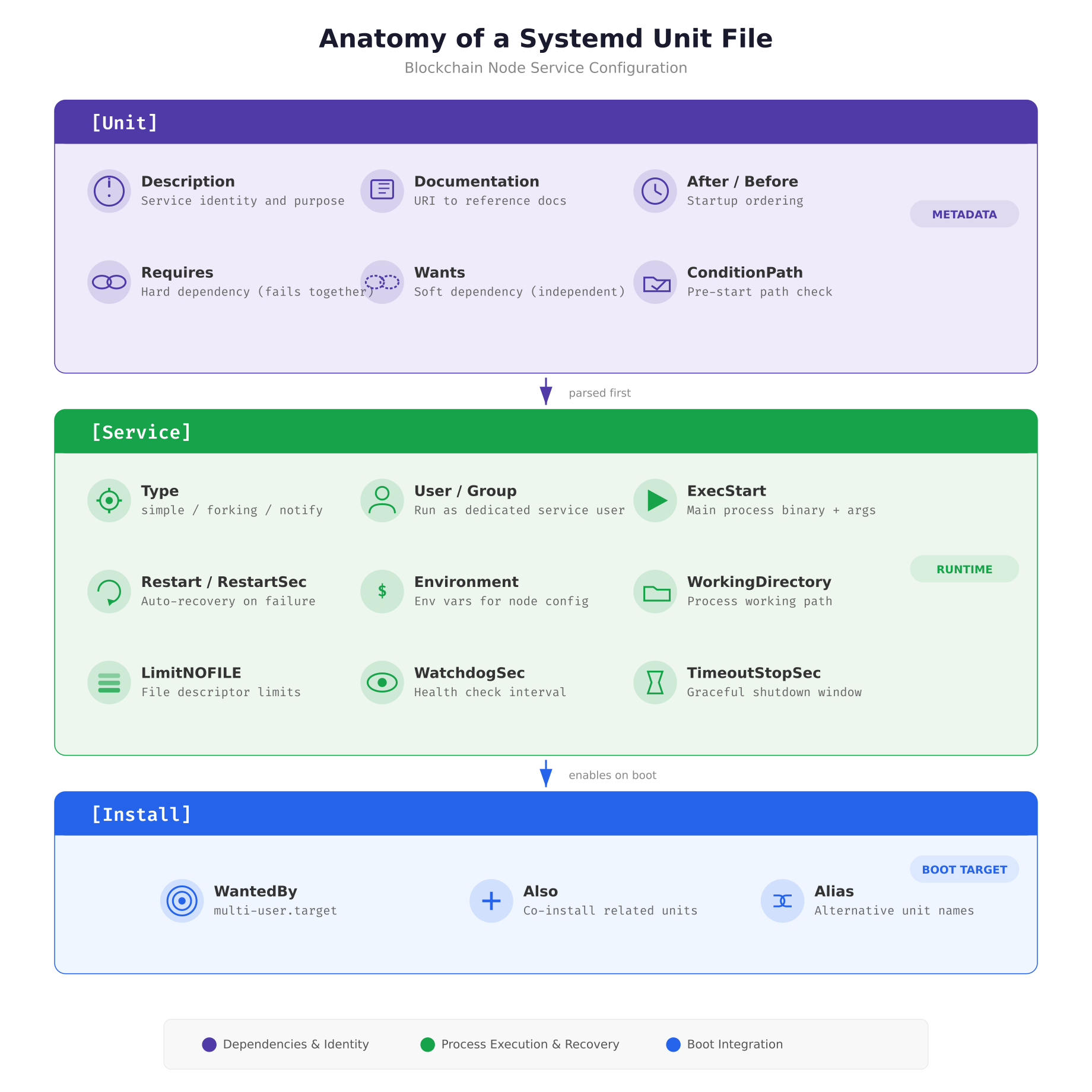
The diagram above breaks down every directive that MeridianChain uses in their blockchain service unit files. The [Unit] section declares what the service is and what it depends on. The [Service] section controls how the process runs, who runs it, what happens when it crashes, and how long systemd waits before killing it. The [Install] section tells systemd which boot target should pull this service in, ensuring the node starts automatically after every reboot.
Writing the Orderer Unit File
The orderer is the most critical component in a Hyperledger Fabric network. It sequences transactions into blocks and distributes them to all peers via the Raft consensus protocol. If the orderer goes down, no new blocks are produced and the entire network stalls. The systemd unit file for the orderer must reflect this criticality through aggressive restart policies, generous shutdown timeouts, and strict dependency ordering.
MeridianChain runs their orderers as native Linux processes (not Docker containers) for maximum control over resource isolation and restart behavior. The unit file below is deployed to /etc/systemd/system/fabric-orderer.service on each orderer node.
[Unit]
Description=Hyperledger Fabric Orderer — MeridianChain
Documentation=https://hyperledger-fabric.readthedocs.io/
After=network-online.target local-fs.target time-sync.target docker.service
Requires=docker.service
Wants=prometheus-node-exporter.service
ConditionPathExists=/opt/fabric/config/orderer.yaml

[Service]
Type=simple
User=fabric
Group=fabric
WorkingDirectory=/opt/fabric
EnvironmentFile=/opt/fabric/config/orderer.env
ExecStartPre=/opt/fabric/scripts/orderer-prestart.sh
ExecStart=/opt/fabric/bin/orderer
ExecStop=/opt/fabric/scripts/orderer-graceful-stop.sh
ExecStopPost=/opt/fabric/scripts/verify-clean-shutdown.sh

Restart=on-failure
RestartSec=5
StartLimitBurst=5
StartLimitIntervalSec=300

TimeoutStartSec=120
TimeoutStopSec=90

WatchdogSec=30
NotifyAccess=main

LimitNOFILE=65536
LimitNPROC=4096

StandardOutput=journal
StandardError=journal
SyslogIdentifier=fabric-orderer

[Install]
WantedBy=multi-user.target
The After directive ensures the orderer waits for network connectivity, local filesystems, and NTP synchronization before starting. This ordering matters because Raft consensus relies on accurate timestamps for leader election timeouts. The Requires=docker.service creates a hard dependency: if Docker fails, the orderer stops too, because chaincode containers depend on the Docker daemon. The ConditionPathExists check prevents the service from attempting to start if the configuration file is missing, which avoids cryptic startup errors.
The restart policy deserves careful attention. Restart=on-failure means systemd only restarts the orderer when it exits with a non-zero code or is killed by a signal. It does not restart on clean exits (exit code 0), which prevents restart loops when an administrator intentionally stops the service. The combination of StartLimitBurst=5 and StartLimitIntervalSec=300 means systemd allows a maximum of 5 restart attempts within any 5-minute window. If the orderer crashes 6 times in 5 minutes, systemd marks it as failed and stops trying, which prevents a crash loop from consuming all system resources.
Service Dependency Graph
Blockchain services cannot start in arbitrary order. A peer node that starts before CouchDB will crash on its first state query. An orderer that starts before NTP synchronization will miscalculate Raft election timeouts. The dependency graph defines the exact startup sequence that systemd follows, ensuring every service finds its prerequisites ready.
Free to use, share it in your presentations, blogs, or learning materials.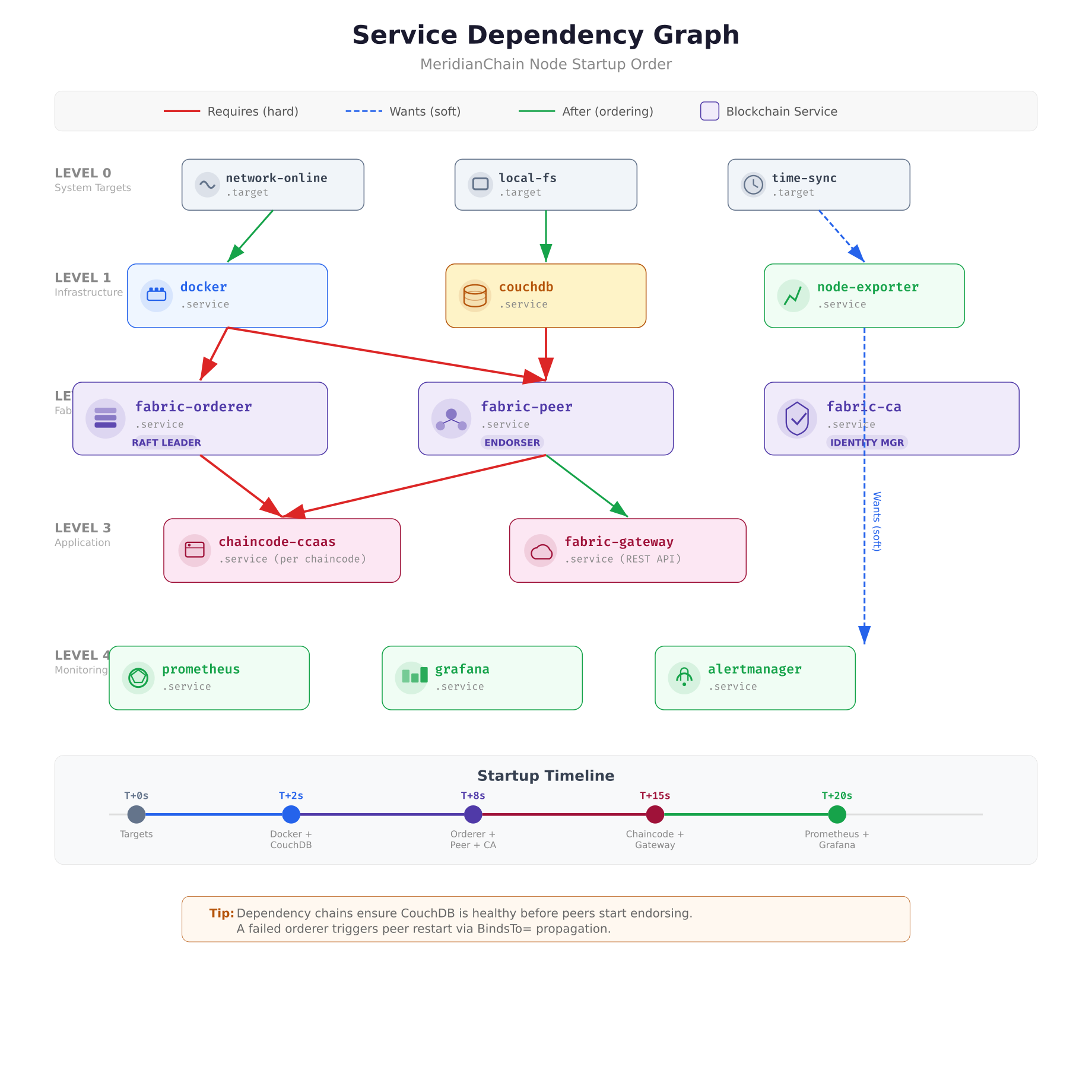
The dependency graph above shows how MeridianChain’s services chain together using three types of relationships. Red lines represent Requires (hard dependencies), where a failure in the upstream service causes the downstream service to stop. Green lines represent After (ordering only), which controls startup sequence without coupling failure states. Blue dashed lines represent Wants (soft dependencies), where the downstream service starts even if the upstream service fails. The monitoring stack uses Wants because a failed Prometheus instance should not prevent blockchain nodes from running.
Peer and CouchDB Unit Files
The peer node and its CouchDB state database form a tightly coupled pair. MeridianChain uses the BindsTo directive to ensure that if CouchDB crashes, the peer stops immediately rather than continuing to serve stale data from its cache. This prevents a scenario where the peer endorses transactions against an outdated world state.
[Unit]
Description=Hyperledger Fabric Peer — MeridianChain
After=network-online.target docker.service couchdb.service
Requires=docker.service
BindsTo=couchdb.service
Wants=prometheus-node-exporter.service
ConditionPathExists=/opt/fabric/config/core.yaml

[Service]
Type=simple
User=fabric
Group=fabric
WorkingDirectory=/opt/fabric
EnvironmentFile=/opt/fabric/config/peer.env
ExecStartPre=/opt/fabric/scripts/peer-prestart.sh
ExecStart=/opt/fabric/bin/peer node start
ExecStop=/bin/kill -SIGTERM $MAINPID

Restart=on-failure
RestartSec=5
StartLimitBurst=5
StartLimitIntervalSec=300

TimeoutStartSec=120
TimeoutStopSec=90
KillMode=mixed
KillSignal=SIGTERM
SendSIGKILL=yes

WatchdogSec=30
NotifyAccess=main

LimitNOFILE=65536
LimitNPROC=4096

StandardOutput=journal
StandardError=journal
SyslogIdentifier=fabric-peer

[Install]
WantedBy=multi-user.target
The KillMode=mixed setting is important for peer nodes. When systemd sends SIGTERM to stop the peer, the main process receives the signal first and begins its graceful shutdown. If any child processes (spawned chaincode containers) do not exit within TimeoutStopSec, systemd sends SIGKILL to the remaining children. This mixed approach gives the main peer process time to flush its state to CouchDB while preventing orphaned chaincode processes from lingering indefinitely.
[Unit]
Description=CouchDB State Database — MeridianChain Fabric
After=network-online.target local-fs.target
ConditionPathExists=/opt/couchdb/etc/local.ini

[Service]
Type=simple
User=couchdb
Group=couchdb
WorkingDirectory=/opt/couchdb
ExecStart=/opt/couchdb/bin/couchdb
ExecStop=/bin/kill -SIGTERM $MAINPID

Restart=on-failure
RestartSec=3
StartLimitBurst=5
StartLimitIntervalSec=300

TimeoutStartSec=60
TimeoutStopSec=120

LimitNOFILE=65536

StandardOutput=journal
StandardError=journal
SyslogIdentifier=couchdb

[Install]
WantedBy=multi-user.target
CouchDB gets a longer TimeoutStopSec (120 seconds) than other services because it needs time to compact active shards and flush its write-ahead log to disk. Killing CouchDB mid-flush corrupts the state database, which requires a full resync from the peer’s block storage, a process that can take hours on a large network.
Cgroup Resource Isolation
Running multiple blockchain services on the same host creates resource contention. Without isolation, a CouchDB compaction job can consume all available IOPS, starving the orderer of disk bandwidth during a critical Raft snapshot. Systemd’s cgroup integration solves this by assigning each service its own resource quotas for CPU, memory, I/O, and network bandwidth.
Free to use, share it in your presentations, blogs, or learning materials.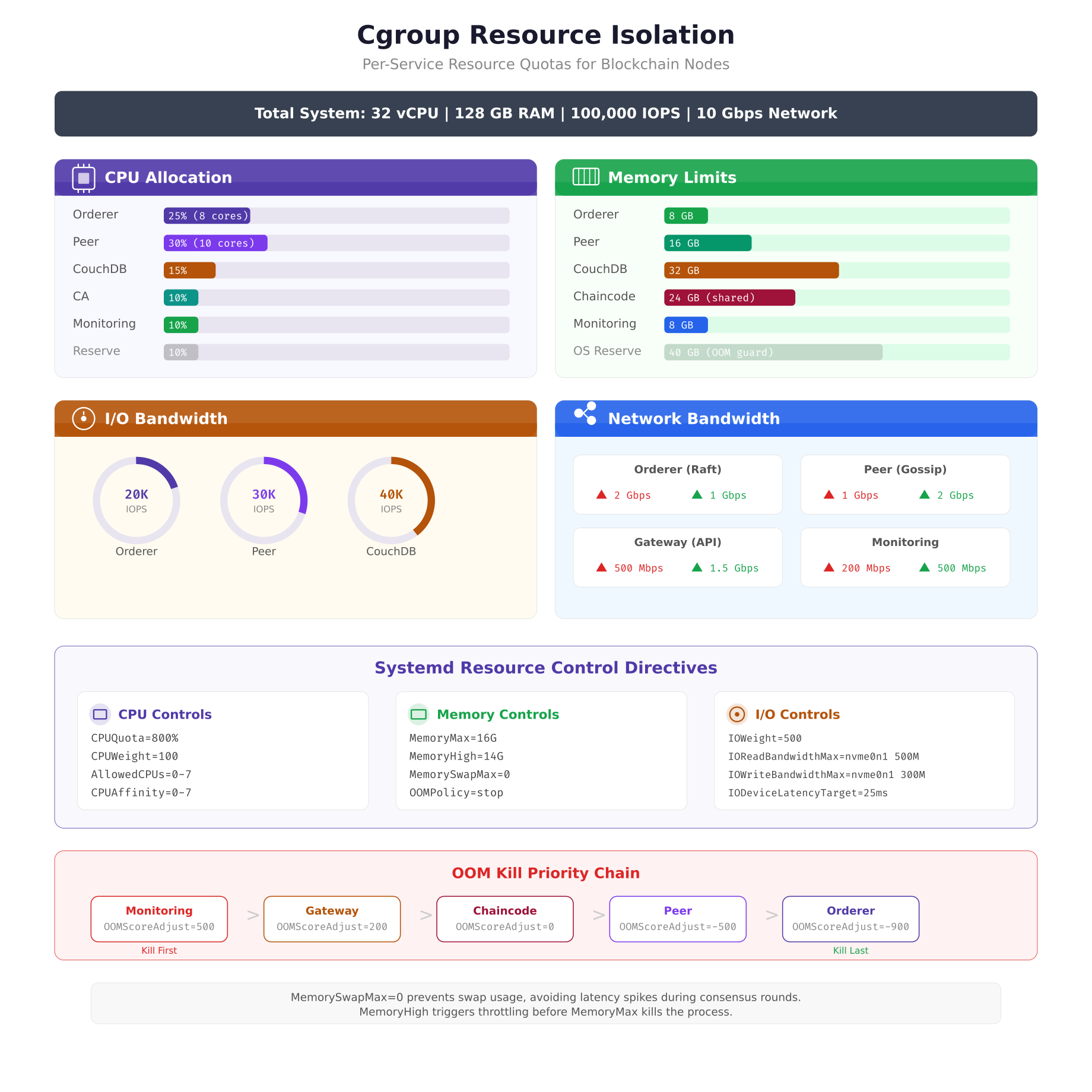
The resource allocation above reflects MeridianChain’s production tuning after six months of performance data collection. The peer node receives the largest CPU share (30%) because endorsement involves cryptographic signature verification across multiple channels. CouchDB receives the highest IOPS allocation (40K) because state queries during endorsement generate heavy random read patterns. The OOM kill priority chain at the bottom ensures that if the system runs low on memory, monitoring services are killed first and orderers are protected until the very end.
Adding resource controls to an existing unit file requires appending the directives to the [Service] section.
# Append to [Service] section of fabric-orderer.service

# CPU: 25% of 32 cores = 8 cores equivalent
CPUQuota=800%
CPUWeight=100
AllowedCPUs=0-7

# Memory: 8 GB hard limit, no swap
MemoryMax=8G
MemoryHigh=7G
MemorySwapMax=0
OOMScoreAdjust=-900

# I/O: prioritize orderer disk access
IOWeight=500
IOReadBandwidthMax=/dev/nvme0n1 200M
IOWriteBandwidthMax=/dev/nvme0n1 150M
The MemorySwapMax=0 directive is critical for blockchain nodes. Swap introduces unpredictable latency spikes that can cause Raft election timeouts, leading to unnecessary leader elections and block production pauses. MemoryHigh=7G sets a soft limit that triggers kernel memory pressure throttling before the hard limit at MemoryMax=8G kills the process. This gives the orderer a 1 GB buffer zone where it slows down rather than dying.
Service Lifecycle and Auto-Recovery
Understanding how systemd manages process states is essential for debugging startup failures and configuring appropriate recovery policies. Each blockchain service transitions through a defined state machine, and the transitions are visible in real time through journal logs.
Free to use, share it in your presentations, blogs, or learning materials.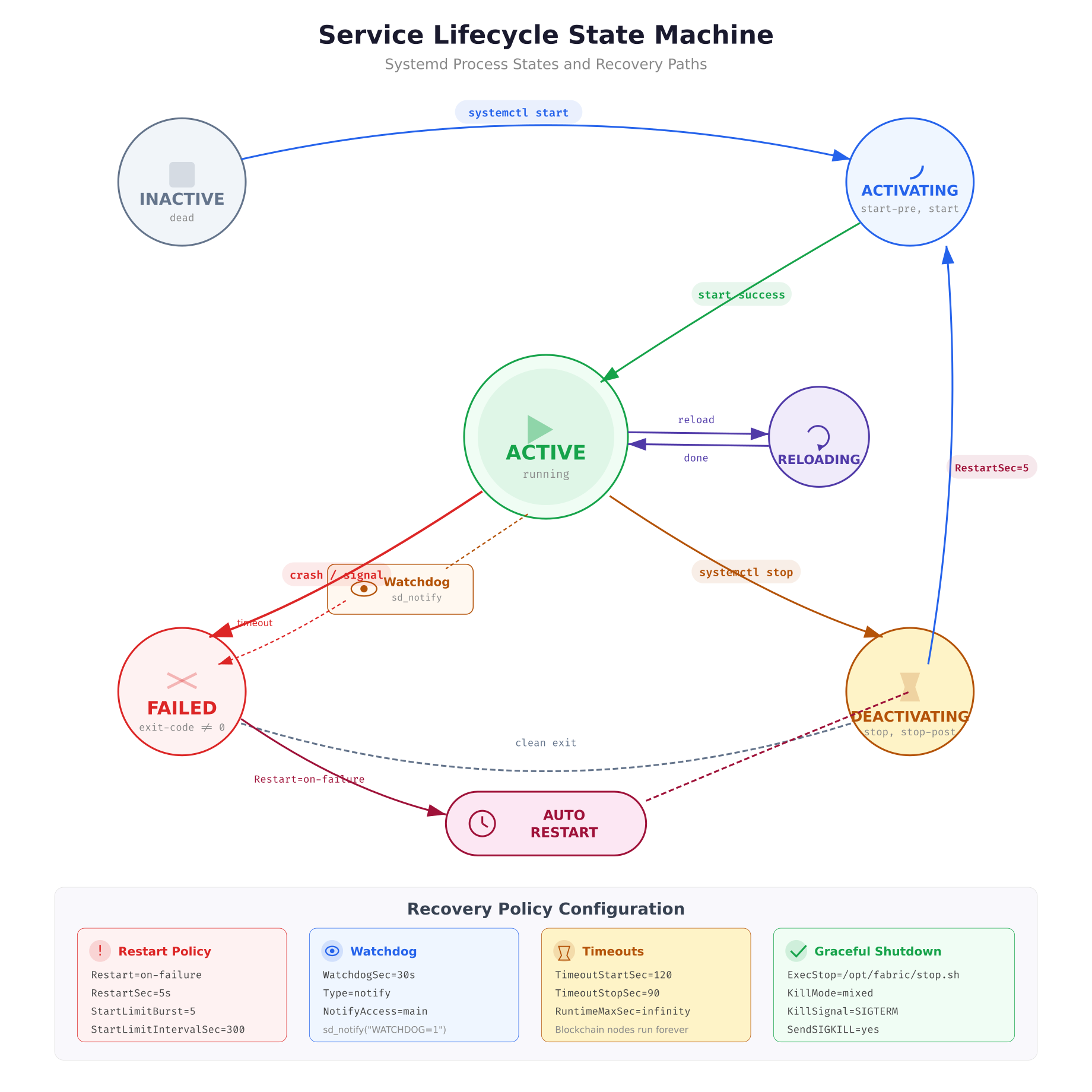
The state machine above shows the complete lifecycle of a blockchain service. The critical path for production reliability is the FAILED to AUTO-RESTART loop. When a peer crashes (exits with non-zero code), systemd transitions it to FAILED state. If Restart=on-failure is configured, systemd waits for RestartSec (5 seconds) before transitioning back to ACTIVATING. The watchdog integration adds a second recovery mechanism: if the peer process stops calling sd_notify(“WATCHDOG=1”) within the WatchdogSec interval, systemd assumes the process is hung and kills it, triggering the same restart flow.
MeridianChain’s orderer includes a watchdog integration script that wraps the standard orderer binary.
#!/bin/bash
# Pre-start validation for fabric orderer
# Verifies all prerequisites before allowing systemd to start the main process

set -e

# Check config file syntax
/opt/fabric/bin/orderer validate-config \
  –configPath /opt/fabric/config/orderer.yaml || {
    echo “ERROR: orderer.yaml validation failed” >&2
    exit 1
}

# Verify TLS certificates are not expired
CERT_EXPIRY=$(openssl x509 -enddate -noout \
  -in /opt/fabric/config/tls/server.crt | cut -d= -f2)
EXPIRY_EPOCH=$(date -d “$CERT_EXPIRY” +%s)
NOW_EPOCH=$(date +%s)
DAYS_LEFT=$(( (EXPIRY_EPOCH – NOW_EPOCH) / 86400 ))

if [ “$DAYS_LEFT” -lt 7 ]; then
  echo “WARNING: TLS cert expires in $DAYS_LEFT days” >&2
fi

if [ “$DAYS_LEFT” -lt 1 ]; then
  echo “ERROR: TLS certificate expired” >&2
  exit 1
fi

# Verify disk space (minimum 10 GB free)
FREE_KB=$(df /opt/fabric/data –output=avail | tail -1)
FREE_GB=$((FREE_KB / 1048576))

if [ “$FREE_GB” -lt 10 ]; then
  echo “ERROR: Only ${FREE_GB}GB free on /opt/fabric/data” >&2
  exit 1
fi

echo “Pre-start checks passed. Disk: ${FREE_GB}GB free. Cert: ${DAYS_LEFT} days.”
The ExecStartPre script runs before systemd launches the orderer binary. If any check fails (config validation, expired TLS certificate, insufficient disk space), the script exits with code 1 and systemd marks the service as failed without ever starting the main process. This prevents the orderer from starting in a broken state where it would either crash immediately or, worse, appear healthy while silently rejecting transactions due to an expired certificate.
Security Sandboxing
A blockchain node that gets compromised should not give the attacker access to the rest of the host. Systemd provides a comprehensive set of sandboxing directives that restrict what a service process can see and do, even if the process itself is exploited. MeridianChain applies these directives to every blockchain service to limit the blast radius of a potential compromise.
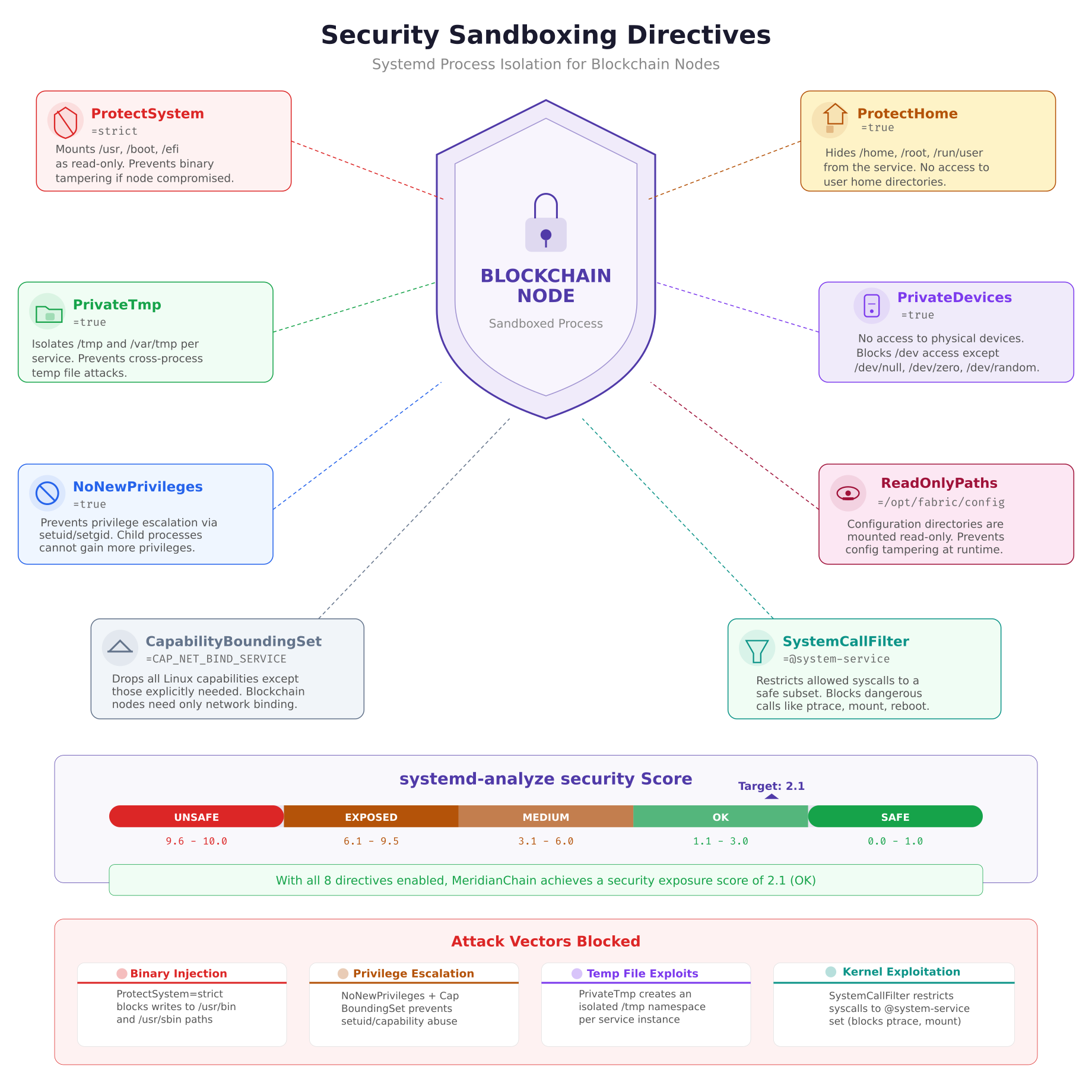
The security sandboxing illustration shows how each directive creates a layer of isolation around the blockchain process. ProtectSystem=strict makes the entire filesystem read-only except for directories explicitly listed in ReadWritePaths. PrivateTmp gives each service its own /tmp namespace, preventing cross-service temp file attacks. NoNewPrivileges blocks any attempt to escalate privileges through setuid binaries or capability acquisition. The systemd-analyze security command produces a numerical score; MeridianChain targets a score below 3.0 (rated “OK”) for all blockchain services.
# Append to [Service] section of any blockchain unit file

# Filesystem protection
ProtectSystem=strict
ProtectHome=true
PrivateTmp=true
PrivateDevices=true
ReadWritePaths=/opt/fabric/data /opt/fabric/logs
ReadOnlyPaths=/opt/fabric/config /opt/fabric/bin

# Privilege restriction
NoNewPrivileges=true
CapabilityBoundingSet=CAP_NET_BIND_SERVICE
AmbientCapabilities=

# Syscall filtering
SystemCallFilter=@system-service
SystemCallArchitectures=native

# Network namespace (optional — disable for multi-host gossip)
# PrivateNetwork=true
RestrictAddressFamilies=AF_INET AF_INET6 AF_UNIX
The ReadWritePaths directive is the key to making ProtectSystem=strict work with blockchain nodes. Without it, the orderer cannot write blocks to /opt/fabric/data and the peer cannot update its state database. By explicitly listing only the directories that need write access, every other path on the system becomes read-only, preventing an attacker from modifying binaries, configs, or system files even if they gain code execution through a chaincode vulnerability.
To verify the security score of a unit file, run the analysis tool against it.
$ $ sudo systemd-analyze security fabric-orderer.serviceNAME DESCRIPTION EXPOSURE
✓ PrivateDevices= Service has no access to hardware 0.2
✓ PrivateTmp= Service uses private /tmp 0.1
✓ ProtectSystem= Service has strict filesystem 0.2
✓ NoNewPrivileges= Service cannot acquire privileges 0.2
✓ CapabilityBoundingSet= Service drops all extra caps 0.2
✓ SystemCallFilter= Service restricts syscalls 0.3
…
→ Overall exposure level for fabric-orderer.service: 2.1 OKJournald Logging Configuration
Blockchain nodes generate substantial log output, especially during block synchronization and chaincode invocations. Without proper log management, journal files consume all available disk space within days on a busy network. Systemd’s journald provides structured binary logging with built-in rotation, rate limiting, and per-service filtering that eliminates the need for external log rotation tools.
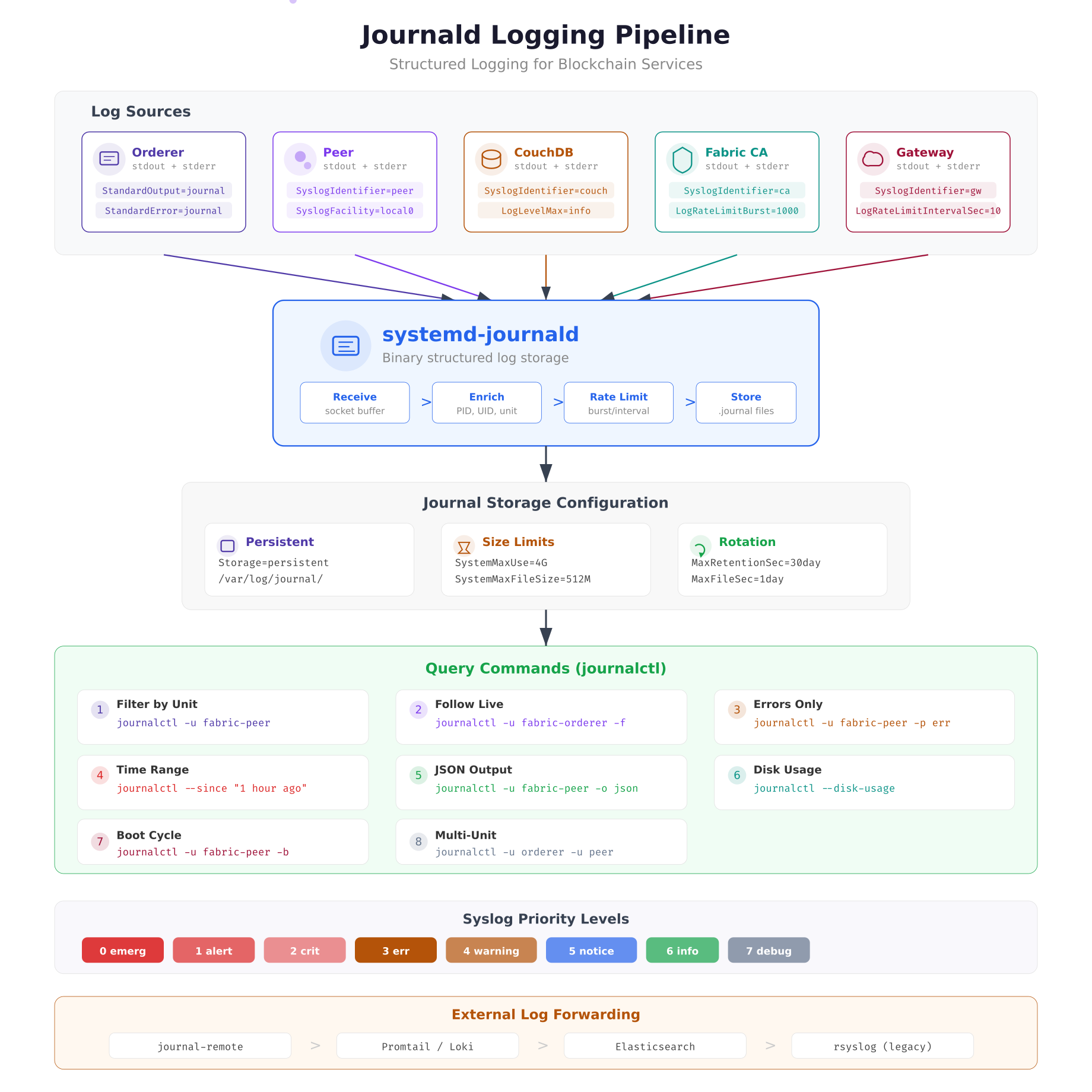
The logging pipeline above traces how blockchain process output flows through journald. Each service’s stdout and stderr are captured directly by the journal socket. The SyslogIdentifier directive tags every log line with the service name, enabling precise filtering with journalctl -u. Rate limiting (LogRateLimitBurst and LogRateLimitIntervalSec) prevents a misbehaving chaincode from flooding the journal and displacing critical orderer logs.
[Journal]
# Persistent storage (survives reboots)
Storage=persistent

# Total journal size limit
SystemMaxUse=4G
SystemMaxFileSize=512M

# Retention
MaxRetentionSec=30day
MaxFileSec=1day

# Rate limiting per service
RateLimitIntervalSec=10s
RateLimitBurst=1000

# Forward to syslog for external shipping
ForwardToSyslog=yes

# Compress stored journals
Compress=yes
The combination of SystemMaxUse=4G and MaxRetentionSec=30day creates a dual constraint: journals grow up to 4 GB total and entries older than 30 days are pruned automatically. MaxFileSec=1day rotates the active journal file daily, which keeps individual files manageable for archival and shipping to external log aggregators. After modifying journald.conf, restart the journal daemon to apply changes.
$ $ sudo systemctl restart systemd-journaldFor production monitoring, MeridianChain ships journal logs to their centralized Loki instance using Promtail. The journal’s structured format (JSON output mode) preserves all metadata fields including PID, unit name, and priority level, which enables filtering and alerting in Grafana dashboards without regex parsing.
Graceful Shutdown Sequence
Shutting down blockchain nodes in the wrong order causes data corruption. Killing a peer while it is committing a block leaves the state database inconsistent. Killing an orderer during a Raft snapshot loses WAL entries that have not been persisted. The shutdown sequence must be the exact reverse of the startup sequence, with each service given enough time to flush its state before the next service stops.
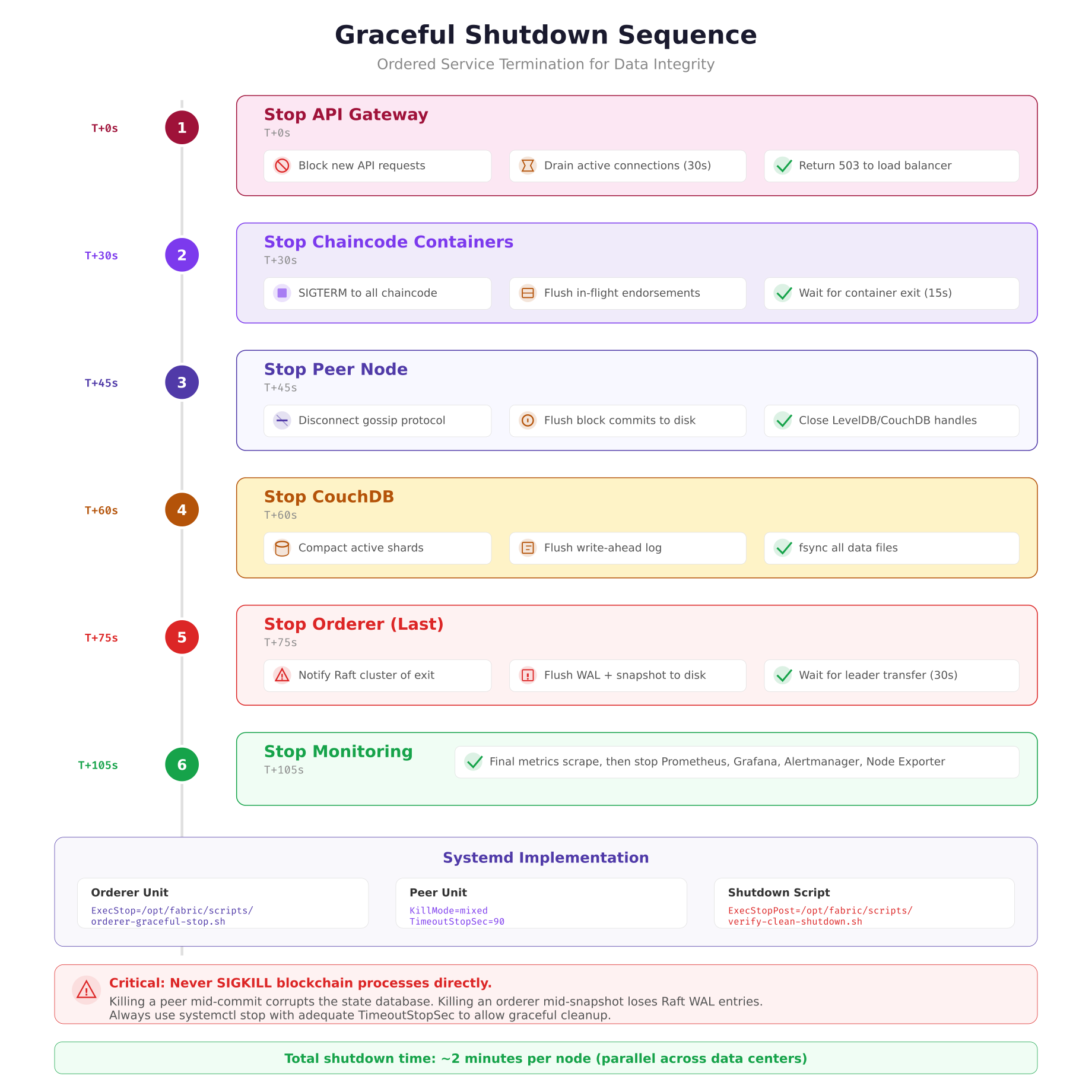
The shutdown sequence above shows six phases executed over approximately two minutes. The API gateway stops first to prevent new client requests from entering the system. Chaincode containers stop next, flushing any in-flight endorsements. The peer disconnects from gossip, commits its final block, and closes database handles. CouchDB compacts shards and flushes its WAL. The orderer stops last because it must notify the Raft cluster and wait for leader transfer to another node. Monitoring stops after everything else so it can capture the final health state of each service.
MeridianChain automates this sequence using a master shutdown script that systemd executes via a target unit.
#!/bin/bash
# MeridianChain ordered shutdown sequence
# Called by systemd via fabric-shutdown.target

set -e

echo “Phase 1: Stopping API gateway…”
systemctl stop fabric-gateway.service
sleep 2

echo “Phase 2: Stopping chaincode containers…”
systemctl stop ‘chaincode-*’
sleep 5

echo “Phase 3: Stopping peer…”
systemctl stop fabric-peer.service
sleep 3

echo “Phase 4: Stopping CouchDB…”
systemctl stop couchdb.service
sleep 5

echo “Phase 5: Stopping orderer…”
systemctl stop fabric-orderer.service
sleep 10

echo “Phase 6: Stopping monitoring…”
systemctl stop prometheus.service grafana.service alertmanager.service
systemctl stop prometheus-node-exporter.service

echo “Shutdown complete at $(date)”
Multi-Node Service Orchestration
Managing systemd services across multiple data centers requires consistent unit file deployment and centralized status monitoring. MeridianChain uses Ansible to deploy identical unit files to all nodes, with site-specific variables injected through EnvironmentFile directives. Each data center runs the same set of services, but the environment files contain location-specific parameters like orderer endpoint addresses, CouchDB bind addresses, and TLS certificate paths.
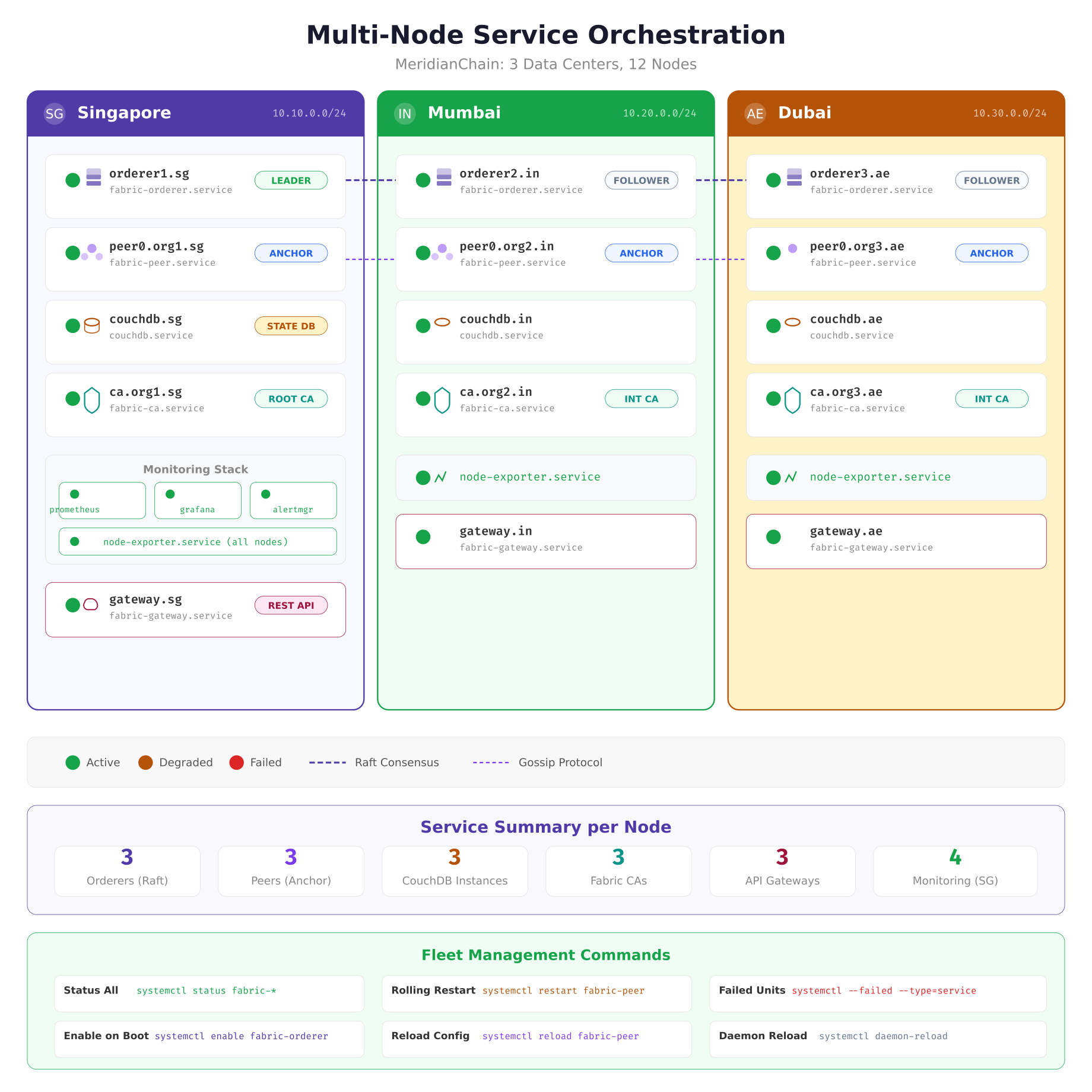
The orchestration map above shows the complete service inventory across MeridianChain’s three data centers. Singapore hosts the primary monitoring stack (Prometheus, Grafana, Alertmanager) that scrapes metrics from node-exporter instances running on every node. The dashed lines between orderers represent Raft consensus traffic, and the dotted lines between peers represent gossip protocol communication. Each green circle indicates a healthy service; this is the target state after a clean deployment or reboot.
Fleet-wide status checks run through Ansible, querying systemd on each node simultaneously.
$ $ ansible blockchain_nodes -m shell -a “systemctl is-active fabric-orderer fabric-peer couchdb fabric-ca fabric-gateway”orderer1.sg | SUCCESS | rc=0 >> active
peer0.org1.sg | SUCCESS | rc=0 >> active
orderer2.in | SUCCESS | rc=0 >> active
peer0.org2.in | SUCCESS | rc=0 >> active
orderer3.ae | SUCCESS | rc=0 >> active
peer0.org3.ae | SUCCESS | rc=0 >> activeFor rolling restarts during upgrades, MeridianChain restarts one data center at a time, waiting for the Raft cluster to confirm the restarted orderer has rejoined before proceeding to the next site. This serial approach ensures the Raft cluster never loses quorum (which requires 2 of 3 orderers active), avoiding any block production interruption.
$ $ ansible-playbook playbooks/rolling-restart.yml –limit site_singapore
$ $ ansible-playbook playbooks/rolling-restart.yml –limit site_mumbai
$ $ ansible-playbook playbooks/rolling-restart.yml –limit site_dubai
Enabling and Verifying Services
After deploying unit files, each service must be enabled and started. The enable command creates the symlinks that make systemd start the service at boot. The daemon-reload command tells systemd to re-read all unit files after any modification.
$ $ sudo systemctl daemon-reload

$ $ sudo systemctl enable –now fabric-orderer.service
$ $ sudo systemctl enable –now fabric-peer.service
$ $ sudo systemctl enable –now couchdb.service
$ $ sudo systemctl enable –now fabric-ca.service
$ $ sudo systemctl enable –now fabric-gateway.service
$ $ sudo systemctl enable –now prometheus-node-exporter.service
The –now flag combines enable and start into a single command. After enabling, verify that all services are running and check for any failed units.
$ $ systemctl status fabric-orderer fabric-peer couchdb fabric-ca fabric-gateway –no-pager
$ $ systemctl –failed –type=service
To validate that auto-restart works, simulate a crash by sending SIGKILL to the peer process and watching the journal for the restart sequence.
$ $ sudo kill -9 $(systemctl show fabric-peer –property=MainPID –value)
$ $ journalctl -u fabric-peer -fApr 05 10:15:32 peer0.sg systemd[1]: fabric-peer.service: Main process exited, code=killed, status=9/KILL
Apr 05 10:15:32 peer0.sg systemd[1]: fabric-peer.service: Failed with result ‘signal’.
Apr 05 10:15:37 peer0.sg systemd[1]: fabric-peer.service: Scheduled restart job, restart counter is at 1.
Apr 05 10:15:37 peer0.sg systemd[1]: Started Hyperledger Fabric Peer — MeridianChain.
Apr 05 10:15:38 peer0.sg fabric-peer[28451]: Pre-start checks passed. Disk: 142GB free. Cert: 89 days.
Apr 05 10:15:39 peer0.sg fabric-peer[28453]: Peer node started successfully.Summary
Converting blockchain nodes from manual process management to systemd services eliminated MeridianChain’s 47 minutes of monthly unplanned downtime. The combination of dependency ordering, automatic restart policies, watchdog health checks, resource isolation through cgroups, and security sandboxing transforms a collection of individual binaries into a production-grade service mesh that recovers from failures without human intervention. The key takeaways are: orderers should always be the last service to stop and the most protected from OOM kills; BindsTo creates the tight coupling between peers and their state databases that prevents stale-data endorsement; MemorySwapMax=0 is non-negotiable for consensus-critical processes; and the security exposure score from systemd-analyze should be a standard check in every deployment pipeline.