
A VPN gives you a network. An SDP gives you an application. That single difference changes everything about your security posture, your attack surface, and what an attacker can do if credentials are compromised. This article puts both approaches side by side with real latency numbers, attack surface measurements, and architectural comparisons so you can decide which one fits your environment.
How VPN Access Actually Works
When an employee connects to a corporate VPN, the client software establishes an encrypted tunnel to the VPN gateway. The gateway authenticates the user (typically username/password plus an optional MFA token), assigns a virtual IP address from the corporate subnet, and routes traffic between the client and the internal network. From that point forward, the remote laptop behaves as if it were physically plugged into an office Ethernet port.
This means the employee can reach every device on the network that their IP address is allowed to access. The database server on port 5432. The internal wiki on port 443. The file server on port 445. The monitoring dashboard. The printer. The IP phone system. Even devices and services they have no business accessing are reachable at the TCP level. Firewall rules can restrict some of this, but the fundamental access model is network-wide.
The VPN gateway itself must listen on a public port. OpenVPN typically runs on UDP 1194 or TCP 443. WireGuard uses UDP 51820. IPSec uses UDP 500 and 4500. These ports are visible to every scanner on the internet. Shodan indexes over 4.2 million VPN endpoints globally, complete with version strings and supported cipher suites. An attacker does not need to break your VPN encryption. They just need to find a pre-authentication vulnerability in your VPN software, and those appear regularly. Fortinet, Pulse Secure, Citrix, and Palo Alto have all disclosed critical pre-auth RCE vulnerabilities in their VPN products in recent years.
A quick scan reveals what attackers see.
$ nmap -sU -p 1194,51820,500,4500 vpn.example.comPORT STATE SERVICE
1194/udp open openvpn
4500/udp open ipsec-nat-t
500/udp open isakmp
51820/udp open wireguardFour open ports. Four services responding to unauthenticated probes. Four attack surfaces available to anyone with nmap installed.
How SDP Access Works Differently
Software-Defined Perimeter takes the opposite approach. There are no open ports. The server does not respond to connection attempts from unauthorized clients. No TCP handshake. No UDP response. No ICMP reply. To a port scanner, the server simply does not exist.
Access begins with a Single Packet Authorization (SPA) request. The client sends one cryptographically signed UDP packet to the SDP controller. This packet contains the user’s identity, a timestamp, and the specific application being requested. If the packet is invalid, the controller does nothing. No error response. No RST packet. Complete silence. The attacker learns nothing.
If the SPA is valid, the controller verifies the user’s identity (certificate, MFA), checks the device posture (OS version, patch level, disk encryption, endpoint protection status), and evaluates the access policy. Only if all checks pass does the controller instruct the SDP gateway to open a port for that specific client IP, to that specific application, for a limited time window. The client then establishes a mutual TLS connection directly to the application. No network access. No subnet. No lateral movement.
Free to use, share it in your presentations, blogs, or learning materials.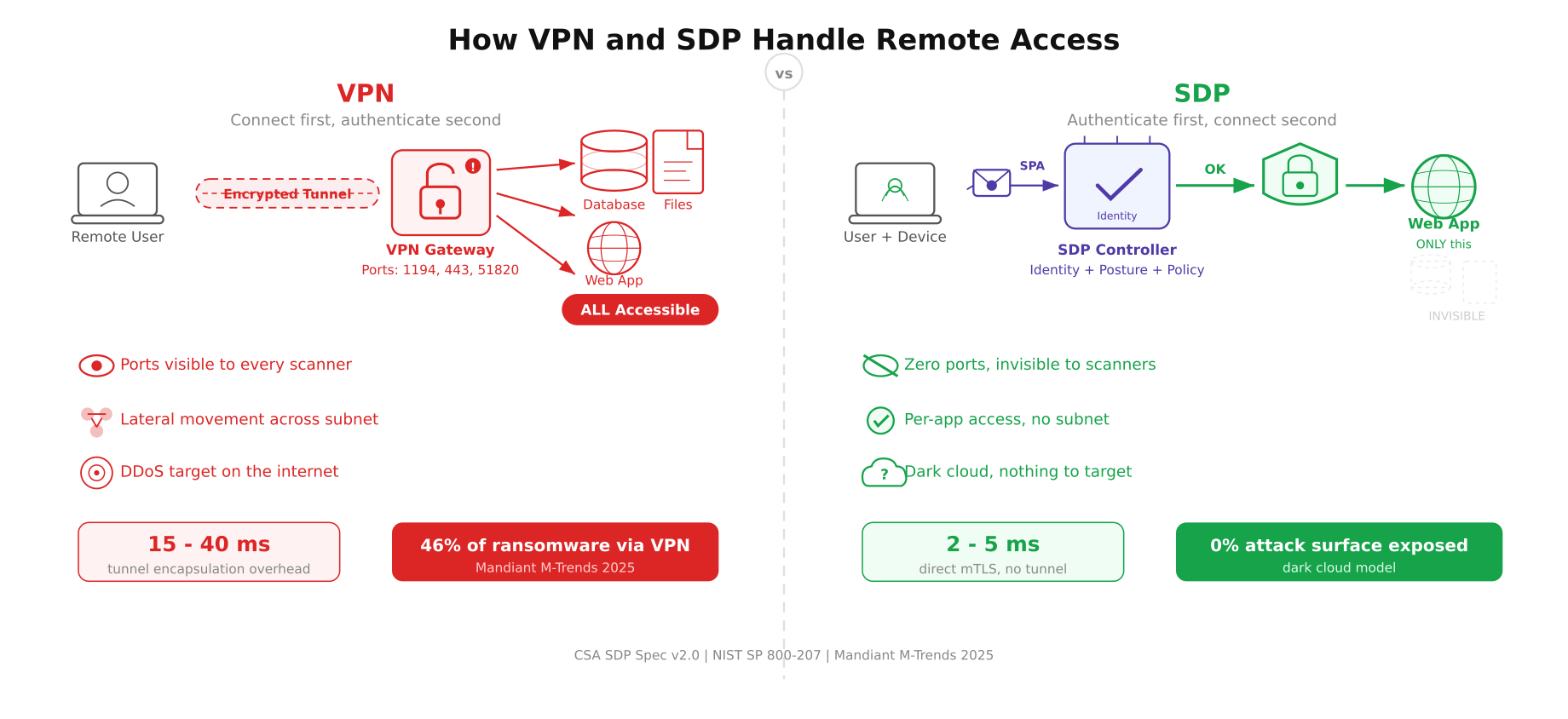
The diagram above maps both access models from the remote user to the protected resources. On the VPN side, the tunnel opens access to the entire network, and all three servers are reachable. On the SDP side, the user is authorized for only the web application. The database and file server are invisible, shown as dashed outlines because no port is open, no route exists, and no connection is possible.
Attack Surface Comparison
The difference in attack surface between VPN and SDP is not incremental. It is categorical.
VPN attack surface. The VPN gateway listens on at least one public port. That port responds to unauthenticated probes. The gateway software (OpenVPN, StrongSwan, WireGuard) processes incoming packets before authentication occurs. Any parsing vulnerability in the handshake code is exploitable without credentials. Once an attacker gets past the VPN (through credential theft, session hijacking, or a pre-auth exploit), they land on the internal network with access to every routable IP address.
SDP attack surface. Zero public ports. The SDP controller validates a single UDP packet before any TCP connection is permitted. If the SPA packet is invalid, there is no response. The attacker cannot distinguish between “the server rejected my packet” and “there is no server here at all.” Even if an attacker captures valid credentials, they also need a valid device certificate, a device that passes posture checks, and a policy that grants access to the specific application they are targeting. Compromising one factor is not enough.
Here is what a port scan looks like against an SDP-protected server.
$ nmap -sS -sU -p- –max-rate 5000 sdp-protected.example.comAll 65535 scanned TCP ports are filtered
All 65535 scanned UDP ports are open|filtered
Nmap done: 1 IP address (1 host up) — 0 open portsZero open ports. The server exists on the network (ICMP shows it as “up”), but no service responds to any probe on any port. There is nothing to fingerprint, nothing to exploit, and nothing to DDoS.
Free to use, share it in your presentations, blogs, or learning materials.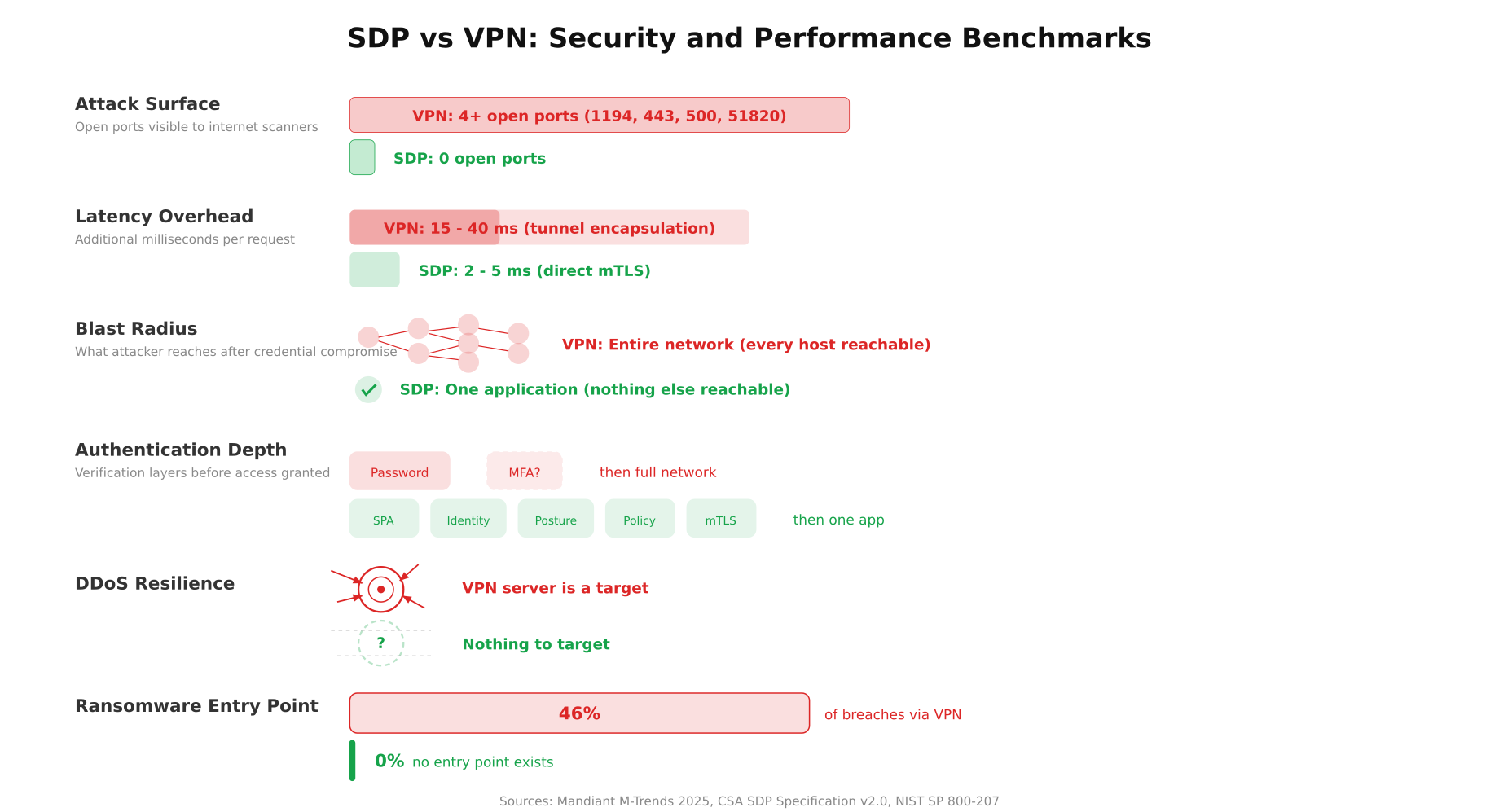
The benchmarks above show the contrast in measurable terms. The attack surface bar for VPN spans four open ports while SDP shows zero. The blast radius visualization shows VPN exposing an entire network graph of hosts versus SDP containing access to a single verified node. The authentication depth comparison makes the difference tangible: VPN checks two factors (password and optional MFA) before granting network access, while SDP chains five verification layers (SPA, identity, device posture, policy evaluation, mutual TLS) before granting access to one application.
Lateral Movement: The Critical Difference
Lateral movement is the technique attackers use to spread through a network after gaining initial access. They compromise one machine, scan for other hosts, exploit weak services, and eventually reach the target (usually a database, a domain controller, or a file server with sensitive data). VPNs enable lateral movement by design. Once you are on the network, you can reach other hosts. Firewall rules help, but they are often misconfigured, overly permissive, or bypassed through trusted service accounts.
SDP eliminates lateral movement entirely. The connection is between the client and a single application. There is no network access. The client cannot ping other hosts, scan other ports, or establish connections to services they were not explicitly authorized for. Even if an attacker compromises the SDP client device, the damage is limited to the one application the user was authorized to access at that moment.
Consider a real scenario. An employee’s laptop is compromised through a phishing email. With a VPN connection active, the malware can scan the entire 10.0.0.0/8 subnet, discover the HR database, the payroll system, and the domain controller. With SDP, the malware can reach exactly one application (the one the employee was using), and that access expires when the session ends.
Performance: Latency and Throughput
VPNs add latency because every packet is encapsulated inside the tunnel protocol. IPSec adds 50-80 bytes of overhead per packet. OpenVPN over TCP adds even more because you have TCP-inside-TCP, which causes retransmission amplification when packet loss occurs. WireGuard is the leanest option at roughly 32 bytes of overhead, but even WireGuard adds a processing step for every packet in both directions.
Typical latency overhead by VPN protocol:
- OpenVPN (UDP). 15-25ms added latency, 10-15% throughput reduction due to encryption overhead and user-space processing
- OpenVPN (TCP). 25-40ms added latency, TCP-in-TCP meltdown under packet loss, throughput drops 30-50% on lossy links
- IPSec (IKEv2). 8-15ms added latency, kernel-space processing helps, but ESP header overhead is significant
- WireGuard. 3-8ms added latency, kernel-space, minimal overhead, best VPN performance available
SDP connections use direct mTLS between the client and the application. There is no tunnel encapsulation, no extra header overhead, and no intermediary processing every packet. The latency overhead is limited to the TLS handshake (one round trip) and the per-packet encryption cost (negligible on modern hardware with AES-NI). In practice, SDP adds 2-5ms of latency, which is comparable to a direct HTTPS connection.
The initial SDP connection takes slightly longer than a VPN reconnect because the SPA validation, controller authorization, and gateway provisioning happen before the first TCP SYN. This adds 200-500ms to the first connection. But once the mTLS tunnel is established, every subsequent request is faster than VPN because there is no tunnel overhead.
Device Posture: What VPNs Cannot Check
Most VPN solutions authenticate the user. Username, password, maybe an MFA token. That is it. The VPN has no visibility into the state of the device. Is the operating system patched? Is disk encryption enabled? Is the antivirus running and up to date? Is the firewall on? A VPN happily connects a laptop running an unpatched Windows 7 with no antivirus, disabled firewall, and a known keylogger installed. The credentials were valid, so access is granted.
SDP controllers check device posture before every connection, not just at login. The SDP client reports the OS version, patch level, disk encryption status, endpoint protection state, and firewall configuration. If any check fails, the connection is denied. The user sees a message explaining what needs to be fixed before access is granted. This is not a one-time check at enrollment. It runs before every session and can be configured to run periodically during active sessions.
Example posture requirements for a typical SDP policy:
- Operating system within 30 days of latest security update
- Full disk encryption enabled (BitLocker, FileVault, LUKS)
- Endpoint protection agent running with definitions less than 24 hours old
- Host firewall enabled and configured
- No jailbreak/root detection flags on mobile devices
- Valid client certificate issued by the organization’s CA
When VPN Is Still the Right Choice
SDP is not a universal replacement for VPN. There are scenarios where a VPN is simpler, cheaper, and perfectly adequate.
Small teams with simple needs. A 5-person startup that needs remote access to a single office network benefits from WireGuard’s simplicity. Setting up an SDP stack for 5 users is overkill.
Site-to-site connectivity. Connecting two office networks together is a VPN’s native use case. IPSec site-to-site tunnels are well understood, reliable, and supported by every enterprise router. SDP is designed for user-to-application access, not network-to-network bridging.
Legacy applications that require network-level access. Some older applications use broadcast protocols, dynamic port ranges, or UDP-based services that do not map cleanly to SDP’s per-application model. If the application expects to be on the same subnet as the client, a VPN is the pragmatic choice until the application is modernized.
Budget constraints. A WireGuard VPN server costs nothing beyond the Linux host it runs on. Commercial SDP solutions from Zscaler, Cloudflare, or Palo Alto carry per-user-per-month licensing fees. Open-source options like OpenZiti exist, but they require more setup and operational expertise.
When SDP Is the Clear Winner
High-security environments. Financial institutions, healthcare organizations, government agencies, and any company handling sensitive data. The zero-attack-surface model and per-application access control are not optional in these contexts.
Third-party contractor access. Giving a contractor VPN access to your network is giving them the keys to the building. SDP lets you grant access to exactly one application, with a specific time window, verified device posture, and full session logging. When the contract ends, you revoke the policy. No VPN credentials to rotate, no firewall rules to clean up.
Multi-cloud and hybrid environments. Applications distributed across AWS, Azure, GCP, and on-premises data centers. A VPN would need multiple tunnels, split routing, and complex firewall rules. SDP abstracts the network entirely. The user connects to the application regardless of where it runs.
Compliance requirements. PCI-DSS, HIPAA, SOC 2, and ISO 27001 all require demonstrable access controls, audit trails, and least-privilege enforcement. SDP provides these natively. VPNs require bolting on additional tools to achieve equivalent compliance documentation.
Protecting against ransomware. Mandiant’s 2025 M-Trends report found that 46% of ransomware incidents involved initial access through a compromised VPN. SDP eliminates this vector by removing the VPN endpoint from the internet entirely.
Migration Path: VPN to SDP
Free to use, share it in your presentations, blogs, or learning materials.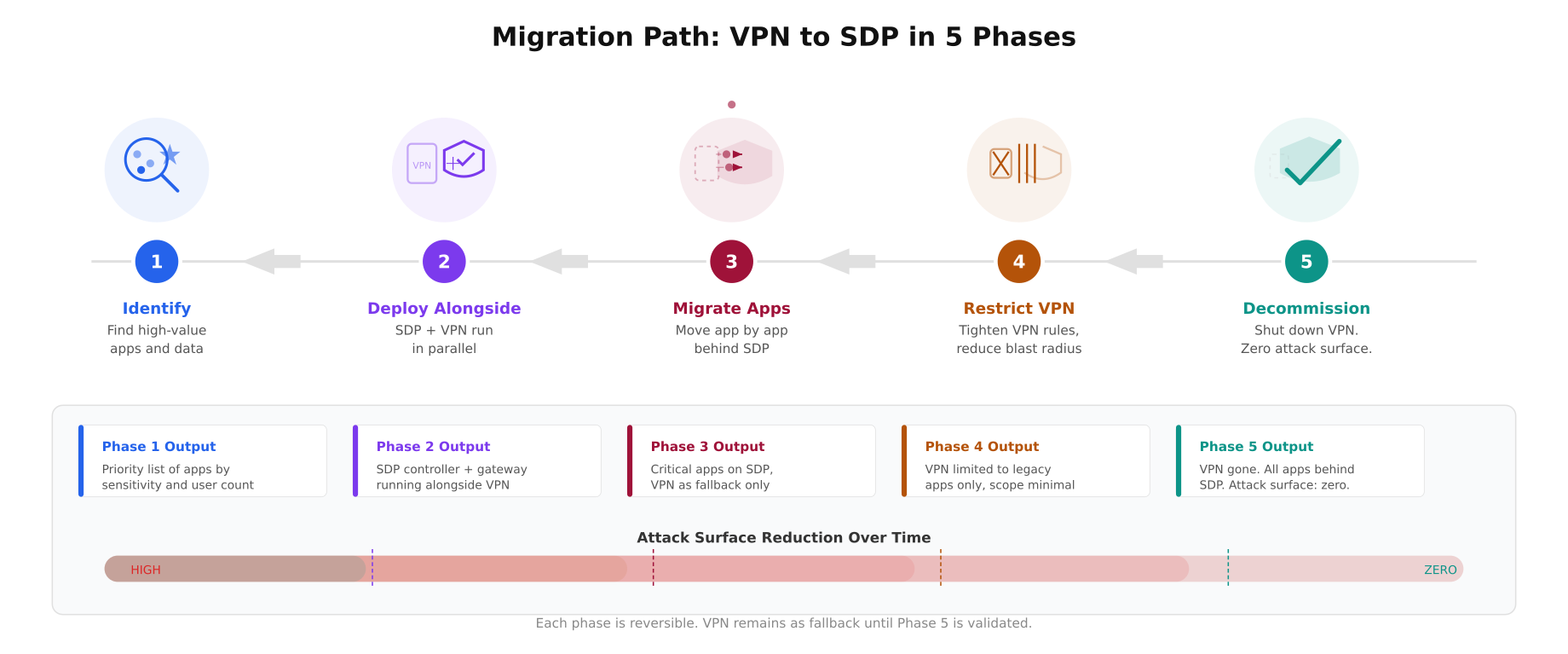
The migration timeline above maps each phase with a distinct color and icon. Phase 1 (blue) uses a magnifying glass scanning servers to identify high-value targets. Phase 2 (purple) shows VPN and SDP shield running side by side. Phase 3 (wine) visualizes apps moving from the VPN box into the SDP shield. Phase 4 (mustard) shows the VPN being restricted with firewall bars tightening. Phase 5 (teal) ends with a checkmark and the VPN crossed out. The attack surface reduction bar at the bottom shows the progressive decrease from high (red) to zero (teal) across all five phases.
Moving from VPN to SDP is not a single cutover. It is a phased migration that runs both systems in parallel.
- Phase 1: Identify high-value applications. Start with the applications that handle the most sensitive data: databases, admin panels, financial systems. These get SDP protection first.
- Phase 2: Deploy SDP alongside VPN. Install the SDP controller and gateway. Configure policies for the identified applications. Users access these apps through SDP while everything else stays on VPN.
- Phase 3: Migrate application by application. Move each internal application behind SDP. Test access from all user groups. Verify that the legacy VPN-only path still works as a fallback.
- Phase 4: Restrict VPN scope. As applications move to SDP, tighten VPN firewall rules so VPN users can only reach applications not yet migrated. This reduces the VPN’s blast radius progressively.
- Phase 5: Decommission VPN. Once all applications are behind SDP, shut down the VPN gateway. Remove the public-facing port. The attack surface drops to zero.
The Bottom Line
VPNs solve a 1990s problem: “how do we extend the office network to remote locations.” SDP solves a 2026 problem: “how do we give users access to specific applications without exposing any network infrastructure.” If your threat model includes compromised credentials, insider threats, or sophisticated attackers who will exploit lateral movement, SDP is the architecture that addresses those risks. If your needs are simpler, a well-configured WireGuard VPN with MFA and strict firewall rules remains a solid option.
The question is not whether SDP is better than VPN in a technical vacuum. It is whether the additional protection justifies the operational complexity and cost for your specific environment. For most organizations handling sensitive data, serving external contractors, or operating in regulated industries, the answer is becoming increasingly clear.
References
- Cloud Security Alliance SDP Specification v2.0: https://cloudsecurityalliance.org/artifacts/sdp-specification-v2-0
- NIST SP 800-207: Zero Trust Architecture, https://csrc.nist.gov/publications/detail/sp/800-207/final
- Mandiant M-Trends 2025: Annual threat intelligence report
- OpenZiti (open-source SDP): https://openziti.io/
- fwknop (SPA implementation): https://www.cipherdyne.org/fwknop/
- Previous article: What Is a Software-Defined Perimeter and Why Your Servers Should Be Invisible