
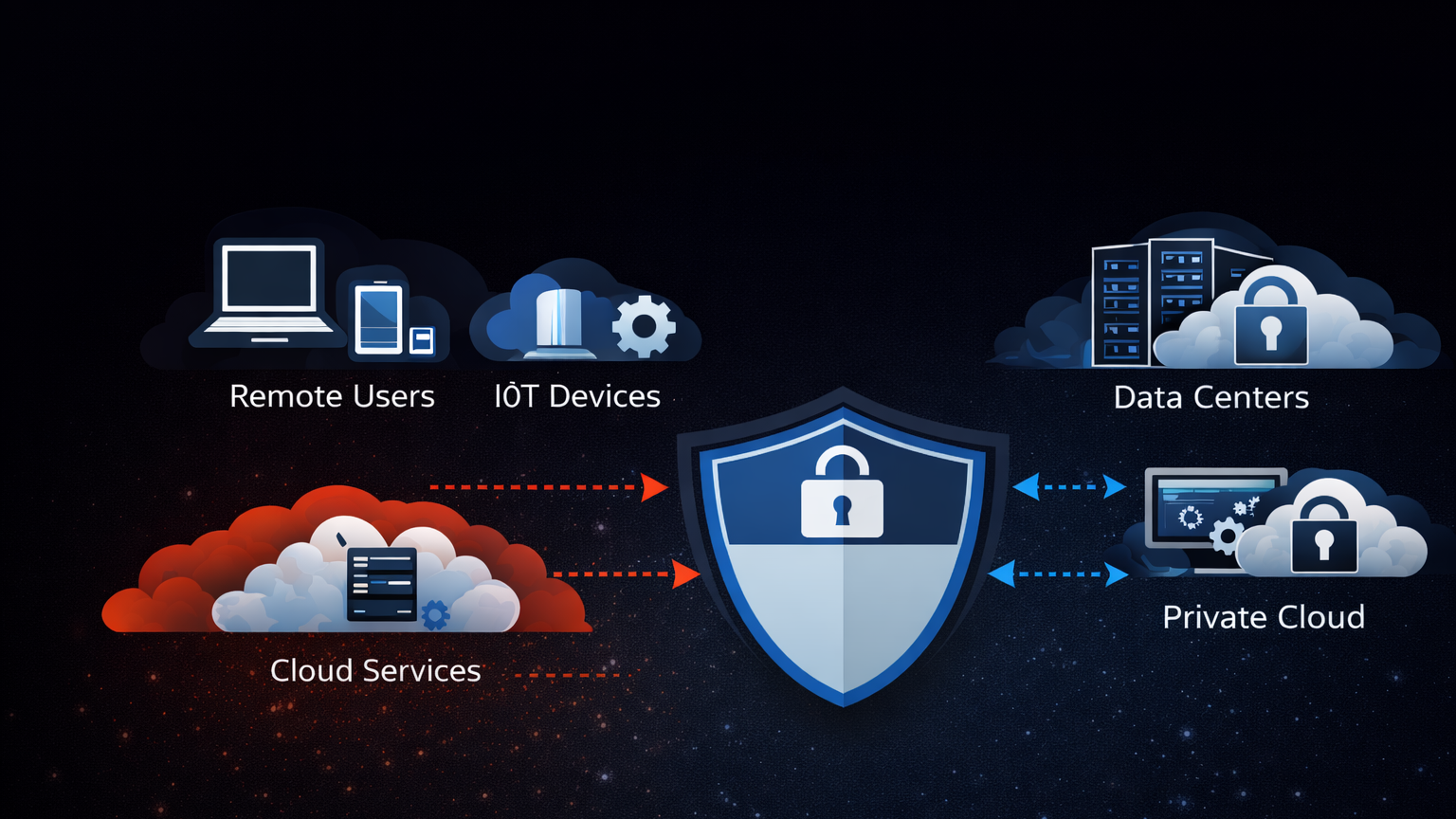
Traditional firewalls follow a connect-first, authenticate-second model. A client initiates a TCP handshake, the server responds, and only then does the application layer ask for credentials. The problem is that the handshake itself leaks information. The attacker already knows the port is open, the service is running, and often the exact software version before a single password is typed. Software-Defined Perimeter flips this entirely. With SDP, you authenticate first and connect second. The server has zero visible ports until you cryptographically prove who you are. No handshake, no banner, no response of any kind. The server is invisible.
The Problem with Traditional Network Security
The way networking has worked for decades is straightforward. A server binds to a port, listens for incoming connections, and a firewall sits in front deciding which source IPs or port ranges are allowed through. This model assumes that visibility is acceptable as long as access is controlled. But visibility itself is the first vulnerability.
Run a basic Nmap scan against any public-facing server and you will see exactly what an attacker sees.
$ nmap -sV -T4 203.0.113.50Starting Nmap 7.94 ( https://nmap.org ) at 2026-04-04 10:15 UTC
Nmap scan report for 203.0.113.50
Host is up (0.023s latency).
Not shown: 995 closed tcp ports (reset)
PORT STATE SERVICE VERSION
22/tcp open ssh OpenSSH 8.9p1 Ubuntu 3ubuntu0.6
80/tcp open http nginx 1.24.0
443/tcp open ssl/http nginx 1.24.0
3306/tcp open mysql MySQL 8.0.36
5432/tcp open postgresql PostgreSQL 15.4In under 4 seconds, the attacker knows the exact SSH version, the web server software, and that both MySQL and PostgreSQL are listening on their default ports. That is not a theoretical risk. That is the starting point of every targeted attack. The SSH version tells the attacker which CVEs to try. The MySQL port tells them to attempt default credentials. The Nginx version tells them whether the server is patched against known exploits.
Firewalls help, but they do not solve this. Even with strict IP allowlists, the server still completes TCP handshakes with allowed sources before authentication happens. A compromised VPN endpoint, a stolen laptop on an allowed IP range, or a misconfigured cloud security group, and the attacker is past the firewall talking directly to the service. SSH brute force attacks account for roughly 36% of all observed intrusion attempts according to SANS 2024 data. Exposed database ports are involved in 22% of data breach incidents tracked by Verizon’s DBIR. These are not edge cases. These are the default attack surface of every organization running servers on the internet.
How Software-Defined Perimeter Works
SDP replaces the connect-first model with an authenticate-first model. The core idea is simple: no connection is established until the client proves its identity. The server does not respond to any network traffic from unauthenticated sources. Not a RST packet, not an ICMP unreachable, nothing. Complete network silence.
Free to use, share it in your presentations, blogs, or learning materials.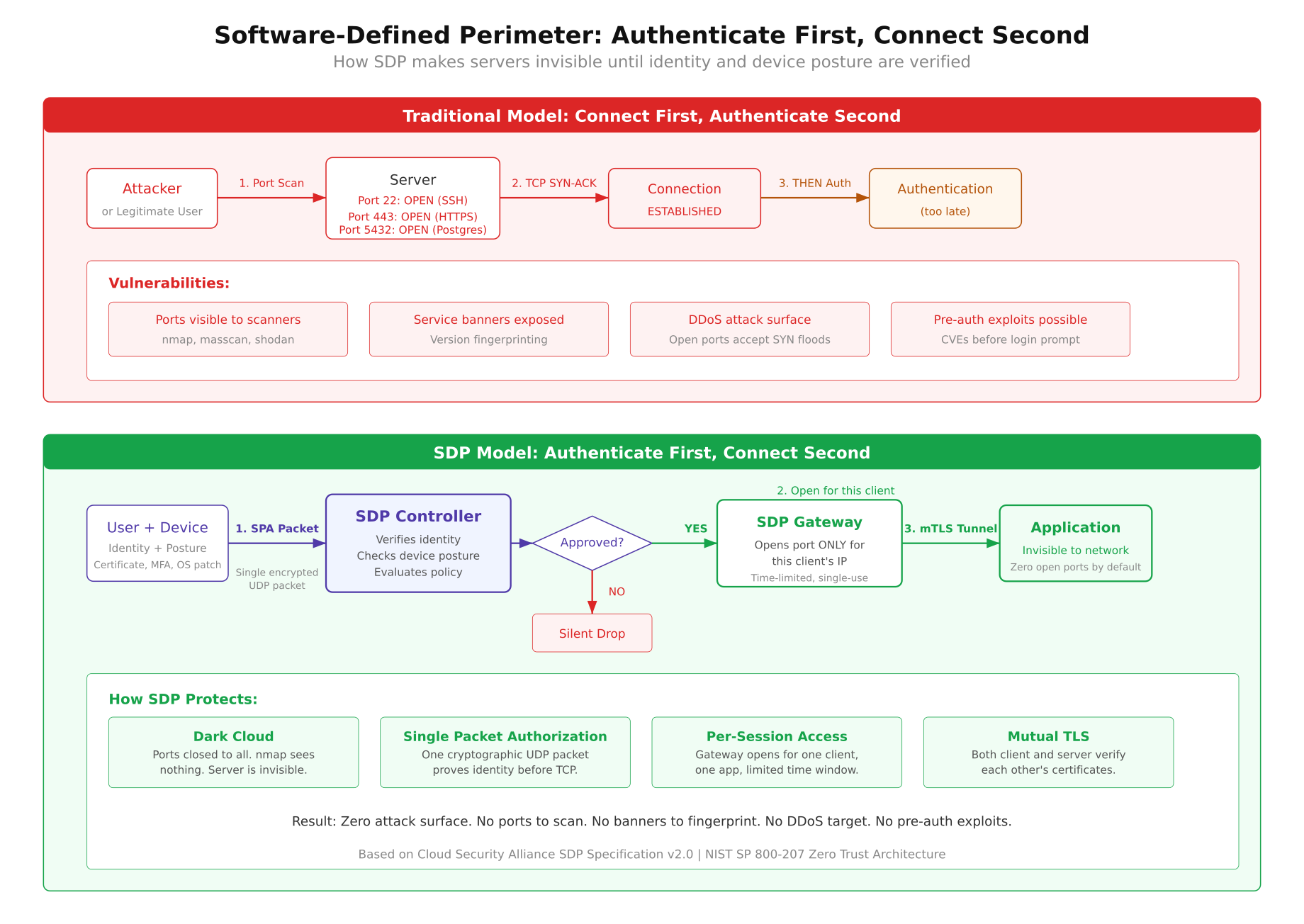
The diagram above contrasts the two models side by side. On the left, the traditional flow starts with a TCP SYN and the server immediately responds, exposing its presence. On the right, the SDP flow begins with a Single Packet Authorization that must pass controller verification before any port opens at all. The three-step process works as follows.
Step 1: Single Packet Authorization (SPA). The SDP client sends a single encrypted UDP packet to the gateway. This packet contains a cryptographic hash of the user’s identity, a timestamp, and the resource being requested. The gateway does not run any listening TCP service, so there is nothing for a port scanner to find. It only watches for valid SPA packets on a specific UDP port using packet capture. If the packet is malformed, replayed, or signed with an unknown key, the gateway does absolutely nothing. No response, no log entry visible to the attacker, no indication that anything is even there.
Step 2: Controller verification. Once the gateway receives a valid SPA packet, it forwards the authentication request to the SDP Controller. The controller checks the user’s identity against its policy database, verifies device posture (Is the OS patched? Is disk encryption enabled? Is the client certificate valid?), and evaluates whether the requested resource is allowed for this user at this time. If any check fails, the connection is denied and the port stays closed.
Step 3: Gateway opens a pinhole. If the controller approves the request, the gateway dynamically adds a firewall rule allowing the specific client IP to connect to the specific application port. This rule has a time-to-live, typically between 30 seconds and 5 minutes. The port is open only for that one client IP, only for that one application, and only for a limited window. A mutual TLS tunnel is then established between the client and the application. Once the session ends or the TTL expires, the firewall rule is removed and the port disappears again.
The Three Components of SDP
Every SDP deployment has three distinct components. They work together but run independently, which means compromising one does not automatically compromise the others.
SDP Controller
The controller is the brain of the system. It stores identity information, manages access policies, and makes authorization decisions. When a client sends a valid SPA packet and the gateway forwards the request, the controller is the component that decides whether to allow or deny access. It checks user identity against an identity provider (LDAP, SAML, OIDC), validates device posture data sent by the client agent, and evaluates time-based or location-based policies. The controller never sits in the data path. It makes decisions but does not handle application traffic. This separation means the controller can be hardened independently and even taken offline for maintenance without disrupting active sessions that have already been authorized.
SDP Gateway
The gateway is the enforcer. It sits in front of the protected applications and defaults to denying all inbound connections. Its firewall rules start with a DROP ALL policy. No ports are open. No services are listening on TCP. The only thing the gateway does is watch for SPA packets on a UDP port using raw packet capture. When the controller authorizes a connection, the gateway dynamically inserts a firewall rule (typically an iptables or nftables rule) that allows the specific client IP to reach the specific application port. The gateway also terminates the mTLS connection from the client and proxies traffic to the backend application.
SDP Client
The client is the initiator. It runs on the user’s device (laptop, phone, server) and handles the SPA packet generation, device posture collection, and mTLS handshake. The client knows its own identity (via a certificate or token), collects telemetry about the device it is running on (OS version, patch level, disk encryption status, running processes), and packages all of this into the SPA packet. After the gateway opens the pinhole, the client establishes the encrypted tunnel to the application. Good SDP clients also handle session renewal, re-authentication on network changes, and graceful disconnection when the session ends.
What Makes SDP Different from a VPN
This is the question that comes up in every conversation about SDP. On the surface they look similar: both encrypt traffic and both control remote access. But the architectural differences are significant enough that they produce very different security outcomes.
- Network vs application access. A VPN connects you to an entire network segment. Once you are on the VPN, you can reach any device on that subnet. SDP connects you to a specific application. You get access to port 5432 on one database server, not to every machine in the data center.
- Static vs dynamic. VPN tunnels are typically always-on with static IP assignments and fixed routing rules. SDP sessions are per-request, per-application, and time-limited. The access disappears when the session ends.
- Visibility before authentication. A VPN concentrator has open ports (usually UDP 1194 for OpenVPN or UDP 500/4500 for IPsec). Attackers can scan, fingerprint, and attack the VPN endpoint itself. An SDP gateway has no open ports. There is nothing to scan.
- Lateral movement. If an attacker compromises a device connected to a VPN, they can move laterally across the network. With SDP, the compromised device only has access to the specific applications that were authorized for that session. There is no network to move through.
- Identity model. VPNs authenticate once at connection time and then trust the tunnel for the duration of the session. SDP can re-evaluate identity and device posture continuously, revoking access if the device falls out of compliance mid-session.
The simplest way to think about it: a VPN is a tunnel into a network, while SDP is a keyhole into a specific application. VPNs were designed for a world where all your applications lived in one data center and you trusted everyone inside the perimeter. That world does not exist anymore.
Single Packet Authorization Explained
SPA is the mechanism that makes servers invisible, and it deserves a closer look. The concept was first implemented by Michael Rash in the fwknop (Firewall Knock Operator) project, which remains the reference implementation for SPA today.
A standard SPA packet is a single UDP datagram, typically under 200 bytes. It contains a cryptographically signed payload with the following fields: a random nonce (prevents replay attacks), the sender’s username or identity hash, a timestamp (packets older than 60 seconds are rejected by default), the requested access (destination IP, port, and protocol), and an HMAC digest computed with a shared key or asymmetric signature. The entire payload is encrypted with AES-256 in CBC mode or, in newer implementations, with GnuPG asymmetric encryption.
The critical property of SPA is that the gateway gives zero feedback for invalid packets. Compare this to port knocking, where an attacker can observe firewall state changes after each knock sequence. With SPA, there is no observable state change. Either the packet is valid and the gateway silently opens a pinhole, or the packet is invalid and the gateway does nothing at all. An attacker watching the network cannot distinguish between a SPA-protected host and a host that does not exist.
Here is how fwknop works in practice. First, install it on both the client and the server.
$ # On the server (gateway)
$ sudo apt install fwknop-server

$ # On the client
$ sudo apt install fwknop-client
The server-side configuration tells fwknopd which ports to protect, which encryption key to expect, and how long to keep the pinhole open. On the client side, sending a SPA packet to open SSH access looks like this.
$ fwknop -A tcp/22 -D 203.0.113.50 –hmac-digest-type sha256The -A tcp/22 flag specifies the requested access (TCP port 22). The -D flag is the destination server. The --hmac-digest-type flag sets the HMAC algorithm. When fwknopd on the server receives this packet, validates the HMAC, decrypts the payload, checks the timestamp, and confirms the requesting user is authorized, it dynamically adds an iptables rule allowing the client’s source IP to connect to port 22. The default timeout is 30 seconds. After that, the rule is removed and port 22 disappears again. If you run the fwknop command and then wait 45 seconds before trying to SSH, the connection will be refused because the window already closed.
The Dark Cloud Effect
The Cloud Security Alliance coined the term “dark cloud” to describe what happens when SDP is deployed. From an attacker’s perspective, the protected infrastructure simply ceases to exist on the network. No open ports, no service banners, no TCP handshakes, no ICMP responses. The server is a black hole.
Here is what an Nmap scan looks like against an SDP-protected server compared to a traditional one. First, the traditional server.
PORT     STATE SERVICE    VERSION
22/tcp   open  ssh        OpenSSH 8.9p1
443/tcp  open  ssl/http   nginx 1.24.0
5432/tcp open  postgresql PostgreSQL 15.4
8080/tcp open  http-proxy Envoy 1.28.0

Host is up (0.018s latency).
4 services detected.
Now the same server after SDP is deployed.
Starting Nmap 7.94 ( https://nmap.org ) at 2026-04-04 10:22 UTC
Nmap scan report for 203.0.113.50
Host is up (0.019s latency).
All 1000 scanned ports on 203.0.113.50 are in ignored states.
Not shown: 1000 filtered tcp ports (no-response)

Nmap done: 1 IP address (1 host up) — scanned in 21.43 seconds
0 services detected.
Every single port shows as filtered with no response. There are no version strings, no service fingerprints, no TCP RST packets that would confirm the host is even running a firewall. The attacker cannot tell the difference between an SDP-protected server and a decommissioned IP address. Masscan produces identical results. Even OS fingerprinting fails because the host does not respond to the TCP/IP stack probes that Nmap uses for OS detection.
This is a massive shift from how we traditionally think about defense. Instead of building walls around visible infrastructure and hoping attackers cannot climb over, you remove the infrastructure from the attacker’s view entirely. You cannot attack what you cannot see.
Where SDP Fits in Your Architecture
SDP is not a replacement for your firewall or your identity provider. It is a layer that sits between the network and your applications, making those applications invisible to unauthorized users. Here are the most common deployment scenarios where SDP delivers immediate value.
Remote database access. Instead of exposing PostgreSQL on port 5432 to a list of allowed IPs (which can be spoofed, rotated by cloud providers, or compromised through VPN lateral movement), you put an SDP gateway in front of the database. Developers authenticate through SPA, the controller verifies their identity and device posture, and a pinhole opens for their specific IP to connect to PostgreSQL for 5 minutes. The database port is invisible to everyone else on the internet, including other developers who have not authenticated yet.
Developer access to staging environments. Staging servers often run with weaker security than production because “they are internal.” But staging environments frequently contain copies of production data and run unpatched software. SDP removes staging servers from the network entirely. A developer sends a SPA packet, the controller checks that their device has the latest OS patches and that their role includes staging access, and the gateway opens the specific ports they need. No more “the staging server got compromised because someone left SSH open with password auth” incidents.
Third-party contractor access. Giving a contractor VPN access to your network is one of the most common sources of breaches. With SDP, the contractor gets access to exactly one application, for a defined time period, with continuous device posture checks. When the contract ends, you revoke their certificate and every access path closes instantly. No firewall rules to clean up, no VPN accounts to deactivate across 3 different systems.
Protecting legacy applications. Some applications cannot be patched. They run on end-of-life operating systems or use protocols with known vulnerabilities. SDP wraps these applications in an invisible perimeter. The legacy app continues running as-is, but it is unreachable from the network unless a user authenticates through SDP first. This buys engineering teams time to plan migrations without leaving the legacy system exposed.
Open-Source SDP Implementations
If you want to test SDP without committing to a commercial product, several open-source projects implement parts or all of the SDP architecture.
- OpenZiti. The most complete open-source SDP implementation available today. It provides the full stack: identity enrollment, SPA, policy engine, edge routers (gateways), and client SDKs for embedding zero-trust connectivity directly into applications. OpenZiti runs its own overlay network, which means the application ports never need to be exposed on the underlay network at all. The project is actively maintained by NetFoundry with over 2,400 GitHub stars and regular releases.
- fwknop. A lightweight SPA-only implementation. It does not provide the full SDP stack (no controller, no policy engine), but it is the gold standard for making a single server’s ports invisible. If you have one server and you want SSH to be invisible to the internet, fwknop does exactly that with minimal overhead. Written in C, runs on Linux, BSD, and macOS.
- Pritunl. A VPN platform that incorporates SDP concepts. It is not pure SDP, but it adds per-user, per-application access controls on top of a WireGuard or OpenVPN tunnel. Good for organizations that want to move toward SDP gradually without ripping out their existing VPN infrastructure.
On the commercial side, Zscaler Private Access, Cloudflare Access, and Google BeyondCorp Enterprise all implement SDP principles at scale. The key difference between commercial and open-source options is typically the management plane: commercial products provide dashboards, compliance reporting, and integrations with enterprise identity providers out of the box. The underlying SDP mechanics are the same.
References
- Cloud Security Alliance, Software Defined Perimeter Specification v2.0 (2022). The original SDP specification that defines the architecture, components, and workflows. Available at cloudsecurityalliance.org.
- NIST SP 800-207, Zero Trust Architecture (2020). The US federal government’s zero trust reference architecture, which references SDP as one of three deployment models for zero trust. Available at csrc.nist.gov.
- OpenZiti Documentation. Full technical documentation for the most active open-source SDP implementation, including architecture guides, quickstart tutorials, and SDK references. Available at openziti.io.
- fwknop: Single Packet Authorization and Port Knocking. Documentation and source code for the reference SPA implementation by Michael Rash. Available at cipherdyne.org/fwknop.
- Verizon Data Breach Investigations Report (2024). Annual report tracking breach patterns and attack vectors, including statistics on exposed services and credential-based attacks. Available at verizon.com/business.