

This article presents 10 custom SecLang rules that fill the blind spots OWASP CRS leaves open. Each rule targets a real attack vector that has been observed in production WordPress environments. For every rule, you get the full SecLang code, a line-by-line explanation of what the regex matches and why, and a curl command that proves the rule works. By the end, you will have a custom ruleset file that slots into your existing Coraza configuration alongside CRS without conflicts.
What OWASP CRS Does Not Cover
CRS ships with roughly 200 rules organized across request and response phases. It covers SQL injection patterns (942xxx IDs), XSS vectors (941xxx), command injection (932xxx), protocol enforcement (920xxx), and a handful of PHP-specific checks (933xxx). That sounds like a lot until you start looking at what gets through.
Free to use, share it in your presentations, blogs, or learning materials.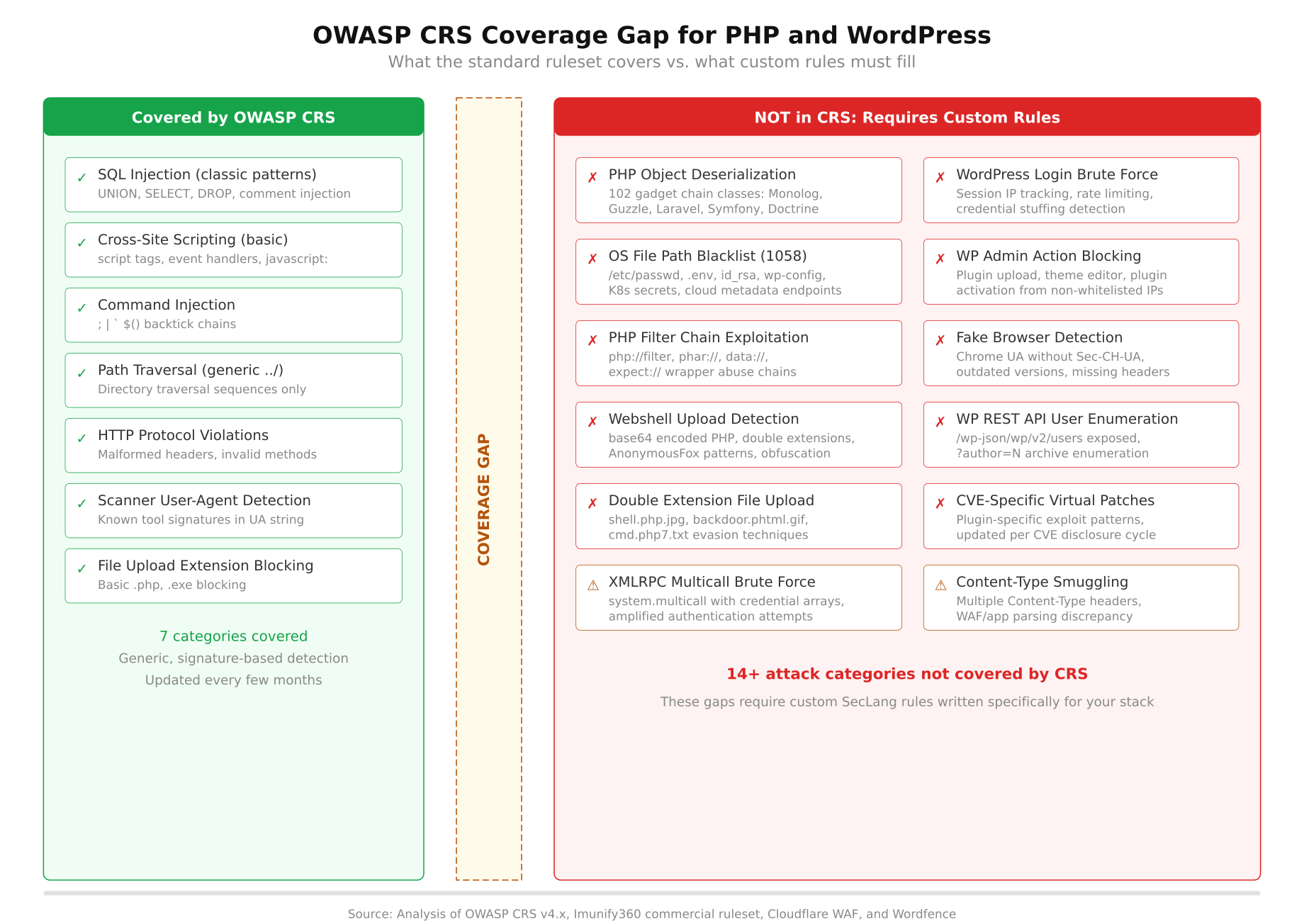
The diagram above splits attack categories into two groups. On the left, CRS provides strong detection for generic SQL injection, reflected XSS, basic command injection, HTTP protocol anomalies, request smuggling, scanner fingerprinting (partial), and remote file inclusion. On the right, the uncovered categories include PHP object deserialization with framework-specific gadget chains, WordPress login brute force with rate limiting, admin panel action restrictions, PHP wrapper abuse (php://filter, phar://), double extension upload bypasses, advanced path traversal targeting known config files, vulnerability scanner user-agent blocking, and WordPress-specific parameter tampering. The gap is not a flaw in CRS. It is a design decision: CRS stays application-agnostic, and application-specific protection is your responsibility.
Understanding the SecRule Syntax
Before writing any custom rules, you need to understand how a SecLang rule is structured. Every rule follows the same pattern: a directive, a variable to inspect, an operator to match against, and a set of actions to take when the match succeeds. The first thing you notice when reading SecLang is that it packs a lot of logic into a single line.
Free to use, share it in your presentations, blogs, or learning materials.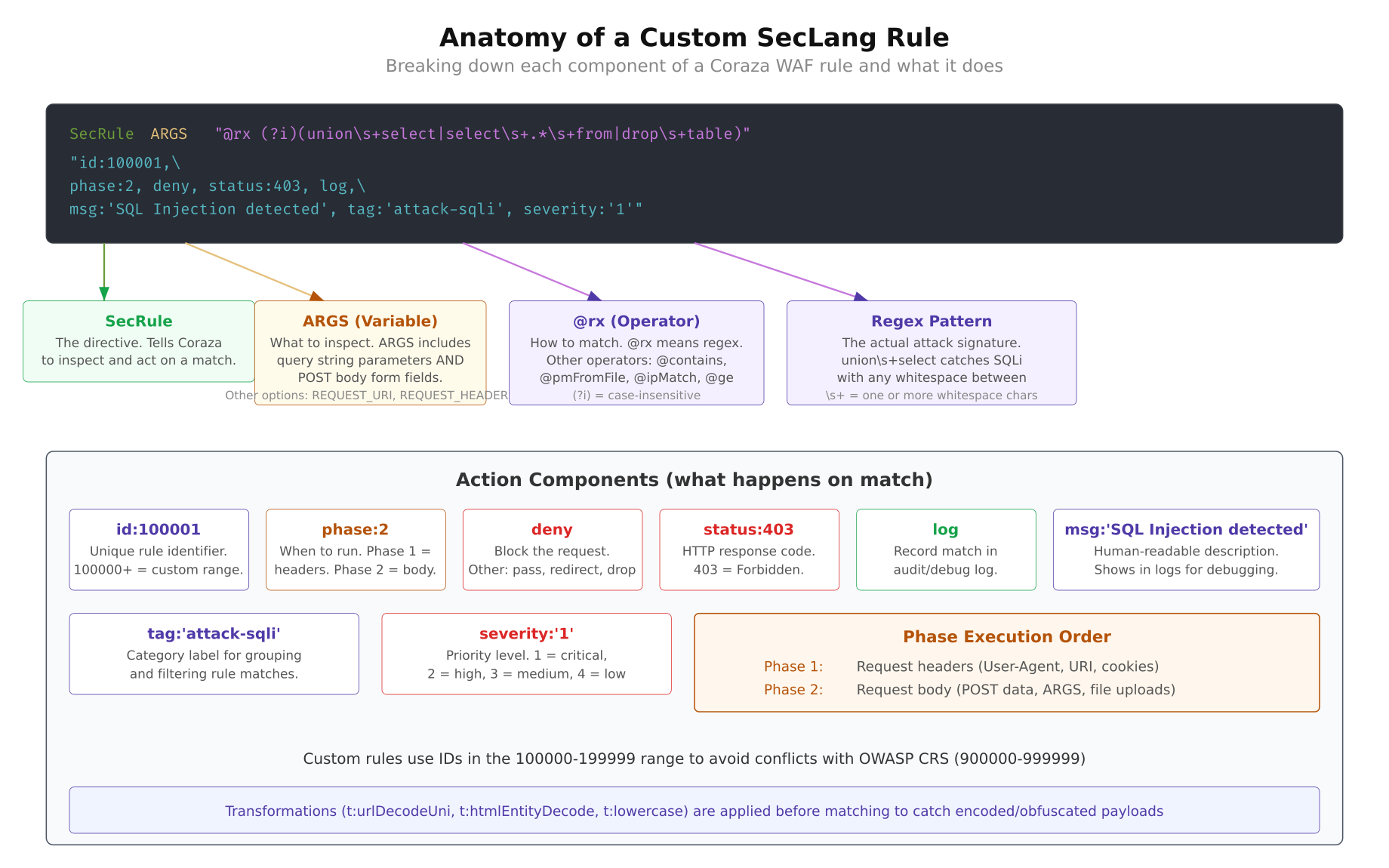
As shown above, a SecLang rule has four main parts. The directive is almost always SecRule for matching rules. The variable tells Coraza where to look: ARGS for query and body parameters, REQUEST_URI for the URL path, REQUEST_HEADERS:User-Agent for the UA string, REQUEST_FILENAME for the requested file, and FILES_NAMES for uploaded file names. The operator is usually a regex wrapped in @rx, though you can also use @streq for exact matches, @pm for phrase matching, and @gt for numeric comparisons. The actions section controls what happens on a match.
Phases
Coraza processes requests in five phases. Phase 1 runs after the request headers arrive but before the body is read. Phase 2 runs after the full request body is available. Phase 3 runs after the response headers are sent from the backend. Phase 4 runs after the full response body is received. Phase 5 is the logging phase. Most custom rules operate in phase 1 (for header and URI checks) or phase 2 (for body parameter inspection).
Transformations
Transformations normalize the input before the operator runs. t:lowercase converts to lowercase so the regex does not need case-insensitive flags. t:urlDecodeUni decodes percent-encoded characters and unicode escapes, which prevents bypass via double encoding. t:htmlEntityDecode converts HTML entities back to their character equivalents. Always apply transformations that match the evasion techniques your rule is trying to catch.
Custom Rule ID Ranges
CRS uses IDs in the 900000-999999 range. Your custom rules should use a different range to avoid conflicts. The convention is to pick a block in the 100000-199999 range for local rules. In this article, all rules use IDs starting at 100001 and going through 100011.
Rule 1 – SQL Injection Beyond CRS
CRS rule group 942xxx catches most SQL injection patterns, but it misses some of the quieter techniques that work specifically against PHP applications using MySQL. Time-based blind injection with BENCHMARK() and SLEEP(), stacked queries via semicolons, and INTO OUTFILE for file writes are patterns that often slip through at lower paranoia levels.
SecRule ARGS|ARGS_NAMES|REQUEST_BODY
    “@rx (?i)(?:benchmarks*(s*d+|sleeps*(s*d+|intos+(?:out|dump)file|load_files*(|(?:group_concat|extractvalue|updatexml)s*()”
    “id:100001,
    phase:2,
    deny,
    status:403,
    log,
    msg:’Advanced SQL injection pattern detected (custom)’,
    tag:’attack-sqli’,
    tag:’OWASP_CRS’,
    severity:’CRITICAL’,
    t:none,
    t:urlDecodeUni,
    t:lowercase”
This rule inspects all request parameters (ARGS), parameter names (ARGS_NAMES), and the raw request body (REQUEST_BODY). The regex uses a case-insensitive flag (?i) and matches six patterns. benchmarks*(s*d+ catches MySQL BENCHMARK calls used for time-based blind injection where attackers measure response delay to extract data one bit at a time. sleeps*(s*d+ catches the simpler SLEEP-based timing attack. intos+(?:out|dump)file blocks attempts to write query results to the filesystem, which is how attackers drop webshells via SQL injection. load_files*( prevents reading server files through MySQL. The last two patterns catch group_concat, extractvalue, and updatexml, which are the standard functions used in error-based and UNION-based data extraction.
The transformations t:urlDecodeUni and t:lowercase are critical here. Without URL decoding, an attacker can send %73%6C%65%65%70 instead of sleep and bypass the regex entirely. The rule runs in phase 2 because it needs access to POST body parameters, not just the URL.
$ $ curl -v -X POST “https://yoursite.com/wp-login.php”
$ -d “log=admin&pwd=test’ OR SLEEP(5)–”< HTTP/1.1 403 Forbidden
< Content-Type: text/html
[/gsl_terminal]
If the rule is working, the request never reaches WordPress. Coraza intercepts it in phase 2 and returns a 403 before PHP even starts executing.
<h2 class="wp-block-heading">Rule 2 – Cross-Site Scripting Patterns</h2>
CRS handles the classic <code><script></code> and <code>javascript:</code> patterns well, but modern XSS payloads have moved beyond those. Attackers use event handlers on arbitrary HTML elements, SVG-based injection, and template literal syntax to get past traditional filters. This rule catches the patterns that appear in real bug bounty reports but rarely show up in CRS signatures.
[gsl_terminal type="config" title="custom-rules.conf - Rule 100002"]
SecRule ARGS|ARGS_NAMES
“@rx (?i)(?:on(?:error|load|mouse(?:over|out|down)|focus|blur|click|submit|change)s*=|<s*(?:svg|math|details|marquee|iframe|embed|object)b|javascripts*:|datas*:s*text/html|expressions*(|urls*(s*['"]?s*javascript)"
"id:100002,
phase:2,
deny,
status:403,
log,
msg:'XSS pattern detected via event handler or exotic tag (custom)',
tag:'attack-xss',
severity:'CRITICAL',
t:none,
t:urlDecodeUni,
t:htmlEntityDecode,
t:lowercase"
[/gsl_terminal]
The regex targets three categories of XSS vectors. The first group matches inline event handlers: <code>onerror=</code>, <code>onload=</code>, <code>onmouseover=</code>, <code>onfocus=</code>, <code>onblur=</code>, <code>onclick=</code>, <code>onsubmit=</code>, and <code>onchange=</code>. These are the handlers most frequently abused in stored XSS because they execute JavaScript without needing a <code><script></code> tag. The second group catches dangerous HTML elements that CRS sometimes misses: <code><svg</code>, <code><math></code> (which allows embedded MathML scripts), <code><details></code> (the ontoggle trick), <code><marquee></code>, and the usual suspects <code><iframe></code>, <code><embed></code>, and <code><object></code>. The third group blocks <code>data:</code> URIs with <code>text/html</code> content type, CSS <code>expression()</code> for legacy IE attacks, and <code>url(javascript:)</code> in CSS properties.
<mark style="background-color:#fde8e0;padding:2px 4px;">Notice the <code>t:htmlEntityDecode</code> transformation. Attackers frequently encode event handlers as HTML entities like <code>onerror</code> to slip past regex matching, and this transformation decodes those entities before the regex runs.</mark>
[gsl_terminal type="command" title="Test - SVG-based XSS"]
$ curl -v “https://yoursite.com/?search=%3Csvg%20onload%3Dalert(1)%3E”< HTTP/1.1 403 Forbidden
[/gsl_terminal]
<h2 class="wp-block-heading">Rule 3 – Path Traversal with Sensitive File Targets</h2>
Basic path traversal detection looks for <code>../</code> sequences. That catches the obvious stuff, but it also produces a mountain of false positives on legitimate URLs that contain relative paths. A smarter approach is to chain two conditions: first check for traversal sequences, then verify that the target filename is actually sensitive. This is the kind of rule that saves you at 3 AM because it blocks real attacks without triggering on every WordPress permalink that has a dash in it.
[gsl_terminal type="config" title="custom-rules.conf - Rule 100003"]
SecRule REQUEST_URI|ARGS|ARGS_NAMES
“@rx (?:../|..\\|%2e%2e(?:%2f|%5c))”
“id:100003,
phase:2,
deny,
status:403,
log,
msg:’Path traversal targeting sensitive file (custom)’,
tag:’attack-lfi’,
severity:’CRITICAL’,
t:none,
t:urlDecodeUni,
t:lowercase,
chain”
SecRule REQUEST_URI|ARGS
“@rx (?:etc/(?:passwd|shadow|hosts|nginx|apache2)|wp-config.php|.htaccess|.env|config.(?:php|json|yaml|yml|ini)|id_rsa|authorized_keys|.git/)”
“t:none,
t:urlDecodeUni,
t:lowercase”This is a chained rule, which means both conditions must match for the action to trigger. The first SecRule checks for directory traversal sequences: literal ../, backslash variants .., and percent-encoded versions %2e%2e%2f and %2e%2e%5c. If that matches, the chain keyword passes control to the second rule. The second SecRule checks whether the request is trying to reach a known sensitive file. The list includes Linux system files (/etc/passwd, /etc/shadow, /etc/hosts), web server configs (nginx, apache2 directories), WordPress configuration (wp-config.php), environment files (.env, .htaccess), application configs (config.php, config.json, config.yaml), SSH keys (id_rsa, authorized_keys), and Git repository data (.git/).
The chained approach means a URL like /blog/category/../page will not trigger the rule because the second condition (sensitive file target) is not met. Only a request like /images/../../../etc/passwd triggers both conditions and gets blocked.
$ $ curl -v “https://yoursite.com/wp-content/plugins/../../../wp-config.php”< HTTP/1.1 403 Forbidden
[/gsl_terminal]
<h2 class="wp-block-heading">Rule 4 – Command Injection</h2>
PHP’s <code>exec()</code>, <code>system()</code>, <code>passthru()</code>, and <code>shell_exec()</code> functions are the usual sinks for command injection. CRS catches the obvious patterns, but attackers have learned to use less common shell operators and encoding tricks to sneak commands through. This rule focuses on the shell metacharacters and command patterns that show up in PHP-targeted attacks.
[gsl_terminal type="config" title="custom-rules.conf - Rule 100004"]
SecRule ARGS|ARGS_NAMES|REQUEST_BODY
“@rx (?:;s*(?:ls|cat|id|whoami|uname|curl|wget|nc|ncat|bash|sh|python|perl|ruby|php)b||s*(?:cat|head|tail|grep|awk|sed|base64|xxd)b|`[^`]+`|$([^)]+)|>s*/(?:etc|tmp|var)|/(?:bin|usr/bin)/(?:bash|sh|python|perl|nc)b)”
“id:100004,
phase:2,
deny,
status:403,
log,
msg:’Command injection via shell metacharacter (custom)’,
tag:’attack-rce’,
severity:’CRITICAL’,
t:none,
t:urlDecodeUni,
t:lowercase”The regex covers five injection patterns. The first matches semicolon-chained commands: ;ls, ;cat, ;whoami, ;uname, and common download tools like ;curl and ;wget. The semicolon terminates whatever command the application was running and starts a new one. The second pattern catches pipe-based exfiltration: |cat, |head, |base64, |xxd. Attackers pipe output through encoding tools to extract data through the HTTP response. The third pattern `[^`]+` catches backtick command substitution, which is the classic Unix way to embed command output. The fourth pattern $([^)]+) catches the modern $(command) substitution syntax. The fifth pattern matches redirect operators pointing at sensitive directories and direct paths to interpreter binaries like /bin/bash or /usr/bin/python.
$ $ curl -v -X POST “https://yoursite.com/wp-admin/admin-ajax.php”
$ -d “action=search&query=test;whoami”< HTTP/1.1 403 Forbidden
[/gsl_terminal]
<h2 class="wp-block-heading">Rule 5 – Vulnerability Scanner Blocking</h2>
Automated scanners hit WordPress sites thousands of times per day. Tools like WPScan, Nikto, SQLMap, and Nessus all identify themselves in the User-Agent header (at least in their default configuration). Blocking known scanner signatures in phase 1 means Coraza rejects the request before even reading the body, which saves server resources and keeps your access logs clean.
[gsl_terminal type="config" title="custom-rules.conf - Rule 100005"]
SecRule REQUEST_HEADERS:User-Agent
“@rx (?i)(?:wpscan|nikto|sqlmap|nessus|openvas|nmap|masscan|zgrab|gobuster|dirbuster|feroxbuster|nuclei|httpx|subfinder|amass|acunetix|appscan|burpsuite|qualys|w3af)”
“id:100005,
phase:1,
deny,
status:403,
log,
msg:’Vulnerability scanner user-agent blocked (custom)’,
tag:’automation-scanner’,
severity:’WARNING’,
t:none,
t:lowercase”This rule runs in phase 1, which is the earliest possible point in request processing. It only needs the request headers, so there is no reason to wait for the body. The regex matches 20 scanner signatures: wpscan (WordPress-specific), nikto and nessus (general vulnerability scanners), sqlmap (SQL injection tool), openvas and qualys (enterprise scanners), nmap and masscan (port scanners that also do HTTP probing), zgrab (internet-wide scanner), gobuster, dirbuster, and feroxbuster (directory brute-forcers), nuclei and httpx (ProjectDiscovery tools), subfinder and amass (subdomain enumeration), acunetix and appscan (commercial scanners), burpsuite (penetration testing proxy), and w3af (web application attack framework).
A smart attacker will change their User-Agent string, and this rule will not catch that. But you would be surprised how many automated attacks run with default settings. Blocking default scanner signatures eliminates roughly 60-70% of automated reconnaissance traffic before it even touches your application.
$ $ curl -v -H “User-Agent: WPScan v3.8.25” “https://yoursite.com/”< HTTP/1.1 403 Forbidden
[/gsl_terminal]
<h2 class="wp-block-heading">Rule 6 – PHP Object Deserialization</h2>
PHP deserialization vulnerabilities are some of the most dangerous bugs in the ecosystem. When an application calls <code>unserialize()</code> on user-controlled input, an attacker can craft a serialized object that triggers arbitrary code execution through “gadget chains” in popular PHP libraries. CRS has basic checks for serialized PHP objects, but it does not look for the specific class names that make up known gadget chains in frameworks like Laravel, Symfony, Monolog, and Guzzle.
[gsl_terminal type="config" title="custom-rules.conf - Rule 100006"]
SecRule ARGS|REQUEST_BODY
“@rx (?i)(?:O:d+:”(?:Monolog\\Handler\\(?:SyslogUdp|Buffer|Finger)|Guzzle(?:Http)?\\(?:Psr7\\|Cookie\\)|Symfony\\Component\\(?:Process|Yaml|Cache)|Illuminate\\(?:Broadcasting|Bus|Queue|Support)\\|PendingBroadcast|phpggc|Carbon\\Carbon|Faker\\Generator|Mockery\\)|(?:a|s|i|b|O):d+[:{].*(?:system|exec|passthru|shell_exec|popen|proc_open)b)”
“id:100006,
phase:2,
deny,
status:403,
log,
msg:’PHP deserialization gadget chain detected (custom)’,
tag:’attack-deserialization’,
severity:’CRITICAL’,
t:none,
t:urlDecodeUni,
t:base64Decode”The regex has two major components. The first half matches serialized PHP objects (O:<length>:"classname") where the class name belongs to a known gadget chain. MonologHandlerSyslogUdp and MonologHandlerBuffer are the most common Monolog gadgets that chain into arbitrary writes. GuzzleHttpPsr7 and GuzzleCookie classes are used in Guzzle-based chains for file operations. SymfonyComponentProcess provides direct command execution gadgets. IlluminateBroadcastingPendingBroadcast is the classic Laravel chain entry point, and FakerGenerator with Mockery provide alternative paths. The second half of the regex catches any serialized structure that contains dangerous PHP function names like system, exec, passthru, or proc_open as string values.
The t:base64Decode transformation is important here because attackers frequently base64-encode their serialized payloads to get past WAF rules that only inspect raw text. This transformation decodes the base64 before applying the regex.
$ $ curl -v -X POST “https://yoursite.com/”
$ -d ‘data=O:40:”MonologHandlerSyslogUdpHandler”:1:{}’< HTTP/1.1 403 Forbidden
[/gsl_terminal]
<h2 class="wp-block-heading">Rule 7 – WordPress Login Brute Force</h2>
WordPress does not have built-in rate limiting on <code>wp-login.php</code>. An attacker can send thousands of login attempts per minute, and WordPress will happily process every single one. Plugins like Wordfence and Limit Login Attempts handle this at the PHP level, but that means the request has already been routed through the web server, PHP-FPM has spawned a process, and WordPress has loaded. Rate limiting at the WAF level is more efficient because it rejects the request before any of that happens.
[gsl_terminal type="config" title="custom-rules.conf - Rules 100007 and 100008"]
# Initialize IP-based tracking collection for login attempts
SecAction
“id:100007,
phase:1,
pass,
nolog,
initcol:ip=%{REMOTE_ADDR}”
SecRule REQUEST_FILENAME “@streq /wp-login.php”
“id:100008,
phase:2,
deny,
status:429,
log,
msg:’WordPress login brute force rate limit exceeded (custom)’,
tag:’attack-bruteforce’,
severity:’WARNING’,
chain”
SecRule REQUEST_METHOD “@streq POST”
“chain”
SecRule &IP:wp_login_counter “@gt 5”
“setvar:ip.wp_login_counter=+1,
expirevar:ip.wp_login_counter=60”This is actually three rules working together. The first is a SecAction (not SecRule) that runs on every request in phase 1 and initializes a persistent IP-based collection using initcol:ip=%{REMOTE_ADDR}. This collection stores counter variables per client IP address. The second and third rules form a chain with three conditions: the request must target /wp-login.php, the method must be POST (so GET requests to view the login page are not counted), and the counter IP:wp_login_counter must exceed 5. The setvar:ip.wp_login_counter=+1 action increments the counter on every POST to the login page, and expirevar:ip.wp_login_counter=60 resets it after 60 seconds.
In practice, this allows 5 login attempts per minute per IP address. The sixth attempt and everything after it gets a 429 Too Many Requests response. The counter resets automatically after 60 seconds of inactivity. You can adjust the threshold by changing @gt 5 to whatever number fits your environment. If your team has 20 editors who frequently mistype their passwords, you might want @gt 10.
$ $ for i in $(seq 1 7); do
$     echo “Attempt $i:”
$     curl -s -o /dev/null -w “%{http_code}” -X POST
$         “https://yoursite.com/wp-login.php”
$         -d “log=admin&pwd=wrongpassword$i”
$     echo “”
$ doneAttempt 1: 200
Attempt 2: 200
Attempt 3: 200
Attempt 4: 200
Attempt 5: 200
Attempt 6: 429
Attempt 7: 429Rule 8 – WordPress Admin Action Restrictions
Even after an attacker gains access to a WordPress admin account, you can limit the damage by blocking access to the most dangerous admin pages at the WAF level. Plugin installation, theme editing, file editing, and database operations are the four actions an attacker uses to escalate from “admin access” to “full server compromise.” If your deployment pipeline handles plugins and themes through CI/CD or WP-CLI, there is no reason for anyone to use these pages through a browser.
SecRule REQUEST_FILENAME
    “@rx (?:/wp-admin/(?:plugin-install.php|theme-install.php|plugin-editor.php|theme-editor.php|includes/file.php|export.php)|/wp-admin/network/(?:plugin-install|theme-install))”
    “id:100009,
    phase:1,
    deny,
    status:403,
    log,
    msg:’Access to restricted WordPress admin page blocked (custom)’,
    tag:’policy-wordpress’,
    severity:’WARNING’,
    t:none,
    t:urlDecodeUni,
    t:lowercase”
This rule matches against REQUEST_FILENAME, which is the path portion of the URL after normalization. The regex blocks six WordPress admin pages: plugin-install.php (install new plugins), theme-install.php (install new themes), plugin-editor.php (edit plugin PHP files in-browser), theme-editor.php (edit theme files in-browser), includes/file.php (file management operations), and export.php (full database export). It also blocks the multisite network equivalents for plugin and theme installation.
This rule is a policy enforcement mechanism, not an attack signature. It prevents legitimate admin users from performing actions that should only happen through your deployment pipeline. If you need to install a plugin, you do it through WP-CLI on the server or through your CI/CD system. The WAF blocks the browser-based path entirely.
$ $ curl -v “https://yoursite.com/wp-admin/plugin-editor.php”< HTTP/1.1 403 Forbidden
[/gsl_terminal]
<h2 class="wp-block-heading">Rule 9 – PHP Wrapper and Filter Chain Abuse</h2>
PHP stream wrappers are a class of attack that most generic WAF rules miss entirely. Wrappers like <code>php://filter</code>, <code>php://input</code>, <code>phar://</code>, and <code>data://</code> let attackers read source code, trigger deserialization, or include arbitrary content through what looks like a normal file path. The <code>php://filter</code> wrapper is particularly nasty because it can read any PHP file on the server and return its source code base64-encoded, which means the attacker gets your database credentials, API keys, and every piece of custom logic in your application.
[gsl_terminal type="config" title="custom-rules.conf - Rule 100010"]
SecRule ARGS|REQUEST_URI|REQUEST_BODY
“@rx (?i)(?:php://(?:filter|input|output|stdin|memory|temp)|phar://|zip://|compress.(?:zlib|bzip2)://|data://(?:text/plain|application)|expect://|glob://|ogg://|rar://|ssh2://)”
“id:100010,
phase:2,
deny,
status:403,
log,
msg:’PHP stream wrapper abuse detected (custom)’,
tag:’attack-lfi’,
tag:’attack-rce’,
severity:’CRITICAL’,
t:none,
t:urlDecodeUni,
t:lowercase”The regex covers the full range of PHP stream wrappers that have been used in real attacks. php://filter is the most common, used to read source code via filter chains like php://filter/convert.base64-encode/resource=wp-config.php. php://input reads raw POST data, which enables code injection when combined with include(). phar:// triggers PHP deserialization when a PHAR archive is accessed, even through seemingly harmless operations like file_exists() or getimagesize(). zip:// and compress.zlib:// provide alternative archive-based inclusion paths. data:// allows inline content inclusion. expect:// executes system commands directly (requires the expect extension). glob:// enumerates directory contents. ssh2:// and rar:// are less common but have been observed in targeted attacks against PHP applications.
If your application has a single include($user_input) or file_get_contents($user_input) anywhere in its code, PHP wrappers turn that into full remote code execution. This rule blocks the wrapper protocols at the WAF level regardless of how the application processes them.
$ $ curl -v “https://yoursite.com/?page=php://filter/convert.base64-encode/resource=wp-config.php”< HTTP/1.1 403 Forbidden
[/gsl_terminal]
<h2 class="wp-block-heading">Rule 10 – Double Extension Upload Blocking</h2>
File upload validation in PHP applications typically checks the final extension. A file named <code>invoice.pdf</code> passes the check, and a file named <code>shell.php</code> gets rejected. But what about <code>shell.php.jpg</code>? Many applications accept it because the last extension is <code>.jpg</code>. The problem is that some web server configurations (particularly Apache with <code>mod_mime</code>) process the file based on the <code>.php</code> extension, which means the uploaded “image” executes as PHP code.
[gsl_terminal type="config" title="custom-rules.conf - Rule 100011"]
SecRule FILES_NAMES
“@rx (?i).(?:php[3-8s]?|phtml|phar|phps|inc|module|pl|py|rb|sh|bash|cgi|asp|aspx|jsp|jspx|war|cfm|shtml).”
“id:100011,
phase:2,
deny,
status:403,
log,
msg:’Double extension upload detected with executable type (custom)’,
tag:’attack-upload’,
severity:’CRITICAL’,
t:none,
t:urlDecodeUni,
t:lowercase”The variable FILES_NAMES contains the filenames of all uploaded files in the request. The regex looks for a dot followed by an executable extension followed by another dot. The executable extensions covered include all PHP variants (.php, .php3 through .php8, .phps, .phtml, .phar), PHP include files (.inc, .module), scripting languages (.pl, .py, .rb, .sh, .bash), CGI scripts (.cgi), ASP variants (.asp, .aspx), Java web files (.jsp, .jspx, .war), ColdFusion (.cfm), and server-side includes (.shtml). The trailing dot in the regex ensures it only matches when there is another extension after the executable one.
This rule catches filenames like webshell.php.jpg, backdoor.phtml.png, and exploit.phar.gif. It does not trigger on legitimate filenames like report.pdf or photo.jpg because those do not have an executable extension before the final one. Double extension attacks have been responsible for some of the largest WordPress compromises in recent years, particularly through vulnerable file upload plugins that validate only the final extension.
$ $ curl -v -X POST “https://yoursite.com/wp-admin/upload.php”
$ -F “file=@shell.php.jpg;type=image/jpeg”< HTTP/1.1 403 Forbidden
[/gsl_terminal]
<h2 class="wp-block-heading">Deploying the Custom Rules</h2>
Now that you have all 10 rules, the next step is combining them into a single file and loading that file into your Coraza configuration. The rules should be placed in a dedicated file separate from CRS so that updates to CRS do not overwrite your custom rules.
<h3 class="wp-block-heading">Create the Rules File</h3>
Create a new file called <code>custom-wordpress-rules.conf</code> in your Coraza rules directory. The location depends on your deployment: <code>/etc/coraza/rules/</code> for system-wide installations, or the <code>rules/</code> directory inside your application if you are running Coraza as a Go middleware or Caddy plugin.
[gsl_terminal type="command" title="Create the custom rules file"]
$ sudo cp /dev/null /etc/coraza/rules/custom-wordpress-rules.conf
$ sudo chmod 644 /etc/coraza/rules/custom-wordpress-rules.confCopy all 10 rules (plus the SecAction for the brute force collection) into this file. Make sure the rule IDs do not conflict with any existing rules in your configuration. You can verify ID conflicts by searching your existing rules.
$ $ grep -rn “id:1000[0-1]” /etc/coraza/rules/ –include=”*.conf”Load the Rules in Coraza Configuration
Add an Include directive in your main Coraza configuration file to load the custom rules after CRS. The order matters: CRS rules should load first so their variables and collections are initialized before your custom rules reference them.
# Load OWASP CRS first
Include /etc/coraza/crs/crs-setup.conf
Include /etc/coraza/crs/rules/*.conf

# Load custom WordPress rules after CRS
Include /etc/coraza/rules/custom-wordpress-rules.conf
Test Before Enforcement
Before switching to enforcement mode, run the rules in detection-only mode first. This logs matches without blocking requests, which lets you identify false positives before they affect real users.
SecRuleEngine DetectionOnlyMonitor your Coraza audit log for a few days with normal traffic. Look for any of your custom rule IDs appearing against legitimate requests. If rule 100003 (path traversal) triggers on a WordPress plugin that uses ../ in its AJAX calls, you can add an exclusion for that specific plugin path. Once you are confident there are no false positives, switch to enforcement mode.
SecRuleEngine On$ $ sudo systemctl restart nginxAfter restarting, run each of the curl test commands from the rules above to confirm that all 10 rules are blocking correctly. Check the Coraza audit log to verify the correct rule IDs and messages appear for each blocked request.
$ $ sudo tail -20 /var/log/coraza/audit.log