

This article walks through every hardening step with exact Linux commands: kernel parameter tuning, service account isolation, filesystem partitioning with security mount options, firewall configuration, audit framework setup, secure boot chain verification, and compliance validation against CIS Benchmark Level 2. The scenario simulated here is PacificLedger Consortium, a trans-Pacific trade finance network deploying Hyperledger Fabric 2.5 orderers and peers across hardened Ubuntu 22.04 LTS servers in data centers in Vancouver, Osaka, and Auckland.
Free to use, share it in your presentations, blogs, or learning materials.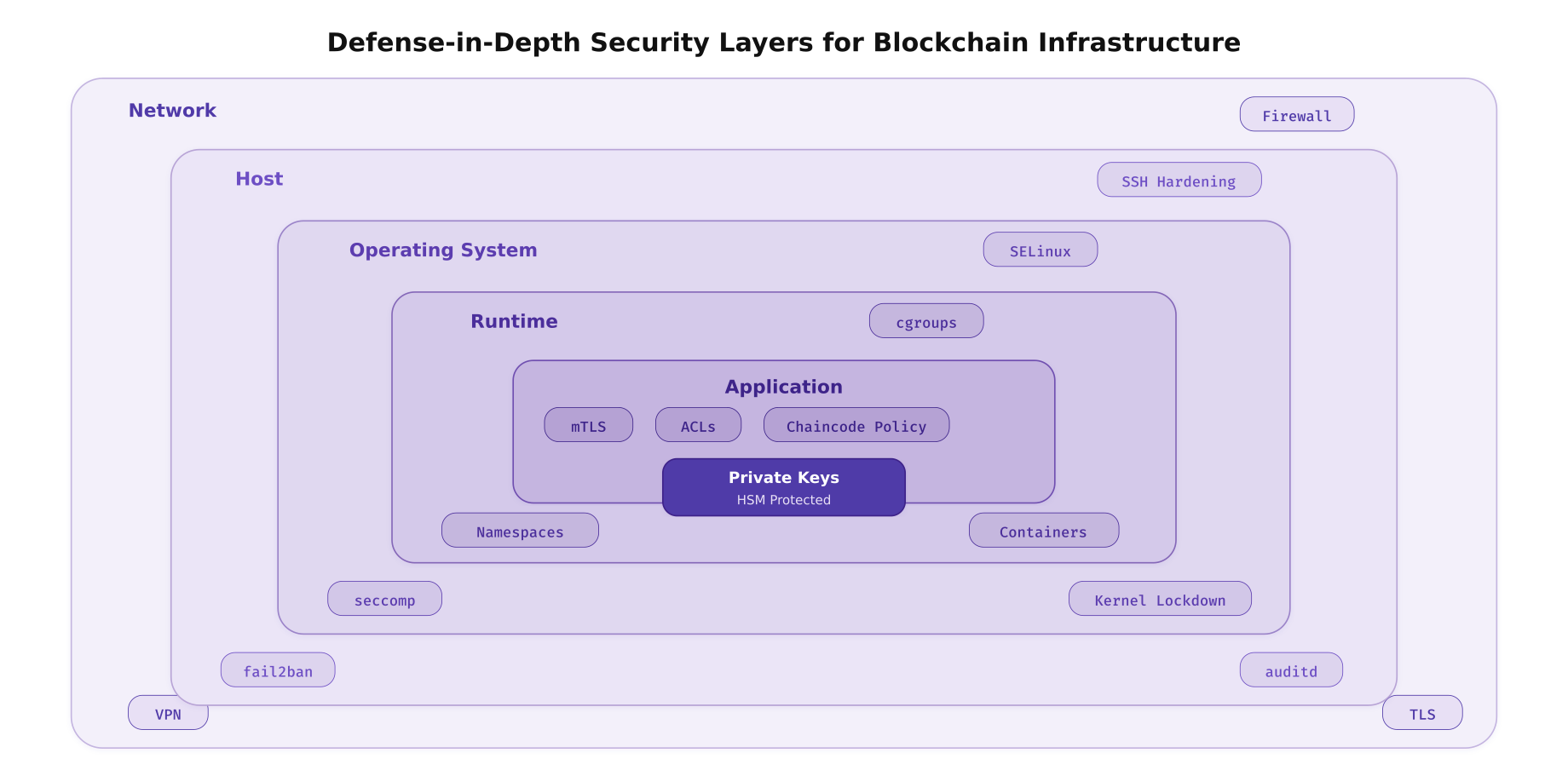
The illustration above maps the six defensive layers that PacificLedger implements on every blockchain server. Each layer operates independently so that a breach at one layer does not automatically compromise the next. The network layer filters traffic before it reaches the host. The host layer monitors access patterns. The OS layer enforces mandatory access controls. The runtime layer isolates processes. The application layer authenticates every connection. The core protects the cryptographic material that underpins the entire trust model.
Kernel Hardening and Sysctl Parameters
The Linux kernel exposes hundreds of tunable parameters through sysctl that affect security, networking, and memory behavior. For blockchain nodes, the priorities are: preventing information leakage, restricting kernel module loading, hardening the network stack against spoofing and flooding, and enabling address space layout randomization to defeat memory exploitation attacks.
# Kernel hardening sysctl parameters for blockchain production nodes
# /etc/sysctl.d/99-blockchain-hardening.conf
# Apply on every PacificLedger node (orderers, peers, CAs)

# --- Address Space Layout Randomization ---
# Full randomization for stack, heap, mmap, and VDSO
kernel.randomize_va_space = 2

# --- Restrict kernel pointer exposure ---
# Prevent unprivileged users from reading kernel addresses
kernel.kptr_restrict = 2

# --- Disable kernel message access for unprivileged users ---
kernel.dmesg_restrict = 1

# --- Disable core dumps (prevent credential/key leakage) ---
fs.suid_dumpable = 0
kernel.core_pattern = |/bin/false

# --- Restrict unprivileged BPF and user namespaces ---
kernel.unprivileged_bpf_disabled = 1
kernel.unprivileged_userns_clone = 0

# --- Disable magic SysRq key (prevents console-level attacks) ---
kernel.sysrq = 0

# --- Restrict ptrace to parent processes only ---
kernel.yama.ptrace_scope = 2

# --- Network stack hardening ---
# Ignore ICMP redirects (prevents MITM routing attacks)
net.ipv4.conf.all.accept_redirects = 0
net.ipv4.conf.default.accept_redirects = 0
net.ipv6.conf.all.accept_redirects = 0
net.ipv6.conf.default.accept_redirects = 0

# Do not send ICMP redirects
net.ipv4.conf.all.send_redirects = 0
net.ipv4.conf.default.send_redirects = 0

# Enable source address verification (anti-spoofing)
net.ipv4.conf.all.rp_filter = 1
net.ipv4.conf.default.rp_filter = 1

# Ignore broadcast pings (prevent Smurf attacks)
net.ipv4.icmp_echo_ignore_broadcasts = 1

# Log martian packets (packets with impossible source addresses)
net.ipv4.conf.all.log_martians = 1
net.ipv4.conf.default.log_martians = 1

# Disable source routing
net.ipv4.conf.all.accept_source_route = 0
net.ipv4.conf.default.accept_source_route = 0

# Enable SYN cookies (protect against SYN flood attacks)
net.ipv4.tcp_syncookies = 1

# Reduce TIME_WAIT socket exhaustion
net.ipv4.tcp_fin_timeout = 15
net.ipv4.tcp_max_tw_buckets = 400000

# TCP keepalive tuning (detect dead gRPC connections faster)
net.ipv4.tcp_keepalive_time = 60
net.ipv4.tcp_keepalive_intvl = 10
net.ipv4.tcp_keepalive_probes = 6

# --- Disable IPv6 if not used ---
net.ipv6.conf.all.disable_ipv6 = 1
net.ipv6.conf.default.disable_ipv6 = 1

# Apply all changes immediately
sudo sysctl --system
# Restrict kernel module loading at runtime
# Prevents attackers from loading malicious kernel modules
# Create module blacklist for unnecessary/dangerous modules
cat <<'EOF' | sudo tee /etc/modprobe.d/blockchain-blacklist.conf
# Disable USB storage (no removable media on servers)
blacklist usb-storage
install usb-storage /bin/false
# Disable Bluetooth
blacklist bluetooth
blacklist btusb
install bluetooth /bin/false
# Disable Firewire (IEEE 1394 DMA attacks)
blacklist firewire-core
blacklist firewire-ohci
install firewire-core /bin/false
# Disable unused filesystem types
blacklist cramfs
blacklist freevxfs
blacklist jffs2
blacklist hfs
blacklist hfsplus
blacklist squashfs
blacklist udf
# Disable unused network protocols
blacklist dccp
blacklist sctp
blacklist rds
blacklist tipc
EOF
# Enable kernel lockdown mode (integrity level)
# This prevents even root from modifying the running kernel
echo "lockdown=integrity" | sudo tee -a /etc/kernel/cmdline
sudo update-grub
# Verify kernel parameters are applied
sysctl kernel.randomize_va_space
sysctl kernel.kptr_restrict
sysctl kernel.dmesg_restrict
sysctl net.ipv4.tcp_syncookiesService Account Isolation
Every blockchain component must run under its own dedicated service account with minimal privileges. No blockchain process should run as root. Each account owns only its required directories, has no interactive shell, cannot use sudo, and is constrained by resource limits. This isolation ensures that a compromised peer process cannot access orderer keys, and a compromised CA cannot modify ledger data.
Free to use, share it in your presentations, blogs, or learning materials.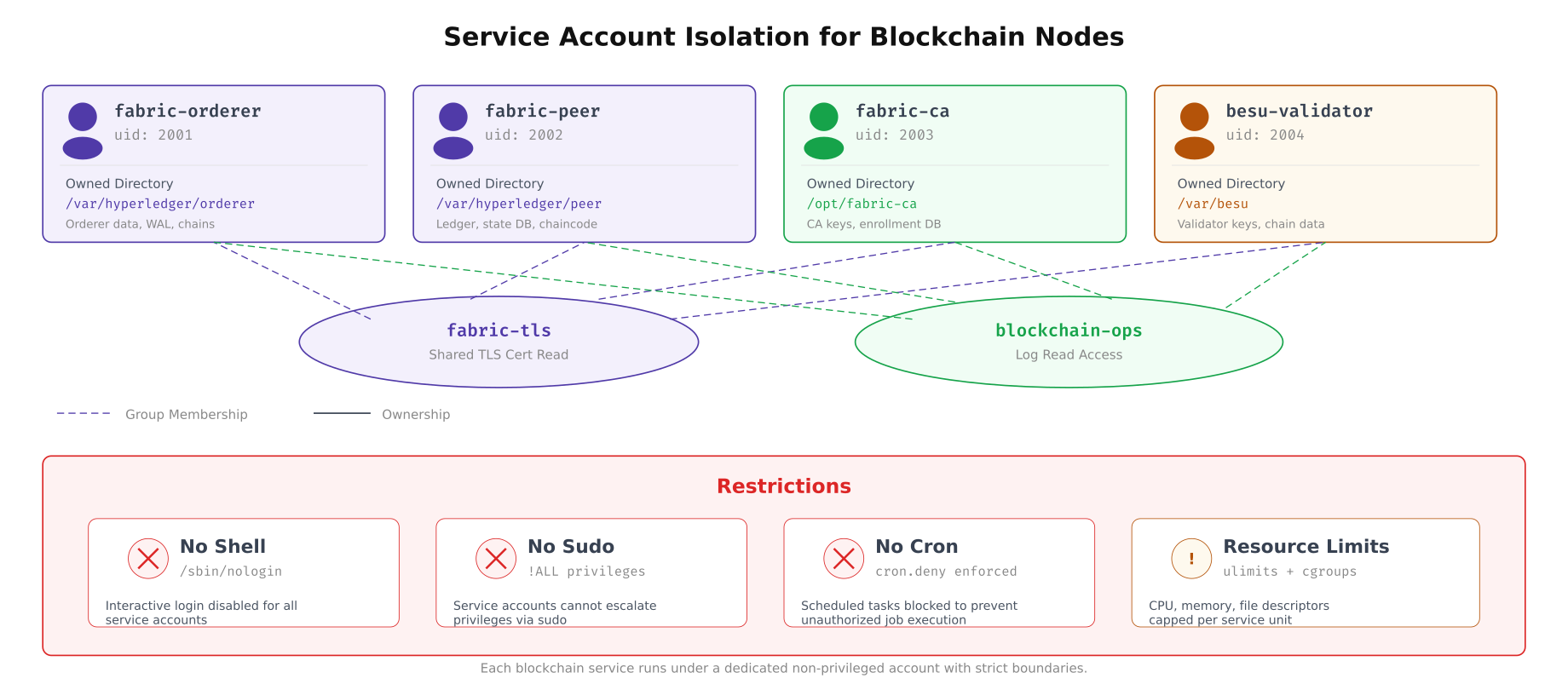
The diagram above shows how PacificLedger isolates each blockchain component into its own service account. The fabric-tls group provides read-only access to shared TLS certificates without giving any account write access to another’s directory. The blockchain-ops group allows the operations team to read logs across all services without having permission to modify binaries or configuration files.
# Create dedicated service accounts for each blockchain component
# No interactive shell, no home directory login

# Fabric Orderer account
sudo groupadd -g 2001 fabric-orderer
sudo useradd -r -u 2001 -g fabric-orderer -s /usr/sbin/nologin \
  -d /var/hyperledger/orderer -c "Fabric Orderer Service" fabric-orderer

# Fabric Peer account
sudo groupadd -g 2002 fabric-peer
sudo useradd -r -u 2002 -g fabric-peer -s /usr/sbin/nologin \
  -d /var/hyperledger/peer -c "Fabric Peer Service" fabric-peer

# Fabric CA account
sudo groupadd -g 2003 fabric-ca
sudo useradd -r -u 2003 -g fabric-ca -s /usr/sbin/nologin \
  -d /opt/fabric-ca -c "Fabric CA Service" fabric-ca

# Besu Validator account
sudo groupadd -g 2004 besu-validator
sudo useradd -r -u 2004 -g besu-validator -s /usr/sbin/nologin \
  -d /var/besu -c "Besu Validator Service" besu-validator

# Create shared groups for cross-service access
sudo groupadd -g 3001 fabric-tls
sudo groupadd -g 3002 blockchain-ops

# Add service accounts to TLS group (read-only cert access)
sudo usermod -aG fabric-tls fabric-orderer
sudo usermod -aG fabric-tls fabric-peer
sudo usermod -aG fabric-tls fabric-ca
sudo usermod -aG fabric-tls besu-validator

# Create directory structure with strict ownership
sudo mkdir -p /var/hyperledger/orderer /var/hyperledger/peer /opt/fabric-ca /var/besu
sudo mkdir -p /var/hyperledger/tls

sudo chown -R fabric-orderer:fabric-orderer /var/hyperledger/orderer
sudo chown -R fabric-peer:fabric-peer /var/hyperledger/peer
sudo chown -R fabric-ca:fabric-ca /opt/fabric-ca
sudo chown -R besu-validator:besu-validator /var/besu

# TLS directory: owned by root, readable by fabric-tls group
sudo chown root:fabric-tls /var/hyperledger/tls
sudo chmod 750 /var/hyperledger/tls
sudo chmod 640 /var/hyperledger/tls/*.pem 2>/dev/null

# Set restrictive permissions on service directories
sudo chmod 700 /var/hyperledger/orderer
sudo chmod 700 /var/hyperledger/peer
sudo chmod 700 /opt/fabric-ca
sudo chmod 700 /var/besu
# Configure resource limits for service accounts
# /etc/security/limits.d/blockchain.conf
cat <<'EOF' | sudo tee /etc/security/limits.d/blockchain.conf
# Fabric Orderer limits
fabric-orderer soft nofile 65536
fabric-orderer hard nofile 131072
fabric-orderer soft nproc 4096
fabric-orderer hard nproc 8192
fabric-orderer hard core 0
# Fabric Peer limits (higher, handles chaincode containers)
fabric-peer soft nofile 65536
fabric-peer hard nofile 131072
fabric-peer soft nproc 8192
fabric-peer hard nproc 16384
fabric-peer hard core 0
# Fabric CA limits
fabric-ca soft nofile 32768
fabric-ca hard nofile 65536
fabric-ca soft nproc 2048
fabric-ca hard nproc 4096
fabric-ca hard core 0
# Besu Validator limits
besu-validator soft nofile 65536
besu-validator hard nofile 131072
besu-validator soft nproc 4096
besu-validator hard nproc 8192
besu-validator hard core 0
EOF
# Configure sudoers: operations team can restart services only
cat <<'EOF' | sudo tee /etc/sudoers.d/blockchain-ops
# blockchain-ops group members can manage blockchain services
%blockchain-ops ALL=(root) NOPASSWD: /usr/bin/systemctl start fabric-orderer.service
%blockchain-ops ALL=(root) NOPASSWD: /usr/bin/systemctl stop fabric-orderer.service
%blockchain-ops ALL=(root) NOPASSWD: /usr/bin/systemctl restart fabric-orderer.service
%blockchain-ops ALL=(root) NOPASSWD: /usr/bin/systemctl status fabric-orderer.service
%blockchain-ops ALL=(root) NOPASSWD: /usr/bin/systemctl start fabric-peer.service
%blockchain-ops ALL=(root) NOPASSWD: /usr/bin/systemctl stop fabric-peer.service
%blockchain-ops ALL=(root) NOPASSWD: /usr/bin/systemctl restart fabric-peer.service
%blockchain-ops ALL=(root) NOPASSWD: /usr/bin/systemctl status fabric-peer.service
%blockchain-ops ALL=(root) NOPASSWD: /usr/bin/systemctl start besu-validator.service
%blockchain-ops ALL=(root) NOPASSWD: /usr/bin/systemctl stop besu-validator.service
%blockchain-ops ALL=(root) NOPASSWD: /usr/bin/systemctl restart besu-validator.service
%blockchain-ops ALL=(root) NOPASSWD: /usr/bin/systemctl status besu-validator.service
# No shell escalation for service accounts
fabric-orderer ALL=(ALL) !ALL
fabric-peer ALL=(ALL) !ALL
fabric-ca ALL=(ALL) !ALL
besu-validator ALL=(ALL) !ALL
EOF
sudo chmod 440 /etc/sudoers.d/blockchain-ops
sudo visudo -cf /etc/sudoers.d/blockchain-opsFilesystem Partitioning and Mount Hardening
Blockchain nodes generate large volumes of ledger data, write-ahead logs, and state databases. Placing all of this on a single root partition means a full ledger can crash the entire OS. Separate partitions with strict mount options prevent this and add security boundaries: noexec on /tmp prevents execution of uploaded exploits, nosuid on /var prevents SUID escalation, and nodev blocks device file creation outside /dev.
Free to use, share it in your presentations, blogs, or learning materials.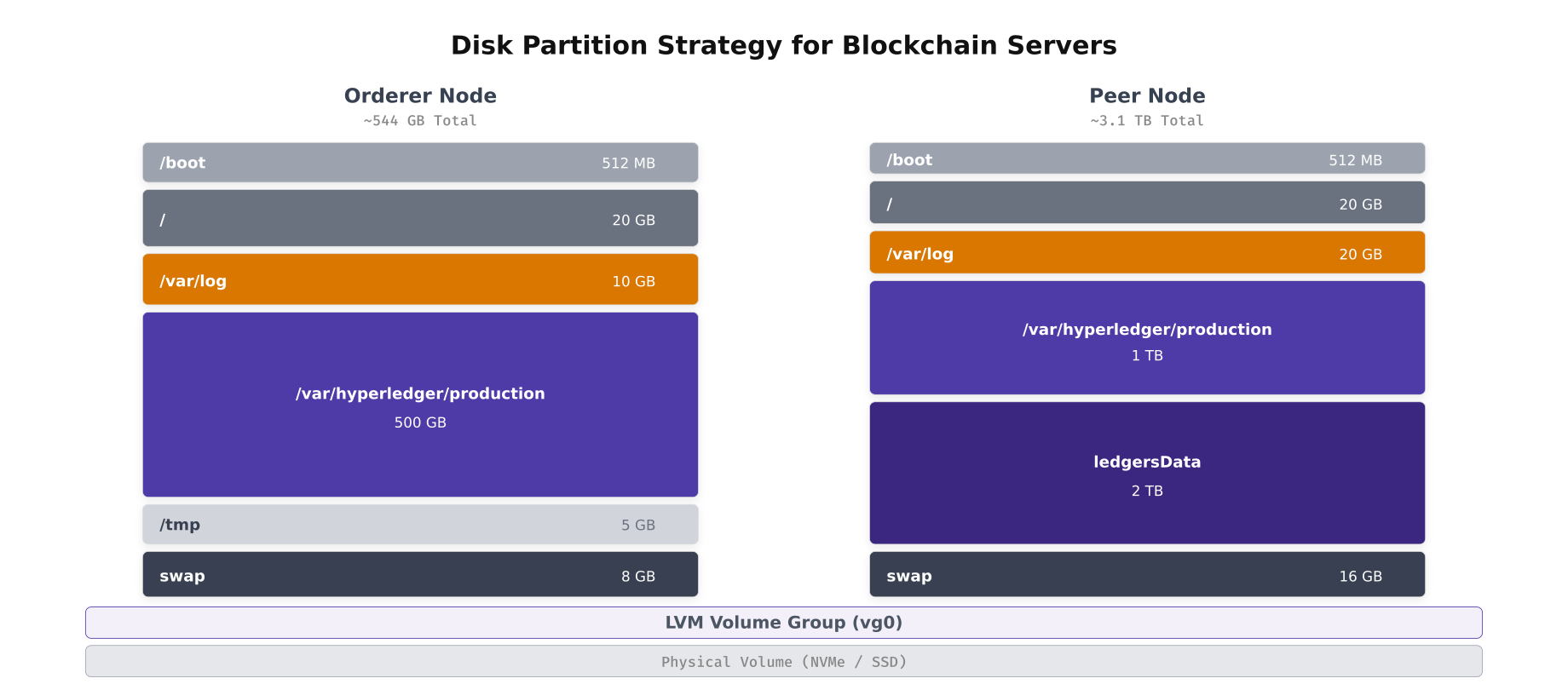
The layout above shows how PacificLedger partitions orderer and peer servers differently. Orderers need less ledger storage (500GB) because they only store the block data, while peers require significantly more (2TB+) for the full ledger plus the CouchDB state database. Both layouts use LVM for flexible volume management and place each mount point on a dedicated logical volume.
# Create LVM volume groups and logical volumes for a peer node
# Assumes two NVMe drives: /dev/nvme0n1 (OS) and /dev/nvme1n1 (data)

# Partition the OS drive
sudo parted /dev/nvme0n1 --script mklabel gpt
sudo parted /dev/nvme0n1 --script mkpart primary fat32 1MiB 513MiB
sudo parted /dev/nvme0n1 --script set 1 esp on
sudo parted /dev/nvme0n1 --script mkpart primary 513MiB 100%

# Set up LUKS encryption on the OS partition
sudo cryptsetup luksFormat /dev/nvme0n1p2
sudo cryptsetup luksOpen /dev/nvme0n1p2 crypt-os

# Create OS volume group
sudo pvcreate /dev/mapper/crypt-os
sudo vgcreate vg-os /dev/mapper/crypt-os

# Create OS logical volumes
sudo lvcreate -L 20G -n lv-root vg-os
sudo lvcreate -L 20G -n lv-varlog vg-os
sudo lvcreate -L 5G -n lv-tmp vg-os
sudo lvcreate -L 16G -n lv-swap vg-os

# Format OS volumes
sudo mkfs.ext4 -L root /dev/vg-os/lv-root
sudo mkfs.ext4 -L varlog /dev/vg-os/lv-varlog
sudo mkfs.ext4 -L tmp /dev/vg-os/lv-tmp
sudo mkswap -L swap /dev/vg-os/lv-swap

# Set up data drive for blockchain storage
sudo cryptsetup luksFormat /dev/nvme1n1
sudo cryptsetup luksOpen /dev/nvme1n1 crypt-data

sudo pvcreate /dev/mapper/crypt-data
sudo vgcreate vg-data /dev/mapper/crypt-data

# Create blockchain data logical volumes
sudo lvcreate -L 1T -n lv-production vg-data
sudo lvcreate -L 2T -n lv-ledger vg-data

# Format data volumes with XFS for large file performance
sudo mkfs.xfs -L production /dev/vg-data/lv-production
sudo mkfs.xfs -L ledger /dev/vg-data/lv-ledger

# Format boot partition
sudo mkfs.fat -F 32 /dev/nvme0n1p1
# /etc/fstab with hardened mount options
# Each partition has the minimum permissions required
cat <<'EOF' | sudo tee /etc/fstab
# Boot partition
/dev/nvme0n1p1 /boot vfat defaults,nodev,nosuid,noexec 0 2
# Root filesystem
/dev/vg-os/lv-root / ext4 defaults,noatime 0 1
# Log partition: no executables, no SUID, no device files
/dev/vg-os/lv-varlog /var/log ext4 defaults,nodev,nosuid,noexec,noatime 0 2
# Temp partition: full lockdown
/dev/vg-os/lv-tmp /tmp ext4 defaults,nodev,nosuid,noexec,noatime 0 2
# Swap
/dev/vg-os/lv-swap none swap sw 0 0
# Blockchain production data: no SUID, no device files, optimized for I/O
/dev/vg-data/lv-production /var/hyperledger/production xfs defaults,nodev,nosuid,noatime 0 2
# Ledger data: separate volume for growth isolation
/dev/vg-data/lv-ledger /var/hyperledger/production/ledgersData xfs defaults,nodev,nosuid,noatime 0 2
EOF
# Apply mount options to currently mounted filesystems
sudo mount -o remount /tmp
sudo mount -o remount /var/log
# Bind mount /var/tmp to /tmp (same restrictions)
echo "/tmp /var/tmp none bind 0 0" | sudo tee -a /etc/fstab
sudo mount --bind /tmp /var/tmp
# Verify mount options are applied
mount | grep -E "tmp|var/log|hyperledger" | column -t
# Set sticky bit on /tmp
sudo chmod 1777 /tmpComprehensive OS Hardening Checklist
Beyond kernel and filesystem hardening, a production blockchain server requires dozens of configuration changes across user management, network services, password policies, and package management. PacificLedger follows the CIS Benchmark Level 2 for Ubuntu 22.04 as the baseline and adds blockchain-specific controls on top.
Free to use, share it in your presentations, blogs, or learning materials.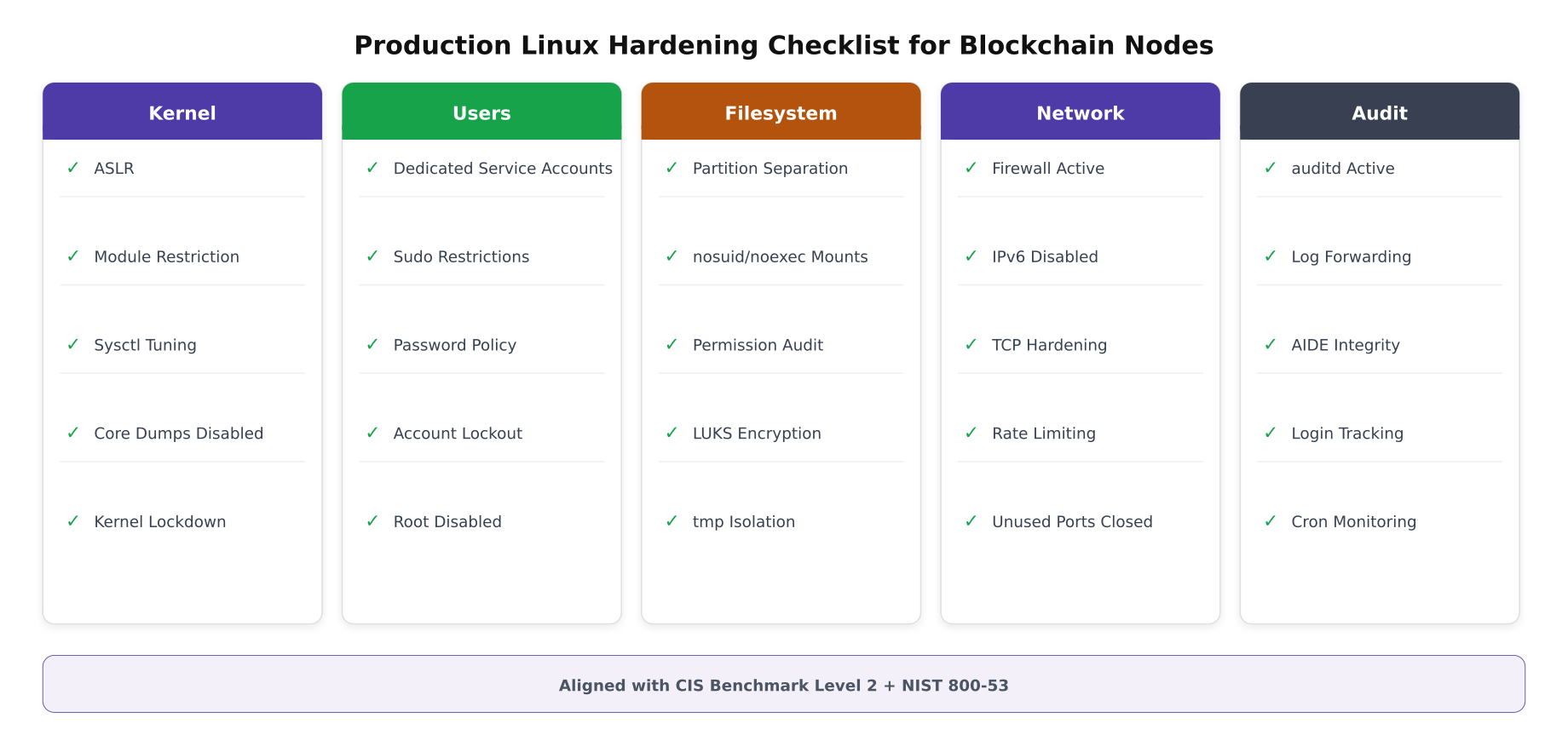
The checklist above organizes hardening tasks into five categories that must all be completed before a server enters the PacificLedger production network. Each item maps to specific CIS Benchmark controls and NIST 800-53 requirements. The sections below provide the exact commands to implement every item on this checklist.
# SSH hardening, /etc/ssh/sshd_config
# Disable root login, enforce key-based auth, restrict protocols

sudo cp /etc/ssh/sshd_config /etc/ssh/sshd_config.bak.$(date +%Y%m%d)

cat <<'EOF' | sudo tee /etc/ssh/sshd_config.d/blockchain-hardening.conf
# Disable root login entirely
PermitRootLogin no

# Key-based authentication only (no passwords)
PasswordAuthentication no
ChallengeResponseAuthentication no
PubkeyAuthentication yes

# Restrict to SSH protocol 2
Protocol 2

# Use strong key exchange and ciphers
KexAlgorithms curve25519-sha256,curve25519-sha256@libssh.org,diffie-hellman-group16-sha512
Ciphers chacha20-poly1305@openssh.com,aes256-gcm@openssh.com,aes256-ctr
MACs hmac-sha2-512-etm@openssh.com,hmac-sha2-256-etm@openssh.com

# Limit login attempts and session duration
MaxAuthTries 3
LoginGraceTime 30
ClientAliveInterval 300
ClientAliveCountMax 2

# Restrict SSH access to operations group only
AllowGroups blockchain-ops

# Disable X11 forwarding and agent forwarding
X11Forwarding no
AllowAgentForwarding no
AllowTcpForwarding no

# Log SFTP activity
Subsystem sftp internal-sftp -l INFO

# Display legal banner
Banner /etc/issue.net
EOF

sudo systemctl restart sshd

# Set legal warning banner
cat <<'EOF' | sudo tee /etc/issue.net
*********************************************************************
*  AUTHORIZED ACCESS ONLY, PacificLedger Consortium                *
*  All connections are monitored and recorded.                       *
*  Unauthorized access will be prosecuted.                           *
*********************************************************************
EOF
# Password and account lockout policies
# Even though we use key-based SSH, these protect against console/local access
# Install and configure PAM modules for account lockout
sudo apt-get install -y libpam-pwquality
# Configure password complexity
cat <<'EOF' | sudo tee /etc/security/pwquality.conf
minlen = 14
dcredit = -1
ucredit = -1
ocredit = -1
lcredit = -1
minclass = 4
maxrepeat = 3
maxsequence = 3
dictcheck = 1
EOF
# Configure account lockout after failed attempts
# /etc/pam.d/common-auth
sudo sed -i '/^auth.*pam_unix.so/i auth required pam_faillock.so preauth silent audit deny=5 unlock_time=900' /etc/pam.d/common-auth
sudo sed -i '/^auth.*pam_unix.so/a auth [default=die] pam_faillock.so authfail audit deny=5 unlock_time=900' /etc/pam.d/common-auth
# Set password aging policies
sudo sed -i 's/^PASS_MAX_DAYS.*/PASS_MAX_DAYS 90/' /etc/login.defs
sudo sed -i 's/^PASS_MIN_DAYS.*/PASS_MIN_DAYS 7/' /etc/login.defs
sudo sed -i 's/^PASS_WARN_AGE.*/PASS_WARN_AGE 14/' /etc/login.defs
# Disable unused system accounts
for USER in games gnats irc list news uucp; do
sudo usermod -s /usr/sbin/nologin "$USER" 2>/dev/null
done
# Lock root account (require sudo for privileged operations)
sudo passwd -l root
# Remove unnecessary packages
sudo apt-get purge -y telnet rsh-client rsh-redone-client talk
sudo apt-get autoremove -y# Install and configure fail2ban for brute force protection
sudo apt-get install -y fail2ban
cat <<'EOF' | sudo tee /etc/fail2ban/jail.d/blockchain.conf
[sshd]
enabled = true
port = ssh
filter = sshd
logpath = /var/log/auth.log
maxretry = 3
bantime = 3600
findtime = 600
banaction = nftables-multiport
# Custom jail for blockchain node API protection
[fabric-api]
enabled = true
port = 7050,7051,7053
filter = fabric-api
logpath = /var/hyperledger/orderer/logs/orderer.log
maxretry = 10
bantime = 1800
findtime = 300
banaction = nftables-multiport
EOF
# Create Fabric API filter
cat <<'EOF' | sudo tee /etc/fail2ban/filter.d/fabric-api.conf
[Definition]
failregex = .*TLS handshake failed.*remote=.*
.*authentication failure.*remote=.*
ignoreregex =
EOF
sudo systemctl enable fail2ban
sudo systemctl start fail2ban
sudo fail2ban-client status sshd Attack Surface Reduction
Every network service, open port, installed package, and loaded kernel module increases the attack surface. PacificLedger’s approach is to start with a minimal Ubuntu Server installation and add only the exact packages required for blockchain operation. Everything else gets removed or disabled.
Free to use, share it in your presentations, blogs, or learning materials.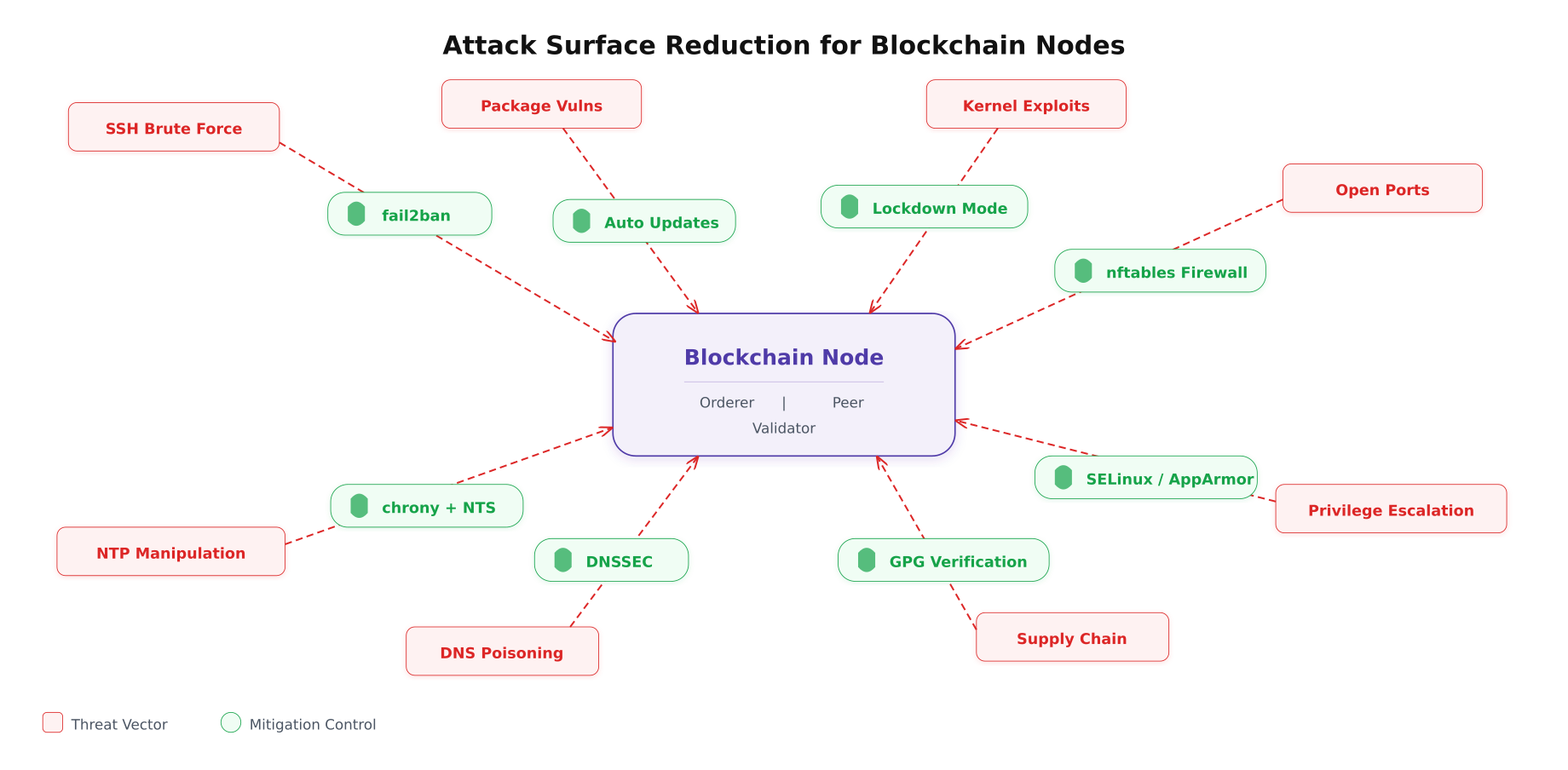
As shown above, each threat vector has a direct countermeasure. The key insight is that blockchain nodes are particularly sensitive to time manipulation (NTP attacks can cause consensus failures) and supply chain attacks (a poisoned binary can compromise the entire ledger). PacificLedger addresses these with chrony configured for Network Time Security and GPG verification on every package installation.
# Disable all unnecessary services
# List currently running services
systemctl list-units --type=service --state=running

# Disable services not needed on blockchain nodes
sudo systemctl disable --now avahi-daemon.service 2>/dev/null
sudo systemctl disable --now cups.service 2>/dev/null
sudo systemctl disable --now ModemManager.service 2>/dev/null
sudo systemctl disable --now bluetooth.service 2>/dev/null
sudo systemctl disable --now snapd.service 2>/dev/null
sudo systemctl disable --now snapd.socket 2>/dev/null
sudo systemctl disable --now multipathd.service 2>/dev/null
sudo systemctl mask ctrl-alt-del.target

# Remove snap entirely (reduces attack surface significantly)
sudo apt-get purge -y snapd
sudo rm -rf /snap /var/snap /var/lib/snapd

# Configure automatic security updates
sudo apt-get install -y unattended-upgrades
cat <<'EOF' | sudo tee /etc/apt/apt.conf.d/50unattended-upgrades
Unattended-Upgrade::Allowed-Origins {
    "${distro_id}:${distro_codename}-security";
};
Unattended-Upgrade::AutoFixInterruptedDpkg "true";
Unattended-Upgrade::MinimalSteps "true";
Unattended-Upgrade::Remove-Unused-Dependencies "true";
Unattended-Upgrade::Automatic-Reboot "false";
Unattended-Upgrade::Mail "ops@pacificledger.net";
EOF

sudo systemctl enable unattended-upgrades

# Configure NTP with Network Time Security (NTS)
sudo apt-get install -y chrony

cat <<'EOF' | sudo tee /etc/chrony/chrony.conf
# NTS-enabled time servers (authenticated, tamper-resistant)
server time.cloudflare.com iburst nts
server nts.netnod.se iburst nts
server ptbtime1.ptb.de iburst nts
server ntppool1.time.nl iburst nts

# Restrict who can query our NTP
allow 10.0.0.0/8
deny all

# Enable NTS key management
ntsdumpdir /var/lib/chrony
driftfile /var/lib/chrony/chrony.drift
logdir /var/log/chrony

# Maximum allowed clock step (prevents sudden time jumps)
makestep 0.1 3

# Rate limiting
ratelimit interval 1 burst 16
EOF

sudo systemctl restart chrony
chronyc sources -v
chronyc authdata
# Firewall configuration using nftables
# Allow only blockchain-required ports
cat <<'EOF' | sudo tee /etc/nftables.conf
#!/usr/sbin/nft -f
flush ruleset
table inet filter {
chain input {
type filter hook input priority 0; policy drop;
# Allow loopback
iif lo accept
# Allow established and related connections
ct state established,related accept
# Drop invalid packets
ct state invalid drop
# SSH (rate limited)
tcp dport 22 ct state new limit rate 5/minute accept
# Fabric Orderer ports (from known CIDRs only)
tcp dport 7050 ip saddr { 10.0.1.0/24, 10.0.2.0/24, 10.0.3.0/24 } accept
tcp dport 7053 ip saddr { 10.0.1.0/24 } accept
# Fabric Peer ports
tcp dport 7051 ip saddr { 10.0.1.0/24, 10.0.2.0/24, 10.0.3.0/24 } accept
# Besu P2P port
tcp dport 30303 ip saddr { 10.0.1.0/24, 10.0.2.0/24, 10.0.3.0/24 } accept
udp dport 30303 ip saddr { 10.0.1.0/24, 10.0.2.0/24, 10.0.3.0/24 } accept
# Prometheus node exporter (monitoring VLAN only)
tcp dport 9100 ip saddr { 10.0.4.0/24 } accept
tcp dport 9101 ip saddr { 10.0.4.0/24 } accept
# Operations port (admin VLAN only)
tcp dport 9443 ip saddr { 10.0.4.0/24 } accept
# ICMP (limited)
icmp type echo-request limit rate 1/second accept
# Log and drop everything else
log prefix "nft-drop: " counter drop
}
chain forward {
type filter hook forward priority 0; policy drop;
}
chain output {
type filter hook output priority 0; policy accept;
}
}
EOF
sudo nft -f /etc/nftables.conf
sudo systemctl enable nftables
# Verify rules
sudo nft list rulesetSecure Boot Chain
The secure boot chain ensures that every piece of software executing on a blockchain server, from the bootloader to the blockchain binary itself, is cryptographically verified. If any component is tampered with, the boot process halts and generates an audit alert. PacificLedger enables UEFI Secure Boot, GRUB password protection, kernel module signing, and LUKS full-disk encryption on every server.
Free to use, share it in your presentations, blogs, or learning materials.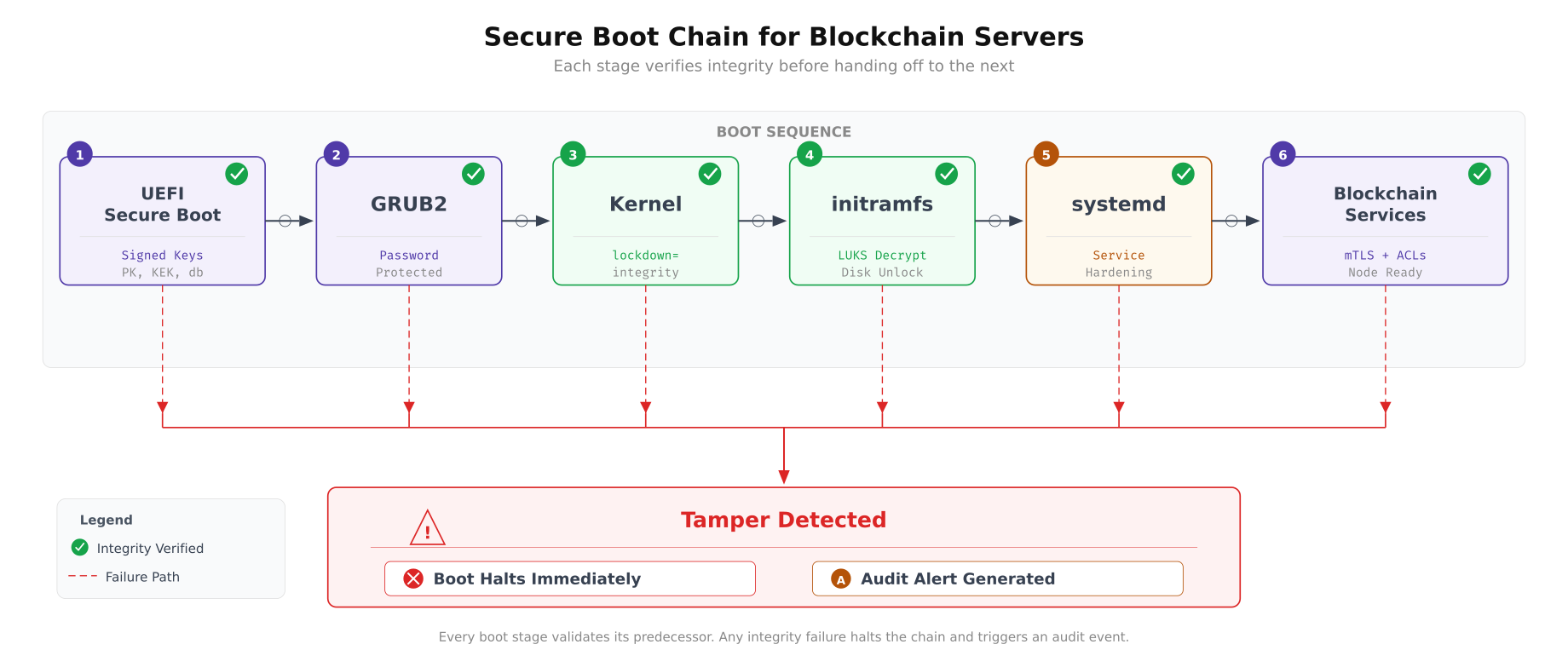
The chain diagram shows how each boot stage validates the next before transferring control. UEFI Secure Boot verifies the GRUB bootloader signature. GRUB requires a password to modify boot parameters and verifies the kernel signature. The kernel enforces lockdown=integrity mode, preventing runtime modification. initramfs unlocks the LUKS-encrypted root partition. systemd starts blockchain services with hardening directives. If any stage detects tampering, execution halts immediately.
# GRUB2 password protection
# Prevents unauthorized modification of boot parameters

# Generate GRUB password hash
GRUB_HASH=$(grub-mkpasswd-pbkdf2 2>/dev/null | grep "grub.pbkdf2" | awk '{print $NF}')

cat <<EOF | sudo tee /etc/grub.d/40_custom
#!/bin/sh
exec tail -n +3 \$0

set superusers="bootadmin"
password_pbkdf2 bootadmin ${GRUB_HASH}
EOF

sudo chmod 755 /etc/grub.d/40_custom
sudo update-grub

# Verify Secure Boot status
mokutil --sb-state

# Verify kernel lockdown mode
cat /sys/kernel/security/lockdown

# Verify LUKS encryption is active
sudo cryptsetup status crypt-os
sudo cryptsetup status crypt-data
# Systemd service hardening for blockchain services
# Each directive restricts what the service process can do
cat <<'EOF' | sudo tee /etc/systemd/system/fabric-orderer.service
[Unit]
Description=Hyperledger Fabric Orderer
After=network-online.target
Wants=network-online.target
[Service]
Type=simple
User=fabric-orderer
Group=fabric-orderer
WorkingDirectory=/var/hyperledger/orderer
ExecStart=/opt/fabric/bin/orderer
Restart=on-failure
RestartSec=10
LimitNOFILE=65536
LimitNPROC=4096
# Security hardening directives
NoNewPrivileges=yes
ProtectHome=yes
ProtectSystem=strict
PrivateTmp=yes
PrivateDevices=yes
ProtectKernelTunables=yes
ProtectKernelModules=yes
ProtectKernelLogs=yes
ProtectControlGroups=yes
RestrictSUIDSGID=yes
RestrictNamespaces=yes
RestrictRealtime=yes
MemoryDenyWriteExecute=yes
# Only allow write to orderer data directory
ReadWritePaths=/var/hyperledger/orderer
ReadOnlyPaths=/var/hyperledger/tls /opt/fabric
# Restrict system calls to only what orderer needs
SystemCallFilter=@system-service
SystemCallFilter=~@mount @reboot @swap @clock @debug @module @raw-io
SystemCallArchitectures=native
# Network restrictions
RestrictAddressFamilies=AF_INET AF_INET6 AF_UNIX
[Install]
WantedBy=multi-user.target
EOF
# Similar service file for peer (with additional chaincode paths)
cat <<'EOF' | sudo tee /etc/systemd/system/fabric-peer.service
[Unit]
Description=Hyperledger Fabric Peer
After=network-online.target
Wants=network-online.target
[Service]
Type=simple
User=fabric-peer
Group=fabric-peer
WorkingDirectory=/var/hyperledger/peer
ExecStart=/opt/fabric/bin/peer node start
Restart=on-failure
RestartSec=10
LimitNOFILE=65536
LimitNPROC=8192
# Security hardening
NoNewPrivileges=yes
ProtectHome=yes
ProtectSystem=strict
PrivateTmp=yes
PrivateDevices=yes
ProtectKernelTunables=yes
ProtectKernelModules=yes
ProtectKernelLogs=yes
ProtectControlGroups=yes
RestrictSUIDSGID=yes
RestrictRealtime=yes
# Peer needs write access to ledger and state data
ReadWritePaths=/var/hyperledger/peer /var/hyperledger/production
ReadOnlyPaths=/var/hyperledger/tls /opt/fabric
SystemCallFilter=@system-service
SystemCallFilter=~@mount @reboot @swap @clock @debug @module @raw-io
SystemCallArchitectures=native
RestrictAddressFamilies=AF_INET AF_INET6 AF_UNIX
[Install]
WantedBy=multi-user.target
EOF
sudo systemctl daemon-reload
sudo systemctl enable fabric-orderer.service fabric-peer.serviceAudit Framework and Compliance
An audit trail that records every security-relevant event is both a compliance requirement and an operational necessity. PacificLedger configures auditd to monitor file access on sensitive directories, track all privilege escalation attempts, log every network connection initiated by blockchain processes, and forward all audit logs to a centralized SIEM for correlation and alerting.
Free to use, share it in your presentations, blogs, or learning materials.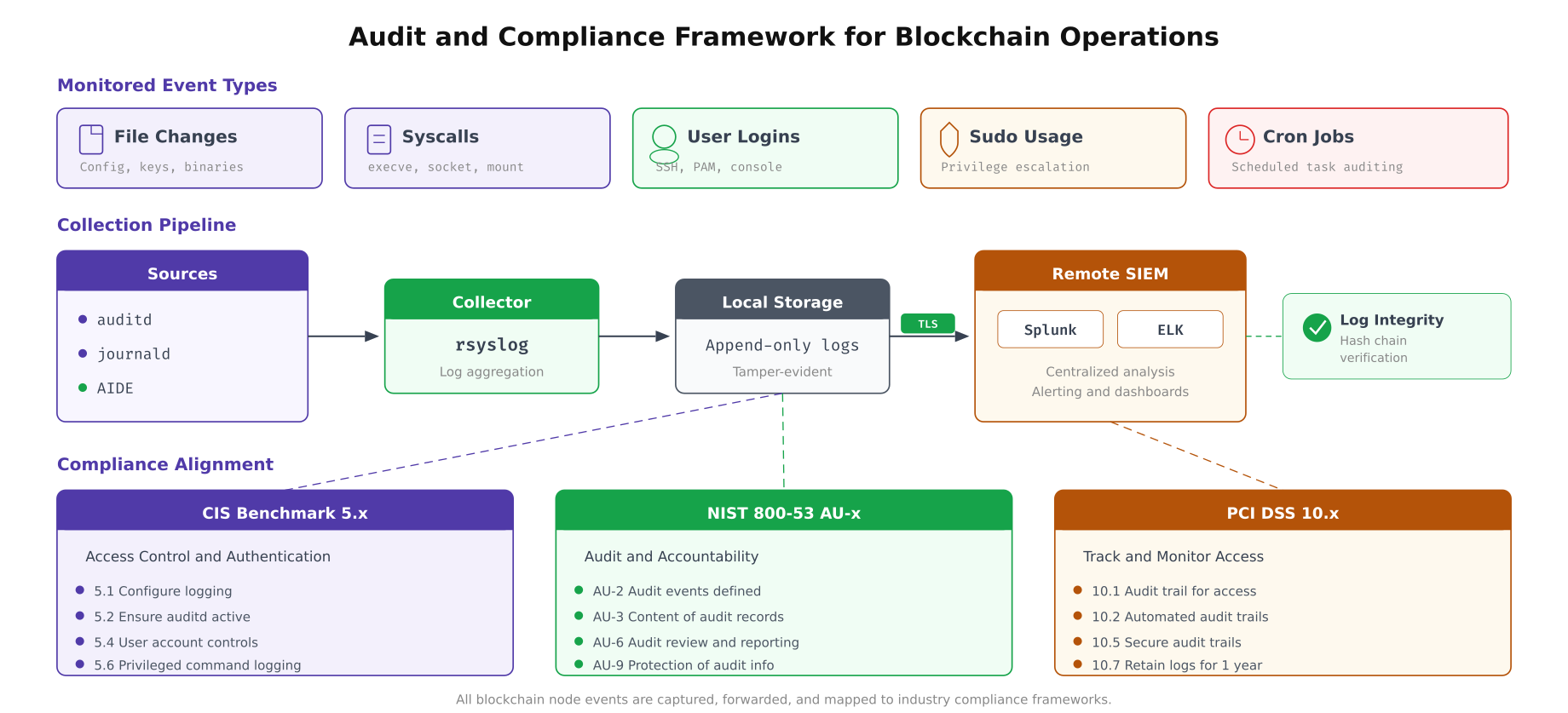
The pipeline above traces how audit events flow from their source to the SIEM platform. auditd captures kernel-level events (file access, syscalls, user actions). journald collects service logs. AIDE performs scheduled file integrity checks. rsyslog aggregates everything and forwards over TLS-encrypted connections to the remote SIEM cluster. The compliance framework boxes at the bottom show which audit controls satisfy which regulatory requirements.
# Configure auditd rules for blockchain server monitoring
# /etc/audit/rules.d/blockchain.rules

cat <<'EOF' | sudo tee /etc/audit/rules.d/blockchain.rules
# Delete all existing rules (start clean)
-D

# Set buffer size for high-throughput environments
-b 8192

# Fail mode: panic on audit failure (ensure no events are lost)
-f 2

# --- File integrity monitoring ---
# Monitor blockchain binary directories
-w /opt/fabric/bin/ -p wa -k fabric-binaries
-w /opt/besu/bin/ -p wa -k besu-binaries

# Monitor blockchain configuration files
-w /var/hyperledger/orderer/ -p wa -k orderer-config
-w /var/hyperledger/peer/ -p wa -k peer-config
-w /opt/fabric-ca/ -p wa -k ca-config

# Monitor TLS certificate directory
-w /var/hyperledger/tls/ -p rwa -k tls-certs

# Monitor crypto material (MSP directories)
-w /var/hyperledger/orderer/msp/ -p rwa -k orderer-msp
-w /var/hyperledger/peer/msp/ -p rwa -k peer-msp

# --- System security monitoring ---
# Monitor authentication files
-w /etc/passwd -p wa -k identity
-w /etc/group -p wa -k identity
-w /etc/shadow -p wa -k identity
-w /etc/sudoers -p wa -k sudoers
-w /etc/sudoers.d/ -p wa -k sudoers

# Monitor SSH configuration changes
-w /etc/ssh/sshd_config -p wa -k sshd-config
-w /etc/ssh/sshd_config.d/ -p wa -k sshd-config

# Monitor cron jobs (detect persistence mechanisms)
-w /etc/crontab -p wa -k cron
-w /etc/cron.d/ -p wa -k cron
-w /var/spool/cron/crontabs/ -p wa -k cron

# Monitor kernel module loading
-w /sbin/insmod -p x -k modules
-w /sbin/rmmod -p x -k modules
-w /sbin/modprobe -p x -k modules

# --- Privilege escalation tracking ---
# Monitor all sudo commands
-a always,exit -F arch=b64 -S execve -F euid=0 -F auid>=1000 -F auid!=-1 -k priv-exec

# Monitor user/group creation
-a always,exit -F arch=b64 -S setuid -S setgid -S setreuid -S setregid -k priv-change

# Monitor file permission changes
-a always,exit -F arch=b64 -S chmod -S fchmod -S fchmodat -k perm-change
-a always,exit -F arch=b64 -S chown -S fchown -S fchownat -k owner-change

# --- Network monitoring ---
# Track network connections from blockchain processes
-a always,exit -F arch=b64 -S connect -F uid=2001 -k orderer-network
-a always,exit -F arch=b64 -S connect -F uid=2002 -k peer-network
-a always,exit -F arch=b64 -S connect -F uid=2004 -k besu-network

# Make rules immutable (requires reboot to change)
-e 2
EOF

sudo systemctl restart auditd

# Verify rules are loaded
sudo auditctl -l | wc -l
sudo auditctl -s
# Configure AIDE (Advanced Intrusion Detection Environment)
# Monitors file integrity against a known-good baseline
sudo apt-get install -y aide
# Customize AIDE configuration for blockchain paths
cat <<'EOF' | sudo tee /etc/aide/aide.conf.d/99-blockchain.conf
# Monitor blockchain binaries (detect unauthorized changes)
/opt/fabric/bin Full
/opt/besu/bin Full
# Monitor configuration files
/var/hyperledger/orderer/orderer.yaml OwnerMode+Size+md5+sha256
/var/hyperledger/peer/core.yaml OwnerMode+Size+md5+sha256
# Monitor TLS certificates
/var/hyperledger/tls Full
# Monitor system security configuration
/etc/ssh/sshd_config Full
/etc/nftables.conf Full
/etc/sysctl.d Full
/etc/audit Full
# Exclude frequently changing data (ledger, logs)
!/var/hyperledger/production/ledgersData
!/var/log
!/var/besu/data
EOF
# Initialize AIDE database (baseline)
sudo aideinit
sudo cp /var/lib/aide/aide.db.new /var/lib/aide/aide.db
# Schedule daily integrity check
cat <<'EOF' | sudo tee /etc/cron.d/aide-check
# Run AIDE integrity check daily at 3 AM
0 3 * * * root /usr/bin/aide --check --config=/etc/aide/aide.conf | mail -s "AIDE Report $(hostname)" ops@pacificledger.net
EOF
# Configure rsyslog to forward audit logs over TLS to SIEM
cat <<'EOF' | sudo tee /etc/rsyslog.d/99-blockchain-forward.conf
# Load TLS module
module(load="omrelp")
# Forward all audit and blockchain logs to central SIEM
action(
type="omrelp"
target="siem.pacificledger.internal"
port="2514"
tls="on"
tls.caCert="/etc/rsyslog-tls/ca.pem"
tls.myCert="/etc/rsyslog-tls/client-cert.pem"
tls.myPrivKey="/etc/rsyslog-tls/client-key.pem"
tls.authMode="x509/name"
tls.permittedPeer="siem.pacificledger.internal"
queue.type="LinkedList"
queue.size="50000"
queue.filename="siem_fwd"
queue.saveonshutdown="on"
action.resumeRetryCount="-1"
)
EOF
sudo systemctl restart rsyslogHardening Validation and Compliance Scanning
After applying all hardening measures, PacificLedger runs an automated validation suite that checks every configuration against the expected state. This script runs before a server is admitted to the production network and weekly thereafter as a compliance check. Any failure blocks deployment until the issue is resolved.
#!/bin/bash
# hardening-audit.sh, Validate all hardening measures are in place
# Run before admitting a server to PacificLedger production network

set -e
PASS=0
FAIL=0
LOG="/var/log/hardening-audit-$(date +%Y%m%d_%H%M%S).log"

log() { echo "[$(date -Iseconds)] $1" | tee -a "$LOG"; }
check() {
  if eval "$1"; then
    log "[PASS] $2"
    ((PASS++))
  else
    log "[FAIL] $2"
    ((FAIL++))
  fi
}

log "=== PacificLedger Server Hardening Audit ==="
log "Hostname: $(hostname)"
log "OS: $(lsb_release -ds)"
log ""

# Kernel checks
log "--- Kernel Security ---"
check "[ $(sysctl -n kernel.randomize_va_space) -eq 2 ]" "ASLR fully enabled"
check "[ $(sysctl -n kernel.kptr_restrict) -ge 1 ]" "Kernel pointer restriction"
check "[ $(sysctl -n kernel.dmesg_restrict) -eq 1 ]" "dmesg restricted"
check "[ $(sysctl -n fs.suid_dumpable) -eq 0 ]" "Core dumps disabled"
check "[ $(sysctl -n net.ipv4.tcp_syncookies) -eq 1 ]" "SYN cookies enabled"
check "[ $(sysctl -n net.ipv4.conf.all.rp_filter) -eq 1 ]" "Source validation enabled"
check "[ $(sysctl -n net.ipv4.conf.all.accept_redirects) -eq 0 ]" "ICMP redirects disabled"

# User checks
log ""
log "--- User Management ---"
check "[ $(grep -c '^PermitRootLogin no' /etc/ssh/sshd_config.d/*.conf 2>/dev/null) -ge 1 ]" "Root SSH login disabled"
check "[ $(grep -c '^PasswordAuthentication no' /etc/ssh/sshd_config.d/*.conf 2>/dev/null) -ge 1 ]" "Password auth disabled"
check "[ $(getent passwd fabric-orderer | cut -d: -f7) = '/usr/sbin/nologin' ]" "fabric-orderer has nologin shell"
check "[ $(getent passwd fabric-peer | cut -d: -f7) = '/usr/sbin/nologin' ]" "fabric-peer has nologin shell"
check "[ $(passwd -S root | awk '{print $2}') = 'L' ]" "Root account locked"

# Filesystem checks
log ""
log "--- Filesystem Security ---"
check "mount | grep -q '/tmp.*nosuid.*noexec'" "tmp mounted with nosuid,noexec"
check "mount | grep -q '/var/log.*nosuid.*noexec'" "var/log mounted with nosuid,noexec"
check "sudo cryptsetup status crypt-os >/dev/null 2>&1" "OS drive LUKS encrypted"
check "[ $(stat -c %a /var/hyperledger/orderer) = '700' ]" "Orderer dir permission 700"
check "[ $(stat -c %a /var/hyperledger/peer) = '700' ]" "Peer dir permission 700"

# Network checks
log ""
log "--- Network Security ---"
check "sudo nft list ruleset | grep -q 'policy drop'" "Firewall default deny policy"
check "sudo nft list ruleset | grep -q 'dport 7050'" "Fabric orderer port allowed"
check "systemctl is-active fail2ban >/dev/null 2>&1" "fail2ban is running"
check "[ $(sysctl -n net.ipv6.conf.all.disable_ipv6) -eq 1 ]" "IPv6 disabled"
check "chronyc sources | grep -q 'NTS'" "NTS time sources configured"

# Audit checks
log ""
log "--- Audit Framework ---"
check "systemctl is-active auditd >/dev/null 2>&1" "auditd is running"
check "[ $(sudo auditctl -l | wc -l) -gt 10 ]" "Audit rules loaded ($(sudo auditctl -l | wc -l) rules)"
check "[ -f /var/lib/aide/aide.db ]" "AIDE database initialized"
check "grep -rq 'siem.pacificledger' /etc/rsyslog.d/" "SIEM log forwarding configured"

# Service checks
log ""
log "--- Service Hardening ---"
check "grep -q 'NoNewPrivileges=yes' /etc/systemd/system/fabric-orderer.service" "Orderer: NoNewPrivileges"
check "grep -q 'ProtectSystem=strict' /etc/systemd/system/fabric-orderer.service" "Orderer: ProtectSystem strict"
check "grep -q 'PrivateTmp=yes' /etc/systemd/system/fabric-orderer.service" "Orderer: PrivateTmp"
check "! systemctl is-active snapd >/dev/null 2>&1" "snapd is disabled"
check "! systemctl is-active avahi-daemon >/dev/null 2>&1" "avahi-daemon is disabled"

# Summary
log ""
log "=== Results: $PASS passed, $FAIL failed ==="
if [ "$FAIL" -eq 0 ]; then
  log "SERVER APPROVED for production deployment"
else
  log "SERVER BLOCKED, Fix $FAIL failures before deployment"
fi
PacificLedger runs this audit script as a gate in their deployment pipeline. A server must achieve zero failures before it receives its Fabric or Besu identity certificates and is added to the consortium. The script covers all five hardening categories: kernel parameters, user management, filesystem mount options, network firewall rules, and audit framework status. Weekly scheduled runs detect configuration drift that may occur through maintenance activities or package updates. Any regression triggers an automated alert to the operations team, who must remediate and re-run the audit before the next block production cycle.