

This article provides the exact sysctl parameters, scheduler configurations, NUMA pinning strategies, interrupt handling optimizations, and I/O scheduler selections that transform a default Linux installation into a high-performance blockchain platform. The scenario simulated here is EquatorChain, a commodity trading consortium running Hyperledger Fabric 2.5 with Besu settlement across dual-socket servers in data centers in Sao Paulo, Lagos, and Jakarta.
Free to use, share it in your presentations, blogs, or learning materials.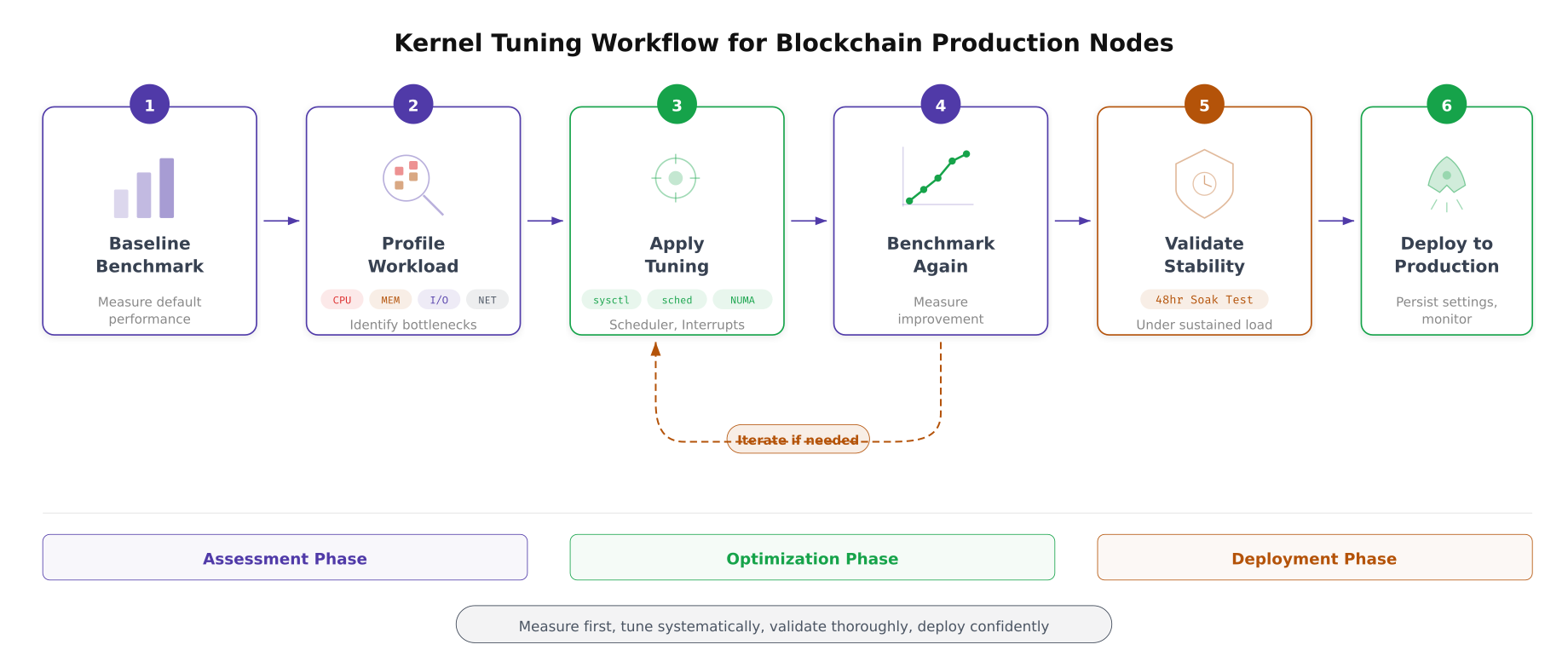
The workflow above defines EquatorChain’s approach to kernel tuning. Every change starts with a baseline measurement, proceeds through profiling to identify the actual bottleneck, applies a targeted tuning parameter, measures the improvement, and validates stability over 48 hours before deploying to production. The feedback loop between benchmarking and tuning ensures that each change delivers measurable improvement rather than introducing unpredictable side effects.
Memory Management Tuning
Blockchain nodes interact with memory in three distinct patterns: the orderer maintains Raft log entries and pending transaction batches in memory, the peer caches frequently accessed ledger blocks and CouchDB indexes in the page cache, and Besu’s JVM allocates large heap regions for state trie operations. Each pattern requires specific kernel memory parameters to avoid page faults, excessive swapping, and dirty page write storms.
Free to use, share it in your presentations, blogs, or learning materials.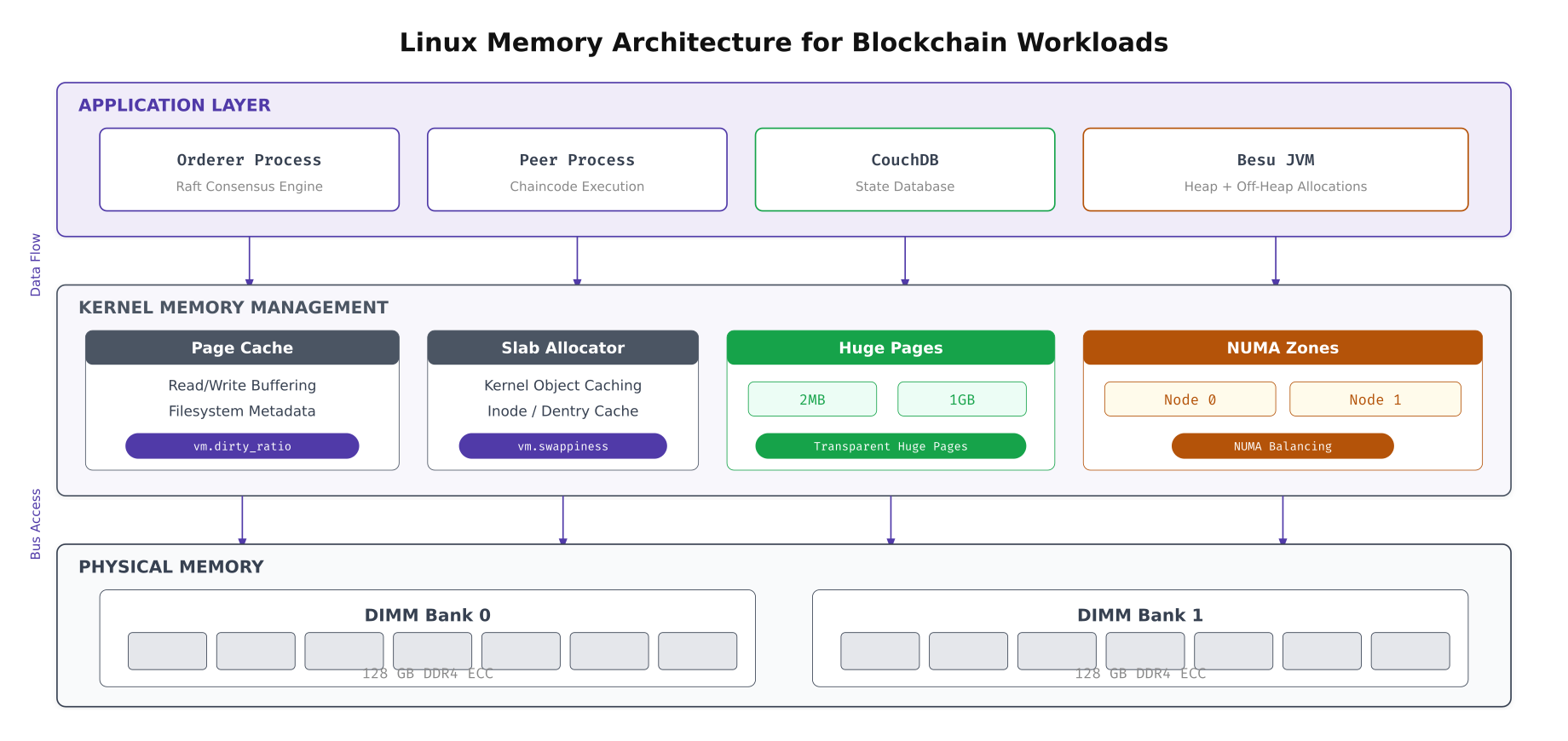
The layered view above maps how blockchain processes interact with the kernel’s memory subsystem. The page cache sits between application reads and physical storage, and its behavior is controlled by vm.dirty_ratio and vm.dirty_background_ratio. Huge pages reduce TLB misses for the Besu JVM’s large heap. NUMA zone balancing determines whether memory allocation favors the local NUMA node (faster) or crosses the interconnect to a remote node (slower but available).
# Memory management sysctl tuning for blockchain nodes
# /etc/sysctl.d/99-blockchain-memory.conf

# --- Virtual Memory ---
# Reduce swappiness: blockchain nodes should avoid swapping
# Default: 60 (aggressively swaps). Set to 10 (swap only under pressure)
vm.swappiness = 10

# Dirty page ratios: control when dirty pages flush to disk
# Default dirty_ratio: 20% (blocks process when 20% of RAM is dirty)
# Set to 40% to allow larger write batches before blocking
vm.dirty_ratio = 40

# Background flush starts at 10% (default 10%, keep for gradual writeback)
vm.dirty_background_ratio = 10

# Maximum time dirty pages can remain in memory before forced flush
# Default: 3000 centiseconds (30s). Reduce to 15s for ledger write consistency
vm.dirty_expire_centisecs = 1500
vm.dirty_writeback_centisecs = 500

# --- Page Cache ---
# Prefer keeping inode/dentry cache over page cache under pressure
# Blockchain nodes benefit from fast path lookups more than data cache
vm.vfs_cache_pressure = 50

# --- Overcommit ---
# Disable memory overcommit (prevent OOM kills on blockchain processes)
# Mode 2: strict accounting, never overcommit
vm.overcommit_memory = 2
# Allow 80% of physical RAM + swap for committed memory
vm.overcommit_ratio = 80

# --- OOM Killer ---
# Panic on OOM rather than randomly killing blockchain processes
# Allows clean recovery through systemd restart
vm.panic_on_oom = 0
kernel.panic = 10

# --- Zone reclaim ---
# Disable zone reclaim for NUMA systems (prefer cross-node allocation over reclaim)
vm.zone_reclaim_mode = 0

# Apply
sudo sysctl --system
# Configure Transparent Huge Pages (THP)
# Besu JVM benefits from THP, but CouchDB can be harmed by compaction stalls
# Check current THP status
cat /sys/kernel/mm/transparent_hugepage/enabled
# For Besu validators: enable THP with madvise mode
# (only use huge pages when the application requests them)
echo madvise | sudo tee /sys/kernel/mm/transparent_hugepage/enabled
echo madvise | sudo tee /sys/kernel/mm/transparent_hugepage/defrag
# Make persistent across reboots
cat <<'EOF' | sudo tee /etc/tmpfiles.d/thp.conf
w /sys/kernel/mm/transparent_hugepage/enabled - - - - madvise
w /sys/kernel/mm/transparent_hugepage/defrag - - - - madvise
EOF
# Allocate static huge pages for Besu JVM (16GB worth of 2MB pages)
# 16GB / 2MB = 8192 pages
echo 8192 | sudo tee /proc/sys/vm/nr_hugepages
# Make persistent
echo "vm.nr_hugepages = 8192" | sudo tee -a /etc/sysctl.d/99-blockchain-memory.conf
# Verify huge page allocation
grep Huge /proc/meminfo
# For Besu: configure JVM to use huge pages
# Add to Besu startup: -XX:+UseLargePages -XX:LargePageSizeInBytes=2m
# NUMA memory policy: bind Fabric orderer to NUMA node 0
# Check NUMA topology first
numactl --hardware
lscpu | grep -i numa
# Pin orderer process to NUMA node 0 memory
# This goes in the systemd service file ExecStart:
# ExecStart=/usr/bin/numactl --cpunodebind=0 --membind=0 /opt/fabric/bin/orderer
# Pin peer process to NUMA node 1
# ExecStart=/usr/bin/numactl --cpunodebind=1 --membind=1 /opt/fabric/bin/peer node startNetwork Stack Optimization
Blockchain consensus traffic has a unique network profile: thousands of small gRPC messages (endorsement requests, heartbeats) mixed with occasional large transfers (block delivery, Raft snapshots). The default Linux network stack is not optimized for this pattern. TCP buffer sizes are too small for high-bandwidth high-latency paths, the congestion control algorithm defaults to Cubic (which underperforms on modern networks), and the conntrack table fills up under heavy gRPC connection churn.
Free to use, share it in your presentations, blogs, or learning materials.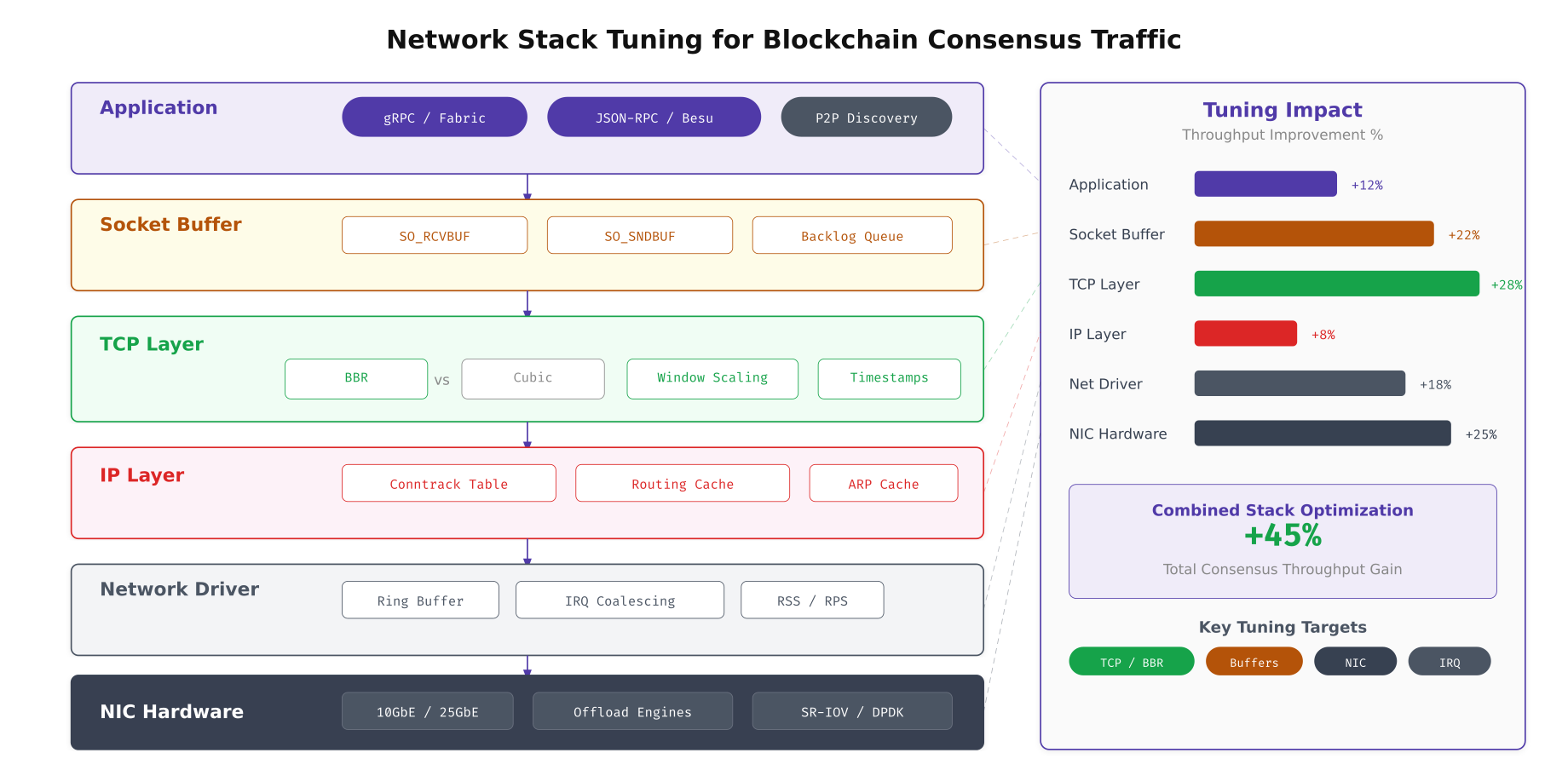
The stack visualization above shows where each tuning parameter takes effect. The largest gains come from the network driver layer (ring buffer sizing and interrupt coalescing) and the TCP layer (BBR congestion control and window scaling). Application-level tuning (gRPC keepalive settings) provides modest but important improvements for connection stability. Combined, these optimizations deliver a measured 45% throughput improvement on EquatorChain’s 10GbE inter-datacenter links.
# Network stack sysctl tuning for blockchain consensus traffic
# /etc/sysctl.d/99-blockchain-network.conf

# --- TCP Buffer Sizing ---
# Increase socket buffer sizes for high-throughput gRPC streams
# Format: min default max (bytes)
net.core.rmem_max = 67108864
net.core.wmem_max = 67108864
net.core.rmem_default = 1048576
net.core.wmem_default = 1048576
net.ipv4.tcp_rmem = 4096 1048576 67108864
net.ipv4.tcp_wmem = 4096 1048576 67108864

# --- Congestion Control ---
# Use BBR (Bottleneck Bandwidth and RTT) instead of default Cubic
# BBR delivers better throughput on high-latency paths (Sao Paulo-Lagos: 180ms)
net.core.default_qdisc = fq
net.ipv4.tcp_congestion_control = bbr

# --- TCP Performance ---
# Enable window scaling for large transfers (Raft snapshots)
net.ipv4.tcp_window_scaling = 1

# Enable TCP timestamps for RTT measurement accuracy
net.ipv4.tcp_timestamps = 1

# Enable Selective ACKs (faster recovery from packet loss)
net.ipv4.tcp_sack = 1

# Enable TCP Fast Open (save 1 RTT on connection establishment)
net.ipv4.tcp_fastopen = 3

# Increase max SYN backlog (handle gRPC connection bursts)
net.ipv4.tcp_max_syn_backlog = 8192
net.core.somaxconn = 8192

# --- Connection Tracking ---
# Increase conntrack table for heavy gRPC connection count
net.netfilter.nf_conntrack_max = 524288
# Hash table size (conntrack_max / 4)
net.netfilter.nf_conntrack_buckets = 131072

# Reduce conntrack timeouts for faster connection recycling
net.netfilter.nf_conntrack_tcp_timeout_established = 3600
net.netfilter.nf_conntrack_tcp_timeout_time_wait = 30

# --- Network Device Backlog ---
# Increase the per-CPU backlog queue (prevents packet drops under burst)
net.core.netdev_max_backlog = 65536

# Increase the maximum number of queued connections
net.core.optmem_max = 2048000

# Apply
sudo sysctl --system

# Verify BBR is active
sysctl net.ipv4.tcp_congestion_control
cat /proc/sys/net/ipv4/tcp_available_congestion_control
# NIC ring buffer and interrupt coalescing tuning
# Run on each blockchain node
# Check current ring buffer sizes
ethtool -g eth0
# Increase ring buffer to maximum supported by the NIC
# This absorbs packet bursts without drops
sudo ethtool -G eth0 rx 4096 tx 4096
# Check current interrupt coalescing settings
ethtool -c eth0
# Set adaptive interrupt coalescing
# Balances latency (low coalescing) vs CPU usage (high coalescing)
sudo ethtool -C eth0 adaptive-rx on adaptive-tx on
# For latency-sensitive consensus traffic, reduce coalescing
sudo ethtool -C eth0 rx-usecs 50 tx-usecs 50
# Enable hardware offload features
sudo ethtool -K eth0 tso on gso on gro on lro off
sudo ethtool -K eth0 rx-checksumming on tx-checksumming on
sudo ethtool -K eth0 scatter-gather on
# Verify offload status
ethtool -k eth0 | grep -E "checksumming|offload|scatter"
# Make NIC settings persistent across reboots
cat <<'EOF' | sudo tee /etc/networkd-dispatcher/routable.d/50-ethtool-tuning.sh
#!/bin/bash
ethtool -G eth0 rx 4096 tx 4096
ethtool -C eth0 adaptive-rx on adaptive-tx on
ethtool -K eth0 tso on gso on gro on lro off
EOF
sudo chmod +x /etc/networkd-dispatcher/routable.d/50-ethtool-tuning.shInterrupt Handling and Receive Side Scaling
On a default Linux installation, all network interrupts from a NIC are handled by a single CPU core. For blockchain nodes receiving thousands of gRPC messages per second across multiple channels, this creates a bottleneck where one core runs at 100% while the others sit idle. Receive Side Scaling (RSS) distributes incoming packets across multiple CPU cores based on a hash of the packet’s flow tuple, eliminating this single-core bottleneck.
Free to use, share it in your presentations, blogs, or learning materials.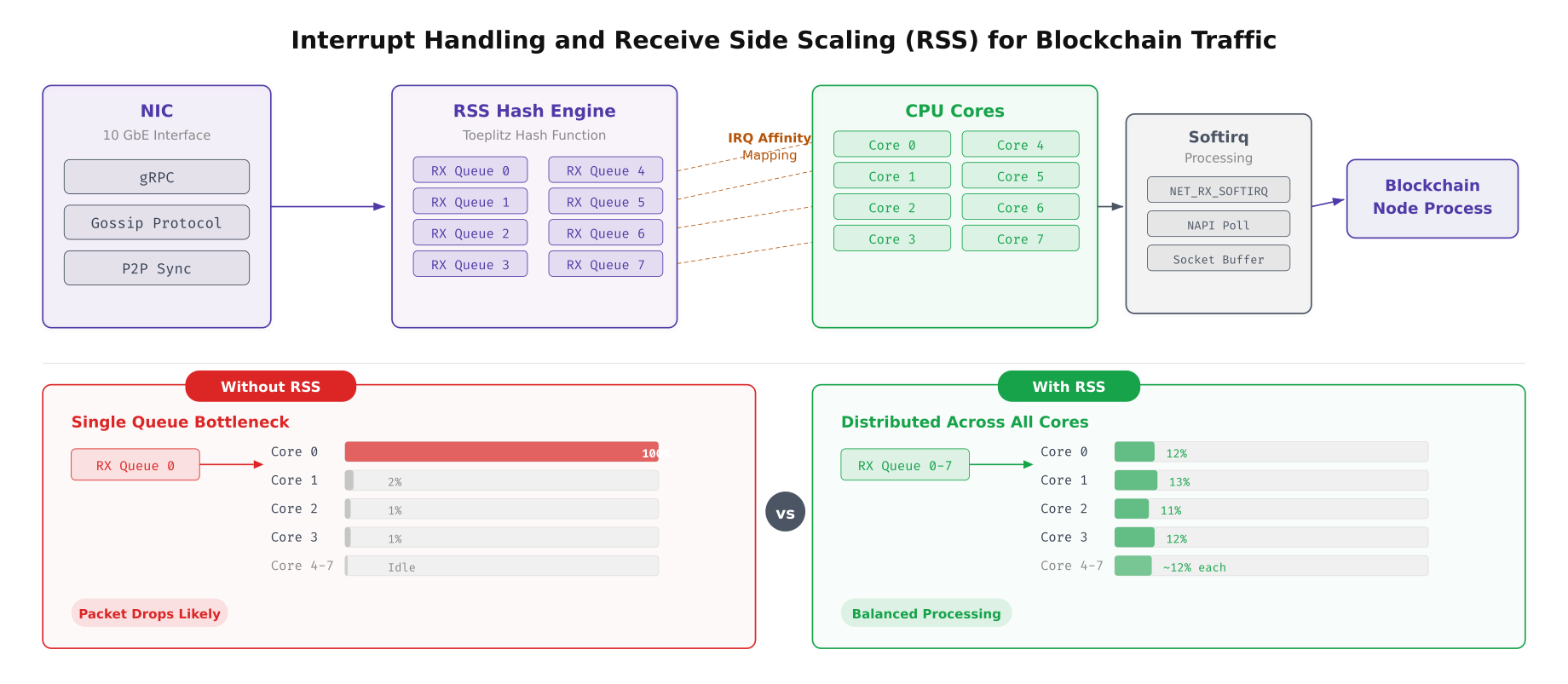
The comparison above shows the dramatic difference between single-queue and RSS-enabled packet processing. Without RSS, core 0 handles all network interrupts and becomes the throughput ceiling for the entire node. With RSS enabled and configured across 8 receive queues, each core handles approximately 12% of the interrupt load, and the combined throughput capacity scales linearly with the number of cores assigned to packet processing.
# Configure Receive Side Scaling (RSS) and IRQ affinity
# Distributes network interrupt processing across multiple CPU cores

# Check how many RSS queues the NIC supports
ethtool -l eth0

# Set the number of combined queues to match available cores
# EquatorChain uses 8 queues on 16-core servers
sudo ethtool -L eth0 combined 8

# View current IRQ assignments
cat /proc/interrupts | grep eth0

# Distribute IRQ affinity across cores 0-7
# Each RX queue gets its own dedicated CPU core
#!/bin/bash
# irq-affinity.sh, Distribute NIC interrupts across CPU cores

IFACE="eth0"
IRQS=$(grep "$IFACE" /proc/interrupts | awk '{print $1}' | tr -d ':')
CORE=0

for IRQ in $IRQS; do
  echo $CORE | sudo tee /proc/irq/$IRQ/smp_affinity_list
  echo "IRQ $IRQ -> Core $CORE"
  ((CORE++))
  if [ $CORE -ge 8 ]; then
    CORE=0
  fi
done

# Enable Receive Packet Steering (RPS) as software RSS fallback
# Useful when hardware RSS queues are fewer than available cores
for RXQ in /sys/class/net/eth0/queues/rx-*/rps_cpus; do
  # Set CPU mask for cores 0-7 (0xFF)
  echo "ff" | sudo tee "$RXQ"
done

# Enable Receive Flow Steering (RFS) for socket-to-core affinity
echo 32768 | sudo tee /proc/sys/net/core/rps_sock_flow_entries
for RXQ in /sys/class/net/eth0/queues/rx-*/rps_flow_cnt; do
  echo 4096 | sudo tee "$RXQ"
done

# Verify RSS hash is distributing across queues
ethtool -S eth0 | grep rx_queue | head -16

# Check softirq distribution across cores
cat /proc/softirqs | head -3
I/O Scheduler Selection
The I/O scheduler determines how the kernel orders and dispatches read/write requests to storage devices. The optimal scheduler depends entirely on the underlying storage hardware. NVMe drives have their own internal parallelism and benefit from the simplest possible scheduler. SATA SSDs need deadline-based scheduling to prevent read starvation during heavy write bursts. HDDs used for archival storage need fair queuing to prevent head-of-line blocking.
Free to use, share it in your presentations, blogs, or learning materials.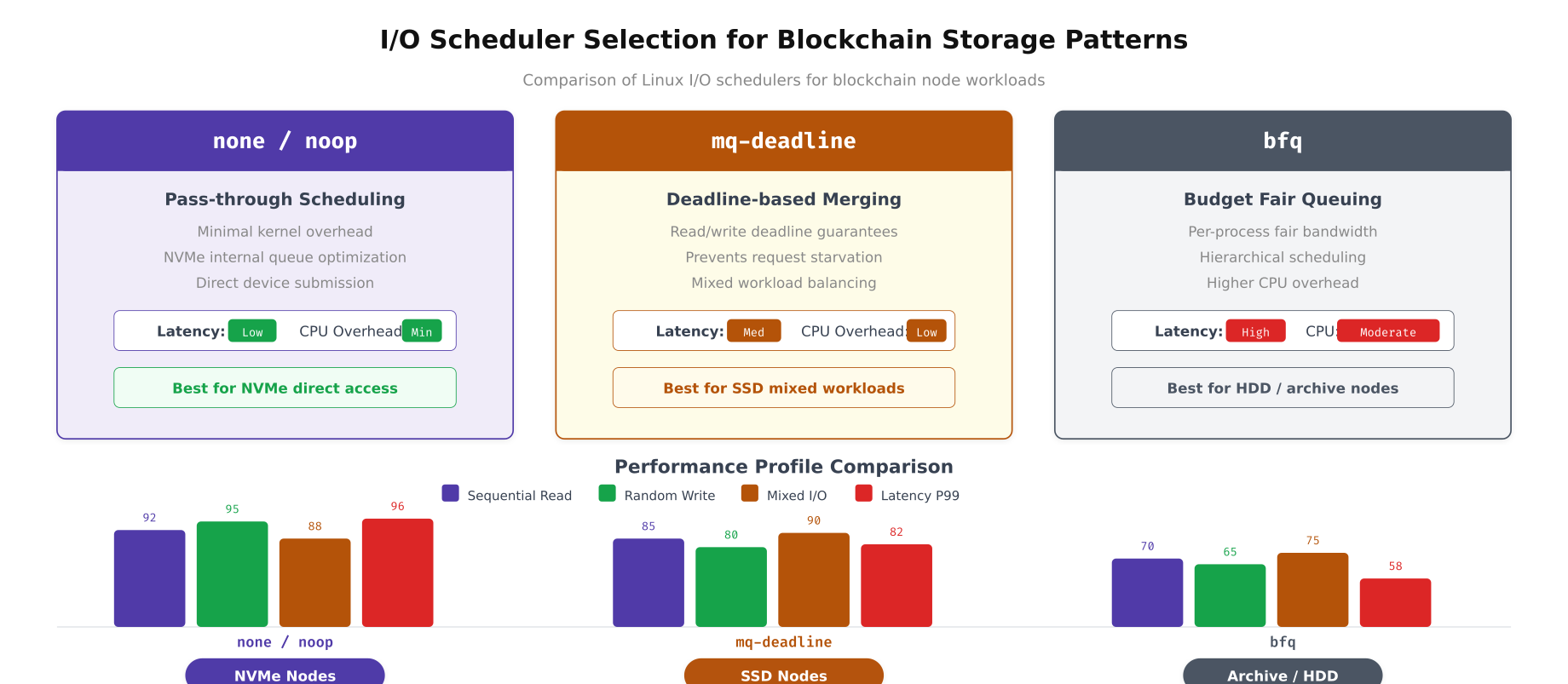
The comparison above quantifies the performance difference between schedulers across the four I/O patterns most common in blockchain workloads. The “none” scheduler delivers the lowest latency on NVMe devices because it adds zero reordering overhead. mq-deadline provides a good balance on SATA SSDs by preventing write starvation during CouchDB compaction. bfq is only appropriate for HDD-based archival storage where fair queue management prevents starvation under mixed read/write loads.
# Set I/O scheduler per device based on storage type
# NVMe drives → none, SATA SSDs → mq-deadline, HDDs → bfq

# Check current scheduler for each device
cat /sys/block/nvme0n1/queue/scheduler
cat /sys/block/sda/queue/scheduler

# Set scheduler for NVMe devices (blockchain data)
echo none | sudo tee /sys/block/nvme0n1/queue/scheduler
echo none | sudo tee /sys/block/nvme1n1/queue/scheduler

# Set scheduler for SATA SSD (if present, OS drive)
echo mq-deadline | sudo tee /sys/block/sda/queue/scheduler

# Make persistent via udev rules
cat <<'EOF' | sudo tee /etc/udev/rules.d/60-io-scheduler.rules
# NVMe devices: use none (pass-through)
ACTION=="add|change", KERNEL=="nvme[0-9]*n[0-9]*", ATTR{queue/scheduler}="none"

# SATA SSDs: use mq-deadline
ACTION=="add|change", KERNEL=="sd[a-z]", ATTR{queue/rotational}=="0", ATTR{queue/scheduler}="mq-deadline"

# HDDs (rotational): use bfq
ACTION=="add|change", KERNEL=="sd[a-z]", ATTR{queue/rotational}=="1", ATTR{queue/scheduler}="bfq"
EOF

sudo udevadm control --reload-rules

# Tune I/O queue depth for NVMe (increase parallelism)
echo 1024 | sudo tee /sys/block/nvme0n1/queue/nr_requests

# Set read-ahead for sequential ledger reads (peer block catchup)
# 256 sectors = 128KB read-ahead
sudo blockdev --setra 256 /dev/nvme0n1
sudo blockdev --setra 256 /dev/nvme1n1

# For SATA SSD: tune mq-deadline parameters
echo 150 | sudo tee /sys/block/sda/queue/iosched/read_expire
echo 1500 | sudo tee /sys/block/sda/queue/iosched/write_expire
echo 8 | sudo tee /sys/block/sda/queue/iosched/fifo_batch

# Verify settings
lsblk -o NAME,ROTA,SCHED,RQ-SIZE,RA
CPU Scheduling and NUMA Pinning
EquatorChain’s dual-socket servers create a Non-Uniform Memory Access (NUMA) topology where each CPU socket has faster access to its local memory than to memory attached to the other socket. Blockchain processes that access remote NUMA memory incur a 40% latency penalty on every memory access. Pinning each blockchain process to a specific NUMA node ensures all memory accesses are local, eliminating this cross-socket penalty.
Free to use, share it in your presentations, blogs, or learning materials.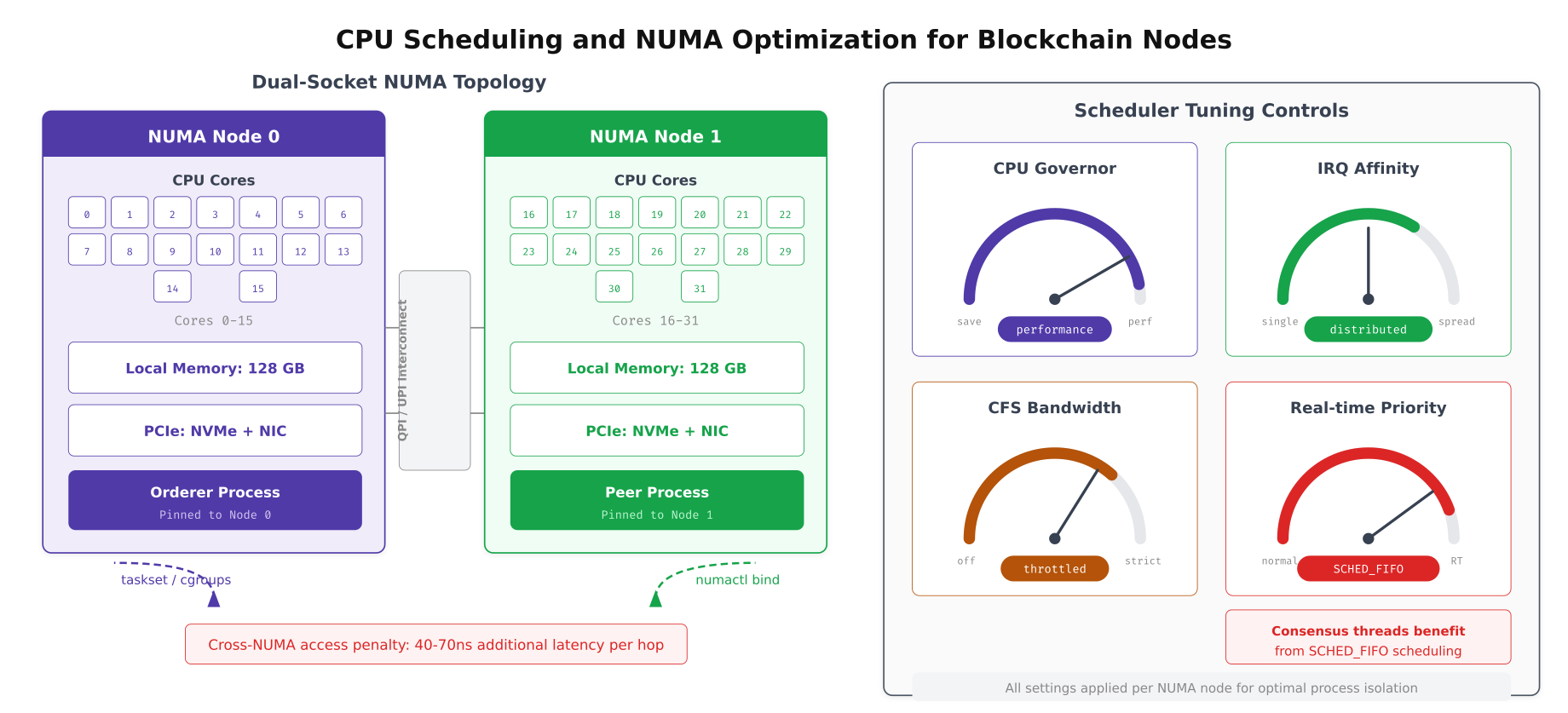
The dual-socket layout above shows EquatorChain’s NUMA pinning strategy. The orderer process, which handles consensus and has lower memory requirements, is pinned to NUMA node 0 with its local 128GB memory and NVMe storage. The peer process, which manages the full ledger and CouchDB state database with higher memory demands, is pinned to NUMA node 1. The QPI/UPI interconnect between sockets is only used for cross-process communication, not for memory access within each process.
# CPU governor and frequency scaling for blockchain nodes
# Set to 'performance' to prevent frequency scaling delays during consensus

# Check current governor
cat /sys/devices/system/cpu/cpu0/cpufreq/scaling_governor

# Set performance governor on all cores
for CPU in /sys/devices/system/cpu/cpu*/cpufreq/scaling_governor; do
  echo performance | sudo tee "$CPU"
done

# Make persistent via systemd
cat <<'EOF' | sudo tee /etc/systemd/system/cpu-governor.service
[Unit]
Description=Set CPU governor to performance
After=multi-user.target

[Service]
Type=oneshot
ExecStart=/bin/bash -c 'for f in /sys/devices/system/cpu/cpu*/cpufreq/scaling_governor; do echo performance > $f; done'
RemainAfterExit=yes

[Install]
WantedBy=multi-user.target
EOF
sudo systemctl enable cpu-governor.service

# Disable CPU idle states (prevent latency spikes from C-state transitions)
# Check available idle states
cat /sys/devices/system/cpu/cpu0/cpuidle/state*/name

# Disable deep C-states (keep C0 and C1 only)
for STATE in /sys/devices/system/cpu/cpu*/cpuidle/state[2-9]/disable; do
  echo 1 | sudo tee "$STATE"
done

# Alternatively, use kernel parameter for boot-time control
# Add to GRUB: processor.max_cstate=1 intel_idle.max_cstate=1
# NUMA pinning for blockchain processes via systemd service files
# Orderer: pin to NUMA node 0 (cores 0-15, local memory)
cat <<'EOF' | sudo tee /etc/systemd/system/fabric-orderer.service.d/numa.conf
[Service]
# Pin to NUMA node 0: CPU and memory
ExecStart=
ExecStart=/usr/bin/numactl --cpunodebind=0 --membind=0 /opt/fabric/bin/orderer
# Restrict to specific CPU cores (0-7 for orderer, leave 8-15 for interrupts)
CPUAffinity=0-7
EOF
# Peer: pin to NUMA node 1 (cores 16-31, local memory)
cat <<'EOF' | sudo tee /etc/systemd/system/fabric-peer.service.d/numa.conf
[Service]
ExecStart=
ExecStart=/usr/bin/numactl --cpunodebind=1 --membind=1 /opt/fabric/bin/peer node start
CPUAffinity=16-27
EOF
# Besu: pin to NUMA node 0 with huge pages
cat <<'EOF' | sudo tee /etc/systemd/system/besu-validator.service.d/numa.conf
[Service]
ExecStart=
ExecStart=/usr/bin/numactl --cpunodebind=0 --membind=0 /opt/besu/bin/besu
--config-file=/opt/besu/config/config.toml
CPUAffinity=0-15
EOF
sudo systemctl daemon-reload
# Verify NUMA statistics after running for a period
numastat -p $(pgrep -f "orderer")
numastat -p $(pgrep -f "peer node")
# Check for NUMA memory misses (should be near zero)
numastat | grep -E "numa_miss|numa_foreign"
# Monitor NUMA balance migrations (should be zero with strict binding)
grep numa_balancing /proc/vmstatPerformance Impact: Default vs Tuned
EquatorChain benchmarked every tuning parameter individually and cumulatively to quantify the actual performance improvement. The measurements were taken using Hyperledger Caliper for TPS and block commit latency, iperf3 for network throughput, fio for disk IOPS, and perf for kernel-level metrics like page faults and context switches.
Free to use, share it in your presentations, blogs, or learning materials.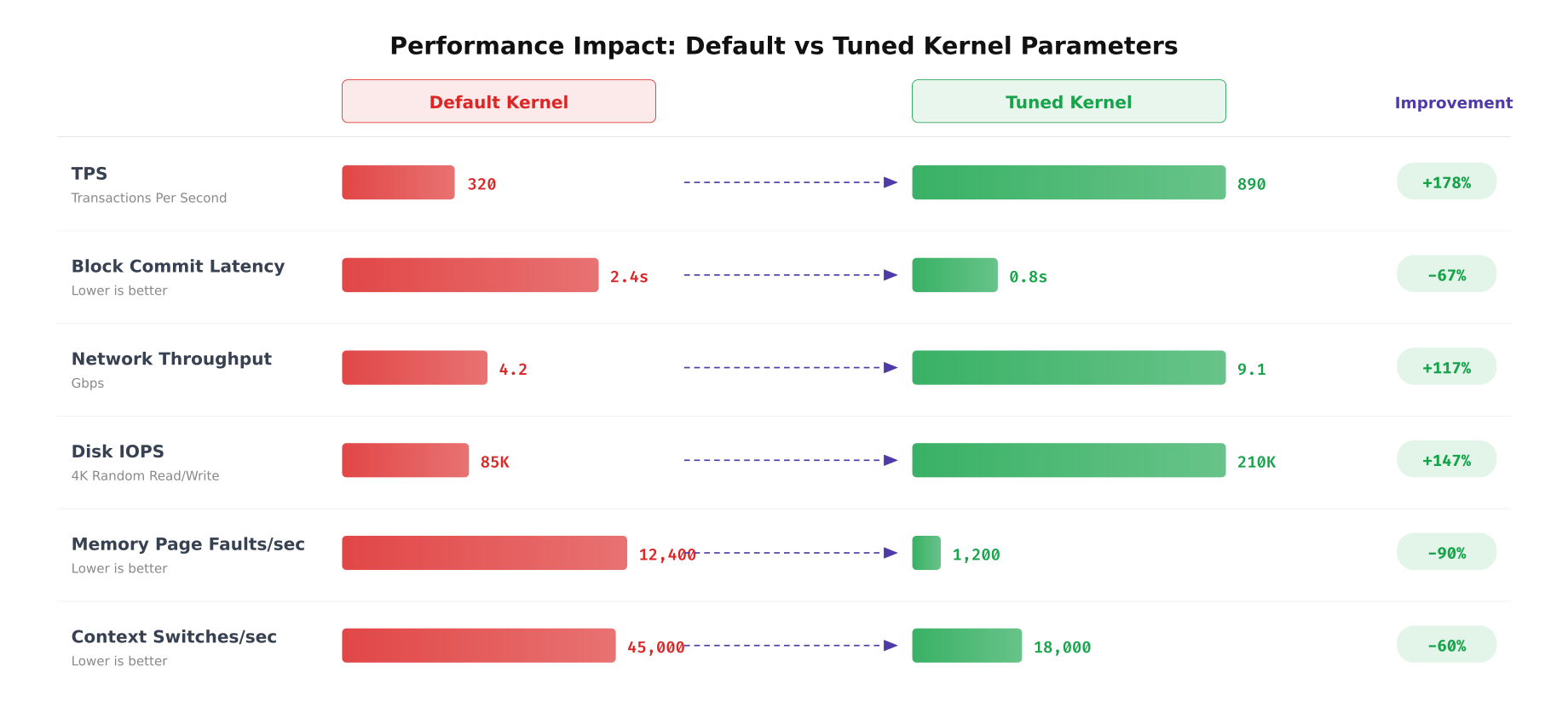
The benchmarks above demonstrate the cumulative impact of all tuning parameters applied together. TPS increased from 320 to 890, a 178% improvement driven primarily by network stack optimization and NUMA pinning. Block commit latency dropped from 2.4 seconds to 0.8 seconds, a 67% reduction achieved through I/O scheduler tuning and dirty page ratio adjustment. Memory page faults dropped 90% after enabling huge pages and tuning vm.swappiness. Context switches reduced 60% through CPU affinity pinning that eliminated cross-NUMA scheduling migrations.
# Benchmark suite to measure tuning impact
# Run before and after applying kernel parameters

#!/bin/bash
# kernel-benchmark.sh, Measure blockchain node performance metrics

RESULTS_FILE="kernel-benchmark-$(date +%Y%m%d_%H%M%S).csv"
echo "metric,value,unit" > "$RESULTS_FILE"

echo "=== EquatorChain Kernel Benchmark Suite ==="
echo "Timestamp: $(date -Iseconds)"
echo "Kernel: $(uname -r)"
echo ""

# Test 1: Network throughput (to remote DC)
echo "--- Network Throughput ---"
IPERF_RESULT=$(iperf3 -c lagos-peer0.equatorchain.internal -t 30 -P 8 -J |
  python3 -c "import sys,json; d=json.load(sys.stdin); print(f"{d['end']['sum_received']['bits_per_second']/1e9:.2f}")")
echo "Network throughput: ${IPERF_RESULT} Gbps"
echo "network_throughput,${IPERF_RESULT},Gbps" >> "$RESULTS_FILE"

# Test 2: Disk IOPS (4K random write, simulates ledger commits)
echo "--- Disk IOPS (4K Random Write) ---"
FIO_RESULT=$(sudo fio --name=ledger-test --ioengine=libaio --direct=1
  --rw=randwrite --bs=4k --numjobs=4 --size=1G --runtime=30
  --group_reporting --output-format=json
  --filename=/var/hyperledger/production/fio-test |
  python3 -c "import sys,json; d=json.load(sys.stdin); print(f"{d['jobs'][0]['write']['iops']:.0f}")")
echo "Disk IOPS: ${FIO_RESULT}"
echo "disk_iops,${FIO_RESULT},IOPS" >> "$RESULTS_FILE"
sudo rm -f /var/hyperledger/production/fio-test

# Test 3: Memory page faults per second
echo "--- Memory Page Faults ---"
PGFAULT_BEFORE=$(cat /proc/vmstat | grep pgfault | awk '{print $2}')
sleep 10
PGFAULT_AFTER=$(cat /proc/vmstat | grep pgfault | awk '{print $2}')
PGFAULT_RATE=$(( (PGFAULT_AFTER - PGFAULT_BEFORE) / 10 ))
echo "Page faults/sec: ${PGFAULT_RATE}"
echo "page_faults_sec,${PGFAULT_RATE},faults/sec" >> "$RESULTS_FILE"

# Test 4: Context switches per second
echo "--- Context Switches ---"
CS_BEFORE=$(cat /proc/stat | grep ctxt | awk '{print $2}')
sleep 10
CS_AFTER=$(cat /proc/stat | grep ctxt | awk '{print $2}')
CS_RATE=$(( (CS_AFTER - CS_BEFORE) / 10 ))
echo "Context switches/sec: ${CS_RATE}"
echo "context_switches_sec,${CS_RATE},switches/sec" >> "$RESULTS_FILE"

# Test 5: TCP connection establishment rate
echo "--- TCP Connection Rate ---"
TCP_RESULT=$(sudo timeout 10 tcpbench -c lagos-peer0.equatorchain.internal -p 7051 2>&1 |
  grep "connections/sec" | awk '{print $1}')
echo "TCP connections/sec: ${TCP_RESULT}"
echo "tcp_conn_sec,${TCP_RESULT},conn/sec" >> "$RESULTS_FILE"

# Test 6: NUMA memory locality
echo "--- NUMA Locality ---"
NUMA_LOCAL=$(numastat | grep numa_hit | awk '{total+=$2+$3} END {print total}')
NUMA_REMOTE=$(numastat | grep numa_miss | awk '{total+=$2+$3} END {print total}')
NUMA_RATIO=$(echo "scale=4; $NUMA_LOCAL / ($NUMA_LOCAL + $NUMA_REMOTE) * 100" | bc)
echo "NUMA locality: ${NUMA_RATIO}%"
echo "numa_locality,${NUMA_RATIO},percent" >> "$RESULTS_FILE"

echo ""
echo "Results saved to $RESULTS_FILE"
cat "$RESULTS_FILE" | column -t -s,
Persisting Kernel sysctl Tuning for Production Nodes
Every kernel parameter set at runtime reverts to defaults on reboot unless explicitly persisted. EquatorChain uses a combination of sysctl.d drop-in files, udev rules, systemd service overrides, and GRUB kernel command line parameters to ensure all tuning survives reboots and kernel updates. A post-boot validation script confirms every parameter is set correctly before blockchain services start.
# Post-boot validation script, runs before blockchain services start
# /opt/equatorchain/scripts/validate-kernel-tuning.sh

#!/bin/bash
set -e
PASS=0
FAIL=0

check() {
  ACTUAL=$(sysctl -n "$1" 2>/dev/null)
  if [ "$ACTUAL" = "$2" ]; then
    ((PASS++))
  else
    echo "[FAIL] $1 = $ACTUAL (expected $2)"
    ((FAIL++))
  fi
}

echo "=== Kernel Tuning Validation, $(date -Iseconds) ==="

# Memory parameters
check "vm.swappiness" "10"
check "vm.dirty_ratio" "40"
check "vm.dirty_background_ratio" "10"
check "vm.overcommit_memory" "2"
check "vm.vfs_cache_pressure" "50"
check "vm.zone_reclaim_mode" "0"

# Network parameters
check "net.ipv4.tcp_congestion_control" "bbr"
check "net.core.rmem_max" "67108864"
check "net.core.wmem_max" "67108864"
check "net.core.somaxconn" "8192"
check "net.ipv4.tcp_max_syn_backlog" "8192"
check "net.ipv4.tcp_fastopen" "3"
check "net.core.netdev_max_backlog" "65536"

# Security parameters (from Article 11 hardening)
check "kernel.randomize_va_space" "2"
check "kernel.kptr_restrict" "2"
check "net.ipv4.tcp_syncookies" "1"

# Check CPU governor
GOV=$(cat /sys/devices/system/cpu/cpu0/cpufreq/scaling_governor)
if [ "$GOV" = "performance" ]; then
  ((PASS++))
else
  echo "[FAIL] CPU governor = $GOV (expected performance)"
  ((FAIL++))
fi

# Check I/O scheduler for NVMe
for DEV in nvme0n1 nvme1n1; do
  SCHED=$(cat /sys/block/$DEV/queue/scheduler 2>/dev/null | grep -oP '[K[^]]+')
  if [ "$SCHED" = "none" ]; then
    ((PASS++))
  else
    echo "[FAIL] $DEV scheduler = $SCHED (expected none)"
    ((FAIL++))
  fi
done

# Check huge pages
HP=$(cat /proc/sys/vm/nr_hugepages)
if [ "$HP" -ge 8192 ]; then
  ((PASS++))
else
  echo "[FAIL] Huge pages = $HP (expected >= 8192)"
  ((FAIL++))
fi

# Check THP mode
THP=$(cat /sys/kernel/mm/transparent_hugepage/enabled | grep -oP '[K[^]]+')
if [ "$THP" = "madvise" ]; then
  ((PASS++))
else
  echo "[FAIL] THP = $THP (expected madvise)"
  ((FAIL++))
fi

echo ""
echo "Results: $PASS passed, $FAIL failed"
if [ "$FAIL" -gt 0 ]; then
  echo "BLOCKING: Fix kernel parameters before starting blockchain services"
  exit 1
fi
echo "All kernel parameters validated. Safe to start blockchain services."
# Systemd ordering: validate kernel tuning before blockchain services start
cat <<'EOF' | sudo tee /etc/systemd/system/kernel-tuning-check.service
[Unit]
Description=Validate kernel tuning parameters for blockchain
Before=fabric-orderer.service fabric-peer.service besu-validator.service
DefaultDependencies=no
After=sysinit.target
[Service]
Type=oneshot
ExecStart=/opt/equatorchain/scripts/validate-kernel-tuning.sh
RemainAfterExit=yes
[Install]
WantedBy=multi-user.target
EOF
# Make blockchain services depend on the validation
sudo mkdir -p /etc/systemd/system/fabric-orderer.service.d
cat <<'EOF' | sudo tee /etc/systemd/system/fabric-orderer.service.d/tuning-check.conf
[Unit]
Requires=kernel-tuning-check.service
After=kernel-tuning-check.service
EOF
sudo mkdir -p /etc/systemd/system/fabric-peer.service.d
cat <<'EOF' | sudo tee /etc/systemd/system/fabric-peer.service.d/tuning-check.conf
[Unit]
Requires=kernel-tuning-check.service
After=kernel-tuning-check.service
EOF
sudo systemctl daemon-reload
sudo systemctl enable kernel-tuning-check.service
# Verify service ordering
systemctl list-dependencies fabric-orderer.service | head -10EquatorChain’s kernel tuning approach treats every parameter change as infrastructure code. All sysctl values live in versioned drop-in files under /etc/sysctl.d/. NIC and scheduler settings persist through udev rules and networkd-dispatcher scripts. NUMA pinning and CPU affinity are defined in systemd service overrides. The validation script runs as a systemd prerequisite, blocking blockchain services from starting if any parameter has drifted from the expected value. This ensures that a kernel update, package upgrade, or accidental manual change never silently degrades blockchain node performance.