

This article details the complete network hardening strategy for ArcticLedger, a cross-border payments consortium operating Hyperledger Fabric 2.5 orderers and peers alongside Hyperledger Besu validators across data centers in Helsinki, Reykjavik, and Tromso. The production network handles settlement for 14 Nordic financial institutions, and any disruption to consensus availability triggers regulatory notification requirements under the EU Digital Operational Resilience Act (DORA).
Free to use, share it in your presentations, blogs, or learning materials.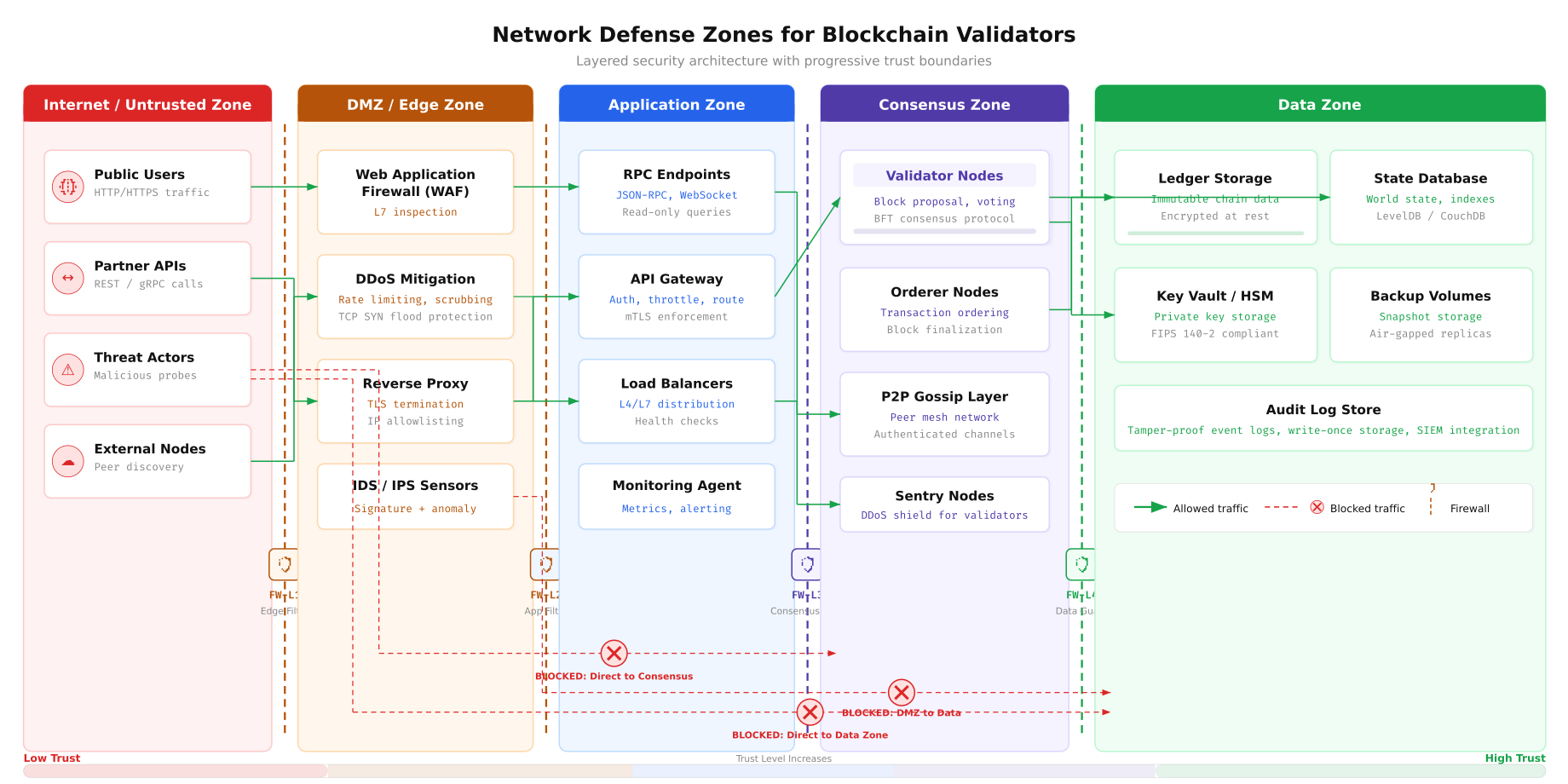
The zone architecture above defines ArcticLedger’s layered defense model. External traffic enters through the Internet zone, passes through the DMZ where DDoS mitigation and WAF inspection occur, then reaches the Application zone containing RPC endpoints and API gateways. The Consensus zone, which houses validator and orderer nodes, is never directly accessible from the internet or DMZ. The Data zone at the innermost layer stores the ledger, state database, and HSM-protected signing keys. Each zone boundary enforces a distinct firewall ruleset.
VLAN Segmentation Strategy
Network segmentation is the foundation of any firewall strategy. ArcticLedger’s infrastructure uses five dedicated VLANs to isolate traffic domains. Each VLAN represents a distinct trust boundary, and inter-VLAN routing passes through a Layer 3 switch that enforces Access Control Lists (ACLs) at every crossing point. This design ensures that a compromise in one zone cannot laterally propagate to adjacent segments without first bypassing ACL rules.
Free to use, share it in your presentations, blogs, or learning materials.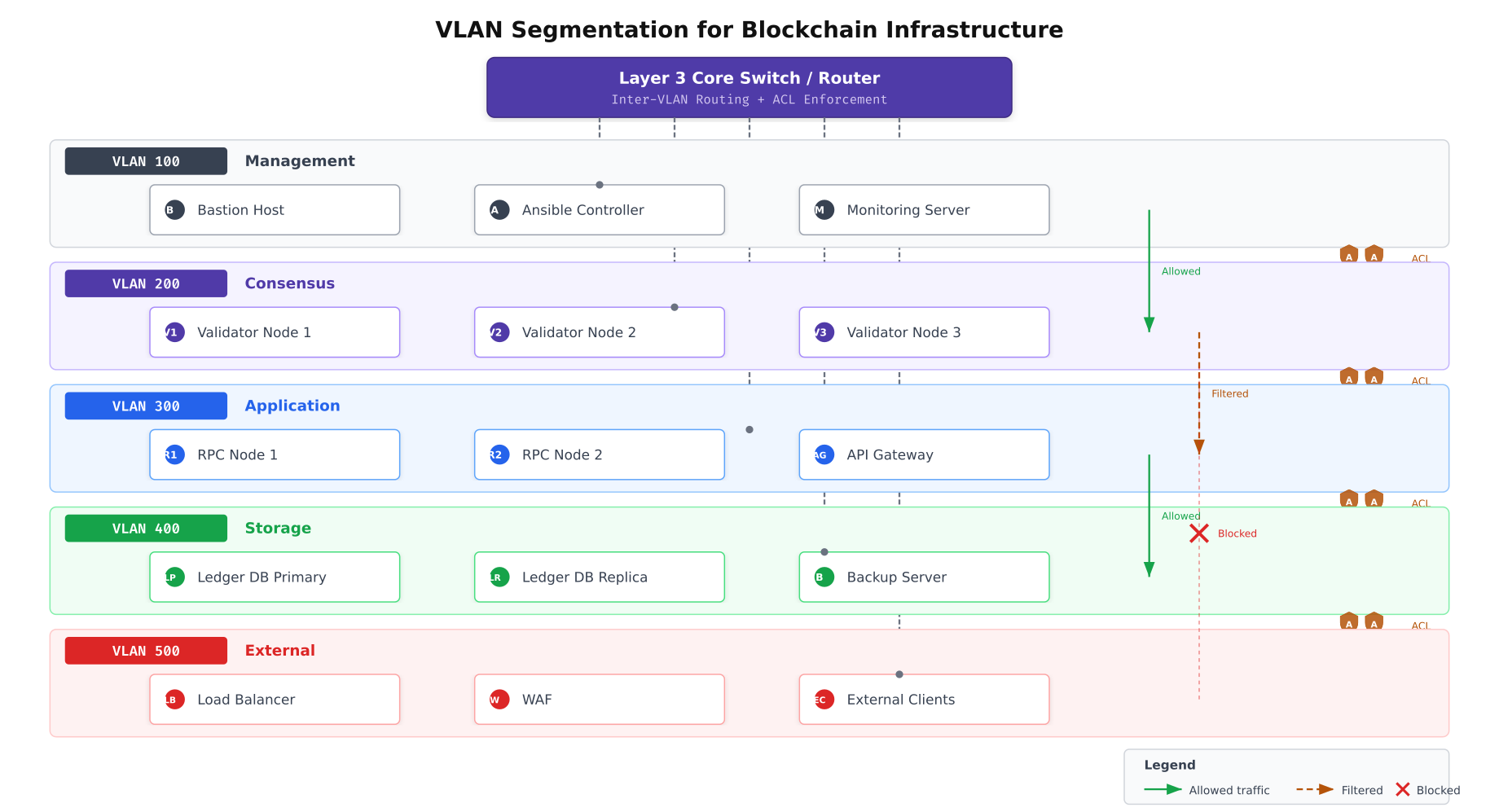
As shown above, each VLAN serves a dedicated function. VLAN 100 handles management traffic including Ansible automation, bastion host SSH sessions, and monitoring server connections. VLAN 200 is reserved exclusively for consensus traffic between validators, orderers, and peers. VLAN 300 serves application-layer traffic from RPC nodes and API gateways. VLAN 400 isolates storage replication and backup operations. VLAN 500 faces the external network through load balancers and WAF appliances. The Layer 3 core switch routes between VLANs while enforcing per-VLAN ACL policies.
Configuring VLAN Interfaces
Each server in ArcticLedger’s infrastructure connects to multiple VLANs through 802.1Q tagged interfaces. The following configuration creates the VLAN interfaces on a validator node that participates in both the consensus and management VLANs.
# Create VLAN 200 (Consensus) on physical interface ens192
# This interface carries all Raft consensus and Gossip traffic
sudo ip link add link ens192 name ens192.200 type vlan id 200
sudo ip addr add 10.20.0.11/24 dev ens192.200
sudo ip link set dev ens192.200 up

# Create VLAN 100 (Management) on the same physical interface
# This interface carries SSH, monitoring, and Ansible traffic
sudo ip link add link ens192 name ens192.100 type vlan id 100
sudo ip addr add 10.10.0.11/24 dev ens192.100
sudo ip link set dev ens192.100 up

# Verify VLAN interfaces are active
ip -d link show ens192.200
ip -d link show ens192.100
For persistent VLAN configuration across reboots, ArcticLedger uses Netplan on Ubuntu 22.04 LTS servers.
# /etc/netplan/01-vlans.yaml
# Persistent VLAN configuration for validator nodes
network:
  version: 2
  renderer: networkd
  ethernets:
    ens192:
      dhcp4: false
      mtu: 9000
  vlans:
    ens192.100:
      id: 100
      link: ens192
      addresses:
        - 10.10.0.11/24
      routes:
        - to: 10.10.0.0/24
          via: 10.10.0.1
    ens192.200:
      id: 200
      link: ens192
      addresses:
        - 10.20.0.11/24
      routes:
        - to: 10.20.0.0/24
          via: 10.20.0.1

# Apply the configuration
sudo netplan apply
Firewall Rule Architecture with nftables
ArcticLedger standardizes on nftables as the primary packet filtering framework. Unlike its predecessor iptables, nftables provides atomic rule updates (preventing transient windows where no rules apply during reload), native set and map support for efficient IP allowlisting, and a single unified framework for IPv4, IPv6, and ARP filtering. Every validator, orderer, peer, and RPC node runs a tailored nftables ruleset.
Free to use, share it in your presentations, blogs, or learning materials.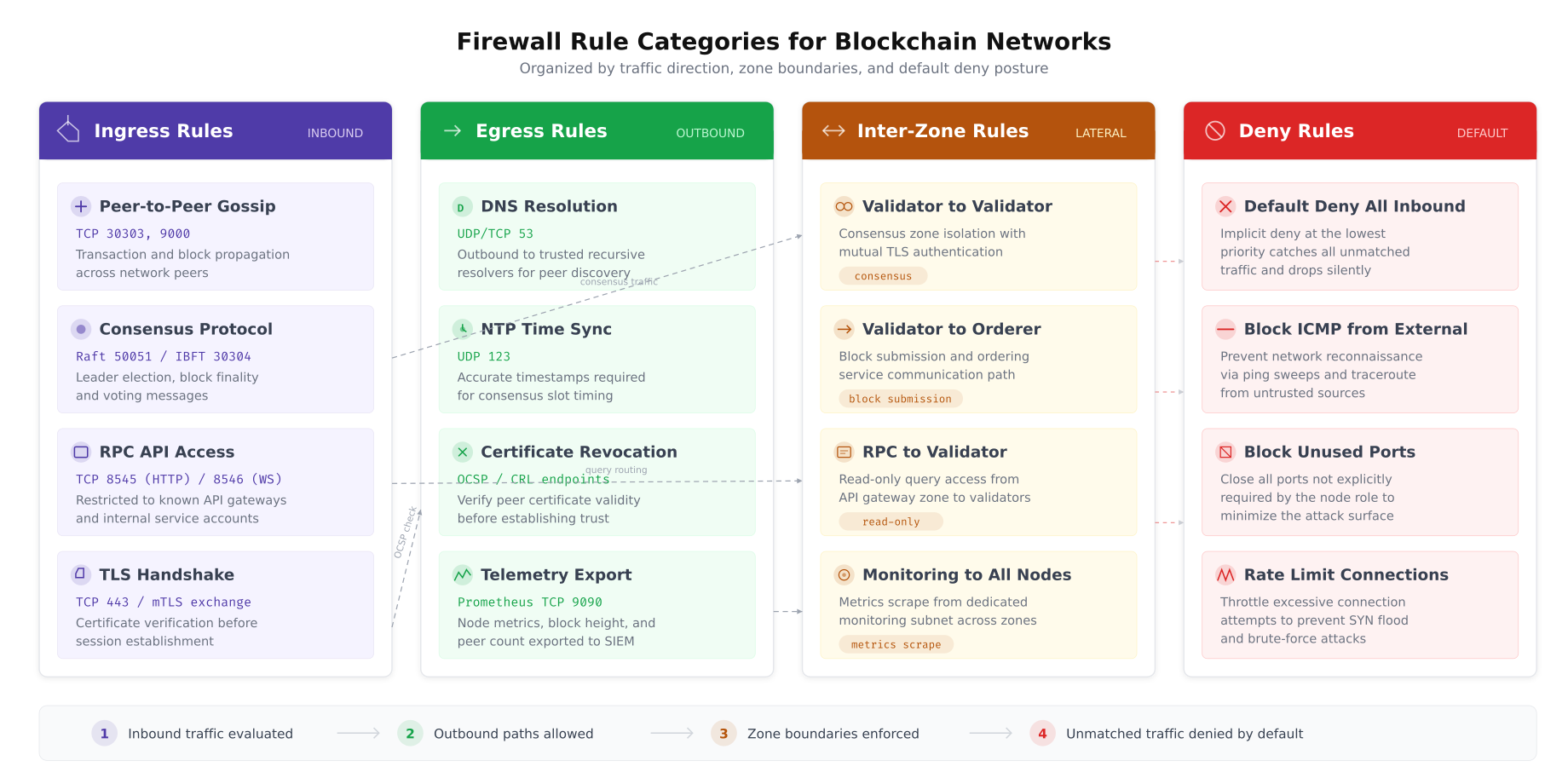
This classification helps ArcticLedger’s operations team understand each rule’s purpose during incident response. Ingress rules define what traffic may enter a node. Egress rules control outbound connections. Inter-zone rules govern lateral traffic between different node types. The default deny baseline ensures that any traffic not explicitly permitted is dropped and logged.
nftables Ruleset for Fabric Orderer Nodes
The orderer is the most critical node in a Fabric network. It sequences transactions into blocks and distributes them to peers. Its firewall ruleset must allow Raft consensus traffic from other orderers, block delivery requests from peers, and administrative gRPC connections from authorized management hosts, while denying everything else.
# /etc/nftables.conf - Orderer Node Ruleset
# ArcticLedger Fabric 2.5 Orderer Firewall Configuration

flush ruleset

# Define named sets for maintainability
define ORDERER_PEERS = {
    10.20.0.11,  # orderer1.helsinki.arcticledger.net
    10.20.0.12,  # orderer2.reykjavik.arcticledger.net
    10.20.0.13   # orderer3.tromso.arcticledger.net
}

define FABRIC_PEERS = {
    10.20.0.21,  # peer0.org1.arcticledger.net
    10.20.0.22,  # peer1.org1.arcticledger.net
    10.20.0.23,  # peer0.org2.arcticledger.net
    10.20.0.24   # peer1.org2.arcticledger.net
}

define MGMT_HOSTS = {
    10.10.0.5,   # bastion.arcticledger.net
    10.10.0.6    # ansible.arcticledger.net
}

define MONITORING = {
    10.10.0.10   # prometheus.arcticledger.net
}

table inet filter {
    # Connection tracking for stateful inspection
    chain input {
        type filter hook input priority 0; policy drop;

        # Allow established and related connections
        ct state established,related accept

        # Drop invalid packets
        ct state invalid drop

        # Allow loopback traffic
        iif "lo" accept

        # ICMP: allow only from management VLAN
        ip saddr $MGMT_HOSTS icmp type { echo-request, echo-reply } accept
        ip6 nexthdr icmpv6 icmpv6 type { echo-request, echo-reply,
            nd-neighbor-solicit, nd-neighbor-advert } accept

        # SSH: only from bastion host (management VLAN)
        tcp dport 22 ip saddr $MGMT_HOSTS ct state new accept

        # Raft consensus: orderer-to-orderer cluster communication
        # Port 7050: orderer service port (transaction submission)
        tcp dport 7050 ip saddr $ORDERER_PEERS ct state new accept

        # Port 7053: orderer cluster port (Raft consensus)
        tcp dport 7053 ip saddr $ORDERER_PEERS ct state new accept

        # Block delivery: peers requesting blocks from orderer
        tcp dport 7050 ip saddr $FABRIC_PEERS ct state new accept

        # Prometheus metrics endpoint
        tcp dport 9443 ip saddr $MONITORING ct state new accept

        # NTP: allow inbound NTP responses
        udp sport 123 accept

        # Log and drop everything else
        log prefix "NFT-INPUT-DROP: " flags all counter drop
    }

    chain forward {
        type filter hook forward priority 0; policy drop;
        # Validator nodes do not forward traffic
    }

    chain output {
        type filter hook output priority 0; policy drop;

        # Allow established connections
        ct state established,related accept

        # Allow loopback
        oif "lo" accept

        # Raft consensus: outbound to other orderers
        tcp dport { 7050, 7053 } ip daddr $ORDERER_PEERS ct state new accept

        # DNS resolution
        udp dport 53 accept
        tcp dport 53 accept

        # NTP time synchronization
        udp dport 123 accept

        # OCSP/CRL certificate validation
        tcp dport { 80, 443 } ip daddr 10.30.0.50 ct state new accept

        # Prometheus metrics push (if using push gateway)
        tcp dport 9091 ip daddr $MONITORING ct state new accept

        # Log dropped outbound
        log prefix "NFT-OUTPUT-DROP: " flags all counter drop
    }
}
nftables Ruleset for Fabric Peer Nodes
Peer nodes have a broader communication profile than orderers. They participate in Gossip protocol exchanges with other peers, receive blocks from orderers, process chaincode endorsement requests from client applications, and serve ledger queries through CouchDB. The firewall ruleset reflects this expanded surface while maintaining strict source restrictions.
# /etc/nftables.conf - Peer Node Ruleset
# ArcticLedger Fabric 2.5 Peer Firewall Configuration

flush ruleset

define ORDERER_NODES = {
    10.20.0.11, 10.20.0.12, 10.20.0.13
}

define PEER_NODES = {
    10.20.0.21, 10.20.0.22, 10.20.0.23, 10.20.0.24
}

define RPC_NODES = {
    10.30.0.31, 10.30.0.32
}

define MGMT_HOSTS = {
    10.10.0.5, 10.10.0.6
}

define MONITORING = {
    10.10.0.10
}

table inet filter {
    chain input {
        type filter hook input priority 0; policy drop;

        ct state established,related accept
        ct state invalid drop
        iif "lo" accept

        # ICMP from management only
        ip saddr $MGMT_HOSTS icmp type { echo-request, echo-reply } accept

        # SSH from bastion
        tcp dport 22 ip saddr $MGMT_HOSTS ct state new accept

        # Gossip protocol: peer-to-peer communication
        tcp dport 7051 ip saddr $PEER_NODES ct state new accept

        # Chaincode endorsement requests from RPC/API gateway
        tcp dport 7051 ip saddr $RPC_NODES ct state new accept

        # Event service: peers deliver events to subscribed clients
        tcp dport 7053 ip saddr $RPC_NODES ct state new accept

        # CouchDB: local access only (chaincode queries)
        tcp dport 5984 ip saddr 127.0.0.1 accept

        # Prometheus metrics
        tcp dport 9443 ip saddr $MONITORING ct state new accept

        # NTP responses
        udp sport 123 accept

        log prefix "NFT-PEER-DROP: " flags all counter drop
    }

    chain forward {
        type filter hook forward priority 0; policy drop;
    }

    chain output {
        type filter hook output priority 0; policy drop;

        ct state established,related accept
        oif "lo" accept

        # Gossip: outbound to other peers
        tcp dport 7051 ip daddr $PEER_NODES ct state new accept

        # Block delivery: request blocks from orderers
        tcp dport 7050 ip daddr $ORDERER_NODES ct state new accept

        # DNS and NTP
        udp dport 53 accept
        tcp dport 53 accept
        udp dport 123 accept

        # Certificate validation
        tcp dport { 80, 443 } ip daddr 10.30.0.50 ct state new accept

        log prefix "NFT-PEER-OUT-DROP: " flags all counter drop
    }
}
nftables Ruleset for Besu Validator Nodes
Besu validators participate in IBFT 2.0 consensus over a dedicated P2P port and expose a JSON-RPC API for transaction submission. The RPC endpoint must be carefully protected because unauthorized access could allow transaction injection or state manipulation.
# /etc/nftables.conf - Besu Validator Node Ruleset
# ArcticLedger Besu IBFT 2.0 Validator Configuration

flush ruleset

define BESU_VALIDATORS = {
    10.20.0.41,  # besu-val1.helsinki.arcticledger.net
    10.20.0.42,  # besu-val2.reykjavik.arcticledger.net
    10.20.0.43,  # besu-val3.tromso.arcticledger.net
    10.20.0.44   # besu-val4.helsinki.arcticledger.net
}

define BESU_RPC = {
    10.30.0.35, 10.30.0.36
}

define MGMT_HOSTS = {
    10.10.0.5, 10.10.0.6
}

define MONITORING = {
    10.10.0.10
}

table inet filter {
    chain input {
        type filter hook input priority 0; policy drop;

        ct state established,related accept
        ct state invalid drop
        iif "lo" accept

        # ICMP from management only
        ip saddr $MGMT_HOSTS icmp type { echo-request, echo-reply } accept

        # SSH from bastion
        tcp dport 22 ip saddr $MGMT_HOSTS ct state new accept

        # IBFT 2.0 P2P: validator-to-validator consensus
        tcp dport 30303 ip saddr $BESU_VALIDATORS ct state new accept
        udp dport 30303 ip saddr $BESU_VALIDATORS accept

        # JSON-RPC API: only from designated RPC proxy nodes
        tcp dport 8545 ip saddr $BESU_RPC ct state new accept

        # WebSocket RPC: event subscriptions from RPC nodes
        tcp dport 8546 ip saddr $BESU_RPC ct state new accept

        # Prometheus metrics
        tcp dport 9545 ip saddr $MONITORING ct state new accept

        # NTP responses
        udp sport 123 accept

        log prefix "NFT-BESU-DROP: " flags all counter drop
    }

    chain forward {
        type filter hook forward priority 0; policy drop;
    }

    chain output {
        type filter hook output priority 0; policy drop;

        ct state established,related accept
        oif "lo" accept

        # IBFT 2.0 P2P outbound
        tcp dport 30303 ip daddr $BESU_VALIDATORS ct state new accept
        udp dport 30303 ip daddr $BESU_VALIDATORS accept

        # DNS and NTP
        udp dport 53 accept
        tcp dport 53 accept
        udp dport 123 accept

        # Certificate validation
        tcp dport { 80, 443 } ip daddr 10.30.0.50 ct state new accept

        log prefix "NFT-BESU-OUT-DROP: " flags all counter drop
    }
}
Port Access Matrix
A port access matrix provides a single reference document that maps every service port against every network zone, defining whether traffic is allowed, filtered, or blocked. ArcticLedger’s operations team reviews this matrix quarterly and after every infrastructure change to ensure that no unnecessary port remains open.
Free to use, share it in your presentations, blogs, or learning materials.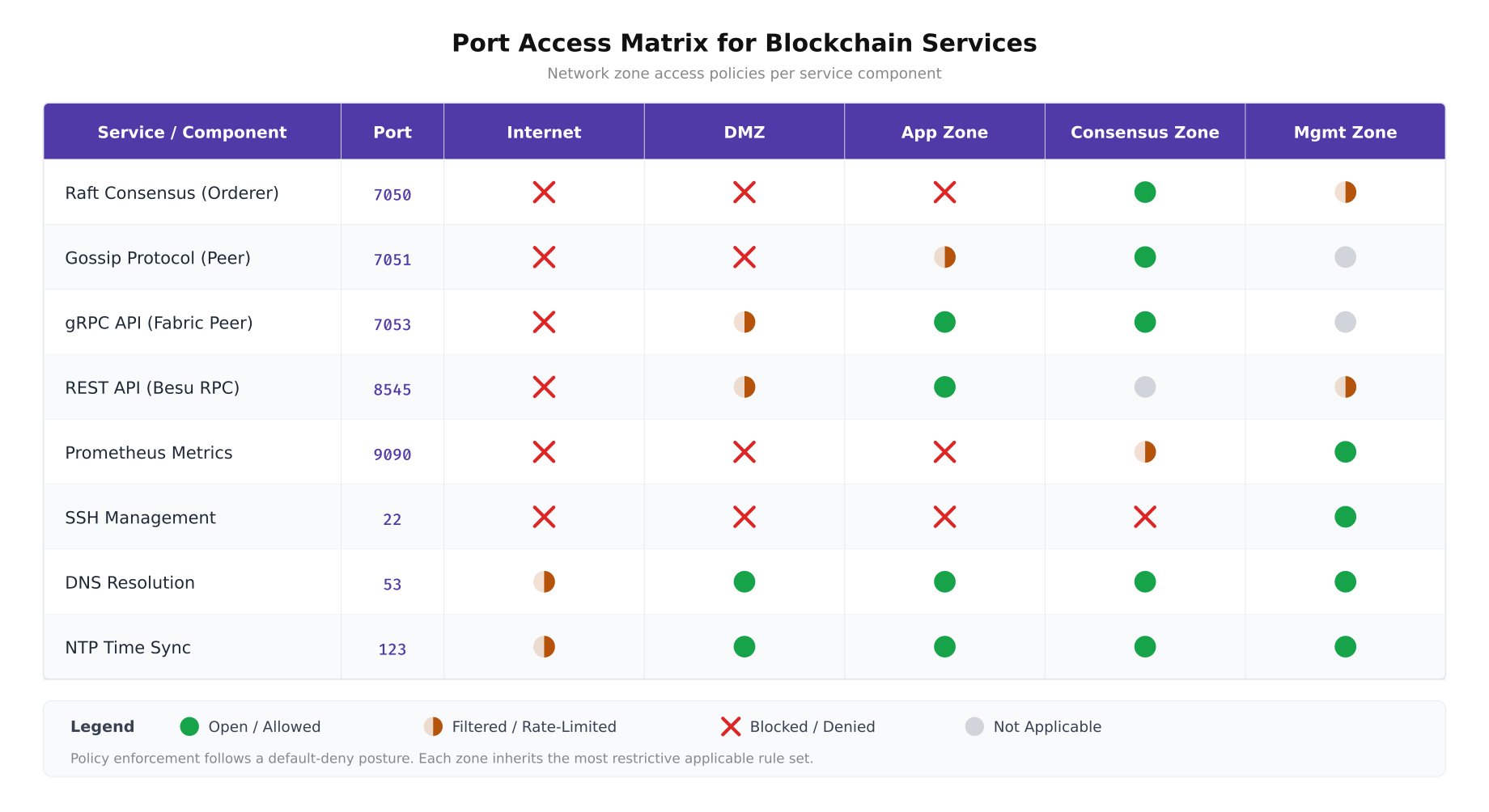
The matrix above documents ArcticLedger’s complete port policy. Consensus ports (7050, 7051, 30303) are exclusively open within the Consensus zone and blocked everywhere else. SSH (port 22) is restricted to the Management zone only. DNS and NTP are broadly permitted because every node requires name resolution and time synchronization for certificate validation and consensus timing. The default posture for any port not listed is deny with logging.
Traffic Flow Analysis
Understanding which traffic flows reach validator nodes and which are blocked at the perimeter is essential for both security assurance and troubleshooting. ArcticLedger maps every legitimate traffic flow from its source to the validator cluster, documenting the protocol, port, direction, and expected frequency. This traffic flow map becomes the authoritative reference for firewall rule validation.
Free to use, share it in your presentations, blogs, or learning materials.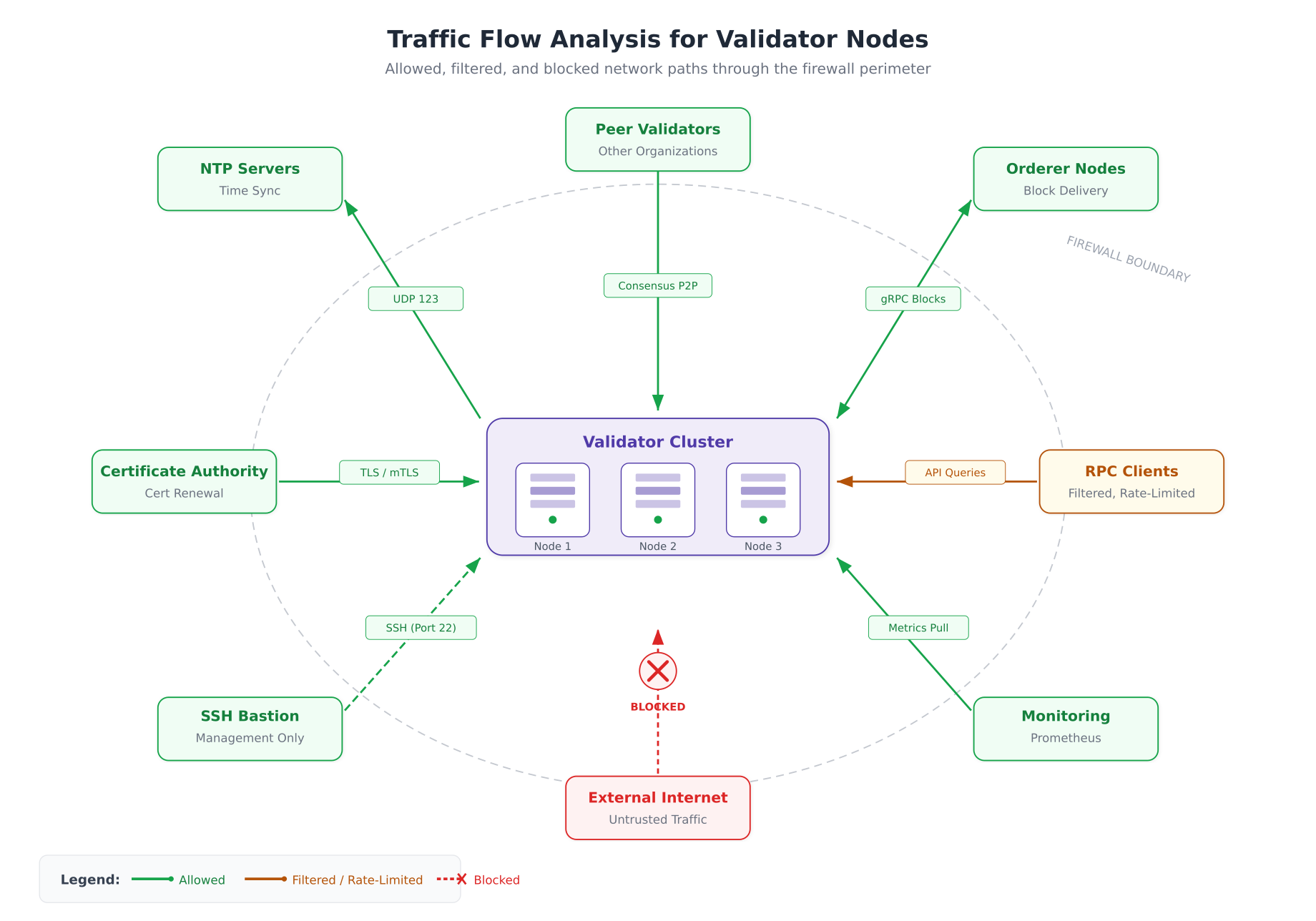
The flow diagram above illustrates how ArcticLedger’s validators interact with surrounding infrastructure. Peer validators communicate directly over the consensus VLAN for Raft and IBFT 2.0 rounds. Orderer nodes exchange blocks bidirectionally. RPC clients can only reach validators through the filtered application zone. The monitoring stack pulls metrics on a scheduled interval. External internet traffic hits a hard block at the firewall perimeter, with no exception. SSH access is limited to the bastion host on the management VLAN via a dashed path indicating restricted, audited access.
Connection Rate Limiting and SYN Flood Protection
Even with strict source IP filtering, validator nodes can be overwhelmed by connection floods from compromised peers or rogue clients within the allowed address ranges. nftables provides native rate limiting through the meter statement, which tracks connection rates per source IP and drops traffic that exceeds defined thresholds.
# Rate limiting additions for orderer nftables ruleset
# Add these rules inside the input chain, before the accept rules

table inet filter {
    chain input {
        # SYN flood protection: limit new TCP connections
        # Maximum 25 new connections per second per source IP
        tcp flags syn ct state new meter syn_flood {
            ip saddr limit rate over 25/second burst 50 packets
        } log prefix "NFT-SYN-FLOOD: " drop

        # Raft consensus rate limit: prevent consensus flooding
        # Orderers should not exceed 100 new connections/second
        tcp dport 7053 ct state new meter raft_limit {
            ip saddr limit rate over 100/second burst 200 packets
        } log prefix "NFT-RAFT-FLOOD: " drop

        # gRPC API rate limit: prevent API abuse
        tcp dport 7050 ct state new meter grpc_limit {
            ip saddr limit rate over 50/second burst 100 packets
        } log prefix "NFT-GRPC-FLOOD: " drop

        # SSH brute force protection: max 3 attempts per minute
        tcp dport 22 ct state new meter ssh_limit {
            ip saddr limit rate over 3/minute burst 5 packets
        } log prefix "NFT-SSH-BRUTE: " drop
    }
}
Kernel-Level SYN Cookie Protection
In addition to nftables rate limiting, ArcticLedger enables kernel-level SYN cookie protection as a second line of defense. SYN cookies allow the kernel to respond to SYN packets without allocating connection state, preventing the SYN queue from being exhausted during a flood.
# /etc/sysctl.d/99-blockchain-syn-protection.conf
# SYN flood protection at the kernel level

# Enable SYN cookies: respond to SYN without allocating state
net.ipv4.tcp_syncookies = 1

# Maximum number of half-open connections (SYN_RECV state)
# Default: 128. Increase for high-traffic validators
net.ipv4.tcp_max_syn_backlog = 4096

# Reduce SYN-ACK retries: give up faster on unresponsive clients
# Default: 5 retries (roughly 180 seconds). Set to 2 (roughly 15 seconds)
net.ipv4.tcp_synack_retries = 2

# Maximum number of sockets in TIME_WAIT state
# Prevents port exhaustion during connection storms
net.ipv4.tcp_max_tw_buckets = 32768

# Enable TIME_WAIT socket reuse for outbound connections
net.ipv4.tcp_tw_reuse = 1

# Reduce FIN_WAIT2 timeout
# Default: 60 seconds. Reduce to 15 for faster cleanup
net.ipv4.tcp_fin_timeout = 15

# Apply changes
# sudo sysctl -p /etc/sysctl.d/99-blockchain-syn-protection.conf
DDoS Mitigation Architecture
A distributed denial-of-service attack against blockchain validators can halt consensus. If enough validators become unreachable, the network stops producing blocks. ArcticLedger implements a four-layer DDoS mitigation strategy that progressively filters attack traffic before it reaches the validator nodes.
Free to use, share it in your presentations, blogs, or learning materials.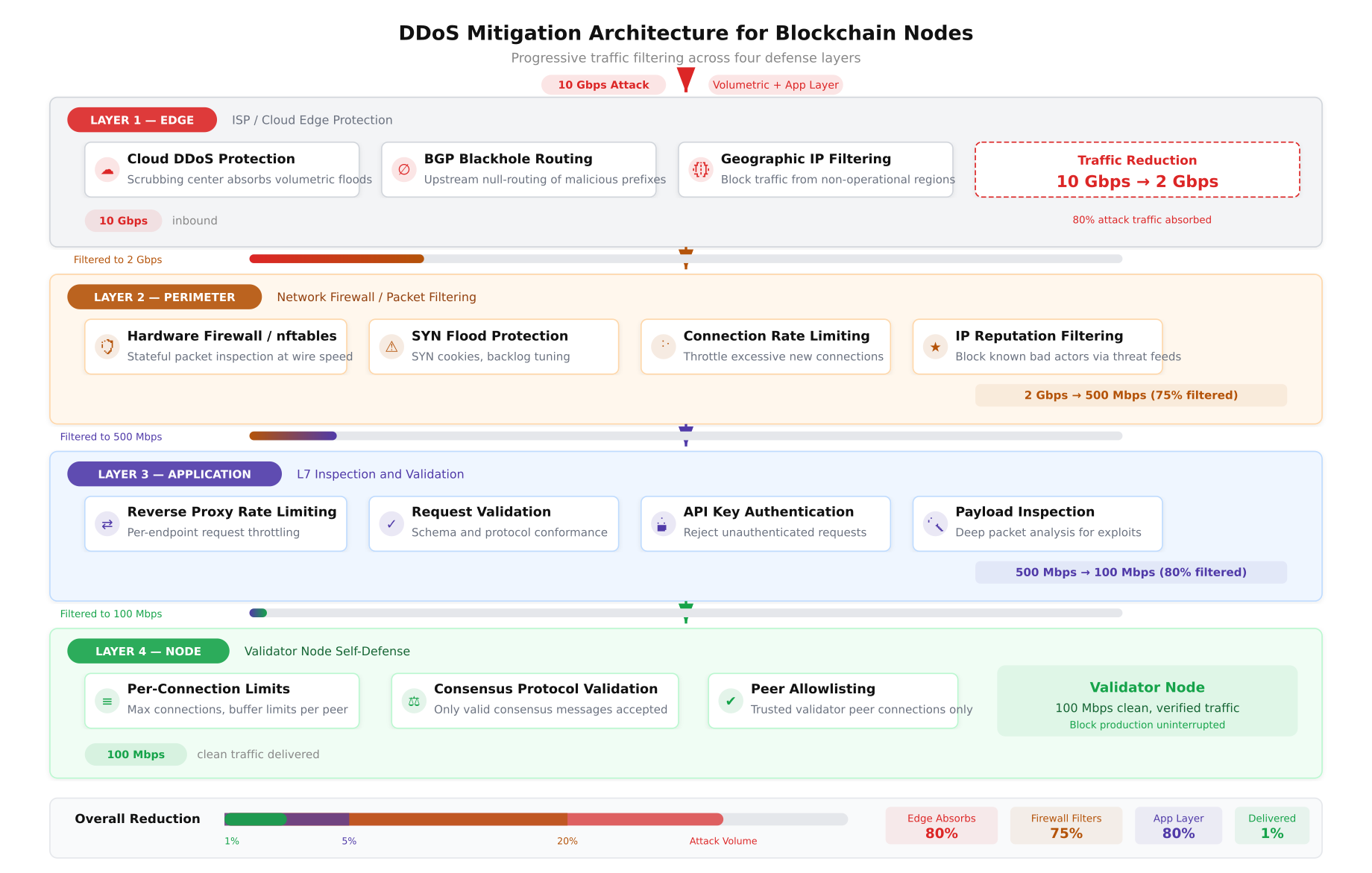
The diagram above illustrates ArcticLedger’s DDoS defense pipeline. At the edge layer, cloud-based scrubbing centers absorb volumetric attacks and BGP blackhole routing drops traffic from known malicious ASNs, reducing 10 Gbps of attack traffic to approximately 2 Gbps. The network perimeter layer uses nftables rate limiting, SYN flood protection, and IP reputation filtering to reduce this further to 500 Mbps of potentially legitimate traffic. The application layer validates API keys, inspects request payloads, and enforces per-client rate limits, narrowing the stream to 100 Mbps. At the node level, only traffic from allowlisted peers with valid mTLS certificates reaches the validators.
fail2ban Integration for Blockchain Services
fail2ban monitors log files for repeated failed authentication attempts and dynamically adds source IPs to the firewall blocklist. ArcticLedger configures fail2ban with custom filters for both SSH and Fabric gRPC authentication failures.
# /etc/fail2ban/filter.d/fabric-grpc.conf
# Custom fail2ban filter for Hyperledger Fabric gRPC authentication failures
[Definition]
failregex = ^.*remote_addr=.*TLS handshake failed.*$
            ^.*remote_addr=.*access denied.*identity not authorized.*$
            ^.*remote_addr=.*certificate verification failed.*$
ignoreregex =

# /etc/fail2ban/jail.d/blockchain.conf
# fail2ban jail configuration for blockchain services
[sshd]
enabled  = true
port     = 22
filter   = sshd
logpath  = /var/log/auth.log
maxretry = 3
findtime = 600
bantime  = 3600
banaction = nftables-multiport

[fabric-grpc]
enabled  = true
port     = 7050,7051,7053
filter   = fabric-grpc
logpath  = /var/log/fabric/orderer.log
maxretry = 5
findtime = 300
bantime  = 7200
banaction = nftables-multiport

[besu-rpc]
enabled  = true
port     = 8545,8546,30303
filter   = besu-rpc
logpath  = /var/log/besu/besu.log
maxretry = 10
findtime = 300
bantime  = 3600
banaction = nftables-multiport
# /etc/fail2ban/filter.d/besu-rpc.conf
# Custom fail2ban filter for Besu RPC authentication failures
[Definition]
failregex = ^.*Unauthorized RPC request from .*$
^.*Invalid JWT token from .*$
^.*P2P connection rejected from .*node not in allowlist.*$
ignoreregex =
# Enable and start fail2ban
sudo systemctl enable fail2ban
sudo systemctl start fail2ban
# Verify active jails
sudo fail2ban-client status
sudo fail2ban-client status sshd
sudo fail2ban-client status fabric-grpc Network Hardening Beyond Firewalls
Firewalls control which traffic flows are permitted. Network hardening goes further by securing the network stack itself, disabling unnecessary protocols, preventing routing manipulation, and protecting against ARP spoofing and MITM attacks within the local network segment.
Kernel Network Stack Hardening
# /etc/sysctl.d/99-blockchain-network-hardening.conf
# Network stack hardening for blockchain validator nodes

# --- IP Forwarding ---
# Disable IP forwarding: validators should not route traffic
net.ipv4.ip_forward = 0
net.ipv6.conf.all.forwarding = 0

# --- Source Route Validation ---
# Enable strict reverse path filtering (BCP38/RFC3704)
# Drops packets with spoofed source addresses
net.ipv4.conf.all.rp_filter = 1
net.ipv4.conf.default.rp_filter = 1

# --- ICMP Hardening ---
# Ignore ICMP broadcast requests (Smurf attack prevention)
net.ipv4.icmp_echo_ignore_broadcasts = 1

# Ignore bogus ICMP error responses
net.ipv4.icmp_ignore_bogus_error_responses = 1

# Limit ICMP rate to prevent ICMP flood
net.ipv4.icmp_ratelimit = 100
net.ipv4.icmp_ratemask = 88089

# --- Source Routing ---
# Reject source-routed packets (prevents routing attacks)
net.ipv4.conf.all.accept_source_route = 0
net.ipv4.conf.default.accept_source_route = 0
net.ipv6.conf.all.accept_source_route = 0
net.ipv6.conf.default.accept_source_route = 0

# --- Redirect Protection ---
# Do not accept ICMP redirects (prevents MITM routing attacks)
net.ipv4.conf.all.accept_redirects = 0
net.ipv4.conf.default.accept_redirects = 0
net.ipv6.conf.all.accept_redirects = 0
net.ipv6.conf.default.accept_redirects = 0

# Do not send ICMP redirects
net.ipv4.conf.all.send_redirects = 0
net.ipv4.conf.default.send_redirects = 0

# Do not accept secure ICMP redirects
net.ipv4.conf.all.secure_redirects = 0
net.ipv4.conf.default.secure_redirects = 0

# --- Router Advertisement ---
# Do not accept IPv6 router advertisements
net.ipv6.conf.all.accept_ra = 0
net.ipv6.conf.default.accept_ra = 0

# --- TCP Hardening ---
# Enable TCP timestamps for PAWS (Protection Against Wrapped Sequences)
net.ipv4.tcp_timestamps = 1

# Disable TCP SACK if not needed (reduces attack surface)
# Note: keep enabled if latency-sensitive consensus requires it
# net.ipv4.tcp_sack = 0

# --- ARP Protection ---
# Restrict ARP responses to matching interface
net.ipv4.conf.all.arp_filter = 1
net.ipv4.conf.all.arp_announce = 2
net.ipv4.conf.all.arp_ignore = 1

# Apply all changes
# sudo sysctl -p /etc/sysctl.d/99-blockchain-network-hardening.conf
Disabling Unnecessary Network Services
Every listening service increases the attack surface. ArcticLedger audits all listening ports on validator nodes and disables any service that is not explicitly required for blockchain operations or management.
# Audit all listening TCP and UDP ports
sudo ss -tlnp
sudo ss -ulnp

# Disable unused services that may be installed by default
sudo systemctl disable --now avahi-daemon.service
sudo systemctl disable --now cups.service
sudo systemctl disable --now rpcbind.service
sudo systemctl disable --now rpcbind.socket
sudo systemctl disable --now nfs-server.service
sudo systemctl disable --now bluetooth.service

# Remove unnecessary network packages
sudo apt purge -y telnet rsh-client rsh-redone-client
sudo apt purge -y xinetd ypbind ypserv tftp-hpa vsftpd

# Disable unused network protocols at kernel module level
cat <<EOF | sudo tee /etc/modprobe.d/blockchain-network-hardening.conf
# Disable DCCP: not used by blockchain protocols
install dccp /bin/true
# Disable SCTP: not used by blockchain protocols
install sctp /bin/true
# Disable RDS: not used by blockchain protocols
install rds /bin/true
# Disable TIPC: not used by blockchain protocols
install tipc /bin/true
EOF

# Verify no unexpected services are listening
sudo ss -tlnp | grep -v -E '(sshd|fabric|besu|node_exporter|chronyd)'
Network Monitoring and Intrusion Detection
Firewall rules are preventive controls. Detection controls provide visibility into traffic patterns that may indicate a breach in progress, a misconfigured rule, or a novel attack vector that the firewall ruleset does not cover. ArcticLedger deploys Suricata as a network intrusion detection system (NIDS) on each VLAN segment.
Suricata IDS Configuration for Blockchain Traffic
# /etc/suricata/suricata.yaml (key sections)
# Blockchain-specific Suricata IDS configuration

# Define HOME_NET to match blockchain VLANs
vars:
  address-groups:
    HOME_NET: "[10.10.0.0/24, 10.20.0.0/24, 10.30.0.0/24, 10.40.0.0/24]"
    EXTERNAL_NET: "!$HOME_NET"
    CONSENSUS_NET: "[10.20.0.0/24]"
    MGMT_NET: "[10.10.0.0/24]"

# AF-PACKET capture on consensus VLAN interface
af-packet:
  - interface: ens192.200
    threads: 4
    cluster-id: 99
    cluster-type: cluster_flow
    defrag: yes
    use-mmap: yes
    ring-size: 200000

# Enable EVE JSON logging for SIEM integration
outputs:
  - eve-log:
      enabled: yes
      filetype: regular
      filename: eve.json
      types:
        - alert:
            payload: yes
            payload-printable: yes
        - flow:
            enabled: yes
        - dns:
            enabled: yes
        - tls:
            enabled: yes
            extended: yes
# /etc/suricata/rules/blockchain-custom.rules
# Custom Suricata rules for blockchain network anomaly detection
# Alert on non-TLS traffic to consensus ports
alert tcp any any -> $CONSENSUS_NET 7050 (msg:"NON-TLS traffic to Fabric orderer port";
flow:to_server,established; content:!"\\x16\\x03"; offset:0; depth:2;
sid:9000001; rev:1; classtype:policy-violation;)
# Alert on unexpected source accessing consensus VLAN
alert tcp !$CONSENSUS_NET any -> $CONSENSUS_NET any (msg:"Unauthorized access to consensus VLAN";
flow:to_server; threshold:type both, track by_src, count 5, seconds 60;
sid:9000002; rev:1; classtype:attempted-recon;)
# Alert on port scan activity targeting validator nodes
alert tcp any any -> $CONSENSUS_NET any (msg:"Port scan detected against validators";
flow:to_server; flags:S; threshold:type both, track by_src, count 20, seconds 10;
sid:9000003; rev:1; classtype:attempted-recon;)
# Alert on DNS queries to suspicious domains from consensus nodes
alert dns $CONSENSUS_NET any -> any 53 (msg:"Suspicious DNS query from consensus node";
dns.query; pcre:"/\\.(top|xyz|tk|ml|ga|cf)$/i";
sid:9000004; rev:1; classtype:trojan-activity;)
# Alert on large data exfiltration from consensus VLAN
alert tcp $CONSENSUS_NET any -> $EXTERNAL_NET any (msg:"Large outbound data transfer from consensus";
flow:to_server,established; dsize:>10000;
threshold:type both, track by_src, count 100, seconds 60;
sid:9000005; rev:1; classtype:policy-violation;)nftables Logging and Log Analysis
Every dropped packet logged by nftables contains forensic information: source IP, destination port, protocol, and interface. ArcticLedger forwards these logs to a centralized SIEM for correlation with application-layer events from Fabric and Besu.
# Configure rsyslog to capture nftables log entries
# /etc/rsyslog.d/30-nftables.conf

# Match nftables log prefixes and route to dedicated file
:msg, contains, "NFT-" /var/log/nftables.log
& stop

# Forward to remote SIEM via TLS
# Requires rsyslog-gnutls package
action(
    type="omfwd"
    target="siem.arcticledger.net"
    port="6514"
    protocol="tcp"
    StreamDriver="gtls"
    StreamDriverMode="1"
    StreamDriverAuthMode="x509/name"
    StreamDriverPermittedPeer="siem.arcticledger.net"
)

# Restart rsyslog to apply
sudo systemctl restart rsyslog

# Verify nftables logs are being captured
tail -f /var/log/nftables.log
Incident Response Workflow
A firewall breach or detected network anomaly triggers ArcticLedger’s incident response workflow. This process is designed specifically for blockchain infrastructure, where the primary concern is not just data confidentiality but consensus integrity. A compromised validator can do more damage by remaining in the consensus set than a compromised web server can do by serving malicious content.
Free to use, share it in your presentations, blogs, or learning materials.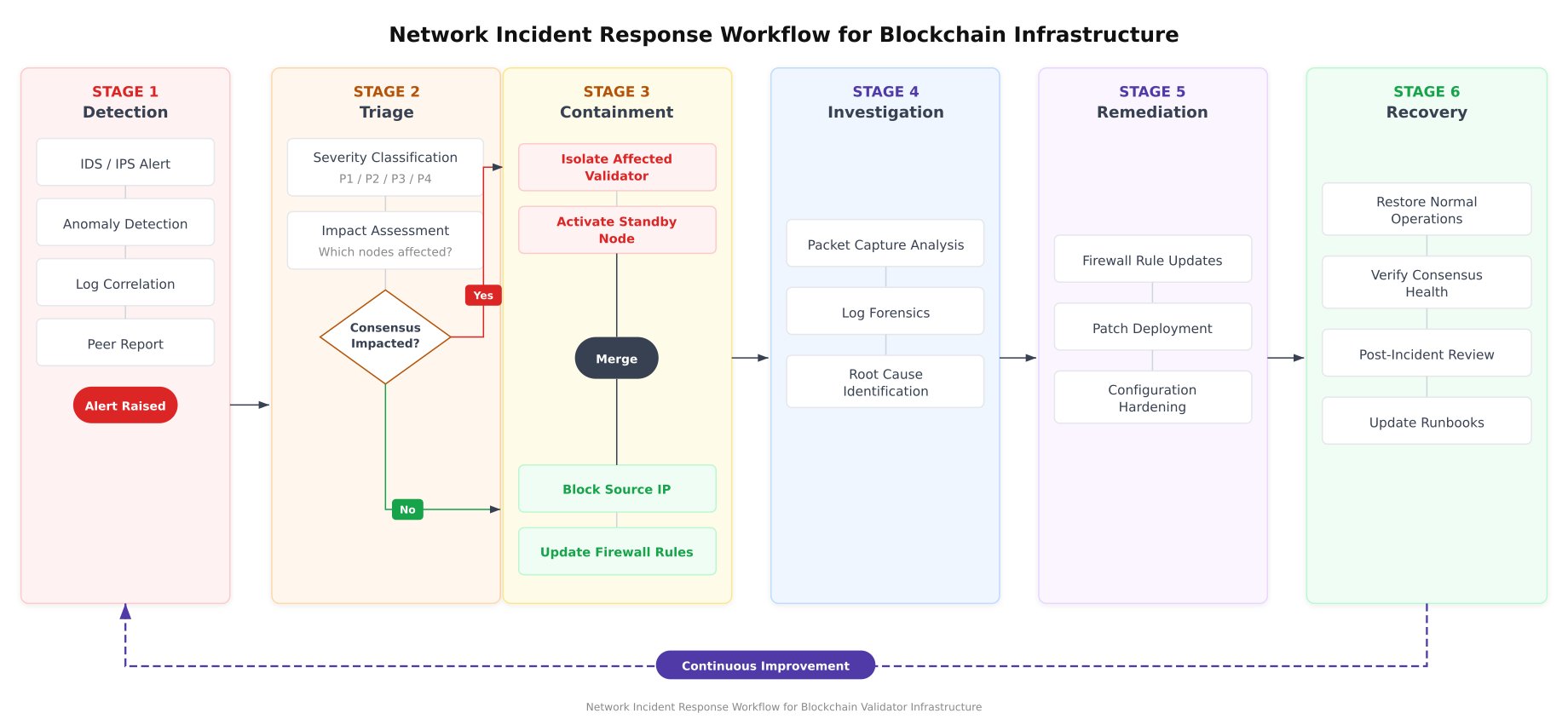
The workflow above highlights the critical decision point at Stage 2. If an incident impacts consensus (for example, a validator signing unexpected blocks or a Raft leader exhibiting anomalous behavior), the response escalates immediately to validator isolation and standby activation. If consensus is not impacted, the containment response focuses on blocking the attack source and updating firewall rules. Both paths converge at the investigation stage, where packet captures and log forensics identify the root cause before remediation and recovery proceed.
Automated Firewall Validation Script
ArcticLedger runs an automated validation script after every firewall change to confirm that security rules are correctly applied and that no unintended ports are accessible.
#!/bin/bash
# firewall-validation.sh
# Automated firewall validation for ArcticLedger blockchain nodes
# Run after every nftables configuration change

set -euo pipefail

NODE_TYPE="${1:-orderer}"
LOGFILE="/var/log/firewall-validation-$(date +%Y%m%d_%H%M%S).log"

echo "=== Firewall Validation Report ===" | tee "$LOGFILE"
echo "Node Type: $NODE_TYPE" | tee -a "$LOGFILE"
echo "Timestamp: $(date -u +%Y-%m-%dT%H:%M:%SZ)" | tee -a "$LOGFILE"
echo "Hostname: $(hostname -f)" | tee -a "$LOGFILE"
echo "" | tee -a "$LOGFILE"

# 1. Verify nftables is active and loaded
echo "[CHECK] nftables service status" | tee -a "$LOGFILE"
if systemctl is-active --quiet nftables; then
    echo "  PASS: nftables is active" | tee -a "$LOGFILE"
else
    echo "  FAIL: nftables is not running" | tee -a "$LOGFILE"
fi

# 2. Verify default policy is DROP
echo "[CHECK] Default input policy" | tee -a "$LOGFILE"
if nft list chain inet filter input | grep -q "policy drop"; then
    echo "  PASS: Input policy is DROP" | tee -a "$LOGFILE"
else
    echo "  FAIL: Input policy is not DROP" | tee -a "$LOGFILE"
fi

echo "[CHECK] Default output policy" | tee -a "$LOGFILE"
if nft list chain inet filter output | grep -q "policy drop"; then
    echo "  PASS: Output policy is DROP" | tee -a "$LOGFILE"
else
    echo "  FAIL: Output policy is not DROP" | tee -a "$LOGFILE"
fi

echo "[CHECK] Default forward policy" | tee -a "$LOGFILE"
if nft list chain inet filter forward | grep -q "policy drop"; then
    echo "  PASS: Forward policy is DROP" | tee -a "$LOGFILE"
else
    echo "  FAIL: Forward policy is not DROP" | tee -a "$LOGFILE"
fi

# 3. Verify no unexpected listening ports
echo "[CHECK] Listening TCP ports" | tee -a "$LOGFILE"
EXPECTED_PORTS=""
case "$NODE_TYPE" in
    orderer) EXPECTED_PORTS="22 7050 7053 9443" ;;
    peer)    EXPECTED_PORTS="22 5984 7051 7053 9443" ;;
    besu)    EXPECTED_PORTS="22 8545 8546 9545 30303" ;;
esac

ACTUAL_PORTS=$(ss -tlnp | awk 'NR>1 {print $4}' | grep -oP ':\K[0-9]+' | sort -un)
for port in $ACTUAL_PORTS; do
    if echo "$EXPECTED_PORTS" | grep -qw "$port"; then
        echo "  PASS: Port $port is expected for $NODE_TYPE" | tee -a "$LOGFILE"
    else
        echo "  WARN: Port $port is open but not in expected list" | tee -a "$LOGFILE"
    fi
done

# 4. Verify IP forwarding is disabled
echo "[CHECK] IP forwarding disabled" | tee -a "$LOGFILE"
IPV4_FWD=$(sysctl -n net.ipv4.ip_forward)
if [ "$IPV4_FWD" = "0" ]; then
    echo "  PASS: IPv4 forwarding is disabled" | tee -a "$LOGFILE"
else
    echo "  FAIL: IPv4 forwarding is enabled" | tee -a "$LOGFILE"
fi

# 5. Verify SYN cookies are enabled
echo "[CHECK] SYN cookies enabled" | tee -a "$LOGFILE"
SYNCOOKIES=$(sysctl -n net.ipv4.tcp_syncookies)
if [ "$SYNCOOKIES" = "1" ]; then
    echo "  PASS: SYN cookies are enabled" | tee -a "$LOGFILE"
else
    echo "  FAIL: SYN cookies are disabled" | tee -a "$LOGFILE"
fi

# 6. Verify source route validation
echo "[CHECK] Reverse path filtering" | tee -a "$LOGFILE"
RP_FILTER=$(sysctl -n net.ipv4.conf.all.rp_filter)
if [ "$RP_FILTER" = "1" ]; then
    echo "  PASS: Strict reverse path filtering is enabled" | tee -a "$LOGFILE"
else
    echo "  FAIL: Reverse path filtering is not strict" | tee -a "$LOGFILE"
fi

# 7. Verify fail2ban is running
echo "[CHECK] fail2ban service" | tee -a "$LOGFILE"
if systemctl is-active --quiet fail2ban; then
    JAIL_COUNT=$(sudo fail2ban-client status | grep "Number of jail" | awk '{print $NF}')
    echo "  PASS: fail2ban is active with $JAIL_COUNT jails" | tee -a "$LOGFILE"
else
    echo "  FAIL: fail2ban is not running" | tee -a "$LOGFILE"
fi

# 8. Verify VLAN interfaces
echo "[CHECK] VLAN interfaces" | tee -a "$LOGFILE"
for vlan in 100 200; do
    if ip link show "ens192.$vlan" &>/dev/null; then
        echo "  PASS: VLAN $vlan interface is configured" | tee -a "$LOGFILE"
    else
        echo "  WARN: VLAN $vlan interface not found" | tee -a "$LOGFILE"
    fi
done

echo "" | tee -a "$LOGFILE"
echo "=== Validation Complete ===" | tee -a "$LOGFILE"
echo "Report saved to: $LOGFILE"
Periodic Firewall Auditing
ArcticLedger schedules quarterly firewall audits that systematically verify every rule against the port access matrix, test for rule drift (rules added manually during incidents that were never removed), and confirm that no new listening services have appeared on validator nodes. The audit combines automated scanning with manual review of the nftables ruleset against the documented policy.
#!/bin/bash
# firewall-audit.sh
# Quarterly firewall audit script for ArcticLedger blockchain infrastructure

AUDIT_DATE=$(date +%Y%m%d)
AUDIT_DIR="/var/log/firewall-audits/$AUDIT_DATE"
mkdir -p "$AUDIT_DIR"

echo "=== Quarterly Firewall Audit: $AUDIT_DATE ===" | tee "$AUDIT_DIR/summary.log"

# 1. Export current nftables ruleset for review
echo "[AUDIT] Exporting nftables ruleset" | tee -a "$AUDIT_DIR/summary.log"
sudo nft list ruleset > "$AUDIT_DIR/nftables-ruleset.txt"
echo "  Saved to: $AUDIT_DIR/nftables-ruleset.txt" | tee -a "$AUDIT_DIR/summary.log"

# 2. Count total rules
RULE_COUNT=$(sudo nft list ruleset | grep -c "accept\|drop\|reject" || true)
echo "  Total rules: $RULE_COUNT" | tee -a "$AUDIT_DIR/summary.log"

# 3. Check for overly permissive rules (accept from any source)
echo "[AUDIT] Checking for overly permissive rules" | tee -a "$AUDIT_DIR/summary.log"
PERMISSIVE=$(sudo nft list ruleset | grep "accept" | grep -v "ct state\|iif\|ip saddr\|127.0.0.1\|loopback" | wc -l)
echo "  Potentially permissive rules: $PERMISSIVE" | tee -a "$AUDIT_DIR/summary.log"

# 4. Port scan from management host (run from bastion)
echo "[AUDIT] Recording all listening ports" | tee -a "$AUDIT_DIR/summary.log"
ss -tlnp > "$AUDIT_DIR/tcp-listeners.txt"
ss -ulnp > "$AUDIT_DIR/udp-listeners.txt"

# 5. Check for fail2ban banned IPs (indicates attack attempts)
echo "[AUDIT] fail2ban ban statistics" | tee -a "$AUDIT_DIR/summary.log"
sudo fail2ban-client status | tee -a "$AUDIT_DIR/fail2ban-status.txt"

# 6. Review nftables drop counters
echo "[AUDIT] Firewall drop counters" | tee -a "$AUDIT_DIR/summary.log"
sudo nft list ruleset | grep "counter" | tee -a "$AUDIT_DIR/drop-counters.txt"

# 7. Compare current ruleset with baseline
if [ -f "/etc/nftables.conf.baseline" ]; then
    echo "[AUDIT] Comparing with baseline ruleset" | tee -a "$AUDIT_DIR/summary.log"
    diff /etc/nftables.conf.baseline /etc/nftables.conf > "$AUDIT_DIR/ruleset-diff.txt" 2>&1 || true
    DIFF_LINES=$(wc -l < "$AUDIT_DIR/ruleset-diff.txt")
    echo "  Differences from baseline: $DIFF_LINES lines" | tee -a "$AUDIT_DIR/summary.log"
else
    echo "[AUDIT] No baseline ruleset found. Creating baseline." | tee -a "$AUDIT_DIR/summary.log"
    sudo cp /etc/nftables.conf /etc/nftables.conf.baseline
fi

echo "" | tee -a "$AUDIT_DIR/summary.log"
echo "=== Audit Complete ===" | tee -a "$AUDIT_DIR/summary.log"
echo "Audit artifacts saved to: $AUDIT_DIR" | tee -a "$AUDIT_DIR/summary.log"
Production Deployment Checklist
Before ArcticLedger promotes any validator node from staging to production, the following network hardening checklist must pass with zero failures.
- VLAN segmentation verified: consensus, management, application, storage, and external VLANs are isolated with ACL enforcement at every crossing point
- nftables ruleset loaded: default-deny policy on input, output, and forward chains with explicit allow rules for documented services only
- Rate limiting active: SYN flood meters, per-service connection limits, and SSH brute force protection configured and tested
- SYN cookie protection enabled: kernel-level tcp_syncookies set to 1 with increased SYN backlog
- IP forwarding disabled: validators do not route traffic between interfaces
- Source routing rejected: accept_source_route set to 0 on all interfaces
- ICMP hardening applied: broadcast echo disabled, bogus error responses ignored, rate limiting active
- Redirect protection enabled: ICMP redirects not accepted or sent on any interface
- ARP protection configured: arp_filter, arp_announce, and arp_ignore set to prevent spoofing
- Unnecessary services removed: no unused network daemons listening, unused kernel modules blacklisted
- fail2ban operational: SSH, Fabric gRPC, and Besu RPC jails active with nftables ban action
- Suricata IDS deployed: custom blockchain rules loaded, EVE JSON logging to SIEM, monitoring consensus VLAN
- Firewall logging enabled: all dropped packets logged with prefixes, forwarded to SIEM via TLS
- Validation script passed: automated firewall validation script reports zero failures
- Baseline snapshot created: current nftables ruleset saved as baseline for quarterly audit comparison
ArcticLedger's experience demonstrates that blockchain network hardening is not a single configuration task but an ongoing operational discipline. The VLAN segmentation creates the foundation. The nftables rulesets define the policy. Rate limiting and DDoS mitigation protect availability. Suricata and logging provide detection. fail2ban adds automated response. The quarterly audit cycle ensures that the security posture does not degrade over time as infrastructure changes accumulate. Every component in this stack works together to protect what matters most in a blockchain network: the integrity of consensus and the immutability of the ledger.