
How an AI-powered firewall actually works, from a year of running two of them side by side for a 6,000-seat enterprise. The signature-only stack it replaced, where the ML sits in the dataplane, which model does which job, and one Cobalt Strike beacon followed from first packet to block.
Firewalls are where the gap between AI marketing and AI reality is widest, and most dangerous. Every firewall datasheet of the last four years says “AI-powered” somewhere on page one. Most of those claims are true in a narrow way. Some are just marketing. In 2025 I ran a four-week proof of concept for a 6,000-employee enterprise. Two vendors’ ML firewalls ran side by side on a mirror of the real traffic. Then I stayed on for the year after the purchase. This article is what I learned. Where the machine learning sits. Which models do which job. And why a well-built AI firewall still does most of its blocking with rules and signatures. Part 2 covers the vendor numbers, the evasions, and what to ask before buying.

Key Takeaways
- An AI firewall does not block everything. Signatures still catch 75 to 85% of known threats. The ML layer covers the 8 to 15% of unknowns they miss, and policy blocks the rest on context.
- Inline ML sits inside the dataplane and scores in under a millisecond. Sandbox detonation, the slow and accurate part, lives in the vendor cloud and streams signatures back in seconds.
- Ten inspections, ten model families: CNNs on byte images for files, LSTMs on packet timing for beacons, random forests on TLS fingerprints, autoencoders for IoT baselines.
- Our Cobalt Strike test beacon was blocked after ten minutes by an accumulation of weak signals, and a faster attacker would have beaten that window.
What Is Inside
The Sentence on Every Datasheet
“AI firewall blocks everything.” I have now read that sentence, or its cousin, in eleven vendor decks. AI firewalls do not block everything. They classify, score, and assist. Rules still do the blocking: access control lists, application policies, URL category policies, and signature-based threat rules. What ML adds is a way to sort traffic the rules cannot sort on their own. Zero-day malware. Phishing URLs on no bad-domain list. DNS tunnelling inside encrypted DNS-over-HTTPS. IoT devices that look normal until they start leaking data. These are the areas where ML clearly beats a signature-only firewall. They are also the only areas where the vendor claims survived our own tests.
Here is the split inside the firewall we deployed, measured over the first quarter. Signatures caught about 81% of blocked threats, all already in the vendor’s threat feed. ML caught about 11%, the unknowns that signatures had missed. Rules and policy blocked the last 8% on context: wrong time, wrong user, wrong destination. The ML layer is not the main blocking mechanism. It is the specialist for the blind spots. That is exactly how the vendors’ own engineers describe it once the sales team leaves the room.
The Signature-Only Firewall We Replaced
Before inline machine learning, a next-generation firewall was a signature engine on top of an access control list. Traffic came in. The firewall decoded it up to the application layer. It matched the traffic against a database of known threats, then allowed or blocked on policy. The database refreshed every few minutes from a cloud feed. Any threat the database had never seen was invisible. That was the enterprise’s old firewall exactly, and it had been in place for six years.
Free to use, share it in your presentations, blogs, or learning materials.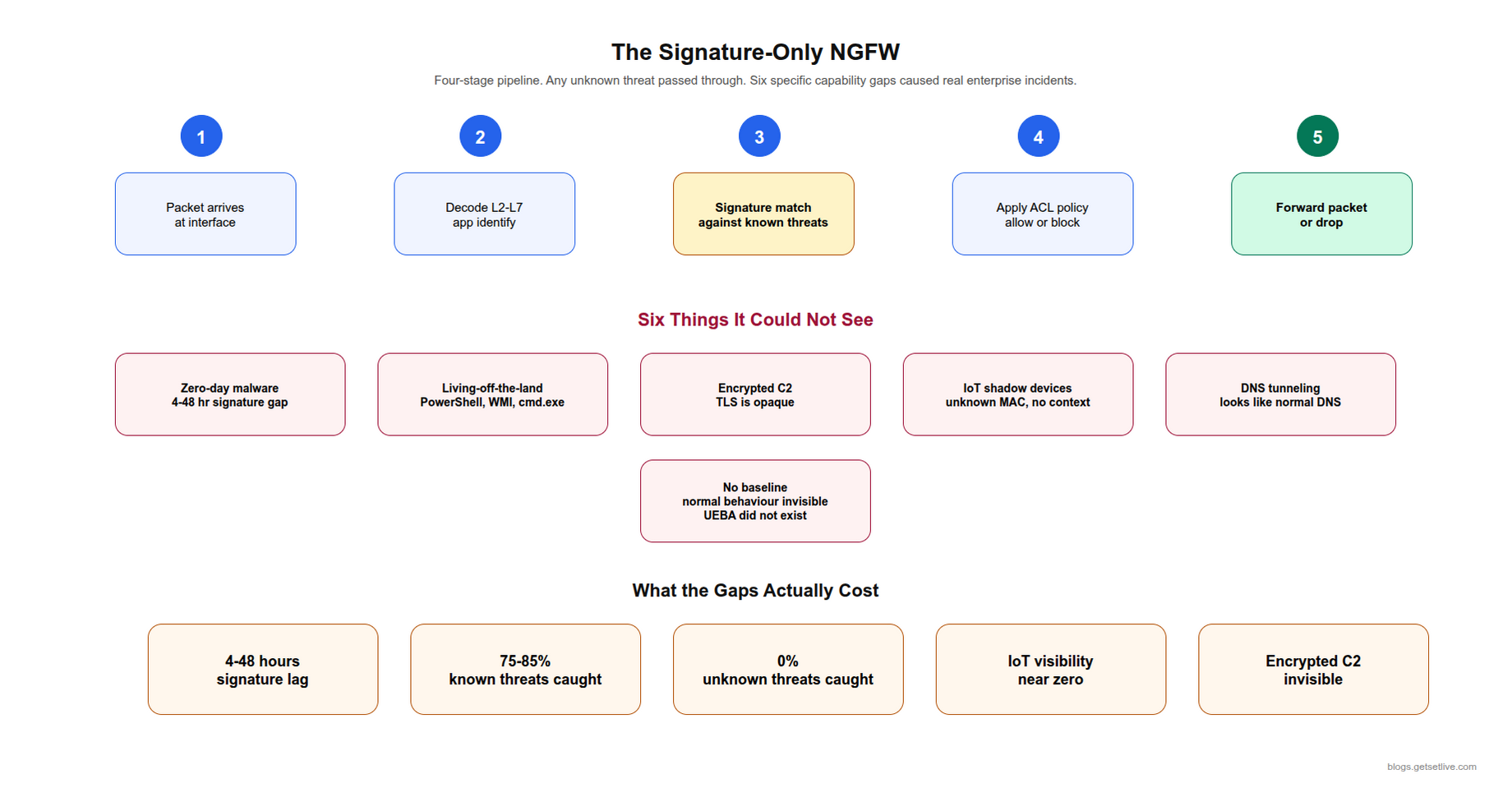
What the signature-only firewall could not do, with the incident that proved each gap:
- Catch zero-day malware. New malware has no signature until the vendor’s lab sees it, a window of 4 to 48 hours. The 2023 ransomware near-miss came through that window.
- Detect living-off-the-land. Attackers who use PowerShell, WMI, and cmd.exe look identical to admins. No signature catches it. The 2023 intruder spent nine days doing exactly this.
- See inside encrypted C2. Command-and-control over TLS looks like any other HTTPS session. Signatures cannot read encrypted content.
- Identify IoT shadow devices. A flow from an unknown MAC address could be a printer, a smart speaker, or a hacked camera. The asset list said 9,000 devices. The first ML fingerprinting pass found 23,000.
- Detect DNS tunnelling. Data exfiltrated through DNS queries looks like DNS. Signatures rarely fire.
- Baseline normal behaviour. Without learning what normal looks like for each asset, a deviation is invisible. Behaviour analytics did not exist at the firewall level.
The industry response, from about 2020, was to embed ML inside the dataplane. Palo Alto Networks led in public with PAN-OS 10 and its ML-Powered NGFW launch. Fortinet followed with FortiGuard AI services. Cisco, Check Point, and the other majors shipped their own versions. The details differ. The pattern is the same, and it is the pattern below.
Anatomy of an ML-Powered NGFW
The diagram below is the reference design as both vendors in our proof of concept describe it, with the lane names made common. Six lanes. The ML layer sits inside the dataplane, not beside it. That placement is the whole point.
Free to use, share it in your presentations, blogs, or learning materials.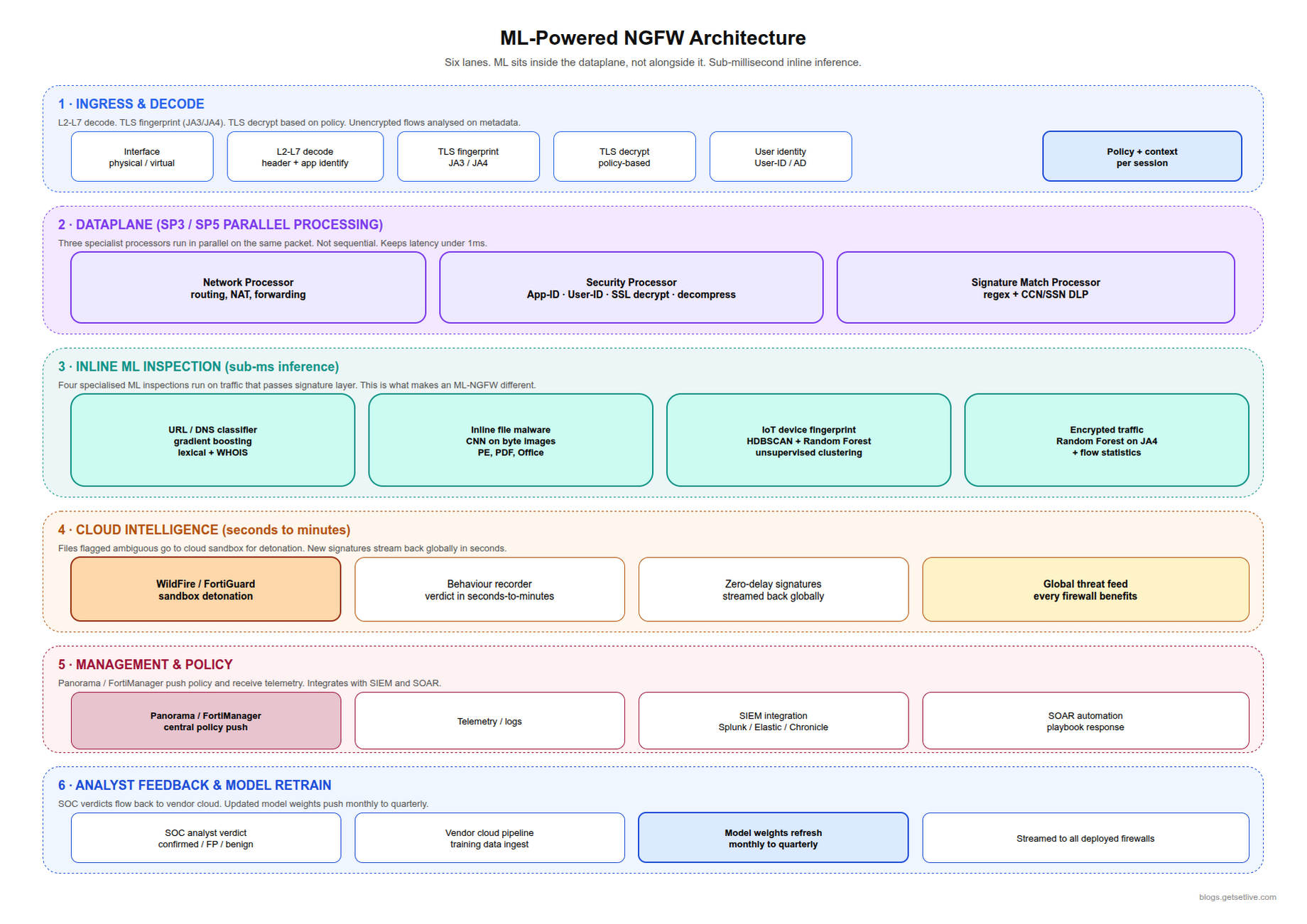
Lane 1: Ingress and Decode
Packets arrive at a physical or virtual interface. The firewall decodes layer 2 through layer 7: TCP and UDP headers, the TLS handshake fingerprint (JA3 or JA4), HTTP headers, application identity. A decrypt-or-not decision happens here, on policy. Outbound web traffic is usually decrypted. Inbound traffic to published services usually is not. Whatever stays encrypted is judged as a flow, from metadata alone. Deciding what to decrypt took legal, HR, and security three meetings. The setup took one.
Lane 2: The Dataplane
Palo Alto’s Single-Pass Parallel Processing (SP3) runs three special processors at once. A network processor handles routing, NAT, and forwarding. A security processor handles app and user identity, SSL decryption, and content inspection. A signature-match processor runs pattern matching for known threats. All three see the same packet at the same time, not one after another. That is what keeps latency under a millisecond with every security service on. Fortinet’s equivalent is the SP5 and NP7 chip pair. Cisco Firepower runs Snort with its own ML coprocessors. Different silicon, same idea: run every security function in parallel on the same packet.
Lane 3: Inline ML Inspection
This is the lane that makes an ML-powered firewall different. Inline ML runs four inspections on traffic that has passed the signature layer:
- URL and DNS classification. A gradient-boosted model or a small neural network sorts unknown URLs and domains into classes (malicious, phishing, adult, business, allowed). It uses the shape of the string, WHOIS data, and certificate details.
- File inspection during download. As a file crosses the firewall, a CNN scores it. The CNN was trained on byte-image renderings of executables, PDFs, and Office files. Files above threshold are blocked before the download finishes. This inline part was the genuinely new thing in 2020.
- IoT device fingerprinting. A clustering model (HDBSCAN at both vendors) plus a random forest identify devices by how they behave on the network. Each known device gets an allowed-behaviour profile. Deviations are flagged.
- Encrypted traffic analysis. With no decryption at all, a random forest reads the JA4 fingerprint plus flow statistics (packet sizes, gaps between packets). It labels a session as a normal app, a C2 beacon, or an anomaly. Not perfect, and better than I expected.
Lane 4: Cloud Intelligence
Files and URLs the dataplane cannot decide on go to a cloud sandbox (WildFire at Palo Alto, FortiGuard Labs at Fortinet, Secure Malware Analytics at Cisco). The sandbox runs the file in isolation, records what it does, and returns a verdict in seconds to minutes. New signatures stream back to every firewall in the world. That delay is now seconds. On the old cloud update cycle it was hours. In our first quarter, 1,140 files went to the sandbox and 37 came back bad. All 37 were unknown to the signature feed at the time.
Lane 5: Management and Policy
Panorama at Palo Alto, FortiManager at Fortinet, and their rivals push policy to the firewalls. They get telemetry back: alert events, session logs, ML confidence scores. This is where the security team sees what the firewall sees and adjusts policy. SIEM integration (Splunk, Elastic, Chronicle) lives here. So does SOAR integration for automated response. The firewall we chose lost a point in the evaluation for a management console that took 40 seconds to load a policy page. A year later that is still the engineers’ most common complaint.
Lane 6: Analyst Feedback
When a SOC analyst investigates an ML-flagged alert, the verdict (confirmed threat, false positive, benign) flows back to the vendor’s cloud training pipeline, with the customer’s consent. This loop keeps the models current. The pace varies. One of our vendors pushes new model weights monthly, the other quarterly. We asked both for the date of the last update during the evaluation. One answered in an hour. The other took nine days, and that told us something too.
Which Model Does Which Job
Ten inspections, ten model families. The diagram maps them. The table gives the reason for each pairing, as both vendors’ engineers explained it in the technical sessions.
Free to use, share it in your presentations, blogs, or learning materials.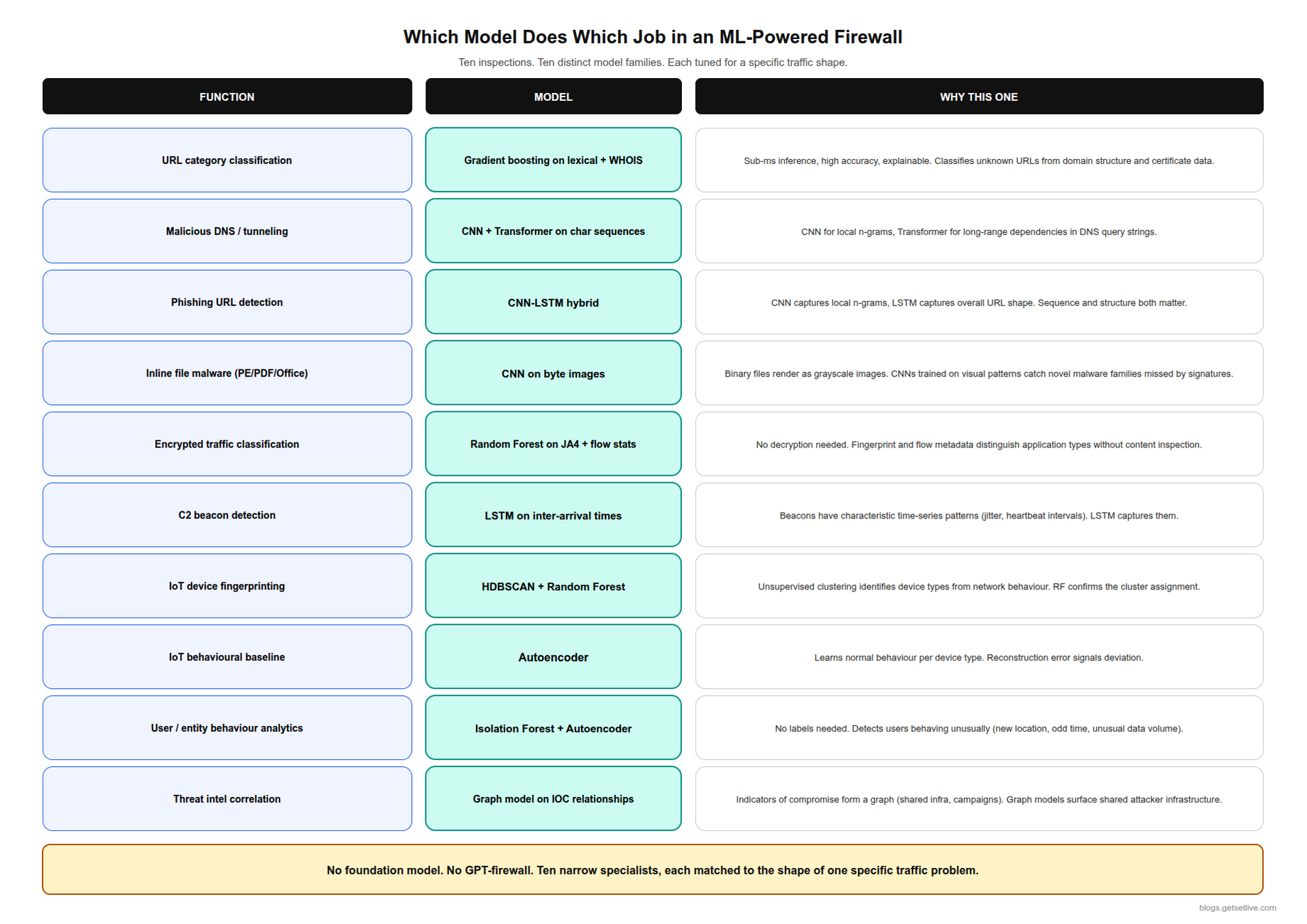
| Function | Model | Why this one |
|---|---|---|
| URL category classification | Gradient boosting on lexical + WHOIS features | Sub-millisecond, accurate, explainable |
| Malicious DNS and tunnelling | CNN + Transformer on character sequences | CNN reads n-grams, Transformer reads long-range structure |
| Phishing URL detection | CNN-LSTM hybrid | Local n-grams plus overall URL shape |
| Inline file malware (PE, PDF, Office) | CNN on byte images | Binaries as greyscale images; catches novel families |
| Encrypted traffic classification | Random Forest on JA4 + flow statistics | No decryption needed; metadata separates app types |
| C2 beacon detection | LSTM on inter-arrival times | Beacons have a timing signature the LSTM learns |
| IoT device fingerprinting | HDBSCAN + Random Forest | Clustering finds device types; the forest confirms |
| IoT behavioural baseline | Autoencoder | Learns normal per device; reconstruction error flags drift |
| User and entity behaviour analytics | Isolation Forest + Autoencoder | No labels needed; new location, odd hours, odd volume |
| Threat intelligence correlation | Graph model on indicator relationships | Indicators form a graph; surfaces shared attacker infrastructure |
This is the fourth domain in the series, and the pattern has not changed once. Every domain ends up with a stack of specialist models, each matched to the shape of its problem. Banking fraud is tabular. Claims mix photos and text. Firewalls mix packets, flows, bytes, and time series. No vendor runs a single large model for network security, and any vendor who tells you otherwise is describing a demo.
What Happened When Our Cobalt Strike Beacon Arrived
Cobalt Strike is the commercial red-team framework that has become the most common post-exploitation tool for testers and criminals alike. Its beacon is the implant that gives an attacker live access to a hacked machine. It is the classic thing a signature-only firewall misses. During the proof of concept, the enterprise’s red team planted a beacon on a test workstation with a randomised C2 profile. We watched what each firewall did. Here is the timeline from the one we bought.
- T+0: The test workstation opens a TLS connection to the red team’s server. The JA3 of a stock Cobalt Strike client is a known value. The profile had randomised it, as a real operator would.
- T+0.4 ms: The firewall sees the connection attempt and runs signature inspection on the TLS client hello. Nothing matches. Had the JA3 been stock, the story would have ended here.
- T+0.8 ms: Encrypted traffic analysis runs. It scores the JA4 fingerprint, the self-signed certificate, the server IP’s reputation (none, a fresh cloud VM), and the client process data from the endpoint agent. Anomaly score: raised, not blocking.
- T+30 s to T+5 min: The beacon starts its heartbeat. The LSTM on packet timing starts collecting samples. The profile used a 60-second interval with 20% jitter. That is the default, and the LSTM has seen it many thousands of times.
- T+10 min: The combined score crosses the threshold. The firewall blocks the flow, alerts the SOC, and tags the workstation for quarantine through the SOAR integration.
What matters in that timeline is that no single signal caught the beacon. The JA4 was suspicious, not conclusive. Its timing was typical, not unique. A self-signed certificate is low-reputation, and so are thousands of honest small sites. Only the pile of signals, built up over ten minutes, produced the block. A signature firewall looks for an exact match; an ML firewall piles up weak signals and blocks when the pile is tall enough. The other vendor’s firewall, for the record, took 14 minutes on the same beacon. It never quarantined the host, because its SOAR hook was not wired yet.
The ten-minute window is the trade-off. Signature matches are instant. ML detection needs enough samples to see a pattern, and an attacker who pulls 400 MB in the first five minutes and leaves will beat it. The red team ran that variant too. It worked. That result is why the enterprise now caps outbound volume per new destination at the policy layer. A rule, not a model.
What Happens When the Firewall Is Wrong
A false positive in a firewall is not abstract. It blocks real work, and someone phones the help desk. We met three kinds in the first quarter:
- CDN false positives. Cloudflare, Fastly, and Akamai host millions of sites behind shared IP ranges. One bad site on a CDN can drag honest sites on the same range into an IP-reputation block. Modern firewalls score by hostname to avoid this. Ours still blocked a supplier’s portal for a morning, because the reputation feed lagged the hostname fix.
- Security tooling. The security team’s own scanners and red-team traffic look exactly like the threats they study. The firewall flagged the vulnerability scanner on day two. Every SOC keeps an allow-list for its own tools. That list drifts when nobody prunes it.
- New software rollouts. A new SaaS tool means new traffic patterns, and the firewall sees an unknown application. A policy tuning step belongs in every rollout plan. In our first quarter it was in none of them.
What the Four-Week Proof of Concept Taught Us
Both firewalls sat on a mirror of production traffic for four weeks, in detect-only mode. The red team fed them the same 40 test cases each week. We scored four things. Unknown-threat detection. False positives on real traffic. Time to verdict from the cloud sandbox. And how long the console took for the ten most common admin tasks. The detection numbers were closer than the marketing suggested: 61% and 58% on genuinely new samples. The false-positive numbers were not close. One firewall flagged 0.3% of real sessions in week one; the other flagged 1.1%. At 14,000 sessions a minute, that second figure is a help-desk queue.
Two things caught me off guard. First, week one’s numbers meant nothing for either vendor. Both models needed roughly ten days of the enterprise’s own traffic before their baselines settled. A one-week proof of concept scores the vendor’s lab defaults, not the product. Second, the IoT fingerprinting pass was the most valuable output of the whole exercise, and it had nothing to do with the purchase. Finding 23,000 devices where the list said 9,000 changed the segmentation plan more than any firewall feature did. If you only take one thing from a firewall evaluation, take the device inventory.
The Decryption Argument
The hardest decision in the whole deployment was not technical. It was what to decrypt. The file-inspection CNN and the URL models only see content that has been decrypted. Leave everything encrypted and the firewall is scoring metadata alone. Decrypt everything and the company is reading its staff’s bank logins. Legal wanted a short list. Security wanted a long one. HR wanted a promise in writing.
Where we landed: decrypt all outbound web traffic except a bypass list of about 60 categories. Banking, health, personal email, and government sites stay encrypted. Everything else is opened, inspected, and re-sealed. A person owns the bypass list and reviews it each quarter. That policy took three meetings. The firewall config took twenty minutes. Every AI firewall project I have seen since has the same shape: the models are ready in a week and the humans need a quarter.
What a SOC Analyst’s Day Looks Like Now
I sat with one of the enterprise’s three SOC analysts for a shift in month five. The queue held 14 firewall alerts. Nine were ML-flagged. Five were signature hits, which need no thought: the firewall already blocked them, and the analyst just confirms and closes. The nine took the whole morning. Four were new SaaS tools the firewall had never seen. Two were the vulnerability scanner again. Two were a marketing contractor’s laptop uploading video to a personal cloud drive, which is a policy question, not a threat. One was a printer talking to an IP in a country the company has no business in. That one became a ticket, and the printer firmware turned out to be four years old.
Nothing in that list is the kind of alert a signature firewall produced. Under the old firewall the queue was hundreds of known-bad hits a day, already blocked, needing nobody. Now it is a dozen judgement calls. The analyst’s job moved from confirming what the firewall did to deciding what the company allows, and that is a harder job with fewer tickets.
What the First Year Looked Like
The deal closed in June. Cut-over took one weekend and two rollbacks. The first rollback was a decryption policy that broke a payroll SaaS login. The second was an application rule that blocked the building’s badge readers, which nobody had listed as an application. Both took under an hour to find. Both were rules, not models.
Month one produced 1,800 ML alerts. The SOC could act on about 300. So we spent month two on thresholds, allow-lists, and the IoT segmentation plan. By month four the ML alert volume was down to 240 a month, and the SOC confirmed 31 of those as real. That confirm rate, 13%, is the number the security lead tracks, and it has crept up to 19% as the baselines matured. A firewall that produces 1,800 alerts nobody reads is not more secure than one that produces 240 that somebody does.
Two incidents in the year stand out. In September the sandbox caught a trojanised installer for a design tool, 40 minutes after a vendor’s download server was compromised and 26 hours before the signature feed had it. That one paid for the year. In February an intern’s laptop beaconed to a fresh domain for six days before the LSTM scored it, because the operator had set a four-hour interval with heavy jitter. Six days is a long time. The volume cap per new destination is what limited the damage, and the cap is a rule.
What Comes Next
The architecture is one half of the story. The other half is what happens when the ML meets a patient attacker. Or when a datasheet says “AI-powered” but the model has not been updated in 14 months. Or when the firewall sits in the wrong place and sees the wrong traffic. Part 2 covers the vendor numbers (what Palo Alto and Fortinet claim, and what the independent tests show). It covers the domain-fronting and CDN evasions, the IoT shadow-device problem at the scale we found it, attacks on the models themselves, and the three questions to put to any “AI firewall” vendor before signing. Part 2 is here.
Related Reading
References
- Palo Alto Networks, What is an ML-Powered NGFW?
- Palo Alto Networks, PAN-OS: Machine Learning-Powered NGFW
- Nature Scientific Reports, Malicious DNS detection by combining improved Transformer and CNN, 2024
- Springer, Phishing detection in IoT: CNN-LSTM with explainable AI, 2025
- Nature Scientific Reports, Smart deep learning model for enhanced IoT intrusion detection, 2025
Frequently Asked Questions
A next-generation firewall that embeds machine learning models in the dataplane to classify traffic, detect malware, identify IoT devices, and analyse encrypted flows without decryption. The ML layer supplements signature and rule-based inspection; it does not replace them.
No. Signatures still catch 75 to 85% of known threats. ML catches the 8 to 15% of unknown threats that slip past them. Rules block the remaining 5 to 10% on context. A modern NGFW runs signatures, ML, and rules in parallel in the dataplane.
Inline ML runs inside the dataplane and scores traffic in under a millisecond as packets pass. Cloud ML (Palo Alto WildFire, Fortinet FortiGuard) detonates ambiguous files in a sandbox and returns verdicts in seconds to minutes, then streams new signatures to every firewall.
Yes, through combined signals: JA4 fingerprint anomalies, certificate reputation, and an LSTM reading the beacon’s inter-arrival times. Detection typically takes 5 to 15 minutes because the LSTM needs enough samples to see the pattern, so a fast-exfiltration attacker can beat the window.
Most NGFWs use gradient boosting on lexical features (domain structure, character distribution) plus WHOIS metadata and certificate properties. CNN-LSTM hybrids are common for phishing-specific detection. Both run in sub-millisecond time to keep pace with traffic.
At least four weeks on a mirror of real traffic. The behavioural models need roughly ten days of the organisation’s own traffic before their baselines settle, so a one-week test only measures the vendor’s lab defaults.
Because the file-inspection and URL models only see content that has been decrypted. Encrypted sessions are scored from metadata alone (fingerprints, packet sizes, timing), which catches beacons but not malware inside a download. Deciding what to decrypt is a policy and privacy decision, not a model decision.