

Google uses mTLS on every internal RPC via their ALTS protocol, covering billions of connections per day. Istio and Linkerd enforce mTLS by default between all service mesh workloads. Cloudflare’s API Shield uses mTLS to authenticate individual IoT devices and API clients. The Capital One breach in 2019 demonstrated what happens without service-level mutual authentication: a misconfigured WAF combined with no mTLS between services allowed SSRF to reach the EC2 metadata endpoint, exposing 100 million customer records. mTLS between services would have limited that lateral movement.
Understanding the TLS Handshake and Why Mutual Authentication Matters
Standard TLS, the protocol securing virtually all HTTPS traffic on the internet, provides server authentication: the client verifies the server’s identity through its certificate, but the server has no cryptographic assurance of the client’s identity. Mutual TLS (mTLS) extends this handshake so that both parties present and verify certificates. The server authenticates the client, and the client authenticates the server, establishing bidirectional cryptographic trust before any application data is exchanged.
In a standard TLS 1.3 handshake, the server sends its certificate in the ServerHello, and the client validates it against its trust store. With mTLS, the server includes a CertificateRequest message, prompting the client to send its own certificate. The server then validates the client certificate against its configured certificate authority. Only after both sides have verified each other’s identity does the encrypted channel become available for application traffic.
Free to use, share it in your presentations, blogs, or learning materials.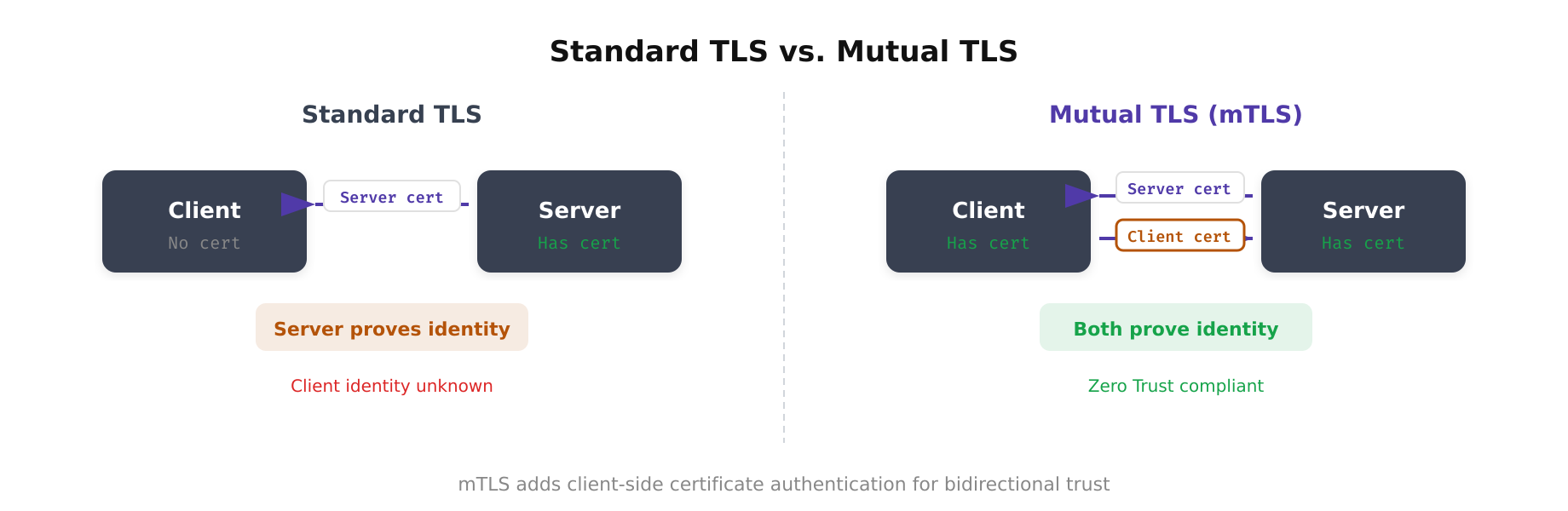
This diagram highlights the fundamental difference between standard TLS and mutual TLS. In standard TLS, only the server presents a certificate and the client remains anonymous at the transport layer. In mTLS, the handshake includes an additional CertificateRequest from the server and a corresponding Certificate response from the client, ensuring both endpoints are cryptographically verified before any application data flows.
The mTLS Handshake Step by Step
The mTLS handshake in TLS 1.3 follows a specific sequence that establishes mutual trust. Understanding each step is essential for debugging connection failures and configuring the protocol correctly.
- ClientHello: The client initiates the connection, sending its supported cipher suites, TLS version, and a random nonce. In TLS 1.3, this message also includes key share extensions for the Diffie-Hellman key exchange.
- ServerHello + EncryptedExtensions: The server selects the cipher suite and key exchange parameters. From this point, all subsequent messages are encrypted using the handshake traffic keys derived from the key exchange.
- CertificateRequest: The server sends this message to request the client’s certificate. It specifies which signature algorithms and certificate authorities are acceptable.
- Server Certificate + CertificateVerify: The server presents its certificate chain and proves possession of the corresponding private key by signing a hash of the handshake transcript.
- Client Certificate + CertificateVerify: The client presents its certificate chain and proves possession of its private key by signing the handshake transcript hash.
- Finished: Both sides exchange Finished messages containing a MAC over the entire handshake transcript, confirming that neither side’s messages were tampered with. The connection transitions to application data encryption.
The entire handshake in TLS 1.3 completes in a single round trip (1-RTT), making mTLS only marginally more expensive than standard TLS in terms of latency. The computational cost is slightly higher due to the additional certificate verification, but this is negligible on modern hardware.
Free to use, share it in your presentations, blogs, or learning materials.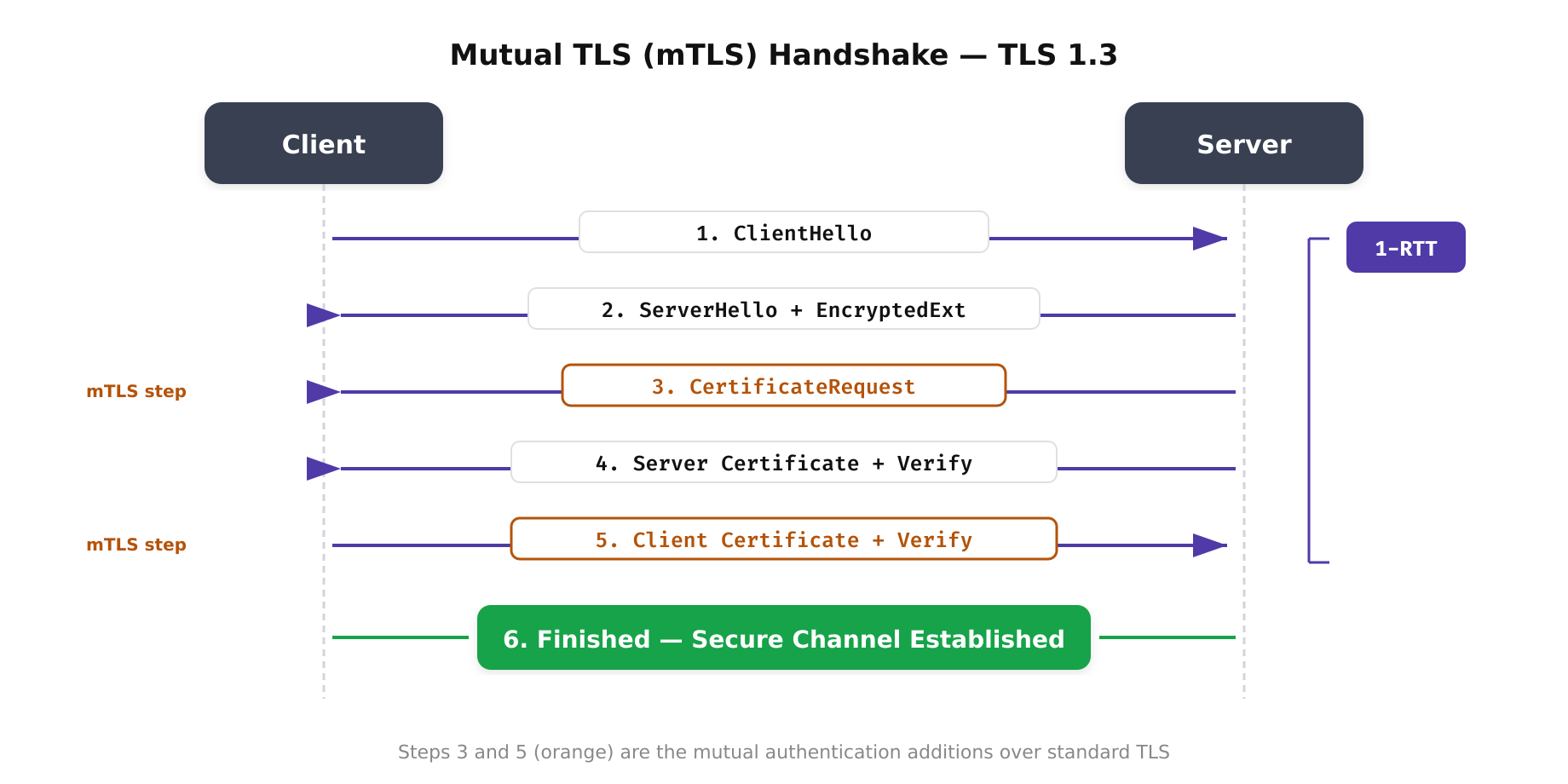
The above illustration walks through the six steps of the mutual TLS handshake under TLS 1.3. Unlike standard TLS where only the server presents a certificate, mTLS requires the client to also prove its identity. The CertificateRequest and client Certificate steps (highlighted) are what differentiate mTLS from regular TLS, enabling true bidirectional authentication between services.
Certificate Authority Architecture for mTLS
A robust mTLS deployment requires a well-designed certificate authority hierarchy. The typical architecture uses a three-tier model: an offline root CA, one or more intermediate CAs, and issuing CAs that sign end-entity certificates for services.
The root CA’s private key is generated and stored in a hardware security module (HSM) that never connects to a network. The root CA signs only intermediate CA certificates and is brought online only for this purpose, typically once every 5-10 years. Intermediate CAs are scoped to environments (production, staging, development) or business units, providing isolation so that a compromise of one intermediate CA does not affect others.
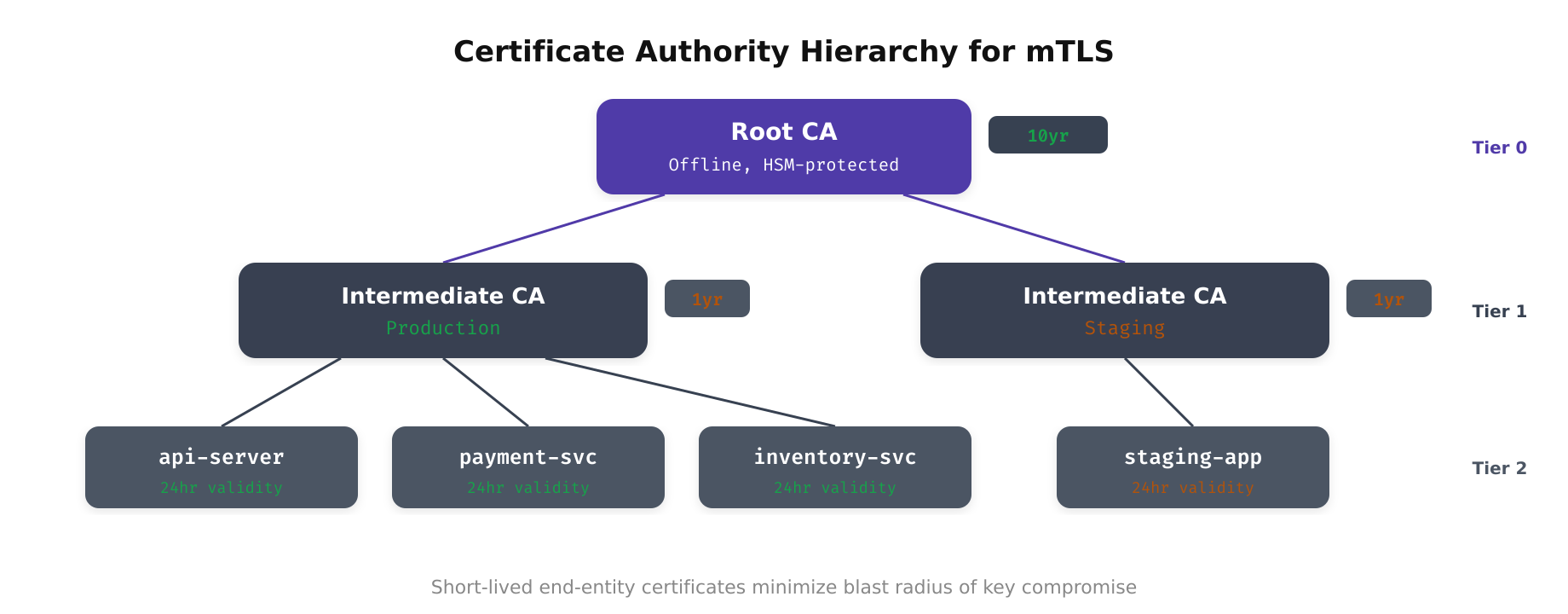
As shown above, the three-tier CA hierarchy separates trust anchoring from certificate issuance. The root CA remains offline and air-gapped, signing only intermediate CA certificates on a multi-year schedule. Intermediate CAs are scoped by environment or business unit, limiting the blast radius of any single CA compromise. Issuing CAs generate short-lived end-entity certificates for workloads, enabling automated rotation without manual intervention.
For Kubernetes-based workloads, a common architecture uses HashiCorp Vault as the issuing CA with cert-manager as the certificate lifecycle manager:
# Vault PKI setup for mTLS issuing CA
vault secrets enable -path=pki_int pki
vault secrets tune -max-lease-ttl=8760h pki_int

vault write pki_int/intermediate/generate/internal
    common_name="Production Issuing CA"
    key_type="ec"
    key_bits=256
    ttl=8760h

# Configure roles for service certificate issuance
vault write pki_int/roles/service-cert
    allowed_domains="svc.cluster.local"
    allow_subdomains=true
    max_ttl=24h
    key_type="ec"
    key_bits=256
    require_cn=false
    allowed_uri_sans="spiffe://cluster.local/*"
This configuration creates an issuing CA with a one-year lifetime that issues service certificates with a maximum 24-hour validity. Certificates use elliptic curve cryptography (P-256) for efficient key operations, and SPIFFE URIs are allowed as Subject Alternative Names (SANs) for workload identity integration.
Configuring mTLS in Real-World Services
Configuring mTLS correctly requires attention to both the server and client sides. Misconfigurations are the most common source of mTLS deployment failures, and they range from incorrect trust store configuration to certificate chain ordering issues.
Server-Side Configuration (Go)
Here is a Go HTTP server configured to require mTLS, demonstrating the essential configuration parameters:
package main

import (
   "crypto/tls"
   "crypto/x509"
   "log"
   "net/http"
   "os"
)

func main() {
    caCert, err := os.ReadFile("/etc/certs/ca-bundle.pem")
    if err != nil {
        log.Fatalf("Failed to read CA bundle: %v", err)
    }

    caCertPool := x509.NewCertPool()
    if !caCertPool.AppendCertsFromPEM(caCert) {
        log.Fatal("Failed to parse CA certificates")
    }

    tlsConfig := &tls.Config{
        ClientCAs:  caCertPool,
        ClientAuth: tls.RequireAndVerifyClientCert,
        MinVersion: tls.VersionTLS13,
        CurvePreferences: []tls.CurveID{
            tls.X25519,
            tls.CurveP256,
        },
    }

    server := &http.Server{
        Addr:     ":8443",
        TLSConfig: tlsConfig,
        Handler:   http.HandlerFunc(handler),
    }

    log.Fatal(server.ListenAndServeTLS(
       "/etc/certs/server.crt",
       "/etc/certs/server.key",
    ))
}

func handler(w http.ResponseWriter, r *http.Request) {
    // Extract client identity from verified certificate
    clientCert := r.TLS.PeerCertificates[0]
    log.Printf("Request from: %s (SAN: %v)",
        clientCert.Subject.CommonName,
        clientCert.URIs,
    )
    w.WriteHeader(http.StatusOK)
}
The critical setting is ClientAuth: tls.RequireAndVerifyClientCert. This ensures the server rejects any connection where the client does not present a valid certificate signed by a CA in the ClientCAs pool. The MinVersion: tls.VersionTLS13 setting enforces the latest TLS version, which provides improved security and performance.
Common Failure Modes and Debugging
mTLS deployments fail in predictable ways. Understanding these failure modes accelerates troubleshooting and prevents misdiagnosis of connection issues as application bugs.
- Certificate chain incomplete: The client or server presents its end-entity certificate without the intermediate CA certificate. The peer cannot build a chain to the root CA and rejects the connection. Always send the full chain: end-entity certificate followed by intermediate CA certificates.
- Trust store mismatch: The server’s ClientCAs pool does not include the CA that signed the client certificate, or vice versa. This commonly occurs when certificates are issued by different intermediate CAs. Verify trust stores include all relevant intermediate and root CA certificates.
- Certificate expired or not yet valid: Clock skew between services causes certificates to appear expired or not yet valid. NTP synchronization across all hosts is essential. Monitor clock drift and alert when it exceeds 1 second.
- SAN mismatch: The certificate’s Subject Alternative Names do not match the hostname or SPIFFE URI that the peer expects. Ensure certificates include all necessary DNS names and URIs in the SAN extension.
- Key algorithm incompatibility: Older clients may not support elliptic curve certificates. While EC certificates are preferred for performance, ensure all clients in the communication path support the chosen algorithm.
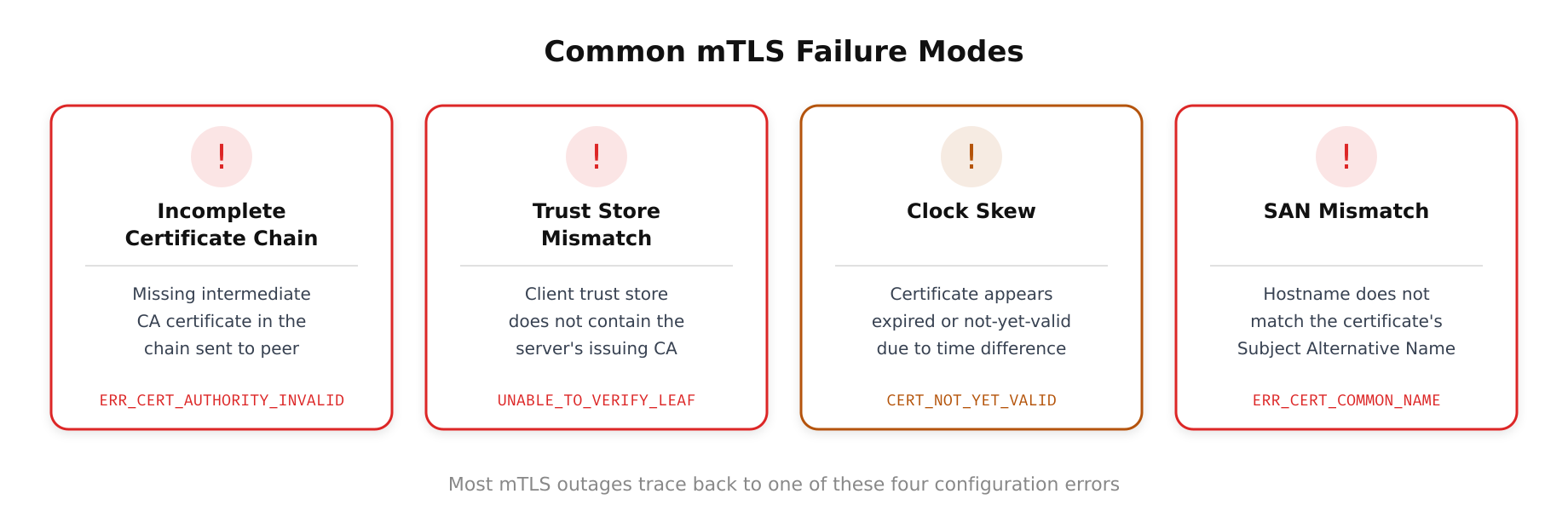
The above illustration depicts the most common mTLS failure scenarios that operations teams encounter in production. Each failure mode is traced from its root cause to the resulting TLS alert or error message, providing a visual troubleshooting reference. Expired certificates and CA trust store mismatches account for the majority of outages, underscoring the importance of automated certificate rotation and consistent trust store distribution across all services.
OpenSSL provides invaluable debugging tools for mTLS issues. The openssl s_client command can test mTLS connections with detailed handshake output:
openssl s_client -connect inventory-api:8443
    -cert /etc/certs/client.crt
    -key /etc/certs/client.key
    -CAfile /etc/certs/ca-bundle.pem
    -verify_return_error
    -status
Performance Considerations and Optimization
mTLS adds computational and latency overhead that must be accounted for in capacity planning. The primary costs are the asymmetric cryptographic operations during the handshake (key exchange and signature verification) and the certificate chain validation. For high-throughput services processing thousands of connections per second, these costs can become significant.
TLS session resumption significantly reduces the overhead of repeated connections between the same pair of services. TLS 1.3 supports session tickets that allow the handshake to complete in zero round trips (0-RTT) for resumed sessions, though 0-RTT data has replay risks and should not be used for non-idempotent operations. Connection pooling at the application level further reduces handshake frequency by reusing established connections across multiple requests.
Hardware acceleration through AES-NI instructions offloads symmetric encryption to dedicated silicon, making the per-packet encryption cost negligible. For the asymmetric operations, elliptic curve cryptography (P-256 or X25519) is significantly faster than RSA, reducing handshake latency by an order of magnitude. In service mesh deployments, the sidecar proxy handles all cryptographic operations, so the application itself incurs zero TLS overhead. According to Cloudflare’s engineering benchmarks, mTLS adds approximately 1-3ms of overhead versus standard TLS, and with session resumption the repeat handshake cost drops by roughly 90%.
For deeper context on how mTLS fits into the broader zero trust model, see our What Zero Trust Really Means article. For identity-centric security architecture that mTLS enables, see Identity as the New Perimeter.
References
- Google Cloud, Application Layer Transport Security (ALTS)
- IETF, RFC 8446: TLS 1.3, August 2018
- SPIFFE, Secure Production Identity Framework for Everyone
- Istio, Security: Mutual TLS and Authorization
- HashiCorp, Vault PKI Secrets Engine
- cert-manager, Kubernetes Certificate Management
Frequently Asked Questions
Mutual TLS (mTLS) extends standard TLS so both client and server present and verify certificates. In standard TLS, only the server proves its identity. In mTLS, the server also requests and validates the client’s certificate. This ensures both sides of the connection are cryptographically authenticated before any data is exchanged. Google, Istio, Linkerd, and Cloudflare all use mTLS in production.
Minimally. The mTLS handshake in TLS 1.3 completes in a single round trip (1-RTT), adding approximately 1-3ms over standard TLS. With session resumption, repeat handshakes cost about 90% less. Hardware AES-NI acceleration makes per-packet encryption negligible. In service mesh deployments (Istio, Linkerd), the sidecar proxy handles all crypto operations, so the application sees zero overhead. Connection pooling further reduces handshake frequency.
Use automated certificate lifecycle tools. cert-manager handles Kubernetes-native issuance from Let’s Encrypt or Vault. SPIFFE/SPIRE provides workload identity with auto-rotating short-lived certificates (typically 1-hour TTL). HashiCorp Vault PKI can issue certificates with TTLs as short as minutes. The key principle: certificates should be short-lived and automatically rotated, never manually managed or long-lived.
The most common failures are: incomplete certificate chains (send full chain including intermediates), trust store mismatches (verify CA bundle includes all relevant CAs), expired certificates (automate rotation), SAN mismatches (ensure certificates include expected DNS names and SPIFFE URIs), and clock skew (synchronize NTP). Use openssl s_client with -cert, -key, -CAfile, and -verify_return_error flags for detailed handshake diagnostics.
No, but service meshes make mTLS significantly easier. Istio enables automatic mTLS with a single PeerAuthentication STRICT mode configuration. Linkerd provides zero-config mTLS by default since version 2.0. Without a mesh, you must configure mTLS in each application’s TLS settings, manage certificate distribution manually, and handle rotation per service. A mesh automates all of this through sidecar proxies.
Yes, for service-to-service communication. API keys are static, long-lived, and provide no cryptographic proof of the caller’s identity. mTLS uses short-lived certificates that cryptographically bind the connection to a verified identity. If an API key is stolen, the attacker has indefinite access. If an mTLS certificate is stolen, it expires within hours and the attacker also needs the private key. mTLS also encrypts the transport, while API keys sent in headers can be intercepted on unencrypted connections.
Use a private CA for mTLS between your own services. Public CAs (Let’s Encrypt, DigiCert) are designed for server authentication to browsers. Internal mTLS needs a private CA hierarchy: offline root CA in an HSM, environment-scoped intermediate CAs, and issuing CAs that generate short-lived leaf certificates. This gives you full control over certificate policies, revocation, and issuance without exposing your internal service topology to public CA infrastructure.