

Bagful runs a technical blog at bagful.net. The blog had been live for six weeks, indexed by Google, and generating its first organic impressions. The stack was straightforward: Nginx as the reverse proxy, Coraza WAF for request filtering, Apache serving WordPress on the backend. The site was small, around 190 posts, but the team had spent weeks optimizing content for search visibility. Then, on a routine Tuesday afternoon, an engineer moved the WordPress directory to a more secure location, ran a find-and-replace with sed, missed one config file, and silently broke every page on the site. This is what happened, how the proxy cache absorbed the failure, and what the team learned.
The Architecture: Four Layers Between the Browser and WordPress
Before the incident, it helps to understand the proxy chain. Every request to bagful.net passes through four layers before reaching WordPress.
Layer 1: Nginx (ports 80/443). The public-facing reverse proxy. Handles TLS termination, HTTP/2, static file caching, and proxy caching. Nginx caches full HTML responses from the backend so that repeat visitors get served directly from disk without hitting Apache at all.
Layer 2: Coraza WAF. An open-source web application firewall running as a reverse proxy between Nginx and Apache. Coraza inspects every request against OWASP Core Rule Set (CRS) rules, blocks SQL injection, XSS, and other malicious payloads before they reach the application. It listens on an internal port and forwards clean requests to Apache.
Layer 3: Apache. The application server running mod_php. Apache processes PHP files, executes WordPress code, queries the MySQL database, and returns the rendered HTML response back through the chain.
Layer 4: WordPress. The CMS itself. Themes, plugins, the block editor, the REST API, and WP-CLI all run here. WordPress lives in a directory on the filesystem, and Apache’s DocumentRoot points to it.
The proxy cache sits between Layer 1 and Layer 2. When Nginx has a cached response, it never contacts Coraza or Apache. The request is served entirely from Nginx’s disk cache. This detail is what saved the site.
Free to use, share it in your presentations, blogs, or learning materials.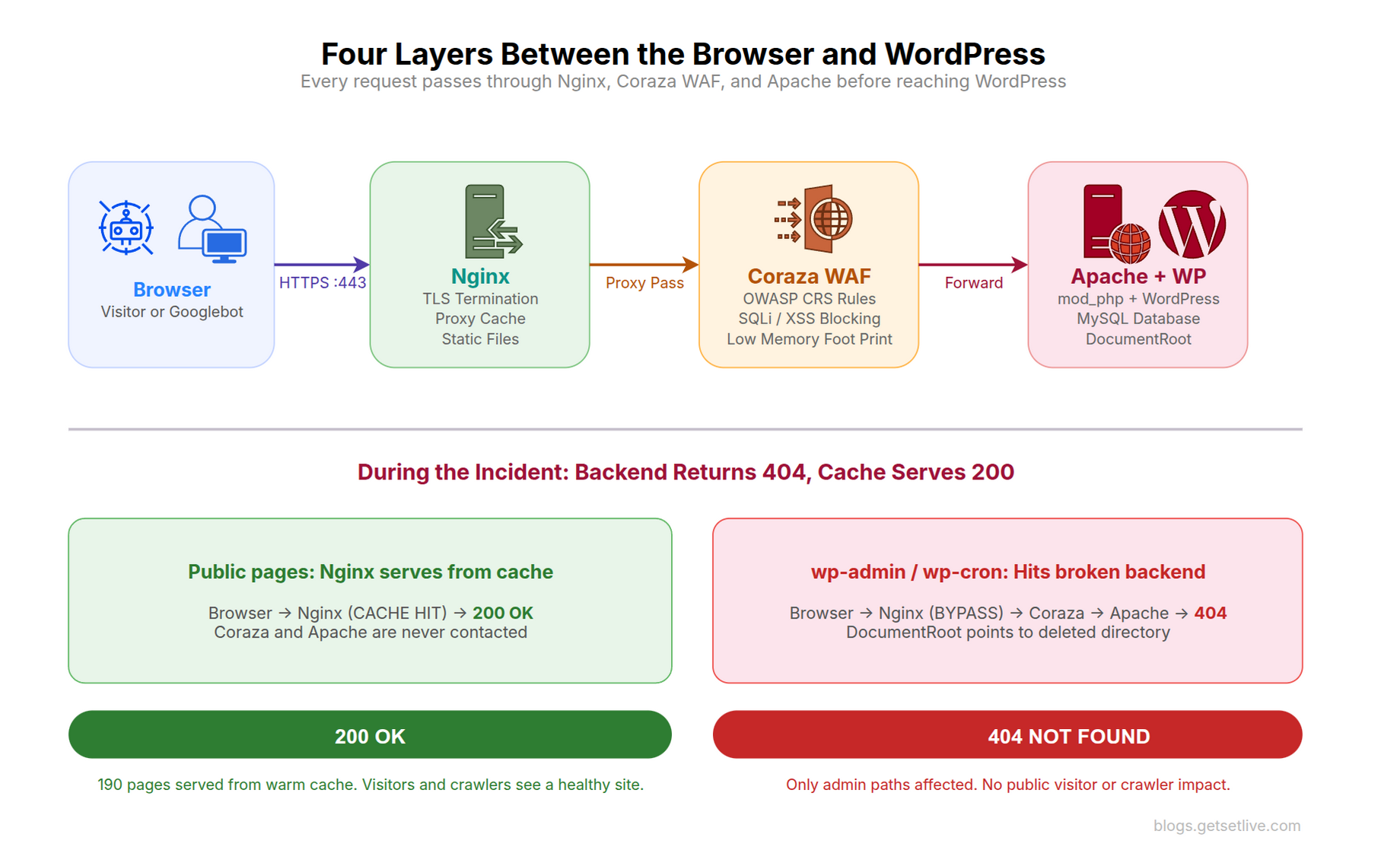
Why the Directory Move Was Necessary
WordPress had been installed at the default Apache document root: a path inside /var/www/html/. This is where most tutorials tell you to put it. The problem is that /var/www/html/ is the default document root for every Apache installation. If another virtual host is misconfigured, if a default site is accidentally enabled, or if a new service is added without careful vhost isolation, files under that path could be exposed. Security audits consistently flag this as a risk.
The plan was simple: move WordPress from /var/www/html/cms/ to /var/www/insights/, a dedicated directory outside the default root. The new path is explicit, isolated, and does not share a parent directory with any other web service. The NIST SP 800-123 Guide to General Server Security recommends isolating web application files from default server roots to reduce the attack surface from misconfiguration.
The Migration Plan
The engineer, Ravi, started by investigating every file on the server that referenced the old path. The goal was to identify every config, script, cron job, and binary that would need updating.
$ grep -rn '/var/www/html/cms' /etc/apache2/ /etc/nginx/ /etc/systemd/ /etc/crontab
$ grep -rn '/var/www/html/cms' /root/.bashrc /home/*/.bashrc
$ strings /usr/local/bin/site-backup | grep '/var/www'
The search found references in three places: the Apache virtual host config (DocumentRoot and Directory directives), a separate Apache SSL vhost, and a Go binary used for automated backups. Nginx config was clean because it only proxies to Coraza’s internal port and never references the filesystem directly. Crontabs were clean. Shell profiles were clean. WordPress’s own wp-config.php uses relative paths, so it did not need changes.
With the investigation complete, Ravi laid out the steps:
- Copy the entire WordPress directory to the new location with permissions preserved
- Run
sed -ito replace the old path in all Apache config files - Restart Apache
- Clear Nginx proxy cache
- Run the cache warmer to pre-warm all pages
- Verify with curl
- Delete the old directory
The Cache Warmer: 190 Pages in 5 Minutes
Before the migration, the team had already deployed a cache warmer. It was a small Go binary that fetched the WordPress sitemap, extracted every URL, and made an HTTP GET request to each page using two concurrent workers. The purpose was to keep Nginx’s proxy cache warm after cache clears, deployments, or server restarts. Every 30 minutes, a cron job ran the warmer to ensure that no visitor ever hit an uncached page.
The warmer’s output looked like this after a typical run:
=== GSL Cache Warmer ===

Fetching sitemap: https://bagful.net/post-sitemap.xml

Found 190 URLs
[W1] 200 | MISS | TTFB:  245ms | OK | /zero-trust-architecture-explained/

[W2] 200 | MISS | TTFB:  189ms | OK | /nginx-proxy-cache-wordpress-setup/

[W1] 200 | MISS | TTFB:  312ms | OK | /coraza-waf-reverse-proxy-guide/

...
=== Summary ===

Total URLs:    190

Cache MISS:    190 (freshly cached)

Cache HIT:     0

Errors:        0

Time elapsed:  5m12s
Every page showed MISS (freshly cached from the backend). This meant Nginx now had a complete, warm cache of every page on the site. For the next 2 hours (the cache TTL), any visitor requesting any page would get a response directly from Nginx’s disk cache without touching Coraza, Apache, or WordPress.
The cache warmer ran successfully at 15:30. The migration started at 15:45.
The Migration: Copy, Sed, Restart
Step one: copy the files.
$ sudo cp -a /var/www/html/cms /var/www/insights
$ sudo chown -R www-data:www-data /var/www/insights
$ ls -la /var/www/insights/wp-config.php
-rw-r----- 1 www-data www-data 3858 Apr 6 13:54 /var/www/insights/wp-config.php
The -a flag preserves ownership, permissions, and timestamps. The copy took about 90 seconds for the 190-post site with its media uploads.
Step two: update Apache configs with sed.
$ sudo sed -i 's|/var/www/html/cms|/var/www/insights|g' /etc/apache2/sites-available/blog-ssl.conf
$ sudo sed -i 's|/var/www/html/cms|/var/www/insights|g' /etc/apache2/sites-available/blog.conf
$ grep DocumentRoot /etc/apache2/sites-available/blog-ssl.conf /etc/apache2/sites-available/blog.conf
/etc/apache2/sites-available/blog-ssl.conf:    DocumentRoot /var/www/insights

/etc/apache2/sites-available/blog.conf:    DocumentRoot /var/www/insights
Ravi ran sed against the two config files he had found during the investigation. Apache config test passed. Apache restarted cleanly.
$ sudo apache2ctl configtest
Syntax OK

$ sudo systemctl restart apache2
Step three: clear the Nginx cache and test.
$ sudo rm -rf /var/cache/nginx/*
$ sudo systemctl reload nginx
$ curl -sk -o /dev/null -w '%{http_code}' https://bagful.net/
200
The homepage returned 200. Ravi tested two more pages. Both returned 200. Everything looked good. He ran the cache warmer again to pre-warm the entire site from the new backend location. All 190 pages came back as 200 MISS (freshly cached).
Step four: check for open files and delete the old directory.
$ sudo lsof +D /var/www/html/cms/ | wc -l
0

$ sudo rm -rf /var/www/html/cms
$ ls -d /var/www/html/cms 2>&1
ls: cannot access '/var/www/html/cms': No such file or directory
Zero open files. Old directory deleted. Migration complete. Or so Ravi thought.
The Config That sed Missed
Twenty minutes later, Ravi ran a routine health check from his laptop.
$ curl -sk -o /dev/null -w '%{http_code}' https://bagful.net/
200
$ curl -sk -o /dev/null -w '%{http_code}' https://bagful.net/wp-admin/
404
The homepage returned 200. But wp-admin returned 404. That made no sense. WordPress was running. The files existed at the new path. Apache had restarted without errors.
The homepage was 200 because Nginx was serving it from cache. The wp-admin path was 404 because wp-admin is never cached (the Nginx config skips caching for authenticated paths). So wp-admin hit the full proxy chain: Nginx > Coraza > Apache. And Apache was returning 404.
Ravi tested each layer individually.
# Test Apache directly

$ curl -s http://127.0.0.1:8080/ -H 'Host: bagful.net' -o /dev/null -w '%{http_code}'
404
# Test Coraza (which forwards to Apache)

$ curl -s http://127.0.0.1:8082/ -H 'Host: bagful.net' -o /dev/null -w '%{http_code}'
404
# Test Nginx (which serves from cache for public pages)

$ curl -sk https://bagful.net/ -o /dev/null -w '%{http_code}'
200 (cached)
Apache was returning 404 on every request. The cache was masking the problem for public pages. Ravi checked the Apache vhost configs he had updated with sed.
$ grep DocumentRoot /etc/apache2/sites-available/blog-ssl.conf
DocumentRoot /var/www/insights  ← correct
$ grep DocumentRoot /etc/apache2/sites-available/blog.conf
DocumentRoot /var/www/insights  ← correct
$ grep DocumentRoot /etc/apache2/sites-enabled/blog-main.conf
DocumentRoot /var/www/html/cms  ← OLD PATH!
There it was. The sites-enabled directory had a third config file: blog-main.conf. This was the vhost listening on the internal port that Coraza forwards to. Ravi’s sed command had updated blog-ssl.conf and blog.conf, but missed blog-main.conf because his investigation had found only two files in sites-available. The third file existed only in sites-enabled as a standalone file, not a symlink.
The proxy chain was: Nginx (443) > Coraza (internal) > Apache (internal port using blog-main.conf). The vhost that actually served requests from the WAF was the one that sed missed. The two vhosts that sed updated were for direct Apache access and legacy SSL, neither of which was in the active request path.
The Fix: One sed Command
$ sudo sed -i 's|/var/www/html/cms|/var/www/insights|g' /etc/apache2/sites-enabled/blog-main.conf
$ sudo systemctl restart apache2$ curl -s http://127.0.0.1:8080/ -H 'Host: bagful.net' -o /dev/null -w '%{http_code}'
200
One command. Apache now served from the correct directory. The entire proxy chain returned 200.
Free to use, share it in your presentations, blogs, or learning materials.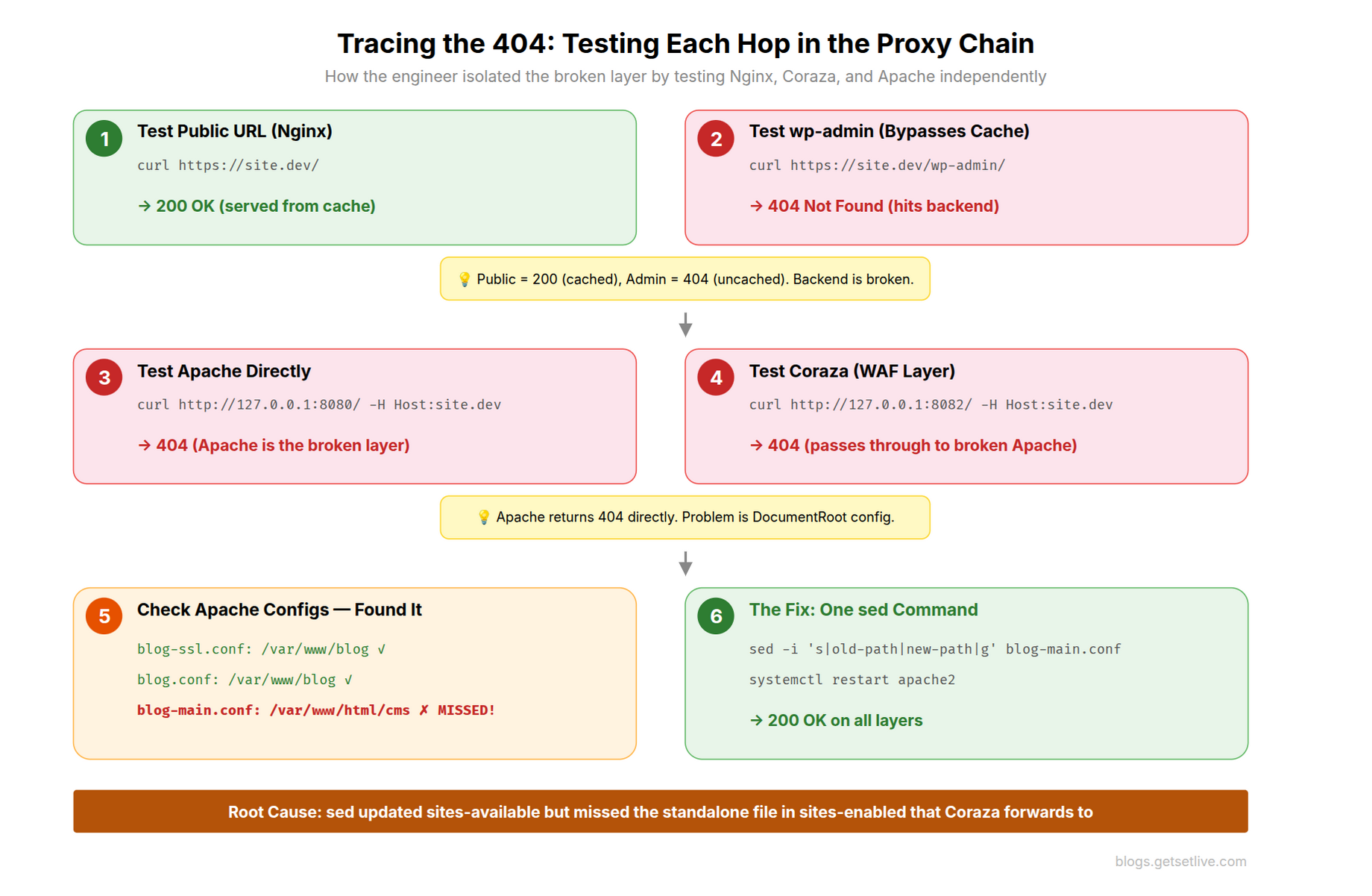
How the Cache Saved SEO: Minute by Minute
Here is the timeline of what happened during the 30-minute window when Apache was broken:
Free to use, share it in your presentations, blogs, or learning materials.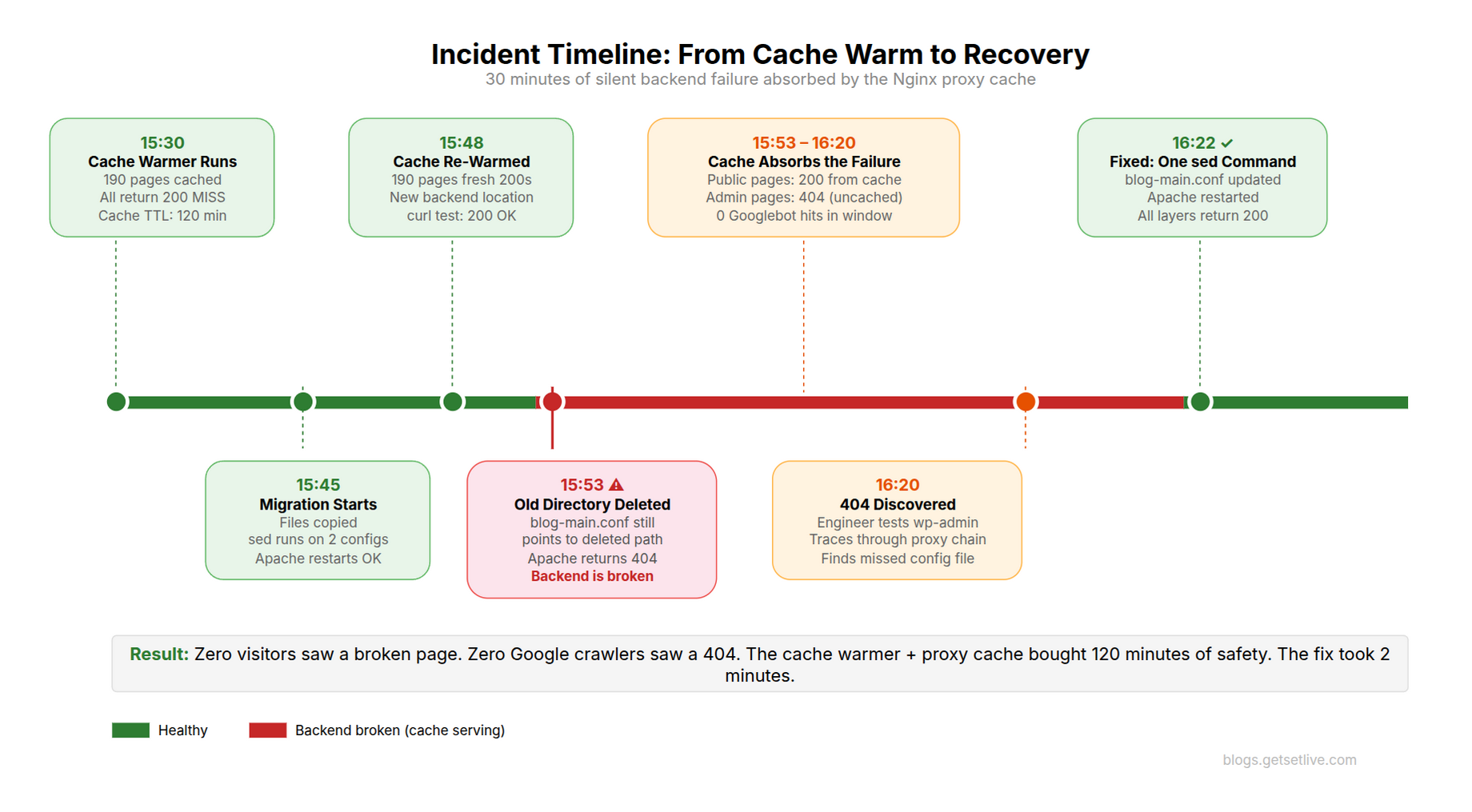
- 15:30 Cache warmer runs. All 190 pages cached with 200 responses. Cache TTL: 120 minutes
- 15:45 Migration starts. Files copied. sed runs against two config files. Apache restarts
- 15:48 Nginx cache cleared. Cache warmer runs again. All 190 pages return 200 from the new backend. Cache is fresh
- 15:53 Old directory deleted. Apache’s internal vhost (blog-main.conf) still points to the deleted path. Apache starts returning 404 for every uncached request
- 15:53 to 16:20 The broken window. Every request that hits the backend returns 404. But Nginx serves all public pages from cache (200 HIT). Only wp-admin, wp-cron, and logged-in user requests see the 404
- 16:20 Ravi discovers the 404 on wp-admin. Traces through the proxy chain. Finds the missed config file
- 16:22 One sed command fixes the config. Apache restarts. Site fully operational
Ravi immediately checked the Nginx access logs for Google crawler activity during the broken window.
$ sudo grep -i 'googlebot' /var/log/nginx/access.log | grep '15:5[3-9]\|16:[01]'
# (empty: zero Googlebot hits during the window)
Zero Google crawler hits during the entire 30-minute window. Google did not request a single page while the backend was broken. Even if it had, Nginx would have served the cached 200 response. The crawler would have seen a perfectly healthy site.
The Nginx cache had a 120-minute TTL. The broken window was 30 minutes. The cache would have continued serving valid responses for another 90 minutes before expiring. Even without the fix, the site would have appeared healthy to every external visitor until the cache TTL expired at 17:48.
Why the Cache Warmer Was the Real Hero
The proxy cache alone would not have saved the site. Here is why. Nginx only caches a page after someone requests it. If the cache had been cold (empty) when the backend broke, the first visitor to each page would have received a 404. That 404 would have been cached (Nginx was configured with proxy_cache_valid 404 1m) and served to every subsequent visitor for one minute. With 190 pages, it would have taken many visitors hitting 404s before anyone noticed.
The cache warmer eliminated this scenario. By pre-fetching every page before the migration, it ensured that Nginx had a warm, complete cache of every URL on the site. When the backend broke, there was no “first visitor” problem. Every page was already cached with a valid 200 response.
The warmer ran on a 30-minute cron schedule from a separate server:
# Run cache warmer every 30 minutes

*/30 * * * * /opt/cache-warmer/bin/warmer >> /opt/cache-warmer/log/warmer.log 2>&1
The combination of proxy cache (Nginx) and cache warmer (external cron) created an unintentional safety net. The cache absorbed the backend failure. The warmer ensured the cache was complete. Together, they bought the team 120 minutes of runway to find and fix the problem without any visitor or crawler seeing a broken page.
The Nginx Proxy Cache Configuration
For context, here is the Nginx proxy cache configuration that made this possible. The cache zone is defined in the http block and used in the server block.
 1<br />
 2# In http block: define the cache zone<br />
 3proxy_cache_path /var/cache/nginx/blog levels=1:2 keys_zone=blog_cache:10m<br />
 4    max_size=500m inactive=120m use_temp_path=off;</p>
 5<p># In server block: use the cache<br />
 6location / {<br />
 7    proxy_pass http://127.0.0.1:8082;  # Coraza WAF</p>
 8<p>    proxy_cache blog_cache;<br />
 9    proxy_cache_valid 200 120m;          # Cache 200 responses for 2 hours<br />
10    proxy_cache_valid 301 302 10m;       # Cache redirects for 10 minutes<br />
11    proxy_cache_valid 404 1m;            # Cache 404s for only 1 minute<br />
12    proxy_cache_bypass $skip_cache;<br />
13    proxy_no_cache $skip_cache;<br />
14    proxy_cache_use_stale error timeout updating http_500 http_502 http_503 http_504;</p>
15<p>    add_header X-Cache-Status $upstream_cache_status always;<br />
16}<br />
Two settings were critical during the incident:
proxy_cache_valid 200 120mmeant every cached 200 response stayed valid for 2 hours. The backend could be completely down for 2 hours and visitors would still see the siteproxy_cache_use_stale error timeout http_500 http_502 http_503 http_504tells Nginx to serve stale (expired) cache if the backend returns an error. This did not activate during the incident because the cache was still fresh, but it would have provided an additional safety net if the outage had lasted longer than the TTL
The $skip_cache variable bypasses caching for logged-in users, wp-admin, wp-cron, and POST requests. This is why Ravi saw the 404 on wp-admin but not on public pages. wp-admin always hits the backend.
The Coraza WAF in the Middle
The team chose Coraza WAF over ModSecurity for a specific reason: memory footprint. The blog server runs on a modest VPS with limited RAM. ModSecurity 3.x (libmodsecurity) loads as an Apache or Nginx module, sharing the web server’s memory space and adding significant overhead per worker process. Coraza is written in Go and runs as a standalone reverse proxy with its own memory management. In testing, the team measured Coraza using 50MB of RAM with the full OWASP Core Rule Set loaded, compared to 120-180MB per Apache worker process with ModSecurity embedded. On a memory-constrained server running WordPress with multiple Apache prefork workers, that difference is the gap between stable operation and OOM kills.
Coraza is also a modern, actively maintained project. ModSecurity’s development slowed significantly after Trustwave transferred it to OWASP in 2024. Coraza is fully compatible with the OWASP CRS rules, supports the SecLang rule language, and can be deployed without compiling into Nginx or Apache. If you are looking to implement Coraza in your own stack, we have articles that walk through the full setup: Part 1: Architecture and Prerequisites, Part 2: Compiling, Testing, and Findings, and Writing Custom Coraza WAF Rules for PHP and WordPress.
The presence of Coraza in the proxy chain added a layer of complexity that contributed to the missed config. In a simple Nginx > Apache setup, there are only two config files: the Nginx server block and the Apache vhost. With Coraza in between, Apache needs two vhosts: one for the WAF’s internal forwarding port and one for direct/legacy access. Coraza acted as a transparent proxy, forwarding clean requests from Nginx to Apache’s internal vhost.
Ravi’s investigation found the Apache configs in sites-available but missed the one in sites-enabled that was not a symlink. This is a common Apache pattern: most files in sites-enabled are symlinks to sites-available, but standalone files can exist there too. A more thorough investigation would have searched both directories independently.
# Search sites-available AND sites-enabled independently

$ grep -rn '/var/www/html/cms' /etc/apache2/sites-available/ /etc/apache2/sites-enabled/
That single grep against both directories would have revealed the third config file. The original investigation only searched /etc/apache2/ recursively, which should have found it. But the file was found, counted, and then sed was run against only the two files in sites-available, not the standalone file in sites-enabled. A manual oversight in a scripted process.
The Google Search Console Check
The team checked Google Search Console the next morning. The Coverage report showed zero new 404 errors. The crawl stats showed no crawl activity during the 30-minute window. The site’s impressions continued their upward trend without a dip.
This was not just luck. Google’s crawler does not visit small sites continuously. For a blog with 190 posts and moderate authority, Googlebot typically crawls a few pages per hour, not per minute. The probability of a crawler hit during any specific 30-minute window is low. Combined with the proxy cache serving valid 200 responses, the risk of a Google-visible 404 was near zero.
However, if the outage had lasted longer (past the 2-hour cache TTL), the risk profile changes dramatically. Once the cache expires, Nginx would request a fresh copy from the backend, receive the 404, and cache that 404 for 1 minute. Googlebot could then see a 404. Google does not immediately deindex a page that returns 404. It retries over several days. But if the 404 persists, the page is dropped from the index within 1-2 weeks. For a new blog still building authority, losing indexed pages would have been devastating.
Lessons Learned
The team documented five takeaways from the incident.
1. Always test the full proxy chain, not just the endpoint. Ravi tested curl https://bagful.net/ and got 200. That tested Nginx (which served from cache). He should have also tested Apache directly: curl http://127.0.0.1:8080/ -H 'Host: bagful.net'. Testing every hop in the proxy chain would have revealed the 404 immediately.
2. Search all config directories, not just the expected ones. Apache’s sites-enabled can contain standalone files that are not symlinks to sites-available. Always search both. Better yet, search the entire /etc/apache2/ tree and process every match.
3. A cache warmer is not just a performance tool. It is a resilience layer. The warmer ensured that every page was cached before the migration. Without it, the first visitor to each page during the outage would have seen a 404.
4. Set proxy_cache_use_stale aggressively. The error timeout http_500 http_502 http_503 http_504 directive tells Nginx to serve stale cache when the backend fails. Consider adding http_404 to this list for content sites where the URLs are stable. A stale cached page is always better than a 404 for a page that existed 5 minutes ago.
5. Do not delete the old directory until you have verified the backend independently. Ravi deleted the old directory after seeing 200 responses from the public URL. Those responses came from cache, not from the backend. The old directory should have stayed until a direct backend test confirmed the new path was serving correctly.
References
- Nginx, ngx_http_proxy_module: proxy_cache documentation
- Nginx, proxy_cache_use_stale: serving stale content during errors
- Coraza WAF, Introduction and Setup Guide
- NIST, SP 800-123: Guide to General Server Security
- Google Search Central, HTTP status codes and network errors for Google Search
- Apache, Apache Virtual Host documentation
- OWASP, Core Rule Set (CRS) for ModSecurity/Coraza
Frequently Asked Questions
Yes. Nginx proxy cache serves stored HTML responses without contacting the backend. If the backend is down or returning errors, Nginx continues serving cached 200 responses to visitors and crawlers. With proxy_cache_use_stale configured, Nginx can even serve expired cache during errors. Combined with a cache warmer that pre-fetches all pages, the cache acts as a complete safety net. Google crawlers see 200 responses and the site’s search rankings are unaffected.
A cache warmer is a script or binary that pre-fetches every page on your site so the proxy cache is fully populated. Without it, the first visitor to each page after a cache clear hits the backend directly (cache MISS). For WordPress sites behind Nginx proxy cache, a warmer ensures every page is served from cache instantly. It also creates a resilience layer: if the backend breaks, all pages are already cached with valid responses.
Yes, but you must update every config that references the old path: Apache DocumentRoot and Directory directives, any standalone vhost files in sites-enabled, backup scripts, cron jobs, and compiled binaries with hardcoded paths. Search both sites-available and sites-enabled independently. Test the backend directly (not through a proxy cache) after making changes. Do not delete the old directory until you confirm the backend serves correctly from the new location.
The proxy_cache_use_stale directive tells Nginx to serve expired (stale) cached content when the backend returns specific errors. For example, proxy_cache_use_stale error timeout http_500 http_502 http_503 http_504 serves stale cache when the backend is unreachable or returns server errors. This prevents visitors from seeing error pages during backend outages. For content sites, consider adding http_404 to serve stale cache instead of 404 errors for previously valid pages.
Google does not immediately deindex a page that returns 404. It retries over several days, typically 3-5 crawl attempts spread over 1-2 weeks. If the 404 persists across all retries, the page is dropped from the index. A brief 404 (minutes to hours) followed by recovery has virtually zero impact on indexing. However, for new sites still building authority, even a temporary loss of indexed pages can slow organic growth.
Coraza is an open-source web application firewall compatible with the OWASP Core Rule Set. Placing it between Nginx and Apache creates a defense-in-depth architecture: Nginx handles TLS and caching, Coraza inspects request payloads for attacks (SQL injection, XSS, command injection), and Apache runs WordPress. This separation means each layer can be updated, scaled, and secured independently. Coraza adds 2-5ms of latency per request for rule evaluation.
The default Apache document root (/var/www/html/) is shared by default configurations and potentially other virtual hosts. If another service or a default Apache config is accidentally enabled, files in that directory could be exposed. Moving WordPress to a dedicated directory (like /var/www/insights/) isolates it from other services. NIST SP 800-123 recommends isolating web application files from default server roots to reduce misconfiguration attack surface.