
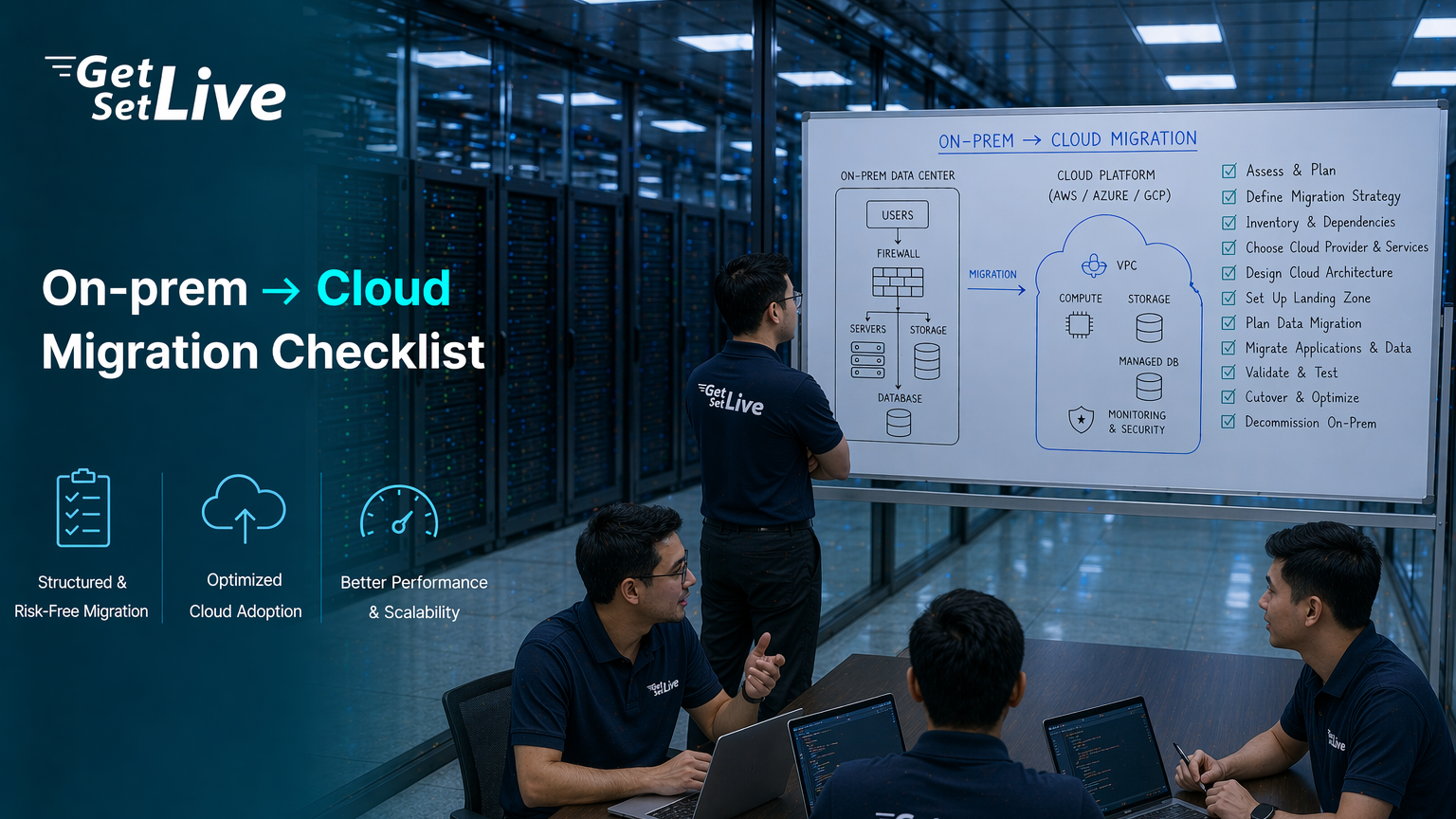
Meridian Healthcare Solutions was a 120-person health-tech company managing electronic health records for 47 hospitals and 1,200 clinics across Andhra Pradesh and Telangana. Their on-prem infrastructure sat in two racks at a Hyderabad colocation facility: 14 physical servers, 38 VMware ESXi virtual machines, 2 Oracle databases, 1 PostgreSQL cluster, 6 .NET applications, 4 Java microservices, an SFTP gateway processing 12,000 insurance claim files daily, and a legacy COBOL billing engine from 2009 that only two developers understood. The colocation contract cost INR 8.2 lakh per month. Three servers had failed in the past 18 months. Disaster recovery tests took 14 hours and succeeded only 60% of the time.
The case for cloud migration seemed obvious. What Vikram’s team did not realize was that the case for cloud migration is never about whether to migrate. It is about whether you have mapped every dependency, audited every license, and stress-tested every cost assumption before you move the first workload.
Why 75% of Cloud Migrations Run Into Trouble
The numbers are not encouraging. According to IDC and Flexera data from 2024 and 2025, 38% of cloud migrations exceed their original budget with an average overrun of 23%. Another 31% miss their planned timeline entirely. 25% of organizations have moved at least one workload back to on-prem after discovering that cloud was not the right fit. The primary cause in 47% of delayed migrations was legacy application dependencies that were not identified during assessment.
The pattern behind most failures is the same: teams focus on the compute and storage costs visible in the cloud pricing calculator and miss everything underneath. Licensing changes, egress fees, double-run costs during the transition period, monitoring tool replacements, identity system rewiring, compliance re-certification, and the 6 to 12 months of reduced productivity while sysadmins learn cloud-native tooling. These hidden costs add 30% to 80% on top of the calculator estimate.
The cloud pricing calculator tells you what compute and storage will cost. It does not tell you what migration will cost. Those are two completely different numbers, and confusing them is how INR 4.5 lakh per month becomes INR 11.3 lakh.
Free to use, share it in your presentations, blogs, or learning materials.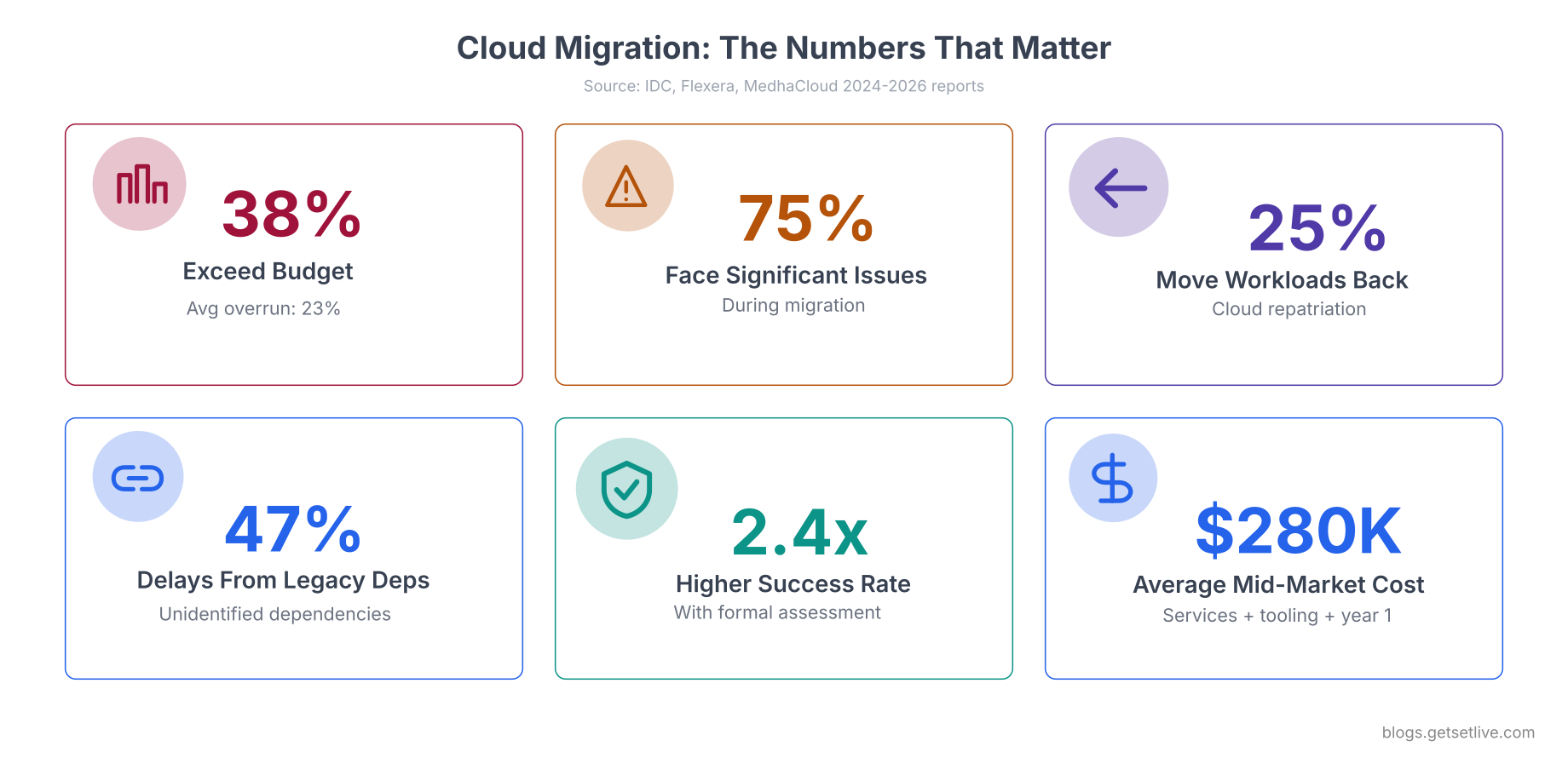
These numbers come from enterprises with dedicated cloud teams and six-figure consulting budgets. The problem is not a lack of resources. The problem is a lack of preparation in categories that do not show up on a cloud pricing calculator.
The 6 Rs: Choosing the Right Strategy Per Workload
Not every workload should move to the cloud the same way. Gartner originally defined the “5 Rs” of cloud migration, later expanded to 6 by AWS. Each strategy carries different costs, timelines, and risk levels. Vikram’s mistake was applying the same strategy (lift-and-shift) to every workload. His COBOL billing engine needed a completely different approach than his Java microservices.
Rehost (Lift and Shift). Move the workload as-is to cloud infrastructure. No code changes. Fastest path but often the most expensive long-term because you are paying cloud prices for an architecture designed for on-prem. Vikram rehosted his Oracle databases to AWS RDS. The compute worked fine. The licensing did not.
Replatform (Lift and Reshape). Make targeted optimizations during migration without changing core architecture. Replace the database engine, swap the web server, or containerize the app. Vikram’s analytics PostgreSQL cluster was a candidate for replatforming to Amazon Aurora PostgreSQL, which gave him managed backups and replication without rewriting queries.
Refactor (Re-architect). Redesign the application to be cloud-native. Break monoliths into microservices, adopt serverless, use managed queues and event-driven patterns. This is the most expensive migration strategy upfront but delivers the best long-term cost and scalability. Vikram’s 4 Java microservices were candidates for refactoring to run on ECS Fargate with auto-scaling.
Repurchase (Drop and Shop). Replace the on-prem application with a SaaS equivalent. Instead of migrating your CRM to the cloud, switch to Salesforce. Instead of migrating your email server, switch to Google Workspace. Vikram moved his internal ticketing system from an on-prem Jira Server to Jira Cloud. Zero migration effort on the infrastructure side.
Retain (Do Not Migrate). Keep the workload on-prem because migrating it does not make sense. Vikram’s COBOL billing engine processed INR 340 crore in annual insurance claims. Refactoring COBOL to cloud-native would cost more than the entire migration budget. Moving it as-is to EC2 would require a COBOL runtime license on Linux that cost more than the bare-metal server it currently ran on. The correct strategy was to retain it on-prem and connect it to cloud workloads via a VPN tunnel.
Retire. Decommission the workload entirely. Vikram found 4 VMs running applications that nobody had used in over a year. One was a test environment for a client demo that ended in 2022. Another was a staging server for a product that was discontinued. Retiring them saved INR 45,000 per month in colocation rack space and licensing.
Free to use, share it in your presentations, blogs, or learning materials.
The matrix above summarizes which workload types fit each strategy. Notice that rehosting has the highest success rate (88%) but also the highest long-term cost. Refactoring has the lowest success rate (72%) but delivers the best cloud-native benefits. The right strategy depends on the workload, not the team’s preference.
Assign a migration strategy to every workload before building the migration plan. If you skip this step, you will default to lift-and-shift for everything, and lift-and-shift is where most cost overruns happen. Organizations that formally assess each workload show 2.4x higher migration success rates.
The Migration Readiness Checklist
This checklist comes from Vikram’s 14-month migration journey and the 23 mistakes his team documented along the way. It is organized into 8 categories. Skip any category and you will discover the gap during production cutover, which is the worst possible time to learn something new about your infrastructure.
1. Infrastructure Inventory and Dependency Mapping
You cannot migrate what you have not catalogued. Vikram’s team thought they had 38 VMs. The actual count was 43. Five VMs were running on a host that a former sysadmin had provisioned outside the standard VMware cluster for “temporary testing” two years ago. Those 5 VMs included a DNS forwarder, a log collector, and a monitoring proxy that 14 other VMs depended on.
- Catalogue every server, VM, and container. CPU cores, RAM, disk (used and allocated), operating system, installed software, patch level. Use automated discovery tools like AWS Application Discovery Service, Azure Migrate, or open-source tools like Netbox.
- Map network dependencies. Which servers talk to which? On which ports? Use network flow analysis (NetFlow, sFlow) or packet captures for 2 weeks of production traffic. Vikram discovered that his SFTP gateway made 340 daily connections to an on-prem LDAP server for authentication. Moving the SFTP gateway to AWS without moving or federating LDAP would have broken every insurance file upload.
- Identify shared services. DNS servers, NTP servers, SMTP relays, LDAP/Active Directory, certificate authorities, license servers, log collectors, monitoring agents. These are the invisible infrastructure that every application depends on. Vikram’s team found 7 shared services that needed to either migrate first or be replicated in the cloud.
- Document storage volumes and mount points. Which VMs use local disk, which use SAN/NAS shares, which use iSCSI targets? What are the IOPS requirements? Vikram’s Oracle database needed 8,000 IOPS sustained. The default gp2 EBS volume on AWS provided 3,000 baseline IOPS. He needed gp3 with provisioned IOPS, which tripled the storage cost estimate.
Here are the commands Vikram’s team used to build their inventory and discover hidden dependencies.
govc ls /Datacenter/vm/ | while read vm; do
  govc vm.info -json "$vm" | jq '{name: .virtualMachines[0].name, cpu: .virtualMachines[0].config.hardware.numCPU, memoryMB: .virtualMachines[0].config.hardware.memoryMB, guestOS: .virtualMachines[0].config.guestFullName, powerState: .virtualMachines[0].runtime.powerState}'
done
$ sudo ss -tlnp | awk '{print $4, $6}' | sort -u$ sudo netstat -an | grep ESTABLISHED | awk '{print $4, $5}' | sort | uniq -c | sort -rn | head -20iostat -xz 5 12 | awk '/^[a-z]/ {print $1, "r/s:", $4, "w/s:", $5, "await:", $10, "%util:", $NF}'
sda r/s: 245.30 w/s: 1892.40 await: 2.34 %util: 67.80
sdb r/s: 12.10 w/s: 3.20 await: 0.45 %util: 4.20
That first disk is doing 2,137 combined IOPS at 67% utilization. During peak hours it will spike higher. Size your cloud storage for the peak, not the average, or your database will hit I/O throttling during the busiest hours.
2. Application Assessment and Compatibility
Every application needs to be tested against the target cloud environment before migration. Assumptions about compatibility are the second leading cause of migration delays after unidentified dependencies.
- Test every application on the target OS and runtime. Vikram’s .NET applications ran on Windows Server 2016 with .NET Framework 4.6. AWS offered Windows Server 2022 AMIs. Two applications used APIs deprecated in the newer Windows version. One had a dependency on a COM component that did not exist in the cloud AMI.
- Identify hardcoded IPs, hostnames, and file paths. On-prem applications are notorious for hardcoding server IPs in configuration files, connection strings, and sometimes directly in source code. Every hardcoded reference becomes a failure point after migration.
- Check for OS-level dependencies. Kernel modules, custom drivers, hardware dongles (USB license keys), locally installed fonts, timezone configurations, locale settings. Vikram’s billing COBOL engine depended on a specific GnuCOBOL compiler version and a custom character encoding table for regional language support in insurance forms.
- Assess database engine compatibility. Oracle on-prem with a perpetual license behaves very differently from Oracle on RDS. Features like Real Application Clusters (RAC), Data Guard, and Advanced Security are either unavailable, limited, or priced separately on cloud managed services. Vikram assumed RDS would support his Oracle Transparent Data Encryption setup. It did, but required the Advanced Security option, which added an extra licensing tier.
- Catalogue cron jobs, scheduled tasks, and batch processes. Vikram had 34 cron jobs across 14 servers. 8 of them ran nightly ETL processes that took 2 to 4 hours. 3 of them depended on NFS-mounted volumes that would not exist in the cloud without an EFS or FSx replacement.
Run these scans across your entire environment to catch hardcoded references and undocumented scheduled tasks before they become cutover failures.
$ grep -rn '[0-9]\{1,3\}\.[0-9]\{1,3\}\.[0-9]\{1,3\}\.[0-9]\{1,3\}' /opt/apps/ --include='*.config' --include='*.xml' --include='*.properties' --include='*.json' --include='*.env' --include='*.ini' | grep -v '127.0.0.1\|0.0.0.0'1for server in $(cat /opt/inventory/servers.txt); do
2 echo "=== $server ==="
3 ssh "$server" 'for user in $(cut -f1 -d: /etc/passwd); do crontab -l -u $user 2>/dev/null | grep -v "^#" | grep -v "^$" && echo " (user: $user)"; done'
4done
1Get-ScheduledTask | Where-Object {$_.State -ne "Disabled"} | Select-Object TaskName, TaskPath, State, @{N='NextRun';E={$_.Triggers.StartBoundary}} | Format-Table -AutoSize
3. Data Migration and Database Strategy
Data migration is where most timelines blow up. Vikram’s combined data footprint was 14 TB: 6 TB in Oracle databases, 3 TB in PostgreSQL, 2 TB on NAS file shares, and 3 TB in application data across VM local disks. Transferring 14 TB over a 100 Mbps dedicated line at theoretical maximum would take 13 days. In practice, with protocol overhead and competing traffic, it took 22 days for the initial sync.
# Formula: (Data in GB * 8) / (Bandwidth in Mbps * 3600) = Hours
# Example: 14 TB = 14336 GB over 100 Mbps
$ echo "Transfer time: $(echo 'scale=1; (14336 * 8) / (100 * 3600)' | bc) hours"$ echo "That is $(echo 'scale=1; (14336 * 8) / (100 * 3600 * 24)' | bc) days at 100% utilization"Transfer time: 318.6 hours
That is 13.2 days at 100% utilization
- Measure your actual upload bandwidth, not theoretical. Run iperf3 between your data center and the cloud region during peak business hours. Vikram’s “100 Mbps dedicated line” delivered 72 Mbps sustained during business hours due to shared WAN traffic.
- Consider physical data transfer for large datasets. AWS Snowball (50 TB or 80 TB), Azure Data Box (100 TB), or Google Transfer Appliance. For Vikram’s 14 TB, a Snowball device would have completed the initial transfer in 3 days instead of 22. The cost was INR 75,000, which was less than the bandwidth charges and productivity loss from the 22-day online transfer.
- Plan database migration with near-zero downtime. Use AWS Database Migration Service (DMS), Azure Database Migration Service, or logical replication for continuous sync. Vikram’s Oracle migration used DMS with CDC (Change Data Capture) to keep the cloud replica in sync while the on-prem database continued serving production traffic. The final cutover window was 45 minutes.
- Test data integrity after every transfer. Row counts are not enough. Compare checksums on critical tables, verify foreign key relationships, and run application-level validation queries.
iperf3 -c iperf.cloud-region.example.com -t 60 -P 4
# Compare row counts between source and target
$ echo "SELECT table_name, num_rows FROM user_tables ORDER BY table_name;" | sqlplus -s user/pass@source > /tmp/source_counts.txt$ echo "SELECT table_name, num_rows FROM user_tables ORDER BY table_name;" | sqlplus -s user/pass@target > /tmp/target_counts.txtdiff /tmp/source_counts.txt /tmp/target_counts.txt

# Verify checksum on critical tables
$ echo "SELECT ORA_HASH(SUM(ORA_HASH(patient_id || dob || medical_record_number))) FROM patients;" | sqlplus -s user/pass@source$ echo "SELECT ORA_HASH(SUM(ORA_HASH(patient_id || dob || medical_record_number))) FROM patients;" | sqlplus -s user/pass@target
4. Network and Connectivity Planning
During migration, your infrastructure runs in two places simultaneously. Applications in the cloud need to reach services still on-prem, and vice versa. This hybrid state lasts months, sometimes over a year for large migrations. The network design for this transitional period is often more complex than the final cloud-only architecture.
- Set up hybrid connectivity early. A site-to-site VPN is the fastest option (deployable in days). AWS Direct Connect or Azure ExpressRoute provides dedicated, lower-latency connections but takes 4 to 8 weeks to provision. Vikram started with a VPN and added Direct Connect in month 3 when database replication latency over VPN caused transaction timeouts.
- Plan for split-horizon DNS. During the hybrid phase, the same hostname must resolve to different IPs depending on where the query originates. An application in the cloud querying “db.meridian.internal” should reach the cloud database, while the same query from on-prem should reach the local database. Vikram’s team used Route 53 private hosted zones paired with on-prem BIND forwarders to handle this.
- Audit firewall rules and security groups. On-prem firewalls use IP-based rules. Cloud security groups can use instance tags, security group references, and CIDR blocks. Vikram had 847 firewall rules across 3 on-prem firewalls. Translating them to AWS security groups took 3 weeks and produced 12 rules that conflicted with each other, causing intermittent connection drops between services.
- Test latency for cross-environment communication. Any application that talks to a database in the other environment will experience added latency. Vikram’s Java microservices in AWS made 200 database calls per request to the on-prem Oracle database. Each call added 8ms of network latency. 200 calls added 1.6 seconds to every API response. The fix was migrating the database before the microservices, not after.
# Continuous ping to cloud-side VPN endpoint
$ ping -c 100 10.200.0.1 | tail -1
# Measure TCP connection time to a cloud service
$ curl -o /dev/null -s -w "TCP connect: %{time_connect}s\nTTFB: %{time_starttransfer}s\n" http://10.200.0.50:8080/health
# Trace route to see hop count through the tunnel
$ traceroute -n 10.200.0.50round-trip min/avg/max/stddev = 6.234/8.417/14.892/2.103 ms
TCP connect: 0.009s
TTFB: 0.018s
8ms average latency through a VPN tunnel is typical for same-region connections. If your applications make hundreds of cross-environment calls per request, that latency compounds into seconds of added response time. Map your call patterns before deciding the migration order.
5. Identity, Authentication, and Secrets
Every enterprise runs Active Directory. Every application authenticates against it. Every service account has credentials stored somewhere. This is the category that Vikram’s team underestimated the most, and it caused the most post-migration incidents.
- Plan Active Directory integration. Options include extending on-prem AD to the cloud (AD domain controllers on EC2/Azure VMs), using AWS Managed AD or Azure AD Domain Services, or federating with a cloud identity provider (Entra ID, Okta). Vikram extended his on-prem AD into AWS by running two domain controllers in the VPC. This worked but required the VPN tunnel to be up 100% of the time. When the VPN flapped for 12 minutes during a maintenance window, every cloud-hosted application lost authentication.
- Audit every service account. Applications on-prem use service accounts with passwords that rarely rotate. Some are embedded in config files, some in Windows Credential Manager, some hardcoded in source code. Vikram found 67 service accounts. 14 of them had passwords last changed in 2019. 3 of them were embedded directly in Java property files.
- Migrate secrets to a cloud-native secrets manager. Move hardcoded credentials to AWS Secrets Manager, Azure Key Vault, or HashiCorp Vault. This is the right time to fix years of credential sprawl. Vikram’s team migrated all 67 service account credentials to Secrets Manager and updated every application to retrieve secrets via API instead of reading config files. It took 4 weeks but eliminated the single largest security risk in their infrastructure.
- Plan for SSO and MFA. If your on-prem applications use Windows Integrated Authentication (Kerberos), they will not work the same way in the cloud. You need SAML/OIDC federation or a hybrid identity setup. Vikram’s .NET applications used Kerberos for single sign-on. After migration to EC2, Kerberos tickets could not be issued because the EC2 instances were not domain-joined initially. Users had to enter credentials on every page load for two weeks until the team configured domain join via AWS Directory Service.
Use these commands to audit your service accounts and find hardcoded credentials before they become post-migration surprises.
Get-ADServiceAccount -Filter * -Properties PasswordLastSet, Enabled | Select-Object Name, PasswordLastSet, Enabled | Sort-Object PasswordLastSet
$ grep -rn 'password\|passwd\|secret\|api_key\|connectionString' /opt/apps/ --include='*.config' --include='*.xml' --include='*.properties' --include='*.json' --include='*.env' | grep -v 'Binary'6. Security, Compliance, and Regulatory
Meridian processed electronic Protected Health Information (ePHI) under India’s Digital Information Security in Healthcare Act (DISHA) and partnered with US-based insurance processors who required HIPAA compliance. Their on-prem infrastructure had passed two compliance audits. Moving to the cloud reset the compliance clock.
- Understand the shared responsibility model. AWS secures the infrastructure. You secure everything you put on it. Encryption configuration, IAM policies, network segmentation, access logging, data classification. Vikram’s team assumed “AWS is HIPAA eligible” meant their deployment was automatically HIPAA compliant. It was not. They had to sign a Business Associate Agreement (BAA), enable CloudTrail logging on every service, configure encryption at rest for every data store, restrict S3 bucket policies, and enable VPC Flow Logs.
- Audit data residency requirements. Where is your data allowed to live? Some regulations require data to stay within specific geographic boundaries. Vikram’s patient data had to remain in India. He configured his AWS account to use only the Mumbai region (ap-south-1) and set up AWS Organizations SCPs to prevent anyone from creating resources in other regions.
- Re-implement access controls. On-prem, you had firewall rules, VLANs, and physical network segmentation. In the cloud, you need security groups, NACLs, IAM policies, and service control policies. The translation is not 1:1. Vikram’s on-prem network had 4 VLANs (production, staging, management, DMZ). His AWS VPC needed 12 subnets across 3 availability zones to achieve equivalent isolation.
- Enable audit logging from day one. CloudTrail, VPC Flow Logs, S3 access logs, RDS audit logs, GuardDuty. Do not wait until the compliance audit to configure these. Vikram enabled CloudTrail in month 1 but forgot to enable RDS audit logging. During the compliance assessment in month 4, the auditor asked for 90 days of database access logs. Vikram had 0 days. The assessment failed, and re-certification was delayed by 6 weeks.
Run these checks on your AWS account before the first workload goes live. If any return false or empty, your compliance posture has a gap.
# Check CloudTrail is enabled and logging
aws cloudtrail get-trail-status --name management-trail --query '{IsLogging: IsLogging, LatestDeliveryTime: LatestDeliveryTime}'

# Check S3 bucket public access is blocked
aws s3api get-public-access-block --bucket patient-records-bucket

# Check encryption at rest is enabled on RDS
aws rds describe-db-instances --query 'DBInstances[*].{ID:DBInstanceIdentifier,Encrypted:StorageEncrypted,Engine:Engine}'

# Check VPC Flow Logs are enabled
aws ec2 describe-flow-logs --query 'FlowLogs[*].{VPC:ResourceId,Status:FlowLogStatus,Destination:LogDestinationType}'
 1{
 2    "IsLogging": true,
 3    "LatestDeliveryTime": "2026-04-15T05:23:17.000Z"
 4}
 5{
 6    "PublicAccessBlockConfiguration": {
 7        "BlockPublicAcls": true,
 8        "IgnorePublicAcls": true,
 9        "BlockPublicPolicy": true,
10        "RestrictPublicBuckets": true
11    }
12}
13[
14    { "ID": "meridian-patient-db", "Encrypted": true, "Engine": "oracle-se2" },
15    { "ID": "meridian-analytics",  "Encrypted": true, "Engine": "aurora-postgresql" }
16]
If any of those checks return false or empty, your compliance posture has a gap. Run these checks before the first workload goes live, not when the auditor shows up. Re-certification after a cloud migration typically takes 4 to 8 weeks. Budget for it in the timeline.
7. Cost Analysis and Licensing Audit
This is the category that burned Vikram the hardest. The cloud pricing calculator showed compute and storage. It did not show licensing, egress, cross-AZ traffic, support plans, or the double-run period where you pay for both on-prem and cloud simultaneously.
The licensing trap. Oracle Database Standard Edition 2 on-prem costs roughly INR 12 lakh as a one-time perpetual license. On AWS RDS, Oracle SE2 is licensed per vCPU per hour. Running a 4-vCPU Oracle RDS instance 24/7 costs approximately INR 3.8 lakh per month, or INR 45.6 lakh per year. That is nearly 4x the perpetual license cost in year one alone. Vikram’s CTO had not included licensing in the cloud cost estimate because “we already own the Oracle license.” On-prem licenses do not transfer to cloud managed services unless the cloud provider has a specific BYOL (Bring Your Own License) program, and even then, the terms are restrictive.
- Audit every software license. Oracle, SQL Server, Windows Server, VMware, Red Hat Enterprise Linux, SAP, IBM DB2. Each vendor has different cloud licensing terms. Some charge per core, some per vCPU, some per socket. Cloud vCPUs are typically hyperthreaded, meaning 1 physical core = 2 vCPUs. Oracle counts cores, not vCPUs. An 8-vCPU EC2 instance = 4 Oracle cores. Licensing costs can change by 2x to 4x depending on this calculation.
- Calculate egress fees. AWS charges approximately $0.09 per GB for data leaving the cloud to the internet. Vikram’s patient report system transferred 2.4 TB per month to partner hospitals. Monthly egress: $216 (INR 18,000). Over a year: INR 2.16 lakh for data transfer alone.
- Budget for cross-AZ and cross-region traffic. Data transfer between availability zones costs $0.01 per GB in each direction. Vikram’s multi-AZ database replicated 800 GB per month between zones. That added $16 per month per database, which seems trivial until you multiply by 3 databases, 2 directions, and 12 months: $1,152 per year in traffic that does not exist on-prem.
- Account for the double-run period. During migration, you pay for on-prem colocation and cloud simultaneously. Vikram’s migration took 14 months. At INR 8.2 lakh per month for colocation, that was INR 1.14 crore in double-run costs. His team had budgeted for 6 months of overlap (INR 49 lakh). The 8-month overrun added INR 65 lakh to the total migration cost.
- Factor in support plan costs. AWS Business Support costs 10% of your monthly bill (minimum $100/month). Enterprise Support costs 15% (minimum $15,000/month). Vikram’s first-month bill of INR 11.3 lakh meant Business Support alone added INR 1.13 lakh. On-prem, vendor support contracts were a fixed annual fee.
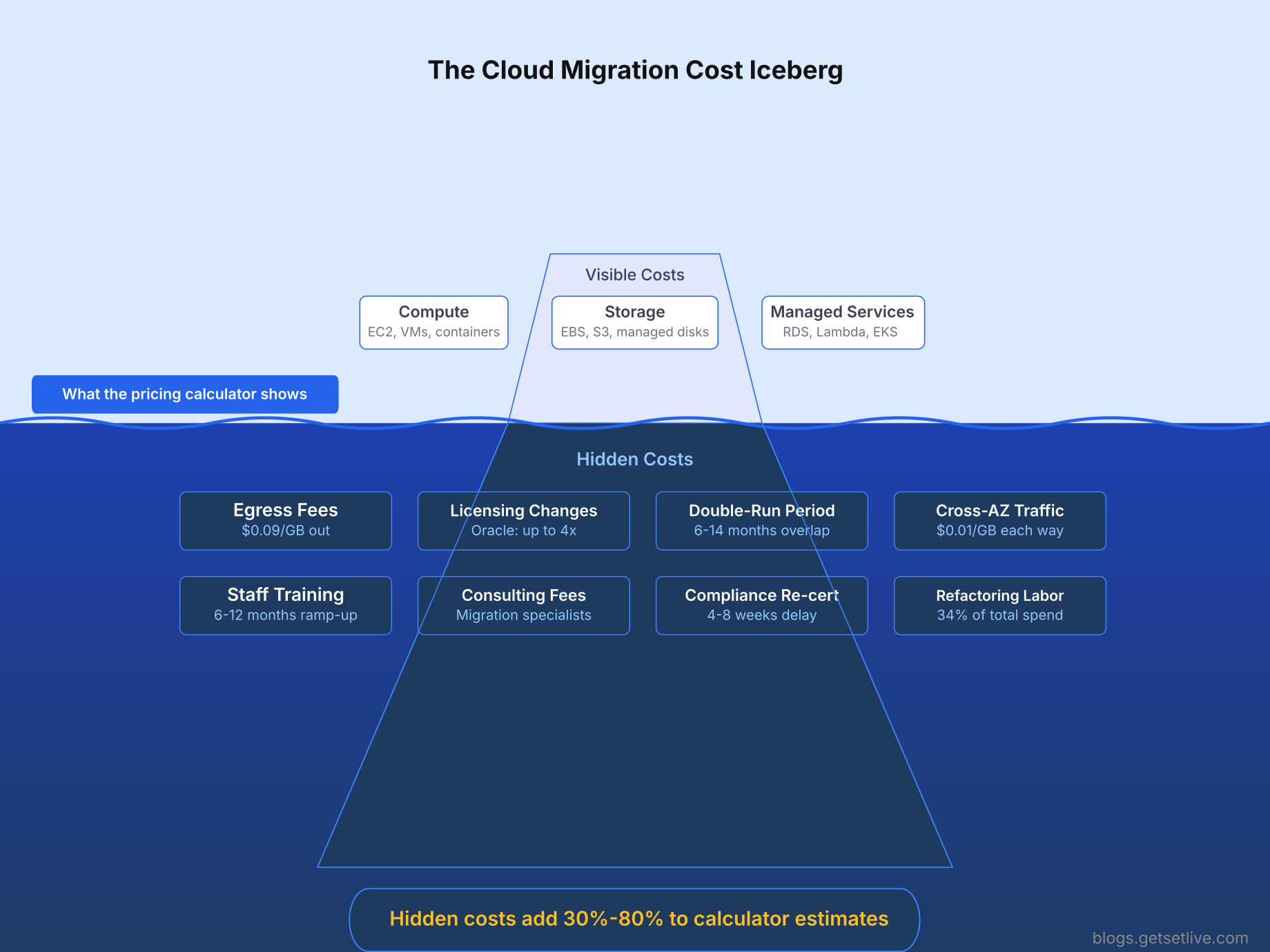
The iceberg visual above explains why Vikram’s INR 4.5 lakh estimate became INR 11.3 lakh. The three items above the waterline (compute, storage, managed services) were all he included in the business case. The eight items below the waterline were discovered one by one over the following months.
Use these commands to track and analyse your actual cloud spend once workloads are running.
aws ce get-cost-and-usage \
  --time-period Start=2026-03-01,End=2026-04-01 \
  --granularity MONTHLY \
  --metrics BlendedCost \
  --group-by Type=DIMENSION,Key=SERVICE \
  --query 'ResultsByTime[0].Groups[*].{Service:Keys[0],Cost:Metrics.BlendedCost.Amount}' \
  --output table
# Find EBS volumes not attached to any instance
aws ec2 describe-volumes --filters Name=status,Values=available --query 'Volumes[*].{ID:VolumeId,Size:Size,Created:CreateTime}' --output table

# Find EC2 instances with low CPU utilization (potential right-sizing candidates)
aws cloudwatch get-metric-statistics --namespace AWS/EC2 --metric-name CPUUtilization --dimensions Name=InstanceId,Value=i-0abc123def456 --start-time 2026-04-08T00:00:00 --end-time 2026-04-15T00:00:00 --period 86400 --statistics Average --query 'Datapoints[*].{Date:Timestamp,AvgCPU:Average}' --output table
Build a total cost of ownership (TCO) spreadsheet that includes: compute, storage, networking, licensing, egress, cross-AZ/cross-region traffic, support plans, monitoring tools, backup storage, the double-run period, staff training, and consulting fees. If you only compare compute prices, you will underestimate cloud costs by 40% to 80%.
8. Team Readiness and Change Management
Running cloud infrastructure is a fundamentally different skill set from running on-prem. Vikram’s 6-person infrastructure team had deep expertise in VMware, Cisco networking, NetApp storage, and Windows Server administration. None of them had production experience with AWS. The learning curve was steeper than anyone anticipated.
- Invest in cloud training before migration, not during. Vikram enrolled his team in AWS Solutions Architect training 3 months before the first workload moved. In hindsight, he said it should have been 6 months earlier. Closing the skill gap for a traditional sysadmin team takes 6 to 12 months of hands-on work.
- Address resistance directly. Sysadmins who have spent 10 years mastering VMware and Cisco feel threatened by a migration that makes their skills obsolete. Two of Vikram’s senior engineers pushed back on every cloud decision because they saw the migration as a threat to their roles. Vikram handled it by making them the cloud migration leads, giving them ownership of the new platform instead of positioning them as legacy specialists being replaced.
- Adopt Infrastructure as Code from the start. Do not click through the AWS console to build infrastructure. Use Terraform, CloudFormation, or Pulumi. Every resource should be version-controlled and reproducible. Vikram’s team initially built their VPC, subnets, and security groups through the console. When they needed to replicate the environment for DR, they spent 2 weeks manually recreating everything because there was no code to clone.
- Redesign your monitoring and alerting. On-prem Nagios and Zabbix installations do not monitor cloud resources effectively. You need CloudWatch, Datadog, Grafana Cloud, or a similar cloud-aware platform. Run the new monitoring in parallel with the old system for at least 4 weeks before decommissioning the legacy monitoring. Vikram shut down Nagios on day one of cloud migration and spent 3 days blind to a memory leak in his Java microservices because CloudWatch alarms had not been configured yet.
- Redesign your backup and DR strategy. On-prem tape backups and SAN snapshots do not translate to cloud. You need EBS snapshots, RDS automated backups, S3 lifecycle policies, and cross-region replication. Vikram’s on-prem DR plan was a second rack in a different colocation facility with weekly tape restores. His cloud DR plan became cross-region RDS replicas with automated failover, S3 cross-region replication, and infrastructure-as-code that could rebuild the entire environment in a new region in under 2 hours.
Performance Baselining: Capture Before You Move
You cannot prove the cloud is better or worse than on-prem if you never measured on-prem performance. Vikram’s team did not baseline their applications before migration. When the CTO asked “Is the cloud faster?” three months in, nobody could answer because there was no comparison point.
# CPU, memory, and disk utilization snapshot
vmstat 60 1440 > /opt/baseline/vmstat_$(hostname)_$(date +%Y%m%d).log &

# Network throughput and connection counts
sar -n DEV 300 288 > /opt/baseline/network_$(hostname)_$(date +%Y%m%d).log &

# Disk IOPS and latency
iostat -xz 300 288 > /opt/baseline/diskio_$(hostname)_$(date +%Y%m%d).log &

# Application response times (for web apps)
while true; do
$   echo "$(date +%Y-%m-%dT%H:%M:%S) $(curl -o /dev/null -s -w '%{time_total}' http://localhost:8080/health)"done >> /opt/baseline/response_times_$(hostname).log &
Run these collectors for at least 7 days to capture weekday and weekend patterns. Save the raw data. After migration, run the same collectors on the cloud instances and compare. This data also helps you right-size your cloud instances instead of guessing.
Performance baselining is not optional. Without it, you cannot right-size instances, you cannot detect post-migration regressions, and you cannot justify the cloud spend to leadership. Capture CPU, memory, disk IOPS, network throughput, and application response times for at least one full business week before moving anything.
What Meridian Learned from the Assessment Phase
Vikram’s team spent 3 months on assessment before moving the first workload. In hindsight, he wished they had spent 5 months. Here is what the assessment revealed that the initial cloud business case had missed.
- 5 undocumented VMs running critical shared services
- 67 service accounts with credentials scattered across config files
- Oracle licensing that would cost 4x more on AWS than on-prem
- 34 cron jobs, 8 of which depended on NFS volumes that had no cloud equivalent
- 847 firewall rules that needed manual translation to security groups
- 14 TB of data requiring 22 days of transfer over their existing WAN link
- A COBOL billing engine that could not be migrated at any reasonable cost
- Zero compliance audit logs configured in the cloud environment
- An infrastructure team with zero cloud production experience
Each of these items would have caused a production incident if discovered during cutover instead of during assessment. The 3 months Vikram spent on the checklist saved him from at least 9 unplanned outages during migration.
In Part 2 of this guide, we walk through the actual migration execution: how to sequence workloads into waves, the cutover process, the rollback decision framework, and the first 90 days of post-migration optimization that brought Vikram’s monthly bill from INR 11.3 lakh down to INR 6.8 lakh.
References
- IDC, Cloud Migration Statistics 2026: Success and Failure Rates, compiled by MedhaCloud, 2026
- Flexera, 15 Cloud Migration Challenges and Their Solutions, compiled by Atlan, 2025
- HOSTKEY, From On-Premises to Cloud and Back: Migration Case Studies, 2025
- HashRoot, Cloud Migration Horror Stories: What Enterprises Can Learn from Real Failures, 2025
- DigitalOcean, Top 10 Cloud Migration Risks in 2025, 2025
- Microsoft, Assess Your Workloads for Cloud Migration: Cloud Adoption Framework, 2025
- Wanclouds, 8 On-Prem to Cloud Migration Challenges and How to Overcome Them, 2026
Frequently Asked Questions
A full data center migration with 30 to 50 VMs typically takes 6 to 18 months from initial assessment to final decommissioning. Email and collaboration tools migrate in 2 to 4 weeks. Individual IaaS workloads take 2 to 4 months. The assessment phase alone should take 2 to 3 months. Organizations that rush the assessment phase experience 47% more delays from unidentified legacy dependencies during execution.
Mid-market migrations average $280,000 including services, tooling, and first-year costs. Enterprise migrations range from $1.2 to $4.5 million. Application refactoring accounts for 34% of total spend. Data transfer fees account for 6 to 12%. Post-migration costs run 23% higher than estimated in year one. The double-run period where you pay for both on-prem and cloud simultaneously adds 30 to 50% on top of the planned budget.
The 6 Rs are Rehost (lift and shift as-is), Replatform (make targeted optimizations), Refactor (re-architect for cloud-native), Repurchase (replace with SaaS), Retain (keep on-prem), and Retire (decommission). Each workload should be assigned one strategy based on its complexity, licensing, dependencies, and business value. Applying the same strategy to all workloads is the most common cause of cost overruns.
Almost always yes. Oracle perpetual licenses purchased for on-prem do not automatically transfer to cloud managed services like AWS RDS or Azure SQL. Oracle on RDS is licensed per vCPU per hour, and cloud vCPUs are hyperthreaded, meaning Oracle counts them differently. An 8-vCPU cloud instance equals 4 Oracle processor cores. Organizations have reported 2x to 4x licensing cost increases after migration. Consider migrating to PostgreSQL or Aurora before moving to the cloud to avoid Oracle cloud licensing entirely.
Yes. Keep the on-prem environment fully operational for the entire migration duration plus 30 to 90 days after the final workload cutover. This is your rollback safety net. Budget for this double-run period explicitly. For a 12-month migration, the double-run cost could equal 6 to 14 months of your on-prem operating expense. Shutting down on-prem prematurely eliminates your ability to rollback if critical issues surface post-migration.