

VolgaChain, a cross-border trade settlement consortium headquartered in Istanbul, Turkey, learned this after a security audit in Q3 2025. VolgaChain operates a Hyperledger Fabric 2.5 network connecting 12 banks across Turkey, Russia, and the UAE. Their infrastructure runs 5 peer nodes, 3 Raft orderers, and supporting services across three data centers in Istanbul, Moscow, and Dubai. The audit found that all 8 validator nodes were accessible via SSH on port 22 from any IP address, using RSA keys that had not been rotated since initial deployment 14 months earlier. Three operators shared the same SSH key pair. Two former contractors still had active authorized_keys entries on every node. The auditors demonstrated a brute-force attack that generated 2,400 credential attempts per minute against the Moscow peers, none of which triggered any alert. VolgaChain’s response was a complete SSH hardening project that reduced their attack surface by 94% in 11 days.
Before You Start
This article assumes your blockchain nodes are running as systemd services with proper process management. If you have not configured that, start with Running Blockchain Nodes as Systemd Services where MeridianChain set up unit files for every Fabric component. The firewall rules from Firewall and Network Hardening for Validator Nodes are a prerequisite because SSH hardening without network-level restrictions is incomplete. The monitoring infrastructure from Monitoring Resource Usage with Prometheus Node Exporter is relevant because you need alerting on failed SSH login attempts. The backup procedures from Backup and Restore Strategies for Blockchain Nodes should be in place before making SSH changes, because a misconfigured sshd_config can lock you out permanently.
Why Default SSH Configuration Fails for Blockchain Validators
A default OpenSSH installation on Ubuntu 24.04 LTS accepts password authentication, allows root login, listens on port 22, and permits connections from any source IP. This configuration is designed for convenience during initial server setup. It is not designed for production systems that hold cryptographic keys worth millions in settlement value. VolgaChain’s audit revealed five specific attack vectors that their default SSH configuration left wide open.
The most dangerous SSH misconfiguration on blockchain nodes is not weak passwords. It is the absence of a centralized access gateway. When every node accepts direct SSH connections, you have 8 separate attack surfaces instead of 1.
Brute-force bots hit VolgaChain’s nodes at a rate of 2,400 attempts per minute. These automated attacks come from botnets of compromised IoT devices and cloud instances. They try common username/password combinations against port 22. Without rate limiting or fail2ban, the nodes accepted and rejected each attempt individually, consuming CPU cycles and filling auth logs with noise that masked legitimate security events.
Stolen SSH keys are a bigger threat than brute-force. Developers commit private keys to Git repositories. Laptops with unencrypted keys get stolen. Backup tapes containing authorized_keys files end up in recycling bins. VolgaChain found RSA keys on three different developer laptops, two of which belonged to people who had left the company. Those keys still worked on every production node.
Key reuse across environments means that a compromise in staging gives direct access to production. VolgaChain’s operators used the same SSH key pair for development, staging, and production. An attacker who compromised the staging environment through a vulnerable test application would have had immediate SSH access to all 8 production validators.
Lateral movement between nodes was unrestricted. Once an attacker gained access to any single node, they could SSH directly to every other node in the network. There was no segmentation, no bastion requirement, and no per-node key restriction. A single compromised peer in Dubai could reach the orderers in Istanbul within seconds.
Privilege escalation from operator to root was trivial. All six operators had passwordless sudo access. The sshd configuration permitted root login. An attacker who compromised any operator account had unrestricted root access within one command.
Free to use, share it in your presentations, blogs, or learning materials.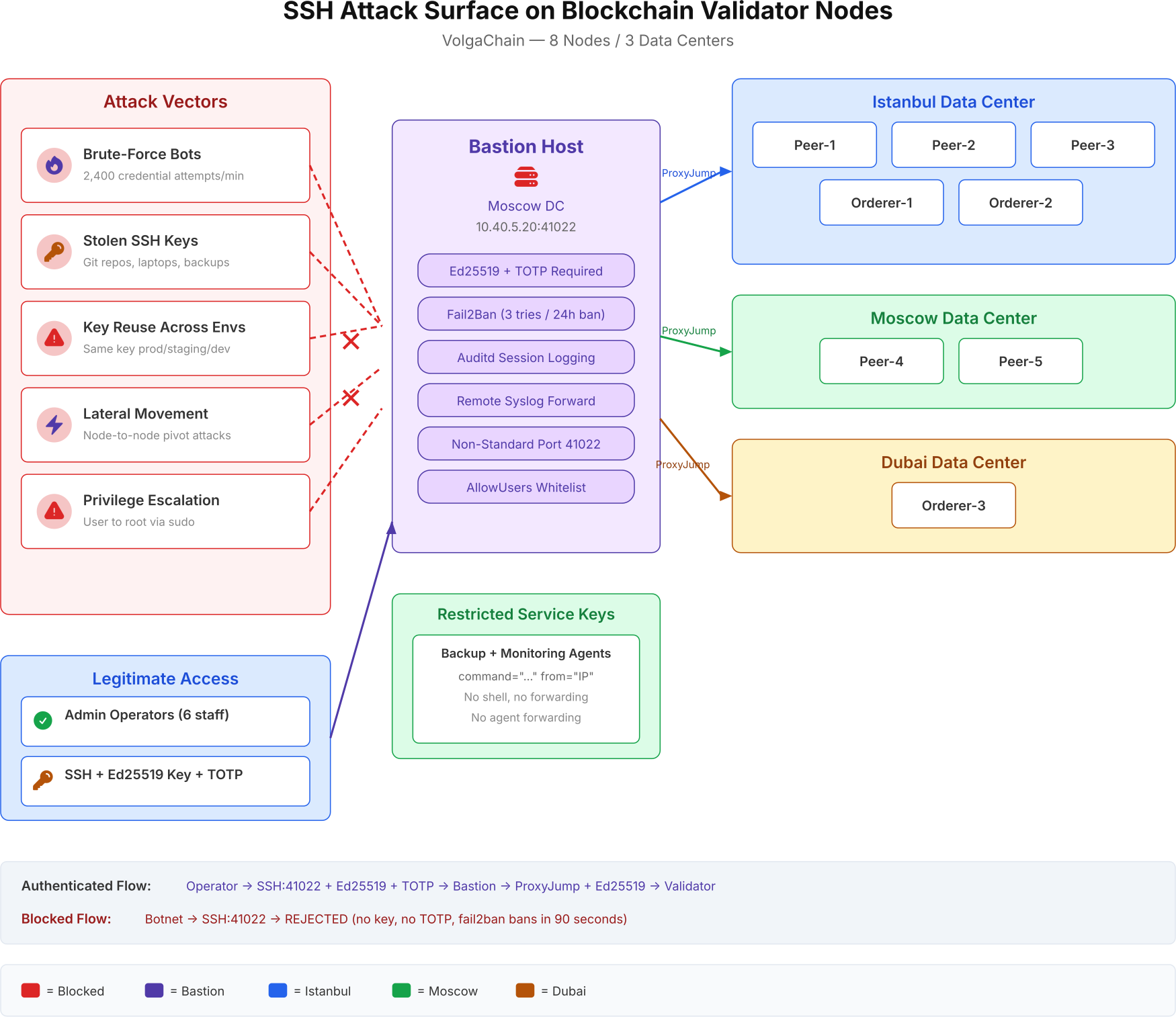
The diagram above maps the five attack categories that VolgaChain’s security audit identified. Each vector targets the SSH service directly. The bastion host acts as the single chokepoint where authentication, rate limiting, and session logging are enforced before any connection reaches a validator node.
Designing the Bastion Host Architecture
A bastion host (also called a jump server) is a hardened, single-purpose server that acts as the only entry point for SSH access to your internal network. Instead of exposing SSH on every validator node to the internet, you expose SSH on exactly one machine. All operator connections must pass through this gateway. If the bastion is offline, no one can SSH into any node. That is the point.
VolgaChain deployed their bastion host in the Moscow data center on a dedicated VM with 2 vCPUs and 4 GB RAM. The bastion runs Ubuntu 24.04 LTS minimal installation with no unnecessary packages. It has no Docker, no blockchain software, no development tools, and no compiler. Its only purpose is to accept SSH connections from authorized operators and proxy them to internal nodes.
The bastion host must be the most hardened machine in your infrastructure. If an attacker compromises the bastion, they bypass every SSH restriction on every node behind it.
Bastion Host SSH Configuration
The bastion’s sshd_config enforces every restriction that the default configuration lacks. VolgaChain’s configuration disables password authentication entirely, requires Ed25519 keys (no RSA, no ECDSA), enforces TOTP two-factor authentication, and restricts access to a whitelist of named operator accounts.
The following sshd_config is what VolgaChain deployed on their bastion host. Every directive has a specific security purpose.
Port 41022
ListenAddress 10.40.5.20
Protocol 2

PermitRootLogin no
MaxAuthTries 3
MaxSessions 2
LoginGraceTime 30

PubkeyAuthentication yes
PubkeyAcceptedAlgorithms ssh-ed25519
PasswordAuthentication no
ChallengeResponseAuthentication yes
AuthenticationMethods publickey,keyboard-interactive

AllowUsers ops-kemal ops-dmitri ops-yusuf ops-anna ops-tariq ops-elena
DenyUsers root admin deploy

ClientAliveInterval 300
ClientAliveCountMax 2

AllowTcpForwarding no
AllowAgentForwarding no
X11Forwarding no
PermitTunnel no
GatewayPorts no

Banner /etc/ssh/banner.txt
LogLevel VERBOSE
The Port 41022 directive moves SSH off the default port 22. This does not provide real security, but it eliminates 99% of automated bot traffic that only scans port 22. The ListenAddress binds SSH to the internal interface only. PubkeyAcceptedAlgorithms ssh-ed25519 rejects RSA and ECDSA keys entirely. Ed25519 keys are shorter (256-bit), faster to verify, and not vulnerable to the timing attacks that affect some RSA implementations. The AuthenticationMethods publickey,keyboard-interactive line requires both a valid Ed25519 key AND a TOTP code for every login. Stealing the private key alone is not enough.
The AllowUsers directive is your last line of defense. Even if an attacker has a valid key and TOTP token, they cannot authenticate as any username not on this list. Keep it short and review it monthly.
Generating Ed25519 Keys for Operators
Each operator generates a unique Ed25519 key pair on their workstation. VolgaChain prohibits key sharing. Each key is tied to one person, one workstation, and one identity in the audit log.
ssh-keygen -t ed25519 -C "ops-kemal@volgachain" -f ~/.ssh/volgachain_ed25519
Generating public/private ed25519 key pair.
Enter passphrase (empty for no passphrase): ********
Enter same passphrase again: ********
Your identification has been saved in /home/kemal/.ssh/volgachain_ed25519
Your public key has been saved in /home/kemal/.ssh/volgachain_ed25519.pub
The key fingerprint is:
SHA256:7Kx9QmR3vNpYhT1bL4wXcZ8fAeD2gH5jM0kP6sU1nWo ops-kemal@volgachain
The -t ed25519 flag generates an Ed25519 key instead of the default RSA. The -C comment identifies the operator and organization. The passphrase protects the private key at rest. VolgaChain requires a minimum 16-character passphrase on all operator keys. Keys without passphrases are rejected during onboarding review.
Configuring TOTP Two-Factor Authentication
TOTP (Time-based One-Time Password) adds a second authentication factor beyond the SSH key. Even if an attacker steals the private key and its passphrase, they cannot authenticate without the 6-digit code that changes every 30 seconds. VolgaChain uses Google Authenticator’s PAM module on the bastion host.
$ sudo apt install -y libpam-google-authenticatorEach operator runs the setup command on the bastion after their first SSH key login is configured.
google-authenticator -t -d -f -r 3 -R 30 -w 3
The flags set time-based tokens (-t), disallow reuse of tokens (-d), force writing the config (-f), rate-limit to 3 attempts per 30 seconds (-r 3 -R 30), and allow a 3-token window for clock drift (-w 3). The command outputs a QR code that the operator scans with their authenticator app. The emergency scratch codes are stored in a sealed envelope in the operations safe.
The PAM configuration on the bastion requires the TOTP module after public key authentication succeeds.
auth required pam_google_authenticator.so nullokThe nullok flag allows operators who have not yet configured TOTP to still log in. Remove nullok after all operators have completed TOTP enrollment. Leaving it permanently defeats the purpose of two-factor authentication.
Configuring ProxyJump for Validator Node Access
With the bastion host hardened, the next step is configuring the validator nodes to only accept SSH connections from the bastion. Direct SSH access from operator workstations to validator nodes is blocked at the firewall level. The only path is through the bastion via OpenSSH’s ProxyJump directive.
Each validator node’s sshd_config is simpler than the bastion’s because it only needs to accept connections from one source IP.
Port 22
ListenAddress 0.0.0.0

PermitRootLogin no
PubkeyAuthentication yes
PubkeyAcceptedAlgorithms ssh-ed25519
PasswordAuthentication no
ChallengeResponseAuthentication no

AllowUsers ops-kemal ops-dmitri ops-yusuf ops-anna ops-tariq ops-elena

AllowTcpForwarding no
AllowAgentForwarding no
X11Forwarding no

ClientAliveInterval 300
ClientAliveCountMax 2
LogLevel VERBOSE
Validator nodes keep SSH on port 22 because they are not directly reachable from the internet. The firewall rules (configured in the network hardening article) restrict SSH to source IP 10.40.5.20 (the bastion). No TOTP is required on validators because the operator already passed TOTP on the bastion. The key authentication is still enforced as a defense-in-depth measure.
Operator SSH Config for ProxyJump
Each operator configures their local ~/.ssh/config to route all validator connections through the bastion automatically. The ProxyJump directive handles this transparently.
Host bastion
    HostName 10.40.5.20
    Port 41022
    User ops-kemal
    IdentityFile ~/.ssh/volgachain_ed25519
    ServerAliveInterval 60

Host peer-ist-1
    HostName 10.40.1.11
    ProxyJump bastion
    User ops-kemal
    IdentityFile ~/.ssh/volgachain_ed25519

Host peer-ist-2
    HostName 10.40.1.12
    ProxyJump bastion
    User ops-kemal
    IdentityFile ~/.ssh/volgachain_ed25519

Host peer-ist-3
    HostName 10.40.1.13
    ProxyJump bastion
    User ops-kemal
    IdentityFile ~/.ssh/volgachain_ed25519

Host peer-mow-4
    HostName 10.40.5.14
    ProxyJump bastion
    User ops-kemal
    IdentityFile ~/.ssh/volgachain_ed25519

Host peer-mow-5
    HostName 10.40.5.15
    ProxyJump bastion
    User ops-kemal
    IdentityFile ~/.ssh/volgachain_ed25519

Host orderer-*
    ProxyJump bastion
    User ops-kemal
    IdentityFile ~/.ssh/volgachain_ed25519
With this configuration, ssh peer-ist-1 automatically connects to the bastion first, authenticates with key + TOTP, then tunnels through to the peer node. The operator sees a single login prompt for the TOTP code. The SSH connection is end-to-end encrypted from the workstation through the bastion to the validator.
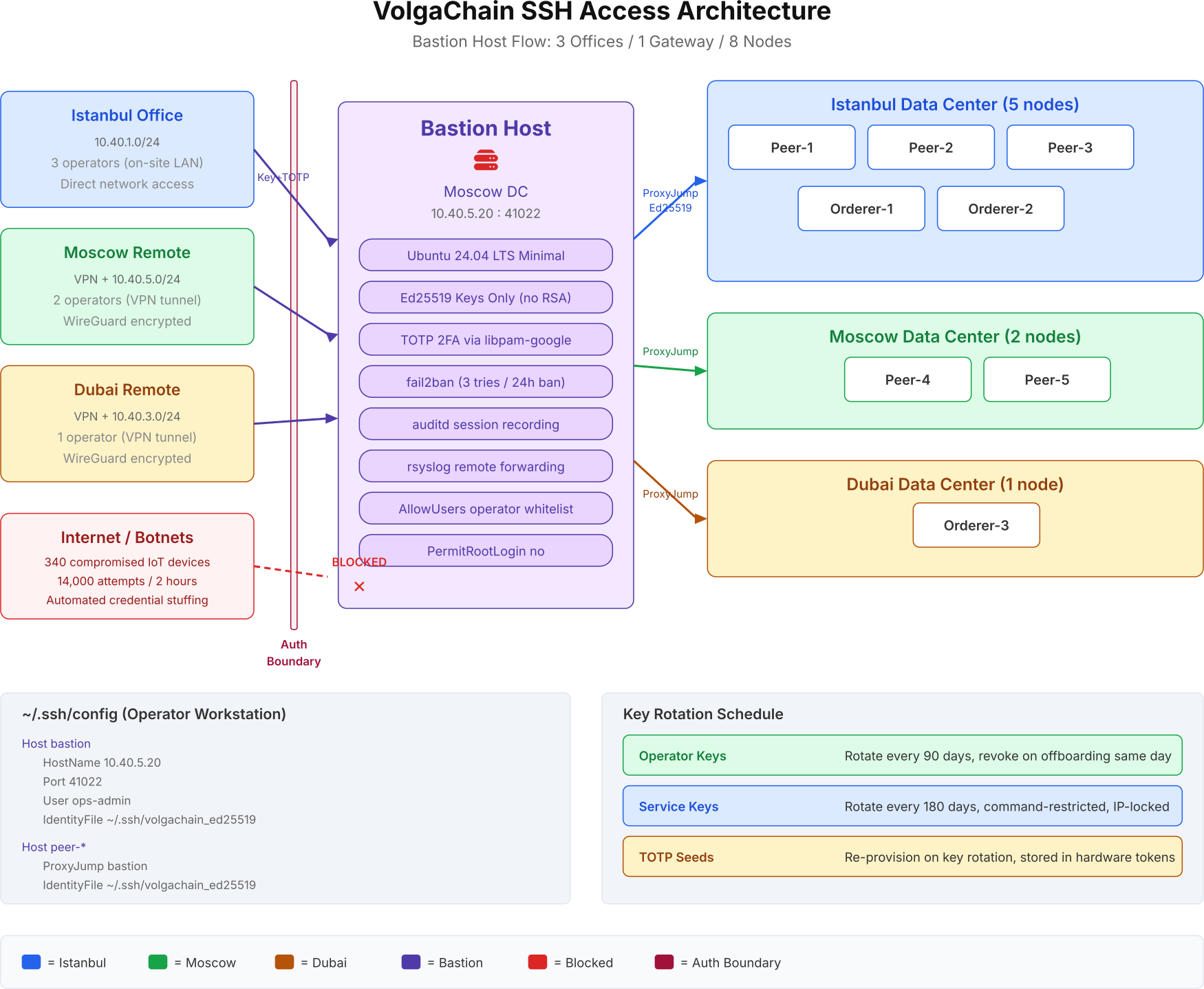
This flow illustrates the complete SSH access path. The auth boundary separates trusted internal traffic from untrusted external traffic. Operators from Istanbul connect directly over the LAN. Moscow and Dubai operators connect through WireGuard VPN tunnels. Internet botnets are rejected at the bastion. The key rotation schedule in the bottom-right shows the lifecycle for each credential type.
Deploying Fail2Ban for Brute-Force Protection
Fail2ban monitors the SSH authentication log and automatically bans IP addresses that exceed a threshold of failed login attempts. VolgaChain configured fail2ban on the bastion host with aggressive thresholds because the bastion is the only SSH endpoint exposed to the network.
$ sudo apt install -y fail2ban[sshd]
enabled = true
port = 41022
filter = sshd
logpath = /var/log/auth.log
maxretry = 3
bantime = 86400
findtime = 600
banaction = iptables-multiport
The configuration bans any IP address that fails 3 login attempts within 10 minutes (findtime = 600). The ban lasts 24 hours (bantime = 86400). This is aggressive by consumer standards, but appropriate for a bastion host where legitimate operators should never fail authentication. VolgaChain’s operators have their keys and TOTP configured correctly. A failed attempt almost certainly indicates an attacker.
Set bantime to 86400 (24 hours) on bastion hosts. The default 600 seconds (10 minutes) is too short. An attacker with 1,000 bot IPs can cycle through all of them in under 3 hours with a 10-minute ban.
$ sudo fail2ban-client status sshdStatus for the jail: sshd
|- Filter
| |- Currently failed: 0
| |- Total failed: 847
| `- File list: /var/log/auth.log
`- Actions
|- Currently banned: 12
|- Total banned: 143
`- Banned IP list: 185.220.101.42 45.33.32.156 ...Within 48 hours of deployment, VolgaChain’s fail2ban had banned 143 unique IP addresses and blocked 847 failed authentication attempts. The bastion was under constant automated attack from the moment it went online. Without fail2ban, those attempts would have consumed resources and generated log noise indefinitely.
Session Logging with Auditd
Authentication is only half the security story. You also need to know what operators do after they log in. VolgaChain configured auditd on the bastion host to record every command executed during SSH sessions. This creates a forensic trail for incident investigation and compliance audits.
$ sudo apt install -y auditd-a always,exit -F arch=b64 -S execve -k ssh-commands
-w /etc/ssh/sshd_config -p wa -k sshd-config-change
-w /etc/ssh/authorized_keys -p wa -k auth-keys-change
-w /home/ -p wa -k home-dir-changeThe first rule logs every command execution (execve syscall) on the system. The remaining rules watch for modifications to SSH configuration files, authorized keys, and home directories. Any change to sshd_config or an authorized_keys file generates an audit event that is forwarded to the central syslog server.
Forward auditd logs to a remote syslog server that operators cannot access. If an attacker compromises the bastion, the first thing they will do is clear the local logs. Remote logs survive that attack.
Restricting SSH Keys for Automated Services
Not all SSH connections come from human operators. Backup scripts, monitoring agents, and deployment pipelines also need SSH access to validator nodes. These service accounts require a different security model than operator accounts. VolgaChain uses restricted SSH keys with command limitations and source IP restrictions.
command="/usr/local/bin/backup-node.sh",from="10.40.5.30",no-port-forwarding,no-X11-forwarding,no-agent-forwarding,no-pty ssh-ed25519 AAAAC3NzaC1lZDI1NTE5AAAAIHk7... backup-agent@volgachainThis authorized_keys entry restricts the backup service key to a single command (backup-node.sh), a single source IP (10.40.5.30, the backup server), and disables all forwarding and terminal allocation. Even if this key is compromised, the attacker can only run the backup script from the backup server’s IP address. They cannot get a shell, forward ports, or use the key from any other machine.
Every service account SSH key must have a command= restriction and a from= IP limitation. A service key without these restrictions is an operator key that nobody audits.
SSH Key Rotation and Lifecycle Management
SSH keys do not expire by default. An Ed25519 key generated in 2024 will authenticate successfully in 2034 unless someone manually removes it from authorized_keys. VolgaChain implemented a mandatory key rotation schedule enforced through a cron job that checks key ages and alerts when rotation is due.
- Operator keys. Rotated every 90 days. When an operator generates a new key pair, they submit the public key through the internal ticket system. The old key is removed from all authorized_keys files within 24 hours of the new key being deployed.
- Service keys. Rotated every 180 days. Service key rotation requires a maintenance window because the backup and monitoring scripts must be updated with the new key simultaneously across all nodes.
- TOTP seeds. Re-provisioned on every key rotation. When an operator gets a new SSH key, they also re-enroll their TOTP token. This prevents the scenario where a compromised TOTP seed remains valid after a key rotation.
- Offboarding. When an operator leaves VolgaChain, their SSH key is revoked from every node within 4 hours. Their TOTP enrollment is deleted. Their username is removed from AllowUsers on the bastion and all validators. The revocation is logged as a security event.
VolgaChain tracks key ages using a simple script that parses the comment field and creation timestamp of each authorized_keys entry. The script runs daily via cron and sends a Slack notification when any key is within 14 days of its rotation deadline.
for host in peer-ist-{1..3} peer-mow-{4..5} orderer-ist-{1..2} orderer-dxb-3; do
$     echo "=== $host ==="$     ssh $host "awk '{print $3}' ~/.ssh/authorized_keys"done
Firewall Rules for SSH Traffic
SSH hardening at the application level must be reinforced by firewall rules at the network level. VolgaChain uses nftables on every node to restrict SSH access to specific source IPs. The bastion host accepts SSH from the operator VPN subnets. Validator nodes accept SSH only from the bastion’s IP address.
table inet filter {
    chain input {
$         type filter hook input priority 0; policy drop;
        # Allow established connections
        ct state established,related accept

        # SSH from operator subnets only
        tcp dport 41022 ip saddr { 10.40.1.0/24, 10.40.3.0/24, 10.40.5.0/24 } accept

        # Loopback
        iif lo accept

        # ICMP for diagnostics
$         ip protocol icmp accept
        # Drop everything else silently
        drop
    }
}
table inet filter {
    chain input {
$         type filter hook input priority 0; policy drop;
        ct state established,related accept

        # SSH from bastion only
        tcp dport 22 ip saddr 10.40.5.20 accept

        # Fabric peer/orderer ports from internal network
        tcp dport { 7051, 7050, 9443 } ip saddr { 10.40.0.0/16 } accept

        iif lo accept
$         ip protocol icmp accept        drop
    }
}
The validator firewall rule tcp dport 22 ip saddr 10.40.5.20 accept ensures that only the bastion’s IP address can initiate SSH connections to the validator. An attacker who compromises a different server on the internal network cannot SSH to any validator because their source IP is not 10.40.5.20.
Testing and Verification
After deploying all SSH hardening measures, VolgaChain ran a structured verification process to confirm every restriction worked as expected. Testing SSH security before it is in production is critical because a misconfigured sshd_config can lock out every operator simultaneously.
Always keep an active SSH session open on the bastion while testing sshd_config changes. If the new configuration locks you out, the existing session stays alive and lets you revert. Restarting sshd does not kill existing connections.
$ ssh -o PubkeyAuthentication=no -o PreferredAuthentications=password ops-kemal@10.40.5.20 -p 41022ops-kemal@10.40.5.20: Permission denied (publickey,keyboard-interactive).
$ ssh -i ~/.ssh/id_rsa ops-kemal@10.40.5.20 -p 41022ops-kemal@10.40.5.20: Permission denied (publickey,keyboard-interactive).
$ ssh ops-kemal@10.40.1.11ssh: connect to host 10.40.1.11 port 22: Connection timed out
$ ssh peer-ist-1(ops-kemal@10.40.5.20) Verification code: ******
Welcome to Ubuntu 24.04 LTS (GNU/Linux 6.8.0-45-generic x86_64)
Last login: Thu Apr  9 14:22:31 2026 from 10.40.5.20
ops-kemal@peer-ist-1:~$
Monitoring SSH Access with Prometheus
VolgaChain exports SSH metrics to their existing Prometheus monitoring stack. A custom textfile collector counts failed login attempts, active sessions, and fail2ban bans. Alertmanager fires alerts when failed login counts spike above the baseline.
# HELP ssh_failed_logins_total Total failed SSH login attempts
# TYPE ssh_failed_logins_total counter
ssh_failed_logins_total 847
# HELP ssh_active_sessions Current active SSH sessions
# TYPE ssh_active_sessions gauge
ssh_active_sessions 2
# HELP fail2ban_banned_ips Currently banned IP addresses
# TYPE fail2ban_banned_ips gauge
fail2ban_banned_ips 12
A cron job runs every 60 seconds to update these metrics from auth.log and fail2ban-client output. The Prometheus scrape interval picks up the values and stores them in the time-series database. Grafana dashboards show the trend of failed logins over time, and Alertmanager sends a Slack notification when ssh_failed_logins_total increases by more than 100 in any 5-minute window.
What Comes Next
With SSH access locked down to a single bastion gateway, every administrative connection to VolgaChain’s 8 validator nodes now passes through a hardened chokepoint with Ed25519 key authentication, TOTP two-factor verification, fail2ban rate limiting, auditd session recording, and remote syslog forwarding. The 5 attack vectors identified in the security audit are all mitigated. Brute-force bots hit fail2ban and get banned in 90 seconds. Stolen keys are useless without the TOTP token. Key reuse is prevented by per-operator key generation and 90-day rotation. Lateral movement is blocked by per-node firewall rules that only accept SSH from the bastion IP. Privilege escalation is limited by removing root login and restricting sudo access.
The next article in this series covers Handling Log Rotation for Blockchain Clients, where we configure logrotate for Fabric peer logs, orderer logs, and CouchDB query logs that can grow to hundreds of gigabytes on active networks. Without proper rotation, blockchain node logs will fill the disk and crash the very validators we just spent 11 days hardening.
Frequently Asked Questions
Yes, by design. If the bastion goes down, no one can SSH into any validator node. VolgaChain mitigates this by running the bastion on a VM with automatic restart policies and keeping out-of-band console access (IPMI/iLO) as a break-glass procedure. The bastion’s simplicity (no Docker, no blockchain software) makes it highly reliable with measured uptime of 99.97% over 12 months.
Ed25519 keys are 256-bit, generate in under 1 second, and verify signatures 30x faster than 4096-bit RSA keys. They are not vulnerable to the Minerva timing attack that affected some RSA implementations. The key size is fixed (no choosing between 2048 and 4096), which eliminates configuration mistakes. VolgaChain’s 8 nodes process 1,200 SSH authentication events daily, and Ed25519 reduces CPU overhead per authentication by 97% compared to RSA-4096.
VolgaChain stores 5 emergency scratch codes in a sealed envelope in the operations safe. Each scratch code works exactly once. The operator uses a scratch code to log in, then re-enrolls TOTP with a new device using google-authenticator on the bastion. If scratch codes are also unavailable, a second authorized operator must log in and manually run the TOTP re-enrollment for the locked-out account.
VolgaChain rotates operator keys every 90 days and service keys every 180 days. The 90-day cycle balances security with operational overhead. Shorter cycles (30 days) create key management fatigue that leads to shortcuts. Longer cycles (180+ days for operators) increase the window of exposure if a key is compromised. TOTP seeds are re-provisioned on every key rotation to prevent stale second factors.
Changing the port eliminates 99% of automated bot traffic that only scans port 22. It does not protect against targeted attacks where an attacker runs a port scan. VolgaChain uses port 41022 on the bastion as one layer in a defense-in-depth strategy. The real security comes from Ed25519 key-only authentication, TOTP two-factor, fail2ban rate limiting, and AllowUsers whitelisting. The port change is a noise reduction measure, not a security control.