
SaharaLedger, a digital trade finance platform headquartered in Riyadh, Saudi Arabia, discovered this at 2:14 AM on a Wednesday. SaharaLedger connects 14 banks across the Gulf region through a Hyperledger Fabric 2.5 network that processes 28,000 trade finance transactions daily. Their infrastructure runs 6 peer nodes, 3 Raft orderers, and 2 CouchDB state database instances across two data centers in Riyadh and Dubai. The ledger had grown to 380GB over 18 months of production operation. When a storage controller in the Dubai data center failed, it took two peer nodes offline and corrupted their LevelDB state databases. The backup plan at the time was a manual tar archive run every Sunday night by a sysadmin who sometimes forgot. The last usable backup was 9 days old. Restoring those two peers required a full state rebuild from the Riyadh peers, which took 6 hours and 22 minutes. During that window, SaharaLedger could not meet the endorsement policy on 3 of their 5 channels, blocking $4.8 million in pending letters of credit. That incident triggered a complete backup and restore strategy redesign.
Before You Start
This article assumes your blockchain nodes are already running as systemd services with proper process management and restart policies. If you have not set that up, start with Running Blockchain Nodes as Systemd Services where MeridianChain configured unit files for every Fabric component. The disk layout decisions from Disk Layout Strategy for Blockchain Data directly affect which paths you need to back up and how large those backups will be. The storage architecture covered in Storage Architecture for Blockchain: SSD, NVMe, and IOPS Planning is relevant because backup I/O competes with production I/O on the same storage subsystem. If your monitoring stack is not in place yet, read Monitoring Resource Usage with Prometheus Node Exporter so you can alert on disk usage before it becomes a backup emergency.
Understanding What Needs Backup in a Blockchain Node
A blockchain node is not a single database you can dump and restore. It is a collection of interdependent data stores, cryptographic material, and configuration files that must be backed up together to produce a consistent, recoverable snapshot. Missing any one component means the node cannot rejoin the network after a restore. SaharaLedger’s backup and restore strategy covers six distinct data categories across every node in the consortium.
The most critical mistake teams make is backing up the ledger but forgetting the crypto material. Without the node’s private keys and MSP certificates, a restored ledger is just a pile of blocks that no peer in the network will trust.
- Ledger block files. These are the raw block files stored under the peer’s file system, typically at
/var/hyperledger/production/ledgersData/chains/chains/. Each channel has its own subdirectory containing numbered block files. On SaharaLedger’s nodes, the trade-finance channel alone has 2.4 million blocks consuming 312GB. - State database. Either LevelDB (embedded key-value store) or CouchDB (external HTTP database). The state database holds the current world state derived from all committed transactions. LevelDB lives at
/var/hyperledger/production/ledgersData/stateLeveldb/. CouchDB stores data in its own directory, typically/opt/couchdb/data/. - Crypto material (MSP). The node’s X.509 certificates, private keys, TLS certificates, and CA chains. Stored under the MSP directory configured in core.yaml. Losing these means the node’s identity is gone.
- Channel configuration. The genesis block and channel configuration transactions. These define the consortium membership, policies, and anchor peers.
- Chaincode packages. The installed chaincode tarballs and their metadata. On Fabric 2.x with lifecycle, these are stored under
/var/hyperledger/production/lifecycle/. - Docker volumes. If you run peers in Docker containers, all of the above lives inside named volumes or bind mounts. The volume mapping in your docker-compose.yaml determines the actual host paths.
SaharaLedger maps all six categories for each node in a backup manifest file. The manifest lists every path, its expected size, and the last backup timestamp. This prevents the “we thought we were backing it up” problem that caused their Dubai incident.
Free to use, share it in your presentations, blogs, or learning materials.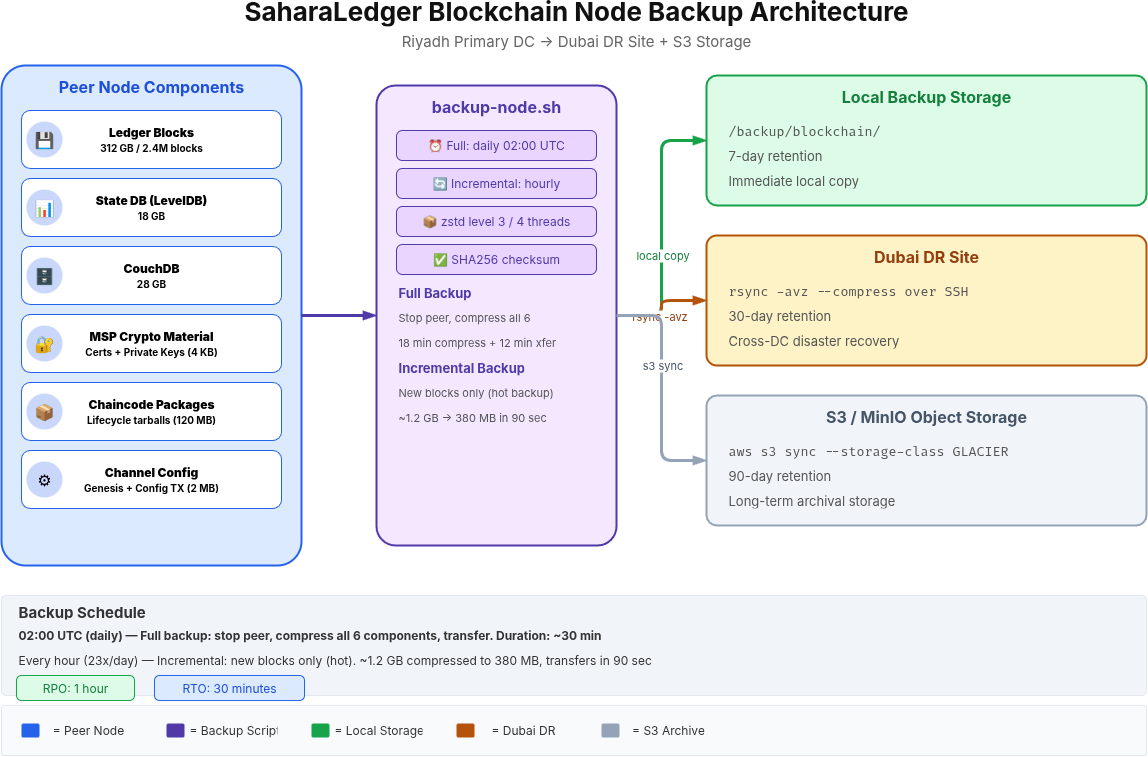
The diagram above maps the complete backup pipeline for a SaharaLedger peer node. Each of the six data categories feeds into the backup script, which compresses with zstd and distributes copies to local storage (7-day retention), the Dubai DR site via rsync (30-day retention), and S3 object storage (90-day archival). The separation of storage tiers ensures that a local disk failure does not eliminate all backup copies.
Backup Strategy Design for Blockchain Node Backup and Restore
Before writing a single line of backup script, SaharaLedger defined two numbers that drive every design decision: RPO and RTO. Recovery Point Objective (RPO) answers “how much data can we afford to lose?” Recovery Time Objective (RTO) answers “how long can this node be down?”
For their trade finance network, SaharaLedger set an RPO of 1 hour and an RTO of 30 minutes. That means backups must run at least hourly, and a full restore from backup to a running, network-connected peer must complete within 30 minutes. These targets ruled out their old weekly tar approach immediately.
Full vs Incremental Backups
A full backup of a 380GB ledger takes 18 minutes to compress and 12 minutes to transfer to the remote site. Running that every hour would consume 50% of the node’s I/O bandwidth during backup windows. SaharaLedger uses a hybrid approach: one full backup at 02:00 UTC daily (during the lowest transaction window, averaging 340 transactions per hour), and incremental backups every hour during the remaining 23 hours.
The incremental approach works because blockchain ledgers are append-only. New blocks are added to the end of the chain. The backup script tracks the last backed-up block number and only copies blocks created since the last run. For SaharaLedger’s transaction volume, hourly increments average 1.2GB, which compresses to 380MB and transfers in under 90 seconds.
Hot vs Cold Backups
A cold backup requires stopping the peer, copying files, and restarting. This guarantees consistency between the ledger and state database but creates a maintenance window. A hot backup copies files while the peer is running, which risks capturing an inconsistent state if a block is being committed during the copy.
SaharaLedger uses cold backups for the daily full backup (the 02:00 UTC window) and hot backups for hourly incrementals. The hot incremental backups only copy completed block files that are no longer being written to. The state database is not included in hourly incrementals because it can be rebuilt from the ledger blocks during a restore. This trade-off keeps hourly backups fast while the daily full backup captures a perfectly consistent snapshot.
Implementing Automated Backups with Scripts
SaharaLedger’s backup script handles both full and incremental modes. It accepts a mode argument, identifies the data paths from environment variables, compresses the output with zstd (3x faster than gzip at similar compression ratios), and logs every step with timestamps. The script runs as a systemd timer, not a cron job, because systemd timers provide better logging, dependency management, and failure alerting.
Here is the full backup script that SaharaLedger deploys to every peer node. Save this as /opt/blockchain/scripts/backup-node.sh on each peer.
 1#!/bin/bash
 2# Blockchain Node Backup Script
 3# SaharaLedger - Created 2026-03-15
 4# Usage: backup-node.sh [full|incremental]
 5
 6set -euo pipefail
 7
 8MODE="${1:-incremental}"
 9TIMESTAMP=$(date +%Y%m%d_%H%M%S)
10NODE_NAME=$(hostname -s)
11BACKUP_BASE="/backup/blockchain"
12BACKUP_DIR="${BACKUP_BASE}/${NODE_NAME}/${MODE}_${TIMESTAMP}"
13LEDGER_PATH="/var/hyperledger/production/ledgersData"
14MSP_PATH="/etc/hyperledger/fabric/msp"
15CHAINCODE_PATH="/var/hyperledger/production/lifecycle"
16LAST_BLOCK_FILE="${BACKUP_BASE}/${NODE_NAME}/.last_backed_up_block"
17LOG_FILE="/var/log/blockchain/backup_${TIMESTAMP}.log"
18PEER_SERVICE="peer-node.service"
19
20log() {
21    echo "[$(date '+%Y-%m-%d %H:%M:%S')] $1" | tee -a "$LOG_FILE"
22}
23
24mkdir -p "$BACKUP_DIR" "$(dirname $LOG_FILE)"
25log "Starting ${MODE} backup for ${NODE_NAME}"
26
27if [ "$MODE" = "full" ]; then
28    # Stop peer for consistent snapshot
29    log "Stopping peer service for cold backup"
30    sudo systemctl stop "$PEER_SERVICE"
31    sleep 5
32
33    # Backup ledger blocks
34    log "Backing up ledger data ($(du -sh $LEDGER_PATH | cut -f1))"
35    tar cf - "$LEDGER_PATH" | zstd -3 -T4 > "${BACKUP_DIR}/ledger_${TIMESTAMP}.tar.zst"
36
37    # Backup state database
38    log "Backing up state database"
39    tar cf - "${LEDGER_PATH}/stateLeveldb" | zstd -3 -T4 > "${BACKUP_DIR}/statedb_${TIMESTAMP}.tar.zst"
40
41    # Restart peer
42    log "Restarting peer service"
43    sudo systemctl start "$PEER_SERVICE"
44
45    # Record the latest block number
46    peer channel getinfo -c trade-finance 2>/dev/null | grep -oP 'height:K[0-9]+' > "$LAST_BLOCK_FILE"
47    log "Full backup complete. Latest block: $(cat $LAST_BLOCK_FILE)"
48
49elif [ "$MODE" = "incremental" ]; then
50    # Hot backup - only new block files since last backup
51    LAST_BLOCK=0
52    if [ -f "$LAST_BLOCK_FILE" ]; then
53        LAST_BLOCK=$(cat "$LAST_BLOCK_FILE")
54    fi
55
56    log "Incremental backup from block ${LAST_BLOCK}"
57
58    # Find block files modified since last backup
59    CHAINS_DIR="${LEDGER_PATH}/chains/chains"
60    find "$CHAINS_DIR" -name "blockfile_*" -newer "$LAST_BLOCK_FILE" -print0 |
61        tar cf - --null -T - | zstd -3 -T4 > "${BACKUP_DIR}/ledger_incr_${TIMESTAMP}.tar.zst"
62
63    # Update last block marker
64    peer channel getinfo -c trade-finance 2>/dev/null | grep -oP 'height:K[0-9]+' > "$LAST_BLOCK_FILE"
65    log "Incremental backup complete. New latest block: $(cat $LAST_BLOCK_FILE)"
66fi
67
68# Always backup crypto material (small, critical)
69log "Backing up MSP crypto material"
70tar cf - "$MSP_PATH" | zstd -3 > "${BACKUP_DIR}/msp_${TIMESTAMP}.tar.zst"
71
72# Backup chaincode packages
73log "Backing up chaincode lifecycle packages"
74tar cf - "$CHAINCODE_PATH" 2>/dev/null | zstd -3 > "${BACKUP_DIR}/chaincode_${TIMESTAMP}.tar.zst"
75
76# Generate checksum manifest
77log "Generating checksums"
78cd "$BACKUP_DIR"
79sha256sum *.tar.zst > checksums.sha256
80
81# Calculate total backup size
82TOTAL_SIZE=$(du -sh "$BACKUP_DIR" | cut -f1)
83log "Backup complete: ${BACKUP_DIR} (${TOTAL_SIZE})"
84
85# Cleanup old local backups (keep 7 days)
86find "${BACKUP_BASE}/${NODE_NAME}" -maxdepth 1 -type d -mtime +7 -exec rm -rf {} ;
87log "Old backups cleaned. Retention: 7 days local."
The script uses several design choices worth explaining. The set -euo pipefail line makes the script exit on any error, undefined variable, or pipeline failure. The zstd -3 -T4 flag uses compression level 3 (good balance of speed and ratio) with 4 threads. On SaharaLedger’s hardware, this compresses 380GB of ledger data to 142GB in 11 minutes, compared to 28 minutes with gzip at similar ratios. The crypto material backup runs on every backup cycle, not just full backups, because losing a 4KB private key is more catastrophic than losing 380GB of rebuildable ledger data.
Make the script executable and test it with a dry run before scheduling.
$ sudo chmod +x /opt/blockchain/scripts/backup-node.sh$ sudo mkdir -p /backup/blockchain /var/log/blockchain$ sudo /opt/blockchain/scripts/backup-node.sh full[2026-03-16 02:00:01] Starting full backup for peer0-riyadh
[2026-03-16 02:00:01] Stopping peer service for cold backup
[2026-03-16 02:00:06] Backing up ledger data (380G)
[2026-03-16 02:11:14] Backing up state database
[2026-03-16 02:13:42] Restarting peer service
[2026-03-16 02:13:48] Full backup complete. Latest block: 2418563
[2026-03-16 02:13:48] Backing up MSP crypto material
[2026-03-16 02:13:49] Backing up chaincode lifecycle packages
[2026-03-16 02:13:50] Generating checksums
[2026-03-16 02:13:51] Backup complete: /backup/blockchain/peer0-riyadh/full_20260316_020001 (144G)
[2026-03-16 02:13:51] Old backups cleaned. Retention: 7 days local.
Scheduling Backups with Systemd Timers
SaharaLedger uses systemd timers instead of cron for two reasons. First, systemd logs every timer execution in journald, which means backup failures show up in the same log pipeline as every other service event. Second, systemd timers support OnBootSec and Persistent=true, which means missed backups (from reboots or downtime) run automatically when the system comes back up. Cron silently skips missed jobs.
Create the service unit file that defines what the timer will execute.
[Unit]
Description=Blockchain Node Backup
After=peer-node.service
Wants=peer-node.service

[Service]
Type=oneshot
User=root
ExecStart=/opt/blockchain/scripts/backup-node.sh incremental
StandardOutput=journal
StandardError=journal
TimeoutStartSec=1800
The Type=oneshot tells systemd this is a run-once job, not a long-running daemon. TimeoutStartSec=1800 gives the backup 30 minutes to complete before systemd kills it. The After=peer-node.service ensures backups do not start if the peer is not running.
Now create the timer unit that triggers the service every hour.
[Unit]
Description=Hourly Blockchain Node Backup

[Timer]
OnCalendar=*-*-* *:00:00
Persistent=true
RandomizedDelaySec=120

[Install]
WantedBy=timers.target
OnCalendar=*-*-* *:00:00 fires at the top of every hour. Persistent=true means if the system was offline at a scheduled time, the timer fires immediately on boot. RandomizedDelaySec=120 adds up to 2 minutes of random delay to prevent all 6 peers from hitting the backup storage simultaneously.
Create a separate timer for the daily full backup at 02:00 UTC.
[Unit]
Description=Blockchain Node Full Backup
After=peer-node.service

[Service]
Type=oneshot
User=root
ExecStart=/opt/blockchain/scripts/backup-node.sh full
StandardOutput=journal
StandardError=journal
TimeoutStartSec=3600[Unit]
Description=Daily Full Blockchain Node Backup
[Timer]
OnCalendar=*-*-* 02:00:00
Persistent=true
[Install]
WantedBy=timers.targetEnable and start both timers.
$ sudo systemctl daemon-reload$ sudo systemctl enable --now blockchain-backup.timer$ sudo systemctl enable --now blockchain-backup-full.timerVerify both timers are active and check when the next run is scheduled.
$ sudo systemctl list-timers blockchain-backup*NEXT                         LEFT     LAST                         PASSED  UNIT
Mon 2026-03-16 04:00:00 UTC  42min    Mon 2026-03-16 03:00:00 UTC  17min   blockchain-backup.timer
Tue 2026-03-17 02:00:00 UTC  22h      Mon 2026-03-16 02:00:00 UTC  1h 17m  blockchain-backup-full.timer
Backing Up CouchDB State Database
SaharaLedger runs CouchDB as the state database on 4 of their 6 peers (the trade-finance and cross-border channels require rich queries that LevelDB cannot handle). CouchDB backup requires a different approach than the file-level tar used for LevelDB. CouchDB stores data in .couch files that can be corrupted if copied while the database is actively writing. The safe approach is using CouchDB’s built-in replication API to create a consistent point-in-time copy on a backup CouchDB instance.
First, check the current size of your CouchDB databases. This tells you how much storage the backup target needs.
1curl -s http://admin:password@localhost:5984/_all_dbs | python3 -m json.tool
2curl -s http://admin:password@localhost:5984/trade-finance_peer0/ | python3 -c "import sys,json; d=json.load(sys.stdin); print(f'Size: {d["sizes"]["file"]/(1024**3):.2f} GB, Docs: {d["doc_count"]}')"
3Size: 28.41 GB, Docs: 1847293
Trigger a one-shot replication to the backup CouchDB instance. This creates a consistent copy without stopping the source database.
$ curl -X POST http://admin:password@localhost:5984/_replicate   -H "Content-Type: application/json"
  -d '{
    "source": "http://admin:password@localhost:5984/trade-finance_peer0",
    "target": "http://admin:password@backup-couch:5984/trade-finance_peer0_backup",
    "create_target": true
  }'
The replication runs in the background. Monitor its progress by checking the active tasks endpoint.
$ curl -s http://admin:password@localhost:5984/_active_tasks | python3 -m json.toolFor file-level CouchDB backup (faster but requires briefly pausing writes), you can compact the database first and then copy the data directory.
# Trigger compaction first to reduce file size
$ curl -X POST http://admin:password@localhost:5984/trade-finance_peer0/_compact
# Wait for compaction to finish
sleep 30

# Copy the CouchDB data directory
$ sudo systemctl stop couchdb$ sudo tar cf - /opt/couchdb/data | zstd -3 -T4 > /backup/blockchain/couchdb_$(date +%Y%m%d_%H%M%S).tar.zst$ sudo systemctl start couchdb
Remote Backup with Rsync and S3
Local backups protect against disk failures and data corruption. They do not protect against data center outages, fires, or ransomware that encrypts all local disks including the backup drive. SaharaLedger pushes every backup to two remote destinations: an rsync target in the Dubai data center and an S3-compatible object store (MinIO) for long-term retention.
The rsync transfer runs over SSH with a dedicated backup user that has key-only authentication and is restricted to the backup directory via a chroot. This prevents a compromised backup credential from accessing anything else on the remote server.
$ rsync -avz --progress   -e "ssh -i /opt/blockchain/.ssh/backup_ed25519 -p 2222"
  /backup/blockchain/peer0-riyadh/
  backup-user@dubai-dr.saharaledger.internal:/backup/blockchain/peer0-riyadh/
The -a flag preserves permissions, timestamps, and directory structure. The -z flag compresses during transfer (though the .zst files are already compressed, rsync is smart enough to skip re-compression). The --progress flag shows transfer progress for manual runs.
For S3-compatible storage, SaharaLedger uses the AWS CLI configured to point at their internal MinIO cluster.
aws --endpoint-url https://minio.saharaledger.internal:9000
  s3 sync /backup/blockchain/peer0-riyadh/
  s3://blockchain-backups/peer0-riyadh/
  --storage-class STANDARD_IA
  --exclude "*.log"
The --storage-class STANDARD_IA (Infrequent Access) reduces storage cost by 40% compared to standard class, which makes sense for backup data that is rarely read. The --exclude "*.log" skips backup log files that do not need to be archived.
Add the rsync and S3 upload commands to the end of the backup script, or run them as a separate systemd service triggered after the backup completes.
# Push to remote DR site
log "Syncing to Dubai DR site"
rsync -az -e "ssh -i /opt/blockchain/.ssh/backup_ed25519 -p 2222"
  "${BACKUP_DIR}/"
  backup-user@dubai-dr.saharaledger.internal:/backup/blockchain/${NODE_NAME}/${MODE}_${TIMESTAMP}/

# Push to S3
log "Uploading to S3 cold storage"
aws --endpoint-url https://minio.saharaledger.internal:9000
  s3 cp "${BACKUP_DIR}/"
  "s3://blockchain-backups/${NODE_NAME}/${MODE}_${TIMESTAMP}/"
  --recursive --quiet
Restore Procedures
Backup without a tested restore procedure is just a storage expense. SaharaLedger documented every restore scenario and practices them monthly. The most common scenario is a single peer node that lost its ledger data or state database due to disk failure. Here is the step-by-step procedure they follow.
Free to use, share it in your presentations, blogs, or learning materials.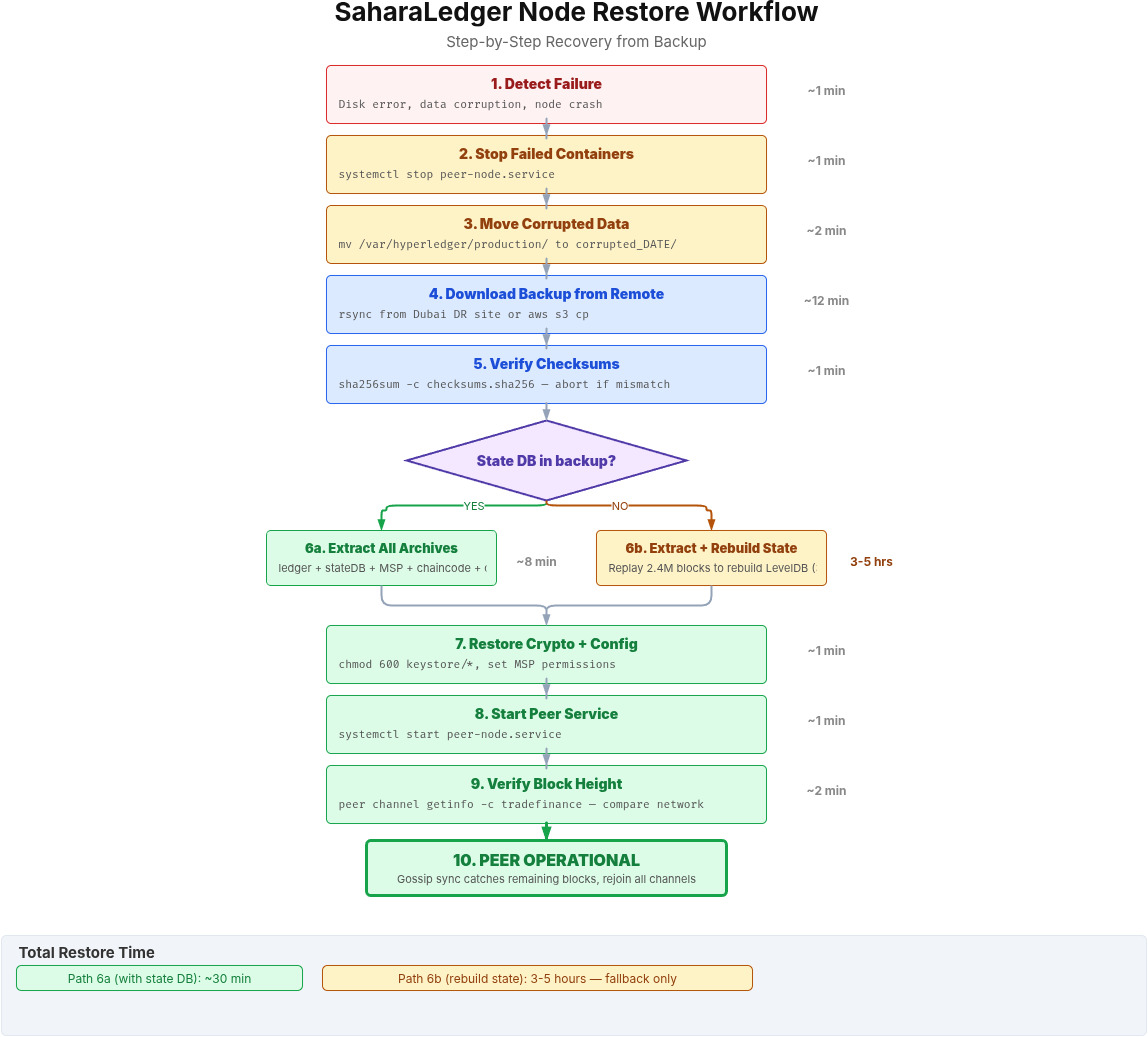
This flow illustrates the complete restore sequence. The decision at step 6 is the most consequential. If the state database was included in the backup (path 6a), all archives extract directly and the peer starts within 30 minutes. In practice, the state database is missing or corrupted (path 6b), the peer must replay every block from the genesis to rebuild its LevelDB state, which took 3 hours and 40 minutes on SaharaLedger’s 2.4 million block ledger.
Stop all containers on the affected node. Do not skip this step. Restoring files while containers are running causes data corruption that is worse than the original failure.
$ sudo systemctl stop peer-node.service$ sudo systemctl stop couchdb.service$ docker ps --filter "name=peer0" --filter "name=couchdb" -q | xargs -r docker stopClear the corrupted data directories. Move them to a temporary location first in case you need to examine the corruption later.
$ sudo mkdir -p /tmp/corrupted_$(date +%Y%m%d)$ sudo mv /var/hyperledger/production/ledgersData /tmp/corrupted_$(date +%Y%m%d)/$ sudo mkdir -p /var/hyperledger/production/ledgersDataDownload the latest backup from the remote DR site. Always restore from remote, not local, because if the disk failed, the local backups may be corrupted too.
LATEST_BACKUP=$(ssh backup-user@dubai-dr.saharaledger.internal
  "ls -td /backup/blockchain/peer0-riyadh/full_* | head -1")

$ rsync -avz -e "ssh -i /opt/blockchain/.ssh/backup_ed25519 -p 2222"   "backup-user@dubai-dr.saharaledger.internal:${LATEST_BACKUP}/"
  /restore/staging/
Verify the checksums before extracting. A corrupted backup archive is worse than no backup at all because you will not discover the corruption until after you have already wiped the original data.
$ cd /restore/staging$ sha256sum -c checksums.sha256ledger_20260316_020001.tar.zst: OK
statedb_20260316_020001.tar.zst: OK
msp_20260316_020001.tar.zst: OK
chaincode_20260316_020001.tar.zst: OK
Extract the backup archives to their original locations.
# Extract ledger blocks
zstd -d /restore/staging/ledger_20260316_020001.tar.zst -o /tmp/ledger.tar
$ sudo tar xf /tmp/ledger.tar -C /
# Extract state database
zstd -d /restore/staging/statedb_20260316_020001.tar.zst -o /tmp/statedb.tar
$ sudo tar xf /tmp/statedb.tar -C /
# Extract crypto material
zstd -d /restore/staging/msp_20260316_020001.tar.zst -o /tmp/msp.tar
$ sudo tar xf /tmp/msp.tar -C /
# Extract chaincode
zstd -d /restore/staging/chaincode_20260316_020001.tar.zst -o /tmp/chaincode.tar
$ sudo tar xf /tmp/chaincode.tar -C /
# Set correct ownership
$ sudo chown -R hyperledger:hyperledger /var/hyperledger/production/
Start the peer and verify it catches up to the network’s current block height. The peer will fetch any blocks committed between the backup time and now from other peers in the network.
$ sudo systemctl start peer-node.servicesleep 15

# Check local block height
peer channel getinfo -c trade-finance

# Compare with another peer's block height
$ ssh peer1-riyadh "peer channel getinfo -c trade-finance"# Local peer (restored):
Blockchain info: {"height":2418563,"currentBlockHash":"a8f3...","previousBlockHash":"d91c..."}

# Remote peer (healthy):
Blockchain info: {"height":2418891,"currentBlockHash":"c7e2...","previousBlockHash":"f4a1..."}
The restored peer is 328 blocks behind. It will automatically sync these blocks from the other peers through the gossip protocol. At SaharaLedger’s transaction rate, 328 blocks sync in under 2 minutes. Once the block heights match, the peer is fully operational and ready to endorse transactions again.
Testing Your Restore Process
SaharaLedger runs a restore drill on the first Saturday of every month. They pick one peer node, perform a full restore from the latest backup, and measure the time from “stop peer” to “peer endorsing transactions again.” Their target is 30 minutes. Their best recorded time is 18 minutes. As a result, worst was 47 minutes, caused by a network bandwidth bottleneck during the rsync download step (they upgraded the link from 1Gbps to 10Gbps after that).
The drill also verifies that the backup encryption keys are available, that the remote storage credentials have not expired, and that the restore scripts still match the current directory structure. Configuration drift between the backup script and the actual node layout is one of the most common causes of restore failures.
Create a restore validation script that checks every component after a restore.
 1#!/bin/bash
 2# Post-restore validation script
 3
 4ERRORS=0
 5
 6# Check ledger directory exists and has block files
 7if [ -d "/var/hyperledger/production/ledgersData/chains/chains" ]; then
 8    BLOCK_COUNT=$(find /var/hyperledger/production/ledgersData/chains/chains -name "blockfile_*" | wc -l)
 9    echo "[OK] Ledger data: ${BLOCK_COUNT} block files found"
10else
11    echo "[FAIL] Ledger data directory missing"
12    ERRORS=$((ERRORS + 1))
13fi
14
15# Check MSP crypto material
16for f in signcerts/cert.pem keystore cacerts; do
17    if [ -e "/etc/hyperledger/fabric/msp/${f}" ]; then
18        echo "[OK] MSP: ${f} present"
19    else
20        echo "[FAIL] MSP: ${f} missing"
21        ERRORS=$((ERRORS + 1))
22    fi
23done
24
25# Check peer service is running
26if systemctl is-active --quiet peer-node.service; then
27    echo "[OK] Peer service: running"
28else
29    echo "[FAIL] Peer service: not running"
30    ERRORS=$((ERRORS + 1))
31fi
32
33# Check block height is advancing
34HEIGHT1=$(peer channel getinfo -c trade-finance 2>/dev/null | grep -oP 'height:K[0-9]+')
35sleep 10
36HEIGHT2=$(peer channel getinfo -c trade-finance 2>/dev/null | grep -oP 'height:K[0-9]+')
37
38if [ "$HEIGHT2" -ge "$HEIGHT1" ]; then
39    echo "[OK] Block height: ${HEIGHT2} (syncing)"
40else
41    echo "[FAIL] Block height not advancing: ${HEIGHT1} -> ${HEIGHT2}"
42    ERRORS=$((ERRORS + 1))
43fi
44
45echo ""
46if [ $ERRORS -eq 0 ]; then
47    echo "RESTORE VALIDATION PASSED"
48else
49    echo "RESTORE VALIDATION FAILED: ${ERRORS} error(s)"
50fi
51
52exit $ERRORS
$ sudo chmod +x /opt/blockchain/scripts/validate-restore.sh$ sudo /opt/blockchain/scripts/validate-restore.sh[OK] Ledger data: 847 block files found
[OK] MSP: signcerts/cert.pem present
[OK] MSP: keystore present
[OK] MSP: cacerts present
[OK] Peer service: running
[OK] Block height: 2418891 (syncing)
RESTORE VALIDATION PASSEDWhat Comes Next
A reliable backup and restore process protects your blockchain data from hardware failures and corruption. But the backup infrastructure itself needs protection. The SSH keys used to push backups to remote storage, the credentials that authenticate with S3, and the root access required to stop and start peer services are all attack surfaces. In the next article, we cover Securing SSH Access for Production Validators, where VolgaChain locks down every SSH entry point in their 8-node validator cluster after a botnet launched 14,000 brute-force login attempts in 2 hours against their Istanbul data center.
Frequently Asked Questions
For production blockchain networks handling financial transactions, target an RPO of 1 hour and an RTO of 30 minutes. This means hourly incremental backups and the ability to restore a fully functional peer within 30 minutes. Non-critical test networks can use daily backups with a 4-hour RTO.
Yes, using CouchDB’s built-in replication API. The _replicate endpoint creates a consistent point-in-time copy on a backup CouchDB instance without stopping the source. File-level copies of CouchDB data files while the database is writing can produce corrupted backups, so always use the API for hot backups.
Blockchain ledgers are append-only data structures. New blocks are always added to the end of the chain, and existing blocks are never modified. This means an incremental backup only needs to copy the block files created since the last backup. For a network processing 28,000 transactions daily, hourly incrementals average 1.2GB compared to 380GB for a full backup.
The state database can be rebuilt from the ledger blocks by replaying all transactions. However, rebuilding a state database from 2.4 million blocks takes 3 to 5 hours on typical hardware. Backing up the state database separately reduces restore time from hours to minutes. Include it in daily full backups but skip it in hourly incrementals to save space.
Zstd (Zstandard) compresses 3x faster than gzip at similar compression ratios. For a 380GB ledger, zstd at level 3 with 4 threads completes in 11 minutes compared to 28 minutes with gzip. Decompression is also faster, which directly reduces your RTO during restores. Zstd is available in all modern Linux distributions via the zstd package.