
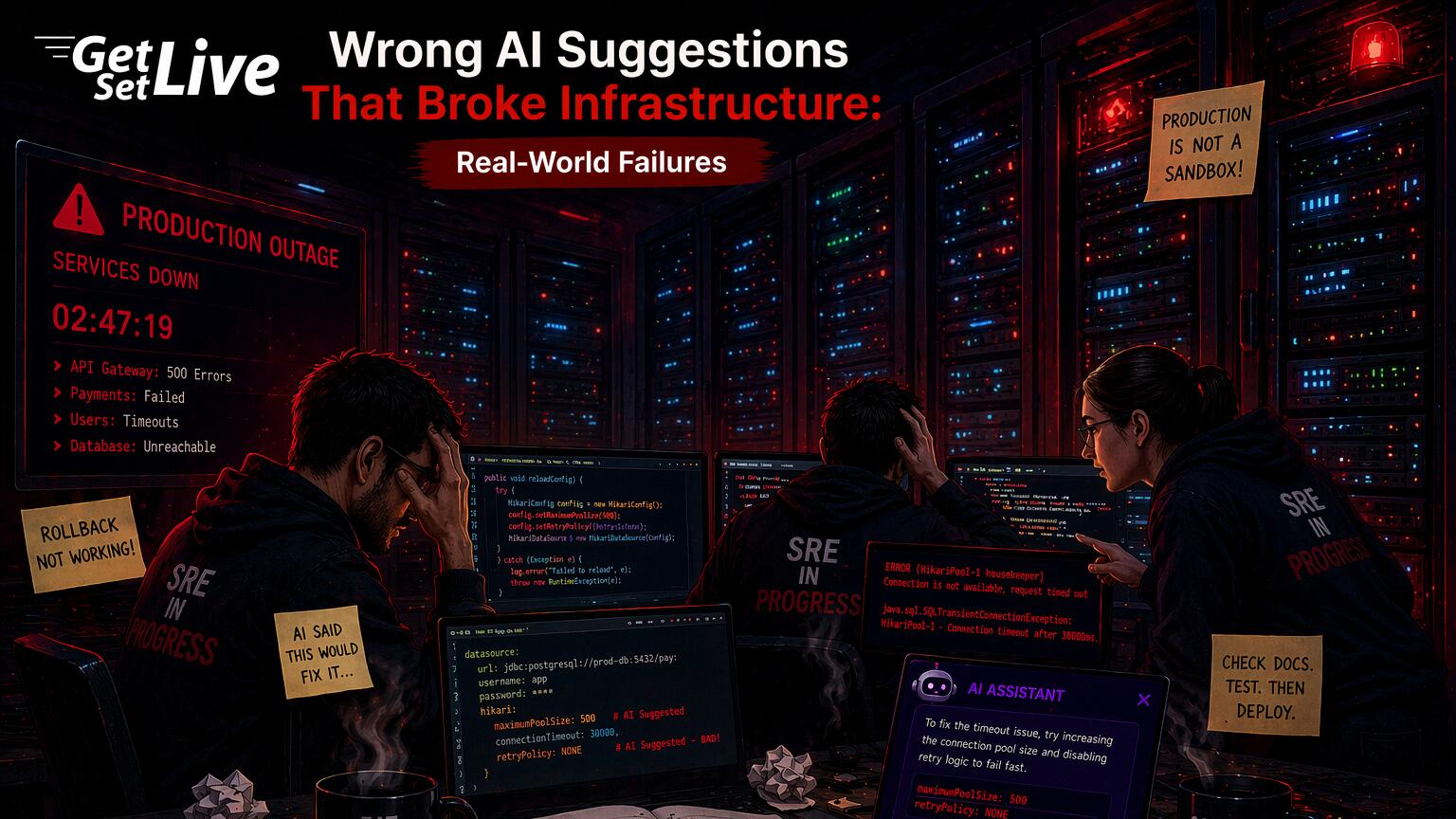
ChatGPT responded with confidence: “The nodes are running out of memory due to a memory leak in your application containers. Increase the memory limits in your pod specs and add a horizontal pod autoscaler.” So the engineer bumped memory limits from 512Mi to 2Gi across 40 deployments and applied the change. Within minutes, the eviction storm got worse. Nodes that sat at 78% memory usage hit 100% because the higher limits let each pod consume more memory before being killed.
In reality, a DaemonSet running a logging agent caused the problem. A Helm chart upgrade three days earlier had broken it. That agent consumed 1.2Gi per node. ChatGPT never asked about DaemonSets, node-level processes, or recent changes. It pattern-matched on “memory pressure” and gave the most common answer, which turned out to be exactly wrong for this situation.
Here is what happened step by step. The engineer had two years of Kubernetes experience and got paged at 2:47 AM local time. She opened Grafana and saw memory climbing on nodes worker-03 through worker-10. Her first instinct was to check pod-level metrics, which showed each application pod using between 380Mi and 490Mi of its 512Mi limit. That looked like the pods were bumping against their ceiling.
However, she skipped the node-level breakdown by process. The kubelet on each node reported 14.2Gi allocatable, but actual free memory sat under 800Mi. The gap between pod usage (about 6.5Gi across all pods on a node) and total used memory (13.4Gi) was the clue she missed. Something outside the tracked pod limits was eating 6.9Gi per node.
When she pasted the kubectl describe node worker-05 output into ChatGPT, the prompt had the Conditions section showing MemoryPressure: True and the pod list with requests and limits. It left out the output of top or ps aux on the node. It also left out the DaemonSet manifest and the Helm release history. ChatGPT saw pods near their memory limits on a node with memory pressure and said they needed more memory. In about 60% of real cases, that answer would be right. This was the other 40%.
The engineer applied the memory limit increase using a single kubectl set resources command looped across 40 deployments. Within 90 seconds, the rolling updates started. Each new pod launched with a 2Gi limit and immediately consumed the memory the old pod had released, plus an additional 200 to 400Mi that was now available because the limit was higher. The kubelet’s eviction threshold typically sits at 100Mi of available memory. With 40 pods each allowed to grow by up to 1.5Gi more than before, the nodes blew past that threshold in under four minutes. Evictions jumped from 12 pods per minute to 35.
The real fix took 11 minutes once the senior SRE joined at 3:15 AM. He ran helm history fluentbit -n logging and spotted a chart upgrade on December 19th. That upgrade changed the Fluentbit buffer from Mem_Buf_Limit 50MB to Mem_Buf_Limit 0, meaning unlimited. The logging agent held the full backlog of unshipped logs in memory. On busy nodes, the agent ate 1.2Gi to 1.8Gi. A one-line Helm override fixed it: --set resources.limits.memory=256Mi and --set config.memBufLimit=50MB. After the rollout, node memory dropped from 95% to 61% in three minutes.
This is what wrong AI suggestions in infra work look like. The advice sounds right. It uses the correct terms. It addresses the symptom in the prompt. Yet it makes the problem worse because it lacks the context that separates a correct call from a confident wrong one. CodeRabbit analyzed 470 GitHub pull requests in December 2025 and found that AI-assisted code produces 2.25 times more logic errors than human-written code, plus 2.29 times more concurrency bugs. These are not syntax mistakes. They are logic failures that look correct on the surface. Stack Overflow’s engineering blog asked the same question: are bugs simply bound to happen when AI agents write infrastructure configs without knowing the environment?
The Confidence Problem in AI infra Advice
What makes AI infrastructure suggestions most dangerous is not that they are wrong. It is that they are wrong with high confidence. When a junior engineer gives uncertain advice, the team naturally double-checks. But when an AI tool presents a definitive answer with specific commands and config changes, engineers tend to execute without verifying. This happens especially during a stressful production incident at 3 AM.
Incident.io’s testing found that AI root cause analysis tools targeting above 80% precision during trials still produce false positives that destroy trust during high-stress outages. A single wrong root cause during a P1 incident costs more credibility than a hundred correct analyses during calm periods.
Consider how differently humans and AI tools talk. A human says “I think it might be memory pressure, but let me check the DaemonSets first.” An AI tool says “The root cause is memory pressure. Here are the exact commands to fix it.” No hedge, no qualifier, no ask to verify. The output reads like a senior engineer who already checked the full system. In reality, the AI just matched keywords in your prompt against patterns in its training data.
At the core, AI tools only see what you paste into the prompt. A ChatGPT wrapper that gets a Slack alert will miss the database migration that ran in GitLab five minutes before the alert fired. It will also miss the network policy change from a separate CI pipeline. On top of that, it has no way to know the on-call engineer rebooted a node 20 minutes ago. Human operators build a mental timeline from many sources. AI tools see one snapshot and match patterns against it.
Free to use, share it in your presentations, blogs, or learning materials.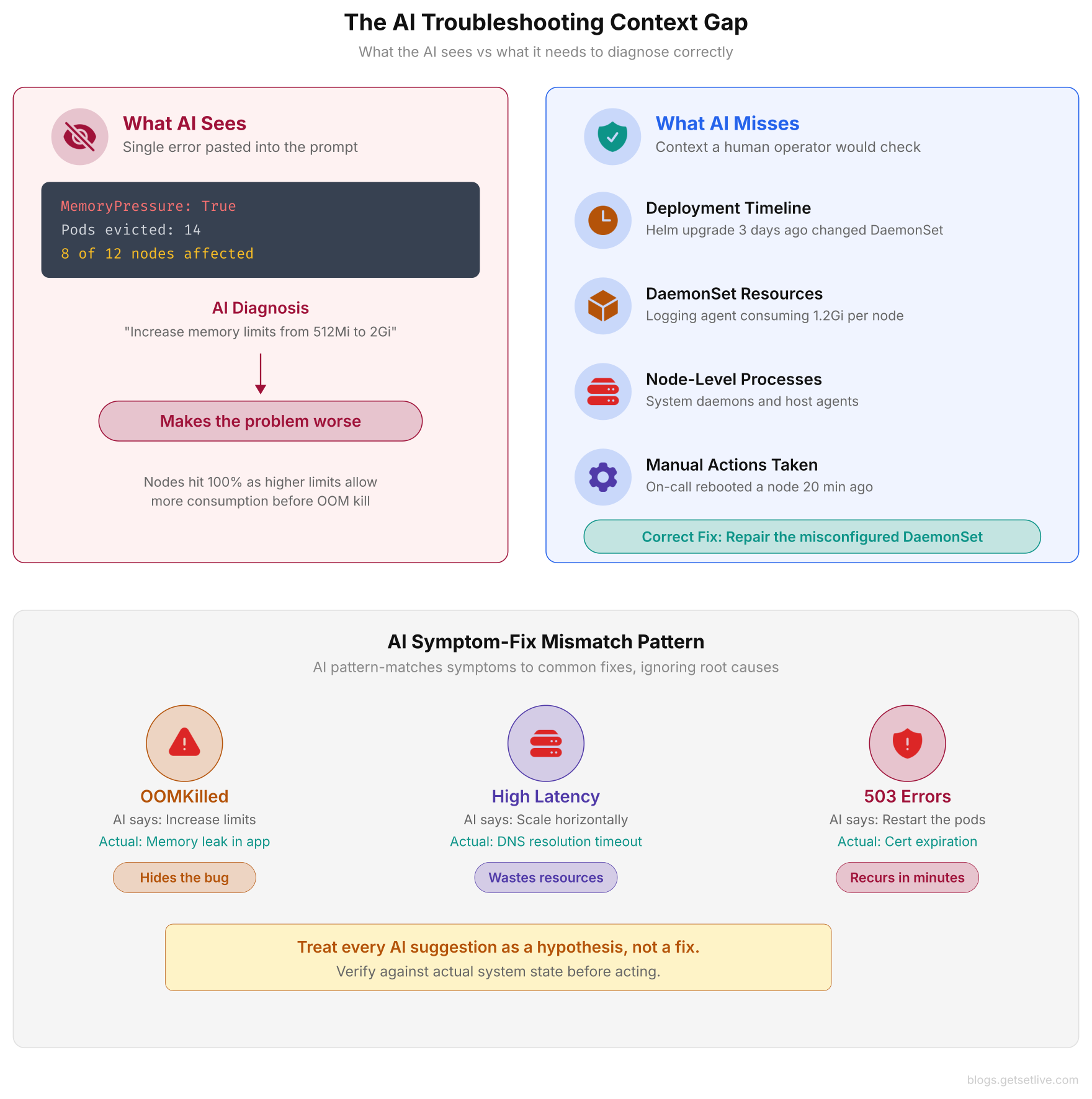
As shown above, the AI tool received one kubectl output and matched it to the most common cause of memory pressure. A human operator would have checked the deployment timeline, reviewed DaemonSet resource consumption, and discovered the broken logging agent consuming 1.2Gi per node.
Wrong Terraform Suggestions That Pass Validation
AI-generated Terraform code has a specific failure mode that makes it dangerous: valid syntax but wrong intent. You ask an AI to build a Terraform module for an AWS VPC with security groups. The output passes terraform validate, passes terraform plan, and even deploys. But the security groups may allow inbound traffic from 0.0.0.0/0 on port 22. The S3 bucket may have public read access. Or the IAM policy may use Action: "*" with Resource: "*". Spacelift’s analysis of AI-generated Terraform shows this pattern across many cloud providers. Valid HCL consistently ships with security defaults that no production setup should accept.
A non-existent Terraform provider attribute is silently ignored by terraform plan. A Kubernetes manifest annotation with a made-up prefix does nothing. The AI-generated code deploys cleanly, but the security policy or config it should have enforce never takes effect.
Take a concrete example. A DevOps engineer asks an AI to generate a Terraform security group for a bastion host. The AI produces a resource block with an ingress rule allowing SSH on port 22 from 0.0.0.0/0. After seeing port 22 in the output and confirming SSH is the right protocol, the engineer runs terraform apply. The security group deploys. SSH works.
Here is the problem: 0.0.0.0/0 means every IP on the internet can try SSH into that bastion. The engineer wanted to restrict access to their office CIDR block (203.0.113.0/24) and the VPN range (10.8.0.0/16). But the AI had no way to know those ranges. So it picked the most open option. Within 48 hours, the bastion host logged 14,000 failed SSH login attempts from 2,300 unique source IPs. Scanners found the open port within minutes of deployment.
Cloud Magazin published an analysis in April 2026 about the “comprehension gap” in AI-generated infrastructurestructure code. Teams deploy AI-generated Terraform without fully grasping what it does. The code looks clean, passes all linting checks, and deploys without errors. That gap between “this code deploys” and “this code does what we intended” is where security holes and failures hide.
One real example from their analysis: a team asked an AI to build a Terraform module for an RDS PostgreSQL instance with encryption at rest and automated backups. The AI built the instance correctly. But it set backup_retention_period = 0 (turning off automated backups) and used the default AWS-managed KMS key instead of a customer-managed key. Both settings are valid Terraform. Both pass plan and apply. Neither meets the team’s actual needs. Six weeks later, the team needed to restore from a point in time and found no snapshots.
This pattern repeats across every major Terraform provider. AI-generated Azure NSG rules default to * source addresses. GCP firewall rules from AI use 0.0.0.0/0 source ranges with protocols set to all. Meanwhile, AI-generated AWS IAM policies grant s3:* on * resources when the actual need is s3:GetObject on a single bucket prefix. All of these pass validation and deploy without error. Yet each one creates a security hole that a 5-second Checkov scan would catch.
The core issue is not that AI cannot write valid Terraform. It writes valid Terraform exceptionally well. But “valid” and “secure” are completely different standards, and the AI optimizes for the first while ignoring the second.
Free to use, share it in your presentations, blogs, or learning materials.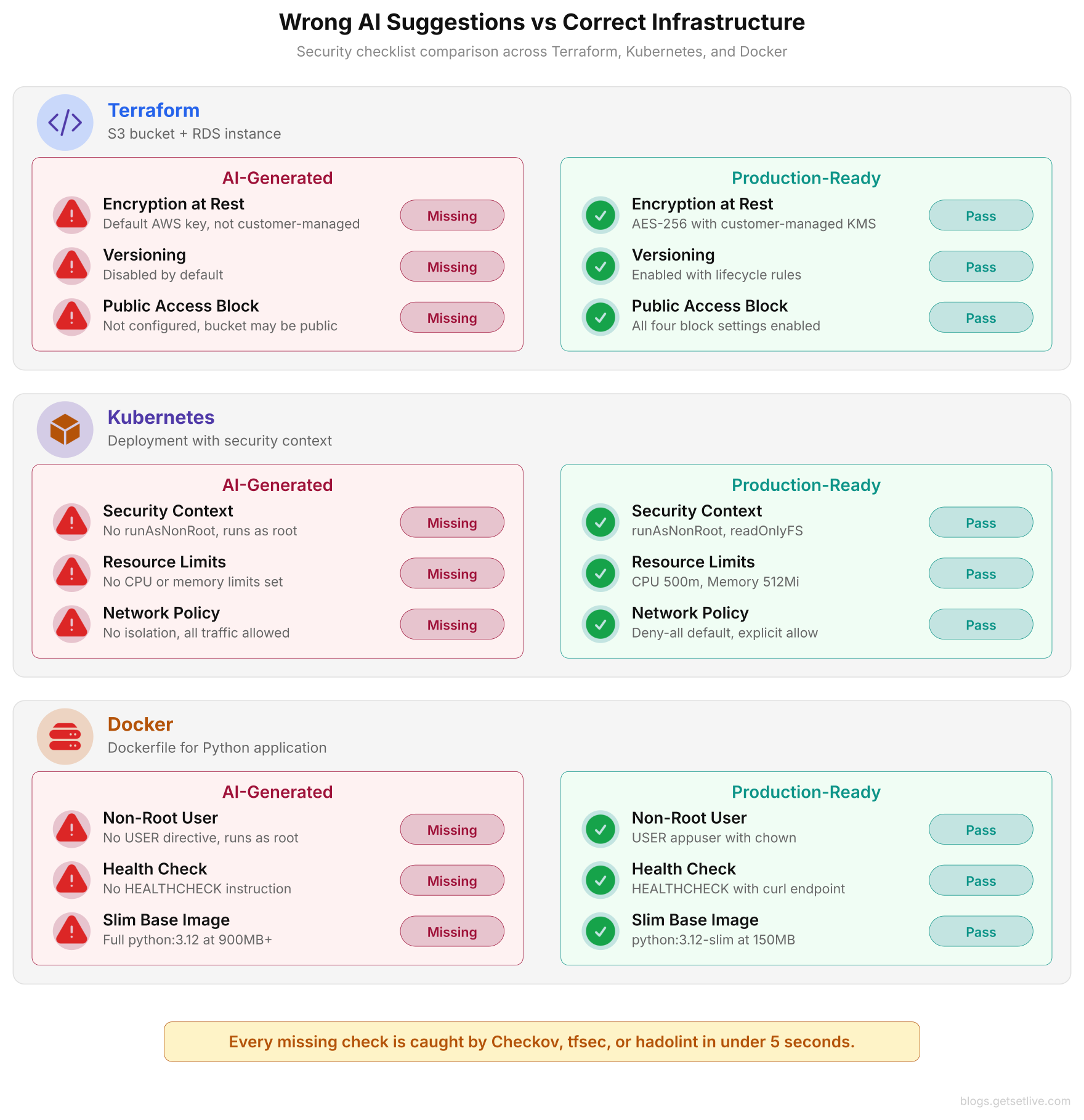
As shown above, the AI output on the left deploys without errors and passes syntax validation. But it leaves containers running as root, S3 buckets without encryption, and Kubernetes pods without security contexts. On the right, the production-ready versions add the security layers that policy-as-code tools like Checkov and tfsec enforce automatically.
Kubernetes Misdiagnosis: When the AI Fixes the Wrong Thing
Kubernetes troubleshooting is where AI suggestions cause the most damage. Clusters have dozens of parts that interact, and the symptom rarely points at the root cause. Pod evictions can result from node memory pressure, bad resource limits, priority class conflicts, kubelet thresholds, or outside processes eating resources. When an AI tool sees “pod evicted due to memory pressure,” it will almost always suggest raising memory limits or adding more nodes. In practice, the root cause is often something the AI cannot see from the error message alone.
Consider a scenario where pods keep crashing with OOMKilled status. The AI suggests raising the memory limit from 512Mi to 1Gi. The engineer applies the change and the pods stop crashing. But now each pod uses twice the memory, so the cluster can fit fewer pods per node. During the next traffic spike, capacity runs out and pods go Pending. What did the AI actually do? It hid the real problem. The app has a memory leak that grows with each request. In practice, correct fix is to find and patch the leak, not give the leaking app more room to leak.
AI troubleshooting tools consistently confuse “the symptom went away” with “the problem is fixed.” Increasing resource limits, restarting pods, and scaling horizontally are the AI equivalent of turning it off and on again. The underlying issue remains until a human investigates.
DNS Resolution Timeouts Misdiagnosed as a Scaling Issue
A fintech team in Singapore ran 14 microservices on EKS. They noticed random 5-second delays on internal service calls. These delays hit about 1 in every 200 requests, always exactly 5 seconds. That number matches the default DNS timeout on Linux. The on-call engineer pasted the symptom into an AI tool: “intermittent 5 second latency spikes between microservices in Kubernetes.”
The AI said the cluster was likely too small. It told the engineer to add a horizontal pod autoscaler with a target CPU of 50% and to scale the node group from 6 to 12 nodes. So the engineer followed this advice. Node count doubled. The HPA added 3 to 5 replicas per service. Total pod count went from 84 to 210. Yet the 5-second delays kept happening at the exact same rate.
Doubling the cluster did nothing because capacity was not the issue. A known Linux kernel bug caused the problem. This bug (tracked as conntrack race condition on UDP DNS packets) happens when A and AAAA DNS lookups from the same source port collide in the kernel’s conntrack table. One packet gets dropped and the resolver waits 5 seconds before retrying.
The fix did not require more pods or more nodes. It required a two-line change to the CoreDNS ConfigMap: enabling the autopath plugin and adding options single-request-reopen to the pod’s /etc/resolv.conf via a custom dnsConfig in the pod spec. Total cost of the wrong AI suggestion: $4,200 in additional EC2 charges for a doubled node group that ran 9 days before someone realized it fixed nothing. Total cost of the actual fix: zero dollars and a 15-minute rollout.
This pattern is what makes AI Kubernetes advice dangerous. The AI sees “latency spikes” and matches it to “not enough capacity.” That is the most common cause in its training data. It does not think about DNS, conntrack tables, or kernel-level networking. It also cannot reason about why the delay is exactly 5.000 seconds every time. That exact timing is a dead giveaway for a timeout, not a load issue. A human SRE who has seen the 5-second DNS timeout before would have found it in under 10 minutes.
GPT-4.1 in Copilot: When the Model Got Worse
In 2025, GitHub rolled out GPT-4.1 as the default model in GitHub Copilot. The upgrade should have improve code quality and suggestion relevance. Instead, developers reported on GitHub Discussions that the new model had lost what they called “commonsense” capabilities compared to its predecessor.
Their complaints were specific. GPT-4.1 wrote code that compiled but did the wrong thing. It built test suites that ran clean but never tested the core logic they claimed to cover. As a result, bugs made it to production that good tests would have caught. One thread titled “GPT-4.1 in Copilot is Driving Me Mad” pulled in hundreds of replies from developers reporting similar drops in quality.
The details are worth walking through. Developers said GPT-4.1 would write a test that asserts a return value is not null, but never call the function being tested. That test passes because it checks a variable set to a non-null default. Here is another pattern: the model built mock objects that returned hardcoded success values no matter what input they got. Then it asserted the function “works correctly” based on those mocked responses.
In practice, the tests had 100% pass rates and 0% coverage of actual business logic. One developer on the thread counted 23 test files generated by Copilot across a two-week sprint. Of those 23, only 4 tested the behavior they claimed to test in their function names.
For DevOps engineers, the impact hit hard. Those using Copilot for Dockerfiles, Kubernetes manifests, and CI/CD pipeline configs found that GPT-4.1 wrote configs with subtle errors: wrong port numbers, missing env var references, and health check paths that did not exist. These errors passed YAML checks and even deployed. But they failed silently in production. Health checks reported false positives. Services could not talk to each other because of port mismatches.
One example from that thread shows the problem clearly. A developer asked Copilot to write a Kubernetes liveness probe for a Java Spring Boot app. The model pointed the probe at /actuator/health on port 8080. But the app served health checks on port 8081 (the management port, a common Spring Boot pattern). After deploying, the probe got connection refused on 8080. Kubernetes restarted the pod after three failures. The cycle repeated and the pod entered CrashLoopBackOff.
That developer spent 40 minutes debugging what looked like an app crash before finding the probe hit the wrong port. The AI picked the most common port for Spring Boot apps instead of reading the application.yml open in the same IDE.
The GPT-4.1 regression showed that AI model upgrades can make infrastructure suggestions worse, not better. Teams that trusted Copilot output based on experience with the previous model got caught off guard when the same prompts produced lower-quality configs. Several developers who had built workflows around Copilot’s previous reliability suddenly found themselves debugging AI-generated code more often than their own. Some respondents in the thread reported switching back to manual code completion entirely, saying the time spent verifying Copilot’s output exceeded the time saved by using it.
Microsoft Copilot: Automation That Could Not Handle a Traffic Spike
Microsoft’s own Copilot went down because a traffic surge moved faster than the AI load balancer could react. The system scaled on its own based on traffic patterns. When an unexpected spike arrived, the whole thing failed. It did not scale fast enough. It did not reroute traffic to healthy regions. And it did not degrade gracefully. Microsoft engineers had to step in and scale by hand.
This incident showed a gap that hits every AI-powered automation system: they work well within the traffic patterns they trained on and break when traffic goes outside those patterns. A simple autoscaler with threshold rules (if CPU above 70%, add a node) would have fired right away. By contrast, the AI system was slower because it tried to predict whether the spike was temporary before acting.
The failure is worth understanding. Normal autoscaling is reactive: a metric crosses a threshold and an action fires. No delay. AI-based autoscaling adds a prediction layer on top. It looks at the traffic pattern, compares it to past patterns, and then decides whether to scale. That extra layer adds latency.
In Microsoft’s case, the AI spent critical seconds checking whether the spike matched known patterns. By the time it chose to scale, the backlog of requests had already swamped the existing capacity. The manual fix that resolved the outage was exactly the kind of simple threshold action the AI should have replace.
The irony of the Microsoft Copilot outage is that the AI system designed to prevent outages caused one. Simple threshold-based autoscaling would have handled the traffic spike. The AI’s attempt to be “smart” about scaling introduced latency that a dumb system would not have had.
The CodeRabbit Numbers: 2.25x More Logic Errors
CodeRabbit’s State of AI vs Human Code Generation Report from December 2025 is the best data we have on AI code quality in infra work. It analyzed 470 open-source GitHub pull requests: 320 with AI help and 150 written by humans only. Automated code review counted and sorted the issues in each PR.
The headline finding: AI-coauthored code produces 1.7 times more issues on average (10.83 per PR vs 6.45 for human-only PRs). But the breakdown by category tells a more specific story for infrastructure teams:
- 2.25x more algorithmic and business logic errors. These are not syntax issues. They are cases where the code does the wrong thing correctly. In infra terms, this means Terraform modules that deploy the wrong architecture, Kubernetes configs that enforce the wrong policies, and CI/CD pipelines that skip critical steps.
- 2.29x more concurrency bugs. Race conditions, missing locks, and wrong mutex handling. For infrastructure code, this means Terraform state corruption, Kubernetes controller conflicts, and CI/CD race conditions that cause broken deploys.
- Nearly doubled error handling gaps. AI-generated code often skips null checks, early returns, and proper exception handling. In infra scripts, this means a deploy script that crashes halfway through without rolling back. Or a health check that throws an error and still reports the service as healthy.
- 1.4x more critical issues and 1.7x more major issues. The AI does not just produce more bugs. It produces more severe bugs. Critical issues include data loss risks, security vulnerabilities, and operational failures that can cause outages.
These numbers come from real pull requests merged into real projects. The AI-assisted PRs came from skilled developers, not beginners blindly accepting AI output. Even experienced engineers using AI tools still produce code with far more logic errors than those working without AI help.
What stands out most for infrastructure teams is the concurrency gap. infrastructure code is concurrent by nature. Terraform runs providers in parallel. Kubernetes controllers reconcile state in the background. CI/CD pipelines share resources across stages. A 2.29x jump in concurrency bugs means more Terraform state corruption during parallel applies and more race conditions in Kubernetes operators. These bugs show up once every 50 runs, pass every test in CI, and then break production on a Friday afternoon.
Free to use, share it in your presentations, blogs, or learning materials.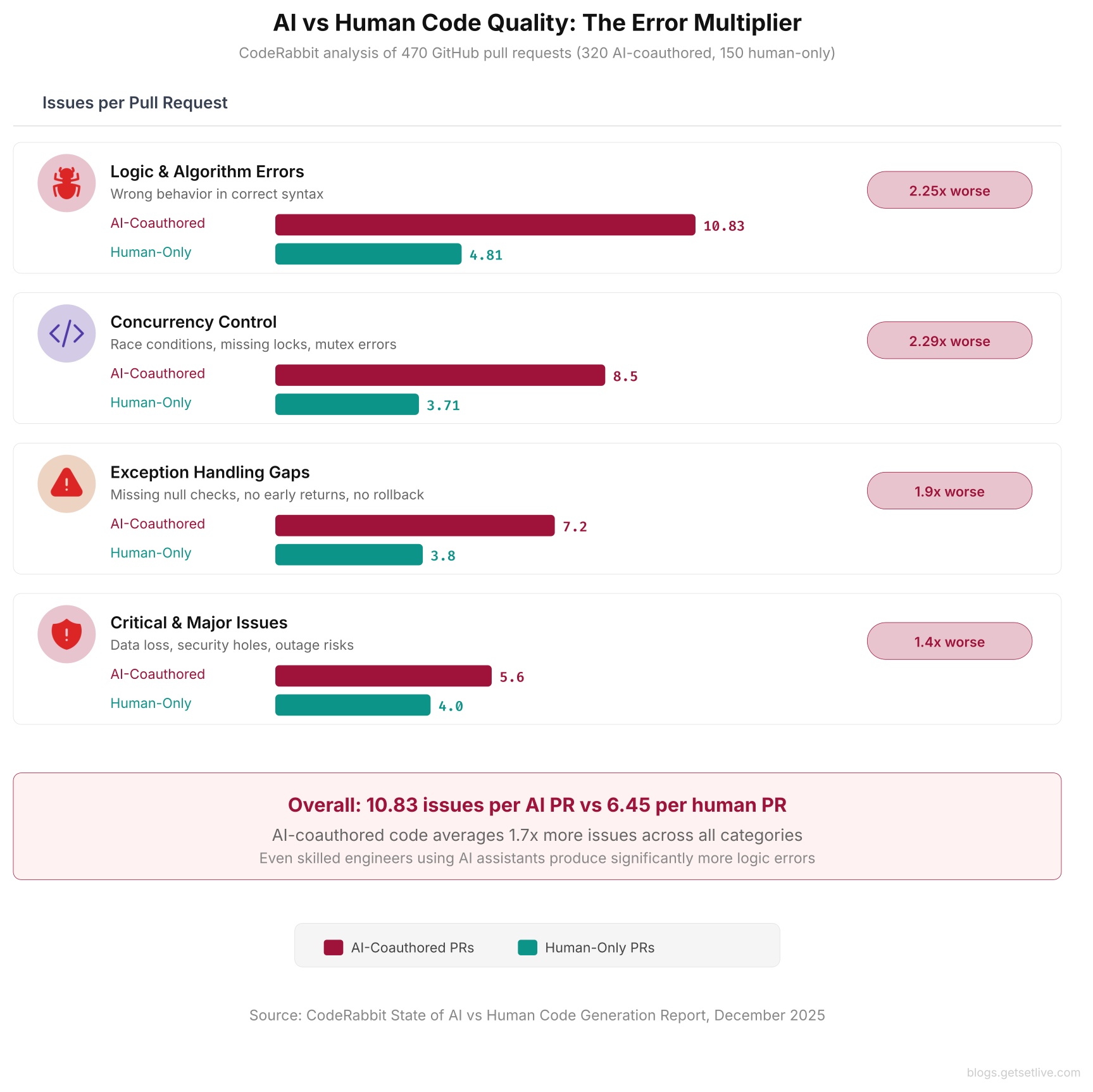
This bar chart shows the error multiplier across four categories. The concurrency control gap at 2.29x is particularly dangerous for infrastructure code, where race conditions in Terraform state, Kubernetes controllers, and CI/CD pipelines cause inconsistent deployments.
What infra Teams Should Do Instead
The solution is not to ban AI tools from infra work. They are genuinely useful for boilerplate generation, log analysis, documentation, and initial drafts of repetitive configs. Instead, treat AI output with the same skepticism you would apply to a pull request from a contractor who has never seen your infra before.
Never apply AI-generated infrastructure changes during an active incident. Use AI for analysis and hypothesis generation during incidents. Write down its suggestions. Then verify each one against your actual infra state before executing anything. The time pressure of a P1 incident is exactly the condition where wrong AI advice causes the most damage.
Run policy-as-code checks on all AI-generated Terraform and Kubernetes configs. Tools like OPA/Gatekeeper, Checkov, and tfsec catch the semantic errors that terraform validate misses. If the AI generates a security group with 0.0.0.0/0 ingress or an S3 bucket without encryption, the policy check rejects it before it reaches terraform apply.
Treat every AI infra suggestion as a hypothesis, never as a fix. Verify the hypothesis against your actual system state before acting. The 30 seconds spent checking saves the 3 hours spent recovering from a wrong change applied under pressure.
Give full context in AI prompts. Do not paste a single error message and ask for a root cause. Include the deploy timeline, recent changes, node-level metrics, DaemonSet configs, and any manual actions in the last hour. More context means less generic advice. For example, the Munich team could have avoided the wrong call by including the Helm chart upgrade history and DaemonSet resource usage in their prompt.
Pin AI model versions in your toolchain. The GPT-4.1 drop in quality showed that model upgrades can make output worse. If your CI/CD pipeline uses an AI model to generate or check configs, pin to a specific version. Test output quality before upgrading. Treat model upgrades like dependency upgrades: test in staging first.
Build a review checklist for AI-generated infrastructurestructure code. Before applying any AI-generated Terraform, Kubernetes manifest, or Dockerfile to production, run through a minimum set of checks. First, verify security groups only allow known CIDR blocks. Then confirm container images use digest pins, not just tags. Next, check that every container has resource limits. Also verify backup retention periods are non-zero. Finally, confirm encryption uses customer-managed keys where required. These five checks alone would have caught every AI-generated misconfig in this article.
AI tools will keep getting better at infra work. Current models are early-stage. But the core limit, that they cannot see what you do not show them, will stay no matter how good the models get. The engineer who knows this and works around it will get real value from AI tools. On the other hand, the engineer who trusts AI output at face value will eventually apply the wrong fix to production at the worst possible time.
References
- CodeRabbit, State of AI vs Human Code Generation Report, December 2025
- Cloud Magazin, AI-Generated Terraform Code is the Cloud Stack’s Biggest Unspoken Risk, April 2026
- incident.io, AI Root Cause Analysis Accuracy Testing Guide, 2025
- Stack Overflow Blog, Are Bugs and Incidents Inevitable with AI Coding Agents?, January 2026
- GitHub Discussions, GPT-4.1 in Copilot is Driving Me Mad, 2025
- Techloy, Microsoft Copilot Outage Exposes Fragility Behind AI Automation, 2025
- Spacelift, Using Terraform with AI: Benefits and Risks, 2025
- The Register, AI-Authored Code Needs More Attention, Not Less, December 2025
Frequently Asked Questions
CodeRabbit’s analysis of 470 GitHub pull requests found that AI-coauthored code contains 2.25 times more algorithmic and business logic errors and 2.29 times more incorrect concurrency control issues than human-only code. Overall, AI-coauthored PRs average 10.83 issues per PR compared to 6.45 for human-only PRs.
Terraform validate and terraform plan only check syntax and provider compatibility. They do not evaluate security posture, compliance requirements, or operational correctness. AI-generated Terraform commonly produces valid HCL that deploys with insecure defaults like public S3 buckets, overly permissive IAM policies, and disabled backup retention.
Use AI for analysis, log correlation, and generating hypotheses during incidents. Never apply AI-suggested changes directly to production during a P1 without independent verification. The time pressure and stress of an active incident is when engineers are most likely to trust wrong AI advice without checking it.
Yes. Developers reported on GitHub community forums that GPT-4.1 in Copilot produced syntactically correct but logically broken code. Test suites compiled and ran without errors but did not actually test core feature. infrastructure configs deployed successfully but contained wrong port numbers, missing environment variables, and health checks pointing to non-existent endpoints.
They can only see what you paste into the prompt. A single error message or kubectl output lacks the deployment timeline, recent changes, DaemonSet configs, and manual actions that a human operator would consider. Without this context, AI tools default to generic advice based on the symptom, which is often the wrong fix for the specific situation.