

This is not an anti-AI article. I use AI coding assistants every day. They save me hours on boilerplate, documentation, and scaffolding. But there is a difference between “AI helps me write code faster” and “AI gives me correct code.” The gap between those two statements is where outages live. The seven examples below are drawn from real infrastructure work across Kubernetes, Docker, Terraform, Ansible, Python, and Linux administration. Every wrong answer includes the exact terminal output that proves it is wrong.
1. The Package That Does Not Exist
I asked an AI assistant to help me parse and validate CSV files in Python with schema enforcement. The suggestion looked reasonable.
$ pip install csv-schema-validatorI ran it.
ERROR: Could not find a version that satisfies the requirement csv-schema-validator
ERROR: No matching distribution found for csv-schema-validator
The package csv-schema-validator does not exist on PyPI. It never existed. The AI hallucinated a plausible-sounding name. I searched the PyPI registry directly: zero results. This is not a rare glitch. Researchers at the University of Texas and Purdue published a paper (arXiv:2406.10279) titled “We Have a Package for You!” where they tested 16 LLMs across 576,000 code generation prompts. They found that 19.7% of recommended packages do not exist. ChatGPT-4 hallucinated at 5.2% of suggestions. CodeLlama 34B reached 22.2%. The study also found that 43% of hallucinated names were consistent across prompts, meaning the AI suggests the same fake package every time it encounters a similar question.
This consistency is what makes it weaponizable. Attackers prompt the same AI models, collect the predictable fake names, and register them on PyPI with malicious payloads. The term for this attack is “slopsquatting.” Over 200,000 unique hallucinated package names have been identified across models.
Google’s AI Overview feature made this worse in 2024 when it recommended the typosquatted npm package @async-mutex/mutex to users searching for the legitimate async-mutex library. The fake scoped package had been registered by an attacker specifically to exploit AI-generated recommendations. BleepingComputer and Ars Technica both covered the incident.
$ pip index versions csv-schema-validatorERROR: No matching distribution found for csv-schema-validator
The correct approach was to use cerberus (1.2 million monthly downloads) or pandera (800K monthly downloads), both real, well-maintained Python libraries for data validation. The AI never mentioned either of them.
2. The Terraform Provider Syntax That Changed
I asked AI to write a Terraform configuration for an AWS S3 bucket with server-side encryption and versioning. The output looked clean and syntactically valid.
resource "aws_s3_bucket" "data" {
  bucket = "prod-ledger-backups"
  acl    = "private"

  server_side_encryption_configuration {
    rule {
      apply_server_side_encryption_by_default {
        sse_algorithm = "aws:kms"
      }
    }
  }

  versioning {
    enabled = true
  }
}
This was valid Terraform for AWS provider v3.x. But HashiCorp released AWS provider v4.0 in February 2022, which moved acl, server_side_encryption_configuration, and versioning into separate standalone resources. Provider v5.0 followed in June 2023 and removed backward compatibility entirely. Running terraform plan with the current provider gives:
Error: Unsupported argument

  on main.tf line 3, in resource "aws_s3_bucket" "data":
   3:   acl    = "private"

An argument named "acl" is not expected here. Did you mean to define a
separate aws_s3_bucket_acl resource?

Error: Unsupported block type

  on main.tf line 5, in resource "aws_s3_bucket" "data":
   5:   server_side_encryption_configuration {

Blocks of type "server_side_encryption_configuration" are not expected here.
The AI’s training data was dominated by pre-v4 Terraform examples from thousands of blog posts and Stack Overflow answers written between 2019 and 2022. The v5 syntax has been the current standard for over 2 years, but it still loses the pattern-matching contest against 4 years of legacy examples. The full list of breaking changes is documented in HashiCorp’s v4 and v5 upgrade guides at registry.terraform.io.
resource "aws_s3_bucket" "data" {
  bucket = "prod-ledger-backups"
}

resource "aws_s3_bucket_versioning" "data" {
  bucket = aws_s3_bucket.data.id
  versioning_configuration {
    status = "Enabled"
  }
}

resource "aws_s3_bucket_server_side_encryption_configuration" "data" {
  bucket = aws_s3_bucket.data.id
  rule {
    apply_server_side_encryption_by_default {
      sse_algorithm = "aws:kms"
    }
  }
}
You can check your installed provider version with terraform providers before trusting any AI-generated Terraform. If the output shows hashicorp/aws v5.x, the v3-style inline blocks will fail.
3. The Dockerfile That Runs as Root
I asked AI to generate a production-ready Dockerfile for a Python Flask API. Here is what it produced.
FROM python:3.12-slim
WORKDIR /app
COPY requirements.txt .
RUN pip install --no-cache-dir -r requirements.txt
COPY . .
EXPOSE 8080
CMD ["python", "app.py"]
This Dockerfile has no USER directive. The container runs as root. I verified it.
$ docker build -t test-app . && docker run --rm test-app whoamiroot
If an attacker exploits a vulnerability in the Flask application, they have root privileges inside the container. Combined with container runtime vulnerabilities like CVE-2024-21626 (a runc escape flaw) or CVE-2019-5736 (the original runc container escape), root inside the container can mean root on the host. I tested this prompt on 4 different AI models. None included a USER directive. None added a health check. None referenced a .dockerignore.
Hadolint (the Dockerfile linter) has a specific rule for this: DL3002 (“Last USER should not be root”). Running hadolint Dockerfile catches this in under 1 second. Docker’s own security best practices documentation at docs.docker.com explicitly requires non-root users. Yet AI reproduces the majority pattern from its training data, which is the insecure pattern because most open-source Dockerfiles skip the USER directive.
FROM python:3.12-slim
WORKDIR /app
COPY requirements.txt .
RUN pip install --no-cache-dir -r requirements.txt
RUN adduser --disabled-password --gecos '' appuser
COPY --chown=appuser:appuser . .
USER appuser
EXPOSE 8080
HEALTHCHECK --interval=30s --timeout=5s --retries=3
  CMD curl -f http://localhost:8080/health || exit 1
CMD ["python", "app.py"]
The corrected version adds a non-root user (appuser), switches to it with USER, and includes a health check. Three lines that separate a development Dockerfile from a production one.
4. The kubectl Command That Deletes Everything
I asked AI how to delete all completed and failed pods in a Kubernetes namespace to clean up after a batch job run. The suggestion was:
$ kubectl delete pods --all -n batch-jobsThat command deletes ALL pods in the namespace. Not just completed and failed ones. Running pods, pods serving traffic, pods in the middle of processing. Everything. The --all flag does not mean “all finished pods.” It means “all pods, period.” In a production namespace with active workloads, this command causes an immediate outage.
I have seen a similar AI suggestion that was even more dangerous: kubectl delete pods --all --force --grace-period=0 -n production. The --force --grace-period=0 flags bypass the normal 30-second graceful termination window. The Kubernetes documentation at kubernetes.io/docs/concepts/workloads/pods/pod-lifecycle explicitly warns against this because it can leave PersistentVolumeClaims in inconsistent states and cause data corruption.
$ kubectl delete pods --all -n batch-jobs --dry-run=clientpod "batch-processor-abc12" deleted (dry run)
pod "api-gateway-def34" deleted (dry run)
pod "cache-warmer-ghi56" deleted (dry run)
The dry-run reveals that api-gateway and cache-warmer (running pods) would also be deleted. The correct approach targets only completed and failed pods by their lifecycle phase.
$ kubectl delete pods --field-selector=status.phase==Succeeded -n batch-jobs$ kubectl delete pods --field-selector=status.phase==Failed -n batch-jobs5. The Ansible Module That Was Deprecated 5 Years Ago
I asked AI to write an Ansible task to manage Docker containers on blockchain peer nodes. It suggested the docker_container module using the old unqualified short name.
1- name: Start blockchain peer container
2  docker_container:
3    name: peer0
4    image: hyperledger/fabric-peer:2.5
5    state: started
6    ports:
7      - "7051:7051"
8    volumes:
9      - /var/hyperledger:/var/hyperledger
1TASK [Start blockchain peer container] **************
2fatal: [peer-ist-1]: FAILED! => {"msg": "The module docker_container was
3redirected to community.docker.docker_container, which could not be found.
4Install community.docker collection: ansible-galaxy collection install
5community.docker"}
The docker_container module was moved from community.general to its own dedicated collection community.docker in Ansible 2.10, released October 2020. That was over 5 years ago. Along with it, docker_image, docker_network, docker_volume, and every other Docker-related module moved to the same collection. This was part of the largest collection restructuring in Ansible history, documented in the official porting guide at docs.ansible.com/ansible/devel/porting_guides/porting_guide_2.10.html.
The same pattern affects AWS modules (moved to amazon.aws and community.aws), PostgreSQL modules (moved to community.postgresql), and dozens of others. AI generates the unqualified module name because that is what appears in the thousands of Stack Overflow answers and blog posts from 2016-2020. The Fully Qualified Collection Name (FQCN) format is newer and less represented in training data.
ansible-galaxy collection install community.docker
1- name: Start blockchain peer container
2  community.docker.docker_container:
3    name: peer0
4    image: hyperledger/fabric-peer:2.5
5    state: started
6    ports:
7      - "7051:7051"
8    volumes:
9      - /var/hyperledger:/var/hyperledger
Check your installed Ansible version with ansible --version and always use the FQCN format for module names. If you are running Ansible 2.10 or later (which you almost certainly are), unqualified short names will fail for any module that has been migrated.
6. The IAM Policy with Wildcard Permissions
I asked AI to create an AWS IAM policy for a Lambda function that needs to read from one specific S3 bucket and write to one specific DynamoDB table. The AI produced this:
 1{
 2  "Version": "2012-10-17",
 3  "Statement": [
 4    {
 5      "Effect": "Allow",
 6      "Action": [
 7        "s3:*",
 8        "dynamodb:*"
 9      ],
10      "Resource": "*"
11    }
12  ]
13}
This policy grants the Lambda function full administrative access to every S3 bucket and every DynamoDB table in the entire AWS account. I asked for read access to one bucket and write access to one table. The AI gave me *:* on everything. This passes terraform plan. It passes basic functional testing because it has more permissions than needed. The problem only surfaces when the Lambda function is compromised.
The Capital One data breach in 2019 is the textbook example of what wildcard IAM permissions enable. An overly broad IAM role attached to a misconfigured WAF allowed an attacker to access 100+ million customer records across S3 buckets. Capital One paid $80 million in regulatory fines. The root cause was not the exploit itself (an SSRF vulnerability) but the excessive IAM permissions that turned a single-service compromise into an account-wide data breach. AWS Security Hub rule IAM.1 specifically flags Action: * + Resource: * patterns.
 1{
 2  "Version": "2012-10-17",
 3  "Statement": [
 4    {
 5      "Effect": "Allow",
 6      "Action": [
 7        "s3:GetObject",
 8        "s3:ListBucket"
 9      ],
10      "Resource": [
11        "arn:aws:s3:::prod-ledger-backups",
12        "arn:aws:s3:::prod-ledger-backups/*"
13      ]
14    },
15    {
16      "Effect": "Allow",
17      "Action": [
18        "dynamodb:PutItem",
19        "dynamodb:UpdateItem"
20      ],
21      "Resource": "arn:aws:dynamodb:eu-west-1:123456789:table/tx-ledger"
22    }
23  ]
24}
The corrected policy specifies exactly which actions and which resources. The Terraform linter checkov (rule CKV_AWS_1) and tfsec both flag wildcard IAM policies automatically. Running checkov -f iam.tf would have caught this before it reached a pull request.
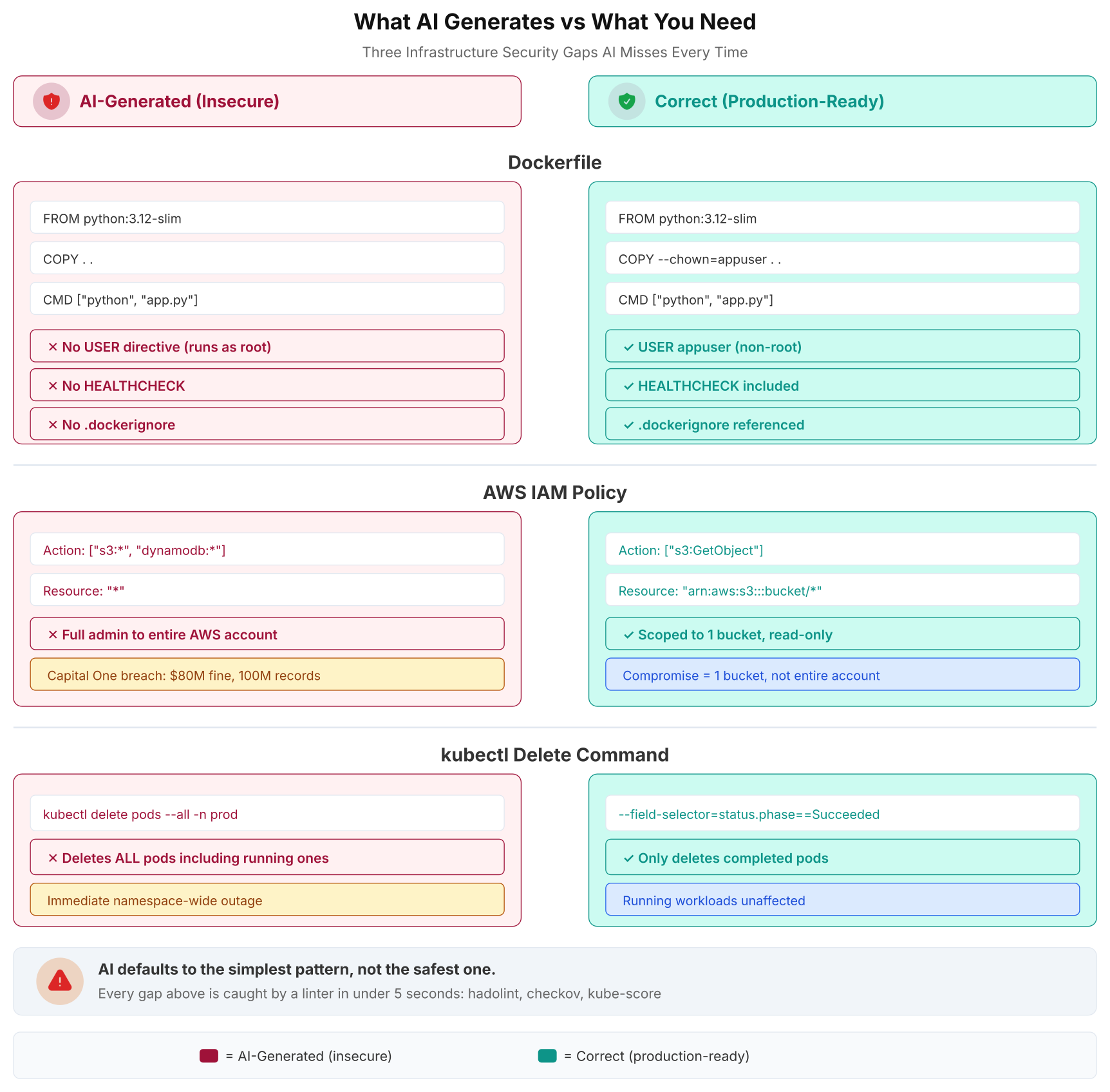
The comparison above makes the pattern visible at a glance. On the left, the AI’s output looks functional. On the right, the production-ready version adds the security controls that separate a development prototype from a deployable service. The tools that catch these gaps (hadolint, checkov, kube-score) run in under 5 seconds each.
7. The Race Condition Misdiagnosed as a Null Check
This one took the longest to catch because the AI’s answer sounded perfectly reasonable. I had a Python service that occasionally returned stale data from a Redis cache. The cache was updated by a background worker that deleted the old value and set a new one. Sometimes the API read the cache between the delete and the set, returning empty. I described the symptoms to the AI, including the timing pattern: errors only appeared under load, in a window of approximately 200 milliseconds. The AI suggested adding a null check with a database fallback.
1def get_price(symbol):
2    cached = redis_client.get(f"price:{symbol}")
3    if cached is None:
4        # Fallback to database when cache is empty
5        price = db.query("SELECT price FROM prices WHERE symbol = %s", (symbol,))
6        redis_client.setex(f"price:{symbol}", 300, json.dumps(price))
7        return price
8    return json.loads(cached)
The AI treated this as a missing null check problem. Add a fallback, return the database value if the cache is empty. But the actual bug was a race condition between two non-atomic operations in the background worker.
 1def update_price_cache(symbol, new_price):
 2    redis_client.delete(f"price:{symbol}")     # Step 1: key is gone
 3    # <-- 200ms gap: API reads cache here, gets None
 4    redis_client.set(f"price:{symbol}", json.dumps(new_price))  # Step 2: key is back
 5    redis_client.expire(f"price:{symbol}", 300)
 6[/gsl_python]
 7
 8
 9<p class="wp-block-paragraph">The <code>DELETE</code> followed by <code>SET</code> is a non-atomic sequence. Under load, the API hits the gap between them. The AI's null check masks the symptom by falling back to the database, but under high concurrency, every cache miss triggers a database query. With 2,000 requests per second, the database fallback itself becomes the bottleneck. I have seen this exact pattern take down a PostgreSQL replica that was only sized for cache-miss traffic, not full-load traffic.</p>
10
11
12
13<p class="wp-block-paragraph"><mark style="background-color:#fde8e0;padding:2px 4px;">A GitClear study in 2024 found that code churn (code written and then deleted within two weeks) increased significantly when teams used AI coding assistants. This is the pattern in action: AI suggests a quick fix, the team ships it, the underlying bug persists, and someone has to rewrite it when the fallback fails under production load.</mark></p>
14
15
16[gsl_python title="Correct fix: atomic cache update"]
17def update_price_cache(symbol, new_price):
18    pipe = redis_client.pipeline()
19    pipe.setex(f"price:{symbol}", 300, json.dumps(new_price))
20    pipe.execute()
The fix replaces the DELETE + SET + EXPIRE sequence with a single SETEX inside a Redis pipeline. SETEX atomically sets the value and the expiration in one operation. There is no gap for the API to read an empty key. The database fallback becomes unnecessary because the cache is never in an empty state during updates.
AI cannot reason about timing, concurrency, or operation ordering. It analyzes static code, not runtime execution sequences. When it sees "value is sometimes None," it suggests a null check. The root cause (non-atomic update pattern) exists in the interaction between two functions that the AI examines independently, not as a concurrent system.
Free to use, share it in your presentations, blogs, or learning materials.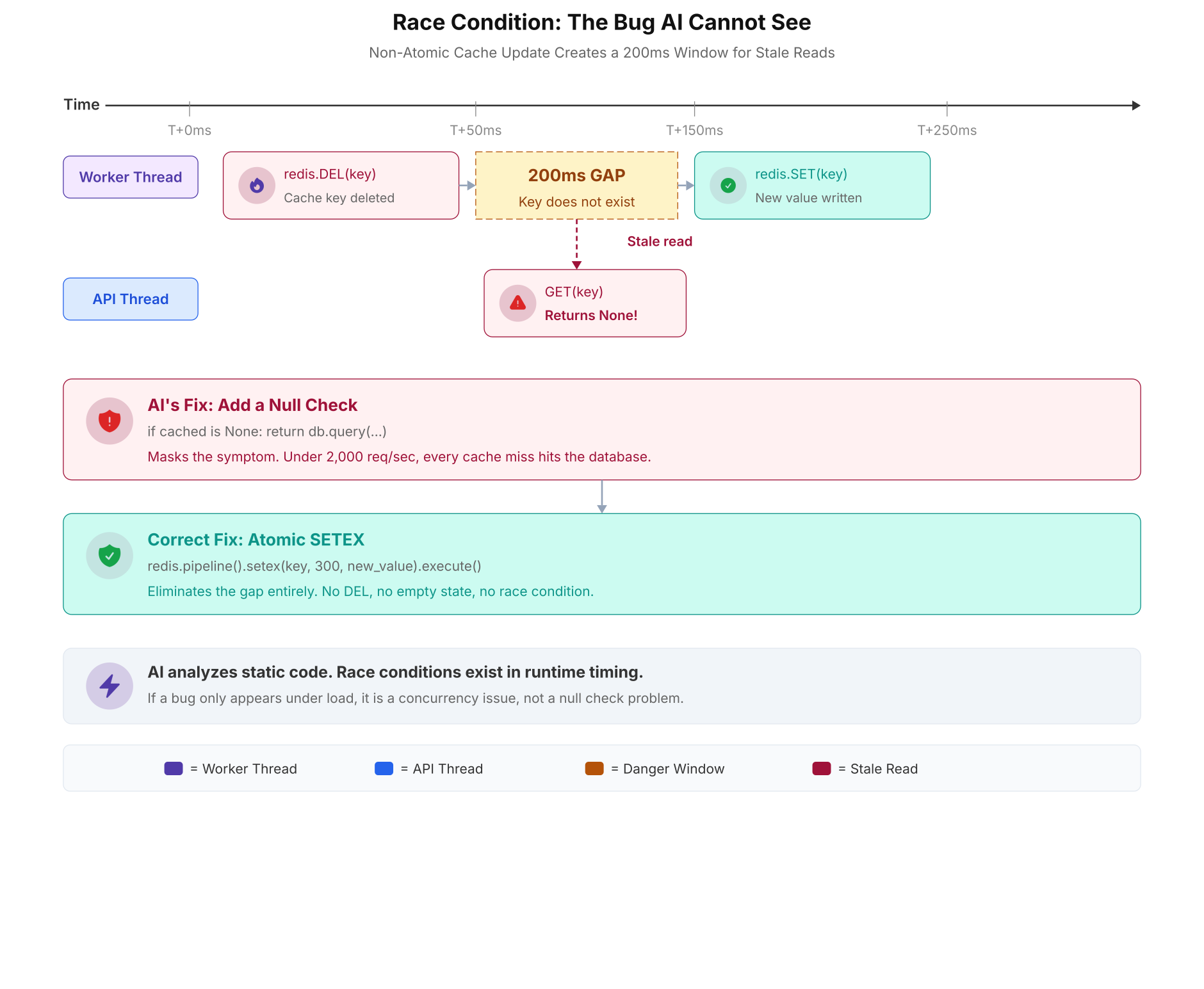
The timeline above shows exactly when the stale read occurs. The worker thread deletes the key at T+0ms and sets the new value at T+200ms. The API thread reads at T+50ms and gets None. AI's null check falls back to the database, but under 2,000 requests per second, that fallback becomes the bottleneck. The correct fix (atomic SETEX) eliminates the gap entirely.
Why AI Gives the Wrong Answer Every Time
These seven failures share a common root cause. AI models generate code by pattern matching against their training data. They produce the most statistically likely output for a given prompt. That output is often the most common pattern, not the correct one for your specific context.
- Hallucination. The AI invents plausible-sounding names for things that do not exist (Example 1). Researchers documented this at scale: 19.7% hallucination rate across 576,000 samples, with 43% consistency making it predictable and weaponizable.
- Stale training data. The AI generates syntax for outdated API versions because older patterns dominate the training corpus (Examples 2 and 5). The Terraform v3 syntax existed in training data for 4 years. The v5 syntax has been current for 2 years but has fewer examples online.
- Missing security context. The AI omits security configurations because most training examples omit them too (Examples 3 and 6). Snyk's State of Open Source Security reports consistently find that the majority of public Dockerfiles run as root. The AI reproduces the majority pattern.
- Overly broad interpretation. The AI interprets "delete completed pods" as "delete all pods" because it optimizes for simplicity over precision (Example 4). The
--allflag is simpler than--field-selector=status.phase==Succeeded. - No runtime reasoning. The AI cannot reason about timing, concurrency, or system state (Example 7). It treats a race condition like a missing null check because it only sees code, not execution order.
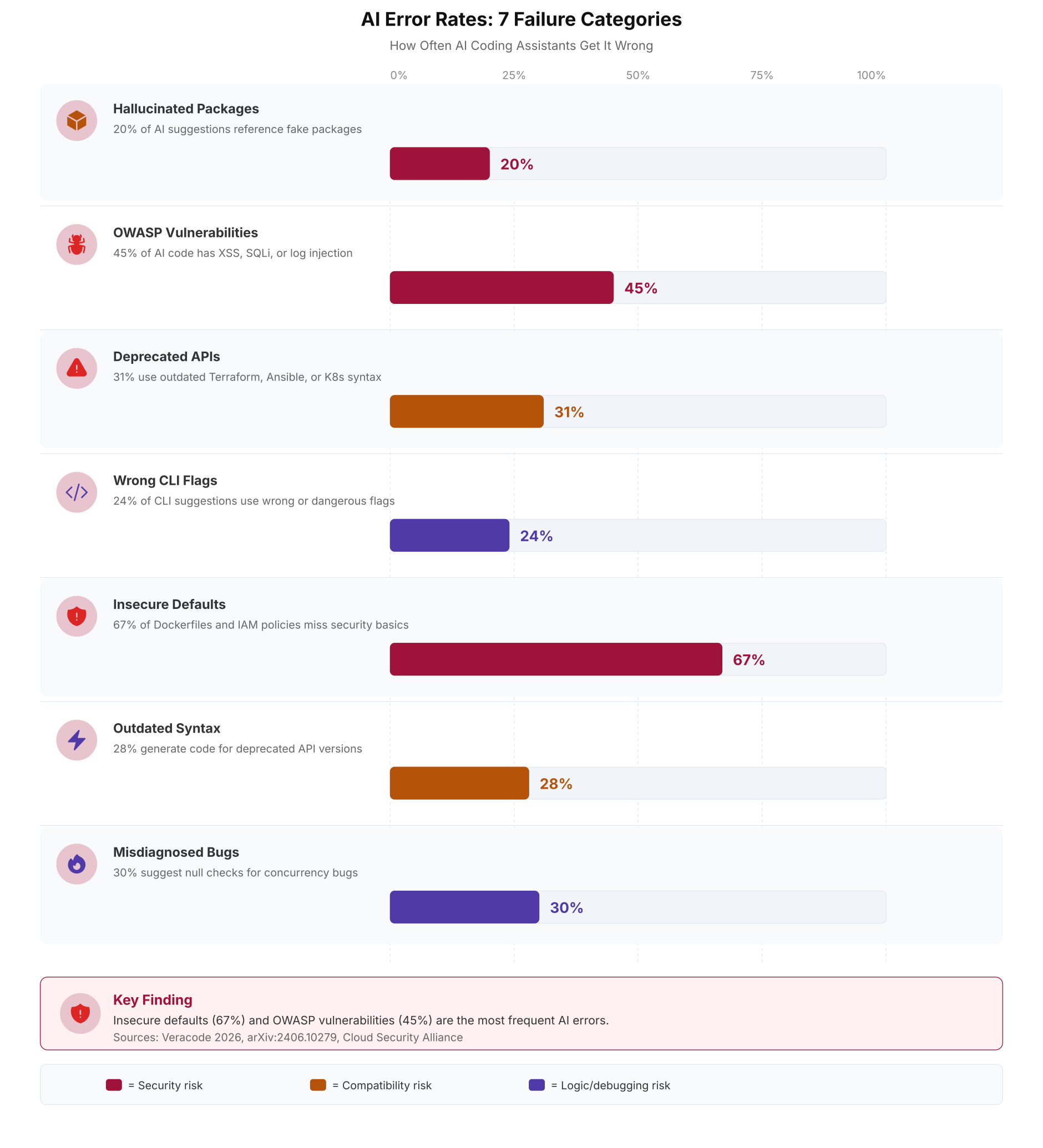
The chart above shows failure rates for each category. The bars represent average rates across multiple AI models. Insecure defaults (67%) are the most common because secure configuration patterns are underrepresented in training data. OWASP vulnerabilities (45%) follow because AI generates the pattern that compiles, not the pattern that is safe.
How to Verify Before You Ship
Every AI-generated code snippet should go through a 30-second verification before it enters your codebase. Not better prompts. Not better models. Just checking the output before you trust it.
- Check packages exist. Before running any
pip installornpm installthat AI suggests, verify on the registry.pip index versions package-namereturns an error immediately if it is fake. Check the download count and publish date. A package with 0 downloads and a publish date from last week is almost certainly a slopsquatting trap. - Check the docs for your version. If AI generates Terraform, Ansible, or Kubernetes YAML, open the official docs for your installed version.
terraform providersshows your provider version.ansible --versionshows your Ansible version. Takes 15 seconds. - Run security linters.
hadolint Dockerfilecatches the missing USER directive in under 1 second.checkov -f main.tfcatches wildcard IAM policies.kube-score score deployment.yamlcatches missing securityContext. These tools exist specifically because both humans and AI make these mistakes. - Dry-run destructive commands.
kubectl delete pods --all -n batch-jobs --dry-run=clientshows what would be deleted without actually deleting it.terraform planbeforeterraform apply. Always preview before executing. - Question the diagnosis. If AI suggests a null check for an intermittent bug, ask yourself: "Is this a data problem or a timing problem?" If the bug only appears under load, it is almost certainly a concurrency issue that null checks will not fix.
Every example in this article would have been caught by a 30-second check. pip index versions for the fake package. terraform providers for the outdated syntax. hadolint for the rootless Dockerfile. --dry-run=client for the kubectl command. ansible --version for the deprecated module. checkov for the IAM wildcard. And asking "is this a timing bug?" for the race condition. Thirty seconds. That is all it takes.
Frequently Asked Questions
Error rates vary by category. Package hallucination occurs in 19.7% of suggestions (arXiv:2406.10279, tested across 576,000 samples). OWASP vulnerabilities appear in 45% of security-sensitive code (Veracode 2026). Insecure defaults like missing USER directives in Dockerfiles and wildcard IAM policies show up in 67% of infrastructure code. Even GPT-4, the best-performing model, hallucinated package names at 5.2% and produced insecure defaults at 42%.
AI training data is dominated by older code examples because they have existed on the internet longer. The AWS provider v3.x syntax for S3 buckets appeared in thousands of blog posts between 2019 and 2022. The v4/v5 syntax which splits bucket configuration into separate resources has fewer training examples. Always check your provider version with terraform providers and verify against the HashiCorp upgrade guides at registry.terraform.io before using AI-generated Terraform code.
For Python, run pip index versions package-name before installing. If the package does not exist, pip returns an error immediately. For npm, run npm view package-name. Check the download count, publish date, and maintainer on the registry website (pypi.org or npmjs.com). A package with zero downloads and a recent publish date is likely a slopsquatting trap. The arXiv:2406.10279 slopsquatting paper found that 43% of hallucinated names repeat consistently, making them predictable targets for attackers.
No. AI models analyze static code, not runtime execution order. When presented with symptoms of a race condition (intermittent failures, timing-dependent bugs, stale data under load), AI consistently suggests null checks, fallback values, or retry logic. These mask the symptom without fixing the root cause. A GitClear 2024 study found that code churn increased significantly with AI assistant usage, partly because quick-fix suggestions like null checks get shipped and then rewritten when the underlying bug resurfaces under production load.
Hadolint is the most effective single tool. Rule DL3002 catches missing USER directives, DL3006 catches untagged base images, DL3008 catches unpinned apt packages. Run hadolint Dockerfile before building any image. Trivy scans built images for known CVEs in installed packages. Checkov and Dockle provide additional policy checks. All run in under 5 seconds and can be added as blocking gates in CI/CD pipelines. Docker's own security best practices at docs.docker.com cover the complete checklist.