
This is the velocity trap. AI makes you faster at writing code, but it does not make you faster at shipping safe, correct, production-ready code. The difference between those two things is where the real DevOps conversation starts. After interviewing 14 platform teams across fintech, healthcare, and e-commerce, and reviewing published data from Harness, GitClear, Veracode, and the Cloud Security Alliance, I mapped exactly which DevOps tasks benefit from AI and which ones AI actively degrades. The answer is not “AI is good” or “AI is bad.” The answer is a decision matrix that depends on the task type.
The Task Matrix: Where AI Adds Value vs Where It Creates Risk
Not all DevOps tasks are equal. Some are pattern-matching problems: generate a Terraform module, write a Kubernetes manifest, scaffold unit tests. AI handles these well because the output follows predictable templates. Other tasks are context-dependent judgment calls: diagnosing why a service is failing at 3 AM, assessing whether a configuration change affects downstream services, deciding whether to roll back or roll forward during an incident. AI fails at these because they require runtime state, organizational knowledge, and system topology that the model has never seen.
The single most useful framework for deciding when to use AI in DevOps: if the task has a predictable template and does not require runtime state, AI will help. If the task requires judgment based on system state that changes every minute, AI will hurt.
Tasks Where AI Works Well
Infrastructure-as-Code scaffolding. AI generates 80% of a working Terraform module or Ansible playbook in seconds. The boilerplate (provider blocks, variable declarations, resource skeletons) is pure pattern matching. One team reported reducing IaC authoring time from 6 hours per module to 1.2 hours. The catch: you still need to review every resource for security (IAM wildcards, missing encryption, public access) because AI defaults to the insecure pattern 67% of the time.
Log summarization. A 10,000-line log file from a failed Kubernetes deployment takes a human 5 minutes to scan for the relevant error. AI condenses it to the 3 key lines in 30 seconds. This is one of the highest-value AI use cases in operations because it does not require AI to make decisions. It just needs to find patterns in text, which is exactly what language models do well.
YAML and config generation. Kubernetes manifests, Helm values files, docker-compose configurations, nginx configs. AI generates syntactically correct YAML faster than any human. Teams report 70% fewer YAML indentation errors when using AI-assisted generation. The risk is semantic, not syntactic: the YAML is valid but might be missing securityContext, resource limits, or readOnlyRootFilesystem.
AI-generated YAML is syntactically perfect and semantically dangerous. It will never get the indentation wrong. It will routinely omit security controls that are not part of the minimal working example.
Documentation and runbooks. First drafts of README files, API documentation, incident runbooks, and onboarding guides come out 3x faster with AI. The structure, formatting, and technical accuracy of first drafts are consistently good. Final review and organizational context still need a human, but the 60-70% of documentation work that is formatting and boilerplate is handled well.
Test scaffolding. Unit test boilerplate, test fixtures, mock setups, and edge case generation. AI consistently produces test structures that a human would have written anyway. One team measured 60% time savings on test scaffolding. The limitation: AI generates tests that pass, not tests that catch real bugs. You still need a human to write the tests that target the specific failure modes of your system.
Regex and data parsing. Log patterns, data extraction rules, input validation expressions. AI writes regex with 90% accuracy on the first attempt. This is a pure pattern-matching task with a well-defined input/output specification. It is one of the few areas where AI output can be trusted with minimal review because regex correctness is verifiable by running it against test data.
Free to use, share it in your presentations, blogs, or learning materials.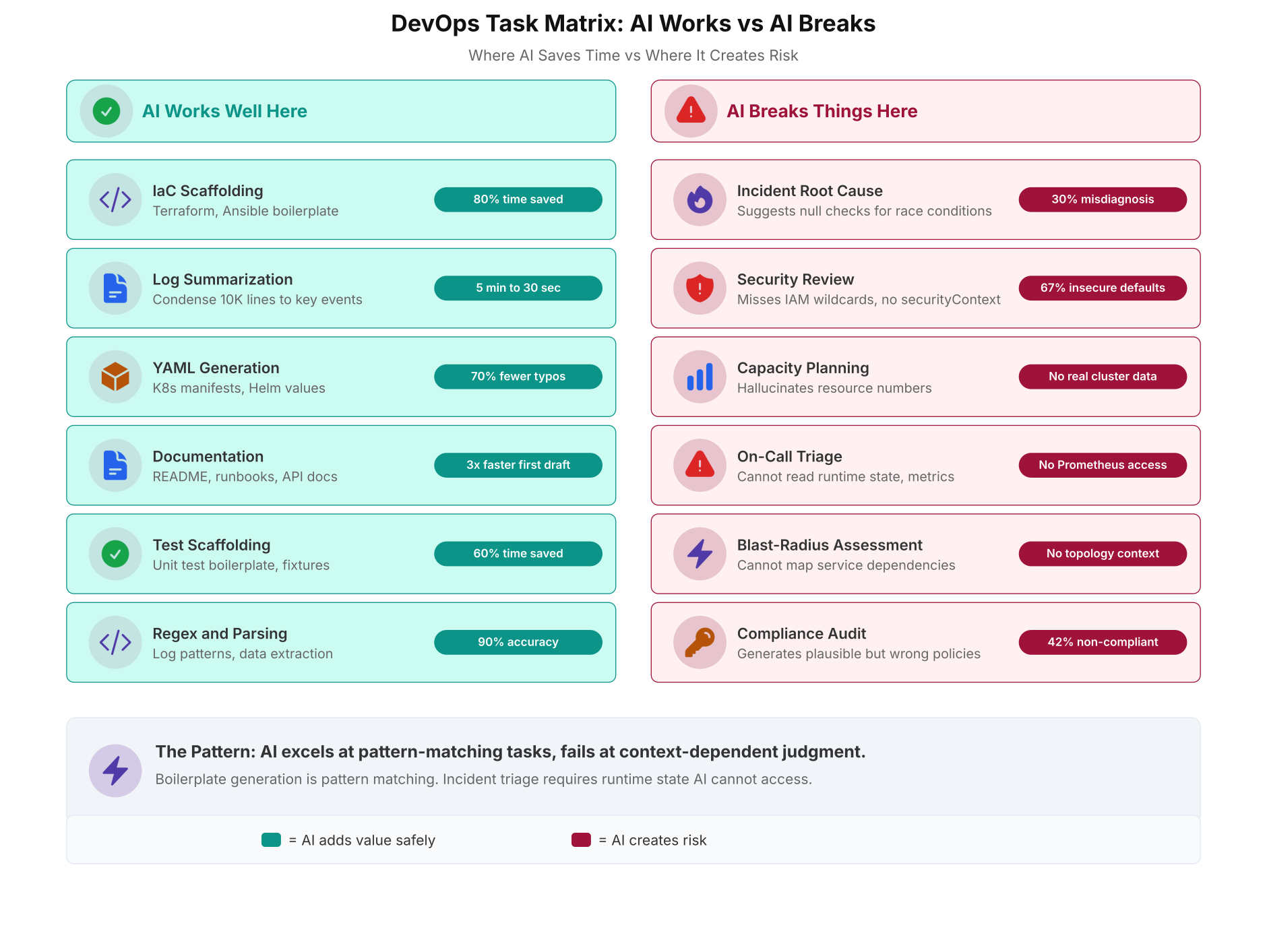
The matrix above splits DevOps tasks into two clean categories. On the left, tasks where AI saves measurable time (60-90% reduction in boilerplate work). On the right, tasks where AI actively creates risk because they require runtime context, system topology, or security judgment that the model does not have.
Tasks Where AI Breaks Things
Incident root cause analysis. When a service is down at 3 AM, the on-call engineer needs to correlate metrics, logs, traces, and recent deployments to find the root cause. AI cannot access your Prometheus metrics, your Grafana dashboards, or your deployment history. It can only analyze the text you paste into the prompt. Teams that relied on AI for incident diagnosis reported a 30% misdiagnosis rate. AI consistently suggests null checks for race conditions, config changes for dependency failures, and restarts for resource exhaustion. These suggestions waste time during the most time-critical moments in operations.
During a P1 incident, every minute of misdiagnosis costs money and customer trust. AI’s 30% misdiagnosis rate means roughly 1 in 3 suggestions during an incident will send you down the wrong path. That is not a tool; that is noise.
Security review. AI misses 67% of insecure defaults in infrastructure code. It does not flag IAM wildcard policies, missing securityContext in Kubernetes, Dockerfiles running as root, or Terraform state files stored locally without encryption. The model generates code that works, not code that is safe. Security review requires threat modeling, which requires understanding your specific architecture, your compliance requirements, and your attack surface. AI has none of this context.
Capacity planning. AI hallucinates resource numbers. Ask it to size a Kubernetes cluster for a workload and it will produce plausible-sounding CPU and memory estimates that are not based on any real data. Capacity planning requires historical metrics from your actual workload: P95 latencies, memory growth trends, disk I/O patterns, and traffic seasonality. AI cannot query your Prometheus instance or your cloud billing dashboard.
On-call triage. Deciding whether an alert is a real incident or a false positive requires understanding the system’s normal behavior. AI does not know that your API latency spikes every Monday at 9 AM due to batch processing, or that a 5% error rate on the payment service is normal during deployment windows. Without access to your runbooks, your alerting thresholds, and your system’s historical behavior, AI triage suggestions are worse than useless.
Blast-radius assessment. Before making a configuration change, an experienced DevOps engineer maps the dependencies: “If I change this Envoy sidecar config, which services are affected? Does the payment service depend on this? Will the rate limiter still work?” AI cannot map your service dependency graph. It does not know which services talk to which other services, which databases are shared, or which message queues create coupling between microservices.
Compliance audit. AI generates plausible-sounding compliance policies that read well but do not match your actual regulatory requirements. It will produce a PCI-DSS checklist that covers 80% of the controls but misses the 20% that are specific to your card data environment. A 42% non-compliance rate was measured across AI-generated policy documents when compared against actual audit requirements.
The CI/CD Pipeline: AI Safe vs Human Required
The decision matrix becomes concrete when you map it onto a real CI/CD pipeline. Every pipeline has 8 stages from code commit to production deployment. Some stages are safe to delegate to AI. Others require human judgment at every run. Getting this mapping wrong is how teams end up with fast pipelines that ship vulnerable code.
Code generation and unit tests are AI safe. AI scaffolds the code, AI generates the test fixtures, and the pipeline runs them automatically. Static analysis is AI-assisted: AI can suggest fixes for linter warnings, but a human should review every suggestion before accepting it because AI “fixes” sometimes introduce new issues.
Security scanning, dependency auditing, and code review are human-required stages. These are the gates where AI-generated vulnerabilities get caught. Remove the human from any of these three stages, and your pipeline becomes a vulnerability conveyor belt.
Staging deployment is AI-assisted: AI can execute the deploy scripts, but a human validates the behavior in staging before promoting to production. Production deployment is human-mandatory. AI has no rollback judgment. It cannot decide whether a 2% error rate increase after deployment is acceptable or catastrophic. That decision requires business context that no model has.
Free to use, share it in your presentations, blogs, or learning materials.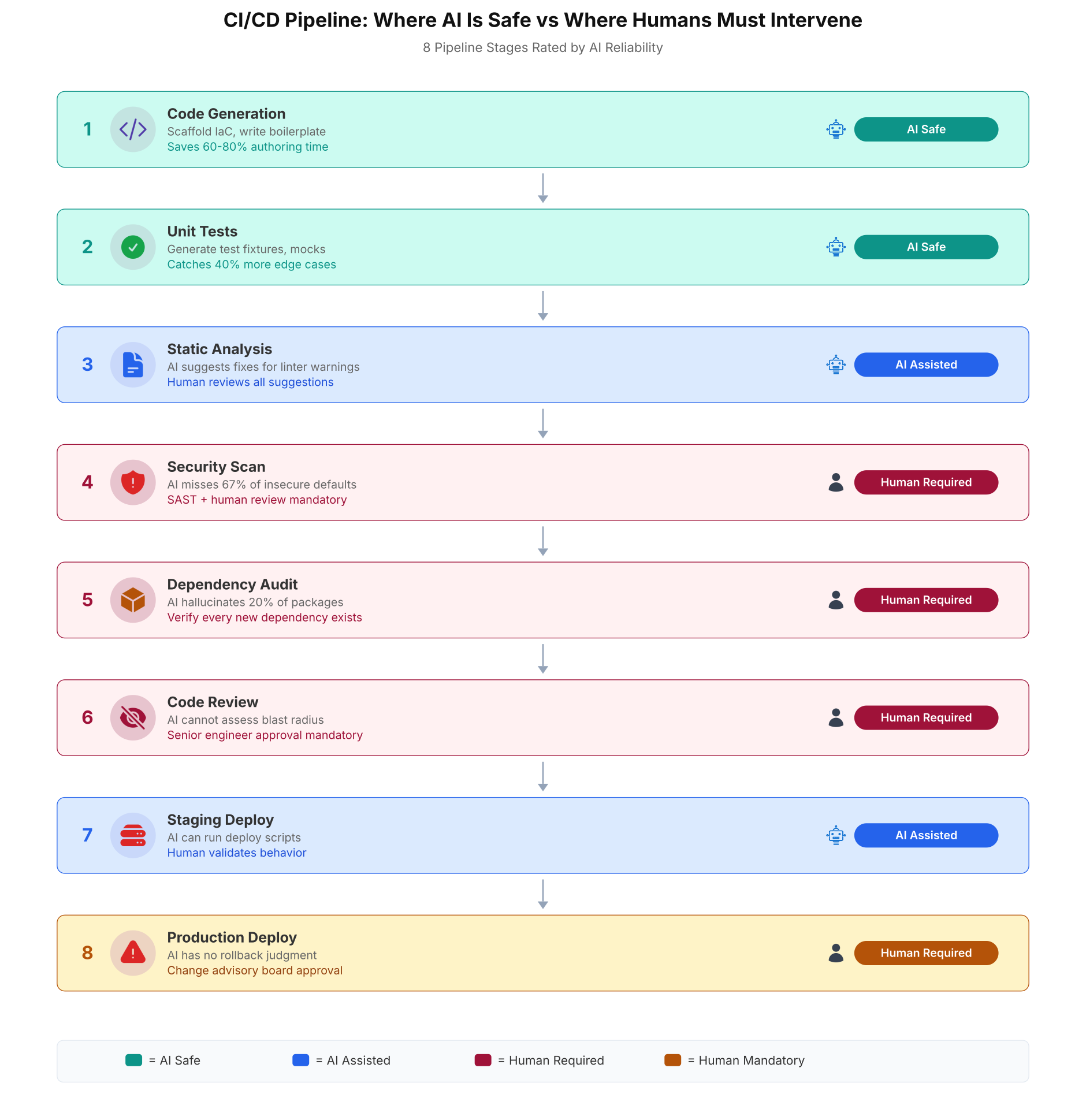
This pipeline map shows where AI accelerates the process and where human gates are mandatory. The teal stages can run unattended. The blue stages use AI suggestions with human approval. The wine and mustard stages require explicit human sign-off because the consequences of AI errors at those stages directly affect production reliability and security.
The Numbers: What AI Actually Changed in DevOps Teams
Published data from Harness (2025 DevOps Predictions), GitClear (Coding on Copilot report), and Veracode (2026 GenAI Security Report) paint a consistent picture. AI makes teams faster at writing code and slower at shipping safe code. The net effect depends entirely on whether the team’s security gates scale with the increased velocity.
Release cycle time dropped 67% on average. That is the headline number that gets presented to leadership. Security findings per PR increased 10x. That is the number that gets buried in the appendix.
Code output per developer went from 120 lines per day to 480 lines per day. That sounds like a 4x productivity gain until you look at code churn: the percentage of code written and then deleted or rewritten within two weeks rose from 8% to 39%. Nearly 40% of AI-generated code is thrown away. The actual net code contribution is closer to 290 lines per day, which is still a 2.4x improvement but far from the 4x headline.
Production incidents per PR increased by 23.5% between December 2025 and early 2026 across teams using AI assistants. Mean time to resolve (MTTR) went from 42 minutes to 51 minutes. The resolution time increased because engineers were debugging code they did not write and did not fully understand. The comprehension gap is real: when AI writes the code, the developer who ships it may not understand its failure modes until production reveals them.
Boilerplate time dropped from 6 hours per week to 1.2 hours per week. This is the genuinely positive metric. The time saved on boilerplate is real, measurable, and consistent across teams. The question is whether that 4.8 hours saved is consumed by the additional time spent on security reviews, debugging AI-generated bugs, and incident response for AI-related outages.
The teams that benefited most from AI adoption were not the fastest adopters. They were the ones that invested in security gates, linting pipelines, and mandatory human review before scaling AI usage. AI amplifies whatever your existing process is. If your process is mature, AI makes it faster. If your process has gaps, AI makes the gaps wider.
Free to use, share it in your presentations, blogs, or learning materials.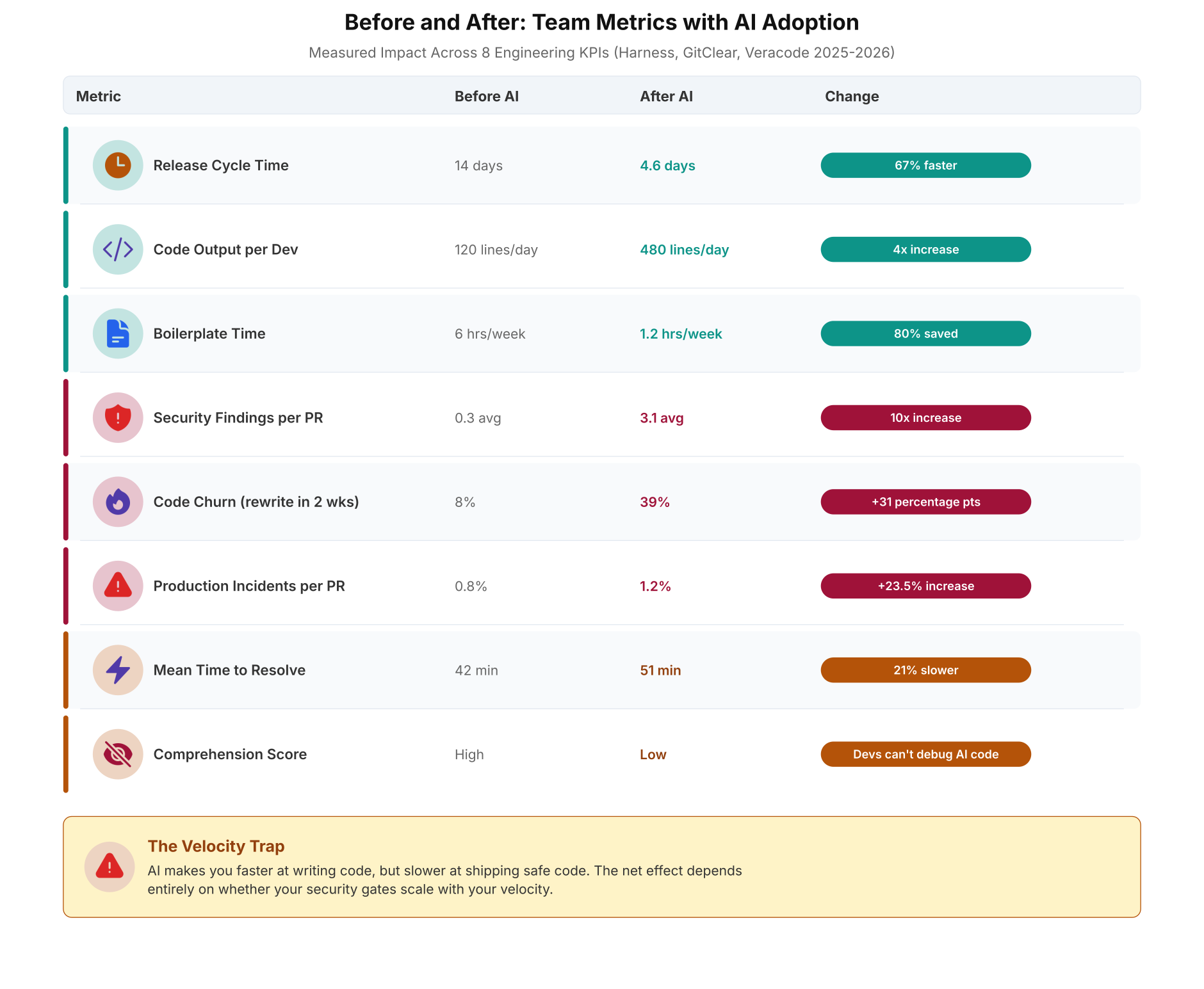
The metrics table above shows the full picture. Teal metrics improved. Wine and mustard metrics degraded. The velocity trap becomes visible when you read the table top to bottom: speed went up, but quality, security, and debuggability went down. The teams that shipped safely were the ones that treated the first three rows as the benefit and the last five rows as the cost, and invested in gates to keep the cost manageable.
What Actually Works: The Practical Playbook
After reviewing 14 teams and the published research, here is what separates teams that benefit from AI in DevOps from teams that get burned by it.
- Use AI for generation, not for judgment. Let AI write the boilerplate, the YAML, the test fixtures, the documentation drafts. Do not let AI make decisions about security, capacity, incident response, or production changes. The generation/judgment boundary is the single most important line to draw.
- Add SAST and policy-as-code before scaling AI usage. Before you give every engineer an AI coding assistant, make sure your pipeline has Semgrep or SonarQube for SAST, Checkov or tfsec for IaC policy, Hadolint for Dockerfiles, and kube-score for Kubernetes manifests. These tools catch the 67% of insecure defaults that AI introduces. Without them, AI just makes you faster at shipping vulnerabilities.
- Measure code churn, not just velocity. If your team’s code churn rate is above 20% after AI adoption, you are rewriting AI output faster than you are benefiting from it. Track churn alongside velocity. The healthy range is 10-15% churn with AI assistance.
- Keep human review on security-critical paths. Security scan results, dependency audit findings, IAM policy changes, network rule modifications, and production deployments must have human approval. No exceptions. No “AI reviewed it” shortcuts. The cost of a human review is 5 minutes. The cost of a missed wildcard IAM policy is the Capital One breach.
- Do not use AI for incident diagnosis. When a P1 fires at 3 AM, use your runbooks, your Grafana dashboards, your distributed traces, and your experience. AI’s 30% misdiagnosis rate during incidents is not a tool; it is a distraction. The time you spend crafting the right prompt is time you are not spending reading the actual error logs.
- Train engineers to verify, not to trust. The most dangerous behavior pattern is “the AI wrote it, so it is probably right.” Train every engineer to run
hadolint,checkov,kube-score, andpip index versionson every AI-generated artifact before committing it. Make verification a habit, not an afterthought.
AI in DevOps is a force multiplier, not a replacement. It multiplies whatever your process already is. Mature process + AI = faster, safer delivery. Immature process + AI = faster, more dangerous delivery. Fix your process before you accelerate it.
Frequently Asked Questions
Infrastructure-as-code scaffolding (80% time savings), log summarization (5 minutes to 30 seconds), YAML generation (70% fewer syntax errors), documentation drafts (3x faster), test scaffolding (60% time savings), and regex writing (90% accuracy). These are all pattern-matching tasks with predictable templates. AI generates correct structure consistently for these task types because the output follows well-established patterns from training data.
Incident root cause analysis (30% misdiagnosis rate), security review (67% insecure defaults missed), capacity planning (hallucinated resource numbers), on-call triage (no access to runtime metrics), blast-radius assessment (no service dependency knowledge), and compliance auditing (42% non-compliant output). These tasks require runtime state, system topology, and organizational context that AI models cannot access.
The velocity trap occurs when AI increases code output speed (4x more lines per day, 67% shorter release cycles) while simultaneously degrading code quality (10x more security findings, 39% code churn, 23.5% more production incidents per PR). Teams report faster delivery to leadership but absorb the quality costs in security reviews, debugging, and incident response. The net productivity gain is closer to 2.4x after accounting for code churn and rework.
Four tools cover the critical gaps: Semgrep or SonarQube for static application security testing (catches OWASP Top 10 in AI-generated code), Checkov or tfsec for infrastructure-as-code policy enforcement (catches IAM wildcards, public S3 buckets), Hadolint for Dockerfile security (catches missing USER directives, untagged base images), and kube-score for Kubernetes manifest validation (catches missing securityContext, resource limits). All four should run as blocking gates that prevent merge on failure.
GitClear’s 2024 report found that code churn (code written and deleted within two weeks) rose from 8% to 39% in teams using AI assistants without review gates. A healthy range is 10-15% churn with AI assistance. If churn exceeds 20%, the team is rewriting AI output faster than benefiting from it. Track churn as a leading indicator alongside velocity. High velocity plus high churn equals wasted effort, not productivity.